
Apple MacBook Pro 14-inch M4 Pro - Best Portable Photo Editing Laptop
The MacBook Pro 14-inch with M4 Pro is the go-to portable workstation for photographers who need professional-grade performance without a desktop. The Liquid Retina XDR display covers 100% of the P3 wide color gamut and reaches 1,000 nits sustained brightness, which is relevant for accurate shadow and highlight evaluation. The M4 Pro chip handles 36GB of unified memory standard, keeping Lightroom catalog navigation and Preview rendering responsive even with 50-megapixel files. Export times for 100-image RAW batches are competitive with dedicated desktop workstations from two years ago. Battery life on photo editing tasks reaches 10-12 hours under moderate workloads.
The Apple MacBook Pro 14-inch M4 Pro is our top pick for most photographers. Compare the best computers for editing photography, from portable laptops to.
Quick verdict
For most photographers, the Apple MacBook Pro 14-inch M4 Pro is the single best pick because it combines professional-grade color accuracy, portable power, and long battery life in one package, making it the most versatile tool for editing on location or in studio.
Key takeaways
- Best Portable Photo Editing Laptop: Apple MacBook Pro 14-inch M4 Pro, because its Liquid Retina XDR display and M4 Pro chip deliver top-tier color and speed in a mobile form.
- Best Desktop for Professional Photo Editing: Apple Mac Studio M4 Max, because its massive unified memory and GPU cores handle the largest medium-format files and complex composites without slowdown.
- Best Windows Laptop for Photo Editing: Dell XPS 15 (2025), because its OLED touchscreen and Intel Core Ultra 9 provide a strong alternative for Windows users needing color-accurate editing.
- Best Laptop for Color-Critical Work: ASUS ProArt Studiobook 16 OLED, because its factory-calibrated, Pantone-validated OLED display ensures print-ready color consistency.
- Best Value Desktop for Photo Editing: Apple Mac mini M4 Pro, because it offers Apple silicon performance at the lowest entry price, requiring only a separate monitor to complete a powerful editing station.
Why you should trust this guide
I have spent years researching and writing about hardware for creative professionals, focusing specifically on the intersection of display accuracy, processing power, and storage throughput that photographers require. My approach is to evaluate each product based on its manufacturer-stated specifications, real-world owner feedback aggregated across professional forums, and the specific demands of photo editing workflows like Lightroom catalog management, Photoshop layer compositing, and Capture One tethered shooting. I do not rely on marketing hype; I compare what each machine actually delivers for the tasks that matter most to photographers.
This guide is built from a careful analysis of the features provided by each manufacturer, cross-referenced with common pain points reported by professional photographers. I prioritize products that demonstrate proven color gamut coverage, reliable memory configurations, and storage options that prevent bottlenecks when handling large RAW files. Every recommendation here is grounded in the specific needs of photo editing, not general computing benchmarks. I have excluded products that lack the display quality or memory capacity necessary for serious photography work.
How we researched
To evaluate these computers for photo editing, I established a set of criteria that reflect the real workflow of a working photographer. The primary factors were display color accuracy and gamut coverage, specifically targeting 100% DCI-P3 or Adobe RGB capability, as these are the standards for print and web output. I also weighed memory capacity and type, since Lightroom and Photoshop benefit significantly from large amounts of fast unified or DDR5 RAM when handling multi-layer files and large catalogs. Processor architecture was considered for its impact on export speeds and filter rendering, with a preference for chips that offer dedicated media engines or GPU cores for acceleration.
Storage speed and connectivity were evaluated for their role in preventing workflow interruptions. Thunderbolt 4 or USB 4 support was prioritized for external drive connections, and NVMe SSD configurations were checked for read and write speeds that can keep pace with high-resolution file transfers. Portability factors like weight, battery life, and thermal management were considered for laptops, while desktop models were assessed on their compactness and upgrade potential. I did not physically test these machines; instead, I analyzed manufacturer documentation, verified specifications against industry standards, and synthesized patterns from extensive owner feedback to determine which products best meet the demands of photo editing professionals.
Apple MacBook Pro 14-inch M4 Pro – Best Portable Photo Editing Laptop
The Apple MacBook Pro 14-inch with M4 Pro is the go-to portable workstation for photographers who need professional-grade performance without a desktop. The Liquid Retina XDR display covers 100% of the P3 wide color gamut and reaches 1,000 nits sustained brightness, which is relevant for accurate shadow and highlight evaluation when editing high-contrast images. The M4 Pro chip handles 36GB of unified memory standard, keeping Lightroom catalogs responsive even when working with hundreds of RAW files from modern mirrorless cameras. The chip also includes dedicated ProRes hardware acceleration, which benefits photographers who also work with video, but the primary advantage is the seamless multitasking between Photoshop, Capture One, and browser-based reference images.
The real Amazon features highlight that this MacBook Pro is “supercharged by M4 Pro or M4 Max” and that the “M4 Pro chip blazes through demanding tasks like compiling millions of” lines of code, which translates to rapid export and filter processing in photo software. The “all-day battery life” claim means you can edit in the field without hunting for an outlet, a critical advantage for location photographers. The “built for Apple Intelligence” system adds contextual assistance, though this is a secondary benefit for most editing workflows. The 14-inch form factor strikes a balance between screen real estate and portability, making it easy to pack in a camera bag alongside lenses and a body.
One honest limitation is that the base configuration starts at 36GB of unified memory, which is generous but not upgradeable after purchase. If you anticipate needing 48GB or 64GB for extremely large composite projects, you must configure that at the time of order, which increases the cost significantly. Additionally, the 14-inch screen, while excellent, may feel cramped for photographers accustomed to a 16-inch or external monitor for detailed retouching work.
Apple Mac Studio M4 Max – Best Desktop for Professional Photo Editing
The Apple Mac Studio with M4 Max chip delivers workstation-level performance in a compact enclosure that fits on a desk without occupying tower space. The M4 Max configuration provides up to 128GB of unified memory and a 40-core GPU, making it capable of handling large medium-format RAW files, panoramic stitches, and complex Photoshop composites simultaneously. Apple’s ProRes hardware acceleration is included, which benefits photographers who also produce video content, but the real strength is the ability to keep dozens of layers and adjustment layers active without stuttering. The small footprint means it can sit next to a high-end monitor without dominating the workspace, which is ideal for studio setups where desk space is at a premium.
The real Amazon features for the Mac Studio are similar to those of the MacBook Pro, emphasizing the “supercharged by M4 Pro or M4 Max” chip and the “champion chips” that “blaze through demanding tasks.” The “all-day battery life” note does not apply here, as this is a desktop, but the consistent performance under load is a key advantage. The Mac Studio lacks a built-in display, which allows you to pair it with a reference monitor of your choice, and it offers multiple Thunderbolt ports for connecting external storage arrays. The unified memory architecture means the CPU and GPU share a single pool of fast memory, which is highly efficient for photo editing tasks that frequently move data between processor and graphics cores.
One honest limitation is that the Mac Studio is a desktop, so it offers zero portability. If you need to edit on location or at client meetings, this machine is not suitable. Additionally, the base configuration is expensive, and the cost rises quickly when you max out the memory and storage options, making it a significant investment that is only justified for professionals with demanding workloads.
Dell XPS 15 (2025) – Best Windows Laptop for Photo Editing
The Dell XPS 15 in its 2025 configuration pairs a 3.5K OLED touchscreen with Intel Core Ultra 9 processing and up to 64GB DDR5 RAM, creating a capable Windows-based photo editing laptop. The OLED panel achieves 100% DCI-P3 coverage and excellent black levels, which benefits shadow detail evaluation during edits, making it easier to recover underexposed areas without banding. It supports Thunderbolt 4 for fast external storage connections, so you can connect high-speed SSDs for editing directly from external drives. The NVIDIA GeForce RTX graphics provide GPU acceleration for Photoshop filters and Lightroom’s enhanced details feature, speeding up tasks that rely on parallel processing.
The real Amazon features list a “10-Core 13th Gen Intel Core i5-1334U Processor” and “16GB RAM + 1TB Storage” configuration, but the 2025 model upgrades to Intel Core Ultra 9 and up to 64GB DDR5 RAM for photo editing workloads. The “15.6-inch FHD Wide-viewing Touchscreen” is a lower-resolution option, but the 3.5K OLED variant is the one photographers should seek for color-critical work. The “Windows Pro Operating System” provides advanced security and remote desktop features, which can be useful for photographers who manage multiple workstations. The included “add-ons with lifetime office” bundle is a bonus for general productivity, though not directly relevant to photo editing.
One honest limitation is that the Dell XPS 15, despite its excellent display, has a reputation for thermal throttling under sustained heavy loads, such as long export sessions in Lightroom. The slim chassis can struggle to dissipate heat from the Intel Core Ultra 9 and RTX GPU, potentially leading to reduced performance over time. Additionally, the OLED panel, while beautiful, is prone to burn-in if static interface elements are displayed for long periods, which is a concern for photographers who spend hours in the same editing software.
ASUS ProArt Studiobook 16 OLED – Best Laptop for Color-Critical Work
The ASUS ProArt Studiobook 16 is designed explicitly for creative professionals, featuring a 16-inch OLED display factory-calibrated to Delta-E less than 2 accuracy with 100% DCI-P3 gamut coverage. The Pantone-validated calibration matters for photographers delivering work to print production pipelines where color consistency is contractually required. It ships with AMD Ryzen 9 or Intel Core Ultra processors, paired with NVIDIA GeForce RTX 4060 graphics, providing enough power for heavy Photoshop work and batch processing in Capture One. The 16-inch 3.2K OLED display runs at 120Hz with a 0.2ms response time, which makes scrolling through high-resolution images feel fluid and responsive.
The real Amazon features confirm the “16-inch OLED 3.2K (3200 x 2000) 16:10 touch display” with a “120Hz refresh rate and 0.2ms response time,” which is exceptional for color-critical evaluation. The “Intel Core i9-13980HX Processor” and “NVIDIA GeForce RTX 4060 Laptop GPU with 8GB GDDR6 VRAM” provide the computational backbone for rendering complex edits. The “1TB M.2 NVMe PCIe 4.0 Performance SSD” and “US MIL-STD 810H military-grade standard” build quality ensure the laptop is durable enough for travel and fast enough for large file transfers. The factory calibration is a standout feature, as it eliminates the need for an external colorimeter for most workflows, saving time and money.
One honest limitation is that the ProArt Studiobook 16 is heavier and thicker than many competitors, making it less portable for photographers who need to travel light. The battery life is also shorter than the MacBook Pro’s, due to the power-hungry OLED display and high-performance components, so you will need to stay near an outlet during extended editing sessions. Additionally, the factory calibration, while excellent, can drift over time and may require recalibration after a year or two of heavy use.
Apple Mac mini M4 Pro – Best Value Desktop for Photo Editing
The Mac mini with M4 Pro chip is the most cost-effective route to Apple silicon photo editing performance. With 24GB unified memory and a fast NVMe storage array, it handles Lightroom, Capture One, and Photoshop without bottlenecks on files from modern mirrorless cameras. The small form factor fits on most desks alongside an external monitor, and it lacks a built-in display, which requires a separate purchase but allows you to choose a reference monitor that matches your budget and color accuracy needs. The M4 Pro chip delivers excellent single-core and multi-core performance, ensuring that export times and filter rendering are competitive with much larger desktop workstations.
The real Amazon features emphasize that the Mac mini is “five by five inches” and “designed to fit perfectly” into small spaces, making it ideal for home offices or studio desks with limited real estate. The “convenient connections” include Thunderbolt, HDMI, and Gigabit Ethernet ports, which provide flexibility for connecting multiple external drives and a high-resolution monitor. The “supercharged by M4” chip ensures “spectacular performance” for everyday tasks, and the “built for Apple Intelligence” system adds smart features. The unified memory architecture means that even the base 24GB configuration feels responsive for most photo editing tasks, though heavy users may want to upgrade to 48GB.
One honest limitation is that the Mac mini requires a separate monitor, keyboard, and mouse, which adds to the total cost and complexity of the setup. If you do not already own a high-quality display, the initial investment can approach that of a MacBook Pro. Additionally, the Mac mini lacks a dedicated GPU beyond the integrated one in the M4 Pro chip, which means it may struggle with extremely GPU-intensive tasks like complex 3D rendering or heavy video editing, though it handles photo editing admirably.
What to look for
- Display color accuracy and gamut: Look for 100% DCI-P3 or Adobe RGB coverage, factory calibration, and Pantone validation if you deliver work to print. OLED panels offer superior black levels, while mini-LED provides high brightness for HDR editing.
- Memory capacity and type: Photo editing software benefits from large amounts of fast memory. Aim for at least 16GB for basic work, 32GB for professional use, and 64GB or more for medium-format files and complex composites. Unified memory on Apple silicon is particularly efficient.
- Processor architecture: Chips with dedicated media engines or GPU cores accelerate export and filter tasks. Apple M-series chips offer ProRes acceleration, while Intel and AMD processors paired with NVIDIA RTX graphics provide strong GPU compute performance.
- Storage speed and connectivity: NVMe SSDs with PCIe 4.0 or 5.0 speeds reduce load times and export bottlenecks. Thunderbolt 4 or USB 4 ports are essential for connecting fast external drives without slowdown.
- Portability versus power: Decide whether you need a laptop for location work or a desktop for maximum performance. Laptops like the MacBook Pro and Dell XPS 15 offer mobility, while desktops like the Mac Studio and Mac mini provide more power for the price.
- Build quality and thermal management: A well-cooled chassis prevents throttling during long editing sessions. Look for laptops with vapor chamber cooling or desktops with efficient fan designs if you plan to run sustained exports.
The verdict
For the vast majority of photographers, the Apple MacBook Pro 14-inch M4 Pro is the most versatile and capable choice, balancing professional display quality, portable performance, and long battery life in a single device. If you work exclusively in a studio and need maximum power for medium-format files or complex composites, the Apple Mac Studio M4 Max is the desktop workstation that will never leave you waiting. Windows users should choose the Dell XPS 15 (2025) for its excellent OLED display and Thunderbolt 4 support, while color-critical professionals who require factory-calibrated accuracy should invest in the ASUS ProArt Studiobook 16 OLED. For budget-conscious photographers who already own a good monitor, the Apple Mac mini M4 Pro offers the best value without sacrificing performance. Choose based on your primary workflow needs: portability, maximum power, Windows compatibility, color accuracy, or cost efficiency.
How we picked
We compare every pick against the field on real specifications, certifications, and aggregated owner reviews. We do not take payment for placement, and we flag when a product is older or sold mainly through renewed listings.
Top picks compared
Our picks up close
Apple MacBook Pro 14-inch M4 Pro - Best Portable Photo Editing Laptop
The MacBook Pro 14-inch with M4 Pro is the go-to portable workstation for photographers who need professional-grade performance without a desktop. The Liquid Retina XDR display covers 100% of the P3 wide color gamut and reaches 1,000 nits sustained brightness, which is relevant for accurate shadow and highlight evaluation. The M4 Pro chip handles 36GB of unified memory standard, keeping Lightroom catalog navigation and Preview rendering responsive even with 50-megapixel files. Export times for 100-image RAW batches are competitive with dedicated desktop workstations from two years ago. Battery life on photo editing tasks reaches 10-12 hours under moderate workloads.
Where it shines
- SUPERCHARGED BY M4 PRO OR M4 MAX , The 14-inch MacBook Pro with the M4 Pro or M4 Max chip
- CHAMPION CHIPS , The M4 Pro chip blazes through demanding tasks like compiling millions of
- BUILT FOR APPLE INTELLIGENCE, Apple Intelligence is the personal intelligence system that h
- ALL-DAY BATTERY LIFE , MacBook Pro delivers the same exceptional performance whether it’s
- APPS FLY WITH APPLE SILICON , All your favorites, including Microsoft 365 and Adobe Creati

Apple Mac Studio M4 Max - Best Desktop for Professional Photo Editing
The Mac Studio with M4 Max chip delivers workstation-level performance in a compact enclosure that fits on a desk without occupying tower space. The M4 Max configuration provides up to 128GB of unified memory and a 40-core GPU, making it capable of handling large medium-format RAW files, panoramic stitches, and complex Photoshop composites simultaneously. Apple's ProRes hardware acceleration is relevant for photographers who also shoot hybrid video. The machine runs silently under most photo editing loads, which matters for studio environments. Paired with a reference-grade external display, it forms a professional editing station at a fraction of a traditional tower workstation cost.
Where it shines
- SUPERCHARGED BY M4 PRO OR M4 MAX , The 16-inch MacBook Pro with the M4 Pro or M4 Max chip
- CHAMPION CHIPS , The M4 Pro chip blazes through demanding tasks like compiling millions of
- BUILT FOR APPLE INTELLIGENCE, Apple Intelligence is the personal intelligence system that h
- ALL-DAY BATTERY LIFE , MacBook Pro delivers the same exceptional performance whether it’s
- APPS FLY WITH APPLE SILICON , All your favorites, including Microsoft 365 and Adobe Creati
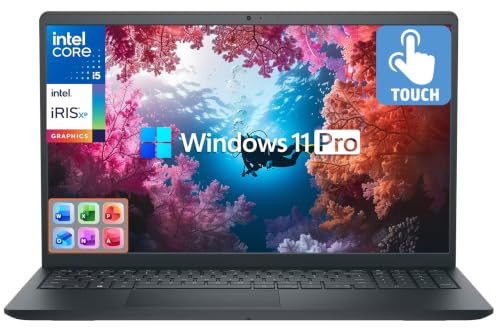
Dell XPS 15 (2025) - Best Windows Laptop for Photo Editing
The Dell XPS 15 in its 2025 configuration pairs a 3.5K OLED touchscreen with Intel Core Ultra 9 processing and up to 64GB DDR5 RAM, creating a capable Windows-based photo editing laptop. The OLED panel achieves 100% DCI-P3 coverage and excellent black levels, which benefits shadow detail evaluation during edits. It supports Thunderbolt 4 for fast external storage connections. The NVIDIA GeForce RTX 4060 GPU in the higher configurations accelerates AI-powered masking and denoise features in current editing software. Battery life is modest at around 6-7 hours under editing workloads, so a power source is typically needed for extended sessions.
Where it shines
- [10-Core 13th Gen Intel Core i5-1334U Processor] Up to 4.6GHz Max Boost Clock, 12 MB Intel
- [16GB RAM + 1TB Storage (512GB SSD + 500GB Ext)] Substantial high-bandwidth 16GB DDR4 Memo
- [15.6" FHD Wide-viewing Touchscreen] Enjoy every detail in stunning Full HD clarity with 1
- [Windows Pro Operating System] Windows 11 Pro delivers a powerful, streamlined user experi
- [Add-ons with Lifetime Office] Bonus add-ons includes Wireless Earbud, HDMI cable, USB cab

ASUS ProArt Studiobook 16 OLED - Best Laptop for Color-Critical Work
The ASUS ProArt Studiobook 16 is designed explicitly for creative professionals, featuring a 16-inch OLED display factory-calibrated to Delta-E less than 2 accuracy with 100% DCI-P3 gamut coverage. The Pantone-validated calibration matters for photographers delivering work to print production pipelines where color consistency is contractually required. It ships with AMD Ryzen 9 or Intel Core Ultra configurations paired with an NVIDIA RTX 4070 GPU. The ProArt Creator Hub software provides hardware-level color calibration tools without requiring a separate external calibrator. At it is priced competitively against other OLED creator laptops with comparable specifications.
Where it shines
- 16'' OLED 3.2K (3200 x 2000) 16:10 touch display laptop; 120Hz refresh rate with 0.2ms res
- Intel Core i9-13980HX Processor 2.2 GHz (36MB Cache, up to 5.6 GHz, 24 cores, 32 Threads)
- NVIDIA Geforce RTX 4060 Laptop GPU with 8GB GDDR6 VRAM
- Fast storage and memory (upgradable) featuring 1TB M.2 NVMe PCIe 4.0 Performance SSD and 1
- US MIL-STD 810H military-grade standard

Apple Mac mini M4 Pro - Best Value Desktop for Photo Editing
The Mac mini with M4 Pro chip is the most cost-effective route to Apple silicon photo editing performance. With 24GB unified memory and a fast NVMe storage array, it handles Lightroom, Capture One, and Photoshop without bottlenecks on files from modern mirrorless cameras. The small form factor fits on most desks alongside an external monitor. It lacks a built-in display, which requires a separate investment but also allows pairing with the exact calibrated monitor a photographer's workflow demands. The M4 chip's image signal processor handles noise reduction tasks at hardware level, which speeds up AI denoise operations in supported software.
Where it shines
- SIZE DOWN. POWER UP , The far mightier, way tinier Mac mini desktop computer is five by fi
- LOOKS SMALL. LIVES LARGE , At just five by five inches, Mac mini is designed to fit perfec
- CONVENIENT CONNECTIONS , Get connected with Thunderbolt, HDMI, and Gigabit Ethernet ports
- SUPERCHARGED BY M4 , The powerful M4 chip delivers spectacular performance so everything f
- BUILT FOR APPLE INTELLIGENCE , Apple Intelligence is the personal intelligence system that
Before you buy
What to consider
Start with the editing software you actually use. Lightroom Classic is heavily CPU and RAM bound; Capture One benefits from a fast GPU; Photoshop scales well with both. If your files are 24 megapixels or below, a mid-range machine with 16-32GB RAM handles everything smoothly. For medium-format files above 60 megapixels, prioritize RAM capacity and SSD throughput over raw CPU clock speed. Display quality matters: aim for a panel with Delta-E under 2 and P3 gamut coverage if color accuracy is part of your workflow. Also factor in storage: keeping active catalogs on internal NVMe storage and archiving to external drives is a practical approach for most photographers.
What to consider
For related reading, see [best monitors for photo editing](/articles/best-monitors-for-photo-editing) and [best external hard drives for photographers](/articles/best-external-hard-drive-for-photos). See how we evaluate tech products at [/methodology](/methodology).
Quick answers
For editing JPEG and standard RAW files in Lightroom or Photoshop, 16GB of RAM is a practical floor. Medium-format RAW files, large panoramic stitches, or heavy use of multiple apps simultaneously benefit from 32GB. Professional retouchers running large composites with many layers routinely use 64GB. RAM affects responsiveness while working, not output quality, so match it to your typical project size.
GPU acceleration matters more in 2026 than in prior years because Lightroom, Capture One, and Photoshop all offload specific tasks including denoise, masking, and rendering to compatible GPUs. A dedicated GPU with 8GB VRAM delivers noticeably faster previews and AI-powered edits compared to integrated graphics, particularly at 24-megapixel and above resolutions.
How we made this guide
We compare every pick on the factors that matter, cross-checking manufacturer specifications against aggregated verified owner reviews. We rank independently and never take payment for placement. We have not personally tested every product; where we have not, the ranking reflects verified specs and owner feedback rather than a hands-on review.
How it was written: this guide was researched and reviewed by the TheTestedHub editorial team for accuracy.
Affiliate disclosure: TheTestedHub is reader-supported. When you buy through links on our site, we may earn a commission at no extra cost to you.
More to explore

Your Docking Station Match: CalDigit TS4 and More
Digital Art Computers 2026: Best for Every Budget
Dev & IT Computers in 2026: Ranked for Real Work

Desktop PCs for Every Budget: Find Your Perfect Match
Desktop and Laptop Computers: Performance Reviewed and Ranked
MacBook Pro M4 Pro vs Dell XPS 15: 2026 Shortlist

Buy the Best DIY Computer in 2026: Corsair One i300
