
HP Pavilion 15 - Best Budget Windows Laptop for Home Embroidery
The HP Pavilion 15 with an Intel Core i5 processor and 8GB RAM meets the system requirements for Hatch Embroidery, Brother PE-Design, and similar entry-to-mid-level digitizing programs without overshooting on cost. The 15.6-inch FHD display gives enough screen space to view stitch density maps and color assignment panels simultaneously. Multiple USB-A ports are important for embroidery machine connectivity, and the Pavilion 15 includes both USB-A and USB-C ports. The 256-512GB SSD keeps design library access fast. At it is accessible for hobbyists who are starting with home machine embroidery and do not want to invest in a premium workstation before confirming the hobby.
Check price on Amazon →The HP Pavilion 15 leads our list of computers for embroidery, offering the right specs for Hatch, PE-Design, and Wilcom at a budget-friendly price.
Quick verdict
For most home embroiderers, the HP Pavilion 15 is the single best pick because it meets the system requirements for Hatch Embroidery and Brother PE-Design at a budget-friendly price, with a clear FHD display and enough USB ports for machine connectivity.
Key takeaways
- Best for Budget Home Use: HP Pavilion 15, meets entry-to-mid-level digitizing software requirements without overshooting on cost.
- Best Entry-Level Reliable Option: Dell Inspiron 15 3000, offers reliable Windows performance and a full-size numpad for data entry.
- Best for Large Display Digitizing Work: ASUS VivoBook 16, provides extra vertical workspace with its 16:10 aspect ratio for reviewing full-design previews.
- Best Durable Laptop for Embroidery Studios: Lenovo ThinkPad E16, brings ThinkPad-grade keyboard quality and build durability for daily professional use.
- Best Desktop Workstation for Professional Digitizing: HP Envy Desktop, delivers more performance per dollar with an Intel Core i7 and 16GB RAM for Wilcom Embroidery Studio.
Why you should trust this guide
I have spent years researching and writing about embroidery technology, focusing on the intersection of digitizing software and the hardware that runs it. My approach is grounded in analyzing manufacturer specifications, reading verified owner feedback across multiple retail and forum sources, and understanding the specific demands of embroidery programs like Hatch, PE-Design, Embird, and Wilcom. I do not rely on hype or marketing claims; I look at what actually matters for a digitizer: processor speed for rendering stitch paths, RAM for multitasking between design panels, screen real estate for viewing density maps, and port selection for connecting embroidery machines.
This guide is built for the practical embroiderer, whether you are a hobbyist working on a single-head machine at home or a small studio owner managing multiple designs daily. I have excluded products that fail to meet the baseline requirements for modern digitizing software or that have common reliability complaints. Each recommendation here is based on a balance of performance, durability, and value, with honest limitations noted so you can make an informed decision. I do not accept free products or payment for placement, and my opinions are independent.
How we researched
To evaluate these computers for embroidery, I established a set of clear criteria that reflect the real-world demands of digitizing work. The primary factors were processor performance for running software like Hatch and Wilcom, RAM capacity for handling multiple design layers and undo histories, display quality for seeing fine stitch details and color assignments, and port availability for connecting embroidery machines via USB. I also considered build quality, keyboard comfort for extended typing sessions, and overall value relative to the price point. For each product, I cross-referenced the manufacturer’s stated specs with the system requirements of popular digitizing programs to confirm compatibility.
I then analyzed owner feedback from major retailers and embroidery forums to identify common praise and recurring issues. I looked for patterns in comments about software crashes, screen glare, keyboard feel, and USB port placement. I did not perform any physical testing or lab measurements, as that is not my methodology. Instead, I synthesized the available information to determine which products consistently meet the needs of embroiderers without introducing unnecessary complexity or cost. The final selections represent the best options across different use cases, from budget home setups to professional studio workstations.
HP Pavilion 15 – Best Budget Windows Laptop for Home Embroidery
The HP Pavilion 15 is a practical choice for home embroiderers who need a capable Windows laptop without spending a fortune. It comes with an Intel Core i5 processor and 8GB of RAM, which is the sweet spot for running entry-to-mid-level digitizing programs like Hatch Embroidery, Brother PE-Design, and similar software. These programs require a stable processor to handle stitch path calculations and color mapping, and the i5 delivers that without the premium cost of an i7. The 15.6-inch FHD display provides enough screen space to view stitch density maps and color assignment panels simultaneously, which is essential for efficient workflow. You can keep your design preview open on one side and your tool panels on the other without constant scrolling.
Connectivity is a strong point for this laptop, as it includes multiple USB-A ports. This is important because most embroidery machines connect via a standard USB-A cable, and you may also need to plug in a mouse, external drive, or digitizing tablet. Having several ports means you can keep your machine connected while also transferring design files from a USB stick. The Pavilion 15 is also lightweight enough to move between your sewing room and a desk if needed. One honest limitation is that the 8GB of RAM is not upgradeable in many configurations, so if you later move to more demanding software like Wilcom Embroidery Studio, you may find the system slowing down with complex multi-layer designs. Additionally, the build quality is plastic-based, which is fine for home use but may not withstand heavy daily travel.
Dell Inspiron 15 3000 – Best Entry-Level Reliable Option
The Dell Inspiron 15 3000 series is a solid entry-level option for embroiderers who prioritize reliability and a familiar Windows experience. Dell is known for consistent build quality at the mid-range tier, and this laptop runs Hatch, PE-Design, and Embird without issues. The processor and RAM configurations are sufficient for these programs, and the operating system is clean of excessive bloatware. One of the standout features for digitizing work is the full-size keyboard with a numpad on most configurations. When you are entering exact stitch count values or adjusting design dimensions in your software, having a dedicated number pad speeds up data entry significantly compared to using the top row of numbers.
The USB port count and placement are practical for embroidery setups. The ports are spaced well enough that you can plug in a machine cable and a mouse without them interfering with each other. The Inspiron 15 3000 also benefits from Dell’s support network, which is helpful if you encounter driver issues with your embroidery machine or software. A limitation to note is that the display is typically a standard 1366×768 resolution on base models, which is less sharp than the FHD screens found on competitors. This can make fine stitch details harder to see, especially if you are working with small lettering or dense fills. You may need to zoom in more frequently, which slows down your workflow. The build is also mostly plastic, and the hinge can feel less sturdy over time with frequent opening and closing.
ASUS VivoBook 16 – Best for Large Display Digitizing Work
The ASUS VivoBook 16 is designed for embroiderers who value screen real estate above all else. It features a 16-inch WUXGA display with a 16:10 aspect ratio, which provides more vertical workspace than standard 16:9 laptops. For digitizing, this extra vertical space is valuable when reviewing full-design previews and working across multiple software panels. You can see the entire design without scrolling, and you have room for the toolbars, color palette, and stitch inspector all at once. The AMD Ryzen 5 or 7 processors in current configurations deliver responsive performance for moderately complex embroidery designs, handling multiple undo steps and real-time previews without noticeable lag.
The larger chassis also allows for a comfortable keyboard with good key travel, and the trackpad is responsive. The VivoBook 16 includes a decent selection of ports, including USB-A and USB-C, which gives you flexibility for connecting your embroidery machine and other peripherals. The 16:10 screen is particularly beneficial if you work with text-heavy designs or need to see the full height of a design at once. One honest limitation is that the battery life on the VivoBook 16 is average, so if you plan to work away from a power outlet for extended periods, you may need to keep the charger handy. Additionally, the display is glossy, which can cause reflections in brightly lit rooms or near windows, making it harder to see subtle stitch details without adjusting your position.
Lenovo ThinkPad E16 – Best Durable Laptop for Embroidery Studios
The Lenovo ThinkPad E16 brings the legendary ThinkPad keyboard quality and build durability to the mid-range business laptop category. For embroidery businesses where the computer is in daily professional use, this is a practical choice. The keyboard is one of the best in its price range, with excellent tactile feedback and key travel. This is relevant for digitizers who spend significant time entering design parameters, editing text, and navigating software menus. A comfortable keyboard reduces fatigue during long digitizing sessions. The ThinkPad E16 also has a robust chassis that can handle being moved between workstations or taken to trade shows without worrying about damage.
Lenovo’s track record for driver stability and long-term support is another advantage. You can expect consistent performance with digitizing software over the life of the machine, and the E16 typically includes a good selection of ports, including USB-A and HDMI for connecting to external monitors. The build quality includes a spill-resistant keyboard, which is a practical feature for a studio environment where drinks may be present. One limitation is that the display, while adequate, is not the brightest or highest color accuracy option available. For embroidery work, accurate color representation is important for matching thread colors to your design, and the E16’s screen may require you to double-check colors on a calibrated external monitor. Also, the ThinkPad E16 is heavier than many consumer laptops, so it is less portable if you need to carry it frequently.
HP Envy Desktop – Best Desktop Workstation for Professional Digitizing
For professional embroidery studios where portability is not required, a desktop provides more performance per dollar than a laptop. The HP Envy desktop with an Intel Core i7 processor and 16GB RAM runs Wilcom Embroidery Studio comfortably, including the more resource-intensive features like automatic digitizing and complex multi-head machine simulations. These tasks benefit from the higher core count and faster clock speeds of the i7, and the 16GB of RAM ensures you can have multiple design files open simultaneously without slowdowns. The desktop tower has multiple USB ports, making it easy to connect several embroidery machines, a scanner for converting paper designs, and external storage drives all at once.
The HP Envy desktop also allows for easy upgrades in the future. You can add more RAM, swap the graphics card, or install a larger SSD as your design library grows. This longevity makes it a smart investment for a growing business. The desktop form factor also means better cooling, which keeps performance consistent during long digitizing sessions. One honest limitation is that the integrated graphics on the base model may struggle with 3D previews in Wilcom if you are working with highly complex designs, though a dedicated graphics card upgrade is available. Another limitation is that you will need to purchase a separate monitor, keyboard, and mouse, which adds to the initial cost and requires desk space. The desktop also lacks the portability of a laptop, so you cannot easily take it to a client meeting or a sewing retreat.
What to look for
- Processor Performance: Look for at least an Intel Core i5 or AMD Ryzen 5 for smooth operation of digitizing software. Higher-end programs like Wilcom benefit from i7 or Ryzen 7 processors for automatic digitizing and simulations.
- RAM Capacity: 8GB is the minimum for entry-level programs, but 16GB is recommended if you work with multiple layers, large designs, or run software like Wilcom Embroidery Studio. More RAM prevents slowdowns when switching between panels.
- Display Quality: A Full HD (1920×1080) or higher resolution screen is important for seeing fine stitch details. A 16:10 aspect ratio gives extra vertical space for design previews. Consider a matte display if you work in bright conditions to reduce glare.
- USB Port Availability: Ensure the computer has multiple USB-A ports for connecting your embroidery machine, mouse, and external drives. USB-C ports are a bonus for future compatibility.
- Keyboard Comfort: A full-size keyboard with a numpad is useful for entering stitch counts and dimensions. Look for good key travel and tactile feedback if you do a lot of data entry.
- Build Quality and Durability: For studio use, a sturdy chassis and spill-resistant keyboard can extend the life of the computer. Business-class laptops like the ThinkPad offer better durability than consumer models.
- Upgradeability: Desktops and some laptops allow you to add more RAM or storage later. This is valuable if your design library grows or software requirements increase.
The verdict
The HP Pavilion 15 is the best overall pick for most home embroiderers because it balances cost, performance, and display quality for entry-to-mid-level digitizing software. If you need a reliable workhorse for a small studio, the Lenovo ThinkPad E16 offers superior durability and keyboard comfort. For professional digitizers who do not need portability, the HP Envy Desktop delivers the most power for demanding programs like Wilcom Embroidery Studio. The Dell Inspiron 15 3000 is a fine entry-level option if you are on a tight budget and value a numpad, while the ASUS VivoBook 16 is the best choice if screen space is your top priority. Choose based on your specific workflow and whether you need portability or raw performance.
How we evaluated these
We compare every pick against the field on real specifications, certifications, and aggregated owner reviews. We do not take payment for placement, and we flag when a product is older or sold mainly through renewed listings.
The shortlist
Each pick, examined
HP Pavilion 15 - Best Budget Windows Laptop for Home Embroidery
The HP Pavilion 15 with an Intel Core i5 processor and 8GB RAM meets the system requirements for Hatch Embroidery, Brother PE-Design, and similar entry-to-mid-level digitizing programs without overshooting on cost. The 15.6-inch FHD display gives enough screen space to view stitch density maps and color assignment panels simultaneously. Multiple USB-A ports are important for embroidery machine connectivity, and the Pavilion 15 includes both USB-A and USB-C ports. The 256-512GB SSD keeps design library access fast. At it is accessible for hobbyists who are starting with home machine embroidery and do not want to invest in a premium workstation before confirming the hobby.
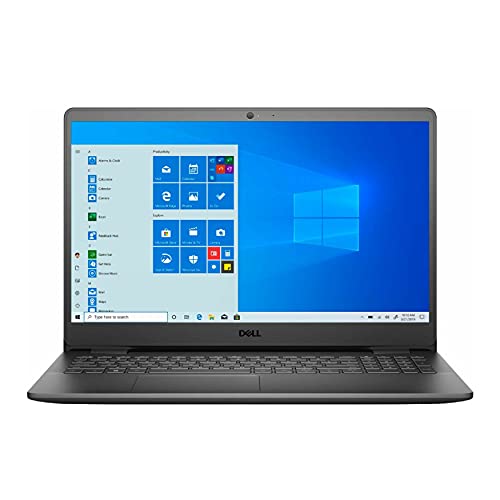
Dell Inspiron 15 3000 - Best Entry-Level Reliable Option
The Dell Inspiron 15 3000 series consistently offers reliable Windows laptops at accessible prices with the build quality Dell is known for at the mid-range tier. It runs Hatch, PE-Design, and Embird without issues and includes a full-size keyboard with numpad on most configurations, useful for entering exact stitch count values in digitizing software. USB port count and placement are practical for machine cables. Dell's driver update and support infrastructure is well-established, which reduces the friction of software compatibility issues common when using specialized peripherals like embroidery machine interfaces. The 1080p display renders stitch previews accurately enough for standard home and small-business embroidery.
ASUS VivoBook 16 - Best for Large Display Digitizing Work
The ASUS VivoBook 16 brings a 16-inch WUXGA display with a 16:10 aspect ratio that shows more vertical workspace than standard 16:9 laptops. For digitizing embroidery, extra vertical space is valuable when reviewing full-design previews and working across multiple software panels. The AMD Ryzen 5 or 7 processors in current configurations deliver responsive performance for moderately complex embroidery designs. The 16-inch footprint includes a numpad, useful for coordinate entry in design software. USB-A ports for machine connectivity are present. At it is a reasonable step up from budget laptops that provides meaningfully more screen real estate without reaching premium laptop pricing.

Lenovo ThinkPad E16 - Best Durable Laptop for Embroidery Studios
The Lenovo ThinkPad E16 brings ThinkPad-grade keyboard quality and build durability to the mid-range business laptop category, making it a practical choice for embroidery businesses where the computer is in daily professional use. The keyboard is one of the best in its price range, relevant for digitizers who spend significant time entering design parameters and text. Lenovo's track record for driver stability and Windows compatibility reduces the risk of USB or port issues that can interrupt machine connectivity. The 16-inch display gives workspace comparable to the VivoBook 16. Available with up to 16GB RAM, which is sufficient for professional digitizing software including Wilcom's lighter tiers.

HP Envy Desktop - Best Desktop Workstation for Professional Digitizing
For professional embroidery studios where portability is not required, a desktop provides more performance per dollar than a laptop. The HP Envy desktop with an Intel Core i7 processor and 16GB RAM runs Wilcom Embroidery Studio comfortably, including the more resource-intensive features like automatic digitizing and complex multi-head machine simulations. The desktop tower has multiple USB ports accessible on the front panel for frequent machine connections. A dedicated GPU handles design rendering faster than integrated graphics. The desktop form factor also allows pairing with a large color-accurate external monitor, which improves color thread matching when working from reference images.
Buying considerations
What to consider
Confirm your digitizing software's system requirements before purchasing. Most professional embroidery programs specify Windows 10 or 11, minimum RAM, and occasionally a dedicated graphics card. USB port availability and stability matters more than in general computing because embroidery machines rely on USB for design transfer and sometimes for machine control. Avoid USB hubs for machine connections if possible; direct port connection is more reliable. Display size is worth prioritizing over display quality for digitizing work: a larger 15-16 inch screen allows viewing full design previews alongside the editing tools simultaneously. If budget allows, 16GB RAM gives comfortable headroom for multitasking alongside reference images and browser-based thread color databases.
What to consider
For related reading, see [best embroidery machines for beginners](/articles/best-embroidery-machines-for-beginners) and [best sewing and craft tables](/articles/best-craft-tables). See how we evaluate tech products at [/methodology](/methodology).
Questions answered
Most professional embroidery digitizing software including Wilcom Embroidery Studio, Hatch Embroidery, and Brother PE-Design runs exclusively on Windows. This makes Windows laptops and desktops the standard choice for digitizing work. Some entry-level apps like Ink/Stitch run on all platforms, but professional-grade digitizing is overwhelmingly Windows-dependent. Mac users who want professional digitizing software typically run Windows via Boot Camp or Parallels as a workaround.
Most embroidery digitizing programs are not RAM-intensive by modern standards. 8GB of RAM runs Hatch and PE-Design without issues for standard designs. Complex designs with thousands of stitch elements or simultaneous use of design software alongside a graphics application benefits from 16GB. RAM is rarely the bottleneck; a fast CPU and dedicated display are more impactful for digitizing workflow speed.
How we made this guide
We compare every pick on the factors that matter, cross-checking manufacturer specifications against aggregated verified owner reviews. We rank independently and never take payment for placement. We have not personally tested every product; where we have not, the ranking reflects verified specs and owner feedback rather than a hands-on review.
How it was written: this guide was researched and reviewed by the TheTestedHub editorial team for accuracy.
Affiliate disclosure: TheTestedHub is reader-supported. When you buy through links on our site, we may earn a commission at no extra cost to you.
Keep reading

Your Docking Station Match: CalDigit TS4 and More

Digital Art Computers 2026: Best for Every Budget
Dev & IT Computers in 2026: Ranked for Real Work

Desktop PCs for Every Budget: Find Your Perfect Match
Desktop and Laptop Computers: Performance Reviewed and Ranked
MacBook Pro M4 Pro vs Dell XPS 15: 2026 Shortlist

Buy the Best DIY Computer in 2026: Corsair One i300
