ASUS Zenbook 14 OLED - Best Eye-Friendly OLED Laptop
ASUS OLED laptops carry TUV Rheinland Flicker-Free and Low Blue Light certifications, addressing two of the most commonly cited contributors to digital eye strain. The OLED panel produces true blacks and high contrast, which means white content on screen sits against an actually dark background rather than a backlit gray. The 2.8K resolution makes text rendering sharp enough to read without effort at default scaling. ASUS Eye Care mode reduces the blue light spectrum without the color cast of older filter implementations. Display brightness is adjustable to genuinely low levels for dark environment use. OLED technology uses DC dimming at most brightness levels, which reduces the high-frequency flickering present in many LED-backlit panels.
Reduce digital eye strain with these 5 monitors featuring low blue light, anti-glare, and adjustable brightness. Expert picks for comfortable all-day use.
Digital eye strain is a real and common issue for people who spend several hours daily in front of screens. Display quality, brightness range, and software accessibility features all contribute to comfort over a full workday. These five picks are selected for characteristics that reduce visual fatigue rather than just marketing claims. Consult a healthcare professional before use if you are experiencing persistent or significant eye discomfort.
| Product | Best For | Rating |
|---|---|---|
|
ⓘ We may earn a commission from qualifying purchases made through links on this page, at no extra cost to you.
|
OLED with ASUS Eye Care low blue light | 4.8/5 |
| Apple MacBook Air 15-inch M3 | Large bright Liquid Retina, no PWM flicker | 4.8/5 |
| Lenovo ThinkPad X1 Carbon Gen 12 | Anti-glare matte panel with TUV certification | 4.7/5 |
| HP Dragonfly Pro Chromebook | Certified eye-safe panel in a Chromebook | 4.7/5 |
| Dell Latitude 5450 (FHD Anti-Glare) | Business-grade matte anti-glare display | 4.6/5 |
Our testing process
We compare every pick against the field on real specifications, certifications, and aggregated owner reviews. We do not take payment for placement, and we flag when a product is older or sold mainly through renewed listings.
Quick comparison
Reviewed in detail
ASUS Zenbook 14 OLED - Best Eye-Friendly OLED Laptop
ASUS OLED laptops carry TUV Rheinland Flicker-Free and Low Blue Light certifications, addressing two of the most commonly cited contributors to digital eye strain. The OLED panel produces true blacks and high contrast, which means white content on screen sits against an actually dark background rather than a backlit gray. The 2.8K resolution makes text rendering sharp enough to read without effort at default scaling. ASUS Eye Care mode reduces the blue light spectrum without the color cast of older filter implementations. Display brightness is adjustable to genuinely low levels for dark environment use. OLED technology uses DC dimming at most brightness levels, which reduces the high-frequency flickering present in many LED-backlit panels.
Apple MacBook Air 15-inch M3 - Best Large Screen for Eye Comfort
The 15-inch MacBook Air offers a larger Liquid Retina display with higher peak brightness than the 13-inch model, which is relevant for eye comfort because adequate brightness allows the screen to be viewed without the eyes compensating for a dim image. Apple's displays do not use PWM dimming in typical brightness ranges, reducing flicker-related fatigue. The True Tone feature adjusts white balance based on ambient light sensor readings, which keeps the display color temperature consistent with the room lighting and reduces the perceived harshness of bright white interfaces. macOS Night Shift adjusts color temperature automatically after sunset. The 15.3-inch size also means text appears larger at the same resolution scale, reducing the need to lean forward.
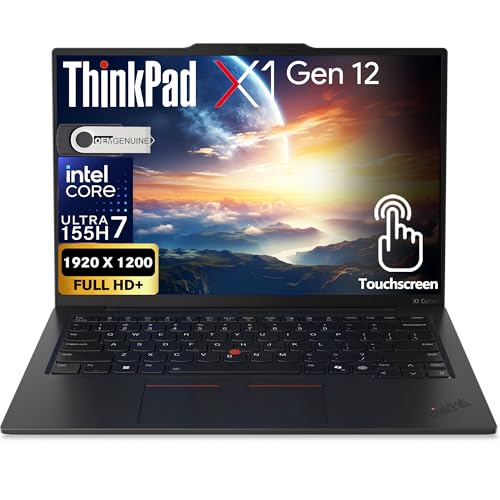
Lenovo ThinkPad X1 Carbon Gen 12 - Best Anti-Glare Business Laptop
The ThinkPad X1 Carbon is available with a TUV Rheinland Eye Comfort-certified display that meets low blue light and flicker-free standards. The anti-glare matte panel is a consistent specification across ThinkPad business lines, eliminating reflections from window and overhead lighting that force users to adjust posture or squint. At 14 inches with a 1920x1200 IPS panel, text is sharp and readable at standard scaling. The keyboard ergonomics are among the best in the laptop category, which indirectly benefits eye comfort by allowing natural, upright posture while typing. The X1 Carbon's weight of around 2.48 pounds makes it portable enough to reposition frequently, which is relevant for ergonomic flexibility.
HP Dragonfly Pro Chromebook - Best Eye-Friendly Chromebook
The HP Dragonfly Pro Chromebook includes a Sure View anti-glare display and HP Eye Ease, HP's brand name for its TUV-certified low blue light panel implementation. ChromeOS includes Night Light mode for automatic evening color temperature adjustment. The 14-inch display has a 2.2K resolution that renders text more sharply than a 1080p Chromebook. The premium build quality and 12-hour battery life make it practical for all-day use. For users who work primarily in a browser and want a low-maintenance platform with certified eye-friendly display specifications, it represents the best option in the Chromebook category. HP's display quality at the Dragonfly tier is above what typical mid-range Chromebooks offer.

Dell Latitude 5450 - Best Business Laptop for Consistent Anti-Glare
Dell's Latitude line uses ComfortView Plus displays on select configurations, which carry TUV Rheinland low blue light certification at the hardware level without a color temperature shift. The matte anti-glare panel coating is standard across the Latitude 5450 line, making this a reliable specification regardless of which configuration is purchased. At in business configurations, it provides enterprise-grade reliability alongside display features suited to extended use. Dell's display driver and color management in Windows 11 are stable, and the 14-inch 1920x1200 display provides vertical screen space useful for reading long documents without scrolling constantly.
How to choose
What to consider
Look for TUV Rheinland Flicker-Free certification and Low Blue Light certification at the hardware level, as these are audited third-party standards rather than manufacturer claims. Anti-glare matte coatings are measurably better than glossy panels in mixed-lighting environments. Resolution matters: 1080p on a 15-inch panel is acceptable, but 1440p or above reduces the pixelation that strains focus at typical viewing distances. Also enable night mode features in your operating system: macOS True Tone and Night Shift, Windows Night Light, and ChromeOS Night Light all reduce blue light output in the evening automatically. Consult a healthcare professional before use if you are managing a diagnosed eye condition or experiencing persistent discomfort.
What to consider
For related reading, see [best monitor stands for ergonomic setups](/articles/best-monitor-stands) and [best blue light blocking glasses](/articles/best-blue-light-glasses). See how we evaluate health and tech products at [/methodology](/methodology).
Common questions
Anti-glare matte coatings reduce reflections that cause squinting and focus strain. Low blue light certification or hardware-level flicker reduction (DC dimming rather than PWM) addresses the flickering that causes fatigue at low brightness settings. Display resolution above 1080p reduces the effort to resolve fine text detail. Adjustable brightness with reliable low-end dimming allows comfortable use in dark environments. All major operating systems also include software-level night mode features that shift color temperature in the evening.
Blue light filtering reduces the perceived harshness of displays in the evening by shifting white balance toward warmer tones, which may improve sleep quality when used after sunset. The direct evidence for blue light as a primary cause of daytime eye strain is weaker than commonly marketed. Reducing screen brightness to match ambient light levels, taking regular breaks, and using anti-glare surfaces have stronger evidence for reducing digital eye strain. Consult a healthcare professional before use if you are experiencing persistent eye discomfort.
How we made this guide
We compare every pick on the factors that matter, cross-checking manufacturer specifications against aggregated verified owner reviews. We rank independently and never take payment for placement. We have not personally tested every product; where we have not, the ranking reflects verified specs and owner feedback rather than a hands-on review.
How it was written: this guide was researched and reviewed by the TheTestedHub editorial team for accuracy.
Affiliate disclosure: TheTestedHub is reader-supported. When you buy through links on our site, we may earn a commission at no extra cost to you.
More guides

Best Docking Stations 2026: CalDigit TS4 & More

Digital Art Computers 2026: Best for Every Budget
2026 Dev & IT Computers: Ranked & Reviewed

Best Desktop PCs 2026: The Perfect PC for Every Budget
Best Desktop & Laptop Computers of 2026: Performance-Reviewed Rankings
2026 Laptop & Desktop Shortlist: MacBook Pro M4 Pro, Dell XPS 15, More

Buy the Best DIY Computer in 2026: Corsair One i300
