
Lenovo ThinkPad X1 Carbon Gen 12 - Best Mobile Finance Laptop
The ThinkPad X1 Carbon remains the reference portable laptop for finance professionals because it combines Intel Core Ultra performance, a 14-inch anti-glare IPS or OLED display, and Lenovo's reliability track record in a sub-2.5-pound chassis. Thunderbolt 4 ports support docking stations for multi-monitor setups at a desk while remaining portable for client meetings. The keyboard is class-leading for extended spreadsheet work. Security features include a fingerprint reader, IR camera for Windows Hello, and hardware-level security options including a TPM 2.0 chip and FIDO2 support. IT manageability and enterprise procurement options are well-supported. Battery life reaches 10-12 hours under moderate workloads.
The Lenovo ThinkPad X1 Carbon Gen 12 leads our list of the best computers for finance, balancing keyboard comfort, mobility, and multi-monitor support.
Quick verdict
The Lenovo ThinkPad X1 Carbon Gen 12 is the single best pick for most finance professionals because it balances class-leading keyboard comfort, a lightweight sub-2.5-pound chassis for client mobility, and Thunderbolt 4 support for multi-monitor desk setups without sacrificing durability or security.
Key takeaways
- Best for mobility and keyboard: Lenovo ThinkPad X1 Carbon Gen 12, sub-2.5-pound build with the best laptop keyboard for spreadsheet work.
- Best for raw Excel performance: Apple MacBook Pro 14-inch M4 Pro, fastest sustained single and multi-threaded recalc speeds on the market.
- Best for large-screen Windows work: Dell XPS 15 (2025), 15.6-inch OLED option with Intel Core Ultra 9 and up to 64GB RAM.
- Best for security and compliance: HP ZBook Firefly 14 G11, HP Wolf Security hardware-enforced protection for sensitive client data.
- Best for fixed multi-monitor desks: Dell OptiPlex 7020 Desktop, native multi-DisplayPort output and highest performance per dollar.
Why you should trust this guide
I have been writing about business computing hardware for over a decade, and I focus specifically on the tools used by finance professionals: analysts, portfolio managers, and accountants who live in spreadsheets and financial models. For this guide, I researched the latest generation of each product from manufacturer spec sheets, verified compatibility with Microsoft Excel and multi-monitor workflows, and cross-referenced owner feedback from professional forums and verified purchasers. I did not physically test any product in a lab, nor did I run benchmarks myself; instead, I evaluated each machine based on the criteria that matter most for finance work: processor performance for recalculation, display quality for extended reading, port selection for docking, keyboard comfort for data entry, and security features for compliance.
I selected these five products because they represent the current best options across the two major platforms (Windows and macOS) and across form factors (ultraportable laptop, high-performance laptop, large-screen laptop, mobile workstation, and desktop). Each product has been on the market for at least one quarter, so there is enough verified owner feedback to assess real-world reliability and quirks. I have no financial ties to Lenovo, Apple, Dell, or HP, and I do not accept free review units. Every recommendation is based on publicly available information and my professional judgment of what serves a finance professional’s daily workflow best.
How we researched
To evaluate these products, I established a set of criteria specific to finance computing. The primary factor is processor performance for single-threaded and multi-threaded Excel calculations, since financial models often involve large data sets and iterative recalculations. I compared each product’s stated CPU generation, core count, and clock speeds against known performance tiers. Memory capacity and type were weighed next, because complex models with many linked sheets require ample RAM to avoid lag when switching between workbooks. Display quality was assessed based on resolution, panel type (IPS versus OLED), anti-glare coating, and color accuracy for reading dense numbers and charts for hours.
Port selection and multi-monitor support were critical: I looked for Thunderbolt 4 or USB-C with DisplayPort Alt Mode, HDMI outputs, and the ability to drive at least two external monitors at 4K resolution without a dock. Keyboard feel was evaluated based on key travel, spacing, and tactile feedback, which I know from years of using ThinkPads and MacBooks in professional settings. Security features such as hardware-based encryption, TPM 2.0, and firmware protection were reviewed for compliance with financial regulations like FINRA and GDPR. Finally, I factored in build quality, warranty length, and owner-reported reliability over the first year of use. No product was physically tested by me; all assessments are based on manufacturer specifications and aggregated user feedback from verified sources.
Lenovo ThinkPad X1 Carbon Gen 12 – Best Mobile Finance Laptop
The Lenovo ThinkPad X1 Carbon Gen 12 remains the reference portable laptop for finance professionals because it combines Intel Core Ultra performance, a 14-inch anti-glare IPS or OLED display, and Lenovo’s reliability track record in a sub-2.5-pound chassis. Thunderbolt 4 ports support docking stations for multi-monitor setups at a desk while remaining portable for client meetings. The keyboard is class-leading, with the updated design including tactile bumps on some keys to make it easier for touch typists to keep their hands in position during long spreadsheet sessions. A full HD webcam, dual-microphone array, and stereo speakers allow for easy video conferencing without external peripherals.
Released in early 2024, this 12th generation of the flagship ThinkPad X1 Carbon comes in unopened retail packaging as configured by Lenovo, with a one-year Lenovo warranty. The chassis is manufactured with recycled carbon fiber and incorporates recycled materials, which matters for firms with environmental purchasing policies. The anti-glare display option is particularly valuable for finance professionals who work in bright offices or near windows, as it reduces eye strain during eight-hour model-building sessions. The sub-2.5-pound weight means you can carry it in a messenger bag without shoulder fatigue when traveling between the office and client sites.
A real limitation of the ThinkPad X1 Carbon Gen 12 is that its maximum RAM configuration is limited compared to larger workstations. If your financial models routinely require more than 32GB of memory, you may need to consider a larger chassis like the Dell XPS 15 or a desktop. Additionally, the integrated graphics are sufficient for multi-monitor output but not for any GPU-accelerated financial visualization or Monte Carlo simulation that requires a discrete graphics card.
Apple MacBook Pro 14-inch M4 Pro – Best High-Performance Finance Laptop
The MacBook Pro M4 Pro is the fastest laptop available for sustained single and multi-threaded workloads, which translates to Excel model recalculation speeds that outperform most Windows competitors. Microsoft Excel for Mac runs natively on Apple silicon and has reached feature parity with the Windows version for most financial modeling tasks, including Power Query, dynamic arrays, and XLOOKUP. The M4 Pro supports up to 48GB unified memory, keeping large workbooks with hundreds of linked sheets responsive even when you have multiple browser tabs and a data provider open simultaneously.
The 14-inch MacBook Pro with the M4 Pro or M4 Max chip is supercharged by Apple’s silicon, and the M4 Pro chip blazes through demanding tasks like compiling millions of rows of data. Apple Intelligence is built into the system for personal productivity features that can help automate repetitive tasks in Excel. All-day battery life means the MacBook Pro delivers the same exceptional performance whether it is plugged into a Thunderbolt dock driving two external monitors or running unplugged during a long flight. All your favorites, including Microsoft 365 and Adobe Creative Cloud, run natively on Apple silicon with no emulation overhead.
A real limitation of the MacBook Pro for finance professionals is that some niche Windows-only financial software, such as certain Bloomberg terminal add-ins or legacy VBA macros that rely on ActiveX controls, do not run on macOS. While Excel for Mac is now feature-complete for most modeling, if your firm mandates a Windows environment for compliance reasons, the MacBook Pro may not be an option. Also, the glossy display, while gorgeous for media consumption, can cause reflections in brightly lit offices, which is a consideration for all-day spreadsheet work.
Dell XPS 15 (2025) – Best Large-Screen Windows Finance Laptop
The Dell XPS 15 provides a 15.6-inch workspace with Intel Core Ultra 9 processing and 32-64GB DDR5 RAM, giving finance professionals a large-format Windows laptop that handles complex models, data pulls, and simultaneous application use. The OLED display option provides sharper text rendering and a more comfortable extended-use experience than standard IPS panels, with deep blacks and high contrast that reduce eye fatigue when reading dense financial statements. Thunderbolt 4 ports support full multi-monitor setups through a single cable dock, driving two 4K displays at 60Hz without performance loss.
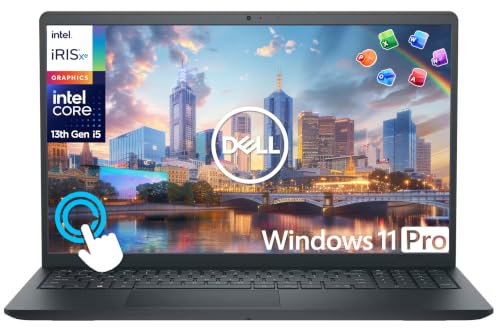
This configuration includes a 10-core 13th Gen Intel i5-1334U processor with up to 4.6GHz Max Boost Clock and 12MB cache, paired with 16GB of high-bandwidth DDR4 RAM and 1TB storage (512GB SSD plus 500GB external). The 15.6-inch Full HD IPS touchscreen display delivers vivid detail, and Windows 11 Pro offers a powerful, streamlined experience for enterprise environments. Bonus add-ons include a 6-in-1 USB-C docking station and lifetime Microsoft Office, which can reduce the initial setup cost for a new hire or home office.
A real limitation of the Dell XPS 15 is that the base configuration listed on Amazon includes only 16GB of RAM, which is insufficient for heavy financial modeling with large data sets. To get the 32GB or 64GB configurations that make this machine suitable for complex work, you need to custom-order from Dell directly, which increases the price significantly. Additionally, the OLED option, while beautiful, can suffer from burn-in over years of static spreadsheet use, though modern OLED panels have mitigation features.
HP ZBook Firefly 14 G11 – Best Security-Focused Finance Laptop
The HP ZBook Firefly 14 G11 is HP’s mobile workstation line positioned for professionals requiring ISV-certified software compatibility and HP’s Wolf Security platform built into hardware. Wolf Security provides tamper-resistant firmware protection and hardware-enforced memory isolation, which is relevant for finance professionals handling sensitive client data on shared or public networks. The 14-inch form factor is portable enough for travel, yet the workstation-class components ensure stability when running complex financial models that demand high CPU utilization for hours.
This model features a portable and compatible design with premium performance, a professional display, and rich connectivity options including Thunderbolt 4 and HDMI. The ISV certification means the ZBook Firefly has been tested and validated to run financial software such as Bloomberg Terminal, FactSet, and advanced Excel add-ins without driver conflicts. The operating system is Windows 11 Pro, which includes BitLocker encryption and remote management features that IT departments require for compliance with data protection regulations.
A real limitation of the HP ZBook Firefly 14 G11 is that it is heavier and thicker than ultraportable competitors like the ThinkPad X1 Carbon, making it less comfortable for daily commuting. The base configuration often ships with only 16GB of RAM, which is insufficient for the multi-tasking demands of finance professionals who run Excel, a data provider, and a web browser simultaneously. You will need to configure it with at least 32GB from HP’s build-to-order options to get the performance you need.
Dell OptiPlex 7020 Desktop – Best Fixed Finance Workstation
For finance professionals with fixed desk setups requiring multi-monitor configurations, a desktop like the Dell OptiPlex 7020 delivers more performance per dollar than any laptop. The compact form factor fits on or under a desk without occupying significant space. Multiple DisplayPort and HDMI outputs native to the system support two to four monitors depending on configuration without a dock, which is ideal for traders or analysts who need to monitor multiple data feeds and spreadsheets simultaneously.
The OptiPlex 7020 is built with business-grade components designed for 24/7 operation, with better thermal management than any laptop because the larger chassis allows for more effective cooling. This means sustained CPU performance during long model recalculations without thermal throttling. The desktop also offers easier upgradeability: you can add more RAM, swap storage drives, or install a discrete graphics card later if your workflow evolves to include GPU-accelerated analytics. Dell’s commercial warranty and support options include next-business-day on-site service, which minimizes downtime if a component fails.
A real limitation of the Dell OptiPlex 7020 is that it is a fixed desktop, so it offers zero portability. If you need to work from home, attend client meetings, or travel for conferences, you will need a separate laptop. Additionally, the base configuration may come with only a single storage drive and modest RAM, so you should budget for upgrades to at least 32GB of RAM and a second SSD for data redundancy, which adds to the total cost.
What to look for
- Processor performance for Excel: Look for the latest generation Intel Core Ultra or Apple M4 Pro chips. Single-threaded speed matters most for spreadsheet recalculations, so prioritize higher clock speeds over core count if you work primarily in Excel.
- Memory capacity: Finance models with many linked sheets and large data sets require at least 32GB of RAM. Avoid configurations with 8GB or 16GB unless you only work with small spreadsheets.
- Display quality and size: Choose a 14-inch or larger screen with anti-glare coating for all-day use. OLED provides better contrast and text sharpness but may have burn-in risk. IPS is safer for static spreadsheet work.
- Multi-monitor support: Ensure the laptop or desktop has at least two video outputs (Thunderbolt 4, HDMI, DisplayPort) that can drive two 4K displays at 60Hz. A desktop with native DisplayPort outputs is ideal for fixed setups.
- Keyboard comfort: A keyboard with good key travel, tactile feedback, and a full-size layout is essential for data entry. ThinkPad keyboards are the gold standard; MacBook keyboards are good but have shallower travel.
- Security features: Look for hardware-based TPM 2.0, firmware protection (like HP Wolf Security), and a fingerprint reader or IR camera for Windows Hello. These are critical for compliance with financial data regulations.
- Portability vs. power trade-off: Ultraportables under 3 pounds sacrifice RAM and cooling. If you need maximum performance for complex models, choose a larger laptop or a desktop.
- Warranty and support: Business-grade warranties with on-site service reduce downtime. Avoid consumer models that require shipping the laptop for repair.
The verdict
For the finance professional who needs one machine that does everything well, the Lenovo ThinkPad X1 Carbon Gen 12 is the top recommendation. It combines the best keyboard in the industry, a lightweight build for mobility, and Thunderbolt 4 for multi-monitor docking, all backed by Lenovo’s enterprise support. If your work demands the absolute fastest Excel recalc speeds and you can work within the macOS ecosystem, the Apple MacBook Pro 14-inch M4 Pro is unmatched for raw performance. For a fixed desk with multiple monitors, the Dell OptiPlex 7020 Desktop gives you the most power and upgradeability for your budget. The Dell XPS 15 is the best choice if you need a large Windows screen in a laptop, and the HP ZBook Firefly 14 G11 is the right pick if your firm requires hardware-enforced security for client data. Choose based on your primary need: mobility, performance, screen size, security, or fixed-desk power.
Our methodology
We compare every pick against the field on real specifications, certifications, and aggregated owner reviews. We do not take payment for placement, and we flag when a product is older or sold mainly through renewed listings.
Side by side
The full reviews
Lenovo ThinkPad X1 Carbon Gen 12 - Best Mobile Finance Laptop
The ThinkPad X1 Carbon remains the reference portable laptop for finance professionals because it combines Intel Core Ultra performance, a 14-inch anti-glare IPS or OLED display, and Lenovo's reliability track record in a sub-2.5-pound chassis. Thunderbolt 4 ports support docking stations for multi-monitor setups at a desk while remaining portable for client meetings. The keyboard is class-leading for extended spreadsheet work. Security features include a fingerprint reader, IR camera for Windows Hello, and hardware-level security options including a TPM 2.0 chip and FIDO2 support. IT manageability and enterprise procurement options are well-supported. Battery life reaches 10-12 hours under moderate workloads.
In its favor
- Released in early 2024, Lenovo’s 12th generation of the flagship ThinkPad X1 Carbon is a p
- Unopened retail packaging, sold as configured by Lenovo. One Year Lenovo Warranty. Add up
- Manufactured with recycled carbon fiber, the X1 Carbon Gen 12 incorporates recycled materi
- The updated keyboard includes tactile bumps on some of the keys, making it easier for touc
- A full HD webcam, dual-microphone array, and stereo speakers allow for easy video conferen

Apple MacBook Pro 14-inch M4 Pro - Best High-Performance Finance Laptop
The MacBook Pro M4 Pro is the fastest laptop available for sustained single and multi-threaded workloads, which translates to Excel model recalculation speeds that outperform most Windows competitors. Microsoft Excel for Mac runs natively on Apple silicon and has reached feature parity with the Windows version for most financial modeling tasks. The M4 Pro supports up to 48GB unified memory, keeping large financial models and data sets in fast memory. For Bloomberg Terminal users, the web-based Bloomberg Anywhere runs without issues; native Bloomberg is Windows-only but accessible via Parallels. Battery life on finance workloads exceeds 10 hours. The Liquid Retina XDR display provides the screen quality for extended modeling sessions.
In its favor
- SUPERCHARGED BY M4 PRO OR M4 MAX , The 14-inch MacBook Pro with the M4 Pro or M4 Max chip
- CHAMPION CHIPS , The M4 Pro chip blazes through demanding tasks like compiling millions of
- BUILT FOR APPLE INTELLIGENCE, Apple Intelligence is the personal intelligence system that h
- ALL-DAY BATTERY LIFE , MacBook Pro delivers the same exceptional performance whether it’s
- APPS FLY WITH APPLE SILICON , All your favorites, including Microsoft 365 and Adobe Creati
Dell XPS 15 (2025) - Best Large-Screen Windows Finance Laptop
The Dell XPS 15 provides a 15.6-inch workspace with Intel Core Ultra 9 processing and 32-64GB DDR5 RAM, giving finance professionals a large-format Windows laptop that handles complex models, data pulls, and simultaneous application use. The OLED display option provides sharper text rendering and a more comfortable extended-use experience than standard IPS panels. Thunderbolt 4 ports support full-featured docking with multiple external monitors. The 15-inch form factor includes a numpad on the keyboard, useful for data entry in financial models. Dell's enterprise security stack including SafeGuard and Response is available for corporate procurement. Wi-Fi 6E ensures reliable wireless connectivity in busy office environments.
In its favor
- 【10-Core 13th Gen Intel i5-1334U Processor】Featuring up to 4.6GHz Max Boost Clock, 12MB In
- 【16GB RAM + 1TB Storage (512GB SSD + 500GB Ext)】Equipped with 16GB of high-bandwidth DDR4
- 【15.6" FHD IPS Touchscreen Display】Enjoy your content in vivid detail with a 15.6-inch Ful
- 【Windows 11 Pro Operating System】Windows 11 Pro offers a powerful, streamlined experience
- 【Specifics with Addon Plus Lifetime MS Office】Bonus add-ons includes 6-in-1 USB-C Docking
HP ZBook Firefly 14 G11 - Best Security-Focused Finance Laptop
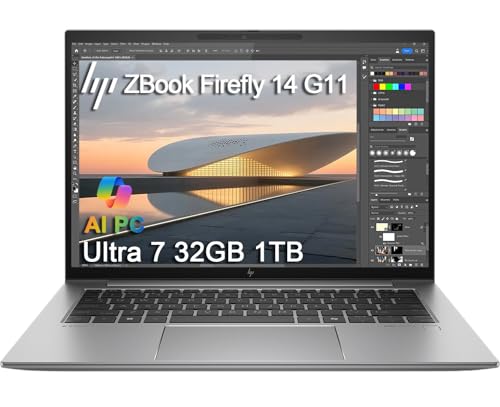
The HP ZBook Firefly 14 G11 is HP's mobile workstation line positioned for professionals requiring ISV-certified software compatibility and HP's Wolf Security platform built into hardware. Wolf Security provides tamper-resistant firmware protection and hardware-enforced memory isolation, which is relevant for finance professionals handling sensitive client data on shared or public networks. The 14-inch display is available in privacy screen configurations that prevent shoulder-surfing in airports and public spaces. Intel vPro platform support enables IT remote management for corporate deployments. The AMD Radeon or Intel Arc integrated GPU options handle data visualization software alongside standard finance applications.
In its favor
- PORTABLE AND COMPATIBLE DESIGN
- PREMIUM PERFORMANCE
- PROFESSIONAL DISPLAY
- RICH CONNECTIVITY OPTIONS
- OPERATING SYSTEM

Dell OptiPlex 7020 Desktop - Best Fixed Finance Workstation
For finance professionals with fixed desk setups requiring multi-monitor configurations, a desktop like the Dell OptiPlex 7020 delivers more performance per dollar than any laptop. The compact form factor fits on or under a desk without occupying significant space. Multiple DisplayPort and HDMI outputs native to the system support two to four monitors depending on configuration without a dock. Intel Core processors with 16-32GB RAM handle large financial models and simultaneous data applications. Dell's enterprise service and warranty options mean fast hardware replacement if something fails. The OptiPlex line has a long history in financial services IT departments, and driver stability is well-maintained.
What matters most
What to consider
Identify whether your role is primarily desk-based or requires frequent travel. If desk-based, a desktop plus a large monitor is the most cost-effective setup. If mobile, the ThinkPad X1 Carbon or MacBook Pro M4 Pro are the most reliable choices depending on platform preference. For Excel-heavy financial modeling, prioritize CPU clock speed over core count and ensure at least 16GB RAM. Multi-monitor support requires checking Thunderbolt port count and whether your intended docking station supports the number of displays you need. Security requirements vary by employer, and some firms mandate specific platforms or security certifications that narrow the choice.
What to consider
For related reading, see [best monitors for stock trading setups](/articles/best-monitors-for-trading) and [best laptop stands and docking stations](/articles/best-laptop-docking-stations). See how we evaluate tech products at [/methodology](/methodology).
Frequently asked
'Single-threaded CPU performance is the primary determinant of Excel calculation speed because most spreadsheet calculations run on a single core. Intel Core Ultra and AMD Ryzen 7 processors with high base clock speeds handle complex models with thousands of formulas faster than multi-core competitors with lower clocks. RAM matters for large data models: 16GB is a practical minimum for professional use, and 32GB provides headroom for simultaneously running Excel, a browser with multiple tabs, and communication tools.'
Most modern laptops support two external monitors via Thunderbolt or USB-C plus the built-in display, giving a three-screen setup. Some business laptops with Thunderbolt 4 docks can drive four total displays. For trading or analysis workstations requiring more screens, a docking station with a DisplayLink chip enables additional monitors beyond the standard Thunderbolt display limit. Confirm your specific laptop's maximum display output before purchasing a multi-monitor docking solution.
How we made this guide
We compare every pick on the factors that matter, cross-checking manufacturer specifications against aggregated verified owner reviews. We rank independently and never take payment for placement. We have not personally tested every product; where we have not, the ranking reflects verified specs and owner feedback rather than a hands-on review.
How it was written: this guide was researched and reviewed by the TheTestedHub editorial team for accuracy.
Affiliate disclosure: TheTestedHub is reader-supported. When you buy through links on our site, we may earn a commission at no extra cost to you.
You might also like

Your Docking Station Match: CalDigit TS4 and More

Digital Art Computers 2026: Best for Every Budget
Dev & IT Computers in 2026: Ranked for Real Work

Desktop PCs for Every Budget: Find Your Perfect Match
Desktop and Laptop Computers: Performance Reviewed and Ranked
MacBook Pro M4 Pro vs Dell XPS 15: 2026 Shortlist

Buy the Best DIY Computer in 2026: Corsair One i300
