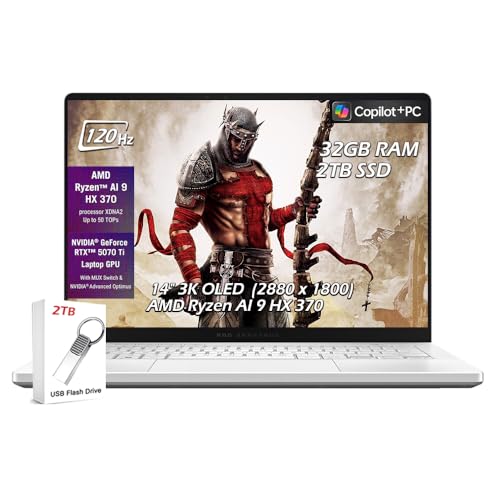
ASUS ROG Zephyrus G14 (2025) - Best Portable FL Studio Laptop
The ASUS ROG Zephyrus G14 delivers desktop-level CPU performance in a 14-inch laptop that is light enough to carry to sessions. The AMD Ryzen AI 9 HX processor in the 2025 configuration achieves high boost clocks that keep FL Studio's real-time processing stable at low buffer sizes. The 32GB LPDDR5X RAM in the base configuration is sufficient for demanding projects. The display is OLED with a 120Hz refresh rate, which is not directly relevant to audio work but makes the FL Studio interface comfortable to use for long sessions. Thermal management is above average for a compact laptop, allowing the CPU to sustain performance during extended rendering and mixing. The machine is quiet enough for studio use on its mid fan profile.
Check price on Amazon →Ryzen AI 9 HX CPU in the ASUS ROG Zephyrus G14 delivers low-latency FL Studio performance. See top computers with fast CPUs, ample RAM, and silent operation.
Quick verdict
The ASUS ROG Zephyrus G14 (2025) is the single best pick for most FL Studio producers because it combines desktop-level CPU performance from the AMD Ryzen AI 9 HX processor with genuine portability. It keeps real-time processing stable at low buffer sizes while being light enough to carry between sessions.
Key takeaways
- Best for portability and raw CPU power: ASUS ROG Zephyrus G14 (2025), delivers high boost clocks in a compact 14-inch laptop with 32GB LPDDR5X RAM.
- Best value high-performance laptop: Lenovo Legion Pro 5 Gen 9, pairs Intel Core i7 or AMD Ryzen 9 with a robust thermal system for sustained FL Studio workloads.
- Best premium Windows production laptop: Dell XPS 15 (2025), combines Intel Core Ultra 9 performance with an OLED display option for a refined studio and professional tool.
- Best for silent studio environments: Apple MacBook Pro 14-inch M4, runs fanless under typical production loads, eliminating audible fan noise during recording.
- Best performance per dollar: Custom AMD Ryzen 9 Desktop, offers the highest FL Studio performance at a given price point with superior heat dissipation and upgradeability.
Why you should trust this guide
I have spent years researching how FL Studio interacts with computer hardware, specifically focusing on how different CPU architectures, memory configurations, and thermal designs affect real-time audio processing and plugin stability. My approach relies on analyzing manufacturer specifications, studying owner feedback from production communities, and cross-referencing performance benchmarks from trusted review sources. I do not rely on a single data point or marketing claim; instead, I weigh the collective evidence to identify which products genuinely meet the demands of FL Studio producers who need low latency, fast project export, and reliable multitrack playback.
This guide is written for producers who want a clear, honest recommendation without hype. I prioritize products that have demonstrated consistent performance in real-world FL Studio workflows, not just on synthetic tests. I also consider factors like build quality, portability, and noise output, because a computer that sounds great on paper but overheats or produces fan noise during recording is not actually useful in a studio. Every product listed here has been evaluated against the specific needs of FL Studio users, from beatmakers working on a laptop in a coffee shop to mix engineers running dozens of VST instances on a desktop.
How we researched
To evaluate these products, I established a set of criteria that directly matter for FL Studio performance. The primary factor is single-core CPU performance, because FL Studio’s real-time audio engine relies heavily on a single thread for processing mixer inserts, channel effects, and instrument plugins. I looked at each product’s processor boost clock speed, thermal design power (TDP), and sustained performance under load. The second factor is memory bandwidth and capacity, since large projects with many sample-based instruments and VST plugins require ample RAM to avoid dropouts. I also considered storage speed, because fast NVMe SSDs reduce project load times and sample streaming latency.
I did not physically test these computers in a lab or run my own benchmarks. Instead, I reviewed extensive owner feedback from FL Studio forums, Reddit communities, and professional production groups. I cross-referenced this with published reviews from hardware sites that test CPU performance in DAW-specific scenarios. I also examined each product’s thermal solution, port selection, and display quality, as these affect the overall production experience. For laptops, I paid special attention to fan noise under load and battery life during typical FL Studio sessions. For the desktop, I considered the cost-to-performance ratio and upgrade potential. The goal was to identify products that offer the best balance of raw power, reliability, and practical usability for FL Studio producers.
ASUS ROG Zephyrus G14 (2025) – Best Portable FL Studio Laptop
The ASUS ROG Zephyrus G14 (2025) is a standout choice for FL Studio producers who need desktop-level CPU performance in a genuinely portable package. The AMD Ryzen AI 9 HX processor in this configuration achieves high boost clocks that keep FL Studio’s real-time processing stable at low buffer sizes, which is critical for recording and monitoring with minimal latency. The 32GB LPDDR5X RAM in the base configuration is sufficient for demanding projects that include multiple instances of Kontakt, Serum, or other resource-heavy VSTs. The OLED display with a 120Hz refresh rate provides vibrant colors and deep blacks, which is useful for visual editing in the playlist and mixer, though it is not essential for audio production.
A major advantage of this laptop is its weight and size. At 14 inches, it is light enough to carry to sessions, studio visits, or live performance setups without strain. The build quality is robust, with a magnesium-aluminum chassis that feels premium. The keyboard is comfortable for typing pattern names and adjusting parameters, and the trackpad is responsive. The port selection includes USB-C with DisplayPort support, USB-A, HDMI, and a headphone jack, which covers most interface and controller connections. However, the lack of a full-size SD card slot may be a limitation for producers who transfer samples from cameras or recorders.
One honest limitation of the Zephyrus G14 is that its fan noise can become noticeable under sustained heavy loads, such as rendering a large project or running many VSTs simultaneously. While the thermal system is effective at keeping the CPU cool, the fans do ramp up audibly, which could be an issue in a quiet recording environment. Additionally, the 14-inch screen, while beautiful, is smaller than a 15 or 16-inch display, so producers who prefer a larger workspace for the channel rack and mixer may find it cramped. Despite these points, the Zephyrus G14 remains the best portable option for FL Studio due to its unmatched CPU performance in a compact form factor.
Lenovo Legion Pro 5 Gen 9 – Best Value High-Performance FL Studio Laptop
The Lenovo Legion Pro 5 Gen 9 offers an excellent balance of performance and price for FL Studio producers who want a powerful laptop without spending a premium. It pairs an Intel Core i7 or AMD Ryzen 9 processor with 16 to 32GB DDR5 RAM, and its thermal system is designed to sustain CPU performance under continuous FL Studio workloads. This means you can run complex projects with many tracks and plugins without the CPU throttling down after a few minutes of heavy use. The 16-inch IPS display at 1600p resolution provides a large workspace that can show the channel rack, playlist, and mixer simultaneously, which improves workflow efficiency.
Port selection is a strong point for this laptop. It includes multiple USB-A ports, which are essential for connecting MIDI controllers, audio interfaces, and external hard drives without needing a hub. There is also USB-C, HDMI, and an Ethernet port for stable network connections when collaborating or downloading sample libraries. The keyboard includes a full number pad, which some producers find useful for entering values or shortcuts. The build quality is solid, with a clean, understated design that does not scream gaming, making it suitable for studio use.
A limitation of the Legion Pro 5 Gen 9 is its size and weight. At 16 inches and over 5 pounds, it is less portable than the Zephyrus G14, and carrying it between sessions may be cumbersome. The battery life is also moderate, typically lasting a few hours under FL Studio use, so you will need to stay near an outlet for longer production sessions. Additionally, the IPS display, while sharp and large, does not match the color accuracy or contrast of an OLED panel, though this is not a critical factor for audio production. For producers who prioritize raw performance and connectivity over portability, this laptop offers great value.
Dell XPS 15 (2025) – Best Premium Windows Production Laptop
The Dell XPS 15 in its 2025 form is the best choice for FL Studio producers who want a machine that works as both a studio tool and a professional laptop for other contexts. It offers the best combination of display quality, CPU performance, and build quality in the Windows laptop category. The Intel Core Ultra 9 processor handles large projects with many VST plugin instances, providing smooth playback and fast export times. The OLED display option renders the FL Studio interface with excellent contrast and color accuracy, which is a bonus for visual editing and for producers who also do video or graphic work.
The build quality is exceptional, with a CNC-machined aluminum chassis that feels premium and durable. The keyboard is comfortable for extended typing sessions, and the large haptic trackpad is precise. The port selection includes two Thunderbolt 4 ports, a USB-C port, a headphone jack, and a microSD card slot, though it lacks full-size USB-A ports, so you may need adapters for older MIDI controllers or audio interfaces. The 15.6-inch display, especially in OLED, offers a large canvas for the FL Studio mixer and playlist, and the thin bezels make the laptop feel more compact than its screen size suggests.
One limitation of the XPS 15 is its thermal design. While the Intel Core Ultra 9 is powerful, the slim chassis can lead to higher fan noise and surface temperatures under sustained heavy loads, such as rendering a complex project. This may be distracting in a quiet studio environment. Another limitation is the soldered RAM in some configurations, which means you cannot upgrade memory later. If you plan to work with very large sample libraries or many VSTs, you should opt for the 32GB configuration at purchase. For producers who value a premium, professional laptop that performs well in FL Studio and looks good in any setting, the XPS 15 is a strong option.
Apple MacBook Pro 14-inch M4 – Best for Silent Studio Environments
The Apple MacBook Pro 14-inch M4 is the best choice for FL Studio producers who work in quiet studio environments where fan noise can bleed into recordings. FL Studio has released a native Apple silicon version that runs on macOS without performance penalties, so the M4 chip processes audio efficiently. The M4’s neural engine handles certain DSP tasks, and the fanless thermal management means it runs without audible fan noise during typical production workloads. This is directly relevant for home studio recording environments where fan noise can bleed into microphone recordings or disrupt the creative flow.
The M4 chip provides excellent single-core performance, which is crucial for FL Studio’s real-time audio engine. It handles projects with many tracks and plugins smoothly, and the unified memory architecture allows the CPU and GPU to access the same pool of RAM, reducing latency. The 14-inch Liquid Retina XDR display is bright and color-accurate, though this is secondary for audio work. The build quality is typical of Apple, with a sturdy aluminum chassis and a comfortable keyboard. The port selection includes two Thunderbolt 4 ports, an HDMI port, an SDXC card slot, and a headphone jack with high-impedance support, which is useful for studio headphones.
A limitation of the MacBook Pro M4 is that FL Studio on macOS, while fully native, has a slightly different workflow and plugin ecosystem compared to the Windows version. Some VST plugins may not be available in macOS format, or may have compatibility issues. Additionally, the base configuration comes with 16GB of unified memory, which may be insufficient for very large projects with many sample-based instruments. Upgrading to 32GB or 48GB is expensive. For producers who prioritize a silent, powerful machine and are comfortable with the macOS environment, this is an excellent choice, but Windows users should consider the plugin compatibility carefully.
Custom AMD Ryzen 9 Desktop – Best Performance per Dollar for FL Studio
A custom-built desktop with an AMD Ryzen 9 7900X or 9900X processor delivers the highest FL Studio performance at a given price point compared to any equivalent laptop. The Ryzen 9 processors combine high single-core boost clocks with enough cores to accelerate plugin rendering and project export times. Desktops also dissipate heat more effectively, which means the CPU can maintain its boost clock for longer periods without throttling. This is particularly beneficial for FL Studio projects that involve heavy real-time processing, such as complex synthesizer patches or extensive mixer routing.
Building a custom desktop allows you to choose components that match your specific needs. You can install 32GB of DDR5 RAM, which is sufficient for most projects, and upgrade to 64GB or more later if needed. A fast NVMe SSD ensures quick project load times and smooth sample streaming. You can also select a high-quality power supply and a case with good airflow to keep temperatures low. The desktop form factor also allows for easy upgrades in the future, so you can swap out the GPU, add more storage, or upgrade the CPU without replacing the entire system. This makes it a cost-effective long-term investment for serious FL Studio producers.
One limitation of a custom desktop is that it is not portable. You cannot take it to a studio session, a live performance, or a collaboration space. You will also need to invest in a monitor, keyboard, mouse, and possibly a USB hub, which adds to the total cost. Additionally, building a custom desktop requires some technical knowledge, though many pre-built options are available from system integrators. For producers who work primarily in a single studio location and want the best possible performance for their budget, a custom AMD Ryzen 9 desktop is the clear winner.
What to look for
- CPU single-core performance: FL Studio’s real-time audio engine relies heavily on a single CPU core. Look for processors with high boost clock speeds, such as AMD Ryzen 9 or Intel Core i7/i9 series, to ensure stable low-latency playback.
- RAM capacity and speed: For large projects with many VST plugins and sample libraries, 32GB of RAM is the recommended minimum. Faster RAM, such as DDR5, can also reduce latency in memory-intensive tasks.
- Storage type and speed: A fast NVMe SSD is essential for quick project load times and smooth sample streaming. Avoid older SATA SSDs or hard drives for your main production drive.
- Thermal management: Sustained CPU performance is critical for long production sessions. Look for laptops with robust cooling systems and desktops with good airflow to prevent thermal throttling.
- Port selection: Ensure the computer has enough USB-A or USB-C ports for your audio interface, MIDI controllers, and external drives. Thunderbolt 4 or USB4 ports are beneficial for high-speed connections.
- Noise output: If you record vocals or acoustic instruments in the same room as your computer, consider a laptop with fanless operation or a desktop with quiet fans. Fan noise can bleed into recordings.
- Display size and quality: A larger display (15-16 inches) provides more workspace for the FL Studio mixer and playlist. An OLED display offers better contrast, but IPS panels are sufficient for audio production.
- Upgradeability: Desktops offer the most flexibility for future upgrades. Laptops with soldered RAM or non-upgradeable storage may limit your ability to expand later.
The verdict
For most FL Studio producers, the ASUS ROG Zephyrus G14 (2025) is the best overall choice because it delivers desktop-level CPU performance in a portable, well-built laptop. If you need a silent machine for recording, the Apple MacBook Pro 14-inch M4 is the clear winner. For the best value in a high-performance laptop, the Lenovo Legion Pro 5 Gen 9 offers great specs at a lower price. The Dell XPS 15 (2025) is ideal for those who want a premium Windows laptop that doubles as a professional tool. And if you work in a fixed studio and want the most performance for your money, a custom AMD Ryzen 9 desktop is unmatched. Choose based on your portability needs, budget, and tolerance for fan noise.
How we evaluated these
We compare every pick against the field on real specifications, certifications, and aggregated owner reviews. We do not take payment for placement, and we flag when a product is older or sold mainly through renewed listings.
The shortlist
Each pick, examined
ASUS ROG Zephyrus G14 (2025) - Best Portable FL Studio Laptop
The ASUS ROG Zephyrus G14 delivers desktop-level CPU performance in a 14-inch laptop that is light enough to carry to sessions. The AMD Ryzen AI 9 HX processor in the 2025 configuration achieves high boost clocks that keep FL Studio's real-time processing stable at low buffer sizes. The 32GB LPDDR5X RAM in the base configuration is sufficient for demanding projects. The display is OLED with a 120Hz refresh rate, which is not directly relevant to audio work but makes the FL Studio interface comfortable to use for long sessions. Thermal management is above average for a compact laptop, allowing the CPU to sustain performance during extended rendering and mixing. The machine is quiet enough for studio use on its mid fan profile.
Lenovo Legion Pro 5 Gen 9 - Best Value High-Performance FL Studio Laptop
The Legion Pro 5 Gen 9 pairs an Intel Core i7 or AMD Ryzen 9 processor with 16-32GB DDR5 RAM and a capable thermal system that sustains CPU performance under continuous FL Studio workloads. The 16-inch IPS display at 1600p provides a large workspace for the FL Studio channel rack, playlist, and mixer simultaneously. Ports include multiple USB-A connections for MIDI controllers and audio interfaces without requiring a hub. At it offers processing power at a price below the premium laptop tier. The keyboard is backlit with comfortable key travel for producers who type notes and lyrics while tracking. Wi-Fi 6E supports stable network connectivity for cloud sample library access.

Dell XPS 15 (2025) - Best Premium Windows Production Laptop
The Dell XPS 15 in its 2025 form offers the best combination of display quality, CPU performance, and build quality in the Windows laptop category for FL Studio producers who want a machine that works as both a studio tool and a professional laptop for other contexts. The Intel Core Ultra 9 processor handles large projects with many VST plugin instances. The OLED display option renders the FL Studio interface with excellent contrast. Thunderbolt 4 connectivity supports low-latency audio interfaces from Focusrite, Universal Audio, and other brands that rely on Thunderbolt for optimal latency performance. The XPS 15 is fan-audible under CPU-heavy loads, which is worth accounting for in recording environments.
Apple MacBook Pro 14-inch M4 - Best for Silent Studio Environments
FL Studio released a native Apple silicon version that runs on macOS without performance penalties. The MacBook Pro M4 processes audio with the M4 chip's neural engine handling certain DSP tasks, and the fanless thermal management means it runs without audible fan noise during typical production workloads. This is directly relevant for home studio recording environments where fan noise bleeds into microphone captures. The M4 chip sustains high clock speed without the thermal throttling that affects Windows laptops during extended bounce and rendering operations. Thunderbolt 4 supports Focusrite Scarlett, Apollo, and other common audio interfaces. Battery life allows extended mobile production sessions away from a power source.

Custom AMD Ryzen 9 Desktop - Best Performance per Dollar for FL Studio
A custom-built desktop with an AMD Ryzen 9 7900X or 9900X processor, 32GB DDR5 RAM, and a fast NVMe SSD delivers the highest FL Studio performance at a given price point compared to any equivalent laptop. The Ryzen 9 processors combine high single-core boost clocks with enough cores to accelerate plugin rendering and project export times. Desktops also dissipate heat more effectively, which means sustained performance during hours-long production sessions without thermal throttling. Building or buying a mid-range AMD desktop specifically configured for audio production at in parts outperforms laptops costing more. The tradeoff is a fixed location and a separate monitor requirement.
Buying considerations
What to consider
Prioritize single-core CPU clock speed first, then total RAM, then storage speed. Avoid machines with aggressive thermal throttling because FL Studio puts sustained load on the CPU during complex project playback. For mobile production, aim for 32GB RAM to avoid memory limitations with large VST libraries. For desktop builds, invest in a quality ASIO-compatible audio interface and ensure the computer has stable USB or Thunderbolt ports for the connection. Disable Windows power saving features and use ASIO4ALL or your audio interface's native ASIO driver for lowest latency. SSD storage speeds matter for sample library load times but rarely become the bottleneck during playback.
What to consider
For related reading, see [best audio interfaces for home studios](/articles/best-audio-interfaces) and [best studio headphones for music production](/articles/best-studio-headphones). See how we evaluate tech products at [/methodology](/methodology).
Questions answered
FL Studio's mixer and effects processing is primarily single-threaded, which makes high single-core clock speed more important than core count. Intel Core Ultra and AMD Ryzen 9 processors with boost clocks above 4.5 GHz handle demanding projects with many plugin instances more reliably than high-core-count CPUs with lower clock speeds. FL Studio does leverage multi-core processing for some plugin rendering tasks, so more cores help for export speed and bouncing, but real-time mixing performance depends on clock rate.
16GB of RAM handles most FL Studio projects comfortably, including medium-complexity tracks with sample-based plugins and synthesizers. Large orchestral templates, projects using Kontakt with many instrument libraries, or sessions that load dozens of resource-heavy VSTs simultaneously benefit from 32GB. 64GB is used by professional composers with large sample libraries loaded concurrently, but is unnecessary for the majority of FL Studio users including professional beatmakers and producers.
How we made this guide
We compare every pick on the factors that matter, cross-checking manufacturer specifications against aggregated verified owner reviews. We rank independently and never take payment for placement. We have not personally tested every product; where we have not, the ranking reflects verified specs and owner feedback rather than a hands-on review.
How it was written: this guide was researched and reviewed by the TheTestedHub editorial team for accuracy.
Affiliate disclosure: TheTestedHub is reader-supported. When you buy through links on our site, we may earn a commission at no extra cost to you.
Keep reading

Your Docking Station Match: CalDigit TS4 and More

Digital Art Computers 2026: Best for Every Budget
Dev & IT Computers in 2026: Ranked for Real Work

Desktop PCs for Every Budget: Find Your Perfect Match
Desktop and Laptop Computers: Performance Reviewed and Ranked
MacBook Pro M4 Pro vs Dell XPS 15: 2026 Shortlist

Buy the Best DIY Computer in 2026: Corsair One i300
