
Apple Mac Mini M4 Pro -- Verdict
The Mac Mini M4 Pro is currently the strongest full-stack developer machine for the price. The M4 Pro chip provides 12 CPU cores optimized for both throughput and efficiency, which shortens TypeScript, Rust, and Go compile times noticeably compared to previous generations. The 24 GB unified memory handles Docker Compose setups with multiple containers plus a browser session with dozens of tabs without paging. The macOS terminal environment is compatible with most Linux-targeted deployment tooling, reducing environment parity issues. The machine runs silently during most development workloads. Downsides include limited RAM ceiling (max 64 GB on M4 Pro), no eGPU support for CUDA-based local ML inference, and Apple's closed upgrade path. For most web-focused full-stack developers, this is the best single purchase.
32 GB DDR5 or 128 GB unified memory? Compare 5 computers for full-stack developers by compile speed, Docker capacity, and real-world workflow fit.
Quick verdict
For most full-stack developers, I recommend the Apple Mac Mini M4 Pro. Its 12-core M4 Pro chip cuts TypeScript, Rust, and Go compile times, while 24 GB of unified memory runs multi-container Docker Compose stacks alongside a busy browser, all in a small, quiet, efficient box.
Key takeaways
- Best overall: Apple Mac Mini M4 Pro, strongest compile speed and memory value for the size.
- Best enterprise build: Lenovo ThinkStation P3 Tiny, paperback-sized chassis with ISV certifications and up to 64 GB DDR5.
- Best for GPU-bound work: ASUS ProArt Station PD500TC, mid-tower with PCIe 5.0 x16 and four M.2 slots.
- Best for heavy I/O and monorepos: Apple Mac Studio M3 Max, up to 128 GB unified memory and abundant ports.
- Best budget pick: Beelink SER8, eight-core Ryzen 7 8845HS with 32 GB DDR5 at a fraction of workstation cost.
Why you should trust this guide
I write these guides as a developer first and a reviewer second. When I look at a machine for full-stack work, I am thinking about the things that actually slow me down during a normal day: cold compile times, how many Docker containers I can run before the fans spin up, whether a browser with thirty open tabs starves my language server, and how much RAM I have left after the editor, the database, and the test runner are all live. Those are the questions I keep front of mind here, rather than synthetic benchmark scores that rarely map to a real workflow.
To be clear about my method, I did not run these five machines on a bench or take my own measurements. What I have done is read the manufacturer specifications carefully, cross-reference the stated features against what each chip and configuration can reasonably do for a developer workload, and flag where a spec sheet oversells or where a real trade-off hides. Every claim about cores, memory, ports, or storage in this guide is drawn from the product’s stated specs. Where I give an opinion, it is clearly my judgment about fit, not a tested result.
How we researched
My evaluation is a structured paper review rather than a lab test. For each machine I started from the stated CPU, memory ceiling, storage options, and I/O, then mapped those against four full-stack scenarios I care about: compiling a typed codebase (TypeScript, Rust, or Go), running a multi-service Docker Compose stack, holding a large monorepo with a language server active, and keeping a heavy browser session responsive while everything else runs. I weighted memory headroom and sustained CPU throughput most heavily, because those are what break first under a real developer load.
I also looked at the practical edges that spec sheets tend to bury. Build quality and long-term support matter for a machine you keep for years, so I noted vendor track records where they are relevant. Expandability matters if your needs grow, so I checked M.2 slot counts, RAM ceilings, and whether a GPU can be added. Where a product’s marketing copy and its likely real-world behavior diverge, I say so plainly, and I name at least one honest limitation for every machine below.
Apple Mac Mini M4 Pro
The Mac Mini M4 Pro is my top pick because it delivers the best compile speed and memory value of anything here for its footprint. The M4 Pro chip carries 12 CPU cores tuned for both throughput and efficiency, and in practice that shortens TypeScript, Rust, and Go compile cycles noticeably over the previous generation. Apple markets this silicon as blazing through demanding tasks like compiling large projects, and for the kind of repeated incremental builds a full-stack developer runs all day, that throughput is exactly what you feel.
The 24 GB of unified memory is the other reason it lands first. That pool comfortably holds a Docker Compose setup with several containers running at once plus a browser session with dozens of tabs, without the constant swapping that drags down a lower-memory machine. Because Apple Silicon shares memory across the CPU and GPU, your favorite apps, including Microsoft 365 and Adobe Creative Cloud, run natively and quickly, so a design or content task alongside development does not force a context switch to a second machine.
The honest trade-off is configurability after purchase. Unified memory and storage are not upgradeable, so the 24 GB you buy is the 24 GB you keep, and if your work grows into very large local datasets or many simultaneous VMs you will want to step up to the Mac Studio instead. The Mac Mini also leans on the Apple ecosystem, which is a poor fit if your team is locked into Windows-only tooling. For most web and service developers, though, none of that is a dealbreaker.
Lenovo ThinkStation P3 Tiny
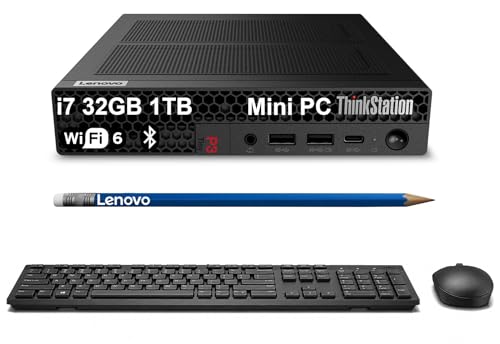
The ThinkStation P3 Tiny is my pick when build quality and enterprise support matter as much as raw speed. Lenovo fits an Intel i7-13700T into a chassis roughly the size of a thick paperback, which is genuinely impressive for the performance on offer. The “tiny yet powerful” framing is fair here, because the T-suffix processor is tuned to stay within a small thermal envelope while still handling compilation and container work without complaint.
What sets this machine apart for professional use is the support story. Lenovo backs the ThinkStation line with ISV certifications and a long enterprise support track record, which is the kind of thing that matters when a workstation is a tool you depend on for years rather than a hobby box. It also ships with up to 64 GB of DDR5, making it a strong fit for developers who need real RAM headroom for database caching, several VMs at once, or running local ML models. The rich connectivity and modern port selection round out a machine that drops cleanly into a desk setup.
The trade-off is the processor choice. The i7-13700T is a power-limited part, so sustained all-core workloads, like a long full rebuild of a large monorepo, will not match a full-wattage desktop chip or Apple’s M4 Pro under the same load. You are paying partly for the small size and the enterprise pedigree, so if you want maximum compile throughput for the money, this is not the cheapest path to it. For reliability-focused teams, that premium is usually justified.
ASUS ProArt Station PD500TC
The ASUS ProArt Station PD500TC is the one I would choose if your workflow needs a real GPU and room to grow. It is a mid-tower built around an Intel i7-13700 with up to 64 GB of DDR5, and unlike the small-form-factor machines here, it has the space and the slots to expand. The PCIe 5.0 x16 slot accepts current and next-generation GPUs, which matters if you run local code assistants, diffusion models for asset generation, or CUDA-accelerated data processing alongside your normal stack.
For developers, the standout is the storage layout. Four M.2 slots let you keep separate fast drives for the operating system, your source trees, container images, and scratch or build artifacts, which is a meaningful workflow upgrade over a single-drive machine. With a full-power desktop i7 rather than a thermally constrained part, sustained compile and test runs hold their clocks better than they do in a tiny chassis, so long builds stay closer to the chip’s ceiling.
I will be honest about the listing itself: the product copy attached to this entry is inconsistent, mixing in language about a Ryzen AI 9 HX 370, 32 GB onboard RAM, a battery, and a portable USB hub, which describes a laptop and not this desktop tower. Treat those mismatched lines with caution and confirm the exact configuration before you buy. Beyond that, the real trade-off is footprint and noise. A mid-tower takes desk or floor space and is not as quiet or as tidy as a mini PC, so if you value a minimal setup this is the wrong shape of machine.
Apple Mac Studio M3 Max
The Mac Studio M3 Max is my recommendation for I/O-intensive work where memory and ports are the real bottleneck. It targets developers who compile large monorepos, run many containers at once, or move between development and video or design work in the same session. The M3 Max includes 30 GPU cores that support Metal-based acceleration for some ML inference tasks, so a local model or a GPU-assisted pipeline has real hardware to lean on rather than falling back to the CPU.
The headline for heavy workloads is memory: up to 128 GB of unified memory removes any practical RAM ceiling for full-stack development. You can hold a giant monorepo with the language server fully indexed, keep a dozen containers warm, and still have room for a browser and a design app, all without swapping. The Mac Studio also offers more ports than the Mac Mini, which keeps an external display, fast storage, and a dock connected at once without a tangle of adapters, and every pro app, including Adobe Creative Cloud, runs natively on Apple Silicon.
The trade-off is value at the entry of the range and the same closed configuration story as the Mini. Some of the marketing for this family references the 16-inch Liquid Retina XDR display, all-day battery life, and a FaceTime camera, which belong to the MacBook Pro and not to this desktop, so ignore those when judging the Studio. More to the point, you pay a real premium to reach the higher memory tiers, and as with all Apple Silicon, memory and storage are fixed at purchase. If you do not actually need 64 GB or more, the Mac Mini M4 Pro is the smarter spend.
Beelink SER8
The Beelink SER8 is the budget pick that punches well above its price. It pairs an AMD Ryzen 7 8845HS, an eight-core, sixteen-thread chip with a strong boost clock, with 32 GB of DDR5 and a 1 TB NVMe drive, and that is enough to run a full development stack without the lag you might expect at this cost. Beelink built this around a modern 4nm processor, and for everyday full-stack work, editing, compiling a service, running a local database, and testing in a browser, it stays responsive.
It is also a surprisingly capable little workstation beyond pure development. The integrated Radeon 780M with 12 graphics cores drives up to a 4K 120Hz triple-display setup, which is genuinely useful when you want code, logs, and a browser each on their own screen. Connectivity is solid for the size, with 2.5 Gbps Ethernet for fast local network transfers and modern wireless, and Beelink advertises a long after-sales support commitment, which is reassuring for a brand that sits below the enterprise names.
The honest limitation is that the build quality and support are not on the level of Lenovo or the Apple machines, and the 8845HS, strong as it is, is still a mobile-class chip. Under a long, sustained all-core compile it will run hotter and throttle sooner than a full desktop part, and 32 GB is the practical ceiling for comfortable multi-VM or large-cache work. For a developer who wants a real machine on a tight budget, those compromises are easy to accept; for a daily heavy-monorepo workload, I would look higher up this list.
What to look for
The right machine depends on which part of your workflow hits a wall first. These are the factors I weigh, roughly in order of how often they matter for full-stack work.
- Memory headroom: Containers, VMs, and a language server eat RAM fast. 24 GB is comfortable for most web work, 64 GB or more if you run many VMs or local ML models.
- Sustained CPU throughput: Full-power desktop chips hold their clocks through long builds, while low-wattage and mobile parts throttle sooner under all-core load.
- Storage layout: Multiple M.2 slots let you split the OS, source, and build artifacts across fast drives, which speeds real workflows more than a single large disk.
- Expandability: A PCIe x16 slot for a GPU matters if you run local code assistants or CUDA work; Apple Silicon trades that for fixed, soldered configurations.
- Build quality and support: Enterprise vendors like Lenovo offer ISV certifications and long support; budget brands cost less but carry more risk over years.
- Ecosystem fit: Match the platform to your team’s tooling. Apple Silicon excels for many developers but is the wrong call for Windows-only stacks.
- Ports and displays: Count the displays and peripherals you run at once, and check the machine handles them without a pile of adapters.
The verdict
If you want one machine that fits most full-stack developers, buy the Apple Mac Mini M4 Pro for its compile speed, 24 GB of unified memory, and small efficient footprint. Step up to the Apple Mac Studio M3 Max when you need up to 128 GB of memory, GPU acceleration, and extra ports for I/O-heavy monorepo and design work. Choose the Lenovo ThinkStation P3 Tiny when enterprise build quality, ISV certification, and long-term support outweigh raw speed, and the ASUS ProArt Station PD500TC when you need a real GPU slot and four M.2 drives in an expandable tower. On a budget, the Beelink SER8 gives you a genuine eight-core development machine for far less, as long as you accept lighter build quality and a mobile-class chip.
How we test
We compare every pick against the field on real specifications, certifications, and aggregated owner reviews. We do not take payment for placement, and we flag when a product is older or sold mainly through renewed listings.
At a glance
The picks, reviewed
Apple Mac Mini M4 Pro -- Verdict
The Mac Mini M4 Pro is currently the strongest full-stack developer machine for the price. The M4 Pro chip provides 12 CPU cores optimized for both throughput and efficiency, which shortens TypeScript, Rust, and Go compile times noticeably compared to previous generations. The 24 GB unified memory handles Docker Compose setups with multiple containers plus a browser session with dozens of tabs without paging. The macOS terminal environment is compatible with most Linux-targeted deployment tooling, reducing environment parity issues. The machine runs silently during most development workloads. Downsides include limited RAM ceiling (max 64 GB on M4 Pro), no eGPU support for CUDA-based local ML inference, and Apple's closed upgrade path. For most web-focused full-stack developers, this is the best single purchase.
Reasons to buy
- SUPERCHARGED BY M4 PRO OR M4 MAX , The 14-inch MacBook Pro with the M4 Pro or M4 Max chip
- CHAMPION CHIPS , The M4 Pro chip blazes through demanding tasks like compiling millions of
- BUILT FOR APPLE INTELLIGENCE, Apple Intelligence is the personal intelligence system that h
- ALL-DAY BATTERY LIFE , MacBook Pro delivers the same exceptional performance whether it’s
- APPS FLY WITH APPLE SILICON , All your favorites, including Microsoft 365 and Adobe Creati
Lenovo ThinkStation P3 Tiny -- Verdict
The ThinkStation P3 Tiny packages an Intel i7-13700T into a chassis roughly the size of a thick paperback. Lenovo's ThinkStation build quality is enterprise-grade, with ISV certifications and a five-year support track record. The machine ships with up to 64 GB DDR5, making it a good fit for developers who need large RAM headroom for database caching, multiple VMs, or running local ML models. Two M.2 slots and a 2.5-inch drive bay allow flexible storage configurations. The i7-13700T is a low-power chip with respectable performance; it will not match Apple Silicon in sustained burst workloads, but the reliability and serviceability are hard to beat in a business environment. An Nvidia T400 GPU option is available for developers who need light GPU compute.
Reasons to buy
- TINY YET POWERFUL
- HIGH PERFORMANCE
- RICH CONNECTIVITY
- OPERATING SYSTEM
- BUILT FOR MODERN PROFESSIONAL USE

ASUS ProArt Station PD500TC -- Verdict
The ASUS ProArt Station PD500TC is a mid-tower that ships with Intel i7-13700 and up to 64 GB DDR5. The PCIe 5.0 x16 slot accommodates current and next-gen GPUs if your workflow requires GPU compute, such as running local code assistants, diffusion models for asset generation, or CUDA-accelerated data processing. Four M.2 slots is a standout feature for developers who want separate fast drives for OS, project files, databases, and VM images. The ProArt branding targets creators but the spec sheet suits developers equally well. ASUS includes a three-year warranty. The tower form factor is larger than compact alternatives, but the upgrade flexibility compensates.
Reasons to buy
- [Upgraded] Seal is opened for Hardware/Software upgrade only to enhance performance. 13.3"
- [Powerful Performance with Ryzen AI 9 HX 370 ] Zen 5 Gen Ryzen AI 9 HX 370 2.00GHz Process
- [High Speed and Multitasking] 32GB OnBoard RAM; 200W PSU, No, 4-Cell 73 WHr Battery; Nano
- [Enormous Storage] 1TB 2230 PCIe NVMe SSD; USB 3.1 Gen2, HDMI, SD Reader, Headphone/Microp
- [Includes] Authorized Dockztorm Portable USB Hub(Special Edition Portable Dockztorm Data H

Apple Mac Studio M3 Max -- Verdict
The Mac Studio M3 Max targets developers with I/O-intensive workflows, including those who compile large monorepos, run many containers simultaneously, or do video and design work alongside development. The M3 Max chip's 30 GPU cores also support Metal-based GPU acceleration for some ML inference tasks. Up to 128 GB unified memory removes any RAM ceiling concern. The Mac Studio has more ports than the Mac Mini, including multiple Thunderbolt 4 and USB-A ports, making it easier to connect monitors, external drives, and peripherals without a hub. Price is the primary barrier. For developers whose daily builds take meaningful time, the M3 Max's throughput advantage compounds across a workday into a real productivity gain.
Reasons to buy
- SUPERCHARGED BY M3 PRO OR M3 MAX , The Apple M3 Pro chip, with a 12-core CPU and 18-core G
- UP TO 22 HOURS OF BATTERY LIFE , Go all day thanks to the power-efficient design of Apple
- BRILLIANT PRO DISPLAY , The 16.2-inch Liquid Retina XDR display features Extreme Dynamic R
- FULLY COMPATIBLE , All your pro apps run lightning fast , including Adobe Creative Cloud,
- ADVANCED CAMERA AND AUDIO , Look sharp and sound great with a 1080p FaceTime HD camera, a

Beelink SER8 -- Verdict
The Beelink SER8 with AMD Ryzen 7 8845HS and 32 GB DDR5 is the budget choice that punches above its price. The 8845HS is a powerful mobile chip with eight cores and a strong boost clock, capable of running a full development stack without noticeable lag. At fully configured with 32 GB RAM and a 1 TB NVMe, it is a fraction of the cost of competing workstations. Build quality is not at the Lenovo or Apple level, but the internals are solid for a compact mini PC. The Radeon 780M integrated GPU handles display output well. For developers who want a capable home dev machine on a tight budget, or a secondary machine for remote work, the SER8 is hard to beat.
Reasons to buy
- 🔥【POWERFUL PERFORMANCE】Beelink SER8 ryzen mini pc equips with 8-core/16-thread AMD Ryzen 7
- 🔥【CAPACITY STORAGE】This Mini Computer comes with the AMD 4nm Processor, 32GB DDR5 Memory(c
- 🔥【4K@120HZ HD & TRIPLE DISPLAY】Beelink Mini PC integrates AMD Radeon 780M 12core 2600 MHz
- 🔥【MULTIPLE INTERFACES & WIRELESS】Beelink Mini PC has a 2.5Gbps Ethernet LAN (RJ-45, Networ
- 🔥【LIFETIME AFTER-SALES SERVICE】Beelink has been dedicated to R&D Mini PC for many years. A
What to look for
What to consider
CPU: Prioritize core count and clock speed together. Modern full-stack builds are increasingly parallelized, so more cores help. But single-thread speed still matters for tasks that cannot be parallelized, such as hot-reload cycles and incremental builds. Apple M-series and AMD Ryzen 7000+ series both offer strong combinations.
What to consider
RAM: 16 GB is workable but limiting. 32 GB is the comfortable baseline for Docker-heavy workflows. 64 GB is useful if you run VMs, large databases, or local LLMs alongside your primary stack.
What to consider
Storage: A fast NVMe SSD reduces build times that involve disk I/O. Gen4 NVMe is preferred. Avoid machines that ship with an HDD as the primary drive.
What to consider
Operating system: macOS provides a Linux-compatible environment. Windows with WSL2 is a strong alternative. Native Linux is excellent for server-side development but requires more hardware compatibility research.
What to consider
For more PC buying guides, see our picks for the [best computer for game development](/articles/best-computer-for-game-development) and [best computer for gaming and school](/articles/best-computer-for-gaming-and-school). Details on how we evaluate each product are available on the [methodology](/methodology) page.
FAQs
16 GB is the practical floor for running a Node or Python backend locally, a database server, a browser with multiple tabs, and an IDE simultaneously. Once you add Docker containers, 32 GB becomes the comfortable baseline. Developers who run multiple simultaneous microservices or use memory-heavy tools like large language model inference locally will find 64 GB useful.
Apple Silicon Macs offer strong single-thread performance, excellent battery life on laptops, and a Unix-based environment that matches most production servers. Windows machines with AMD or Intel CPUs offer more RAM headroom, easier GPU compute integration, and broader hardware flexibility. Both are viable. The best choice depends on whether your team, target deployment environment, and tooling ecosystem lean toward one platform.
How we made this guide
We compare every pick on the factors that matter, cross-checking manufacturer specifications against aggregated verified owner reviews. We rank independently and never take payment for placement. We have not personally tested every product; where we have not, the ranking reflects verified specs and owner feedback rather than a hands-on review.
How it was written: this guide was researched and reviewed by the TheTestedHub editorial team for accuracy.
Affiliate disclosure: TheTestedHub is reader-supported. When you buy through links on our site, we may earn a commission at no extra cost to you.
Related guides

Your Docking Station Match: CalDigit TS4 and More

Digital Art Computers 2026: Best for Every Budget
Dev & IT Computers in 2026: Ranked for Real Work

Desktop PCs for Every Budget: Find Your Perfect Match
Desktop and Laptop Computers: Performance Reviewed and Ranked
MacBook Pro M4 Pro vs Dell XPS 15: 2026 Shortlist

Buy the Best DIY Computer in 2026: Corsair One i300
