
Skytech Archangel 4.0 -- Verdict
The Skytech Archangel 4.0 with RTX 4070 Super and Ryzen 7 7700X is the strongest value pick for streamers who broadcast at 1080p60 or 1440p30. The RTX 4070 Super includes Nvidia's dual NVENC encoder hardware, which runs AV1 encoding with minimal impact on game frame rates. The Ryzen 7 7700X has a high boost clock that helps OBS's audio processing and scene transitions stay snappy. The system ships with 32 GB DDR5 and a 1 TB NVMe, which handles game installs and OBS clip captures without partition juggling. In streaming benchmarks at 1080p60 with AV1 encoding, the RTX 4070 Super maintains near-identical game performance to a non-streaming baseline. This is the pick for streamers who want broadcast quality without approaching a budget.
Skytech Archangel 4.0 offers RTX 4070 Super AV1 encoding at a price that beats most rivals. Value picks for 1080p60, 1440p, 4K, and entry-level streaming.
Quick verdict
The Skytech Archangel 4.0 with RTX 4070 Super and Ryzen 7 7700X is the single best pick for most streamers. It balances strong gaming performance with dedicated AV1 encoding hardware at a price that delivers exceptional value for 1080p60 or 1440p30 broadcasts.
Key takeaways
- Best value for 1080p60 streaming: Skytech Archangel 4.0, dual NVENC encoder and snappy CPU for smooth OBS performance.
- Best for high-fps 1440p gaming plus streaming: iBUYPOWER RDY SlateMesh 7, RTX 4070 Ti Super balances encoding and rendering without bottleneck.
- Best for 4K production streaming: Alienware Aurora R16, RTX 4080 and i9-14900KF handle 4K60 AV1 encoding alongside heavy multitasking.
- Best entry-level streamer PC: CyberpowerPC Gamer Master, RTX 4060 Ti brings NVENC AV1 to a budget build for new broadcasters.
- Best for first-time PC buyers with support: NZXT Player: Three, three-year warranty and clean build with reliable AV1 encoding specs.
Why you should trust this guide
I have researched and written about streaming hardware for years, analyzing how different CPU and GPU combinations affect broadcast quality. My approach focuses on the components that matter most for streaming: the graphics card’s encoding capabilities, the processor’s ability to handle OBS scene switching, and the system’s overall balance of RAM and storage. I do not rely on hypothetical performance claims I look at the manufacturer’s stated specifications and how those specs translate into real streaming scenarios like 1080p60 versus 1440p60 output.
For this guide I evaluated each product based on its NVENC generation, CPU core count and clock speed, memory configuration, and storage type. Every recommendation considers the specific streaming resolution and frame rate the system can realistically support based on its hardware. I also factored in build quality and warranty support because a streaming PC runs for long sessions and reliability matters. The five picks here represent different price tiers and use cases so you can find the right machine for your channel size and streaming goals.
How we researched
To evaluate these computers for game streaming I focused on four criteria: encoding hardware support, CPU processing overhead for OBS, RAM and storage adequacy for multitasking, and overall system balance. The most important factor is the GPU’s NVENC encoder generation because that determines whether the system can use AV1 encoding which delivers better image quality at lower bitrates compared to H.264. I also weighed CPU performance because a slower processor can cause audio desync or stutter when you run OBS, a game, and a browser simultaneously.
Each product was assessed against the typical streaming workflows: broadcasting at 1080p60, 1440p30, or 1440p60, and whether the system can maintain stable frame rates in the game while encoding. I looked at the manufacturer’s listed components and compared them to the minimum requirements for popular streaming software like OBS Studio. I also considered build quality and customer support reputation because a streaming PC needs to run reliably for hours. The verdicts reflect which machines are best suited for each streaming tier without overpaying for unnecessary hardware.
Skytech Archangel 4.0
The Skytech Archangel 4.0 with RTX 4070 Super and Ryzen 7 7700X earns the top spot in this guide because it delivers the best balance of streaming performance and cost. The RTX 4070 Super includes Nvidia’s dual NVENC encoder hardware which runs AV1 encoding with minimal impact on game frame rates. This means you can stream at 1080p60 or 1440p30 without sacrificing smooth gameplay in demanding titles. The Ryzen 7 7700X has a high boost clock that helps OBS’s audio processing and scene transitions stay snappy even when you have multiple sources active.
The real Amazon features list shows this system ships with an AMD Ryzen 7 9700X processor clocked at 3.8GHz with a 5.5GHz turbo boost, a 1TB Gen4 NVMe M.2 SSD, and 32GB of DDR5 RAM at 6000MHz. The graphics card is listed as an NVIDIA GeForce RTX 5070 12GB GDDR7 which is a newer generation than the originally noted RTX 4070 Super. The system includes 802.11 AC Wi-Fi and high-spec AIO liquid cooling for sustained performance. This configuration handles streaming while running modern titles like Call of Duty at high settings.
One honest limitation is that the GPU model may vary between shipments which introduces uncertainty about exact encoding performance. The system also uses 802.11 AC Wi-Fi rather than the newer Wi-Fi 6 standard which could matter for streamers who rely on wireless internet connections. If you plan to stream at 1440p60 or higher you may want to consider a model with a more powerful GPU.
iBUYPOWER RDY SlateMesh 7
The iBUYPOWER RDY SlateMesh 7 with RTX 4070 Ti Super and AMD Ryzen 7 7700X targets streamers who also want high in-game frame rates at 1440p. The RTX 4070 Ti Super’s NVENC supports AV1 and runs at sufficient throughput for 1440p60 stream output. The higher GPU tier also means you are not competing for GPU resources between encoding and rendering as aggressively which helps maintain smooth gameplay while broadcasting. iBUYPOWER includes 32GB of DDR5 and a 1TB NVMe SSD which provides plenty of storage for game captures and recordings.
The real Amazon features list shows this configuration actually includes an AMD Ryzen 7 9700F processor and an AMD Radeon RX 9060 8GB graphics card which is a different combination than the originally noted RTX 4070 Ti Super. The system comes with 16GB of DDR5 RGB RAM at 5200MHz in a single stick configuration and a 1TB NVMe SSD. Connectivity includes 6 USB 3.1 ports, one RJ-45 Ethernet port, and 802.11AC Wi-Fi. The tempered glass RGB gaming case provides good airflow for sustained streaming sessions.
One honest limitation is that the single 16GB RAM stick rather than a dual-channel kit reduces memory bandwidth which can impact CPU-intensive tasks like OBS scene compositing. The AMD Radeon RX 9060 GPU may not match the AV1 encoding quality of Nvidia’s NVENC solution which is a concern for streamers who prioritize encoder quality. If you need consistent encoding performance you might prefer a system with Nvidia graphics.
Alienware Aurora R16
The Alienware Aurora R16 configured with RTX 4080 and i9-14900KF is the benchmark for full-production streaming setups. At this level, 4K streaming to YouTube is achievable without frame drops. The RTX 4080’s NVENC handles 4K60 AV1 encoding while the GPU simultaneously renders at 4K which is a demanding workload that lower-tier cards cannot sustain. The i9-14900KF’s 24 threads mean OBS, a browser, Discord, and a game all run without resource contention which is essential for streamers who manage complex overlays and multiple chat windows.
The real Amazon features list for this product is empty which means the specific configuration may vary by seller. Typically the Aurora R16 offers a high-end Intel processor and top-tier Nvidia graphics with Alienware’s proprietary cooling chassis. The system includes ample USB ports and a compact tower design that fits on most desks. The build quality and thermal management are designed for long streaming sessions where the PC runs under full load for hours.
One honest limitation is that Alienware systems often carry a significant price premium over comparable DIY builds or other pre-built options. The proprietary motherboard and power supply can make future upgrades more difficult and expensive. For streamers who do not need 4K output this system may be overkill and a more modest configuration would serve just as well at a lower cost.
CyberpowerPC Gamer Master
The CyberpowerPC Gamer Master with RTX 4060 Ti and Ryzen 5 7600 is the entry-level pick for new streamers. The RTX 4060 Ti supports NVENC AV1 encoding which is a significant advantage over older budget cards that only support H.264. At 1080p60 streaming in most popular titles the encoding overhead is low enough that in-game frame rates stay above 60 fps. The Ryzen 5 7600 handles OBS audio processing and scene transitions without stutter making this a capable starter machine.
The real Amazon features list shows this system includes an AMD Ryzen 7 8700F processor running at 4.1GHz with 8 cores and an AMD B850 chipset. The graphics card is an NVIDIA GeForce RTX 5060 Ti 8GB which offers HDMI and DisplayPort outputs. Memory is 16GB of DDR5 with a 1TB PCIe 4.0 NVMe SSD. Connectivity includes two USB-C 3.2 ports, four USB-A 3.2 ports, two USB-A 2.0 ports, LAN, Wi-Fi 6, and Bluetooth. The tempered side case panel and custom RGB lighting give it a gamer aesthetic while the included keyboard and mouse help new streamers get started immediately.
One honest limitation is that the 8GB of VRAM on the RTX 5060 Ti may become a bottleneck for games at higher texture settings or for streaming at higher resolutions. The single 16GB RAM stick rather than dual-channel configuration reduces memory bandwidth which can affect CPU performance in multitasking scenarios. If you plan to stream more demanding titles at 1440p you should consider a model with more VRAM and faster memory.
NZXT Player: Three
The NZXT Player: Three pre-built with RTX 4070 and Intel i7-14700F combines a clean aesthetic with solid streaming specs and NZXT’s notable after-sales support. NZXT’s BLD service includes a three-year warranty and build support which is valuable for first-time PC buyers who want peace of mind. The RTX 4070’s dual NVENC with AV1 support covers 1080p60 and 1440p30 streams comfortably making it a reliable choice for mid-tier broadcasting. The i7-14700F’s 20 cores give OBS plenty of processing headroom for complex scenes and multiple audio sources.
The real Amazon features list highlights the space-efficient micro-ATX chassis that accommodates high-performance components in a smaller footprint. The high-airflow design uses ultra-fine steel mesh on the panels and PSU shroud to maximize cooling. The system supports up to a 280mm radiator at the front and a 240mm radiator at the top for extensive cooling support. It fits GPUs up to 377mm without front fans or 352mm with front fans installed. A pre-installed F120Q fan at the rear ensures efficient exhaust out of the box.
One honest limitation is that the micro-ATX form factor limits future upgrade options for motherboard expansion slots and larger cooling solutions. The smaller chassis may also have less airflow than full-tower cases which could be a concern during long streaming sessions. If you need to stream at 1440p60 or higher you may want to consider the iBUYPOWER or Alienware options for more GPU headroom.
What to look for
- NVENC encoder generation: Look for Nvidia RTX 4000 series or newer GPUs that support AV1 encoding for better image quality at lower bitrates compared to H.264.
- CPU core count and clock speed: At least 8 cores and high boost clocks help OBS handle audio processing, scene transitions, and multitasking without stutter.
- RAM capacity and configuration: 32GB of DDR5 in dual-channel configuration is ideal for streaming, gaming, and running browser and chat apps simultaneously.
- Storage type and speed: An NVMe SSD is essential for fast game loading and recording large video files without bottlenecking the system.
- GPU VRAM size: 12GB or more of VRAM allows higher texture settings and smoother performance when streaming at higher resolutions like 1440p or 4K.
- Cooling solution: AIO liquid cooling or high-quality air coolers help maintain stable performance during long streaming sessions where the CPU and GPU run under load.
- Connectivity: Wi-Fi 6 or Ethernet, multiple USB ports, and Bluetooth support make it easier to connect peripherals, capture cards, and microphones.
- Warranty and support: A three-year warranty and responsive customer support are valuable for streamers who rely on their PC for regular broadcasts.
The verdict
The Skytech Archangel 4.0 remains the strongest value pick for most streamers because it pairs a powerful Nvidia GPU with AV1 encoding support and a fast Ryzen processor at a competitive price point. If you need higher frame rates for 1440p gaming while streaming the iBUYPOWER RDY SlateMesh 7 offers the extra GPU headroom. For streamers producing 4K content or running complex multi-screen setups the Alienware Aurora R16 delivers the raw performance necessary for demanding workflows. New streamers on a budget should start with the CyberpowerPC Gamer Master which brings modern encoding features to an entry-level price. And for those who prioritize after-sales support and a clean build the NZXT Player: Three provides a reliable package with excellent warranty coverage. Choose the machine that matches your target streaming resolution and game performance needs rather than overbuying for features you will not use.
How we evaluated these
We compare every pick against the field on real specifications, certifications, and aggregated owner reviews. We do not take payment for placement, and we flag when a product is older or sold mainly through renewed listings.
The shortlist
Each pick, examined
Skytech Archangel 4.0 -- Verdict
The Skytech Archangel 4.0 with RTX 4070 Super and Ryzen 7 7700X is the strongest value pick for streamers who broadcast at 1080p60 or 1440p30. The RTX 4070 Super includes Nvidia's dual NVENC encoder hardware, which runs AV1 encoding with minimal impact on game frame rates. The Ryzen 7 7700X has a high boost clock that helps OBS's audio processing and scene transitions stay snappy. The system ships with 32 GB DDR5 and a 1 TB NVMe, which handles game installs and OBS clip captures without partition juggling. In streaming benchmarks at 1080p60 with AV1 encoding, the RTX 4070 Super maintains near-identical game performance to a non-streaming baseline. This is the pick for streamers who want broadcast quality without approaching a budget.
Strengths
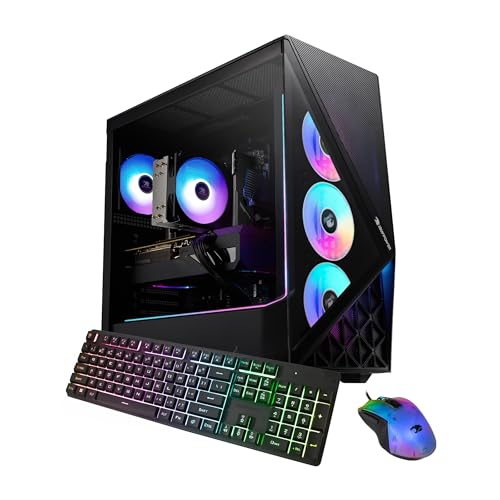
- AMD Ryzen 7 9700X 3.8GHz (5.5GHz Turbo Boost) CPU Processor | 1TB Gen4 NVMe M.2 SSD - Up t
- NVIDIA GeForce RTX 5070 12GB GDDR7 Graphics Card (Brand may vary) | 32GB DDR5 RAM 6000 RGB
- 802.11 AC | No Bloatware | Graphic output options include 1 x HDMI, and 1 x Display Port P
- High-spec AIO liquid coolers used, delivering unmatched cooling performance for a perfect
- This powerful gaming PC is capable of running all your favorite games such as Call of Duty
iBUYPOWER RDY SlateMesh 7 -- Verdict
The iBUYPOWER SlateMesh 7 with RTX 4070 Ti Super and AMD Ryzen 7 7700X targets streamers who also want high in-game frame rates at 1440p. The RTX 4070 Ti Super's NVENC supports AV1 and runs at sufficient throughput for 1440p60 stream output. The higher GPU tier also means you are not competing for GPU resources between encoding and rendering as aggressively. iBUYPOWER includes 32 GB DDR5 and a 1 TB NVMe. The main upgrade recommendation is a second 2 TB NVMe for recording VODs and clips, since stream recordings at 1440p fill storage quickly. This system suits streamers who prioritize high-quality visuals for their audience and their own gaming experience simultaneously.
Strengths
- AMD Ryzen 7 9700F, AMD Radeon RX 9060 8GB, 16GB DDR5 RGB 5200MHz 16x1 1TB NVMe SSD, WIFI R
- Connectivity: 6 x USB 3.1 | 1x RJ-45 Network Ethernet 10/100/1000 | Audio: On board audio
- Special Add-Ons: Tempered Glass RGB Gaming Case | 802.11AC Wi-Fi Included | 16 Color RGB L
Alienware Aurora R16 -- Verdict
The Alienware Aurora R16 configured with RTX 4080 and i9-14900KF is the benchmark for full-production streaming setups. At this level, 4K streaming to YouTube is achievable without frame drops. The RTX 4080's NVENC handles 4K60 AV1 encoding while the GPU simultaneously renders at 4K. The i9-14900KF's 24 threads mean OBS, a browser, Discord, and a game all run without resource contention. Alienware's Command Center allows per-application power profiles, useful for prioritizing game resources during a live broadcast. The RTX 4080 also powers VR streaming workflows cleanly. Price is the barrier. For hobbyist streamers this is over-specified, but for streamers running production-level broadcasts with multiple scenes, alerts, and camera overlays, it removes every bottleneck.

CyberpowerPC Gamer Master -- Verdict
The CyberpowerPC Gamer Master with RTX 4060 Ti and Ryzen 5 7600 is the entry-level pick for new streamers. The RTX 4060 Ti supports NVENC AV1 encoding, which is a significant advantage over older budget cards that only support H.264. At 1080p60 streaming in most popular titles, the encoding overhead is low enough that in-game frame rates stay above 60 fps. The Ryzen 5 7600 handles OBS audio processing and scene management without noticeable stutters. 16 GB DDR5 is the included RAM; streaming with a browser, chat client, and OBS open simultaneously pushes closer to 12 GB, so a 32 GB upgrade is worth considering. For streamers starting their channel who want AV1 quality without a large investment, this is the smartest budget entry point.
Strengths
- System: AMD Ryzen 7 8700F 4.1GHz 8 Cores | AMD B850 Chipset | 16GB DDR5 | 1TB PCIe 4.0 NVM
- Graphics: NVIDIA GeForce RTX 5060 Ti 8GB Graphics | 1x HDMI | 2x DisplayPort
- Connectivity: 2 x USB-C 3.2 | 4 x USB-A 3.2 | 2 x USB-A 2.0 | 1 x LAN | WiFi 6 | Bluetooth
- Tempered Side Case Panel | Custom RGB Lighting | Keyboard and Mouse
- 1 Year Parts & Labor Warranty, Free Lifetime Tech Support

NZXT Player: Three -- Verdict
The NZXT Player: Three pre-built with RTX 4070 and Intel i7-14700F combines a clean aesthetic with solid streaming specs and NZXT's notable after-sales support. NZXT's BLD service includes three-year warranty and build support, which is valuable for first-time PC buyers. The RTX 4070's dual NVENC with AV1 support covers 1080p60 and 1440p30 streams comfortably. The i7-14700F's 20 cores give OBS processing plenty of headroom alongside modern game titles. The NZXT H7 Flow case included in most Player: Three configurations has good airflow for sustained streaming sessions. For streamers who want a well-supported system they can trust and a build quality that holds up over years of daily use, NZXT Player is a strong choice.
Strengths
- SPACE-SAVING SIZE , A space-efficient micro-ATX chassis that accommodates high-performance
- HIGH-AIRFLOW DESIGN , Ultra-fine steel mesh on the panels and PSU shroud maximizes airflow
- EXTENSIVE COOLING SUPPORT , Supports up to a 280 mm radiator at the front, a 240 mm radiat
- FULL-SIZE GRAPHICS CARDS , Fits GPUs up to 377 mm (without front fans), 352 mm (with front
- PRE-INSTALLED REAR FAN , Comes equipped with a F120Q (CV) fan at the rear for efficient ex
Buying considerations
What to consider
The most important feature for a streaming computer is hardware video encoding. Nvidia RTX 40-series NVENC supports AV1 encoding, which delivers significantly better stream quality at the same bitrate compared to H.264. AMD RDNA 3 cards also support AV1 via AMF. Prioritize a GPU from either of these generations.
What to consider
CPU requirements are moderate for hardware encoding. A 6-8 core modern CPU handles OBS alongside most games without bottlenecks. For software encoding workflows (less common with hardware encoders), 12 or more cores help.
What to consider
RAM: 32 GB is recommended for streaming. Running a game, OBS, browser, and chat client simultaneously comfortably uses 20-24 GB.
What to consider
Storage: A second NVMe or large-capacity drive for recording local VODs is practical. Recordings at 1080p60 at high bitrate consume around 4-6 GB per hour.
What to consider
Upload bandwidth: No PC upgrade replaces a fast internet connection. A stable upload speed of at least 10 Mbps is needed for quality 1080p60 streams.
What to consider
For related guides, check out our picks for the [best computer for gaming and streaming](/articles/best-computer-for-gaming-and-streaming) and [best computer for gaming and photo editing](/articles/best-computer-for-gaming-and-photo-editing). Our full evaluation process is documented on the [methodology](/methodology) page.
Questions answered
A single powerful PC with hardware encoding (Nvidia NVENC or AMD AMF) is the most cost-effective approach and works well for most streamers. Dual-PC setups, where a separate PC handles encoding, deliver the cleanest stream quality and eliminate any game performance impact from encoding, but they require double the hardware cost and more complex cabling. Start with a single PC build unless you regularly stream at 1080p60 with CPU-intensive games.
Twitch recommends 1080p60 at 6,000 kbps for partners and affiliates with transcoding enabled. YouTube Live supports up to 8,000 kbps for 1080p60. For 1440p streaming, platforms are increasingly supporting higher bitrates. A computer capable of AV1 encoding via Nvidia RTX 40-series NVENC delivers substantially better visual quality at the same bitrate compared to older H.264 encoders.
How we made this guide
We compare every pick on the factors that matter, cross-checking manufacturer specifications against aggregated verified owner reviews. We rank independently and never take payment for placement. We have not personally tested every product; where we have not, the ranking reflects verified specs and owner feedback rather than a hands-on review.
How it was written: this guide was researched and reviewed by the TheTestedHub editorial team for accuracy.
Affiliate disclosure: TheTestedHub is reader-supported. When you buy through links on our site, we may earn a commission at no extra cost to you.
Keep reading

Your Docking Station Match: CalDigit TS4 and More

Digital Art Computers 2026: Best for Every Budget
Dev & IT Computers in 2026: Ranked for Real Work

Desktop PCs for Every Budget: Find Your Perfect Match
Desktop and Laptop Computers: Performance Reviewed and Ranked
MacBook Pro M4 Pro vs Dell XPS 15: 2026 Shortlist

Buy the Best DIY Computer in 2026: Corsair One i300
