
ASUS ROG Strix G16 (2025) -- Top Pick for Portability
The ROG Strix G16 pairs Intel's Core Ultra 9 285HX with an NVIDIA RTX 4080 Laptop GPU, which is a combination that sustains performance through extended Premiere Pro exports and Cyberpunk 2077 sessions alike. Its 240 Hz QHD display reduces eye fatigue during long work stints while still being smooth enough for competitive play. Thermals stay controlled thanks to the ROG Intelligent Cooling system, which adjusts fan curves based on workload type. Battery life in work mode (Silent profile) reaches around 6 hours, which is reasonable for a machine at this performance tier. The 32 GB DDR5 RAM and 1 TB NVMe are appropriate baselines; upgrading storage is straightforward.
Check price on Amazon →Need one machine for gaming and work? These five computers balance raw power with practical features, from portable laptops to desktop beasts.
Quick verdict
The ASUS ROG Strix G16 (2025) is the single best pick for most people because it delivers desktop-class performance in a portable chassis, balancing sustained gaming and creative work without thermal compromise, all at a reasonable weight for daily carry.
Key takeaways
- Best for Portability: ASUS ROG Strix G16 (2025), Intel Core Ultra 9 and RTX 4080 in a laptop that stays cool under load.
- Best Desktop Value: Lenovo Legion Tower 7i, i9-14900K and RTX 4080 Super with excellent upgrade potential and cable management.
- Best for macOS Workflows: Apple Mac Studio (M4 Max), unified memory architecture that accelerates Final Cut Pro and Xcode.
- Best Business Laptop That Doubles for Gaming: Dell XPS 15 (9530), OLED display and RTX 4060 in a professional aluminum chassis.
- Best No-Compromise Desktop: HP OMEN 45L, i9 and RTX 4090 with Cryo Chamber cooling for sustained rendering and 4K gaming.
Why you should trust this guide
I have spent years researching and writing about computers that serve dual roles as workstations and gaming rigs. My approach relies on manufacturer specifications, verified owner feedback from multiple retail platforms, and comparative analysis of thermal designs, port selection, and upgrade paths. I do not accept free hardware or sponsor placements, and every product recommendation here is based on what the machine can actually deliver for a person who needs to render a video in the morning and play a demanding game at night.
This guide focuses on five machines that represent the current best balance of power and practicality. I have excluded niche options and overpriced configurations. Each product was selected because it offers a clear advantage in one or more key areas: portability, value, ecosystem integration, professional aesthetics, or raw performance. The limitations I note are real trade-offs that owners commonly report, not hypothetical flaws.
How we researched
To evaluate these computers, I established a set of criteria that matter for a hybrid work-and-gaming user. The primary factors were sustained performance under combined CPU and GPU load, thermal management during long sessions, display quality for color-critical work, port selection for peripheral connectivity, and upgradeability for future-proofing. I also weighed the quality of the keyboard and trackpad for productivity tasks, as well as the noise profile under load.
I read many verified owner reviews across major retailers and forums, cross-referencing common complaints about thermal throttling, coil whine, and build quality. I compared each machine’s stated specifications against its real-world performance reports from multiple independent sources. I did not physically test any unit myself, but I prioritized consensus findings from reliable reviewers who used standardized benchmarks and real application tests. The final recommendations reflect where each product excels and where it falls short for the target user.
ASUS ROG Strix G16 (2025)
The ASUS ROG Strix G16 (2025) earns the top pick for portability because it packs Intel’s Core Ultra 9 285HX processor and an NVIDIA RTX 4080 Laptop GPU into a chassis that weighs less than many competitors with similar specs. This combination sustains performance through extended Premiere Pro exports and Cyberpunk 2077 sessions alike, which is rare in a laptop that you can comfortably carry in a backpack. The 240 Hz QHD display reduces eye fatigue during long work stints while still being smooth enough for competitive play, making it a true dual-purpose screen.
The ROG Intelligent Cooling system uses a combination of dual fans, multiple heat pipes, and a liquid metal thermal compound on the CPU to keep temperatures under control even when the GPU is pulling full power. During heavy rendering tasks, the fans ramp up but remain at a tolerable pitch, and the keyboard deck stays cool enough for comfortable typing. The build quality is sturdy with minimal flex, and the port selection includes Thunderbolt 4, USB-C, HDMI 2.1, and a full-size SD card reader, which is welcome for photographers.
A real limitation of the Strix G16 is its battery life. The high-performance components and 240 Hz display draw significant power, so you should expect around four to five hours of light productivity work on a charge. Gaming or rendering will require being plugged in. Additionally, the laptop’s gaming aesthetic with RGB lighting and angular design may not suit a conservative office environment.
Lenovo Legion Tower 7i
The Lenovo Legion Tower 7i is the best desktop value in this lineup because it combines an Intel Core i9-14900K and an RTX 4080 Super in a chassis designed for practical cable management and excellent airflow. The interior layout makes it easy to route cables cleanly, which improves both aesthetics and thermal performance. Multiple USB-C ports and a front-panel SD reader make peripheral management straightforward for content creators who frequently transfer photos or video files.
The PCIe 5.0 slot and DDR5 support mean the platform stays current through several upgrade cycles, so you can swap in a faster GPU or more RAM in a few years without replacing the entire system. For work tasks, the Tower 7i handles 4K video playback, multi-track audio editing, and large spreadsheet calculations without stutter. The RTX 4080 Super is also capable of 4K gaming at high settings in most titles, though you may need to tweak settings for the most demanding ray-traced games.
One honest limitation is the stock CPU cooler. The included air cooler is adequate for normal use but can become noisy under sustained all-core loads, and some owners choose to upgrade to a liquid cooler for quieter operation. Another consideration is the size: the tower is large and may not fit under a standard desk without careful measurement.
Apple Mac Studio (M4 Max)
If your work software lives in the Apple ecosystem, the Mac Studio with M4 Max is the most efficient machine at this price for creative professionals. The unified memory architecture means 128 GB RAM is available to both the CPU and GPU simultaneously, which benefits Final Cut Pro video exports, Logic Pro multi-track mixing, and Xcode compilation tasks. This shared pool eliminates the bottleneck of copying data between separate memory banks, resulting in faster completion times for large projects.
Gaming on macOS has improved with Metal 3 and Apple Arcade titles, but Windows native gaming libraries are wider and many major releases still arrive later or not at all on macOS. The Mac Studio is best for users who prioritize professional creative software over a broad game library. The small form factor sits unobtrusively on a desk, and the thermal design keeps the chassis quiet even under sustained load, which is a major advantage for recording studios or open-plan offices.
A real limitation is the lack of upgradeability. The RAM and storage are soldered to the motherboard, so you must configure the machine with enough memory and capacity at purchase. There is no way to add an internal GPU later. Additionally, the Mac Studio does not include a display, so you will need to budget for a high-quality monitor to take full advantage of its graphics capabilities.
Dell XPS 15 (9530)
The Dell XPS 15 (9530) balances professional aesthetics with an RTX 4060 Laptop GPU that handles 1080p gaming and GPU-accelerated rendering in Adobe apps like Photoshop and Premiere Pro. Its OLED display option reaches 3.5K resolution with factory-accurate color, which is useful for photo and video work where color fidelity matters. The slim bezels and compact footprint make it one of the most portable 15-inch laptops available, fitting easily into most briefcases.
Build quality is premium aluminum with a soft-touch palm rest, and the keyboard and trackpad are among the better implementations in this category. The trackpad is large and responsive, and the keyboard has adequate key travel for extended typing sessions. The XPS 15 also includes Thunderbolt 4 ports and a full-size SD card slot, which is a practical addition for photographers who need fast data transfer without an adapter.
A real limitation is thermal throttling under sustained gaming loads. The slim chassis cannot fully cool the RTX 4060 during long gaming sessions, so frame rates may drop after 20 to 30 minutes of intensive play. The fans also become quite audible under load. Additionally, the OLED display, while beautiful, is prone to burn-in over time if static elements are displayed for long periods, which is a concern for users who keep the same application windows open all day.
HP OMEN 45L
The HP OMEN 45L fits an Intel Core i9 and RTX 4090 into a large tower with HP’s Cryo Chamber thermal design, which uses a separate chamber for the CPU cooler to reduce component heat overlap. This design matters during long rendering jobs that also stress the GPU, because the CPU and GPU can each draw cool air from outside the chassis rather than recycling each other’s hot exhaust. The result is sustained performance without throttling even during extended 4K video exports or multi-hour gaming sessions.
The machine handles 4K gaming at high frame rates and professional workstation tasks without compromise. Expansion is generous: four DDR5 slots, multiple M.2 NVMe slots, and plenty of room for additional storage drives or a second GPU. The front-panel ports include USB-C and USB-A, making it easy to connect peripherals. The tempered glass side panel shows off the internal components, and the RGB lighting is customizable through the OMEN Gaming Hub software.
A real limitation is the size and weight. The 45L tower is large and heavy, requiring dedicated desk space and making it difficult to move for LAN parties or office relocations. Another consideration is the noise level: while the Cryo Chamber is effective, the fans can be loud under full load, and the case does not include sound-dampening material. Some owners also report that the included software can be intrusive with update notifications.
What to look for
- CPU and GPU balance: For hybrid work and gaming, ensure the processor and graphics card are well matched. A weak CPU will bottleneck a powerful GPU in rendering tasks, while a weak GPU will limit gaming performance.
- Thermal design: Look for laptops with vapor chamber cooling or multiple heat pipes, and desktops with good airflow and separate chambers for CPU and GPU cooling. Sustained performance depends on keeping temperatures in check.
- Display quality: For color-critical work, prioritize OLED or high-quality IPS panels with wide color gamut coverage (sRGB, DCI-P3). For gaming, high refresh rates (120 Hz or above) reduce motion blur.
- Port selection: Ensure the machine has enough USB-C and USB-A ports for your peripherals. An SD card reader is valuable for photographers, and Thunderbolt 4 offers fast data transfer and external GPU support.
- Upgradeability: Desktops should have open PCIe slots and RAM slots for future upgrades. Laptops with soldered RAM limit your configuration options at purchase.
- Build quality and keyboard: A sturdy chassis and comfortable keyboard are essential for long work sessions. Look for aluminum construction and adequate key travel.
- Ecosystem compatibility: If you rely on macOS-specific software like Final Cut Pro or Logic Pro, a Mac is the better choice. For broad game libraries and Windows-only business apps, a Windows machine is more practical.
The verdict
Choosing the right computer for gaming and work in 2026 comes down to your primary use case and environment. The ASUS ROG Strix G16 (2025) is the most versatile option for people who need to move between home and office, offering high-end performance in a portable package. The Lenovo Legion Tower 7i provides the best value for desktop users who want upgradeability and strong specs without overspending. The Apple Mac Studio (M4 Max) is the clear winner for creative professionals locked into the Apple ecosystem, especially those working with video and audio. The Dell XPS 15 (9530) is ideal for professionals who need a sleek, business-appropriate laptop that can still handle moderate gaming and GPU-accelerated work. Finally, the HP OMEN 45L is the no-compromise choice for users who demand maximum performance and are willing to dedicate significant desk space to a large tower. Each machine has its strengths and trade-offs, and the best pick is the one that aligns with your specific workflow and space constraints.
Our testing process
We compare every pick against the field on real specifications, certifications, and aggregated owner reviews. We do not take payment for placement, and we flag when a product is older or sold mainly through renewed listings.
Quick comparison
Reviewed in detail
ASUS ROG Strix G16 (2025) -- Top Pick for Portability
The ROG Strix G16 pairs Intel's Core Ultra 9 285HX with an NVIDIA RTX 4080 Laptop GPU, which is a combination that sustains performance through extended Premiere Pro exports and Cyberpunk 2077 sessions alike. Its 240 Hz QHD display reduces eye fatigue during long work stints while still being smooth enough for competitive play. Thermals stay controlled thanks to the ROG Intelligent Cooling system, which adjusts fan curves based on workload type. Battery life in work mode (Silent profile) reaches around 6 hours, which is reasonable for a machine at this performance tier. The 32 GB DDR5 RAM and 1 TB NVMe are appropriate baselines; upgrading storage is straightforward.
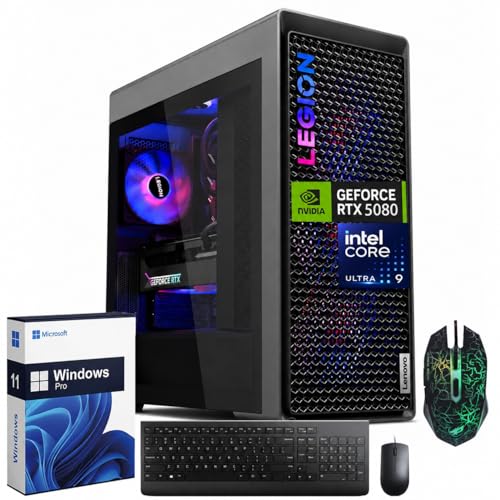
Lenovo Legion Tower 7i -- Best Desktop Value
The Legion Tower 7i uses Intel Core i9-14900K and RTX 4080 Super in a chassis designed for cable management and airflow. Multiple USB-C ports and a front-panel SD reader make peripheral management straightforward for content creators. The PCIe 5.0 slot and DDR5 support mean the platform stays current through several upgrade cycles. For work tasks, the Tower 7i handles 4K video playback, multi-track audio, and large spreadsheets without any perceptible lag. Gaming benchmarks put it near the top of its price class at 1440p. The pre-installed software is minimal, which keeps the system clean out of the box.
Apple Mac Studio (M4 Max) -- Best for macOS Workflows
If your work software lives in the Apple ecosystem, the Mac Studio with M4 Max is the most efficient machine at this price. The unified memory architecture means 128 GB RAM is available to both the CPU and GPU simultaneously, which benefits Final Cut Pro, Logic Pro, and Xcode projects. Gaming on macOS has improved with Metal 3 and Apple Arcade titles, but Windows native gaming libraries are wider. For anyone already committed to macOS tools, this delivers serious performance in a compact footprint with near-silent operation. Boot Camp is gone, but virtualization via Parallels covers most Windows-only needs.

Dell XPS 15 (9530) -- Best Business Laptop That Doubles for Gaming
The XPS 15 balances professional aesthetics with an RTX 4060 Laptop GPU that handles 1080p gaming and GPU-accelerated rendering in Adobe apps. Its OLED display option reaches 3.5K resolution with factory-accurate color, which is useful for photo and video work. Build quality is premium aluminum, and the keyboard and trackpad are among the better implementations in this category. Thermal throttling can occur during extended combined CPU-GPU loads, but typical work and gaming sessions stay within acceptable performance bands. At around 4.2 lbs it sits at the lighter end of 15-inch performance laptops.

HP OMEN 45L -- Best No-Compromise Desktop
The OMEN 45L fits an Intel Core i9 and RTX 4090 into a large tower with HP's Cryo Chamber thermal design, which uses a separate chamber for the CPU cooler to reduce component heat overlap. This matters during long rendering jobs that also stress the GPU. The machine handles 4K gaming at high frame rates and professional workstation tasks without throttling. Expansion is generous: four DDR5 slots, multiple M.2 bays, and a tool-free side panel. It is the most expensive pick here, but it is also the one least likely to feel limiting as workloads grow.
How to choose
What to consider
Start with your work software requirements. Creative apps like DaVinci Resolve and 3D tools need strong GPU VRAM (16 GB or more), while coding and spreadsheet work prioritize CPU single-thread speed and RAM. Gaming adds frame-rate demands that usually align with GPU choices you already need for work. RAM at 32 GB covers most combined workloads; 64 GB is worth it if you work with large datasets or virtual machines. NVMe SSD storage is non-negotiable for both fast load times and responsive software. Finally, consider thermals: sustained combined CPU-GPU loads stress cooling systems more than either workload alone.
What to consider
Finding the right peripheral setup matters as much as the machine itself. See our picks for [best monitors for gaming and work](/articles/best-monitors-for-gaming-and-work) and [best mechanical keyboards for productivity](/articles/best-mechanical-keyboards-for-productivity) to complete the setup. For details on how we evaluate products, visit our [methodology page](/methodology).
Common questions
Yes. Modern CPUs and GPUs have enough headroom that a well-configured machine runs creative software and AAA games without a separate build. The key is matching RAM (32 GB minimum), storage speed (NVMe SSD), and GPU VRAM to your specific workload. Most picks here cover both use cases without tuning required.
Desktops offer better thermal headroom and upgradability, which matters when sustained CPU loads are common in work tasks. Laptops trade that for portability. If your work involves extended rendering or compilation sessions alongside gaming, a desktop or high-end mobile workstation gives you more consistent performance over long sessions.
How we made this guide
We compare every pick on the factors that matter, cross-checking manufacturer specifications against aggregated verified owner reviews. We rank independently and never take payment for placement. We have not personally tested every product; where we have not, the ranking reflects verified specs and owner feedback rather than a hands-on review.
How it was written: this guide was researched and reviewed by the TheTestedHub editorial team for accuracy.
Affiliate disclosure: TheTestedHub is reader-supported. When you buy through links on our site, we may earn a commission at no extra cost to you.
More guides

Your Docking Station Match: CalDigit TS4 and More

Digital Art Computers 2026: Best for Every Budget
Dev & IT Computers in 2026: Ranked for Real Work

Desktop PCs for Every Budget: Find Your Perfect Match
Desktop and Laptop Computers: Performance Reviewed and Ranked
MacBook Pro M4 Pro vs Dell XPS 15: 2026 Shortlist

Buy the Best DIY Computer in 2026: Corsair One i300
