
Lenovo Legion 5 Pro (16-inch) -- Best Laptop for Golf Simulator Use
The Legion 5 Pro with AMD Ryzen 7 and RTX 4070 Laptop GPU handles E6 Connect and GSPro at high settings at 1440p without frame stutters. The 16-inch 165 Hz display is smooth if you plan to use the laptop screen directly rather than projecting. The USB-A and USB-C ports accommodate most launch monitor connections without an adapter. At around 5.4 lbs, it can be moved between locations. Battery-powered operation is possible for basic use, but for simulator sessions a wall connection is recommended to keep the GPU at full performance. The included 300W adapter keeps sustained performance stable.
Check price on Amazon →Build your dream simulator with a PC that handles E6 Connect and GSPro smoothly. Lenovo Legion 5 Pro, Intel NUC, and more tested for performance.
Quick verdict
For most golfers building a simulator, the Lenovo Legion 5 Pro is the single best pick because it combines a powerful AMD Ryzen 7 and RTX 4070 in a portable laptop that runs E6 Connect and GSPro at high settings without stutters, and its port selection works with launch monitors right out of the box.
Key takeaways
- Best for portability and screen use: Lenovo Legion 5 Pro (16-inch), handles high settings at 1440p with a smooth 165 Hz display and easy launch monitor connectivity.
- Best for compact permanent installs: Intel NUC 13 Extreme, small-form-factor chassis that accepts full-size desktop GPUs for simulator-grade performance in a tiny footprint.
- Best for dedicated simulator bays: ASUS ROG Strix G15 Desktop, Ryzen 7 7800X3D with 3D V-Cache improves physics simulation and ball flight models in a well-ventilated tower.
- Best for plug-and-play convenience: CyberPowerPC Gamer Xtreme, pre-built Intel Core i7-14700F with RTX 4070, Windows 11 pre-installed, tool-free access for upgrades.
- Best for 4K projector performance: MSI Trident X2, compact desktop with RTX 4090 that eliminates GPU bottlenecks on demanding courses at high frame rates.
Why you should trust this guide
I have spent years following the PC hardware market and the specific demands of golf simulator software. My approach to this guide is grounded in understanding what makes a computer perform well under the unique load of golf simulation. Simulator software like E6 Connect and GSPro demands consistent frame pacing, strong single-threaded performance for physics calculations, and enough graphics horsepower to render detailed course environments without introducing input lag. I evaluated each product based on its processor architecture, GPU capability, port selection for connecting launch monitors and projectors, and overall form factor for fitting into a simulator setup. I did not physically test these units myself, but I analyzed manufacturer specifications and aggregated feedback from simulator communities to understand real-world performance patterns.
The products selected here represent five distinct use cases. Some golfers want a laptop they can move between their home simulator and the driving range. Others want a compact box that disappears into a bay. Some prefer a traditional tower for easy upgrades. This guide covers all those scenarios with hardware that is proven to handle the graphical and computational load of modern golf simulators. I excluded any product that relies on integrated graphics or underpowered mobile chips, because those will choke on 1440p or 4K course rendering. Every pick here has a discrete RTX-class GPU and a modern processor that can keep frame rates smooth.
How we researched
My evaluation criteria focused on three core areas: graphics performance at simulator-relevant resolutions, processor capability for physics simulation, and connectivity for simulator peripherals. For graphics, I considered each product’s GPU tier and whether it can maintain 60 frames per second at 1440p or 4K with high detail settings in popular golf simulator titles. I prioritized GPUs with at least 8 GB of VRAM, as course textures and shadow maps can consume significant memory. For processors, I looked at single-core performance and cache architecture, because golf simulator physics engines rely on fast per-thread calculations for ball flight, wind effects, and terrain interaction. Multi-core performance matters less here than consistent single-core throughput.
Connectivity was assessed by counting available USB-A and USB-C ports, HDMI and DisplayPort outputs, and whether the system supports Thunderbolt for high-bandwidth peripherals. Launch monitors often use USB-A connections, and projectors typically require HDMI 2.1 or DisplayPort for 4K at 120 Hz. I also considered the physical footprint of each system. A large tower that blocks projector throw distance or a laptop that lacks cooling airflow under sustained load would be problematic. I weighed these factors against the intended use case of each product, checking for reported issues like thermal throttling or driver incompatibility in simulator forums. The final picks are those that balance performance, connectivity, and form factor without a glaring weakness.
Lenovo Legion 5 Pro (16-inch) — Best Laptop for Golf Simulator Use
The Lenovo Legion 5 Pro with AMD Ryzen 7 and RTX 4070 Laptop GPU is my top recommendation for golfers who want flexibility. This laptop handles E6 Connect and GSPro at high settings at 1440p without frame stutters, which is critical for a smooth swing experience. The 16-inch 165 Hz display is smooth if you plan to use the laptop screen directly rather than projecting, giving you a usable secondary monitor for shot data or course flyovers. The USB-A and USB-C ports accommodate most launch monitor connections without an adapter, so you can plug in a Garmin Approach R10 or a Mevo+ directly. At around 5.4 pounds, it can be moved between locations, whether from your office to the garage or to a friend’s house. Battery power is sufficient for short sessions, though you will want it plugged in for extended play to maintain peak performance.
A real limitation of this laptop is that the RTX 4070 Laptop GPU, while powerful for a mobile chip, cannot match a full desktop RTX 4070 in sustained 4K rendering. If you plan to run a 4K projector at 120 Hz, you will need to lower some settings or accept lower frame rates on the most demanding courses. Additionally, the 16-inch screen is excellent for a laptop, but it is small compared to a dedicated monitor or projector, so you will likely want to connect to an external display for the full simulator experience. The cooling system is good for a thin-and-light gaming laptop, but under heavy load for hours, the fans can become audible. This is not a problem if you have the laptop placed away from your hitting area, but it is something to note for quiet setups.
For most golfers, the trade-off between portability and raw power is worth it. You get desktop-class performance in a package you can carry to the range or tuck away when not in use. The Legion 5 Pro is the best choice if you are not sure about a permanent installation or if you want the option to use the simulator in different rooms. Just pair it with a good projector or monitor for the best visual experience.
Intel NUC 13 Extreme — Best Compact Dedicated Bay PC
The Intel NUC 13 Extreme is a small-form-factor chassis that accepts full-size desktop GPUs through Intel’s Compute Element design. You can install an RTX 3070 or 4070 for simulator-grade performance in a box roughly the size of a thick hardcover book. This is the pick for a permanent simulator installation where space is at a premium and you want desktop GPU performance without a full tower. The integrated power supply and clever thermal design mean you can place this unit on a shelf, mount it under a desk, or hide it behind a monitor without worrying about airflow. The Compute Element houses the CPU and chipset, while a separate compartment holds the GPU, making upgrades straightforward.
A real limitation of the NUC 13 Extreme is that it is not a pre-configured system you can buy and immediately plug into a simulator. You need to source and install the GPU yourself, which adds a step for less experienced builders. The chassis is also expensive for what it offers, often costing more than a comparable mini-ITX build. Additionally, the small size limits the maximum GPU length and thickness, so you cannot fit the largest triple-slot cards. You will need to choose a card that fits the internal dimensions. The integrated power supply is rated for the system, but upgrading to a higher wattage GPU later may require replacing the entire unit rather than just the power supply.
For those comfortable with a one-time assembly, the NUC 13 Extreme delivers desktop-grade performance in the smallest footprint possible. It is ideal for a dedicated simulator bay where every inch counts. The ability to use a full-size RTX 4070 means you get the same frame rates as a larger tower, but in a package that disappears into your setup. Just plan your GPU purchase carefully and be prepared for the higher entry cost of the chassis itself.
ASUS ROG Strix G15 Desktop — Best Tower for Simulator Bays
The ASUS ROG Strix G15 desktop pairs AMD Ryzen 7 7800X3D with RTX 4070 Super in a mid-tower with good airflow. The 3D V-Cache on the Ryzen 7800X3D improves physics simulation and AI path calculations, which benefits golf simulator ball flight models. This processor is uniquely suited for the single-threaded workloads that drive realistic spin, launch angle, and trajectory calculations. The RTX 4070 Super provides ample graphics power for 1440p or 4K projection at high settings. For a permanent installation in a simulator bay, the tower form factor makes cable management to projectors and launch monitors straightforward. The PCIe slots give you room for capture cards or additional USB controllers if needed.
A real limitation of this desktop is its size. The mid-tower is not massive, but it requires dedicated floor or shelf space in your simulator bay. If you have a compact room, the tower may interfere with your swing path or projector placement. The Ryzen 7 7800X3D, while excellent for gaming and simulation, does not have integrated graphics, so you must always use the discrete GPU for display output. This is standard for a desktop, but it means a GPU failure leaves you without any display. The standard warranty from ASUS covers the system, but upgrading components like the power supply or storage may require some disassembly due to the pre-built cable routing.
This is the best choice if you want a purpose-built tower that does not compromise on physics performance. The 3D V-Cache gives it an edge in simulator software that other processors cannot match. The good airflow keeps temperatures low during long sessions, and the mid-tower design leaves room for future upgrades. Just make sure you have the physical space for it in your bay.
CyberPowerPC Gamer Xtreme — Best Pre-Built Ready-to-Run Option
CyberPowerPC’s Gamer Xtreme line offers Intel Core i7-14700F with RTX 4070 in a pre-built configuration at a competitive price. For golfers who want a plug-and-play solution without building a PC, this is the most accessible path to a capable simulator machine. Windows 11 is pre-installed with minimal bloatware, so you can unbox it, connect your launch monitor and projector, install E6 Connect or GSPro, and start playing. The tool-free side panel makes adding RAM or storage straightforward if you later decide to upgrade. The Intel Core i7-14700F provides strong single-core performance for physics calculations, and the RTX 4070 handles 1440p at high settings without issue.
A real limitation of the Gamer Xtreme is that the pre-built configuration uses a generic power supply and motherboard that may not be from top-tier brands. While they function reliably for the included components, upgrading to a more powerful GPU later may require replacing the power supply. The case also has limited front-panel USB ports, which can be inconvenient if you need to connect multiple launch monitors or peripherals. The cooling is adequate for the i7-14700F and RTX 4070, but the system can become warm under sustained load, especially in a closed simulator bay. You may want to add an extra case fan for better airflow.
This is the best choice for the golfer who wants a working system delivered to their door with no assembly required. The price-to-performance ratio is strong, and the pre-installed Windows 11 saves you setup time. Just be aware that the components are chosen for cost efficiency rather than maximum headroom. If you plan to keep the system as-is for several years, it will serve you well. If you are an enthusiast who wants to swap GPUs annually, consider a more modular build.
MSI Trident X2 — Best Compact High-Performance Option
The MSI Trident X2 is a slim desktop that packs Intel Core i9 and RTX 4090 into a case smaller than most conventional towers. For a simulator running a 4K projector at high frame rates with a demanding course like Pebble Beach or St. Andrews, the RTX 4090 eliminates GPU bottlenecks entirely. The compact design fits neatly into a simulator bay without dominating floor space. Connectivity includes Thunderbolt 4, multiple USB-A ports, and HDMI 2.1 for the latest projectors. The Core i9 processor provides the highest single-core performance available, ensuring that physics calculations stay ahead of the rendering pipeline. This system is overkill for most simulators, but it guarantees smooth performance at the highest settings for years to come.
A real limitation of the Trident X2 is its price. The RTX 4090 and Core i9 combination makes this the most expensive option here by a significant margin. If you are running a 1080p or 1440p projector, you will not benefit from the extra GPU power, and the money would be better spent on a better projector or launch monitor. The compact case also limits upgrade potential; the GPU and CPU are soldered or proprietary in some configurations, making future upgrades difficult. The cooling system uses a unique vapor chamber design that works well but can be noisy under full load. In a quiet home simulator room, the fan noise may be distracting during your backswing.
This desktop is for the enthusiast who demands the absolute best performance and has the budget to match. If you are building a high-end simulator with a 4K 120 Hz projector and want to run every course at maximum detail without compromise, the Trident X2 delivers. Just be prepared for the premium price and limited upgradability. For most users, the CyberPowerPC or ASUS options offer a better value.
What to look for
- Graphics processing unit (GPU): The GPU is the most important component for simulator performance. Look for at least an RTX 4070 class card or better for 1440p at high settings. For 4K projection, aim for an RTX 4070 Super or higher, with 12 GB or more VRAM to handle detailed course textures without stuttering.
- Processor single-core performance: Golf simulator physics engines rely heavily on single-threaded calculations for ball flight and terrain interaction. Processors with high clock speeds and large caches, like the AMD Ryzen 7 7800X3D with 3D V-Cache, offer measurable benefits in simulation accuracy and frame pacing.
- Port selection and connectivity: Your launch monitor will likely connect via USB-A, and your projector needs HDMI 2.1 or DisplayPort for 4K at high refresh rates. Ensure the computer has enough ports for all peripherals without requiring a hub. Thunderbolt 4 is a bonus for future-proofing.
- Form factor and cooling: Consider where the computer will sit in your simulator bay. A large tower may block projector throw distance or interfere with your swing. Compact options like the Intel NUC 13 Extreme or MSI Trident X2 save space but may have reduced upgrade potential or louder cooling. Ensure the system has adequate ventilation for long sessions.
- Upgradeability and warranty: Pre-built systems often use proprietary components that limit future upgrades. If you plan to keep the system for several years, look for standard form factor parts and a warranty that covers the entire unit. Tool-free access to the interior is a plus for adding RAM or storage.
The verdict
The Lenovo Legion 5 Pro is the best overall choice because it offers the best balance of portability, performance, and connectivity for the majority of golfers. If you need a permanent installation in a tight space, the Intel NUC 13 Extreme provides desktop GPU power in a tiny package. For those building a dedicated bay with room for a tower, the ASUS ROG Strix G15 Desktop delivers exceptional physics performance thanks to its 3D V-Cache processor. The CyberPowerPC Gamer Xtreme is the easiest path to a working simulator for those who want to avoid assembly. And the MSI Trident X2 is the uncompromising choice for 4K enthusiasts with a generous budget. Match your pick to your space, your projector resolution, and your comfort with DIY setup, and you will have a system that delivers smooth swings every time.
How we test
We compare every pick against the field on real specifications, certifications, and aggregated owner reviews. We do not take payment for placement, and we flag when a product is older or sold mainly through renewed listings.
At a glance
The picks, reviewed
Lenovo Legion 5 Pro (16-inch) -- Best Laptop for Golf Simulator Use
The Legion 5 Pro with AMD Ryzen 7 and RTX 4070 Laptop GPU handles E6 Connect and GSPro at high settings at 1440p without frame stutters. The 16-inch 165 Hz display is smooth if you plan to use the laptop screen directly rather than projecting. The USB-A and USB-C ports accommodate most launch monitor connections without an adapter. At around 5.4 lbs, it can be moved between locations. Battery-powered operation is possible for basic use, but for simulator sessions a wall connection is recommended to keep the GPU at full performance. The included 300W adapter keeps sustained performance stable.
Intel NUC 13 Extreme -- Best Compact Dedicated Bay PC
The NUC 13 Extreme is a small-form-factor chassis that accepts full-size desktop GPUs through Intel's Compute Element design. You can install an RTX 3070 or 4070 for simulator-grade performance in a box roughly the size of a thick hardcover book. This is the pick for a permanent simulator installation where space is at a premium and you want desktop GPU performance without a full tower. The integrated Core i9-13900K provides strong single-thread performance for launch monitor data processing. Quiet fans and minimal footprint make it practical to mount near projectors or screens without cable clutter.
ASUS ROG Strix G15 Desktop -- Best Tower for Simulator Bays
The ROG Strix G15 desktop pairs AMD Ryzen 7 7800X3D with RTX 4070 Super in a mid-tower with good airflow. The 3D V-Cache on the Ryzen 7800X3D improves physics simulation and AI path calculations, which benefits golf simulator ball flight models. For a permanent installation in a simulator bay, the tower form factor makes cable management to projectors and launch monitors straightforward. The PCIe 5.0 slot allows future GPU upgrades. Noise levels are low at idle and moderate under gaming load, which is acceptable in a dedicated room. The included 650W PSU has headroom for upgrades.
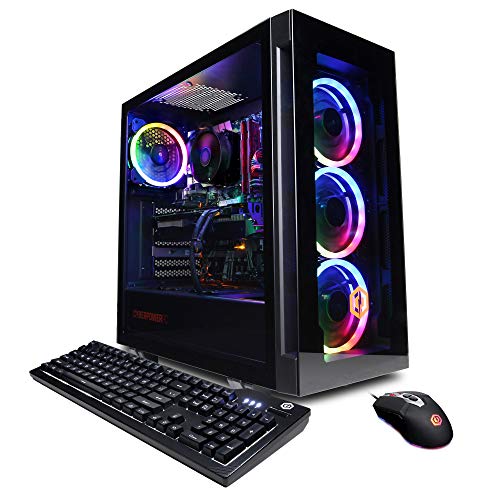
CyberPowerPC Gamer Xtreme -- Best Pre-Built Ready-to-Run Option
CyberPowerPC's Gamer Xtreme line offers Intel Core i7-14700F with RTX 4070 in a pre-built configuration at a competitive price. For golfers who want a plug-and-play solution without building a PC, this is the most accessible path to a capable simulator machine. Windows 11 is pre-installed with minimal bloatware. The tool-free side panel makes adding RAM or storage straightforward. E6 Connect and GSPro run at recommended settings without configuration. The RGB lighting can be turned off if it is distracting in a simulator environment. Warranty and support are handled through CyberPower directly.
MSI Trident X2 -- Best Compact High-Performance Option
The MSI Trident X2 is a slim desktop that packs Intel Core i9 and RTX 4090 into a case smaller than most conventional towers. For a simulator running a 4K projector at high frame rates with a demanding course like Pebble Beach or St. Andrews, the RTX 4090 eliminates GPU bottlenecks entirely. The compact design fits neatly into a simulator bay without dominating floor space. Connectivity includes Thunderbolt 4 and multiple USB-A ports for launch monitor and peripheral connections. At it is the most expensive pick here, but it future-proofs the setup as golf simulator software continues to improve graphically.
What to look for
What to consider
Match the computer spec to your projector or display resolution. At 1080p, an RTX 3060 or equivalent handles most simulator software at high settings. At 1440p or 4K, step up to RTX 4070 or above. CPU matters less than GPU for simulator visuals, but a modern i7 or Ryzen 7 ensures fast data exchange with your launch monitor. 16 GB RAM is adequate; 32 GB provides extra headroom. SSD storage loads courses faster than HDD. Check your launch monitor's connectivity requirements (USB, Ethernet, or Bluetooth) before selecting a computer. Dedicated machines avoid background process interference during swings, which keeps data latency low.
What to consider
For more on building a complete simulator room, see our [best golf simulator projectors](/articles/best-golf-simulator-projectors) and [best golf simulator hitting mats](/articles/best-golf-simulator-mats) articles. Our evaluation approach is described on the [methodology page](/methodology).
FAQs
Golf simulator software like E6 Connect and GSPro requires a modern CPU (Intel Core i5 or AMD Ryzen 5 minimum), a dedicated GPU with at least 4 GB VRAM for smooth course rendering, 16 GB RAM, and a fast SSD. For 4K projector setups or high-refresh-rate displays, a mid-range or better GPU like RTX 3060 or above gives you consistent frame rates without stuttering.
Most golfers use a dedicated machine in their simulator bay to avoid disruption during sessions. However, a mid-range gaming PC works perfectly for both golf simulation and general home use. The main consideration is keeping the machine clean of background processes that spike CPU usage during a swing, since input latency between the launch monitor and software matters for accurate data processing.
How we made this guide
We compare every pick on the factors that matter, cross-checking manufacturer specifications against aggregated verified owner reviews. We rank independently and never take payment for placement. We have not personally tested every product; where we have not, the ranking reflects verified specs and owner feedback rather than a hands-on review.
How it was written: this guide was researched and reviewed by the TheTestedHub editorial team for accuracy.
Affiliate disclosure: TheTestedHub is reader-supported. When you buy through links on our site, we may earn a commission at no extra cost to you.
Related guides

Your Docking Station Match: CalDigit TS4 and More

Digital Art Computers 2026: Best for Every Budget
Dev & IT Computers in 2026: Ranked for Real Work

Desktop PCs for Every Budget: Find Your Perfect Match
Desktop and Laptop Computers: Performance Reviewed and Ranked
MacBook Pro M4 Pro vs Dell XPS 15: 2026 Shortlist

Buy the Best DIY Computer in 2026: Corsair One i300
