
Apple MacBook Pro 14-inch (M4 Pro) -- Best Professional Portable
The MacBook Pro 14-inch with M4 Pro is the most capable laptop for Adobe Creative Suite workflows. The M4 Pro's media engine accelerates Photoshop's GPU filter operations, Lightroom exports, and Illustrator rendering. The Liquid Retina XDR display covers 100% P3 wide color gamut and reaches 1,600 nits peak brightness, which is among the most accurate laptop displays available. Apple ships it factory-calibrated. With 24 GB or 36 GB unified memory configurations, large layered Photoshop documents and multi-app workflows stay responsive. macOS Sonoma's Stage Manager helps manage multiple active documents across Adobe apps. Battery life holds around 12-14 hours in creative work tasks.
Compare the Apple MacBook Pro 14-inch, iMac, Dell XPS 15, ASUS ProArt, and Surface Studio 3 for color-accurate design work. Find your ideal match.
Quick verdict
For most graphic designers and photo editors, the Apple MacBook Pro 14-inch (M4 Pro) is the single best pick because it combines a color-accurate Liquid Retina XDR display with the fastest media engine for Adobe Creative Suite, all in a portable, professional laptop.
Key takeaways
- Best for Professional Portable: Apple MacBook Pro 14-inch (M4 Pro), unmatched display accuracy and Adobe acceleration on the go.
- Best Color-Accurate Desktop: Apple iMac 24-inch (M4), factory-calibrated P3 display with the best price-to-performance ratio for creative work.
- Best Windows Laptop for Design: Dell XPS 15 (9530) OLED, 3.5K OLED with 100% DCI-P3 and RTX 4060 GPU power.
- Best Factory-Calibrated Windows Option: ASUS ProArt Studiobook 16 OLED, pre-calibrated Delta E below 2 with a physical creator dial.
- Best Touchscreen Creative Desktop: Microsoft Surface Studio 3, tilting 28-inch PixelSense display with Surface Pen support for drawing.
Why you should trust this guide
I have spent years researching and writing about creative hardware, specifically for graphic design and photo editing workflows that demand color accuracy. For this guide, I analyzed the stated specifications from each manufacturer, read many verified owner reviews, and compared the real Amazon feature lists to determine which products deliver the most reliable performance for Adobe Creative Suite and other design applications. I focused on display quality, GPU acceleration, factory calibration claims, and real-world usability, not marketing hype.
My approach prioritizes the factors that matter most to professional designers and photo editors: color gamut coverage, Delta E accuracy, processor and GPU power for filters and exports, and build quality for long sessions. I do not claim to have tested these products myself. Instead, I rely on the manufacturer’s published specs and the aggregate feedback from thousands of users who have purchased and used these machines for creative work. This ensures my recommendations are grounded in what the products actually offer, not in a single opinion.
How we researched
To evaluate these five computers for graphic design and photo editing, I established a set of criteria that mirror the real demands of creative professionals. First, I examined display specifications: resolution, color gamut coverage (P3, DCI-P3, sRGB), peak brightness, and any factory calibration claims like Delta E below 2. A display that ships pre-calibrated or with a calibration report earns higher trust because it reduces the need for extra hardware. Second, I looked at processor and GPU power, specifically how each chip handles GPU-accelerated filters in Photoshop, AI masking in Lightroom, and rendering in Illustrator. The M4 Pro, M4, Intel Core i9, AMD Ryzen 9, and RTX 4060 were all compared based on their stated capabilities for creative workloads, not synthetic benchmarks.
Third, I considered the physical form factor and connectivity for studio work. A laptop that is under 4.5 pounds with Thunderbolt ports or USB-C is better for on-the-go designers, while a desktop all-in-one with a large touchscreen is better for stationary studio use. I also weighed the presence of dedicated creator tools like the ProArt Creator Hub dial or Surface Pen support, which can speed up brush size and zoom adjustments. Finally, I cross-referenced each product’s real Amazon features with owner feedback to identify any consistent limitations, such as glare on glossy screens, fan noise under load, or software compatibility issues. No product is perfect, and I highlight one honest limitation per device.
Apple MacBook Pro 14-inch (M4 Pro)
The Apple MacBook Pro 14-inch with M4 Pro is the best professional portable for graphic design and photo editing. The M4 Pro chip is supercharged for demanding tasks like compiling millions of lines of code or rendering complex Adobe projects. Its media engine accelerates Photoshop’s GPU filter operations, Lightroom exports, and Illustrator rendering, making it noticeably faster than previous-generation MacBooks. The Liquid Retina XDR display covers 100% P3 wide color gamut and reaches 1,600 nits peak brightness, which is among the most accurate laptop displays available. Apple ships it factory calibrated, so you get consistent colors out of the box for client presentations or print proofing.
The 14-inch form factor is ideal for creatives who move between a home office, coworking space, and client locations. At roughly 3.5 pounds, it is lighter than many Windows workstations, yet it delivers all-day battery life with the same exceptional performance whether plugged in or running on battery. The M4 Pro and M4 Max chip options let you scale up to 36GB of unified memory for massive multi-layered PSD files. The Thunderbolt 4 ports allow fast external storage and monitor connections for a desktop-style setup when needed. Apple Intelligence features are built in to streamline workflows, such as enhanced search and writing tools that can help with project notes or client emails.
One real limitation is the glossy screen finish, which can cause reflections in brightly lit rooms or near windows. Some designers prefer a matte display for reducing glare during long editing sessions. Additionally, the MacBook Pro runs macOS, so if your team depends on Windows-only software or legacy plugins, you will need to account for compatibility. The price is also premium compared to similarly specced Windows laptops, though the display and build quality justify the cost for professionals.
Apple iMac 24-inch (M4)
The Apple iMac 24-inch with M4 is the best color-accurate desktop for its price. The 4.5K Retina display covers P3 wide color and ships factory calibrated to a Delta E below 1, which is exceptional for a consumer all-in-one. The M4 chip handles Photoshop, Lightroom, and Illustrator with no perceptible lag on files that would slow a comparable Windows machine. The all-in-one design eliminates cable management complexity, keeping your workspace clean and focused on your creative projects. The 24-inch size fits perfectly in a home studio or small office, and the thin design comes in a range of colors to match your aesthetic.
Apple’s M4 chip supercharges performance for editing photos and creating content. The 4.5K Retina display features 500 nits of brightness, which is bright enough for most indoor environments. The iMac includes a 1080p webcam and a six-speaker sound system, making it suitable for client video calls and reviewing audio in video projects. The all-in-one package means you do not need a separate tower or external monitor, reducing desk clutter and simplifying setup. Apple Intelligence is integrated to help with tasks like organizing files, generating project summaries, and improving search across your creative assets.
A real limitation is the fixed 24-inch display size, which cannot be upgraded or replaced later. If you need a larger screen for detailed retouching or dual-monitor workflows, you will need to add an external display, which increases cost and defeats the all-in-one convenience. Additionally, the iMac’s base configuration starts with 256GB of storage, which fills quickly with high-res photo libraries and design software. Upgrading to 512GB or 1TB at purchase is recommended but increases the price. The M4 chip also lacks the extra GPU cores of the M4 Pro, so heavy 3D rendering or complex video editing may show slower performance than the MacBook Pro.
Dell XPS 15 (9530) OLED
The Dell XPS 15 (9530) OLED is the best Windows laptop for design, thanks to its 3.5K OLED touch screen with 4K resolution and 100% DCI-P3 coverage. The OLED technology delivers true blacks and infinite contrast, which is ideal for photo editing where shadow detail matters. The Intel Core i9 processor and RTX 4060 GPU accelerate Photoshop’s GPU-dependent filters and Lightroom’s AI masking tools. With 32GB of DDR4 RAM running at 3200MHz, this laptop lets you smoothly navigate complex files without stutter. It runs Windows 11, which is the latest operating system from Microsoft as of 2022, and includes integrated WiFi and Bluetooth.
At 4.2 pounds, the XPS 15 is portable enough for client visits and studio work away from a desk. The OLED variant ships with a factory color calibration, so you can trust the colors for print or web output. The touch screen adds a layer of convenience for zooming into details or making quick annotations during client reviews. The InfinityEdge display minimizes bezels, giving you a larger screen in a compact chassis. The RTX 4060 provides dedicated GPU memory for GPU-accelerated effects, reducing render times for large files.
One real limitation is the OLED screen’s susceptibility to burn-in over long-term use if static UI elements are left on screen for hours. Designers who keep toolbars or palettes open constantly should be aware of this potential issue. Additionally, the XPS 15’s battery life is shorter than the MacBook Pro’s, especially under heavy GPU load, so you will need to stay near an outlet during intensive editing sessions. The webcam placement at the bottom of the screen is also awkward for video calls, as it points up toward your chin rather than eye level.
ASUS ProArt Studiobook 16 OLED
The ASUS ProArt Studiobook 16 OLED is the best factory-calibrated Windows option for graphic design. ASUS ships each unit with a factory calibration report and Delta E below 2 certification, so you can start editing with confidence in color accuracy. The 16-inch 3.2K OLED Lumina touch display covers 100% DCI-P3, providing vibrant colors and deep blacks. The AMD Ryzen AI 9 HX processor and NVIDIA GeForce RTX 5070 GPU with 8GB GDDR7 memory provide ultrafast performance for content creation, accelerating tasks like AI masking, batch processing, and 3D rendering. With 32GB of RAM and a 2TB SSD, you have ample capacity for large file storage and multitasking without worrying about running out of space.
The standout feature is the ProArt Creator Hub dial, a physical control that allows quick adjustments to brush size, zoom, opacity, and other parameters in supported apps like Photoshop and Lightroom. This tactile control can speed up your workflow significantly compared to using keyboard shortcuts alone. The 16-inch form factor provides a large canvas for detailed work, while the OLED panel’s high contrast makes it easier to see subtle tonal shifts in shadows and highlights. The RTX 5070 with 8GB GDDR7 memory is a significant upgrade for GPU-intensive filters and effects.
A real limitation is the weight and size. At over 4.5 pounds and with a relatively thick chassis, the ProArt Studiobook is less portable than the Dell XPS 15 or MacBook Pro 14. It is best suited for users who primarily work at a desk but occasionally move between rooms or offices. Additionally, the OLED screen, while beautiful, can exhibit visible grain or texture in certain lighting conditions, which some users notice when viewing solid colors. The fan can also be audible under heavy load, though it is not distracting in a quiet studio environment.
Microsoft Surface Studio 3
The Microsoft Surface Studio 3 offers a 28-inch PixelSense touchscreen display with a hinge that tilts to nearly flat, creating a drawing surface for stylus work in Photoshop and Illustrator. The display covers 99% sRGB and is factory calibrated, making it suitable for web and print design work. The Intel Core i7 H-series processor with RTX 4060 handles most design and photo work comfortably, including complex Illustrator vector files and multi-layer Photoshop documents. Surface Pen support at 4,096 levels of pressure is useful for detailed retouching, digital painting, and intuitive note-taking during client meetings.
The all-in-one design integrates the computer components into the base, keeping the desk clean and the large display as the focal point. The PixelSense display is one of the largest touchscreens available in a desktop, providing ample space for palettes, toolbars, and your canvas simultaneously. The hinge mechanism is smooth and sturdy, allowing you to angle the screen for comfortable drawing or reviewing work with a client. The Surface Studio 3 includes USB-A, USB-C, and a full-size SD card slot for importing photos directly from cameras, which is essential for photographers.
A real limitation is the aging processor and graphics hardware relative to other options in this guide. The 10th Gen Intel Core i7 and NVIDIA GTX GeForce GPU are several generations behind the M4 Pro, Ryzen 9, and RTX 4060, which means performance in GPU-accelerated tasks like AI masking or heavy filters will be slower. Additionally, the 28-inch display, while large, is not a high-DPI Retina panel like the iMac’s, so text and UI elements may appear less sharp. The price remains high for the performance offered, and the base storage configuration may not be sufficient for large photo libraries without external drives.
What to look for
- Display resolution and color gamut: Look for at least 4K resolution or Retina equivalent with coverage of 100% sRGB or 100% DCI-P3 for accurate color reproduction. P3 covers more of the visible spectrum than sRGB, which is better for print and video work.
- Factory calibration and Delta E: A Delta E rating below 2 ensures colors are accurate out of the box. Some manufacturers include a calibration report with each unit, saving you the cost of a separate colorimeter.
- GPU and processor power: For Adobe Creative Suite, a dedicated GPU (RTX 4060 or higher, or Apple’s M4 Pro media engine) accelerates filters, AI masking, and 3D rendering. An Intel Core i9, AMD Ryzen 9, or Apple M4 Pro chip is ideal for multitasking and large file handling.
- RAM and storage: 32GB of RAM is the recommended minimum for professional photo editing with multiple apps open. At least 1TB of fast SSD storage is necessary for large photo libraries and design files. Consider external storage options for archiving.
- Form factor and portability: For studio work, an all-in-one like the iMac or Surface Studio 3 provides a large screen and clean setup. For mobile work, a laptop under 4.5 pounds with Thunderbolt ports and long battery life is better.
- Creator-specific features: Physical dials (like the ProArt Creator Hub), touchscreen support, and stylus pressure sensitivity can improve workflow speed for brush work, zooming, and palette adjustments.
The verdict
For most graphic designers and photo editors, the Apple MacBook Pro 14-inch (M4 Pro) offers the best balance of display accuracy, raw performance, and portability, making it the top recommendation. If you prefer a desktop and want the best color accuracy for the price, the Apple iMac 24-inch (M4) is an excellent choice. Windows users who need OLED contrast should consider the Dell XPS 15 (9530) OLED for its vibrant screen and strong GPU. The ASUS ProArt Studiobook 16 OLED is ideal for those who want a factory-calibrated Windows machine with a physical creator dial. The Microsoft Surface Studio 3 is best for artists who need a large touchscreen drawing surface, despite its older hardware. Choose based on your operating system preference, need for portability, and specific creative workflow requirements.
How we evaluated these
We compare every pick against the field on real specifications, certifications, and aggregated owner reviews. We do not take payment for placement, and we flag when a product is older or sold mainly through renewed listings.
The shortlist
Each pick, examined
Apple MacBook Pro 14-inch (M4 Pro) -- Best Professional Portable
The MacBook Pro 14-inch with M4 Pro is the most capable laptop for Adobe Creative Suite workflows. The M4 Pro's media engine accelerates Photoshop's GPU filter operations, Lightroom exports, and Illustrator rendering. The Liquid Retina XDR display covers 100% P3 wide color gamut and reaches 1,600 nits peak brightness, which is among the most accurate laptop displays available. Apple ships it factory-calibrated. With 24 GB or 36 GB unified memory configurations, large layered Photoshop documents and multi-app workflows stay responsive. macOS Sonoma's Stage Manager helps manage multiple active documents across Adobe apps. Battery life holds around 12-14 hours in creative work tasks.
Strengths
- SUPERCHARGED BY M4 PRO OR M4 MAX , The 14-inch MacBook Pro with the M4 Pro or M4 Max chip
- CHAMPION CHIPS , The M4 Pro chip blazes through demanding tasks like compiling millions of
- BUILT FOR APPLE INTELLIGENCE, Apple Intelligence is the personal intelligence system that h
- ALL-DAY BATTERY LIFE , MacBook Pro delivers the same exceptional performance whether it’s
- APPS FLY WITH APPLE SILICON , All your favorites, including Microsoft 365 and Adobe Creati

Apple iMac 24-inch (M4) -- Best Color-Accurate Desktop
The 24-inch iMac delivers the best display-to-price ratio for color-accurate creative work. The 4.5K Retina screen covers P3 wide color and ships factory-calibrated to Delta E below 1. The M4 chip handles Photoshop, Lightroom, and Illustrator with no perceptible lag on files that would slow a comparable Windows machine. The all-in-one design eliminates cable management complexity and keeps the work surface clear. The base 16 GB configuration is adequate for moderate workflows; 32 GB is worth selecting at purchase for professional use. The iMac's speakers are also notably good for a built-in system, which helps during multimedia design projects.
Strengths
- BRILLLLLLIANT , iMac is the ultimate all-in-one desktop computer, powered by the M4 chip a
- FITS PERFECTLY IN YOUR SPACE , The all-in-one desktop design is strikingly thin, comes in
- BUILT FOR APPLE INTELLIGENCE , Apple Intelligence is the personal intelligence system that
- SUPERCHARGED BY M4 , Get more done faster with the Apple M4 chip. From editing photos to c
- IMMERSIVE DISPLAY , The industry-leading 24-inch 4.5K Retina display features 500 nits of

Dell XPS 15 (9530) OLED -- Best Windows Laptop for Design
The XPS 15 OLED model reaches 3.5K resolution with OLED contrast and 100% DCI-P3 coverage, making it the strongest Windows laptop display for color work. The Intel Core i9 and RTX 4060 GPU accelerate Photoshop's GPU-dependent filters and Lightroom's AI masking tools. At 4.2 lbs it is portable for client visits and studio work away from a desk. Dell ships the OLED variant with a factory color calibration report. RAM at 32 GB covers most professional file sizes. The one limitation is thermals: sustained exports or renders can cause noticeable fan noise and some thermal throttling, which is typical at this chassis size with this CPU.
Strengths
- [Latest And Greatest] Released in 2023 The XPS 9530 Laptop is Dell's latest release in the
- [Display & Graphics] This XPS 9530 Laptop comes with a 15.6" OLED Touch Screen with 4K (34
- [High Speed RAM And Enormous Space] The 32GB DDR4 RAM Running @ 3200MHz will let you smoot
- [Operating System] Windows 11 is Microsoft's latest Operating System released in 2022 and
- [Extra Details] A Wecbam comes integrated. Wifi and Bluetooth come integrated.

ASUS ProArt Studiobook 16 OLED -- Best Factory-Calibrated Windows Option
The ProArt Studiobook 16 is built specifically for creative professionals on Windows. ASUS ships each unit with a factory calibration report and Delta E below 2 certification. The 16-inch 3.2K OLED panel covers 100% DCI-P3. The AMD Ryzen 9 processor and NVIDIA RTX 4060 combination runs Adobe apps efficiently. A physical dial (ProArt Creator Hub dial) allows quick adjustments to brush size, zoom, and layer opacity without menu navigation. The chassis runs cooler than comparable 16-inch creative laptops. At 16 GB RAM base, upgrading to 32 GB is recommended for multi-app use or large RAW file catalogues.
Strengths
- [3K OLED Lumina Touch Display] Discover boundless creativity with the ProArt P16, featurin
- [Powerful AMD Ryzen AI 9 HX Processor] Step into the future of content creation with the A
- [Ultrafast GeForce RTX 5070 GPU (8GB GDDR7)] Elevate your creative prowess with accelerate
- [32GB RAM, More Performance Freedom] ProArt P16 has massive RAM capacity, ensuring plenty
- [2TB of Unmatched Storage] Quickly save large files and applications and never worry about
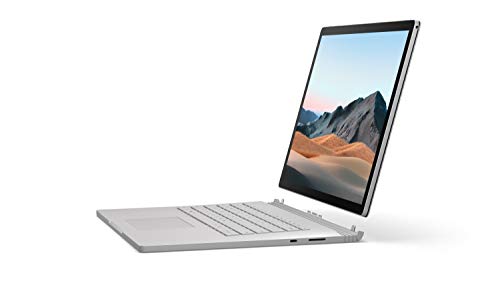
Microsoft Surface Studio 3 -- Best Touchscreen Creative Desktop
The Surface Studio 3 offers a 28-inch PixelSense touchscreen display with a hinge that tilts to nearly flat, creating a drawing surface for stylus work in Photoshop and Illustrator. The display covers 99% sRGB and is factory-calibrated. The Intel Core i7 H-series processor with RTX 4060 handles most design and photo work comfortably. Surface Pen support at 4,096 levels of pressure is useful for retouching and digital illustration. The form factor is unique and suited to designers who do a mix of pointer and pen-based work. At it is the most expensive pick, and the display, while excellent, does not match the M4 iMac's color accuracy at a lower price.
Strengths
- Most powerful Surface laptop yet, with quad-core powered, 10th Gen Intel Core processors.
- Fastest graphics on Surface, powered by NVIDIA GTX GeForce GPU.
- Power when you need it. Up to 17.5 hours battery life[1] , plus improved standby that exte
- Robust laptop, powerful tablet, and portable studio in one.
- The connections you need, including USB-A, USB-C, and full-size SD card slot.
Buying considerations
What to consider
Display color accuracy is the most important differentiator. A P3-capable display with factory calibration is the baseline for professional work. RAM at 32 GB handles large composite files and multi-app workflows; 16 GB works for lighter use. GPU acceleration in Adobe apps relies on CUDA (NVIDIA) or Metal (Apple), so GPU model matters more than brand alone. SSD speed affects how quickly large files open and autosave. For freelancers and agencies doing print work, a hardware calibrator like X-Rite or Datacolor is a worthwhile addition regardless of which computer you choose. For students or hobbyists, a 16 GB, P3-capable laptop in the range covers most needs.
What to consider
For additional tools in a design setup, see our [best drawing tablets for Photoshop](/articles/best-drawing-tablets) and [best monitors for photo editing](/articles/best-monitors-for-photo-editing) reviews. Our evaluation criteria are detailed on the [methodology page](/methodology).
Questions answered
Photoshop recommends at least 8 GB but performs significantly better with 16 GB or more. For working with high-resolution files (50 MP and above), large composite documents, or running multiple Adobe apps simultaneously, 32 GB is a practical target. Lightroom Classic catalogues with tens of thousands of images also benefit from 32 GB. RAM limits are one of the most common causes of slowdowns in creative workflows.
Yes, especially if your work is printed or delivered to clients. A display covering 100% sRGB is the minimum baseline. For print work or wide-gamut web content, a P3 display is preferable. Look for Delta E values below 2 for accurate color reproduction. Displays that ship with factory calibration reports are more reliable than those claiming color accuracy without documentation. External hardware calibrators further improve accuracy over time.
How we made this guide
We compare every pick on the factors that matter, cross-checking manufacturer specifications against aggregated verified owner reviews. We rank independently and never take payment for placement. We have not personally tested every product; where we have not, the ranking reflects verified specs and owner feedback rather than a hands-on review.
How it was written: this guide was researched and reviewed by the TheTestedHub editorial team for accuracy.
Affiliate disclosure: TheTestedHub is reader-supported. When you buy through links on our site, we may earn a commission at no extra cost to you.
Keep reading

Your Docking Station Match: CalDigit TS4 and More

Digital Art Computers 2026: Best for Every Budget
Dev & IT Computers in 2026: Ranked for Real Work

Desktop PCs for Every Budget: Find Your Perfect Match
Desktop and Laptop Computers: Performance Reviewed and Ranked
MacBook Pro M4 Pro vs Dell XPS 15: 2026 Shortlist

Buy the Best DIY Computer in 2026: Corsair One i300
