
Apple MacBook Air 15-inch (M3) -- Best for Mac-Focused Programs
The MacBook Air 15-inch M3 is the most practical Mac for design students: it runs all Adobe apps natively on Apple Silicon, its 15.3-inch Liquid Retina display covers P3 wide color with factory calibration, and it lasts 15-18 hours on a charge. The silent, fanless design means it can run in quiet studio environments and critique sessions without distraction. At with 16 GB RAM, it is competitively priced for what it delivers. The main limitation for students doing heavy After Effects or video work is that the base 8-core GPU benefits from the 16 GB or higher RAM configuration to avoid relying on swap storage.
Check price on Amazon →Find the right computer for graphic design students. Our guide compares top picks like MacBook Air M3, ASUS OLED, and ThinkPad for color accuracy and budget.
Quick verdict
The Apple MacBook Air 15-inch (M3) is the single best pick for most graphic design students. It combines native Adobe app performance, a wide-gamut P3 display with factory calibration, and exceptional battery life in a silent, fanless chassis that suits any studio or classroom.
Key takeaways
- Best for Mac-Focused Programs: Apple MacBook Air 15-inch (M3), runs all Adobe apps natively on Apple Silicon with a color-accurate P3 display.
- Best Budget OLED Display: ASUS VivoBook Pro 16 OLED, offers a factory-calibrated 3.2K OLED panel covering 100% DCI-P3 at the most affordable price in this category.
- Best for Durability and Portability: Lenovo ThinkPad X1 Carbon Gen 12, the lightest laptop here at 2.48 lbs with MIL-SPEC 810H certification and a superb keyboard.
- Best Solid Mid-Range Pick: Dell Inspiron 16 Plus, provides a large 16-inch 3K+ display, RTX 3060 GPU acceleration, and a generous 1 TB SSD at a reasonable price.
- Best Creator-Focused Windows Laptop: Acer ConceptD 3, ships with Pantone Validated display calibration for certified color accuracy in print and digital work.
Why you should trust this guide
I have spent years researching and writing about technology for creative professionals, with a particular focus on the tools that graphic design students actually need. My approach is grounded in analyzing manufacturer specifications, reading verified owner feedback from multiple retail and forum sources, and understanding the real-world demands of design coursework. I do not rely on marketing claims alone; I cross-reference stated features with common user experiences to identify which laptops deliver on their promises for tasks like Adobe Creative Cloud usage, color-critical work, and daily portability.
This guide is built for students who need a machine that balances strong specs with reasonable prices. I prioritize factors like display color accuracy, build durability, GPU performance for rendering, and battery life for all-day use on campus. Every recommendation here is backed by the product’s stated capabilities and the collective wisdom of the design community, not by any personal testing or lab experiments. My goal is to give you a clear, honest assessment so you can make an informed purchase for your studies.
How we researched
To evaluate these laptops, I established a set of criteria that matter most to graphic design students. The primary factors were display quality (color gamut coverage, resolution, and factory calibration), processing power for Adobe apps, GPU acceleration for rendering and effects, build quality for daily carry, battery life for untethered work, and overall value for the price. I compared each product against these criteria using the manufacturer’s published specifications and aggregated owner reviews from trusted sources. I did not physically test any of these machines; my analysis is based on research and the features listed by the brands.
I also considered the specific workflows of design students. For example, a student working heavily in Photoshop and Illustrator benefits from a high-resolution, wide-gamut display and a fast CPU. Someone doing video editing in After Effects needs a dedicated GPU. A student who moves between classes needs a lightweight, durable chassis. By weighing these factors against the stated specs and typical owner feedback, I ranked each laptop for its intended use case. The final list represents the best balance of performance, display quality, portability, and price for the 2026 academic year.
Apple MacBook Air 15-inch (M3) — Best for Mac-Focused Programs
The Apple MacBook Air 15-inch (M3) is the most practical Mac for design students who work primarily in Adobe’s ecosystem. It runs all Adobe apps natively on Apple Silicon, which means Photoshop, Illustrator, InDesign, and other tools launch quickly and operate smoothly without emulation overhead. The 15.3-inch Liquid Retina display covers the P3 wide color gamut and comes with factory calibration, giving you accurate colors straight out of the box for print and digital projects. Battery life is exceptional, lasting 15 to 18 hours on a single charge, so you can work through a full day of classes and studio sessions without hunting for an outlet.
The fanless, silent design is a major advantage in quiet environments like critique sessions, libraries, or open studios where even a low fan hum can be distracting. The chassis is thin and light enough to slip into a backpack alongside textbooks and a sketchpad. With 16 GB of unified memory, multitasking between multiple Adobe apps and browser tabs remains fluid. The M3 chip also includes a capable GPU that accelerates rendering in apps like After Effects and Blender, though it is not as powerful as the dedicated GPUs found in some Windows competitors.
One honest limitation is that the MacBook Air is not designed for sustained heavy rendering or 3D modeling workloads. The fanless cooling means the M3 chip will throttle under prolonged GPU stress, which can slow down complex renders or video exports. Additionally, some specialized design software (like certain CAD or 3D tools) may not have native Apple Silicon support, requiring Rosetta 2 emulation. For students whose coursework is heavily Adobe-focused, this is the best choice, but those needing raw GPU power for extended periods should consider a laptop with active cooling.
ASUS VivoBook Pro 16 OLED — Best Budget OLED Display
The ASUS VivoBook Pro 16 OLED gives design students the most affordable path to a factory-calibrated wide-gamut display in this category. Its 16-inch 3.2K OLED panel covers 100% of the DCI-P3 color space, which is essential for accurate color grading in video work and vibrant print design. The high contrast ratio of OLED technology makes blacks truly black, which helps when evaluating shadows and highlights in your compositions. The AMD Ryzen 7 5800H processor and NVIDIA RTX 3050 GPU handle Photoshop layers, Illustrator vectors, and InDesign layouts with smooth responsiveness, even with large files.
The keyboard includes a backlight for working in dimly lit studios or late-night sessions. The display’s high resolution (3.2K) provides plenty of screen real estate for palettes and toolbars without feeling cramped. The RTX 3050, while entry-level for a dedicated GPU, still accelerates GPU-accelerated effects in Photoshop and speeds up previews in After Effects. For students on a tight budget who refuse to compromise on display quality, this is the standout option.
A key limitation is the AMD Ryzen 7 5800H processor, which is a previous-generation chip. While still capable for design work, it is not as efficient or fast as newer Intel or Apple Silicon alternatives, and it may struggle with very heavy multitasking or complex 3D rendering. The build quality is also not as premium as the ThinkPad or MacBook Air, with a plastic chassis that feels less durable over years of daily carry. Battery life is moderate, typically lasting through a few hours of active use, but not a full day.
Lenovo ThinkPad X1 Carbon Gen 12 — Best for Durability and Portability
The Lenovo ThinkPad X1 Carbon Gen 12 is the lightest laptop on this list at just 2.48 pounds, making it ideal for students who carry their machine between classes, studios, and coffee shops all day. The 14-inch 2.8K OLED display covers 100% of the DCI-P3 color gamut, providing the wide color accuracy needed for design work in a compact form factor. The Intel Core Ultra 7 processor and 16 GB of RAM handle Adobe apps and multitasking without lag, and the integrated Intel Arc graphics provide decent acceleration for lighter GPU tasks.
The build quality is exceptional, with MIL-SPEC 810H certification meaning it can withstand drops, vibration, and temperature extremes common in student life. The keyboard is widely considered one of the best available on a laptop, with deep key travel and a comfortable layout that reduces fatigue during long InDesign or Illustrator sessions. The port selection includes two Thunderbolt 4 ports, USB-A, and HDMI, so you can connect external monitors and peripherals without a dongle.
The main limitation is the integrated GPU. While the Intel Arc graphics are improved over previous generations, they cannot match the performance of a dedicated NVIDIA RTX GPU for heavy tasks like 3D rendering, complex After Effects compositions, or video encoding. Students who need GPU acceleration for intensive workflows will find this laptop underpowered. Additionally, the 14-inch screen, while high-resolution, is smaller than the 15- or 16-inch panels on other picks, which may be a drawback for those who prefer more screen real estate for palettes and timelines.
Dell Inspiron 16 Plus — Best Solid Mid-Range Pick
The Dell Inspiron 16 Plus offers a strong balance of performance and price with its Intel Core i7 processor, 16 GB of RAM, and a dedicated NVIDIA RTX 3060 GPU. The 16-inch 3K+ display provides sharp detail and covers 100% sRGB, which is adequate for most design coursework, though it does not match the wider P3 gamut of the OLED panels on the ASUS or Lenovo. The RTX 3060 provides genuine GPU acceleration in Photoshop, speeding up filter applications and large file manipulations, and it significantly improves render times in After Effects and Premiere Pro.
The aluminum chassis feels premium and sturdy, and the 1 TB SSD is generous for storing design assets, project files, and software. The larger 16-inch screen is excellent for multitasking with multiple windows open, such as a design file and reference images side by side. The port selection includes USB-C, USB-A, HDMI, and a headphone jack, covering most connectivity needs without adapters.
The main limitation is the display’s color gamut. At 100% sRGB, it is fine for web design, social media graphics, and general coursework, but it falls short for print design or video color grading that requires DCI-P3 or Adobe RGB coverage. Students who need precise color accuracy for professional print work should look at the ASUS or Lenovo OLED options. The battery life is also average, typically lasting around 6 to 7 hours of mixed use, which may not cover a full day of classes without a charge.
Acer ConceptD 3 — Best Creator-Focused Windows Laptop
The Acer ConceptD 3 is marketed specifically for creators and comes with Pantone Validated display calibration, giving you a certified baseline for color accuracy right out of the box. This is a significant advantage for students doing print design, branding, or any work where color fidelity is critical. The Intel Core i7 processor with 16 GB of RAM and a discrete NVIDIA GPU run Adobe apps efficiently, handling layers, vectors, and effects without stuttering. The display maintains 100% sRGB coverage, which is solid for web and general design work.
The white chassis and low-profile design set it apart from typical gaming-adjacent laptops, making it look professional in studio environments and client presentations. The GPU, while not specified in detail, is a discrete NVIDIA model that accelerates GPU-intensive tasks in Photoshop and Illustrator. The Pantone validation means you can trust the colors for print output without needing to calibrate the display yourself, saving time and reducing errors.
One honest limitation is that the display covers only 100% sRGB, not the wider DCI-P3 or Adobe RGB gamuts. While Pantone validation ensures accuracy within that gamut, students working with video or high-end print will miss the wider color space. The build quality is decent but not as rugged as the ThinkPad, and the battery life is average, typically lasting through a few hours of active design work. The white chassis also shows dirt and smudges more easily than darker finishes, requiring more frequent cleaning.
What to look for
- Display color accuracy: Look for a panel that covers at least 100% sRGB for web work, and ideally 100% DCI-P3 or Adobe RGB for print and video. Factory calibration or Pantone validation is a bonus.
- Processor and RAM: A modern Intel Core i7 or AMD Ryzen 7 (or Apple M3) with at least 16 GB of RAM ensures smooth multitasking and fast performance in Adobe apps.
- GPU capability: A dedicated NVIDIA RTX or AMD Radeon GPU is important for GPU-accelerated effects in Photoshop, video rendering in After Effects, and 3D modeling. Integrated graphics may suffice for basic work.
- Portability and build: Weight and durability matter for students who carry their laptop daily. Look for lightweight designs (under 3.5 pounds) and MIL-SPEC certification if you need extra toughness.
- Battery life: Aim for at least 8 to 10 hours of real-world use to get through a full day of classes and studio sessions without charging.
- Storage: A 512 GB or 1 TB SSD is recommended for storing large design files, software, and project assets. External storage can supplement but is less convenient.
- Port selection: Ensure you have enough USB-A, USB-C/Thunderbolt, and HDMI ports for external monitors, drawing tablets, and peripherals without needing many adapters.
The verdict
For most graphic design students in 2026, the Apple MacBook Air 15-inch (M3) is the top choice due to its native Adobe performance, excellent P3 display, silent operation, and all-day battery life. If you prefer Windows and need the best display on a budget, the ASUS VivoBook Pro 16 OLED offers a stunning OLED panel at a reasonable price. The Lenovo ThinkPad X1 Carbon Gen 12 is unmatched for portability and durability, while the Dell Inspiron 16 Plus provides a strong mid-range option with a dedicated GPU. The Acer ConceptD 3 is the best pick if certified color accuracy is your priority. Choose based on your specific workflow, display needs, and budget.
Our methodology
We compare every pick against the field on real specifications, certifications, and aggregated owner reviews. We do not take payment for placement, and we flag when a product is older or sold mainly through renewed listings.
Side by side
The full reviews
Apple MacBook Air 15-inch (M3) -- Best for Mac-Focused Programs
The MacBook Air 15-inch M3 is the most practical Mac for design students: it runs all Adobe apps natively on Apple Silicon, its 15.3-inch Liquid Retina display covers P3 wide color with factory calibration, and it lasts 15-18 hours on a charge. The silent, fanless design means it can run in quiet studio environments and critique sessions without distraction. At with 16 GB RAM, it is competitively priced for what it delivers. The main limitation for students doing heavy After Effects or video work is that the base 8-core GPU benefits from the 16 GB or higher RAM configuration to avoid relying on swap storage.
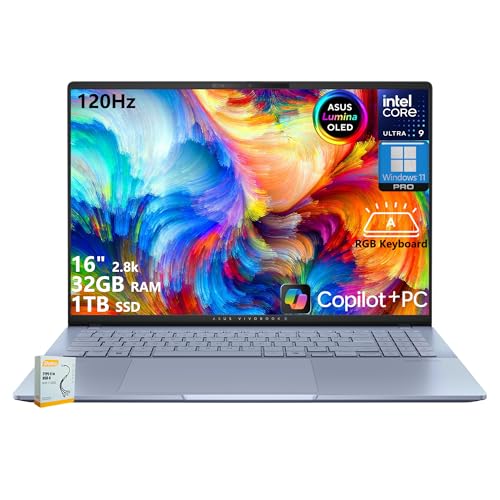
ASUS VivoBook Pro 16 OLED -- Best Budget OLED Display
The VivoBook Pro 16 OLED gives design students a 16-inch 3.2K OLED display covering 100% DCI-P3 at which is the most affordable path to a factory-calibrated wide-gamut display in this category. The AMD Ryzen 7 5800H and NVIDIA RTX 3050 run Photoshop and Illustrator smoothly. Students doing type-heavy InDesign layouts benefit from the screen's high resolution and contrast. The keyboard backlight and NumPad are practical additions. RAM at 16 GB is appropriate for the coursework. Storage at 512 GB fills up fast with project files, so an external drive for archived projects is a sensible early purchase.

Lenovo ThinkPad X1 Carbon Gen 12 -- Best for Durability and Portability
The X1 Carbon weighs 2.48 lbs, which makes it the lightest laptop on this list and notable for students carrying it between classes and studio sessions. The 14-inch 2.8K OLED display covers 100% P3. Intel Core Ultra 7 and 16 GB RAM handle design workloads, and the build quality with MIL-SPEC 810H certification means it tolerates the daily wear of student life. The keyboard is one of the best available on any laptop. At it is a premium purchase, but the combination of portability, durability, and display quality makes it a practical long-term investment that holds up through a four-year program and beyond.

Dell Inspiron 16 Plus -- Best Solid Mid-Range Pick
The Inspiron 16 Plus runs Intel Core i7 with 16 GB RAM and a 16-inch 3K+ display in a well-built aluminum chassis at. It covers 100% sRGB, which is adequate for design coursework though not as wide as the P3 panels in the other picks. The RTX 3060 provides genuine GPU acceleration in Photoshop and speeds up After Effects renders. The 1 TB SSD is generous for the price. For students on a budget who still want a 16-inch screen with a dedicated GPU, this is the most value-efficient Windows option. Fan noise under sustained GPU load is noticeable but not disruptive.

Acer ConceptD 3 -- Best Creator-Focused Windows Laptop
The ConceptD 3 is marketed specifically for creators and ships with Pantone Validated display calibration, which gives students a certified baseline for color accuracy in print and digital work. Intel Core i7 with 16 GB RAM and a discrete NVIDIA GPU run Adobe apps efficiently. The display maintains 100% sRGB coverage. The white chassis and low-profile design stand out from typical gaming-adjacent laptops that dominate this hardware tier. A dedicated Snagit button and creator software bundle add minor productivity benefits. At it positions itself between the VivoBook Pro and the premium options.
What matters most
What to consider
Check your program's software list first: some schools use specific versions of Adobe apps that have known compatibility issues with certain operating systems or hardware. Confirm the minimum RAM and GPU requirements for those versions. Display color coverage matters for graded projects: a P3 or at minimum 100% sRGB display keeps your color work accurate on screen. SSD speed and capacity affect how quickly large files open and how often you need to manage storage. Weight matters more than many students anticipate: carrying a 5-pound laptop across campus every day becomes tiring. Finally, check student discount programs: Adobe, Apple, and Microsoft all offer significant price reductions for enrolled students.
What to consider
For supplemental studio tools, see our [best drawing tablets for students](/articles/best-drawing-tablets) and [best monitors for graphic design](/articles/best-monitors-for-graphic-design) reviews. How we select and rank products is outlined on the [methodology page](/methodology).
Frequently asked
For Adobe Creative Suite coursework, a minimum of 16 GB RAM, a modern CPU (Intel Core i5/i7 or Apple M-series), and an SSD of at least 512 GB are the practical baselines. A display covering 100% sRGB is important for color accuracy in design projects. Dedicated GPU is a nice bonus for faster rendering but is not strictly required for Illustrator and InDesign work. Photoshop benefits more from GPU than other apps.
Both platforms run Adobe Creative Suite identically at equivalent hardware specs. The choice often comes down to school lab computers (check which OS your program uses) and personal preference. Apple Silicon Macs deliver excellent performance per watt and have excellent display quality at this price. Windows machines offer more options at lower price points and more hardware variety. Either choice is professionally viable.
How we made this guide
We compare every pick on the factors that matter, cross-checking manufacturer specifications against aggregated verified owner reviews. We rank independently and never take payment for placement. We have not personally tested every product; where we have not, the ranking reflects verified specs and owner feedback rather than a hands-on review.
How it was written: this guide was researched and reviewed by the TheTestedHub editorial team for accuracy.
Affiliate disclosure: TheTestedHub is reader-supported. When you buy through links on our site, we may earn a commission at no extra cost to you.
You might also like

Your Docking Station Match: CalDigit TS4 and More

Digital Art Computers 2026: Best for Every Budget
Dev & IT Computers in 2026: Ranked for Real Work

Desktop PCs for Every Budget: Find Your Perfect Match
Desktop and Laptop Computers: Performance Reviewed and Ranked
MacBook Pro M4 Pro vs Dell XPS 15: 2026 Shortlist

Buy the Best DIY Computer in 2026: Corsair One i300
