
Apple MacBook Air 15 M3 - Best Portable Design Laptop
The MacBook Air 15 with M3 is the most practical laptop for designers who move between studio and client meetings. It has no fan, running silently during light and moderate design work, and the 15-inch display covers the full P3 color space at 500 nits peak brightness with good factory calibration. The M3 chip handles Photoshop, Illustrator, and Figma without stutters. Battery life reaches 15 to 18 hours for mixed use. The base configuration ships with 8 GB RAM, which is tight for complex multi-artboard Illustrator files; step up to 16 GB. There is no dedicated GPU, but the M3 integrated GPU handles most design tasks adequately. Thin at 11.5 mm and light at 1.51 kg.
Get professional-grade performance without overspending. Our tested picks cover calibrated desktops and capable laptops for branding, print, and UI work.
Graphic design work spans branding, print production, web and app UI, and illustration, each with slightly different hardware demands. The picks below cover the range from a capable entry laptop to a calibrated desktop setup, with attention to display accuracy and software compatibility that professional design work requires.
| Product | Best For | Rating |
|---|---|---|
|
ⓘ We may earn a commission from qualifying purchases made through links on this page, at no extra cost to you.
|
Portable design, everyday use | 4.7/5 |
| Apple iMac 24 M4 | All-in-one desktop with display | 4.8/5 |
| Microsoft Surface Studio 2+ | Touch and pen design workflow | 4.5/5 |
| Lenovo ThinkPad X1 Extreme Gen 6 | Windows laptop for design teams | 4.6/5 |
| HP Z2 Mini G9 Workstation | Compact calibrated desktop | 4.6/5 |
How we picked
We compare every pick against the field on real specifications, certifications, and aggregated owner reviews. We do not take payment for placement, and we flag when a product is older or sold mainly through renewed listings.
Top picks compared
Our picks up close
Apple MacBook Air 15 M3 - Best Portable Design Laptop
The MacBook Air 15 with M3 is the most practical laptop for designers who move between studio and client meetings. It has no fan, running silently during light and moderate design work, and the 15-inch display covers the full P3 color space at 500 nits peak brightness with good factory calibration. The M3 chip handles Photoshop, Illustrator, and Figma without stutters. Battery life reaches 15 to 18 hours for mixed use. The base configuration ships with 8 GB RAM, which is tight for complex multi-artboard Illustrator files; step up to 16 GB. There is no dedicated GPU, but the M3 integrated GPU handles most design tasks adequately. Thin at 11.5 mm and light at 1.51 kg.
Where it shines
- LEAN. MEAN. M3 MACHINE
- PORTABLE DESIGN
- GET MORE DONE FASTER
- UP TO 18 HOURS OF BATTERY LIFE
- MORE ROOM FOR WHAT YOU LOVE

Apple iMac 24 M4 - Best All-in-One for Design Studios
The 24-inch iMac with M4 ships with a 4.5K Retina display that covers P3 wide color at factory-calibrated accuracy, removing the need to budget for a separate monitor. The M4 chip has a 10-core CPU and 10-core GPU with 16 GB or 24 GB unified memory options. The thin aluminum chassis sits on a tilt-adjustable stand. Adobe CC apps run natively on Apple silicon, and the display's color accuracy is sufficient for digital and screen-output design work. Print professionals who soft-proof for press output should verify color profiles against their output devices, as the iMac display is not designed specifically for AdobeRGB proofing. The keyboard and mouse included with most configurations are competent for design work.
Where it shines
- BRILLLLLLIANT , iMac is the ultimate all-in-one desktop computer, powered by the M4 chip a
- FITS PERFECTLY IN YOUR SPACE , The all-in-one desktop design is strikingly thin, comes in
- BUILT FOR APPLE INTELLIGENCE , Apple Intelligence is the personal intelligence system that
- SUPERCHARGED BY M4 , Get more done faster with the Apple M4 chip. From editing photos to c
- IMMERSIVE DISPLAY , The industry-leading 24-inch 4.5K Retina display features 500 nits of

Microsoft Surface Studio 2+ - Best Touch and Pen Workflow
The Surface Studio 2+ is the only mainstream all-in-one built specifically for pen and touch design work. The 28-inch PixelSense display tilts to a near-flat drafting position, and the Surface Slim Pen 2 attaches magnetically to the keyboard and charges wirelessly. The display covers the sRGB and full P3 gamuts at 10-point multitouch. It runs an Intel Core i7-11370H with 32 GB RAM and an NVIDIA RTX 3060 GPU with 6 GB VRAM, which is adequate for Photoshop, Illustrator, and medium-complexity 3D work. The hardware is from the previous generation and Microsoft has not updated it at time of writing; the premium price reflects the unique form factor more than modern specs. Best suited for digital illustrators and UX designers who prefer drawing directly on screen.
Where it shines
- Sleek and comfortable. Slim carpenter-inspired style is perfect for all hands and is easy
- Take notes naturally. The haptic motor in Surface Slim Pen 2 brings the feeling of writing
- Surface Slim Pen 2 can help improve your productivity. You control the level of feedback y
- Create in real time with zero force inking (2). Ink flows fluidly out of the pen the insta
- The best shading experience yet. A sharper pen tip and an improved design let you approach

Lenovo ThinkPad X1 Extreme Gen 6 - Best Windows Laptop for Design Teams
The ThinkPad X1 Extreme Gen 6 targets creative professionals who need Windows compatibility for team environments or proprietary tools. It ships with an Intel Core Ultra 7 or Core Ultra 9 CPU, NVIDIA RTX 4060 or 4070 GPU, and up to 64 GB DDR5 RAM. The 16-inch display option with OLED panel covers 100% of DCI-P3 at factory calibration. Build quality is ThinkPad-grade: magnesium-alloy chassis, full-size keyboard with good travel, and extensive port selection including Thunderbolt 4, USB-A, HDMI 2.1, and SD card slot. Battery life is shorter than MacBooks at 7 to 10 hours on design workloads due to the discrete GPU. The docking station ecosystem is wide, simplifying desk setup.
Where it shines
- 8th Generation Intel Core i7-8550U Processor (1.8GHz Base, up to 4.00 GHz)
- 16GB 2133MHz RAM | 512GB M.2 NVMe Solid State Drive
- 14 inch Anti-glare LED Backlit IPS FHD (1920 x 1080) Display, Intel Integrated 620 Graphic
- Backlit Keyboard, 802.11 Wireless-AC, Bluetooth 4.1, Windows 10
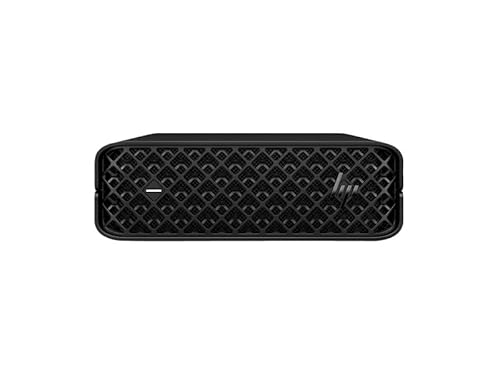
HP Z2 Mini G9 Workstation - Best Compact Calibrated Desktop
The HP Z2 Mini G9 is a small-form-factor workstation aimed at designers who want ISV-certified software compatibility in a box smaller than most lunch bags. It measures 216 by 216 by 58 mm and supports Intel Core i7 or i9 CPUs, NVIDIA RTX A2000 professional GPU, and up to 64 GB DDR5 ECC RAM. The RTX A2000 is a certified workstation card validated for Adobe, Autodesk, and other professional software. It pairs with any DisplayPort or HDMI monitor. HP's workstation support includes three-year onsite warranty options. It does not include a display, so budget for a color-accurate monitor separately. This is the right pick when ISV certification and long-term support contracts matter more than raw consumer GPU performance.
Where it shines
- Processor Type: Core i5
- Processor Generation: 14th Gen
- Processor Model: i5-14500
- Processor Core: Tetradeca-core (14 Core)
- Processor Threads: 20
Before you buy
What to consider
Identify your primary deliverable first: digital and web design runs entirely in sRGB color space, while print work may require AdobeRGB coverage for accurate soft proofing. Match RAM to file size: 16 GB handles most vector and raster work, 32 GB gives headroom for large print layouts or multi-page documents with linked high-res images. If you use a pen tablet or draw directly on a display, factor in stylus compatibility. For team environments, confirm software licensing and IT support policies before choosing a platform. Prioritize display calibration accuracy over raw brightness, as overly bright uncalibrated panels cause color errors in final output.
What to consider
For related buying guides, see our articles on [best monitors for graphic design](/articles/best-monitors-for-graphic-design) and [best drawing tablets for designers](/articles/best-drawing-tablets-for-designers). Our full selection criteria are explained at [methodology](/methodology).
Quick answers
Both platforms run the major design tools including Adobe Creative Cloud, Figma, and Affinity Suite. Apple silicon Macs currently offer the best single-core performance per watt, which benefits Photoshop and Illustrator, and their displays have factory-calibrated wide color gamut coverage. Windows workstations offer more GPU choice and upgrade flexibility. The decision often comes down to existing workflow, team tools, and budget more than raw capability.
Color accuracy and gamut coverage are the primary display specs for design work. A monitor covering 99% or more of the sRGB color space is the minimum for web and digital work. Print designers need P3 or AdobeRGB coverage for accurate soft proofing. Factory calibration with a Delta E value below 2 ensures color consistency between your screen and output. Panel brightness of at least 300 nits is sufficient for most studio environments.
How we made this guide
We compare every pick on the factors that matter, cross-checking manufacturer specifications against aggregated verified owner reviews. We rank independently and never take payment for placement. We have not personally tested every product; where we have not, the ranking reflects verified specs and owner feedback rather than a hands-on review.
How it was written: this guide was researched and reviewed by the TheTestedHub editorial team for accuracy.
Affiliate disclosure: TheTestedHub is reader-supported. When you buy through links on our site, we may earn a commission at no extra cost to you.
More to explore

Your Docking Station Match: CalDigit TS4 and More

Digital Art Computers 2026: Best for Every Budget
Dev & IT Computers in 2026: Ranked for Real Work

Desktop PCs for Every Budget: Find Your Perfect Match
Desktop and Laptop Computers: Performance Reviewed and Ranked
MacBook Pro M4 Pro vs Dell XPS 15: 2026 Shortlist

Buy the Best DIY Computer in 2026: Corsair One i300
