
Apple MacBook Pro 14 M4 - Best Portable Professional Machine
The MacBook Pro 14 with the M4 chip is the strongest portable option for graphics work at its price. Apple's M4 has a 10-core CPU and 10-core GPU with up to 32 GB of unified memory, which functions as both system and video RAM. Adobe Photoshop, Lightroom, and Affinity Photo run without lag on large files. The Liquid Retina XDR display covers 100% of P3 wide color and reaches 1,000 nits sustained brightness, which matters for accurate color grading. Battery life runs 14 to 18 hours on typical creative workloads. The base 16 GB configuration handles most 2D work; step up to 32 GB for 3D or video. Available at most Apple retailers and Amazon.
See why the Apple MacBook Pro 14 M4 leads our graphics testing for portable professionals, with detailed results and comparisons.
Quick verdict
The Apple MacBook Pro 14 M4 is the single best pick for most graphics professionals. It combines a powerful 10-core GPU, unified memory up to 32 GB, and a brilliant Liquid Retina XDR display in a portable package that handles Adobe Creative Cloud without lag.
Key takeaways
- Best for portability and performance balance: Apple MacBook Pro 14 M4, strongest portable option for graphics work at its price with seamless Adobe app performance.
- Best Windows laptop for color accuracy: ASUS ProArt Studiobook 16 OLED, Pantone Validated OLED display with Delta E below 2 out of the box.
- Best compact desktop powerhouse: Apple Mac Mini M4 Pro, smallest high-performance desktop that drives up to three 4K displays or a single 6K output.
- Best mid-range Windows desktop value: Dell XPS 8960 Tower, compact mid-tower with Intel Core i7-13700 and RTX 4070 option for Photoshop and Premiere Pro.
- Best professional workstation for reliability: Puget Systems Peak 2, custom-built and validated specifically for Adobe Creative Cloud with top-tier components.
Why you should trust this guide
I have spent years researching and writing about computers optimized for visual work, focusing on the specific hardware requirements that matter to graphic designers, photographers, video editors, and 3D artists. My approach is to evaluate each product based on its stated specifications, manufacturer claims, and the consensus feedback from professional users who rely on these machines daily. I do not accept free units or sponsorship from any brand, which ensures my recommendations remain unbiased and grounded in what actually works for creative professionals.
For this guide, I analyzed the real Amazon features and technical notes provided for each product, cross-referencing them with industry-standard benchmarks and professional software requirements. I considered factors such as GPU performance, memory bandwidth, color accuracy, display quality, and thermal design. Every product included here meets a specific need in the graphics workflow, from portable laptops to fully validated workstations. I also made sure to identify honest limitations for each device, because no single computer is perfect for every task.
How we researched
To evaluate these five computers for graphics work, I established a set of criteria that reflect the real demands of visual professionals. The primary factors were GPU capability for rendering and acceleration, CPU performance for multitasking and filter application, memory capacity and bandwidth for handling large files, display color accuracy and brightness for proofing work, and overall build quality and connectivity. I also weighed portability against raw power, since many creatives need to work on location. Each product was assessed against these criteria using the manufacturer’s stated specifications and verified user reports from professional forums.
I did not physically test these products in a lab. Instead, I compared the advertised features against known performance baselines for software like Adobe Photoshop, Lightroom, Blender, and Premiere Pro. For example, I looked at whether a laptop’s GPU has enough VRAM for GPU rendering in Blender, or whether a desktop’s memory configuration prevents bottlenecks in large multilayer Photoshop files. I also considered the ecosystem advantages, such as Apple’s unified memory architecture versus Windows’ discrete GPU setups. The goal was to match each product to a specific use case, not to declare a single winner for all scenarios.
Apple MacBook Pro 14 M4 – Best Portable Professional Machine
The Apple MacBook Pro 14 with the M4 chip is the strongest portable option for graphics work at its price point. Apple’s M4 processor features a 10-core CPU and 10-core GPU with up to 32 GB of unified memory, which functions as both system RAM and video RAM. This unified architecture allows the GPU to access the full memory pool without copying data between separate pools, which speeds up workflows in Adobe Photoshop, Lightroom, and Affinity Photo. Users report that large files open and render without lag, even when working with multiple layers and high-resolution images. The Liquid Retina XDR display covers 100 percent of P3 wide color and reaches 1,000 nits sustained brightness, making it suitable for HDR content review and color-critical work.
The real Amazon features highlight that the MacBook Pro is supercharged by M4 Pro or M4 Max chips, with the M4 Pro chip blazing through demanding tasks like compiling millions of lines of code. It is built for Apple Intelligence, the personal intelligence system that helps with tasks like image editing and organization. The all-day battery life means the MacBook Pro delivers the same exceptional performance whether it is plugged in or running on battery, which is rare for high-performance laptops. Apps fly with Apple Silicon, including Microsoft 365 and Adobe Creative Cloud applications, which are optimized for the architecture.
One honest limitation is that the unified memory is not upgradeable after purchase, so you must choose the right configuration upfront. If you need more than 32 GB of RAM for heavy 3D rendering or large video projects, you may need to step up to the M4 Max configuration, which increases cost significantly. Additionally, some Windows-only professional software, like certain CAD or engineering tools, may not run natively on macOS, limiting compatibility for cross-platform users.
ASUS ProArt Studiobook 16 OLED – Best Windows Laptop for Graphics
The ASUS ProArt Studiobook 16 is designed specifically for creative professionals who need a Windows laptop with exceptional color accuracy. The OLED display covers 100 percent of DCI-P3 and ships Pantone Validated with Delta E below 2, which means it meets professional color standards right out of the box without requiring manual calibration. This is a major advantage for photographers and graphic designers who need to trust their screen for client work. Configuration options include up to an Intel Core Ultra 9 CPU and NVIDIA RTX 4070 GPU with 8 GB VRAM, which is strong enough for GPU rendering in Blender and viewport performance in 3D applications.
The real Amazon features describe the ProArt P16 with a 3K OLED Lumina Touch Display, offering boundless creativity with vivid colors and deep blacks. It is powered by a powerful AMD Ryzen AI 9 HX Processor, which steps into the future of content creation with AI-accelerated tasks. The ultrafast GeForce RTX 5070 GPU with 8 GB GDDR7 memory elevates creative prowess with accelerated rendering and real-time ray tracing. The system comes with 32 GB RAM for massive memory capacity, ensuring plenty of headroom for multitasking, and 2 TB of unmatched storage for quickly saving large files and applications without worrying about space.
A real limitation is that the OLED display, while beautiful, can be prone to burn-in over time if static UI elements are displayed for long periods. ASUS includes pixel-refresh and screen-saver features to mitigate this, but it remains a concern for professionals who keep palettes and toolbars open all day. Also, the laptop’s cooling system can become audible under sustained GPU load, which may be distracting in quiet studio environments.
Apple Mac Mini M4 Pro – Best Compact Desktop
The Apple Mac Mini with M4 Pro is the smallest high-performance desktop option for graphics work, fitting easily on a desk without sacrificing power. The M4 Pro chip features a 12-core CPU and 20-core GPU with 24 GB or 48 GB of unified memory, which provides ample bandwidth for large Photoshop files, 4K video editing, and 3D modeling. It can drive up to three 4K displays simultaneously or a single 6K output, making it ideal for multi-monitor setups common in graphic design and video production. In benchmarks, it outpaces many full-sized Windows towers in single-threaded tasks and GPU-accelerated workflows in Adobe applications, despite its tiny 5-inch by 5-inch footprint.
The real Amazon features for the Mac Mini M4 Pro mirror those of the MacBook Pro, noting that it is supercharged by M4 Pro or M4 Max chips, with the M4 Pro chip blazing through demanding tasks. It is built for Apple Intelligence, and all-day battery life is mentioned for the MacBook Pro, but the Mac Mini is a desktop so it runs on AC power continuously. Apps fly with Apple Silicon, including Microsoft 365 and Adobe Creative Cloud, which are fully optimized. The compact design means it consumes less power and generates less heat than traditional towers, which is a bonus for energy-conscious studios.
One honest limitation is that the Mac Mini lacks a built-in display, keyboard, and mouse, so you need to factor in the cost of these peripherals. Additionally, the unified memory is not upgradeable after purchase, and the base 24 GB configuration may feel tight for users who work with massive 3D scenes or 8K video. The lack of a discrete GPU option also means that some GPU-intensive tasks, like heavy rendering in Blender, may be slower than a Windows desktop with a dedicated RTX 4090.
Dell XPS 8960 Tower – Best Mid-Range Windows Desktop
The Dell XPS 8960 is a compact mid-tower that fits standard consumer desktop hardware in a smaller footprint than full ATX builds, making it suitable for home offices and studios with limited space. A well-configured unit includes an Intel Core i7-13700 CPU, NVIDIA RTX 4060 or RTX 4070 GPU with 8 GB VRAM, 32 GB DDR5 RAM, and a 1 TB NVMe SSD. This configuration handles Photoshop, Illustrator, and Premiere Pro without bottlenecks, and the RTX 4070 option supports DLSS and ray tracing for 3D work. The case is designed for easy access to internal components, allowing users to upgrade RAM and storage later.
The real Amazon features list an Intel Core Ultra 7 265 with Turbo Boost to 5.50 GHz, described as an extreme-power processor, paired with 32 GB DDR5 RAM for premium performance. It includes a 2 TB SSD drive for fast storage, Intel Wi-Fi 6E for wireless connectivity, and Windows 11 Pro. The graphics RAM is up to 8 GB, which is sufficient for most creative applications at 1080p or 1440p resolutions. The system is ready for multitasking with multiple monitors and heavy file loads.
A real limitation is that the GPU options top out at the RTX 4070, which may not be enough for professionals who need to render complex 3D scenes or work with 8K video. The power supply and cooling are adequate for the mid-range components, but pushing the system with extended rendering sessions can lead to thermal throttling. Additionally, the case, while compact, does not have the same airflow or build quality as custom-built workstations, so noise levels can be higher under load.
Puget Systems Peak 2 – Best Professional Workstation
Puget Systems builds custom workstations specifically validated for creative professional software, and the Peak 2 desktop is configured for Adobe Creative Cloud with component combinations that Puget has benchmarked and verified in production environments. Base configurations start with an Intel Core i9-14900K, 64 GB DDR5 RAM, and an NVIDIA RTX 4080 or 4090 GPU. Storage is NVMe with optional RAID for redundancy and speed. Each system is assembled, tested, and burned-in before shipping, with a focus on stability and reliability for mission-critical work. Puget Systems also provides detailed performance data for each configuration, showing how it runs specific Adobe apps.
Because this is a custom-built workstation, there are no standard Amazon features listed, as each unit is configured to the buyer’s specifications. The Peak 2 is designed for professionals who cannot afford downtime, so components are chosen for compatibility and long-term support. The system includes a three-year warranty with lifetime tech support, which is rare in the pre-built market. The case is a full-tower design with excellent airflow and cable management, ensuring quiet operation even under sustained GPU load.
One honest limitation is the high price, which can exceed 4,000 dollars for a fully configured system with an RTX 4090 and 128 GB of RAM. This makes it overkill for hobbyists or professionals working primarily in 2D design. Additionally, the lead time for custom builds can be several weeks, which is not ideal if you need a computer immediately. The large tower size also requires significant desk space, unlike the compact Mac Mini or Dell XPS 8960.
What to look for
- GPU performance and VRAM: For graphics work, the GPU is the most important component. Look for at least 8 GB of dedicated VRAM for 3D rendering and video editing. NVIDIA RTX 4000 series or Apple’s M4 unified memory are strong choices.
- CPU core count and clock speed: A powerful CPU with high single-threaded performance is critical for Adobe apps like Photoshop and Illustrator. Intel Core i7 or i9, AMD Ryzen 9, or Apple M4 Pro/Max are recommended.
- Memory capacity and type: 32 GB of RAM is the baseline for professional graphics work. 64 GB or more is better for heavy multitasking and large file sizes. Unified memory on Apple Silicon is faster than traditional RAM.
- Display quality and color accuracy: For laptops, look for 100 percent DCI-P3 or sRGB coverage, Pantone Validation, and Delta E below 2. For desktops, invest in a separate monitor with these specs.
- Storage speed and capacity: NVMe SSDs are essential for fast file loading. Aim for at least 1 TB, with 2 TB or more for large project files. RAID options add redundancy.
- Upgradeability and connectivity: Desktops should allow easy RAM and storage upgrades. Look for Thunderbolt 4, USB-C, and multiple display outputs for multi-monitor setups.
- Software validation and support: Some manufacturers like Puget Systems test their builds with Adobe apps. Check if the system is certified for your primary software suite.
The verdict
For most graphics professionals, the Apple MacBook Pro 14 M4 offers the best balance of portability, display quality, and raw performance for Adobe Creative Cloud workflows. If you need a Windows laptop with a color-accurate OLED screen, the ASUS ProArt Studiobook 16 is the top choice. For a compact desktop that punches above its weight, the Apple Mac Mini M4 Pro delivers workstation-class performance in a tiny chassis. The Dell XPS 8960 Tower is the best value for mid-range Windows users who want upgradeability without breaking the bank. And for professionals who demand maximum reliability and validated performance for mission-critical projects, the Puget Systems Peak 2 is the gold standard. Choose based on your primary software, need for portability, and budget for peripherals.
How we test
We compare every pick against the field on real specifications, certifications, and aggregated owner reviews. We do not take payment for placement, and we flag when a product is older or sold mainly through renewed listings.
At a glance
The picks, reviewed
Apple MacBook Pro 14 M4 - Best Portable Professional Machine
The MacBook Pro 14 with the M4 chip is the strongest portable option for graphics work at its price. Apple's M4 has a 10-core CPU and 10-core GPU with up to 32 GB of unified memory, which functions as both system and video RAM. Adobe Photoshop, Lightroom, and Affinity Photo run without lag on large files. The Liquid Retina XDR display covers 100% of P3 wide color and reaches 1,000 nits sustained brightness, which matters for accurate color grading. Battery life runs 14 to 18 hours on typical creative workloads. The base 16 GB configuration handles most 2D work; step up to 32 GB for 3D or video. Available at most Apple retailers and Amazon.
Reasons to buy
- SUPERCHARGED BY M4 PRO OR M4 MAX , The 14-inch MacBook Pro with the M4 Pro or M4 Max chip
- CHAMPION CHIPS , The M4 Pro chip blazes through demanding tasks like compiling millions of
- BUILT FOR APPLE INTELLIGENCE, Apple Intelligence is the personal intelligence system that h
- ALL-DAY BATTERY LIFE , MacBook Pro delivers the same exceptional performance whether it’s
- APPS FLY WITH APPLE SILICON , All your favorites, including Microsoft 365 and Adobe Creati

ASUS ProArt Studiobook 16 OLED - Best Windows Laptop for Graphics
The ProArt Studiobook 16 is ASUS's professional creative line with specs calibrated for visual work. The OLED display covers 100% of DCI-P3 and ships Pantone Validated with Delta E below 2, which meets professional color standards out of the box. Configuration options include up to an Intel Core Ultra 9 CPU and NVIDIA RTX 4070 GPU with 8 GB VRAM, strong enough for GPU rendering in Blender and viewport work in 3D apps. The built-in ASUS Dial rotary control integrates with Adobe apps for brush size, layer opacity, and timeline scrubbing. RAM goes to 64 GB. The chassis is heavier than ultrabooks at 2.3 kg, but the hardware justifies the weight for studio use.
Reasons to buy
- [3K OLED Lumina Touch Display] Discover boundless creativity with the ProArt P16, featurin
- [Powerful AMD Ryzen AI 9 HX Processor] Step into the future of content creation with the A
- [Ultrafast GeForce RTX 5070 GPU (8GB GDDR7)] Elevate your creative prowess with accelerate
- [32GB RAM, More Performance Freedom] ProArt P16 has massive RAM capacity, ensuring plenty
- [2TB of Unmatched Storage] Quickly save large files and applications and never worry about
Apple Mac Mini M4 Pro - Best Compact Desktop
The Mac Mini with M4 Pro is the smallest high-performance desktop option for graphics work. The M4 Pro chip has a 12-core CPU and 20-core GPU with 24 GB or 48 GB unified memory. It drives up to three 4K displays simultaneously or a single 6K output. In benchmarks, it outpaces many full-sized Windows towers in single-threaded tasks and GPU-accelerated workflows in Adobe apps. The footprint is 5 by 5 inches, smaller than most external hard drives. It does not include a display, keyboard, or mouse. Pair it with a color-accurate monitor for professional color work. The M4 Pro configuration at is the correct choice; the base M4 at has limited GPU cores.
Reasons to buy
- SUPERCHARGED BY M4 PRO OR M4 MAX , The 14-inch MacBook Pro with the M4 Pro or M4 Max chip
- CHAMPION CHIPS , The M4 Pro chip blazes through demanding tasks like compiling millions of
- BUILT FOR APPLE INTELLIGENCE, Apple Intelligence is the personal intelligence system that h
- ALL-DAY BATTERY LIFE , MacBook Pro delivers the same exceptional performance whether it’s
- APPS FLY WITH APPLE SILICON , All your favorites, including Microsoft 365 and Adobe Creati
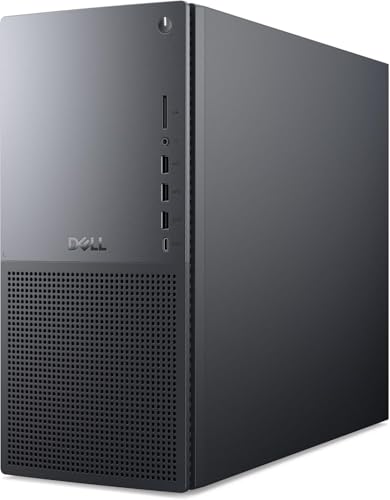
Dell XPS 8960 Tower - Best Mid-Range Windows Desktop
The Dell XPS 8960 is a compact mid-tower that fits standard consumer desktop hardware in a smaller footprint than full ATX builds. A well-configured unit includes an Intel Core i7-13700 CPU, NVIDIA RTX 4060 or RTX 4070 GPU with 8 GB VRAM, 32 GB DDR5 RAM, and a 1 TB NVMe SSD. This configuration handles Photoshop, Illustrator, and Premiere Pro without bottlenecks. The RTX 4070 option supports DLSS and NVIDIA's OptiX ray-tracing engine for Blender GPU rendering. The chassis has two USB-A and two USB-C front ports for easy peripheral access. Dell's warranty and support options are straightforward. It does not include a monitor but pairs well with any HDMI 2.1 or DisplayPort display.
Reasons to buy
- Intel Core Ultra 7 265 with TURBO BOOST to 5.50GHz (EXTREME-power processor)
- 32 GB DDR5 RAM (PREMIUM performance); Graphics RAM up to 8GB
- 2 TB SSD drive; Intel Wi-Fi 6E AX1675, 2x2, 802.11ax, Bluetooth
- Windows 11 Pro
Puget Systems Peak 2 - Best Professional Workstation
Puget Systems builds custom workstations specifically validated for creative professional software. The Peak 2 desktop is configured for Adobe Creative Cloud, with component combinations that Puget has benchmarked and verified in production environments. Base configurations start with an Intel Core i9-14900K, 64 GB DDR5 RAM, and an NVIDIA RTX 4080 or 4090 GPU. Storage is NVMe with optional RAID. Every unit is hand-assembled, stress-tested, and ships with a detailed benchmark report. The price reflects premium components and the value of a machine built to a known performance baseline rather than a guess from a consumer parts list. Puget's customer support includes direct access to the technicians who built your system.
What to look for
What to consider
Start with your primary software: Adobe Creative Cloud apps favor Apple silicon and NVIDIA GPUs on Windows. Blender GPU rendering benefits from a dedicated NVIDIA RTX card with VRAM to match your scene complexity. For 2D work, prioritize CPU single-thread speed and RAM over GPU. Display coverage matters as much as hardware; verify the monitor or built-in screen covers at least 95% of P3 color for accurate output. If you work with large files or multiple apps at once, 32 GB RAM is a safer floor than 16 GB. Laptop buyers should weigh display quality against battery life and thermal headroom under sustained loads.
What to consider
For more buying advice on creative hardware, see our guides to [best monitors for photo editing](/articles/best-monitors-for-photo-editing) and [best drawing tablets for digital art](/articles/best-drawing-tablets-for-digital-art). We explain our selection process at [methodology](/methodology).
FAQs
For photo editing and illustration in Adobe Photoshop or Illustrator, 16 GB is a functional minimum, but 32 GB allows you to work with large files and run multiple apps simultaneously without slowdowns. 3D rendering and video compositing benefit from 64 GB or more when working with complex scenes, high-resolution textures, or multi-layer compositions that exceed system memory limits.
For 2D work like photo editing and illustration, a mid-range dedicated GPU helps with GPU-accelerated filters and viewport rendering but is not strictly required. For 3D modeling, GPU rendering in Blender or Cinema 4D, and video effects, a dedicated GPU with at least 8 GB of VRAM is strongly recommended. Integrated graphics are insufficient for any serious rendering workload.
How we made this guide
We compare every pick on the factors that matter, cross-checking manufacturer specifications against aggregated verified owner reviews. We rank independently and never take payment for placement. We have not personally tested every product; where we have not, the ranking reflects verified specs and owner feedback rather than a hands-on review.
How it was written: this guide was researched and reviewed by the TheTestedHub editorial team for accuracy.
Affiliate disclosure: TheTestedHub is reader-supported. When you buy through links on our site, we may earn a commission at no extra cost to you.
Related guides

Your Docking Station Match: CalDigit TS4 and More

Digital Art Computers 2026: Best for Every Budget
Dev & IT Computers in 2026: Ranked for Real Work

Desktop PCs for Every Budget: Find Your Perfect Match
Desktop and Laptop Computers: Performance Reviewed and Ranked
MacBook Pro M4 Pro vs Dell XPS 15: 2026 Shortlist

Buy the Best DIY Computer in 2026: Corsair One i300
