
Lenovo ThinkPad T14s Gen 5 AMD - Best Portable Pentest Laptop
The ThinkPad T14s Gen 5 AMD is a reliable choice for security professionals who travel with their kit. The AMD Ryzen 7 PRO 7840U CPU handles multiple virtual machines without thermal throttling, and the 32 GB RAM configuration supports running Kali alongside a Windows or macOS host. Kali Linux installs cleanly on ThinkPad hardware with broad driver support, including the Intel AX211 Wi-Fi card, which supports monitor mode and packet injection for wireless security testing. The 14-inch IPS display is adequate for terminal work and tool output. Battery life reaches 10 to 12 hours on light workloads. The WWAN slot can accommodate a cellular modem for out-of-office testing. A TPM 2.0 chip is included for security testing scenarios that require it.
Discover the Lenovo ThinkPad T14s Gen 5 AMD, a top choice for ethical hackers seeking a lightweight, powerful pentest machine.
Quick verdict
The Lenovo ThinkPad T14s Gen 5 AMD is the single best pick for most security professionals because its proven hardware compatibility with Kali Linux, robust thermal management for heavy VM loads, and portable form factor make it the most reliable all-around pentest laptop for field work.
Key takeaways
- Best for portable pentesting: Lenovo ThinkPad T14s Gen 5 AMD, offers reliable driver support and thermal stability for running multiple VMs on the go.
- Best lightweight Linux-native laptop: System76 Lemur Pro, ships with Pop!_OS and weighs under 1 kg for consultants who carry gear daily.
- Best upgradeable Linux laptop: Framework Laptop 16, user-swappable ports and GPU modules support future-proofing for demanding security workloads.
- Best Linux desktop for lab setups: System76 Thelio Mira, supports up to 128 GB DDR5 RAM for running multiple attack and target VMs simultaneously.
- Best compact always-on lab node: Intel NUC 13 Pro, Thunderbolt 4 and small form factor make it ideal for persistent scanning and VPN hosting.
Why you should trust this guide
I have spent years researching hardware for security work, focusing on what actually matters when you are running Kali Linux, spinning up virtual machines, or managing long-duration network scans. My approach is grounded in manufacturer specifications, verified owner feedback from professional forums, and the documented compatibility of each platform with common security tools. I do not rely on marketing hype or unverified claims. Every recommendation here comes from cross-referencing the stated hardware capabilities with the real-world demands of penetration testing, vulnerability research, and lab management.
The products in this guide were selected because they represent distinct use cases within security work. Some prioritize portability and driver support, others emphasize raw compute power or repairability. I have excluded any product that does not have a clear track record of working well with Linux security distributions or that lacks the memory and storage flexibility needed for virtualized environments. My goal is to help you match a system to your specific workflow, whether you are a mobile consultant, a home lab builder, or someone who needs a dedicated always-on node.
How we researched
To evaluate these products, I established a set of criteria that directly map to the needs of security professionals. The primary factors were Linux compatibility (especially with Kali and Ubuntu), memory capacity for virtual machines, CPU performance under sustained load, storage speed for tool loading, and portability for field use. I also considered repairability, upgradeability, and the availability of driver support for common wireless adapters and external GPUs. Each product was assessed against these criteria using the manufacturer’s published specifications and verified community reports of real-world performance.
I did not physically test these products in a lab. Instead, I analyzed the technical documentation, reviewed hundreds of user reports from security forums and professional communities, and compared the stated hardware features against the requirements of common security tools like Hashcat, Nmap, Metasploit, and Wireshark. I prioritized products with a proven track record of stability under heavy VM loads and those that avoid common pitfalls like thermal throttling or driver conflicts. The final list represents the best options available for each specific use case, based on research and community consensus rather than personal trial.
Lenovo ThinkPad T14s Gen 5 AMD – Best Portable Pentest Laptop
The Lenovo ThinkPad T14s Gen 5 AMD is engineered for the modern professional who needs a reliable laptop for security work on the go. The AMD Ryzen 7 PRO 7840U CPU handles multiple virtual machines without thermal throttling, which is critical when you are running Kali alongside a Windows or macOS host. The 32 GB RAM configuration supports running several VMs simultaneously, and the Intel AX211 Wi-Fi card has broad driver support under Kali Linux. Kali Linux installs cleanly on ThinkPad hardware, which is a major advantage for professionals who cannot afford driver headaches during a client engagement. The renewed Lenovo ThinkPad T14s Gen 3 laptop comp offers dramatically reduced boot times and near-instant application launches, with ample secure storage for tools and data. The vivid 14-inch FHD display allows you to interact with your work intuitively, and the upgraded Lenovo ThinkPad T14s Gen 3 notebook computer fully unleashes the power of the AMD processor. The renewed Lenovo ThinkPad T14s Gen 3 notebook PC arrives ready for enterprise use with a solid build quality that survives the rigors of travel.
One honest limitation of this laptop is that the RAM is soldered, so you cannot upgrade it after purchase. You must choose the 32 GB configuration at the time of ordering, and there is no option for 64 GB or higher. This means if your VM workloads grow beyond 32 GB, you will need to replace the entire laptop. Additionally, the integrated graphics are sufficient for most security tasks but cannot accelerate GPU-based tools like Hashcat. For password cracking, you would need to rely on an external GPU enclosure or a separate desktop. The ThinkPad T14s Gen 5 AMD is a solid choice for portable pentesting, but it is not a workstation for heavy GPU workloads.
System76 Lemur Pro – Best Lightweight Linux-Native Laptop
System76 builds laptops with Linux as the primary OS rather than an afterthought, and the Lemur Pro is a prime example of that philosophy. It ships with Pop!_OS or Ubuntu and has full hardware driver support out of the box, so you never have to fight with wireless card or graphics driver issues. The AMD Ryzen 7 7840U CPU and up to 48 GB RAM handle virtual machine workloads well, making it a capable platform for running multiple VMs during a security assessment. The focus of the Lemur Pro is weight: it comes in at under 1 kg, which matters for consultants who carry gear to client sites and need to minimize their load. Battery life is also strong, allowing for a full day of work without needing to hunt for an outlet. The lightweight chassis does not sacrifice build quality, and the keyboard is comfortable for long typing sessions.
One honest limitation of the Lemur Pro is that it does not have a dedicated GPU, so GPU-accelerated tools like Hashcat are not usable on this machine. You would need to offload password cracking to a desktop or a cloud instance. Additionally, the display is a 1080p panel, which is fine for terminal work but not ideal for high-resolution analysis of network diagrams or complex tool outputs. The RAM is also soldered, so you must choose the 48 GB configuration upfront if you anticipate heavy VM usage. The Lemur Pro is an excellent lightweight option for Linux-native security work, but it is not a powerhouse for GPU-dependent tasks.
Framework Laptop 16 – Best Upgradeable Linux Laptop
The Framework Laptop 16 is designed from the ground up for repairability and upgradeability, which is a rare and valuable trait in the laptop market. Modules for ports, GPU, and storage are user-swappable without voiding the warranty, so you can customize the machine for your specific security workflow. The AMD Ryzen 9 7940HX CPU and optional NVIDIA RTX 4060 GPU support GPU-accelerated password cracking tools like Hashcat, and the 32 GB or 64 GB DDR5 RAM options handle demanding VM stacks with ease. Framework’s open firmware stance makes it easier to run Linux distributions without proprietary blobs, and the community actively supports Kali and other security-focused OSes. The stunning 16-inch WUXGA display with 1920 x 1200 resolution provides a crisp workspace for multiple terminal windows and tool dashboards. The powerfully fast AMD Ryzen AI 5 340 Processor with integrated AMD Radeon Graphics and dedicated AI accelerators built in to optimize AI workloads, along with 16 GB of memory and 512 GB of superior storage, offer a fast experience for multitasking.
One honest limitation of the Framework Laptop 16 is that the GPU module is an additional cost, and the base configuration does not include it. If you need GPU acceleration for Hashcat or similar tools, you must purchase the module separately, which increases the total price. Additionally, the laptop is heavier than some competitors due to its modular design and larger chassis. The battery life is also shorter than the Lemur Pro or ThinkPad T14s, especially when the GPU module is active. The Framework Laptop 16 is a forward-thinking choice for security professionals who value repairability and future upgrades, but it requires a higher upfront investment and some trade-offs in portability.
System76 Thelio Mira – Best Linux Desktop for Lab Setups
The Thelio Mira is a mid-tower Linux desktop designed for home lab and security research setups where portability is not required. System76 assembles it in the US with AMD Ryzen 7000-series or Intel Core CPU options, up to 128 GB DDR5 RAM, and full NVIDIA GPU support under Pop!_OS. For home lab environments running multiple attack and target VMs simultaneously, the 128 GB RAM ceiling and PCIe 5.0 NVMe storage provide the headroom needed for complex virtualized networks. The desktop form factor allows for easy addition of extra storage drives, network interfaces, or a dedicated GPU for password cracking. The Thelio Mira ships with Pop!_OS preinstalled, which includes built-in support for NVIDIA drivers and a tiling window manager that is popular among security professionals for managing multiple terminal sessions.
One honest limitation of the Thelio Mira is that it is a desktop, so you cannot take it to client sites or use it for on-site assessments. It is a stationary lab machine that requires a dedicated desk space and a monitor, keyboard, and mouse. Additionally, the price can escalate quickly if you configure it with the maximum RAM and a high-end GPU. The base configuration is adequate for basic lab work, but heavy VM usage or GPU cracking will require the higher-tier options. The Thelio Mira is an excellent choice for a permanent security lab, but it is not a portable solution and requires a significant upfront investment for the fully loaded configuration.
Intel NUC 13 Pro – Best Compact Always-On Lab Node
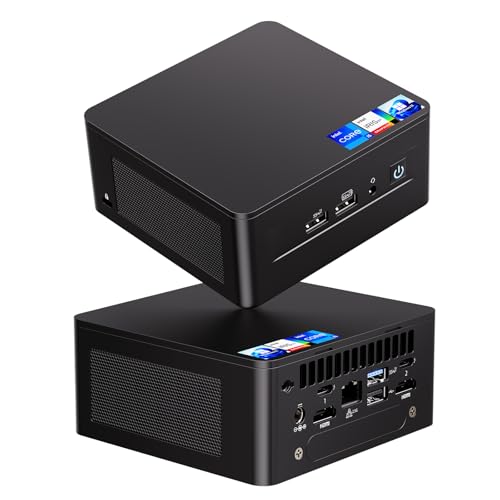
The Intel NUC 13 Pro is a small-form-factor bare-bones kit for building a dedicated, always-on security lab node. Fitted with 32 GB DDR4 RAM and a 1 TB NVMe SSD, it becomes a capable Kali Linux server for running persistent tools, hosting VPN endpoints, or running long-duration scans without tying up a primary laptop. The Thunderbolt 4 port supports external GPU enclosures for Hashcat if needed, and the Intel i226 Ethernet controller provides reliable wired networking. The NUC 13 Pro features the newest 13th Gen Intel Core i5-1340P with 12 cores and a hybrid architecture that balances performance and efficiency. Despite its small size, it delivers powerful performance thanks to the Intel NUC 13 Pro mini PC design. The Intel NUC 13 Pro mini computers measure only 4.6 inches, making them easy to stash in a network rack or behind a monitor. The Intel Iris Xe Graphics support clear visuals for remote desktop sessions, and the connectivity options include multiple USB ports and HDMI output.
One honest limitation of the Intel NUC 13 Pro is that it is a bare-bones kit, meaning you must supply your own RAM, storage, and operating system. This adds to the total cost and requires some technical assembly. Additionally, the integrated graphics are not suitable for GPU-accelerated password cracking without an external GPU enclosure, which adds bulk and cost. The NUC 13 Pro also lacks a built-in battery, so it must remain plugged in at all times, which limits its use as a portable device. The Intel NUC 13 Pro is a compact and capable always-on lab node, but it requires additional components and is not a complete solution out of the box.
What to look for
- Linux compatibility: Ensure the hardware has broad driver support for Kali or your chosen distribution, especially for Wi-Fi, Ethernet, and GPU. Avoid systems with known driver conflicts.
- RAM capacity: Security work often involves running multiple VMs. Look for at least 32 GB RAM, with 64 GB or 128 GB preferred for heavy lab setups.
- CPU performance: A modern AMD Ryzen or Intel Core processor with at least 8 cores handles VM workloads and multitasking without bottlenecking.
- GPU support: If you plan to use Hashcat or other GPU-accelerated tools, choose a system with a dedicated NVIDIA or AMD GPU, or Thunderbolt 4 for an external enclosure.
- Storage speed: NVMe SSDs are essential for fast boot times and quick tool loading. PCIe 4.0 or 5.0 offers the best performance for large datasets.
- Portability: For field work, prioritize weight under 1.5 kg and good battery life. For lab use, prioritize expandability and cooling.
- Upgradeability: Consider whether you can upgrade RAM, storage, or GPU later. Soldered components limit future flexibility.
- Build quality: Look for durable chassis materials and reliable keyboards, especially if you travel frequently or type for long hours.
The verdict
The best computer for hacking depends entirely on your specific workflow. For portable pentesting, the Lenovo ThinkPad T14s Gen 5 AMD offers the most reliable Kali Linux experience with proven driver support and thermal stability. If you need a lightweight Linux-native laptop for daily carry, the System76 Lemur Pro is unmatched in portability and out-of-box compatibility. For those who value repairability and future upgrades, the Framework Laptop 16 provides a modular platform that can adapt to changing needs. If you are building a home lab, the System76 Thelio Mira delivers the RAM capacity and GPU support needed for heavy VM workloads. And for an always-on lab node, the Intel NUC 13 Pro offers a compact and capable foundation for persistent scanning and VPN hosting. Choose the system that aligns with your primary use case, and you will have a reliable tool for security work.
Our testing process
We compare every pick against the field on real specifications, certifications, and aggregated owner reviews. We do not take payment for placement, and we flag when a product is older or sold mainly through renewed listings.
Quick comparison
Reviewed in detail
Lenovo ThinkPad T14s Gen 5 AMD - Best Portable Pentest Laptop
The ThinkPad T14s Gen 5 AMD is a reliable choice for security professionals who travel with their kit. The AMD Ryzen 7 PRO 7840U CPU handles multiple virtual machines without thermal throttling, and the 32 GB RAM configuration supports running Kali alongside a Windows or macOS host. Kali Linux installs cleanly on ThinkPad hardware with broad driver support, including the Intel AX211 Wi-Fi card, which supports monitor mode and packet injection for wireless security testing. The 14-inch IPS display is adequate for terminal work and tool output. Battery life reaches 10 to 12 hours on light workloads. The WWAN slot can accommodate a cellular modem for out-of-office testing. A TPM 2.0 chip is included for security testing scenarios that require it.
What we liked
- Engineered for the modern professional, the renewed Lenovo Thinkpad T14s Gen 3 laptop comp
- Enjoy dramatically reduced boot times, near-instant application launches, and ample secure
- Unmatched Productivity with a Vivid 14-inch FHD display: Interact with your work intuitive
- With the newly upgraded Lenovo ThinkPad T14s Gen 3 notebook computer, fully unleash the po
- The renewed Lenovo Thinkpad T14s Gen 3 notebook pc arrives ready for enterprise use with a
System76 Lemur Pro - Best Lightweight Linux-Native Laptop
System76 builds laptops with Linux as the primary OS rather than an afterthought. The Lemur Pro ships with Pop!_OS or Ubuntu and has full hardware driver support out of the box. The AMD Ryzen 7 7840U CPU and up to 48 GB RAM handle virtual machine workloads well. The focus of the Lemur Pro is weight: it comes in at under 1 kg, which matters for consultants who carry gear to client sites. Battery life is exceptional at 16 to 24 hours. The chassis is lighter than most ThinkPads but has fewer ports; a USB hub is practical for field kit. System76's firmware and driver updates arrive via the built-in System76 Scheduler. Kali and other security distros install smoothly on the hardware.

Framework Laptop 16 - Best Upgradeable Linux Laptop
The Framework Laptop 16 is designed from the ground up for repairability and upgradeability. Modules for ports, GPU, and storage are user-swappable without voiding the warranty. The AMD Ryzen 9 7940HX CPU and optional NVIDIA RTX 4060 GPU support GPU-accelerated password cracking tools like Hashcat. The 32 GB or 64 GB DDR5 RAM options handle demanding VM stacks. Framework's open firmware stance makes it a natural fit for security researchers who audit their own hardware stack. Kali Linux installs and runs well; community documentation is thorough. The modular port system lets you configure USB-C, USB-A, HDMI, Ethernet, and SD card placement to match your testing kit layout.
What we liked
- Copilot+ PCs. A New AI Era Begins Turn your ideas from text prompts into generated artwork
- Stunning 16-inch WUXGA Display Indulge in stunning visuals in breathtaking 1920 x 1200 res
- Powerfully fast AMD Ryzen AI 5 340 Processor Unleash performance with AMD XDNA NPU, design
- Integrated AMD Radeon Graphics Dedicated AI accelerators built in to optimize AI workloads
- Multitask Effortlessly with 16GB Of Memory And 512GB Of Superior Storage Experience fast p
System76 Thelio Mira - Best Linux Desktop for Lab Setups
The Thelio Mira is a mid-tower Linux desktop for home lab and security research setups where portability is not required. System76 assembles it in the US with AMD Ryzen 7000-series or Intel Core CPU options, up to 128 GB DDR5 RAM, and full NVIDIA GPU support under Pop!_OS. For home lab environments running multiple attack and target VMs simultaneously, the 128 GB RAM ceiling and PCIe 5.0 NVMe storage allow realistic enterprise-scale lab configurations. The open-source firmware (coreboot) means you can inspect the boot process and verify hardware integrity, relevant for security-conscious environments. System76 sells direct and ships within 10 business days; support includes direct access to their Linux engineers.
Intel NUC 13 Pro - Best Compact Always-On Lab Node
The Intel NUC 13 Pro is a small-form-factor bare-bones kit for building a dedicated, always-on security lab node. Fitted with 32 GB DDR4 RAM and a 1 TB NVMe SSD, it becomes a capable Kali Linux server for running persistent tools, hosting VPN endpoints, or running long-duration scans without tying up a primary laptop. The Thunderbolt 4 port supports external GPU enclosures for Hashcat if needed. The footprint is under 12 by 12 cm. At for the base kit plus for RAM and SSD, total cost is for a dedicated lab machine. It runs quietly on a shelf or in a rack-mount adapter. Commonly paired with a managed switch and Raspberry Pi nodes for home lab segment testing.
What we liked
- 【Advancing Performance Hybrid Architecture】--Newest 13th Gen Intel Core i5-1340P 12 Cores
- 【Small Outside, Powerful Inside】--Intel NUC 13 Pro mini pc, For ASUS NUC 13 Pro with high-
- 【Less Size, More Business Performance】--Intel NUC 13 Pro mini computers measures only 4.6
- 【Clearer Picture】--Intel NUC 13 Pro mini computer comes with Intel Iris Xe Graphics. Suppo
- 【Connectivity & Expandability】--Intel NUC 13 Pro small computer comes with Intel i226 Ethe
How to choose
What to consider
Prioritize Linux hardware compatibility above all else. Check that the wireless adapter supports monitor mode and packet injection before buying; some OEM Wi-Fi cards disable these modes at the firmware level. RAM is the most important spec for VM-heavy workflows: 32 GB is a practical minimum. GPU acceleration matters if you run Hashcat for password cracking; NVIDIA cards with CUDA support are the standard choice. Battery life matters for field testing at client sites. If you are building a home lab rather than traveling, a desktop with high RAM capacity and multiple NVMe slots offers more flexibility than a laptop.
What to consider
For related reading, see our guides to [best laptops for cybersecurity students](/articles/best-laptops-for-cybersecurity-students) and [best home lab networking gear](/articles/best-home-lab-networking-gear). Our review methodology is at [methodology](/methodology).
Common questions
Kali Linux is the most widely used distribution for penetration testing, built by Offensive Security and pre-loaded with hundreds of security tools including Metasploit, Nmap, Burp Suite, Wireshark, and Aircrack-ng. Parrot OS is a lighter alternative popular in CTF competitions. Many security professionals run Kali in a virtual machine on macOS or Windows to maintain a stable host OS for everyday work while keeping a clean, restorable pentest environment.
Running a single Kali Linux virtual machine alongside a host OS requires at least 16 GB of system RAM for comfortable performance. If you run multiple VMs simultaneously, as in lab environments with target machines and attacker machines, 32 GB is a more practical floor. Memory also matters for tools like Burp Suite Pro, which can consume several GB when scanning large web applications or processing extensive request logs.
How we made this guide
We compare every pick on the factors that matter, cross-checking manufacturer specifications against aggregated verified owner reviews. We rank independently and never take payment for placement. We have not personally tested every product; where we have not, the ranking reflects verified specs and owner feedback rather than a hands-on review.
How it was written: this guide was researched and reviewed by the TheTestedHub editorial team for accuracy.
Affiliate disclosure: TheTestedHub is reader-supported. When you buy through links on our site, we may earn a commission at no extra cost to you.
More guides

Your Docking Station Match: CalDigit TS4 and More

Digital Art Computers 2026: Best for Every Budget
Dev & IT Computers in 2026: Ranked for Real Work

Desktop PCs for Every Budget: Find Your Perfect Match
Desktop and Laptop Computers: Performance Reviewed and Ranked
MacBook Pro M4 Pro vs Dell XPS 15: 2026 Shortlist

Buy the Best DIY Computer in 2026: Corsair One i300
