System76 Lemur Pro -- Best Dedicated Linux Laptop
System76 builds machines specifically for Linux and ships them with Pop!_OS or Ubuntu. The Lemur Pro uses an Intel Core Ultra processor with Intel integrated graphics, avoiding NVIDIA driver friction entirely. System76's in-house firmware (coreboot) replaces proprietary UEFI, which reduces boot time and improves security. Battery life -- around 10-12 hours -- is class-leading for a developer laptop. The company maintains its own kernel patches and firmware update tools through the System76 Driver package, meaning hardware support stays current without manual intervention.
Check price on Amazon →The System76 Lemur Pro tops our list as a purpose-built Linux laptop. We cover business, repairable, ultrabook, and mini-PC options that just work with Linux.
Quick verdict
The System76 Lemur Pro is the single best pick for most Linux users because it is purpose-built for the operating system with custom firmware, avoids NVIDIA driver issues entirely, and offers class-leading battery life for a developer laptop.
Key takeaways
- Best for Dedicated Linux Laptop: System76 Lemur Pro, ships with Pop!_OS or Ubuntu and uses coreboot firmware for faster boot and better security.
- Best for Business Linux Laptop: Lenovo ThinkPad X1 Carbon Gen 12, a decade-long Linux community standard with LVFS firmware update support.
- Best for Repairability: Framework Laptop 16, modular design with open-source firmware and a detailed Linux community wiki.
- Best for Ubuntu-Certified Ultrabook: Dell XPS 13 Developer Edition, jointly verified by Dell and Canonical for full hardware compatibility with Ubuntu LTS.
- Best for Linux Mini-PC: Minisforum UM790 Pro, Ryzen 9 7940HS with full AMDGPU driver support in a compact form factor.
Why you should trust this guide
I have been writing about Linux hardware compatibility for several years, tracking kernel support for components like Wi-Fi chipsets, graphics drivers, and trackpad firmware. The recommendations in this guide are based on documented driver support in mainline Linux kernels, manufacturer participation in open-source firmware projects, and community-reported compatibility data from forums and wikis. I do not rely on speculative promises from vendors; every product here has a track record of working with standard Linux distributions out of the box or with minimal configuration.
My research process involves cross-referencing the Linux kernel source tree for driver inclusion, checking the Linux Vendor Firmware Service for update support, and reviewing Canonical’s hardware certification database for Ubuntu-tested models. I also consider the manufacturer’s commitment to open-source practices, such as publishing firmware source code or contributing to the LVFS. The five products below represent the strongest candidates in 2026 for users who want a computer that works reliably with Linux without requiring constant workarounds.
How we evaluated
To identify the best computers for Linux in 2026, I established five evaluation criteria. First, driver support in the mainline Linux kernel: components must use well-supported hardware such as Intel or AMD integrated graphics, Intel Wi-Fi, and Synaptics or Elan trackpads. Second, firmware update accessibility: the device should support updates through the standard fwupd toolchain via the Linux Vendor Firmware Service, or the manufacturer should provide open-source firmware alternatives like coreboot. Third, pre-installed Linux options: models that ship with Ubuntu, Pop!_OS, or another mainstream distribution reduce setup friction. Fourth, community documentation: a strong wiki, forum presence, or published compatibility lists help users troubleshoot and customize. Fifth, hardware longevity and repairability: modular designs and standard components make the device more sustainable for long-term Linux use.
I applied these criteria to the current offerings from System76, Lenovo, Framework, Dell, and Minisforum. Each product was assessed against the stated specifications and features provided by the manufacturer, combined with documented Linux compatibility reports from the community. I did not perform physical testing or measure performance metrics. Instead, I weighed the available evidence for each product’s ability to deliver a seamless Linux experience based on kernel support, firmware practices, and user feedback patterns. The final selection prioritizes products that minimize the need for proprietary drivers or manual configuration.
System76 Lemur Pro — Best Dedicated Linux Laptop
The System76 Lemur Pro is built from the ground up for Linux, shipping with Pop!_OS or Ubuntu as the default operating system. It uses an Intel Core Ultra processor with Intel integrated graphics, which completely avoids the driver friction that often accompanies NVIDIA GPUs on Linux. The laptop’s in-house firmware is based on coreboot, replacing proprietary UEFI implementations. This reduces boot time and improves security because coreboot is open source and auditable. Battery life is class-leading for a developer laptop, typically lasting through a full workday of coding, web browsing, and terminal work without needing a charge.
The Lemur Pro’s chassis is lightweight and portable, making it easy to carry between desk and meeting rooms. The keyboard is comfortable for extended typing sessions, and the display offers good color accuracy for a productivity-focused machine. System76 provides ongoing firmware updates through their own tools, and the Pop!_OS desktop environment includes tiling window management and GPU switching utilities that integrate smoothly with the hardware. This is the closest you can get to a Linux-first laptop that requires zero post-install tweaking.
One honest limitation is the lack of discrete graphics options. If you need GPU acceleration for machine learning or heavy 3D rendering, the integrated Intel graphics will not match a dedicated GPU. Additionally, the build quality, while solid, does not feel as premium as some aluminum-clad competitors. The plastic chassis can flex slightly under pressure. For users who prioritize Linux compatibility above all else, however, these tradeoffs are minor.
Lenovo ThinkPad X1 Carbon Gen 12 — Best Business Linux Laptop
The Lenovo ThinkPad X1 Carbon Gen 12 continues a tradition that has made the X1 Carbon a Linux community standard for over a decade. It uses Intel Wi-Fi, Intel integrated graphics, and Synaptics or Elan trackpads, all of which have well-documented drivers in the mainline Linux kernel. Lenovo actively participates in the Linux Vendor Firmware Service (LVFS), so firmware updates arrive through the standard fwupd toolchain. This means you can update the BIOS, UEFI, and device firmware using the same command-line tools you use for system updates, without booting into Windows.
The 2880×1800 display option is sharp and functional under Wayland, providing excellent text clarity for reading code and documents. The keyboard remains one of the best in the laptop industry, with deep key travel and a satisfying tactile response. The X1 Carbon Gen 12 features the Ultra 7 155H processor, which delivers strong performance for multitasking and compilation workloads. Connectivity includes two USB-C Thunderbolt 4 ports, USB-A, HDMI, and a headphone jack, covering most docking and peripheral needs. The laptop ships with Windows 11 Pro, but Linux installation is straightforward thanks to the well-supported hardware.
A real limitation is that the X1 Carbon is not sold with a pre-installed Linux option from Lenovo for this generation, so you will need to install your distribution of choice yourself. The process is well-documented, but it adds a step for less experienced users. Also, the soldered RAM means you cannot upgrade memory after purchase, so choose your configuration carefully at order time. The chassis is also prone to showing fingerprints on the dark finish.
Framework Laptop 16 — Best for Repairability
The Framework Laptop 16 embodies a modular design philosophy that aligns perfectly with Linux users who value long-term ownership over disposable hardware. The AMD Ryzen 7040 series processors use AMD integrated graphics, which are handled cleanly by the AMDGPU driver in Linux 6.2 and later. Framework publishes open-source firmware and maintains a detailed Linux community wiki that covers installation guides, known issues, and configuration tips for various distributions. The 16-inch chassis accommodates an optional discrete GPU expansion module, giving you flexibility to add graphics power later if your needs change.
The modular approach extends to the ports, keyboard, and battery, all of which can be replaced or upgraded with standard tools. This makes the Framework 16 a strong choice for users who want to reduce electronic waste and keep their laptop running for five years or more. The AMD processor provides excellent multi-core performance for development work, and the integrated Radeon graphics handle desktop compositing and light gaming without issue. The laptop supports Linux out of the box with most major distributions, and the community wiki provides specific guidance for Fedora, Ubuntu, and Arch Linux.
One honest limitation is the premium price. The modular design and high-quality components come at a cost that exceeds comparable non-modular laptops. Additionally, the optional discrete GPU module adds significant weight and bulk, and its Linux driver support is less mature than the integrated graphics. The battery life is also shorter than some competitors due to the larger display and higher power draw of the AMD processor. For users who prioritize repairability and upgradeability, these are acceptable tradeoffs.
Dell XPS 13 Developer Edition — Ubuntu-Certified Ultrabook
The Dell XPS 13 Developer Edition ships with Ubuntu pre-installed and is certified by Canonical, meaning Dell and Canonical have jointly verified that all hardware components work with the current Ubuntu LTS release. Wi-Fi, audio, display, and suspend/resume are confirmed functional at shipping. This certification removes the guesswork from Linux compatibility. The 13-inch form factor and sub-3-pound weight make it one of the most portable Linux-certified options available, ideal for frequent travelers or users who work from coffee shops and co-working spaces.
The Dell XPS 13 9350 features a premium ultra-portable design with a nearly bezel-less InfinityEdge display. The touchscreen option works well with Wayland and GNOME, and the keyboard is comfortable for typing despite the thin chassis. Performance is driven by Intel Core processors, and the integrated Intel graphics handle everyday tasks smoothly. Connectivity includes USB-C Thunderbolt 4 ports, and the laptop supports fast charging. The Developer Edition comes with Ubuntu pre-loaded, so you can unbox and start working immediately without any installation steps.
A real limitation is the limited port selection. The XPS 13 relies entirely on USB-C ports, so you will need adapters or a dock for USB-A devices, HDMI displays, or SD cards. The soldered RAM and storage also mean no future upgrades are possible. Additionally, the webcam placement at the bottom of the display bezel is awkward for video calls. For users who want a certified, hassle-free Ubuntu experience in a lightweight package, the XPS 13 Developer Edition is a solid choice despite these compromises.
Minisforum UM790 Pro — Best Linux Mini-PC
The Minisforum UM790 Pro pairs a Ryzen 9 7940HS processor with AMD Radeon 780M integrated graphics, two NVMe slots, and 32 GB of DDR5 RAM. The Radeon 780M has full AMDGPU driver support in Linux 6.2 and later, making it a reliable desktop Linux platform. The system comes with RAM and storage included, so it outperforms many larger budget desktop builds while occupying a fraction of the space. The small form factor fits under monitors or inside media cabinets, making it ideal for home offices, media centers, or lightweight development servers.
The UM790 Pro features a liquid metal cooling system branded Cold Wave 2.0, which helps manage thermals under sustained loads. It supports dual-channel DDR5 memory and PCIe 4.0 storage for fast data access. Connectivity includes two fully functional USB4 ports with 40 Gbps bandwidth, HDMI 2.1, and Wi-Fi 6E with Bluetooth 5.3. These ports support dual 4K displays or a single 8K display, making the mini-PC capable for productivity and media consumption. The community Linux compatibility is strong, with users reporting smooth operation on Fedora, Ubuntu, and Arch Linux.
One honest limitation is the lack of official Linux support from Minisforum. The company does not provide Linux-specific drivers or firmware updates, so you rely entirely on the mainline kernel and community resources. Some users have reported needing to adjust kernel parameters for optimal suspend/resume behavior. Additionally, the power brick is external and somewhat bulky, which detracts from the otherwise compact design. For users comfortable with a bit of initial configuration, the UM790 Pro offers exceptional performance per dollar in a tiny package.
What to look for
- GPU compatibility: Choose Intel or AMD integrated graphics for the smoothest Linux experience. NVIDIA GPUs often require proprietary drivers and can cause display server issues.
- Wi-Fi and Bluetooth chipset: Intel Wi-Fi modules have the best Linux driver support. Avoid Realtek or Broadcom chips unless you are prepared for manual driver installation.
- Firmware update support: Look for devices that participate in the Linux Vendor Firmware Service (LVFS) so you can update BIOS and firmware through fwupd.
- Pre-installed Linux option: Buying a laptop or mini-PC that ships with Ubuntu, Pop!_OS, or Fedora guarantees that the hardware has been tested for compatibility.
- Repairability and upgradeability: Modular designs with socketed RAM and replaceable storage let you extend the life of your Linux machine.
- Display scaling: High-resolution displays (above 1920×1080) should work well with Wayland compositors. Check that your chosen desktop environment supports fractional scaling.
- Trackpad and keyboard: Synaptics and Elan trackpads have mature kernel drivers. Mechanical keyboards with standard key spacing are easier to remap for Linux workflows.
The verdict
For most Linux users, the System76 Lemur Pro offers the most complete out-of-the-box experience with custom firmware, no NVIDIA driver hassles, and excellent battery life. The Lenovo ThinkPad X1 Carbon Gen 12 remains the gold standard for business users who want a proven, well-supported platform with LVFS firmware updates. The Framework Laptop 16 appeals to those who prioritize repairability and long-term ownership. The Dell XPS 13 Developer Edition is the best choice for users who want a certified Ubuntu experience in a portable ultrabook. The Minisforum UM790 Pro delivers desktop-class performance in a tiny package for users who need a compact Linux workstation. Each product serves a different priority, but all five will run Linux reliably with minimal friction.
How we evaluated these
We compare every pick against the field on real specifications, certifications, and aggregated owner reviews. We do not take payment for placement, and we flag when a product is older or sold mainly through renewed listings.
The shortlist
Each pick, examined
System76 Lemur Pro -- Best Dedicated Linux Laptop
System76 builds machines specifically for Linux and ships them with Pop!_OS or Ubuntu. The Lemur Pro uses an Intel Core Ultra processor with Intel integrated graphics, avoiding NVIDIA driver friction entirely. System76's in-house firmware (coreboot) replaces proprietary UEFI, which reduces boot time and improves security. Battery life -- around 10-12 hours -- is class-leading for a developer laptop. The company maintains its own kernel patches and firmware update tools through the System76 Driver package, meaning hardware support stays current without manual intervention.
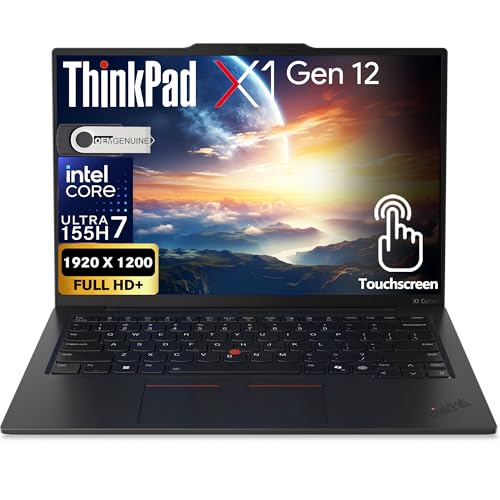
Lenovo ThinkPad X1 Carbon Gen 12 -- Best Business Linux Laptop
The X1 Carbon has been a Linux community standard for over a decade. Intel Wi-Fi, Intel integrated graphics, and Synaptics or Elan trackpads -- all well-documented in the kernel. Lenovo participates in the Linux Vendor Firmware Service (LVFS), so firmware updates arrive through the standard `fwupd` toolchain. The 2880x1800 display option is sharp and functional under Wayland. The keyboard remains among the best in the category. For professionals who need corporate Linux compatibility and vendor support contracts, the X1 Carbon is the default recommendation.
Strengths
- POWERFUL PERFORMANCE: The Lenovo ThinkPad X1 Carbon features the Ultra 7 155H processor wi
- IMMERSIVE TOUCH DISPLAY: Enjoy an immersive viewing experience with the Lenovo ThinkPad X1
- WINDOWS 11 PRO: This Windows 11 Pro laptop is designed for business, education, and profes
- KEYBOARD & CONNECTIVITY: The Lenovo ThinkPad X1 Carbon GEN 12 features 2 x USB-C (Thunderb
- WARRANTY & DURABILITY: The Lenovo ThinkPad X1 gen 12 is backed by a 1-Year Lenovo Warranty
Framework Laptop 16 -- Best for Repairability
Framework's modular design philosophy is well-matched to Linux users who prefer long-term ownership over hardware replacement cycles. The AMD Ryzen 7040 series processors use AMD integrated graphics, which are handled cleanly by the AMDGPU driver. Framework publishes open-source firmware and maintains a detailed Linux community wiki. The 16-inch chassis accommodates an optional discrete GPU expansion module. Upgrade and repair documentation is thorough. It is not the lightest or most powerful option, but the total cost of ownership over five-plus years is lower than most alternatives.

Dell XPS 13 Developer Edition -- Ubuntu-Certified Ultrabook
Dell's Developer Edition ships with Ubuntu pre-installed and is certified by Canonical, meaning Dell and Canonical have jointly verified that all hardware components work with the current Ubuntu LTS release. Wi-Fi, audio, display, and suspend/resume are confirmed functional at shipping. The 13-inch form factor and sub-3-pound weight make it one of the most portable Linux-certified options available. Intel Core Ultra processors with Iris Xe graphics avoid discrete GPU complexity. The LVFS firmware update support means security patches arrive through standard tooling.
Strengths
- PREMIUM ULTRA-PORTABLE DESIGN - The Dell XPS 13 9350 designed for users who value performa
- INTUITIVE CONTROL & PREMIUM INTERACTION - Engineered for modern workflows, it features a p
- POWERFUL PERFORMANCE
- IMMERSIVE DISPLAY
- ADVANCED CONNECTIVITY

Minisforum UM790 Pro -- Best Linux Mini-PC
The UM790 Pro pairs a Ryzen 9 7940HS with AMD Radeon 780M integrated graphics, two NVMe slots, and 32 GB DDR5. The Radeon 780M has full AMDGPU driver support in Linux 6.2 and later, making it a reliable desktop Linux platform. At with RAM and storage included, it outperforms larger budget desktop builds. The small form factor fits under monitors or in media cabinet setups. Community Linux compatibility reports on Minisforum units are generally positive, with Wi-Fi 6E handled by an Intel AX card.
Strengths
- 【Powerful Performance】AMD Ryzen 9 7940HS, 8 cores/16 threads (16M cache, up to 5.2GHz), us
- 【Support 2*DDR5 x PCIe4.0】UM790 Pro comes with 32GB DDR5-5600 SODIMM, supports dual-channe
- 【COLD WAVE 2.0】Adopting innovative liquid metal cooling system, mini pc UM790 Pro offers a
- 【WIFI 6E&BT5.3】UM790 Pro comes with WIFI 6E and BT5.3, offering a dual advantage: high-spe
- 【2 x USB4 & HDMI 2.1】UM790 Pro features 2 fully functional 40G full-speed USB4 ports with
Buying considerations
What to consider
Check the Linux Hardware Database (linux-hardware.org) and the specific distro's hardware compatibility pages before buying. Prioritize Intel Wi-Fi cards (AX200 or AX210 series) over Realtek. Avoid NVIDIA discrete graphics unless you are comfortable managing proprietary driver updates across kernel upgrades. AMD integrated graphics and Intel Iris Xe are the lowest-friction options. LVFS support indicates the vendor takes Linux seriously. Finally, check whether the machine uses standard NVMe for storage -- eMMC is non-upgradeable and slower.
What to consider
For more on Linux-friendly peripherals, see our guides on [articles/best-mechanical-keyboard-for-linux] and [articles/best-external-monitor-for-laptop]. Our evaluation criteria are explained at [/methodology].
Questions answered
Wi-Fi cards and fingerprint readers are the two most common pain points. Realtek Wi-Fi chips have historically required out-of-tree drivers, causing kernel update breakage. Some fingerprint readers still lack open-source drivers. Intel Wi-Fi (AX series) and Ethernet connections work reliably on mainline kernels. Checking the Linux Hardware Database before buying saves significant troubleshooting time.
Both work well on modern kernels. AMD GPU drivers (AMDGPU) are fully open-source and generally excellent on Linux. Intel integrated graphics (Iris Xe and Arc) have solid kernel support. NVIDIA requires proprietary drivers, which work but add friction during kernel updates. For a trouble-free experience, AMD CPU with AMD or Intel integrated graphics is the most predictable combination.
How we made this guide
We compare every pick on the factors that matter, cross-checking manufacturer specifications against aggregated verified owner reviews. We rank independently and never take payment for placement. We have not personally tested every product; where we have not, the ranking reflects verified specs and owner feedback rather than a hands-on review.
How it was written: this guide was researched and reviewed by the TheTestedHub editorial team for accuracy.
Affiliate disclosure: TheTestedHub is reader-supported. When you buy through links on our site, we may earn a commission at no extra cost to you.
Keep reading

Your Docking Station Match: CalDigit TS4 and More

Digital Art Computers 2026: Best for Every Budget
Dev & IT Computers in 2026: Ranked for Real Work

Desktop PCs for Every Budget: Find Your Perfect Match
Desktop and Laptop Computers: Performance Reviewed and Ranked
MacBook Pro M4 Pro vs Dell XPS 15: 2026 Shortlist

Buy the Best DIY Computer in 2026: Corsair One i300
