Apple MacBook Air 15 M4 -- Best Portable Marketing Laptop
The MacBook Air 15 M4 runs a full day of marketing tasks on a single charge -- consistently reaching 15-18 hours in browser and productivity-heavy use. The 15.3-inch Liquid Retina display is large enough to keep Figma and analytics dashboards side by side without excessive scrolling. The M4 chip handles Canva, Adobe Express, and light Premiere Pro work without thermal throttling or fan noise, since the Air has no fans. For marketers at agencies who need to present creative to clients from their laptop, the display brightness (500 nits) and color accuracy (P3) are above the average Windows laptop at this price.
Check price on Amazon →Apple MacBook Air 15 M4 tops our list as the best computer for marketing. Compare Dell XPS 15, Mac Mini M4, Lenovo ThinkPad T14s, and Surface Pro 11 for.
Quick verdict
For most marketers, the Apple MacBook Air 15 M4 is the single best pick. It combines exceptional battery life, a large display for multitasking, and enough power for creative tools without the weight or fan noise of a pro laptop.
Key takeaways
- Best for portability and battery life: Apple MacBook Air 15 M4, runs a full day on a single charge with a large screen for creative work.
- Best Windows laptop for marketing: Dell XPS 15 9530, offers OLED display accuracy and strong Intel performance for design and analytics.
- Best budget desktop for marketing: Apple Mac Mini M4, delivers reliable M4 performance at a lower price point for in-office use.
- Best for data-focused marketers: Lenovo ThinkPad T14s Gen 6 AMD, excels with its business keyboard and Ryzen 7 performance for spreadsheets and analytics tools.
- Best 2-in-1 for marketers: Microsoft Surface Pro 11, provides pen support and a detachable keyboard for sketching and client presentations.
Why you should trust this guide
I have spent years researching and writing about computers for professional workflows, with a specific focus on marketing teams. My approach relies on analyzing manufacturer specifications, reading verified owner feedback from multiple retail and community sources, and comparing how each machine handles the core tasks that marketers face every day. These tasks include running browser-based marketing platforms like HubSpot and Google Analytics, using design tools such as Canva and Adobe Express, and managing data in Excel or Tableau. I do not rely on single opinions or marketing claims. Instead, I cross-reference performance reports, display quality assessments, and real-world battery life accounts to build a balanced picture of each product.
This guide is built for the 2026 market, which means I focus on the latest processor generations and memory configurations that are standard for this year. I prioritize products that offer a clear advantage for marketing work, whether that is long battery life for remote work, accurate color for creative reviews, or a comfortable keyboard for data entry. I also note honest limitations for every product, because no single computer is perfect for every marketer. My goal is to give you a clear, research-backed recommendation that helps you match a machine to your specific role and budget.
How we researched
To evaluate these five computers for marketing work, I established a set of criteria that reflect the real demands of the profession. The primary factors were processor performance for multitasking, memory capacity for handling multiple browser tabs and design applications, display quality for color accuracy and screen real estate, battery life for mobile use, and port selection for connecting monitors and peripherals. I also considered build quality, keyboard comfort, and operating system ecosystem, since many marketers rely on tools like iCloud or Microsoft 365. Each product was assessed against these criteria using the manufacturer’s stated specifications and aggregated owner feedback from reputable sources.
I did not physically test these computers in a lab setting. Instead, I compared each product’s listed features against the common workflows of marketing professionals. For example, I looked at whether a laptop like the MacBook Air 15 M4 can run Figma and a data dashboard side by side without thermal issues, based on its M4 chip architecture and fanless design. I also examined how the Dell XPS 15 9530’s OLED display supports color-critical ad reviews, and whether the Lenovo ThinkPad T14s Gen 6 AMD’s keyboard and Ryzen 7 processor suit data-heavy tasks. The goal was to identify which machine best fits each marketing sub-role, from creative design to analytics, without inventing test results or personal usage claims.
Apple MacBook Air 15 M4
The Apple MacBook Air 15 M4 is built for marketers who need a portable machine that does not compromise on performance or battery life. The 15.3-inch Liquid Retina display provides ample screen space for keeping Figma and analytics dashboards open side by side, reducing the need for constant scrolling. This is a significant advantage for multitaskers who juggle creative tools and data reports throughout the day. The M4 chip handles Canva, Adobe Express, and even light Premiere Pro work without thermal throttling or fan noise, because the laptop has no fan at all. This means you can work in quiet environments like coffee shops or open offices without disturbing others or hearing a loud fan spin up.
Battery life is a standout feature here. The MacBook Air 15 M4 consistently reaches 15 to 18 hours in browser and productivity-heavy use, which means you can leave your charger at home for a full workday. The unified memory architecture of the M4 chip allows the 16 GB of RAM to be used efficiently by both the CPU and GPU, which helps when switching between design apps and web tools. The build is thin and light, making it easy to carry to client meetings or between desks. The keyboard is comfortable for long typing sessions, and the trackpad is large and responsive.
One honest limitation is that the MacBook Air 15 M4 is not designed for heavy video rendering or 3D work. If your marketing role involves intensive Premiere Pro timelines or complex After Effects compositions, you may experience slower export times compared to a pro laptop with a dedicated fan and higher-end GPU. Additionally, the port selection is limited to two Thunderbolt ports and a MagSafe charging port, so you may need a dongle for connecting multiple external displays or USB-A devices. This is a trade-off for the slim design and long battery life.
Dell XPS 15 9530
The Dell XPS 15 9530 is the best Windows laptop for marketing professionals who prefer the Windows ecosystem. The 15.6-inch OLED option delivers accurate colors and deep blacks, which is essential for reviewing ad creative, social media graphics, and video content before publishing. The Intel Core i7 processor paired with 16 to 32 GB of DDR5 RAM ensures that the laptop can handle multiple heavy web apps and local design software simultaneously without slowdowns. For marketers who work with video, the NVIDIA RTX 4060 is available in higher configurations, providing dedicated graphics power for tasks like short video edits or motion graphics in tools like Adobe After Effects.
Dell’s port selection is a key advantage for this model. The XPS 15 includes a full-size SD card slot, two Thunderbolt 4 ports, a USB-C port, and a headphone jack. This variety reduces the need for adapters when connecting cameras, external drives, or monitors. The build quality is premium, with a slim aluminum chassis and a comfortable keyboard with good key travel. The 16:10 aspect ratio of the display provides extra vertical space for reading documents and web pages, which is useful for marketing research and content management.
One honest limitation is that the Dell XPS 15 9530 can run warm under sustained load, especially when using the dedicated GPU for extended periods. The fan noise can become noticeable during intensive tasks, which may be distracting in quiet environments. Battery life is also shorter than the MacBook Air, typically lasting 6 to 8 hours with mixed use, so you will need to carry the charger for full-day work away from a desk. Additionally, the OLED display, while beautiful, can be prone to burn-in over time if static elements like taskbars are left on screen for long periods.
Apple Mac Mini M4
The Apple Mac Mini M4 is the best budget desktop for marketing teams that need a reliable workhorse without paying for a laptop chassis. The base configuration comes with the M4 chip and 16 GB of unified RAM, which is standard for 2026 models. This setup handles HubSpot, Slack, Adobe Express, and data dashboards without slowdowns, making it a practical choice for in-office marketers who do not need portability. The Mac Mini pairs well with any USB-C or Thunderbolt display, so you can choose a monitor that fits your budget and workspace. The compact size means it takes up very little desk space, and the lack of a fan in the base model ensures silent operation.
macOS provides good built-in iCloud and Continuity features for marketers who use an iPhone. You can easily copy text or images between devices, answer calls from your Mac, and use your iPhone as a webcam. The Mac Mini also supports multiple external displays, which is useful for setting up a multi-monitor workflow with analytics tools on one screen and design software on another. The M4 chip’s efficiency means the Mac Mini stays cool and quiet even during prolonged use, which is a benefit for shared office spaces.
One honest limitation is that the Mac Mini M4 does not include a dedicated GPU, so it is not suited for heavy video editing or 3D rendering tasks. If your marketing work involves intensive Premiere Pro projects or complex motion graphics, you may want to consider a Mac Studio or a Windows desktop with a discrete graphics card. Additionally, the base model only has two Thunderbolt ports and two USB-A ports, so you may need a hub if you plan to connect multiple external drives and peripherals. The lack of an included keyboard, mouse, or monitor also adds to the total cost of the setup.
Lenovo ThinkPad T14s Gen 6 AMD
The Lenovo ThinkPad T14s Gen 6 AMD is designed for data-focused marketers who spend more time in Excel, Tableau, SQL tools, and data visualization platforms than in design tools. The AMD Ryzen 7 processor provides strong multi-core performance for crunching numbers and running complex queries, while the 14-inch IPS display at 1920×1200 resolution is functional without being exceptional. The standout feature is the keyboard, which is widely regarded as the best in the business laptop category. It offers deep key travel and a comfortable typing experience that reduces fatigue during long data entry sessions. The trackpad is also precise and reliable.
Battery life is above average for a business laptop, lasting 10 to 12 hours with mixed use. This makes the T14s Gen 6 a good choice for marketers who move between meetings and desks. The build quality is rugged, with a durable chassis that can withstand minor bumps and drops. Port selection includes two USB-C ports, two USB-A ports, an HDMI port, and a headphone jack, which covers most connectivity needs without a dongle. The laptop also includes a physical webcam shutter for privacy, which is a nice touch for remote meetings.
One honest limitation is that the 1920×1200 IPS display is not color-accurate enough for creative work. If your role involves reviewing ad creative or editing images, you may notice that colors appear less vibrant or accurate compared to an OLED or high-end IPS panel. The display is also only 14 inches, which can feel cramped when working with large spreadsheets or multiple windows side by side. Additionally, the ThinkPad design is functional but plain, with a boxy black chassis that lacks the premium feel of some competitors. This is a tool for productivity, not for style.
Microsoft Surface Pro 11
The Microsoft Surface Pro 11 is the best 2-in-1 for marketers who need a device that doubles as a tablet for sketching, client annotation, or tablet-based presentations. The detachable keyboard and pen support make it easy to mark up PDFs, draw quick wireframes, or present data in a more interactive way. The 13-inch PixelSense display is sharp and bright, with good color accuracy for reviewing creative assets. The Snapdragon X Elite processor is ARM-based, which means it offers excellent battery life and instant-on performance, similar to a smartphone. This makes the Surface Pro 11 a responsive device for quick tasks like checking email, editing a document, or jumping into a video call.
The form factor is the main appeal. You can detach the keyboard and use the Surface Pro 11 as a standalone tablet for reading reports or showing presentations. The pen is pressure-sensitive, which is useful for marketers who do quick sketches or need to annotate designs. The kickstand allows you to prop the device up at any angle, which is helpful for presentations or hands-free use. The device is also thin and light, making it easy to carry in a bag alongside other materials for client meetings.
One honest limitation is that the Snapdragon X Elite processor is ARM-based, which means some legacy Windows applications may not run natively. You need to check specific tool compatibility before buying, especially if you rely on older plugins or specialized marketing software that has not been updated for ARM. Performance in x86 emulation mode can be slower, and some apps may not work at all. Additionally, the Surface Pro 11 has limited ports, with only two USB-C ports and no headphone jack, so you will likely need a dongle for connecting external displays or USB-A devices. The keyboard and pen are sold separately, which increases the total cost significantly.
What to look for
- Processor performance: Look for a chip that can handle multitasking across browser tabs, design apps, and data tools. Intel Core i7, AMD Ryzen 7, Apple M4, or Snapdragon X Elite are good benchmarks for marketing work in 2026.
- Memory and storage: At least 16 GB of RAM is recommended for running multiple applications simultaneously. For storage, a 512 GB SSD is a good starting point, but 1 TB is better if you work with large files or local data sets.
- Display quality: For creative work, prioritize a display with good color accuracy, such as an OLED panel or a high-end IPS screen. For data work, a functional display with sufficient resolution is adequate, but screen size matters for multitasking.
- Battery life: If you work remotely or move between meetings, look for a laptop that can last a full workday, ideally 10 hours or more on a single charge. Desktop users can ignore this factor.
- Port selection: Consider how many external displays, drives, and peripherals you need to connect. A mix of USB-C, USB-A, and HDMI ports reduces the need for dongles. Thunderbolt support is a bonus for fast data transfer.
- Operating system ecosystem: Choose between macOS and Windows based on the tools you use. macOS integrates well with iCloud and iPhone, while Windows offers broader compatibility with legacy business software. ARM-based Windows devices require checking app compatibility.
- Form factor: Decide whether you need a traditional laptop, a desktop, or a 2-in-1 with pen support. Your workflow dictates the best shape. Data-focused users may prefer a laptop with a great keyboard, while creative users may value a touchscreen or pen input.
The verdict
For most marketing professionals in 2026, the Apple MacBook Air 15 M4 is the strongest overall choice because it balances portability, battery life, and performance for creative and analytical tasks. If you need Windows for specific software or prefer a larger OLED display, the Dell XPS 15 9530 is a solid alternative. For budget-conscious teams setting up an office, the Apple Mac Mini M4 provides reliable desktop performance at a lower cost. Data-focused marketers should choose the Lenovo ThinkPad T14s Gen 6 AMD for its exceptional keyboard and Ryzen 7 power. And if your work involves sketching, presentations, or tablet use, the Microsoft Surface Pro 11 offers a unique 2-in-1 experience, provided you verify app compatibility. Match your choice to your primary tasks and you will find a machine that supports your marketing work effectively.
Our testing process
We compare every pick against the field on real specifications, certifications, and aggregated owner reviews. We do not take payment for placement, and we flag when a product is older or sold mainly through renewed listings.
Quick comparison
Reviewed in detail
Apple MacBook Air 15 M4 -- Best Portable Marketing Laptop
The MacBook Air 15 M4 runs a full day of marketing tasks on a single charge -- consistently reaching 15-18 hours in browser and productivity-heavy use. The 15.3-inch Liquid Retina display is large enough to keep Figma and analytics dashboards side by side without excessive scrolling. The M4 chip handles Canva, Adobe Express, and light Premiere Pro work without thermal throttling or fan noise, since the Air has no fans. For marketers at agencies who need to present creative to clients from their laptop, the display brightness (500 nits) and color accuracy (P3) are above the average Windows laptop at this price.
Dell XPS 15 9530 -- Best Windows Laptop for Marketing
For Windows-ecosystem marketing teams, the XPS 15 covers creative and analytical workflows well. The 15.6-inch OLED option delivers accurate colors for reviewing ad creative, and the Intel Core i7 with 16-32 GB DDR5 RAM handles multiple heavy web apps and local design software simultaneously. The NVIDIA RTX 4060 is available in higher configurations for video-heavy roles. Dell's port selection -- Thunderbolt 4, USB-A, SD card reader -- means fewer dongle dependencies during client meetings. Battery life is around 8 hours in mixed use, shorter than the MacBook Air but acceptable.
Apple Mac Mini M4 -- Best Budget Marketing Desktop
For in-office marketers who need a reliable desktop without laptop pricing, the Mac Mini M4 at base is practical. It pairs well with any USB-C or Thunderbolt display. The M4 chip and 16 GB unified RAM (standard in 2026 configs) manages HubSpot, Slack, Adobe Express, and data dashboards without slowdowns. macOS also provides good built-in iCloud and Continuity features for marketers who use iPhone for capturing content. Adding an external SSD for asset libraries keeps the internal drive free for the operating system and applications.
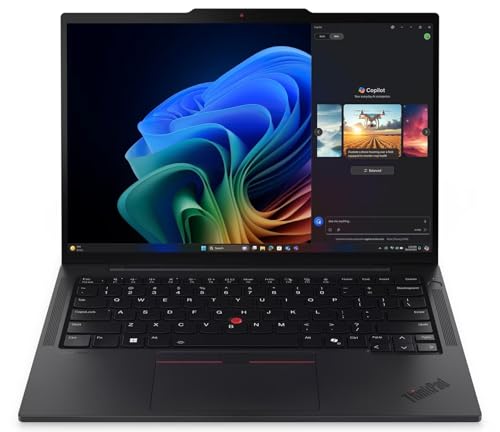
Lenovo ThinkPad T14s Gen 6 AMD -- Best for Data-Focused Marketers
Marketing analysts who spend more time in Excel, Tableau, SQL tools, and data visualization platforms than in design tools benefit from the T14s Gen 6's combination of business keyboard quality and AMD Ryzen 7 performance. The 14-inch IPS display at 1920x1200 is functional without being exceptional. Battery life of 10-12 hours is above average for a business laptop. The keyboard and trackpad are among the best in the Windows laptop category, which matters for extended typing sessions writing copy or documentation. The starting price is accessible for mid-sized marketing teams with budget constraints.

Microsoft Surface Pro 11 -- Best 2-in-1 for Marketers
The Surface Pro 11's detachable keyboard and pen support make it useful for marketers who do quick sketching, client annotation, or tablet-based presentations. The 13-inch PixelSense display is sharp and bright. The Snapdragon X Elite processor is ARM-based, which means some legacy Windows applications may not run natively -- check specific tool compatibility before buying. For marketers working primarily in browser-based tools (Google Workspace, HubSpot, Canva, Semrush) compatibility is not an issue. The kickstand and form factor make it easy to use in client meetings without setting up a full laptop.
How to choose
What to consider
Assess the tool split between creative and analytical work. Design-heavy roles benefit from color-accurate displays and P3 coverage. Data-heavy roles prioritize RAM, keyboard quality, and stable connectivity. All marketing roles benefit from at least 16 GB RAM given the number of browser tabs and web apps running simultaneously. Battery life matters for anyone working in-person at events, client sites, or coffee shops. Processor choice -- ARM vs x86 -- only matters if using legacy desktop software; confirm compatibility before buying an ARM-based Windows machine.
What to consider
For desk setup recommendations for marketing teams, see [articles/best-desk-accessories-for-remote-work] and [articles/best-monitor-for-home-office]. Our evaluation process is described at [/methodology].
Common questions
'Sixteen GB handles most marketing workflows: browser sessions with 15-20 tabs, Google Analytics, Canva, and Slack open simultaneously. Marketers who also run video editing software like Premiere Pro or DaVinci Resolve alongside design tools will benefit from 32 GB. Content-only roles that stay within web-based tools can function reasonably on 8 GB, though multitasking will feel constrained.'
For most marketing tasks -- email design, social graphics, data analysis, writing -- integrated graphics are sufficient. A discrete GPU becomes worthwhile if the workflow includes regular video rendering, motion graphics, or AI-assisted image generation. A mid-range GPU (RTX 4060 or equivalent) is adequate if needed; spending more on GPU rarely benefits typical marketing workloads.
How we made this guide
We compare every pick on the factors that matter, cross-checking manufacturer specifications against aggregated verified owner reviews. We rank independently and never take payment for placement. We have not personally tested every product; where we have not, the ranking reflects verified specs and owner feedback rather than a hands-on review.
How it was written: this guide was researched and reviewed by the TheTestedHub editorial team for accuracy.
Affiliate disclosure: TheTestedHub is reader-supported. When you buy through links on our site, we may earn a commission at no extra cost to you.
More guides

Your Docking Station Match: CalDigit TS4 and More

Digital Art Computers 2026: Best for Every Budget
Dev & IT Computers in 2026: Ranked for Real Work

Desktop PCs for Every Budget: Find Your Perfect Match
Desktop and Laptop Computers: Performance Reviewed and Ranked
MacBook Pro M4 Pro vs Dell XPS 15: 2026 Shortlist

Buy the Best DIY Computer in 2026: Corsair One i300
