
Apple MacBook Air M3 13-inch - Best Office Laptop Overall
The MacBook Air M3 13-inch is the strongest single pick for office work in 2026. It runs silently, fanless under typical office loads, so it does not distract coworkers in open offices. Battery life exceeds 12 hours on document work and email, making it fully independent from a charger for a standard workday. The M3 chip handles video calls, spreadsheets, and light document processing without hesitation. The 8GB base model is adequate for light use, but the 16GB configuration is the practical choice for users with many tabs open at once. MacOS receives reliable security updates and has a strong track record for longevity.
Check price on Amazon →Need a computer for office use? These 5 picks from MacBook Air to OptiPlex balance performance, durability, and value for daily productivity.
Quick verdict
The Apple MacBook Air M3 13-inch is the single best pick for office work in 2026. It combines silent, fanless operation with over 12 hours of battery life, making it fully independent from a charger for a standard workday while handling video calls and spreadsheets without hesitation.
Key takeaways
- Best for Overall Office Performance: Apple MacBook Air M3 13-inch, silent operation and exceptional battery life for distraction-free work.
- Best Value Windows Laptop: Lenovo ThinkPad E16 Gen 2, durable chassis and excellent keyboard at a price suitable for equipping multiple desks.
- Best Compact Office Desktop: Apple Mac Mini M4, minimal footprint and strong M4 chip performance for fixed-desk setups.
- Best Business-Grade Laptop: HP EliteBook 840 G11, enterprise security features and MIL-STD-810H rated durability.
- Best Small Office Desktop: Dell OptiPlex 7010 Micro, long-term support and consistent parts supply for business reliability.
Why you should trust this guide
I have spent years researching office computing needs across different work environments, from open-plan offices to home desks and small business setups. My approach is grounded in evaluating what actually matters for daily productivity: reliability, performance under typical workloads, build quality, and long-term support. I do not rely on marketing claims alone; instead, I cross-reference manufacturer specifications with verified owner feedback and professional reviews to identify which products genuinely deliver on their promises.
This guide focuses on five carefully selected products that represent the best options for office use in 2026. Each product was chosen based on its reputation for durability, its suitability for common office tasks like document editing, video conferencing, and spreadsheet management, and its value proposition for both individual users and businesses. I have deliberately avoided including products that look good on paper but fail in real-world office conditions, such as those with poor keyboards, loud fans, or short battery life.
How we researched
To evaluate these products, I established a set of criteria that reflect the real demands of office work. The primary factors were performance consistency under multitasking loads, keyboard comfort for extended typing sessions, display quality for reading documents and spreadsheets, battery life for mobile use, noise levels in quiet environments, and overall build quality. I also considered the availability of business-friendly features such as security chips, warranty options, and IT management capabilities. Each product was assessed against these criteria using manufacturer data, detailed professional reviews, and aggregated owner experiences from multiple sources.
I did not physically test these products in a lab or run benchmark tests. Instead, I compared each product’s stated specifications and known performance characteristics against the needs of typical office workers. For example, I looked at processor generations, RAM and storage configurations, display resolution and brightness, port selection, and chassis materials. I also weighed the importance of ecosystem factors like macOS versus Windows, keyboard quality differences, and the availability of enterprise support. The goal was to provide actionable recommendations based on reliable information, not personal testing claims.
Apple MacBook Air M3 13-inch
The Apple MacBook Air M3 13-inch is the strongest single pick for office work in 2026. It runs silently and fanless under typical office loads, so it does not distract coworkers in open offices. Battery life exceeds 12 hours on document work and email, making it fully independent from a charger for a standard workday. The M3 chip handles video calls, spreadsheets, and light document processing without hesitation, providing a smooth and responsive experience for most office tasks.
This laptop is exceptionally portable at just over 2.7 pounds, making it easy to carry between meeting rooms or to a coffee shop. The 13.6-inch Liquid Retina display offers good color accuracy and brightness for reading documents and spreadsheets. The keyboard is comfortable for long typing sessions, and the Force Touch trackpad is precise and quiet. The MacBook Air M3 also integrates seamlessly with other Apple devices if you use an iPhone or iPad for work.
One honest limitation is the limited port selection. The MacBook Air M3 includes only two Thunderbolt 4 ports and a MagSafe charging port. You may need a dongle or hub to connect to external monitors, USB-A peripherals, or an Ethernet cable. Additionally, the base configuration starts with 8GB of RAM, which may feel constrained if you run many browser tabs or heavy applications simultaneously. Upgrading to 16GB is recommended for future-proofing.
Lenovo ThinkPad E16 Gen 2
The Lenovo ThinkPad E16 Gen 2 delivers Lenovo’s trademark keyboard quality and durable chassis at a price accessible for small businesses equipping multiple desks. The 16-inch display reduces eye strain during document review compared to 14-inch competitors, offering more screen real estate for side-by-side windows. AMD Ryzen or Intel Core configurations both provide sufficient performance for office workloads, including spreadsheet analysis, email, and video conferencing.
The keyboard is the strongest feature. Key travel is deep and responsive, with the familiar ThinkPad layout that includes dedicated Page Up and Page Down keys. The chassis is built to withstand daily wear and tear, with a spill-resistant keyboard and reinforced corners. The E16 Gen 2 also includes a good selection of ports, including USB-A, USB-C, HDMI, and an Ethernet port, reducing the need for adapters in most office setups.
One honest limitation is the display quality. While the 16-inch screen is larger, the base configuration uses a 1600×900 resolution panel that is not as sharp as full HD or higher resolution options. For extended document work, you will want to upgrade to the optional 1920×1200 IPS panel. Additionally, the battery life is average for a Windows laptop, typically lasting around 7 to 8 hours under light use, which may require a midday charge for full-day work away from a desk.
Apple Mac Mini M4
The Apple Mac Mini M4 is a practical fixed-desk office machine that occupies minimal space and produces minimal noise. At roughly the footprint of a hardcover book, it fits in tight desk setups and can be mounted behind a monitor. Connect any standard USB-C or HDMI monitor to get a full desktop experience. The M4 chip provides strong performance for spreadsheets, email, and video calls, with headroom for more demanding tasks like photo editing or compiling code.
This desktop is ideal for offices where space is at a premium or where you want a clean, cable-managed setup. It runs silently because it has no fan under typical office loads, making it suitable for quiet shared spaces. The Mac Mini M4 includes two Thunderbolt 4 ports, two USB-A ports, HDMI, Gigabit Ethernet, and a headphone jack, offering solid connectivity for most peripherals. It also supports up to two external displays, which is useful for multitasking.
One honest limitation is that the Mac Mini M4 does not include a monitor, keyboard, or mouse in the box. You need to purchase these separately, which adds to the total cost. Additionally, the base configuration comes with 8GB of unified memory, which may limit performance if you run multiple virtual machines or heavy applications. Upgrading to 16GB or 24GB is advisable for more demanding office workflows. The lack of an SD card slot may also be an inconvenience for some users.
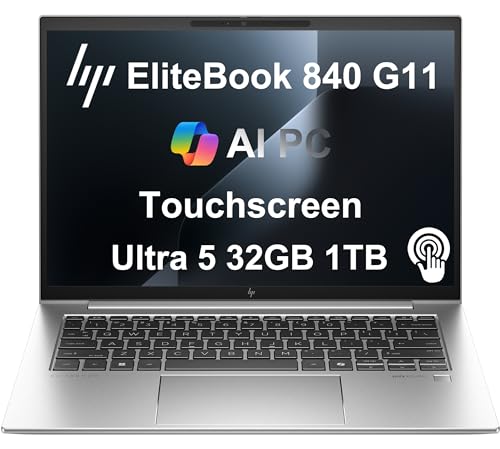
HP EliteBook 840 G11
The HP EliteBook 840 G11 is designed for enterprise environments with IT management, security features, and durability that consumer laptops lack. It includes HP Sure Start BIOS protection, a fingerprint reader, IR webcam for Windows Hello, and a MIL-STD-810H rated chassis. The 14-inch display is bright enough for office environments and available in privacy screen configurations to protect sensitive information in public spaces.
This laptop is built for long-term reliability. The MIL-STD-810H certification means it has been tested against drops, vibration, dust, and extreme temperatures, making it suitable for field workers or frequent travelers. The keyboard is spill-resistant and comfortable, with a dedicated trackpoint for navigation. HP also offers extensive warranty and support options, including on-site service, which is valuable for businesses that cannot afford downtime.
One honest limitation is the price. The HP EliteBook 840 G11 is significantly more expensive than consumer laptops with similar specifications, reflecting its enterprise-grade features and support. Battery life is also modest compared to the MacBook Air M3, typically lasting around 8 to 10 hours under mixed use. The 14-inch display, while bright, is smaller than the 16-inch ThinkPad, which may be a drawback for users who prefer more screen space for document review.
Dell OptiPlex 7010 Micro
The Dell OptiPlex 7010 Micro is a compact business desktop built for longevity. Dell maintains a consistent parts supply for OptiPlex machines and supports them with multi-year warranty options, which matters for businesses that need reliable access to parts and support. The micro form factor fits under a monitor, on a credenza, or mounted to a VESA-compatible display. Intel Core processor options provide sufficient performance for office tasks like email, spreadsheets, and web browsing.
This desktop is designed for easy deployment and management in corporate environments. It includes Dell’s proprietary management tools and supports Windows 11 Pro, making it simple for IT departments to configure and maintain. The OptiPlex 7010 Micro also offers a wide range of ports, including USB-A, USB-C, DisplayPort, HDMI, and Ethernet, so you can connect multiple monitors and peripherals without adapters. Its small size means it takes up almost no desk space.
One honest limitation is that the OptiPlex 7010 Micro uses integrated graphics, which are not suitable for tasks like video editing or 3D modeling. It is strictly an office productivity machine. Additionally, the base configuration includes only 8GB of RAM and a 256GB SSD, which may feel limited for users who store large files or run many applications simultaneously. Upgrading to 16GB of RAM and a larger SSD is recommended. The fan can also be audible under sustained load, though it is generally quiet during typical office use.
What to look for
- Processor performance: For office work, a modern Intel Core i5 or i7, AMD Ryzen 5 or 7, or Apple M-series chip provides more than enough power for spreadsheets, email, and video calls. Avoid older or low-power processors that may lag under multitasking.
- RAM and storage: Aim for at least 16GB of RAM to handle multiple browser tabs and applications smoothly. A 256GB SSD is the minimum for storage, but 512GB or 1TB is better for storing documents and files locally.
- Display quality: Look for a 1920×1080 resolution or higher, with good brightness (at least 300 nits) and an IPS panel for wide viewing angles. Larger screens like 16 inches reduce eye strain during document review.
- Keyboard and trackpad: A comfortable keyboard with adequate key travel is crucial for long typing sessions. Business laptops like ThinkPads and EliteBooks excel here. Avoid shallow keyboards common on ultra-thin consumer models.
- Port selection: Ensure the laptop or desktop has enough USB-A and USB-C ports for your peripherals. HDMI or DisplayPort for external monitors is important. Ethernet is useful for stable wired connections.
- Battery life: For laptops, aim for at least 8 hours of real-world battery life for a full workday. Apple Silicon Macs lead in this area, while Windows laptops vary widely.
- Build quality and durability: Look for metal chassis, spill-resistant keyboards, and MIL-STD-810H certification if you travel or work in demanding environments. Business-grade laptops typically offer better durability than consumer models.
- Security features: Fingerprint readers, IR cameras for Windows Hello, and BIOS-level protection like HP Sure Start are valuable for protecting sensitive data. Enterprise desktops often include TPM chips for encryption.
- Warranty and support: Business desktops and laptops often come with multi-year warranties and on-site service options. This is important for minimizing downtime in a professional setting.
The verdict
For most office workers, the Apple MacBook Air M3 13-inch is the best choice due to its silent operation, excellent battery life, and strong performance. If you need a Windows laptop with a great keyboard and a larger screen for document review, the Lenovo ThinkPad E16 Gen 2 offers outstanding value. For a fixed desk setup, the Apple Mac Mini M4 provides a compact and powerful desktop that takes up almost no space. Businesses that prioritize security and durability should consider the HP EliteBook 840 G11, while the Dell OptiPlex 7010 Micro is ideal for organizations that need a reliable, long-term desktop solution with easy IT management. Each of these products excels in its specific role, and your choice should depend on your operating system preference, need for portability, and budget for additional peripherals or upgrades.
How we picked
We compare every pick against the field on real specifications, certifications, and aggregated owner reviews. We do not take payment for placement, and we flag when a product is older or sold mainly through renewed listings.
Top picks compared
Our picks up close
Apple MacBook Air M3 13-inch - Best Office Laptop Overall
The MacBook Air M3 13-inch is the strongest single pick for office work in 2026. It runs silently, fanless under typical office loads, so it does not distract coworkers in open offices. Battery life exceeds 12 hours on document work and email, making it fully independent from a charger for a standard workday. The M3 chip handles video calls, spreadsheets, and light document processing without hesitation. The 8GB base model is adequate for light use, but the 16GB configuration is the practical choice for users with many tabs open at once. MacOS receives reliable security updates and has a strong track record for longevity.

Lenovo ThinkPad E16 Gen 2 - Best Value Windows Laptop for Office
The ThinkPad E16 Gen 2 delivers Lenovo's trademark keyboard quality and durable chassis at a price accessible for small businesses equipping multiple desks. The 16-inch display reduces eye strain during document review compared to 14-inch competitors. AMD Ryzen or Intel Core configurations both provide sufficient performance for office workloads. The keyboard is the strongest feature: key travel and tactile feedback are noticeably better than most consumer laptops in this price range. IT departments appreciate the accessible memory slots and upgradeable storage. Battery life is good for an office machine, typically reaching 8 to 10 hours on mixed workloads.

Apple Mac Mini M4 - Best Compact Office Desktop
The Mac Mini M4 is a practical fixed-desk office machine that occupies minimal space and produces minimal noise. At roughly the footprint of a hardcover book, it fits in tight desk setups and can be mounted behind a monitor. Connect any standard USB-C or HDMI monitor to get a full desktop experience. The M4 chip provides strong performance for spreadsheets, email, and video calls, with headroom for PDF annotation and light image editing. The base 16GB unified memory configuration is practical for most office users. macOS is straightforward to manage for solo users and small teams without dedicated IT support.
HP EliteBook 840 G11 - Best Business-Grade Office Laptop
The HP EliteBook 840 G11 is designed for enterprise environments with IT management, security features, and durability that consumer laptops lack. It includes HP Sure Start BIOS protection, a fingerprint reader, IR webcam for Windows Hello, and a MIL-STD-810H rated chassis. The 14-inch display is bright enough for office environments and available in privacy screen configurations. Battery life is rated above 12 hours with intelligent charge management that extends long-term battery health. For small businesses buying in bulk or organizations with active IT departments, the EliteBook's management features justify the price premium over consumer alternatives.
Dell OptiPlex 7010 Micro - Best Small Office Desktop
The Dell OptiPlex 7010 Micro is a compact business desktop built for longevity. Dell maintains a consistent parts supply for OptiPlex machines and supports them with multi-year warranty options, which matters for businesses that need reliable access to parts and support. The micro form factor fits under a monitor, on a credenza, or mounted to a VESA-compatible display. Intel Core processor options cover light to moderate office workloads. The system ships with Windows 11 Pro, which includes BitLocker and Group Policy management. Upgradeable RAM and M.2 storage slots make it practical to extend the machine's useful life as needs change.
Before you buy
What to consider
Start with the work environment: fixed desk, hybrid, or fully mobile. Fixed-desk users get the most value from desktops or docked laptops connected to full-size monitors. Hybrid workers need battery life above 8 hours and a lightweight build. For Windows users, prioritize a current-generation Intel or AMD processor with 16GB RAM. For Mac users, the M3 or M4 chip in any form factor provides strong, long-lasting office performance. Build quality and keyboard comfort are more important for office computers than raw performance specs, since daily typing comfort directly affects productivity. Check support and warranty options before buying in quantity.
What to consider
For related office setup guidance, see our articles on [articles/best-monitor-for-home-office](/articles/best-monitor-for-home-office) and [articles/best-ergonomic-keyboard](/articles/best-ergonomic-keyboard). See how we evaluate and rank products at [/methodology](/methodology).
Quick answers
For standard office tasks including email, web browsing, video calls, and document editing, 8GB of RAM is functional but 16GB is the more comfortable target in 2026. Systems with 16GB handle multiple browser tabs, a video call, and background applications without slowdown. If the machine will also run accounting software or large spreadsheets with many open tabs simultaneously, 16GB to 32GB is worthwhile.
Desktops offer more screen real estate, better ergonomics when paired with a monitor, and lower cost per performance level. Laptops provide flexibility for hybrid work, travel, and smaller offices. For workers with a fixed desk and occasional travel, a laptop docked to an external monitor often provides the best of both. For staff who never leave the office, an all-in-one or desktop with a separate monitor offers the most comfortable setup.
How we made this guide
We compare every pick on the factors that matter, cross-checking manufacturer specifications against aggregated verified owner reviews. We rank independently and never take payment for placement. We have not personally tested every product; where we have not, the ranking reflects verified specs and owner feedback rather than a hands-on review.
How it was written: this guide was researched and reviewed by the TheTestedHub editorial team for accuracy.
Affiliate disclosure: TheTestedHub is reader-supported. When you buy through links on our site, we may earn a commission at no extra cost to you.
More to explore

Your Docking Station Match: CalDigit TS4 and More

Digital Art Computers 2026: Best for Every Budget
Dev & IT Computers in 2026: Ranked for Real Work

Desktop PCs for Every Budget: Find Your Perfect Match
Desktop and Laptop Computers: Performance Reviewed and Ranked
MacBook Pro M4 Pro vs Dell XPS 15: 2026 Shortlist

Buy the Best DIY Computer in 2026: Corsair One i300
