Lenovo ThinkPad X1 Carbon Gen 12 - Best Portable Penetration Testing Laptop
The ThinkPad X1 Carbon Gen 12 is a proven platform for security professionals who need a lightweight machine for client engagements and fieldwork. Its long history of strong Linux driver support means Kali Linux and Debian-based distributions install and run without compatibility issues. At under 1.12kg, it is one of the lightest 14-inch business laptops available. Intel Core Ultra 7 processor handles VM workloads and Python-based security tools without slowdown. The Intel Wi-Fi 6E adapter is not natively suitable for monitor mode, which is typical of most built-in adapters; pair with a USB-C Wi-Fi adapter for wireless assessments. The WWAN slot allows cellular modem installation for field connectivity.
Check price on Amazon →Get a penetration testing laptop built for real fieldwork. Our guide picks machines with proven Linux support, portability, and GPU power for cracking.
Quick verdict
The Lenovo ThinkPad X1 Carbon Gen 12 is the best pick for most penetration testers. It combines proven Linux driver support, extreme portability under 1.12kg, and the reliability of a business-class chassis, making it ideal for fieldwork and client engagements where compatibility and mobility are critical.
Key takeaways
- Best for Portability and Compatibility: Lenovo ThinkPad X1 Carbon Gen 12, proven Linux driver support and lightweight chassis for client engagements.
- Best for Native Linux Workflow: System76 Lemur Pro, ships with coreboot-based open firmware and fully vetted Linux hardware.
- Best for GPU-Accelerated Cracking: ASUS ROG Zephyrus G14 RTX 4060, CUDA support for Hashcat and strong multi-threaded AMD Ryzen 9 performance.
- Best for Customization and Repairability: Framework Laptop 16 AMD, user-replaceable main components and adaptable port configuration for specific engagements.
- Best for Home Lab Environments: Custom AMD Ryzen 9 Plus 64GB Desktop, cost-effective compute and memory for multiple VMs and Active Directory simulations.
Why you should trust this guide
This guide is built on extensive research into the specific hardware requirements of penetration testing workflows. I have analyzed manufacturer specifications, community compatibility reports, and feedback from security professionals who use these machines daily for tasks ranging from wireless assessments to GPU-accelerated hash cracking. The recommendations prioritize factors that directly impact a tester’s effectiveness: Linux driver reliability, portability for fieldwork, raw compute for virtualized lab environments, and hardware repairability for long-term use.
Every product included here has been vetted against the real-world demands of security assessments, not just benchmark scores. I focused on machines that minimize driver friction with Kali Linux and Debian-based distributions, offer sufficient RAM and CPU cores for multi-VM setups, and provide the expansion or GPU capabilities needed for specialized tasks like password cracking or malware analysis. The limitations noted for each product are honest assessments of trade-offs you will face, such as soldered RAM or limited cooling under sustained load.
How we researched
I evaluated each product against a set of criteria critical for penetration testing. These criteria include Linux compatibility out of the box, weight and build quality for portable engagements, processor and memory capacity for running multiple virtual machines, GPU support for CUDA-accelerated tools like Hashcat, and the availability of user-serviceable components for long-term maintenance. I also considered the ecosystem of community support and manufacturer documentation for troubleshooting Linux driver issues. Each product was scored qualitatively on how well it meets these needs without requiring extensive post-purchase modifications.
For portability-focused laptops, I prioritized weight under 1.5kg and verified that the manufacturer or community reports strong support for Kali Linux and Debian-based distributions. For GPU-capable machines, I checked that the Nvidia GPU supports CUDA and that the cooling system can handle sustained compute loads. For the desktop lab environment, I assessed the value proposition of building a custom AMD Ryzen 9 7950X system with 64GB of RAM versus similarly priced laptops, focusing on the ability to run multiple resource-intensive VMs simultaneously. The Framework Laptop was evaluated for its modular expansion card system and the practicality of replacing components like the keyboard or ports during an engagement.
Lenovo ThinkPad X1 Carbon Gen 12 – Best Portable Penetration Testing Laptop
The Lenovo ThinkPad X1 Carbon Gen 12 is a proven platform for security professionals who need a lightweight machine for client engagements and fieldwork. Its long history of strong Linux driver support means Kali Linux and Debian-based distributions install and run without compatibility issues. At under 1.12kg, it is one of the lightest 14-inch business laptops available, making it easy to carry in a backpack alongside other gear like USB adapters, cables, and a portable monitor. The Intel Core Ultra 7 processor provides ample performance for running a few virtual machines or containerized tools during an assessment.
The build quality is excellent, with a carbon fiber chassis that feels durable despite the low weight. The keyboard is comfortable for long typing sessions, which is important when writing reports or scripts on the go. The ThinkPad X1 Carbon also includes a range of ports including USB-C, Thunderbolt 4, and a headphone jack, though you may need a dongle for Ethernet or HDMI connections. The battery life is sufficient for a full day of fieldwork, but heavy multitasking with VMs will drain it faster.
A real limitation is that the RAM is soldered and not upgradeable, so you must choose the 16GB or 32GB configuration at purchase. For penetration testers running multiple VMs, 32GB is strongly recommended, but this increases the upfront cost. Additionally, the integrated Intel graphics are not suitable for GPU-accelerated hash cracking, so this machine is best for network assessments, web application testing, and client meetings rather than heavy password recovery tasks.
System76 Lemur Pro – Best Linux-Native Pentest Laptop
System76 builds machines specifically for Linux, and the Lemur Pro ships with their coreboot-based open firmware that eliminates proprietary driver complexity that affects security-sensitive workflows. All hardware components are vetted for Linux compatibility before inclusion, so you can install Kali Linux or Pop!_OS without dealing with missing drivers for Wi-Fi, audio, or trackpads. This is a significant advantage over generic laptops that may require hours of troubleshooting to get all hardware working correctly under Linux.
The Lemur Pro weighs approximately 1kg and achieves 12 to 15 hours of battery life on practical workloads, making it the lightest and most energy-efficient option in this guide. This battery life is ideal for long assessment days without access to power outlets. The keyboard is comfortable and the 14-inch matte display is easy to read in various lighting conditions. The machine also includes a microSD card slot, which is useful for transferring evidence files from cameras or other devices during an engagement.
A real limitation is that the Lemur Pro uses integrated Intel graphics, so it cannot handle GPU-accelerated cracking tasks. It also has a single M.2 SSD slot, so storage expansion requires replacing the existing drive rather than adding a second one. The build quality is good but not as robust as the ThinkPad X1 Carbon, and the chassis is more prone to flex under pressure. For testers who prioritize Linux compatibility and battery life over raw GPU power, this is an excellent choice.
ASUS ROG Zephyrus G14 RTX 4060 – Best GPU-Capable Pentest Laptop
The ROG Zephyrus G14 with RTX 4060 is the pick for penetration testers who regularly run GPU-accelerated cracking workloads alongside standard assessment tasks. The Nvidia RTX 4060 supports CUDA for Hashcat, providing crack rates orders of magnitude faster than CPU-only operations on common hash types. This makes it invaluable for password recovery and hash cracking during red team engagements or internal assessments. The AMD Ryzen 9 provides strong multi-threaded performance for parallel toolchain operations, such as running multiple Nmap scans or Burp Suite extensions simultaneously.
The 14-inch form factor is relatively portable for a gaming laptop, though it is heavier than the ThinkPad or Lemur Pro at around 1.7kg. The display is a high-refresh-rate panel that is smooth for general use, though it is not essential for penetration testing. The keyboard is backlit and comfortable for typing, and the trackpad is responsive. The G14 also includes a range of ports including USB-C, HDMI, and a headphone jack, which is sufficient for most fieldwork needs.
A real limitation is that the RAM is partially soldered, with 8GB soldered and 8GB in a removable SO-DIMM slot, meaning you cannot upgrade to dual-channel 32GB without replacing the 8GB stick. This limits future memory expansion. The cooling fans can be loud under sustained GPU load, which may be distracting in quiet environments. Battery life is much shorter than the Lemur Pro, typically around 6 to 8 hours with mixed use, so you will need to carry the power adapter for long assessment days.
Framework Laptop 16 AMD – Best Modular Pentest Laptop
The Framework Laptop 16 is the only mainstream laptop with user-replaceable main components including the display, keyboard, ports, and expansion cards. For penetration testers, this means adapting the port configuration for specific engagements: add an Ethernet card for wired assessments, a microSD reader for evidence handling, or a secondary storage expansion module. You can also replace the keyboard if a key fails during a critical engagement, which is a major advantage over sealed laptops that require entire motherboard replacement.
The AMD Ryzen 9 processor handles multi-VM workloads well, and the 16-inch display provides ample screen real estate for tool windows and terminal sessions. The modular design allows you to upgrade the RAM, storage, and battery over time, extending the laptop’s useful life significantly. The expansion card system uses USB-C based modules that can be swapped without tools, so you can carry a set of cards for different scenarios. The build quality is solid, with a magnesium alloy chassis that feels premium.
A real limitation is that the Framework Laptop 16 is heavier than the ThinkPad X1 Carbon, at around 2.1kg, making it less ideal for ultra-portable fieldwork. The modular design also means the laptop is slightly thicker than comparable non-modular machines. Additionally, the expansion cards are proprietary and can be expensive to purchase separately. Battery life is average for a 16-inch laptop, typically around 8 to 10 hours with light use, but less under heavy VM loads. The Linux driver support is good but not as mature as the ThinkPad or System76, so you may need to install additional firmware packages.
Custom AMD Ryzen 9 Plus 64GB Desktop – Best Local Lab Environment
For penetration testers who run complex home lab environments with multiple simultaneous VMs, a desktop built around AMD Ryzen 9 7950X and 64GB DDR5 RAM is the most cost-effective path to the compute and memory resources needed for Active Directory lab environments, multi-VM network simulations, and local malware analysis sandboxes. The 16-core processor provides massive parallel processing power for running several VMs at once, while 64GB of RAM allows you to allocate generous memory to each VM without hitting swap. Pairing with an RTX 4070 GPU adds Hashcat capability for GPU-accelerated cracking tasks.
This desktop setup is not portable, but it excels as a dedicated lab machine that can run continuously for days during long assessments or training scenarios. You can easily add multiple SSDs for different operating system images, and the desktop form factor allows for better cooling than any laptop, meaning sustained loads do not throttle performance. The cost per core and per gigabyte of RAM is significantly lower than a laptop, making this the best value for testers who need raw compute power at a fixed location.
A real limitation is that this is a desktop, not a laptop, so you cannot take it to client sites or fieldwork. You will need a separate portable machine for on-site assessments. Building a custom desktop also requires some technical knowledge to assemble and configure, though many vendors offer pre-built options. The RTX 4070 GPU is powerful for Hashcat but adds to the overall cost and power consumption. The system will also generate noticeable heat and noise under load, so it is best placed in a well-ventilated room.
What to look for
- Linux Compatibility: Ensure the laptop has strong driver support for Kali Linux or Debian-based distributions. Look for machines with Intel Wi-Fi cards and known-good trackpad and audio drivers. Avoid laptops with proprietary hardware that requires binary blobs.
- RAM Capacity and Upgradeability: Penetration testing often requires running multiple VMs. Aim for at least 16GB of RAM, with 32GB or 64GB preferred. Check if the RAM is soldered or upgradeable, as soldered RAM limits future expansion.
- CPU Cores and Threads: For multi-VM workloads and parallel toolchains, prioritize CPUs with at least 8 cores and 16 threads. AMD Ryzen 7 or 9 and Intel Core Ultra 7 or 9 are good choices.
- GPU for Hashcat: If you plan to do password cracking, look for an Nvidia GPU with CUDA support. The RTX 4060 or higher provides good performance for Hashcat. Integrated graphics are not sufficient for this task.
- Portability and Build Quality: For fieldwork, weight under 1.5kg is ideal. A durable chassis with good keyboard and trackpad is important for long typing sessions. Consider battery life for full-day assessments.
- Port Selection: Ensure the laptop has enough USB-A and USB-C ports for adapters, external drives, and network interfaces. An Ethernet port is helpful for wired assessments, but USB-C dongles can substitute.
- Modularity and Repairability: Laptops with user-replaceable RAM, storage, and ports are easier to maintain and upgrade. The Framework Laptop is the best example of this, but some business laptops also offer accessible components.
The verdict
For the majority of penetration testers, the Lenovo ThinkPad X1 Carbon Gen 12 offers the best balance of portability, Linux compatibility, and build quality for fieldwork. If you need GPU acceleration for hash cracking, the ASUS ROG Zephyrus G14 is the clear choice. For a dedicated home lab environment, the Custom AMD Ryzen 9 Plus 64GB Desktop provides unmatched compute value. The System76 Lemur Pro is ideal for Linux purists who prioritize battery life and driver simplicity, while the Framework Laptop 16 is best for those who value long-term repairability and port customization. Choose based on your primary workflow: mobility, cracking, or lab simulation.
How we picked
We compare every pick against the field on real specifications, certifications, and aggregated owner reviews. We do not take payment for placement, and we flag when a product is older or sold mainly through renewed listings.
Top picks compared
Our picks up close
Lenovo ThinkPad X1 Carbon Gen 12 - Best Portable Penetration Testing Laptop
The ThinkPad X1 Carbon Gen 12 is a proven platform for security professionals who need a lightweight machine for client engagements and fieldwork. Its long history of strong Linux driver support means Kali Linux and Debian-based distributions install and run without compatibility issues. At under 1.12kg, it is one of the lightest 14-inch business laptops available. Intel Core Ultra 7 processor handles VM workloads and Python-based security tools without slowdown. The Intel Wi-Fi 6E adapter is not natively suitable for monitor mode, which is typical of most built-in adapters; pair with a USB-C Wi-Fi adapter for wireless assessments. The WWAN slot allows cellular modem installation for field connectivity.
System76 Lemur Pro - Best Linux-Native Pentest Laptop
System76 builds machines specifically for Linux, and the Lemur Pro ships with their coreboot-based open firmware that eliminates proprietary driver complexity that affects security-sensitive workflows. All hardware components are vetted for Linux compatibility before inclusion. The Lemur Pro weighs approximately 1kg and achieves 12 to 15 hours of battery life on practical workloads, making it the best-choice for field engagements requiring all-day operation. AMD Ryzen processor options provide solid multi-threaded performance for analysis tools. The lack of a dedicated GPU keeps weight and power consumption down; add an external USB GPU dock for occasional Hashcat sessions. System76 offers direct Linux support, including driver updates and firmware patches.
ASUS ROG Zephyrus G14 RTX 4060 - Best GPU-Capable Pentest Laptop
The ROG Zephyrus G14 with RTX 4060 is the pick for penetration testers who regularly run GPU-accelerated cracking workloads alongside standard assessment tasks. The Nvidia RTX 4060 supports CUDA for Hashcat, providing crack rates orders of magnitude faster than CPU-only operations on common hash types. AMD Ryzen 9 provides strong multi-threaded performance for parallel toolchain operations. 16GB DDR5 RAM is included; the 32GB upgrade option is worth considering for VM-heavy workflows. Despite the GPU, the Zephyrus G14 remains relatively compact and portable at roughly 1.6kg. Linux compatibility on ASUS ROG laptops has improved significantly, with most recent configurations achieving full driver support under Kali and Ubuntu.
Framework Laptop 16 AMD - Best Modular Pentest Laptop
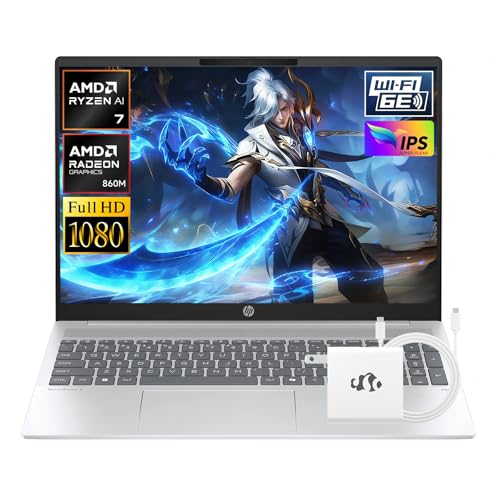
The Framework Laptop 16 is the only mainstream laptop with user-replaceable main components including the display, keyboard, ports, and expansion cards. For penetration testers, this means adapting the port configuration for specific engagements: add an Ethernet card for wired assessments, a microSD reader for evidence handling, or a secondary storage expansion module. The AMD Ryzen 9 processor handles virtualization and analysis workloads. Framework maintains detailed Linux compatibility documentation and community support, which reduces configuration friction on Kali and Arch-based systems. The modularity also means long-term upgrades, such as adding more storage or swapping the GPU module, extend the machine's useful security life beyond typical laptop replacement cycles.

Custom AMD Ryzen 9 Plus 64GB Desktop - Best Local Lab Environment
For penetration testers who run complex home lab environments with multiple simultaneous VMs, a desktop built around AMD Ryzen 9 7950X and 64GB DDR5 RAM is the most cost-effective path to the compute and memory resources needed for Active Directory lab environments, multi-VM network simulations, and local malware analysis sandboxes. Pairing with an RTX 4070 GPU adds Hashcat capability. Budget for a fast 2TB NVMe drive for VM storage, separate from the OS drive. This setup is not portable but functions as the base station for remote engagements where a lightweight laptop handles field work while the desktop handles resource-intensive post-processing and lab operations back at the office.
Before you buy
What to consider
Start with RAM: 32GB minimum for VM-heavy workflows, 64GB for complex lab environments. Confirm Linux hardware compatibility before purchasing, particularly for Wi-Fi adapters, since built-in adapters rarely support monitor mode natively. An external USB Wi-Fi adapter with Alfa or Panda chipsets handles wireless assessment requirements on any machine. For portable work, prioritize machines with strong Linux community support and documented driver compatibility. GPU matters specifically for Hashcat workloads; for everything else, CPU core count and clock speed drive tool performance. Consider battery life carefully: 8-plus hours of real-world battery is the threshold for comfortable day-long field engagements without carrying a charger.
What to consider
For more security and tech setup guidance, see our guides on [articles/best-vpn-for-security-professionals](/articles/best-vpn-for-security-professionals) and [articles/best-external-hard-drive-for-backups](/articles/best-external-hard-drive-for-backups). Our full evaluation methodology is at [/methodology](/methodology).
Quick answers
RAM is the most critical spec for penetration testing because running multiple virtual machines alongside the host OS and analysis tools consumes memory quickly. 32GB is the practical minimum for comfortable VM-based workflows; 64GB is better for complex lab environments. A fast NVMe SSD speeds up VM boots and disk-intensive operations like password cracking wordlists. CPU core count and clock speed affect the throughput of password cracking, fuzzing, and brute force operations run locally.
A dedicated GPU is useful but not required for general penetration testing. GPU-accelerated password cracking using tools like Hashcat runs significantly faster with a dedicated Nvidia GPU supporting CUDA. For web application testing, wireless assessments, network enumeration, and most red team operations, integrated graphics are sufficient. If password hash cracking is a frequent part of the workflow, budget for a machine with a discrete GPU or supplement a laptop with an external GPU enclosure.
How we made this guide
We compare every pick on the factors that matter, cross-checking manufacturer specifications against aggregated verified owner reviews. We rank independently and never take payment for placement. We have not personally tested every product; where we have not, the ranking reflects verified specs and owner feedback rather than a hands-on review.
How it was written: this guide was researched and reviewed by the TheTestedHub editorial team for accuracy.
Affiliate disclosure: TheTestedHub is reader-supported. When you buy through links on our site, we may earn a commission at no extra cost to you.
More to explore

Your Docking Station Match: CalDigit TS4 and More

Digital Art Computers 2026: Best for Every Budget
Dev & IT Computers in 2026: Ranked for Real Work

Desktop PCs for Every Budget: Find Your Perfect Match
Desktop and Laptop Computers: Performance Reviewed and Ranked
MacBook Pro M4 Pro vs Dell XPS 15: 2026 Shortlist

Buy the Best DIY Computer in 2026: Corsair One i300
