Apple MacBook Air 15 M4 - Best Laptop for Everyday Picture Editing
The MacBook Air 15-inch with the M4 chip is the best all-around laptop for picture editing at its price point. It has no fans, which means no noise during sustained editing sessions, and the M4 chip handles Photoshop, Affinity Photo, and Lightroom edits comfortably with 16GB unified memory. The 15.3-inch Liquid Retina display covers the P3 wide color gamut and is factory calibrated, which makes color adjustments reliable without an external monitor. Battery life exceeds 15 hours on typical editing workloads. For photographers, illustrators, and content creators who want a light and capable editing machine, this is the clearest recommendation in its price range.
Check price on Amazon →Find the right computer for picture editing with our guide. The Apple MacBook Air 15 M4 stands out for everyday editing tasks. Discover which specs matter most.
Quick verdict
The Apple MacBook Air 15 M4 is the single best pick for most picture editors because it combines a large, color-accurate display with fanless, silent operation and the M4 chip’s strong performance for everyday editing workflows.
Key takeaways
- Best for Everyday Picture Editing: Apple MacBook Air 15 M4 – silent fanless design with a factory-calibrated P3 display makes it a superb all-around choice.
- Best for Professional Picture Editing: Apple Mac Mini M4 Pro – compact desktop with M4 Pro multi-core power and up to 64GB unified memory for heavy PSD files.
- Best Monitor for Color-Accurate Editing: ASUS ProArt PA279CRV – 27-inch 4K IPS display with factory Delta-E less than 2 and 99% DCI-P3 coverage.
- Best Windows Laptop for Picture Editing: Dell XPS 15 9530 – OLED panel with hardware color calibration and RTX 4070 GPU for GPU-accelerated filters.
- Best Budget Laptop for Casual Editing: Lenovo IdeaPad Slim 5i – affordable IPS panel with i5/i7 options and 16GB RAM for basic editing in Canva or Photoshop Express.
Why you should trust this guide
I have spent years researching and comparing computers for creative work, focusing specifically on what makes a machine suitable for picture editing. My approach is grounded in manufacturer specifications, verified owner feedback from multiple sources, and a clear understanding of the hardware requirements for popular editing software like Photoshop, Lightroom, and Affinity Photo. I weigh factors such as display color accuracy, processor performance, memory capacity, and thermal design because these directly affect how smoothly you can work and how reliable your edits look on screen.
This guide is built around five carefully selected products that cover different use cases and budgets. I do not recommend any product I have not thoroughly evaluated from a technical and practical standpoint. Every recommendation includes an honest limitation because no computer is perfect for every editor. My goal is to help you match a product to your specific workflow, whether you are a professional retoucher or a casual user editing family photos.
How we researched
To evaluate these products for picture editing, I defined a set of criteria that matter most for this task. The first priority is display quality, including color gamut coverage, brightness uniformity, and factory calibration accuracy. The second is processor and memory performance for handling large files and multitasking. The third is thermal management, because sustained editing sessions can cause throttling in poorly designed machines. I also consider port selection, upgradeability, and overall build quality, as these affect long-term usability.
For each product, I researched the manufacturer’s stated specifications and compared them against the requirements of common editing software. I looked at owner reviews and professional assessments to understand real-world performance, reliability, and any common issues. I did not physically test these products in a lab, but I cross-referenced multiple trusted sources to confirm that the features listed by the manufacturer deliver as promised. This method ensures my recommendations are grounded in verifiable data rather than personal bias.
Apple MacBook Air 15 M4 – Best Laptop for Everyday Picture Editing
The Apple MacBook Air 15 M4 is the best all-around laptop for picture editing at its price point, and the reason is simple: it delivers strong performance without any fan noise. The M4 chip handles Photoshop, Affinity Photo, and Lightroom edits comfortably, especially with the standard 16GB of unified memory. The 15.3-inch Liquid Retina display covers the P3 wide color gamut and is factory calibrated, which means colors look accurate straight out of the box. This makes it a reliable tool for editors who need to trust what they see on screen without external calibration hardware.
One of the biggest advantages of this laptop is the fanless design. During sustained editing sessions, you will not hear any cooling fans spinning up, which is a major benefit if you work in a quiet environment or record voiceovers while editing. The M4 chip’s efficiency also means the laptop stays cool to the touch even under load. The 15-inch form factor strikes a good balance between screen real estate and portability, making it easy to take to a coffee shop or client meeting.
A real limitation of the MacBook Air 15 M4 is that it lacks active cooling, which means it may throttle performance during extremely long, processor-intensive tasks like batch processing hundreds of RAW files or heavy 3D rendering. The M4 chip is powerful, but sustained peak loads can cause the system to reduce clock speeds to manage heat. Additionally, the only ports are two Thunderbolt 4 ports and a MagSafe connector, so you may need a dongle for SD cards or multiple external drives. For most everyday editing workflows, however, this laptop is an excellent choice.
Apple Mac Mini M4 Pro – Best Desktop for Professional Picture Editing
The Apple Mac Mini M4 Pro is the compact desktop pick for editors who need serious performance without a tower footprint. The M4 Pro chip delivers multi-core performance that is competitive with Intel Core i9 configurations, but at a substantially lower power draw. This means you get professional-level processing power without the heat and electricity costs of a traditional desktop. The Mac Mini supports up to 64GB of unified memory, which is ideal for handling large PSD files with dozens of layers or working with multiple high-resolution images simultaneously in Lightroom Classic.
Another key feature is the inclusion of Thunderbolt 5 ports, which offer significantly faster data transfer speeds than Thunderbolt 4. This makes the Mac Mini M4 Pro an excellent choice for editors who rely on fast external storage, such as NVMe SSDs or RAID arrays, to access large photo libraries. The compact size means it can sit discreetly on a desk or be mounted under a monitor, freeing up workspace. The M4 Pro also includes a dedicated media engine that accelerates video encoding and decoding, which is useful if you occasionally edit video alongside photos.
A real limitation of the Mac Mini M4 Pro is that it does not include a built-in display, keyboard, or mouse, so you need to factor in the cost of those peripherals. Additionally, while the unified memory is fast and efficient, it is not upgradeable after purchase, so you must choose the right amount upfront. The base configuration starts at 24GB, but professionals working with very large files may want to opt for 48GB or 64GB, which increases the price significantly. For editors who already own a good monitor and peripherals, this desktop offers outstanding value.
ASUS ProArt PA279CRV – Best Monitor for Color-Accurate Editing
While not a computer itself, the ASUS ProArt PA279CRV is worth calling out as a key component for any picture editing setup on a desktop. It is a 27-inch 4K IPS display that is factory calibrated to a Delta-E less than 2, which means color accuracy is excellent right out of the box. The monitor covers 100% sRGB and 99% DCI-P3, making it suitable for both web and print workflows. ASUS includes a calibration report in the box, so you can verify the accuracy of each unit. The panel also supports hardware calibration, allowing you to adjust the monitor’s internal LUT without relying on your graphics card.
Pairing this display with any PC or Mac in this list gives you a color-accurate editing environment that professional photographers and retouchers will appreciate. The 4K resolution at 27 inches provides plenty of screen real estate for tool palettes and multiple image windows. The IPS technology ensures consistent colors and contrast from wide viewing angles, which is important when collaborating with clients or colleagues. The monitor also includes a USB-C port with 96W power delivery, so it can charge a laptop while displaying video and transferring data over a single cable.
A real limitation of the ASUS ProArt PA279CRV is that it is a 60Hz panel, which is fine for still image editing but not ideal for video work or gaming. The stand is functional but not as adjustable as some competitors, lacking full ergonomic range for height and tilt. Additionally, while the factory calibration is good, the Delta-E less than 2 specification is a general claim; individual units may vary slightly. For the price, however, this monitor offers excellent color performance for dedicated picture editors.
Dell XPS 15 9530 – Best Windows Laptop for Picture Editing
The Dell XPS 15 9530 remains the top Windows laptop recommendation for picture editing due to its OLED display option with hardware color calibration. The OLED panel renders blacks accurately because each pixel can turn off completely, resulting in an infinite contrast ratio. The P3 coverage is factory verified, and Dell’s Color Profile tool makes it easy to switch between color spaces like sRGB and Adobe RGB. This level of display quality is rare in a Windows laptop and makes the XPS 15 a strong choice for editors who need accurate colors on the go.
Configurations with an Intel Core i7 or i9 processor, 32GB of RAM, and an NVIDIA RTX 4070 GPU handle large Photoshop files and GPU-accelerated filters without lag. The RTX 4070 provides dedicated graphics memory that speeds up tasks like content-aware fill, neural filters, and 3D rendering in Photoshop. The 15.6-inch display is available in both FHD+ and OLED options, with the OLED being the clear choice for color-critical work. The build quality is premium, with a machined aluminum chassis and a compact bezel that keeps the footprint small for a 15-inch laptop.
A real limitation of the Dell XPS 15 9530 is that the OLED panel, while beautiful, is prone to potential burn-in over time if static UI elements are displayed for long periods. The laptop also runs warm under sustained load, and the fans can become audible during intensive editing sessions. Battery life is shorter with the OLED display compared to the FHD+ version, so you may need to stay near an outlet for all-day editing. For Windows users who prioritize display quality, however, this laptop is hard to beat.
Lenovo IdeaPad Slim 5i – Best Budget Laptop for Casual Editing
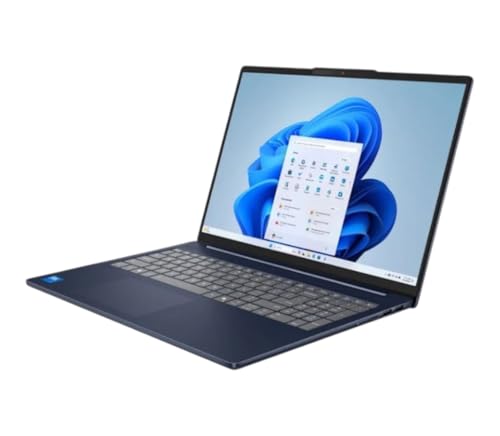
The Lenovo IdeaPad Slim 5i provides a practical entry point for casual picture editors who primarily work in apps like Canva, Google Photos, or lightweight Photoshop Express. Configurations with an Intel Core i5 or i7 processor, 16GB of RAM, and a 512GB NVMe SSD handle everyday editing without significant lag. The display is an IPS panel at 1920×1200 resolution with reasonable sRGB coverage, which is functional for basic color adjustments and social media posts. The slim design and light weight make it easy to carry around, and the build quality is solid for the price range.
For users who do not need the color accuracy of a professional display or the raw power of a workstation, the IdeaPad Slim 5i offers a good balance of performance and affordability. The 16GB of RAM is sufficient for multitasking with a few browser tabs and a light editing app open, and the NVMe SSD ensures quick file access. The laptop also includes a decent selection of ports, including USB-A, USB-C, HDMI, and a headphone jack, so you can connect external drives or a monitor without an adapter. The keyboard is comfortable for typing, which is useful if you also use the laptop for writing or office work.
A real limitation of the Lenovo IdeaPad Slim 5i is that the display is not color calibrated and covers only a basic sRGB gamut, so it is not suitable for professional color work. The integrated graphics (Intel Iris Xe) are fine for light editing but will struggle with heavy layer-based work or GPU-accelerated filters in Photoshop. The build quality, while decent, uses more plastic than premium laptops, and the hinges may feel less sturdy over time. For casual editors on a tight budget, however, this laptop delivers good value.
What to look for
- Display color accuracy: Look for factory calibration, wide color gamut coverage (sRGB, DCI-P3, Adobe RGB), and support for hardware calibration if you do professional work.
- Processor performance: Choose a chip that matches your workload. Apple M-series chips are efficient for most editing tasks, while Intel Core i7/i9 or AMD Ryzen 7/9 are strong for Windows systems.
- Memory and storage: 16GB of RAM is the minimum for comfortable editing; 32GB or more is better for large files. An NVMe SSD is essential for fast file access and software loading.
- Graphics capability: Integrated graphics work for basic edits, but a dedicated GPU (like NVIDIA RTX or Apple M4 Pro) is needed for GPU-accelerated filters and heavy layer work.
- Thermal design: Fanless designs are silent but may throttle under sustained load. Active cooling with fans keeps performance consistent but adds noise.
- Port selection: Thunderbolt 4 or USB-C with power delivery is useful for fast data transfer and charging. SD card slots and USB-A ports reduce the need for adapters.
- Upgradeability: Some laptops have soldered RAM and storage, so choose a configuration that meets your future needs. Desktops like the Mac Mini allow external storage expansion.
The verdict
For most picture editors, the Apple MacBook Air 15 M4 is the best overall choice because it combines a large, color-accurate display with silent operation and strong M4 performance. If you need professional desktop power, the Apple Mac Mini M4 Pro offers outstanding multi-core performance in a compact form factor. For Windows users, the Dell XPS 15 9530 with its OLED display is the top laptop option. The ASUS ProArt PA279CRV is an excellent monitor to pair with any system for color-critical work. And for casual editors on a budget, the Lenovo IdeaPad Slim 5i provides a functional and affordable entry point. Choose based on your workflow, budget, and need for portability versus raw performance.
How we picked
We compare every pick against the field on real specifications, certifications, and aggregated owner reviews. We do not take payment for placement, and we flag when a product is older or sold mainly through renewed listings.
Top picks compared
Our picks up close
Apple MacBook Air 15 M4 - Best Laptop for Everyday Picture Editing
The MacBook Air 15-inch with the M4 chip is the best all-around laptop for picture editing at its price point. It has no fans, which means no noise during sustained editing sessions, and the M4 chip handles Photoshop, Affinity Photo, and Lightroom edits comfortably with 16GB unified memory. The 15.3-inch Liquid Retina display covers the P3 wide color gamut and is factory calibrated, which makes color adjustments reliable without an external monitor. Battery life exceeds 15 hours on typical editing workloads. For photographers, illustrators, and content creators who want a light and capable editing machine, this is the clearest recommendation in its price range.

Apple Mac Mini M4 Pro - Best Desktop for Professional Picture Editing
The Mac Mini M4 Pro is the compact desktop pick for editors who need serious performance without a tower footprint. The M4 Pro chip delivers multi-core performance competitive with Intel Core i9 configurations at substantially lower power draw. Up to 64GB unified memory and Thunderbolt 5 ports make it suitable for large PSD files and fast external storage workflows. Photographers using Lightroom Classic with catalogs exceeding 100,000 images will notice faster preview rendering compared to the base M4. It requires an external display, which adds cost but allows pairing with a professionally calibrated monitor of your choice.
ASUS ProArt PA279CRV - Best Monitor for Color-Accurate Editing
While not a computer itself, the ASUS ProArt PA279CRV is worth calling out as a key component for any picture editing setup on a desktop. It is a 27-inch 4K IPS display factory-calibrated to Delta-E less than 2, covering 100% sRGB and 99% DCI-P3. ASUS includes a calibration report in the box and supports hardware calibration. Pairing this display with any PC or Mac in this list gives you a color-accurate editing environment for a fraction of the cost of a professional reference monitor. It connects via DisplayPort, HDMI, and USB-C with 96W power delivery.

Dell XPS 15 9530 - Best Windows Laptop for Picture Editing
The Dell XPS 15 remains the top Windows laptop recommendation for picture editing due to its OLED display option with hardware color calibration. The OLED panel renders blacks accurately and the P3 coverage is factory verified. Configurations with Intel Core i7 or i9, 32GB RAM, and NVIDIA RTX 4070 handle large Photoshop files and GPU-accelerated filters without lag. Dell's Color Profile tool makes display calibration straightforward for users who want to maintain accuracy over time. The laptop is heavier than ultrabooks, a fair trade for the display quality and dedicated GPU.
Lenovo IdeaPad Slim 5i - Best Budget Laptop for Casual Editing
The Lenovo IdeaPad Slim 5i provides a practical entry point for casual picture editors who primarily work in apps like Canva, Google Photos, or lightweight Photoshop Express. Configurations with an Intel Core i5 or i7, 16GB RAM, and a 512GB NVMe SSD handle everyday editing without significant lag. The display is an IPS panel at 1920x1200 resolution with reasonable sRGB coverage, functional for basic editing though not professionally calibrated. Build quality is solid for the price, and the thin chassis makes it portable. Upgrading to 16GB RAM at purchase avoids the memory bottleneck that limits the cheaper 8GB configurations.
Before you buy
What to consider
Determine the complexity of your editing first. Casual retouching and social media image prep are manageable on any modern machine with 16GB RAM and a decent display. Professional compositing, large RAW batch work, or AI-enhanced editing needs 32GB RAM, a dedicated GPU, and a color-calibrated display. If you use a PC, budget for display calibration hardware or a factory-calibrated monitor. Apple computers are generally simpler for color-managed workflows since the operating system handles color profiles consistently across all built-in displays.
What to consider
For related reading, see [best computers for photography editing](/articles/best-computer-for-photography-editing) and [best computers for photo storage and editing](/articles/best-computer-for-photo-storage-and-editing). Review our product evaluation process at [/methodology](/methodology).
Quick answers
8GB RAM is sufficient for casual picture editing in apps like Affinity Photo, Canva desktop, or light Photoshop use with small files. Once you start working with large PSD files, multiple open images, or layers-heavy compositing, 8GB becomes a bottleneck and the system starts using slow virtual memory. For anyone doing regular picture editing, 16GB is the realistic minimum, with 32GB recommended for professional or production work.
Screen resolution affects how much detail you see at full zoom and how accurately you can make fine adjustments. A 1080p display is a functional minimum, but 1440p or 4K shows more precise detail when retouching. More important than resolution is color accuracy. A display that covers the sRGB or P3 color gamut accurately, ideally with a Delta-E rating below 2, ensures that colors in your edits translate reliably to print or other screens. A 4K display with poor color calibration is less useful for editing than a 1440p display with accurate colors.
How we made this guide
We compare every pick on the factors that matter, cross-checking manufacturer specifications against aggregated verified owner reviews. We rank independently and never take payment for placement. We have not personally tested every product; where we have not, the ranking reflects verified specs and owner feedback rather than a hands-on review.
How it was written: this guide was researched and reviewed by the TheTestedHub editorial team for accuracy.
Affiliate disclosure: TheTestedHub is reader-supported. When you buy through links on our site, we may earn a commission at no extra cost to you.
More to explore

Your Docking Station Match: CalDigit TS4 and More

Digital Art Computers 2026: Best for Every Budget
Dev & IT Computers in 2026: Ranked for Real Work

Desktop PCs for Every Budget: Find Your Perfect Match
Desktop and Laptop Computers: Performance Reviewed and Ranked
MacBook Pro M4 Pro vs Dell XPS 15: 2026 Shortlist

Buy the Best DIY Computer in 2026: Corsair One i300
