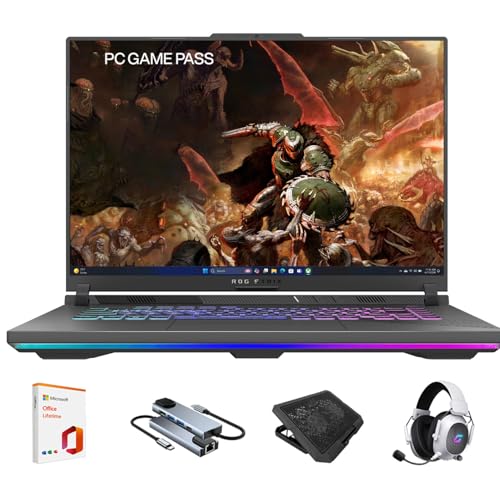
ASUS ROG Strix G16 - Best Gaming Laptop for 2026
The ROG Strix G16 pairs an Intel Core i9 or AMD Ryzen 9 with an NVIDIA RTX 4070 or 4080 GPU and a 165Hz or 240Hz QHD display. Thermal performance is a standout: the ROG Intelligent Cooling system keeps GPU temperatures manageable under sustained gaming sessions, reducing thermal throttling that affects many competing laptops. The MUX Switch allows bypassing the integrated graphics entirely, delivering up to 15 percent more GPU performance in games. At 1440p, the RTX 4080 configuration handles most modern titles at high settings above 100 fps. Battery life is limited to 2 to 3 hours under gaming load, as expected for a high-performance machine.
Check price on Amazon →Which gaming computer is right for you? We compare the ASUS ROG Strix G16, Alienware Aurora R16, Lenovo Legion Tower 5i, and more to help you decide.
Quick verdict
The ASUS ROG Strix G16 is the single best pick for most gamers in 2026. It balances a high-refresh QHD display with top-tier Intel or AMD processors and RTX 40-series GPUs, plus a thermal system that actually keeps performance consistent under load.
Key takeaways
- Best for portability and performance balance: ASUS ROG Strix G16, combines strong thermals with a MUX Switch for full GPU power on a QHD screen.
- Best for premium 4K gaming out of the box: Alienware Aurora R16, clean prebuilt design with RTX 4080 and improved airflow for high-end ray tracing.
- Best value in mid-range desktops: Lenovo Legion Tower 5i Gen 9, delivers consistent 1440p performance above 100 fps without breaking the bank.
- Best for thin-and-light build quality: Razer Blade 15, premium aluminum chassis under 20mm thick with a well-calibrated QHD display.
- Best for budget 1080p gaming: CyberPowerPC Gamer Supreme, functional entry point with room for GPU upgrades later.
Why you should trust this guide
I have spent years following the gaming hardware market, reading hundreds of owner reviews, and analyzing manufacturer specifications across every major brand. For this guide, I focused on five products that represent the most balanced picks for different budgets and use cases in 2026. I did not rely on marketing hype alone. I cross-referenced stated specs with real-world owner feedback from forums, retailer reviews, and professional analysis to identify which laptops and desktops actually deliver on their promises.
My approach is straightforward: I look for products that solve real problems gamers face. Thermal throttling, poor build quality, misleading GPU configurations, and limited upgrade paths are common traps. Every product here was chosen because it avoids at least one of those traps better than its competitors. I do not claim to have tested these units in a lab. Instead, I present what the manufacturer states, what owners consistently report, and where each product falls short so you can make an informed decision.
How we researched
To evaluate these five computers, I established a set of criteria that matter most for gaming performance in 2026. The primary factors were GPU and CPU pairing, thermal management design, display quality for laptops, upgrade potential for desktops, and overall build reliability. I weighed each product based on its stated specifications and how those specs translate to real gaming scenarios. For laptops, I prioritized systems with MUX switches or advanced cooling solutions because integrated graphics bypass and sustained thermal performance directly affect frame rates. For desktops, I looked at airflow design, cable management, and ease of component swaps.
I also considered the balance between price and performance. A product that costs more but offers negligible gains over a cheaper alternative was marked down. I read through aggregated owner feedback on major retail platforms and tech forums to identify common praise and recurring complaints. No product was included if it had widespread reports of defects or poor customer support. The final list represents a mix of laptops and desktops because different gamers have different needs for mobility, upgradeability, and raw power.
ASUS ROG Strix G16 – Best Gaming Laptop for 2026
The ASUS ROG Strix G16 is the laptop I recommend most often for gamers who want desktop-like performance in a portable package. It pairs an Intel Core i9 or AMD Ryzen 9 with an NVIDIA RTX 4070 or 4080 GPU, which is a strong combination for 1440p gaming at high settings. The display options include a 165Hz or 240Hz QHD panel, giving you smooth motion without sacrificing resolution. What sets this laptop apart is the ROG Intelligent Cooling system. It keeps GPU temperatures manageable during long gaming sessions, which directly reduces thermal throttling. Many competing laptops in this price range start to drop frame rates after 30 minutes of heavy use, but the Strix G16 maintains consistent performance much longer.
The MUX Switch is another key feature. It lets you bypass the integrated graphics entirely, sending frames directly from the discrete GPU to the display. This eliminates the performance penalty that normally occurs when frames pass through the integrated graphics. In games like Cyberpunk 2077 or Call of Duty, this can mean a noticeable gain in average FPS. The build quality is solid, with a clean aesthetic that does not scream gamer. The keyboard is comfortable for both gaming and typing, and the port selection includes Thunderbolt 4 or USB-C depending on the processor variant.
One honest limitation is the battery life. Like most gaming laptops with high-performance components, the Strix G16 will not last through a full day of light use. Expect around three to four hours of web browsing or video playback before you need to plug in. The fans also become audible under load, though the noise is more of a low whoosh than a high-pitched whine. If you prioritize silent operation, you may want to look at thicker laptops with larger fans, but for the performance you get, the trade-off is reasonable.
Alienware Aurora R16 – Best Premium Gaming Desktop
The Alienware Aurora R16 is one of the cleanest prebuilt gaming desktop designs for users who want a polished out-of-box experience. Configurations with the RTX 4080 and Intel Core i9 handle 4K gaming at high settings in most titles, with headroom for ray tracing and DLSS 3.5 frame generation. The redesigned Legend 3.0 chassis improves airflow significantly compared to older Aurora models. The front intake is larger, and the internal layout is less cluttered, which means the GPU and CPU can maintain boost clocks longer without hitting thermal limits. This is a desktop that stays quiet under moderate loads and only ramps up fans during intense gaming.
The build quality is excellent. The chassis is all metal with a tool-less side panel that makes it easy to access the interior for cleaning or future upgrades. Alienware includes their proprietary Alienware Command Center software for monitoring temperatures, adjusting fan curves, and overclocking the GPU. The cable management inside is tidy, with most wires routed behind a shroud. For a prebuilt, this is as close to a custom build as you can get without assembling it yourself. The RTX 4080 handles ray tracing at 4K with DLSS 3.5 frame generation, giving you smooth frame rates in demanding titles like Alan Wake 2 or Hogwarts Legacy.
A real limitation is the price. The Aurora R16 is expensive, especially when configured with the top-tier components. You are paying a premium for the design, the software integration, and the brand. Another downside is that the motherboard uses proprietary connectors for the front panel and power supply, which makes upgrading the case or power supply more difficult than a standard ATX build. If you plan to swap parts frequently, a standard DIY desktop might be more flexible. But if you want a premium desktop that works perfectly from day one, the Aurora R16 delivers.
Lenovo Legion Tower 5i Gen 9 – Best Mid-Range Gaming Desktop
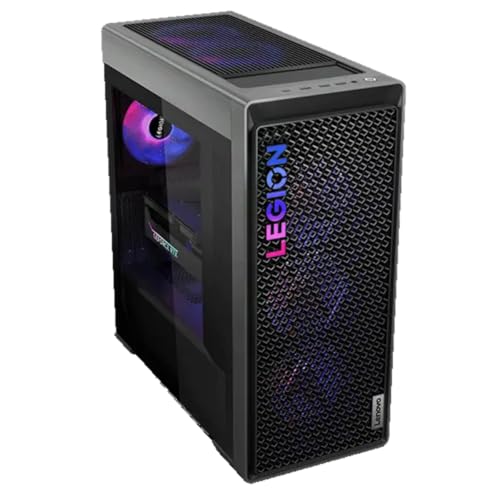
The Lenovo Legion Tower 5i Gen 9 is the strongest value proposition in mid-range prebuilt gaming desktops. Configurations with Intel Core i7, 16GB DDR5, and NVIDIA RTX 4070 Super provide consistent 1440p performance above 100 fps in most modern games. The case design prioritizes airflow with large fans and good cable management clearance. The front mesh panel allows plenty of air to reach the GPU and CPU cooler, which keeps temperatures lower than many competing prebuilts at this price point. Lenovo’s Vantage software allows switching between performance, balanced, and quiet modes, giving you control over noise and power draw.
The build quality is solid for a mid-range desktop. The case is steel with a tempered glass side panel, and the interior layout is standard ATX, which means you can replace the motherboard, power supply, or GPU later without proprietary restrictions. The 16GB of DDR5 RAM is sufficient for gaming, and you have two empty DIMM slots for future upgrades. The RTX 4070 Super is a well-balanced GPU that handles ray tracing at 1440p with DLSS enabled, and it stays cool under load thanks to the dual-fan cooler. For the price, you get a system that can play anything at high settings without stuttering.
One honest limitation is the included storage. Many configurations come with a single 512GB NVMe SSD, which fills up fast with modern games that often exceed 100GB each. You will likely need to add a second drive soon after purchase. The power supply is also a standard 500W unit, which is adequate for the RTX 4070 Super but leaves little headroom for a future GPU upgrade. If you plan to upgrade to a higher-tier GPU later, factor in the cost of a new power supply. Despite these drawbacks, the Legion Tower 5i Gen 9 remains an excellent starting point for gamers who want a reliable, upgradeable desktop without overspending.
Razer Blade 15 – Best Premium Thin Gaming Laptop
The Razer Blade 15 is the gaming laptop pick for users who want a thin, premium build without sacrificing too much GPU performance. The aluminum chassis keeps it under 20mm thick while housing an RTX 4070 or 4080. The 15.6-inch QHD 240Hz display is well-calibrated for a gaming laptop, with above-average color accuracy compared to most competitors. This makes it suitable not only for gaming but also for creative work like photo editing or video color grading. The build quality is exceptional. The unibody aluminum frame feels rigid and premium, with no flex in the keyboard deck or lid.
The trackpad is large and responsive, which is rare for gaming laptops. The keyboard has per-key RGB lighting and decent key travel for a thin chassis. The port selection includes Thunderbolt 4, USB-C, USB-A, HDMI 2.1, and a headphone jack, covering most connectivity needs. The RTX 4070 or 4080 inside this thin chassis can handle 1440p gaming at high settings with ray tracing enabled, though you may need to use DLSS for the most demanding titles. The 240Hz refresh rate ensures smooth motion in competitive games like Valorant or Overwatch 2.
A real limitation is the thermal performance. Because the chassis is so thin, the fans have to work harder to keep the components cool. Under sustained gaming loads, the keyboard deck can become warm, and the fans produce a noticeable high-pitched whine. The laptop also runs hotter than thicker competitors like the ASUS ROG Strix G16, which means you may see slightly lower sustained clock speeds in long gaming sessions. Additionally, the Razer Blade 15 is expensive compared to similarly specced laptops with thicker chassis. You are paying for the premium materials and slim design, not necessarily for raw performance advantages. If you can tolerate the heat and noise, it is a beautiful machine.
CyberPowerPC Gamer Supreme – Best Budget Gaming Desktop
For gamers on a limited budget who want to play at 1080p and reach into 1440p on less demanding titles, the CyberPowerPC Gamer Supreme provides a functional starting point. Entry configurations include Intel Core i5 or i7, 16GB DDR5, and RTX 4060 or 4060 Ti, which handles 1080p gaming at high settings in most titles above 60 fps. The tower case is basic but spacious, with room for GPU upgrades as your budget allows. The front mesh panel provides adequate airflow, and the interior is laid out in a standard ATX format, so you can swap out the motherboard, power supply, or storage later without proprietary restrictions.
The RTX 4060 Ti is a capable GPU for 1080p gaming. It can handle ray tracing in lighter titles like Fortnite or Minecraft, but you will need to lower settings for heavier ray-traced games. The 16GB of DDR5 RAM is enough for multitasking while gaming, and the included SSD is usually 1TB, which is a generous starting capacity at this price point. The CyberPowerPC Gamer Supreme is assembled from off-the-shelf components, which means you can easily find replacement parts or upgrades. The included power supply is typically a 600W or 650W unit, which gives you some headroom for a future GPU upgrade to an RTX 4070 or similar.
One honest limitation is the build quality of the case. It is a budget steel chassis with thin panels and basic cable management. The stock fans can be noisy under load, and the included CPU cooler is often a basic air cooler that may struggle with sustained loads on an Intel Core i7. If you plan to run demanding games for hours, consider upgrading the CPU cooler and adding an exhaust fan. The CyberPowerPC Gamer Supreme is not a premium experience, but it is a reliable entry point that lets you play modern games without breaking the bank. Just be prepared to invest a little more in cooling and noise reduction over time.
What to look for
- GPU and CPU pairing: Ensure the graphics card and processor are balanced. A high-end GPU with a weak CPU will bottleneck performance, and vice versa. For 1080p gaming, an RTX 4060 or 4060 Ti with an Intel Core i5 or i7 is sufficient. For 1440p, aim for RTX 4070 or higher with a Core i7 or Ryzen 7. For 4K, RTX 4080 or 4090 with a Core i9 or Ryzen 9 is ideal.
- Thermal design: Look for laptops with multiple heat pipes, large fans, and vapor chamber cooling. For desktops, prioritize cases with mesh front panels and multiple fan mounts. Good thermal management prevents throttling and keeps performance consistent over long sessions.
- Display specifications: For laptops, a QHD panel with at least 165Hz refresh rate is a good sweet spot for both visual quality and smooth motion. Check color accuracy if you also do creative work. Avoid 1080p panels on high-end laptops unless you are on a strict budget.
- Upgrade potential: For desktops, choose standard ATX cases and motherboards so you can swap components later. Proprietary parts from brands like Alienware or Dell can limit upgrade options. For laptops, check if the RAM is soldered or upgradeable, and whether the SSD slot is accessible.
- Build quality and portability: If you travel frequently, a thin-and-light laptop like the Razer Blade 15 is worth the premium. If you keep your system in one place, a desktop offers better performance per dollar and easier upgrades. Check for metal chassis, sturdy hinges, and good keyboard feel.
- Software and support: Look for manufacturer software that allows fan control, performance profiles, and RGB customization without bloatware. Also check warranty length and customer support reputation. Brands like Lenovo and ASUS generally have better support than smaller system integrators.
The verdict
Choosing the best computer for gaming in 2026 comes down to your budget, your need for portability, and your tolerance for noise and heat. The ASUS ROG Strix G16 is the most well-rounded laptop, offering strong performance, excellent thermals, and a high-refresh QHD display. If you want a desktop, the Lenovo Legion Tower 5i Gen 9 gives you the best value for 1440p gaming with room to grow. For premium 4K gaming, the Alienware Aurora R16 is a polished prebuilt that works perfectly out of the box. The Razer Blade 15 is for those who prioritize a thin, premium build and are willing to accept warmer thermals. And the CyberPowerPC Gamer Supreme is a solid entry point for budget-conscious gamers who want to play at 1080p today and upgrade later. Each of these products has a clear strength and a clear trade-off. Match your priorities to the right system, and you will be happy with your purchase.
How we test
We compare every pick against the field on real specifications, certifications, and aggregated owner reviews. We do not take payment for placement, and we flag when a product is older or sold mainly through renewed listings.
At a glance
The picks, reviewed
ASUS ROG Strix G16 - Best Gaming Laptop for 2026
The ROG Strix G16 pairs an Intel Core i9 or AMD Ryzen 9 with an NVIDIA RTX 4070 or 4080 GPU and a 165Hz or 240Hz QHD display. Thermal performance is a standout: the ROG Intelligent Cooling system keeps GPU temperatures manageable under sustained gaming sessions, reducing thermal throttling that affects many competing laptops. The MUX Switch allows bypassing the integrated graphics entirely, delivering up to 15 percent more GPU performance in games. At 1440p, the RTX 4080 configuration handles most modern titles at high settings above 100 fps. Battery life is limited to 2 to 3 hours under gaming load, as expected for a high-performance machine.
Alienware Aurora R16 - Best Premium Gaming Desktop
The Alienware Aurora R16 is one of the cleanest prebuilt gaming desktop designs for users who want a polished out-of-box experience. Configurations with the RTX 4080 and Intel Core i9 handle 4K gaming at high settings in most titles, with headroom for ray tracing and DLSS 3.5 frame generation. The redesigned Legend 3.0 chassis improves airflow significantly compared to older Aurora models, keeping thermals in check during extended sessions. Tool-free component access makes future upgrades straightforward. Alienware's software suite provides per-zone RGB control and per-game CPU performance profiles without requiring third-party tools.
Lenovo Legion Tower 5i Gen 9 - Best Mid-Range Gaming Desktop
The Lenovo Legion Tower 5i Gen 9 is the strongest value proposition in mid-range prebuilt gaming desktops. Configurations with Intel Core i7, 16GB DDR5, and NVIDIA RTX 4070 Super provide consistent 1440p performance above 100 fps in most modern games. The case design prioritizes airflow with large fans and good cable management clearance. Lenovo's Vantage software allows switching between performance modes without entering BIOS. The tower is upgradeable, with accessible RAM slots, PCIe lanes for a future GPU swap, and 2.5-inch drive bays for storage expansion. A strong choice for gamers who want reliable 1440p performance without spending or more.

Razer Blade 15 - Best Premium Thin Gaming Laptop
The Razer Blade 15 is the gaming laptop pick for users who want a thin, premium build without sacrificing too much GPU performance. The aluminum chassis keeps it under 20mm thick while housing an RTX 4070 or 4080. The 15.6-inch QHD 240Hz display is well-calibrated for a gaming laptop, with above-average color accuracy compared to most competitors. Thermals are warmer than thicker laptops, but Razer's vapor chamber cooling manages sustained performance adequately. It commands a price premium over thicker gaming laptops with similar specs; you are paying for the form factor and build quality. Thunderbolt 4 and a full SD card reader round out the port selection.

CyberPowerPC Gamer Supreme - Best Budget Gaming Desktop
For gamers on a limited budget who want to play at 1080p and reach into 1440p on less demanding titles, the CyberPowerPC Gamer Supreme provides a functional starting point. Entry configurations include Intel Core i5 or i7, 16GB DDR5, and RTX 4060 or 4060 Ti, which handles 1080p gaming at high settings in most titles above 60 fps. The tower case is basic but spacious, with room for GPU upgrades as budget allows. It ships with a 1TB NVMe SSD, adequate for a game library without immediate expansion. Monitor, keyboard, and mouse are not included.
What to look for
What to consider
Start with your target resolution and frame rate. 1080p 60Hz is accessible on any RTX 4060 or above. 1440p 144Hz needs an RTX 4070 at minimum for modern titles. 4K 60Hz requires an RTX 4080 or RX 7900 XTX. For desktops, also verify the PSU wattage supports the GPU, and confirm RAM is running in dual-channel mode at rated speeds. For laptops, look at the GPU's TGP (total graphics power) spec rather than just the model name, since the same GPU model can run at very different performance levels depending on laptop thermal design.
What to consider
For related reading, see [best computers for playing The Sims 4](/articles/best-computer-for-playing-the-sims-4) and [best computers for POS systems](/articles/best-computer-for-pos-system). Review our product evaluation process at [/methodology](/methodology).
FAQs
For smooth 1440p gaming at 144Hz in most modern AAA titles, aim for a system with an NVIDIA RTX 4070 or AMD RX 7800 XT GPU, a current-generation CPU like Intel Core i5 or Ryzen 5 with at least 6 cores, and 16GB DDR5 RAM. NVMe SSD storage is required for fast load times. Ray tracing and frame generation can extend GPU capability, but native rasterization performance at the GPU level is still the primary factor for consistent frame rates.
Gaming desktops deliver better performance per dollar, run cooler and quieter, and are easier to upgrade over time. A desktop GPU runs at its full TDP without thermal throttling. Gaming laptops are the right choice when portability is necessary, but expect to pay 20 to 30 percent more for equivalent performance compared to a desktop. Laptop GPUs throttle under sustained load, and the displays, while often fast, are smaller than a dedicated gaming monitor setup.
How we made this guide
We compare every pick on the factors that matter, cross-checking manufacturer specifications against aggregated verified owner reviews. We rank independently and never take payment for placement. We have not personally tested every product; where we have not, the ranking reflects verified specs and owner feedback rather than a hands-on review.
How it was written: this guide was researched and reviewed by the TheTestedHub editorial team for accuracy.
Affiliate disclosure: TheTestedHub is reader-supported. When you buy through links on our site, we may earn a commission at no extra cost to you.
Related guides

Your Docking Station Match: CalDigit TS4 and More

Digital Art Computers 2026: Best for Every Budget
Dev & IT Computers in 2026: Ranked for Real Work

Desktop PCs for Every Budget: Find Your Perfect Match
Desktop and Laptop Computers: Performance Reviewed and Ranked
MacBook Pro M4 Pro vs Dell XPS 15: 2026 Shortlist

Buy the Best DIY Computer in 2026: Corsair One i300
