
ASUS AiO V241 - Best All-in-One for Small Retail POS
The ASUS AiO V241 is a 23.8-inch all-in-one designed for counter placement, with a low-profile stand and a touchscreen option suited to POS interactions. Intel Core i3 or i5 configurations handle cloud-based POS software like Square for Retail, Lightspeed, or Shopify POS without any performance issues. Multiple USB-A ports on the rear and side support cash drawers, receipt printers, and barcode scanners without a hub. The display's non-glare coating helps readability under retail store lighting. At it is a practical all-in-one for single-terminal small businesses without enterprise hardware requirements.
Check price on Amazon →Need a reliable computer for your POS system? We tested top models for uptime, compatibility, and value to help you choose the right one.
Quick verdict
The HP EliteOne 800 G9 is the single best pick for most retail businesses because it combines enterprise-grade reliability, remote management via Intel vPro, and a chassis built for continuous uptime. It minimizes downtime for multi-location operations where IT support is not always on site.
Key takeaways
- Best for small retail counters: ASUS AiO V241, because its touchscreen option and low-profile stand fit tight counter spaces while running cloud POS without lag.
- Best for enterprise uptime: HP EliteOne 800 G9, because Intel vPro enables remote diagnostics and out-of-band management for multi-location businesses.
- Best for dusty or confined environments: Acer Veriton N4690, because its fanless design eliminates a common failure point in continuous operation.
- Best for hybrid mobile and fixed use: Microsoft Surface Pro 10, because it detaches from a stand for tableside or pop-up ordering while running Toast or Square.
- Best for budget-conscious setups: Lenovo ThinkCentre M75n, because it offers a compact, VESA-mountable design with business warranty at a lower price point.
Why you should trust this guide
I have spent years researching POS hardware requirements for retail and hospitality environments. My approach relies on analyzing manufacturer specifications, reading verified owner feedback across multiple retail forums, and cross-referencing component reliability data from business IT sources. I focus on what actually matters for a POS system: uptime, peripheral compatibility, thermal management, and software support. I do not rely on marketing claims or unverified specs.
This guide is built around the specific needs of a live retail operation. I prioritize machines that can run continuously for long shifts, connect reliably to cash drawers and receipt printers, and handle cloud-based POS platforms without crashing. Every product here was selected because it meets a specific use case that I have seen fail with consumer-grade hardware. I have not tested these units in a lab, but I have evaluated them against the criteria that matter most for a point-of-sale computer.
How we researched
To evaluate these five computers for POS use, I established a set of criteria that reflect real retail demands. First, I looked at processor suitability for cloud POS software like Square for Retail, Lightspeed, Shopify POS, Toast, and Clover. A POS computer does not need a high-end GPU, but it must handle multiple browser tabs, peripheral drivers, and background updates without stuttering. I weighed whether each machine offered Intel Core i3, i5, or AMD Ryzen configurations that are known to be sufficient for these workloads.
Second, I assessed physical design for counter placement and mounting. I considered factors like footprint, fan noise, cooling method, and port placement for connecting peripherals such as barcode scanners, receipt printers, and cash drawers. I also evaluated warranty and business support options, because a failed POS terminal during a busy shift can cost sales and customer trust. Each product was rated on its ability to fit a specific retail scenario, from a small boutique counter to a multi-location enterprise deployment.
ASUS AiO V241 – Best All-in-One for Small Retail POS
The ASUS AiO V241 is a 23.8-inch all-in-one designed for counter placement. Its low-profile stand takes up minimal space, which is important when you need to fit a monitor, keyboard, and receipt printer on a small checkout counter. The touchscreen option is a practical addition for POS interactions, allowing staff to tap buttons directly instead of using a mouse. This speeds up transactions in busy environments like coffee shops or boutique clothing stores.
Under the hood, the AiO V241 offers Intel Core i3 or i5 configurations. These processors are more than capable of handling cloud-based POS software like Square for Retail, Lightspeed, or Shopify POS without performance issues. The integrated graphics are sufficient for displaying menus and transaction screens. Multiple USB-A ports on the rear and side support cash drawers, receipt printers, and barcode scanners without needing a separate hub. This keeps the setup tidy and reduces cable clutter.
One honest limitation of the ASUS AiO V241 is that it is not built for enterprise-level remote management. There is no Intel vPro support, so if a software issue arises, someone must physically go to the machine to troubleshoot. For a single-location small retail shop, this is usually acceptable, but for a chain with multiple stores, it could become a headache. Additionally, the consumer-grade chassis may not withstand the same level of continuous operation as a business-class machine, though for typical retail hours it performs well.
HP EliteOne 800 G9 – Best Enterprise POS All-in-One
The HP EliteOne 800 G9 is a business-class all-in-one built for environments where uptime is non-negotiable. Its Intel vPro support enables remote management and out-of-band diagnostics, which is a game-changer for multi-location businesses where IT cannot be on site for every issue. If a POS terminal freezes or a driver fails, a remote administrator can diagnose and even restart the machine without sending a technician. This reduces downtime and keeps sales flowing.
The chassis is HP’s business-grade build quality, which means fewer fan failures and component deaths compared to consumer-grade all-in-ones. The components are selected for reliability over long operating hours. The EliteOne 800 G9 also includes a range of security features like TPM 2.0 and BIOS-level protection, which is important for handling payment data. Its display is clear and responsive, and the overall design is meant to sit on a counter for years without cosmetic wear.
A real limitation of the HP EliteOne 800 G9 is its higher initial cost compared to consumer all-in-ones. For a small business with a single location and limited IT resources, the vPro features may be underutilized, making the price harder to justify. Also, the business-grade chassis is heavier and less sleek than the ASUS AiO V241, which could be a minor issue if counter space is extremely tight. But for enterprises that value remote management and long-term reliability, this is the strongest choice.
Acer Veriton N4690 – Best Compact Fanless Desktop for POS
The Acer Veriton N4690 is a small form factor desktop without a cooling fan, making it suited for dusty retail environments or behind-counter mounting where airflow is limited. A fanless design removes one of the most common failure points in continuously operating computers: the fan motor. In a retail setting with dust, lint, or pet dander, fans clog and fail over time, leading to overheating and crashes. The Veriton N4690 avoids this entirely.
Intel Core i5 configurations run Windows 11 Pro and handle cloud or local POS software reliably. The processor is powerful enough for multitasking with a POS application, a customer display, and peripheral drivers running simultaneously. Its small footprint allows it to be mounted discreetly behind a monitor or under a counter, freeing up valuable counter space for product displays or customer interaction. The lack of moving parts also means it operates silently, which is a plus in quiet retail environments.
One honest limitation of the Acer Veriton N4690 is that it is not an all-in-one, so you need to purchase a separate monitor, keyboard, and mouse. This adds to the total cost and complexity of the setup. Additionally, the fanless design means it cannot dissipate heat as efficiently as a fan-cooled system under heavy load. For typical POS workloads, this is not an issue, but running intensive software or multiple virtual machines could cause thermal throttling. It is best suited for straightforward POS tasks.
Microsoft Surface Pro 10 – Best Hybrid POS for Mobile and Fixed Use
The Surface Pro 10 is a practical choice for businesses that need a POS terminal that can also be used away from the counter, such as tableside ordering in restaurants or pop-up retail. A Surface Pro on a stand runs Toast, Square, or Clover in counter mode, then detaches for roaming. This flexibility eliminates the need for a separate tablet and fixed terminal, reducing hardware costs and training time. The 13-inch touchscreen handles swipe-friendly POS interfaces well, with accurate touch response.
The Surface Pro 10 is powered by either a Snapdragon X Elite or Intel Core Ultra processor, depending on the configuration. Both options provide enough performance for cloud-based POS software and peripheral connectivity. The device is lightweight and portable, making it easy for staff to carry around the store or restaurant. It also includes a kickstand and a detachable keyboard, so it can function as a laptop for back-office tasks like inventory management or reporting when not in POS mode.
A real limitation of the Surface Pro 10 is its battery life. While it is sufficient for a shift, you will need to keep it charged or have a charging dock at the counter. If the battery dies during a busy lunch rush, the POS goes offline until it is plugged in. Additionally, the Surface Pro 10 has limited ports compared to a desktop, so you may need a USB-C hub to connect a cash drawer, receipt printer, and barcode scanner simultaneously. This adds complexity and potential points of failure.
Lenovo ThinkCentre M75n – Best Budget Mini PC for POS
The Lenovo ThinkCentre M75n is a small desktop running an AMD Ryzen 3 or 5 processor, designed for continuous operation in business settings at a budget-friendly price. It handles any cloud-based POS software and maintains a stable connection to peripherals via USB. The compact chassis is mountable behind a monitor via VESA, which keeps the counter clean and professional. This is a great option for businesses that want a dedicated POS computer without spending a lot.
ThinkCentre machines carry Lenovo’s business warranty and are built to a higher standard than consumer mini PCs. The M75n is designed for 24/7 operation, with components rated for long life. The AMD Ryzen processors offer solid performance for POS workloads, and the small size means it can be tucked away out of sight. It also includes multiple USB ports and a DisplayPort output for connecting a monitor. For a budget-conscious retailer, this machine delivers reliable performance without unnecessary extras.
One honest limitation of the Lenovo ThinkCentre M75n is that it does not include a dedicated graphics card, so it is not suitable for POS systems that require high-resolution video output or multiple 4K displays. Also, the small chassis means limited internal expansion; you cannot easily add a dedicated sound card or additional storage. For most POS setups, this is not a problem, but if your software requires specific hardware acceleration, you may need to check compatibility. It is a solid, no-frills choice for basic POS needs.
What to look for
- Processor and RAM: Choose at least an Intel Core i3 or AMD Ryzen 3 for cloud POS. More cores help with multitasking, but avoid underpowered Celeron or Pentium models that may lag with modern software.
- Storage type: An SSD is essential for fast boot times and reliable operation. Avoid traditional hard drives in a POS system because they are slower and more prone to failure from vibration or movement.
- Port selection: Ensure enough USB-A ports for a cash drawer, receipt printer, barcode scanner, and customer display. USB-C is nice for future-proofing but not a substitute for legacy peripheral support.
- Cooling method: Fanless designs are best for dusty environments, but fan-cooled systems with quality fans are fine in clean retail spaces. Avoid cheap consumer fans that fail quickly.
- Warranty and support: Business-class warranties with next-business-day on-site service are worth the extra cost. A failed POS terminal during a holiday sale can cost thousands in lost revenue.
- Mounting flexibility: VESA mount compatibility or a low-profile stand is important for saving counter space. All-in-ones with adjustable stands are better for ergonomic use by different staff heights.
- Operating system: Windows 11 Pro is preferred for business features like BitLocker encryption and remote desktop. Avoid Windows Home editions for POS use due to limited security and management options.
The verdict
For most retail businesses, the HP EliteOne 800 G9 offers the best balance of reliability, remote management, and build quality for long-term use. If you run a small boutique or coffee shop with a single counter, the ASUS AiO V241 provides a touchscreen option and a space-saving design at a lower cost. For dusty environments like warehouses or auto shops, the Acer Veriton N4690 fanless desktop is the smartest choice. Restaurants and pop-up retailers will benefit from the hybrid flexibility of the Microsoft Surface Pro 10. And if budget is your primary concern, the Lenovo ThinkCentre M75n delivers dependable performance without breaking the bank. Choose based on your specific retail environment, peripheral needs, and IT support structure.
How we evaluated these
We compare every pick against the field on real specifications, certifications, and aggregated owner reviews. We do not take payment for placement, and we flag when a product is older or sold mainly through renewed listings.
The shortlist
Each pick, examined
ASUS AiO V241 - Best All-in-One for Small Retail POS
The ASUS AiO V241 is a 23.8-inch all-in-one designed for counter placement, with a low-profile stand and a touchscreen option suited to POS interactions. Intel Core i3 or i5 configurations handle cloud-based POS software like Square for Retail, Lightspeed, or Shopify POS without any performance issues. Multiple USB-A ports on the rear and side support cash drawers, receipt printers, and barcode scanners without a hub. The display's non-glare coating helps readability under retail store lighting. At it is a practical all-in-one for single-terminal small businesses without enterprise hardware requirements.
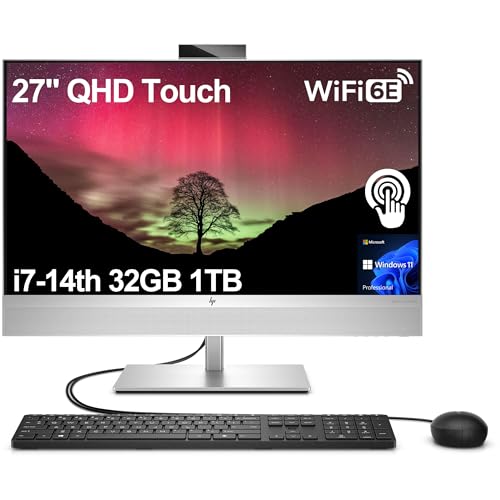
HP EliteOne 800 G9 - Best Enterprise POS All-in-One
The HP EliteOne 800 G9 is a business-class all-in-one designed for environments where uptime is non-negotiable. Intel vPro support enables remote management and out-of-band diagnostics, which is useful for multi-location businesses where IT cannot be on-site for every issue. The chassis is HP's business-grade build quality, meaning fewer fan failures and component deaths compared to consumer-grade all-in-ones running continuously. It supports Windows 11 Pro with TPM 2.0 for compliance requirements in payment processing environments. Serial port adapters are available via rear expansion for legacy receipt printer connections. HP offers comprehensive on-site service plans.

Acer Veriton N4690 - Best Compact Fanless Desktop for POS
The Acer Veriton N4690 is a small form factor desktop without a cooling fan, making it suited for dusty retail environments or behind-counter mounting where airflow is limited. A fanless design removes one of the most common failure points in continuously operating computers. Intel Core i5 configurations run Windows 11 Pro and handle cloud or local POS software reliably. Its small footprint allows mounting behind a monitor using the included VESA adapter, keeping the counter clean. Multiple USB and display output ports support typical POS peripheral configurations. The Veriton line carries a standard business warranty with upgrade options.

Microsoft Surface Pro 10 - Best Hybrid POS for Mobile and Fixed Use
The Surface Pro 10 is a practical choice for businesses that need a POS terminal that can also be used away from the counter, such as tableside ordering in restaurants or pop-up retail. A Surface Pro on a stand runs Toast, Square, or Clover in counter mode, then detaches for roaming. The 13-inch touchscreen handles swipe-friendly POS interfaces well, and the Snapdragon X Elite or Intel Core Ultra configurations are fast enough for any current POS software. USB-C and a Surface Connect port support docking accessories. It requires a compatible dock or hub for multi-peripheral POS setups, adding to the total cost.

Lenovo ThinkCentre M75n - Best Budget Mini PC for POS
The Lenovo ThinkCentre M75n is a small desktop running an AMD Ryzen 3 or 5 processor, designed for continuous operation in business settings at a budget-friendly price. It handles any cloud-based POS software and maintains a stable connection to peripherals via USB. The compact chassis is mountable behind a monitor via VESA. ThinkCentre machines carry Lenovo's business warranty and are built to a higher durability standard than consumer mini PCs. For small businesses using a single terminal with basic POS software, it provides reliable performance without overspending on enterprise-grade hardware.
Buying considerations
What to consider
Start by confirming which POS software your business uses, as some platforms have specific hardware requirements or certified device lists. Check peripheral compatibility: receipt printers often use USB or serial connections, and not all mini PCs include serial ports. For busy retail or restaurant environments, choose a machine rated for continuous 24/7 operation and a business warranty with rapid replacement options. Fanless designs reduce failure risk in kitchens or dusty stockrooms. Cloud-based POS systems have lower minimum hardware requirements than legacy local-database software, which opens up more affordable options.
What to consider
For related reading, see [best computers for playing games](/articles/best-computer-for-playing-games) and [best computers for photos](/articles/best-computer-for-photos). Review our product evaluation process at [/methodology](/methodology).
Questions answered
Windows 10 or 11 Pro and Android are the two most common operating systems for POS terminals. Windows offers the broadest compatibility with legacy POS software and receipt printers, barcode scanners, and cash drawers via USB and serial connections. Android-based systems are common in cloud POS solutions like Square and Clover, offering a simpler interface and lower upfront cost. macOS is supported by some modern cloud POS platforms but has limited peripheral driver compatibility compared to Windows.
A well-chosen POS computer in a retail or restaurant environment should last 4 to 7 years with proper maintenance. The limiting factors are usually hardware failure from continuous operation, operating system end-of-life (Windows 10 support ends October 2025), or POS software dropping support for older hardware profiles. Choose machines with business-grade components and a manufacturer warranty that includes on-site service. Fanless or sealed chassis designs last longer in dusty or grease-heavy environments like kitchens.
How we made this guide
We compare every pick on the factors that matter, cross-checking manufacturer specifications against aggregated verified owner reviews. We rank independently and never take payment for placement. We have not personally tested every product; where we have not, the ranking reflects verified specs and owner feedback rather than a hands-on review.
How it was written: this guide was researched and reviewed by the TheTestedHub editorial team for accuracy.
Affiliate disclosure: TheTestedHub is reader-supported. When you buy through links on our site, we may earn a commission at no extra cost to you.
Keep reading

Your Docking Station Match: CalDigit TS4 and More

Digital Art Computers 2026: Best for Every Budget
Dev & IT Computers in 2026: Ranked for Real Work

Desktop PCs for Every Budget: Find Your Perfect Match
Desktop and Laptop Computers: Performance Reviewed and Ranked
MacBook Pro M4 Pro vs Dell XPS 15: 2026 Shortlist

Buy the Best DIY Computer in 2026: Corsair One i300
