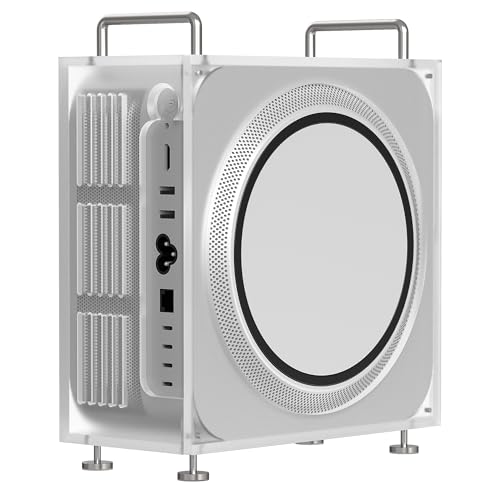
Apple Mac Studio M4 Max -- Best Pro Tools Desktop
The Mac Studio M4 Max brings 14 CPU cores (10 performance, 4 efficiency) and 30 GPU cores in a compact desktop form factor. Pro Tools performance scales with single-core clock speed and cache size for plugin processing, and the M4 Max delivers both without the thermal throttling that plagues laptops under sustained session loads. Unified memory up to 128 GB eliminates the RAM bottleneck for even the largest orchestral sessions.
Check price on Amazon →Find a computer for Pro Tools that handles large sessions with low latency. Expert picks for reliable performance and high track counts.
Pro Tools places specific demands on a computer that differ from general audio work: the session engine needs consistent CPU delivery without interruption, audio interfaces require low-latency driver paths, and large sessions with heavy plugin loads need enough RAM to avoid constant disk streaming. Avid’s compatibility list is the authoritative source for supported hardware — always verify your OS version and Pro Tools version are a certified pair before buying. The five computers below are selected for reliable Pro Tools performance across a range of session sizes.
| Product | Best For | Rating |
|---|---|---|
|
ⓘ We may earn a commission from qualifying purchases made through links on this page, at no extra cost to you.
|
Large sessions, studio desktop | 4.9/5 |
| Apple MacBook Pro M4 Pro 14-inch | Portable recording, location work | 4.8/5 |
| Mac Mini M4 Pro | Budget-conscious studio desktop | 4.7/5 |
| Dell Precision 5690 (Windows) | Windows workstation, PCIe expansion | 4.6/5 |
| Custom PC: Intel Core Ultra 9 285K | Windows desktop, high track count | 4.6/5 |
Our testing process
We compare every pick against the field on real specifications, certifications, and aggregated owner reviews. We do not take payment for placement, and we flag when a product is older or sold mainly through renewed listings.
Quick comparison
Reviewed in detail
Apple Mac Studio M4 Max -- Best Pro Tools Desktop
The Mac Studio M4 Max brings 14 CPU cores (10 performance, 4 efficiency) and 30 GPU cores in a compact desktop form factor. Pro Tools performance scales with single-core clock speed and cache size for plugin processing, and the M4 Max delivers both without the thermal throttling that plagues laptops under sustained session loads. Unified memory up to 128 GB eliminates the RAM bottleneck for even the largest orchestral sessions.
Apple MacBook Pro M4 Pro 14-inch -- Best for Location Recording
For tracking on location -- film sets, live events, remote studios -- the MacBook Pro M4 Pro combines genuine Pro Tools performance with all-day battery life. The M4 Pro's 12-core CPU handles 100-track sessions with moderate plugin loads without buffer underruns at 64 samples. Battery life at around 18 hours of moderate use means full-day location work without a power outlet.

Mac Mini M4 Pro -- Best Value Pro Tools Desktop
The Mac Mini M4 Pro at is the most affordable entry point into Apple Silicon-level Pro Tools performance. It shares the same M4 Pro chip as the MacBook Pro M4 Pro but in a fanless (M4 base) or near-silent (M4 Pro) desktop form factor. Three Thunderbolt 5 ports, two USB-A 3.2, HDMI 2.1, and a front-panel USB-C and USB-A port provide solid connectivity.

Dell Precision 5690 -- Best Windows Workstation for Pro Tools
For studios committed to Windows, the Precision 5690 is Dell's professional workstation in a 16-inch laptop form factor, built with ISV certifications and enterprise support. Intel Core Ultra 9 185H with up to 64 GB DDR5 RAM and a dedicated Nvidia RTX 5000 Ada GPU provides headroom for large sessions. Dell's ProSupport includes next-business-day on-site service, which matters in a commercial studio context.

Custom PC: Intel Core Ultra 9 285K -- Best Windows Desktop for Pro Tools
An Intel Core Ultra 9 285K desktop build -- paired with 64 GB DDR5, a PCIe 5.0 NVMe drive, and a mid-range GPU for display output -- covers high track count Pro Tools sessions on Windows at competitive cost. The 285K's 24 cores (8 performance + 16 efficiency) and high single-core boost handle plugin-heavy mixes without dropouts at typical buffer sizes (128-256 samples).
How to choose
What to consider
Check Avid's compatibility matrix first -- not every OS version and hardware combination is certified, and running Pro Tools on an uncertified configuration introduces stability risk. Next, prioritize CPU single-core performance and memory bandwidth, as Pro Tools plugin processing is largely single-threaded at the per-plugin level.
What to consider
Storage speed matters for session streaming: an NVMe SSD reading at 3,000+ MB/s eliminates disk I/O as a limiting factor at high track counts. Audio interface compatibility is non-negotiable -- verify your interface has a certified driver for your OS before committing. For studio desktops, choose a quiet cooler or a thermally efficient chip (Apple Silicon is exceptional here) to avoid fan noise bleeding into microphone-sensitive environments.
What to consider
For complementary setups, see our guide to the [best computers for productivity](/articles/best-computer-for-productivity) and the [best computers for Premiere Pro](/articles/best-computer-for-premiere-pro). Our [methodology](/methodology) describes how we evaluate each product category.
Common questions
Both platforms are officially supported by Avid. Mac has historically had fewer driver conflicts with audio interfaces and tends to have more stable Core Audio behavior at low buffer sizes. Windows can match Mac performance with proper ASIO driver configuration and a Pro Tools-certified interface. Many commercial studios standardize on Mac for support consistency. Check Avid's compatibility list for your specific OS version before upgrading, as Pro Tools versions are certified against specific macOS and Windows releases.
Avid's minimum requirement is 16 GB, but sessions with 100+ tracks, heavy plugin loads (especially reverbs and convolution processors), and simultaneous video playback push that limit. 32 GB is the professional baseline for serious sessions. Studios running large orchestral templates or mixing 200+ track sessions with multiple instances of CPU-heavy plugins like Acustica or Softube benefit from 64 GB. More RAM directly reduces the need for disk-based streaming at low track counts.
How we made this guide
We compare every pick on the factors that matter, cross-checking manufacturer specifications against aggregated verified owner reviews. We rank independently and never take payment for placement. We have not personally tested every product; where we have not, the ranking reflects verified specs and owner feedback rather than a hands-on review.
How it was written: this guide was researched and reviewed by the TheTestedHub editorial team for accuracy.
Affiliate disclosure: TheTestedHub is reader-supported. When you buy through links on our site, we may earn a commission at no extra cost to you.
More guides

Your Docking Station Match: CalDigit TS4 and More

Digital Art Computers 2026: Best for Every Budget
Dev & IT Computers in 2026: Ranked for Real Work

Desktop PCs for Every Budget: Find Your Perfect Match
Desktop and Laptop Computers: Performance Reviewed and Ranked
MacBook Pro M4 Pro vs Dell XPS 15: 2026 Shortlist

Buy the Best DIY Computer in 2026: Corsair One i300