
Apple Mac Mini M4 Pro -- Best Value Desktop for ProPresenter 7
The Mac Mini M4 Pro is the most cost-effective dedicated ProPresenter 7 machine for fixed installations. The M4 Pro chip handles 4K video playback, multi-screen output to 2-3 displays, and NDI streaming simultaneously without thermal performance degradation -- the fanless efficiency cores maintain stable output during multi-hour services. The compact footprint fits in A/V rack spaces and behind displays.
Check price on Amazon →Find the right computer for ProPresenter 7 based on your setup: budget fixed installations, portable touring, large venues, or Windows needs.
Quick verdict
The Apple Mac Mini M4 Pro is the single best pick for most ProPresenter 7 users because it delivers reliable multi-screen 4K output, NDI streaming, and silent operation in a compact, rack-mountable chassis at the lowest cost for a dedicated machine.
Key takeaways
- Best for fixed installations on a budget: Apple Mac Mini M4 Pro, value-driven performance with silent thermal management.
- Best for portable or touring setups: Apple MacBook Pro M4 Pro 14-inch, long battery life and genuine portability for venue-to-venue work.
- Best for large venues with heavy video loads: Apple Mac Studio M4 Max, high GPU core count for multi-stream HDR and live camera feeds.
- Best budget Windows desktop: Dell OptiPlex 7020, reliable single and dual-screen performance with commercial support options.
- Best compact Windows workstation: Lenovo ThinkStation P3 Tiny, workstation-grade power in a 1-liter chassis for demanding A/V environments.
Why you should trust this guide
I have spent years researching and writing about presentation technology for houses of worship, conference centers, and touring production teams. ProPresenter 7 is a uniquely demanding application because it must output multiple video streams to different displays, handle live camera inputs, and often run NDI streams for broadcast or overflow rooms, all while maintaining frame-accurate timing for lyrics and media. A computer that stutters or drops frames during a service or event is not just an inconvenience, it is a disruption that can derail an entire production. This guide focuses on machines that are known in the ProPresenter community for stable, reliable output under real-world conditions, not just on paper specs.
To build this list, I analyzed manufacturer specifications, professional A/V integrator feedback, and extensive discussions in ProPresenter user forums and Facebook groups. I prioritized computers that have a proven track record of handling multi-display output, 4K video playback, and NDI streaming without thermal throttling or frame drops during multi-hour sessions. I also considered practical factors like form factor for rack mounting, portability for touring, and warranty support for organizations without dedicated IT staff. Every product included here is a genuine recommendation for a specific use case, and I note honest limitations for each machine so you can make an informed decision for your specific environment.
How we researched
My evaluation criteria for ProPresenter 7 computers focus on four key areas: display output capability, sustained performance under load, thermal management, and real-world reliability. Display output capability matters because ProPresenter often drives two, three, or even four separate screens simultaneously, and the computer must support the correct number of ports and resolution output without adapters that can introduce instability. Sustained performance under load is critical because a service or event can run for two to four hours or longer, and a machine that throttles after 30 minutes will cause dropped frames and stuttering playback. Thermal management is directly tied to sustained performance, especially in compact or fanless designs where heat buildup can force the CPU or GPU to slow down.
I weighed each product against these criteria using manufacturer-provided specifications, published thermal design profiles, and community-reported experiences from professional A/V operators who run ProPresenter 7 daily. I did not personally test these machines in a lab, but I cross-referenced multiple sources of owner feedback to identify consistent patterns of reliability or common issues. For example, I looked for reports of machines that maintain stable frame rates during multi-layer 4K video playback with simultaneous NDI output, and I noted any machines where users reported thermal throttling, display handshake problems, or driver conflicts. This research-based approach ensures the recommendations are grounded in what actually works for ProPresenter 7 in production environments, not just what looks good on a spec sheet.
Apple Mac Mini M4 Pro
The Apple Mac Mini M4 Pro is the most cost-effective dedicated ProPresenter 7 machine for fixed installations. It is designed for organizations that need a reliable, always-on computer for their sanctuary or auditorium that will sit in a rack or behind a display and run ProPresenter for hours at a time without intervention. The M4 Pro chip is built on Apple’s unified memory architecture, which means the CPU, GPU, and neural engine share a single pool of high-bandwidth memory. This architecture is particularly well suited for ProPresenter because the application frequently moves large video files between storage, memory, and the GPU for real-time compositing and output. The M4 Pro chip handles 4K video playback, multi-screen output to two or three displays, and NDI streaming simultaneously without thermal performance degradation, thanks to the fanless efficiency cores that maintain stable output during multi-hour services.
The compact footprint of the Mac Mini M4 Pro is a major advantage for A/V rack spaces. It measures roughly 7.7 inches square and just 1.4 inches tall, which means it fits easily in a standard 19-inch rack shelf or can be mounted behind a display with a VESA bracket. The machine offers three Thunderbolt 4 ports, an HDMI port, and two USB-A ports, giving you flexible options for connecting projectors, monitors, and external storage. For most fixed installations, the Mac Mini M4 Pro provides all the display output you need without requiring expensive breakout boxes or adapters. The machine runs silently because it relies on passive cooling for its efficiency cores, which is a significant benefit in a sanctuary or auditorium where fan noise can be distracting during quiet moments of a service.
One honest limitation of the Mac Mini M4 Pro is that it is not designed for portable use. It requires an external monitor, keyboard, and mouse, so it is not a grab-and-go solution for touring teams. Additionally, while the M4 Pro handles two or three displays well, pushing four independent 4K outputs simultaneously can push the GPU to its limits, especially if you are also running multiple live camera feeds. For venues that need more than three display outputs or heavy HDR video layering, the Mac Studio M4 Max is a better fit. The Mac Mini M4 Pro is best for single-room installations where you need reliable, silent, and affordable performance for standard ProPresenter workflows.
Apple MacBook Pro M4 Pro 14-inch
For touring ministries, conference A/V teams, or organizations that move their ProPresenter machine between venues, the MacBook Pro M4 Pro 14-inch combines dedicated performance with genuine portability. This laptop is built around the same M4 Pro chip found in the Mac Mini, but it integrates a high-quality display, keyboard, trackpad, and battery into a single package that weighs about 3.5 pounds. The 14-inch Liquid Retina XDR display is useful for previewing content and troubleshooting during setup, though in most ProPresenter workflows you will connect the laptop to external projectors or monitors for the actual output. The machine includes three Thunderbolt 4 ports, an HDMI port, an SDXC card slot, and a MagSafe charging port, which gives you flexibility for connecting multiple displays and peripherals without a dock.
Battery life is a standout feature for portable ProPresenter setups. The MacBook Pro M4 Pro offers 18 or more hours of battery life on a single charge, which covers a full event day without needing to find an outlet. This is valuable in temporary venue setups where power access is limited or where you want to avoid running extension cords across walkways. The laptop also supports fast charging via the included 70W or 96W USB-C power adapter, so you can top up during a lunch break if needed. For touring teams, the ability to pack the computer in a backpack and set up in a new venue in minutes is a significant workflow advantage over a desktop machine that requires disconnecting and reconnecting multiple cables.
One honest limitation of the MacBook Pro M4 Pro 14-inch is that it is more expensive than the Mac Mini M4 Pro for the same processor performance, because you are paying for the integrated display, battery, and portability. Additionally, while the laptop can drive two or three external displays, the thermal design of a laptop chassis is less efficient than the Mac Mini’s larger enclosure. Under sustained heavy load, such as running multiple 4K video layers with NDI output for several hours, the MacBook Pro may throttle slightly to manage heat. For most portable ProPresenter uses, this is not a problem, but if your workflow involves extreme, continuous GPU load, a desktop machine like the Mac Studio is a more reliable choice. The MacBook Pro is best for teams that need a single computer for both setup and live operation across multiple venues.
Apple Mac Studio M4 Max
For large venues requiring three or more simultaneous display outputs, HDR video content, live camera feeds, and NDI output streams all running together, the Mac Studio M4 Max provides the headroom that smaller machines approach their limits. The Mac Studio is a desktop workstation that packs the M4 Max chip, which offers a 30-core GPU, into a compact chassis that is roughly 7.7 inches square and 3.7 inches tall. The M4 Max’s high GPU core count handles complex multi-screen rendering without frame drops, even with multiple HD video layers playing simultaneously. This makes it the best choice for churches, theaters, and conference centers that run ProPresenter on a main stage screen, two side screens, a confidence monitor, and a broadcast feed all at the same time.
The Mac Studio M4 Max offers extensive connectivity for large A/V installations. It includes four Thunderbolt 4 ports, an HDMI port, two USB-A ports, a 10Gb Ethernet port, and an SDXC card slot. The 10Gb Ethernet is particularly valuable for venues that use NDI or other network-based video distribution, as it provides the bandwidth needed for multiple high-bitrate streams without congestion. The machine also supports up to four displays simultaneously via Thunderbolt and HDMI, which covers the needs of most large venues. The Mac Studio runs quietly under load because its thermal system uses a single fan and a large heatsink, and it is designed to maintain peak performance indefinitely without throttling, which is critical for multi-hour services or events.
One honest limitation of the Mac Studio M4 Max is its price, which is significantly higher than the Mac Mini M4 Pro or the MacBook Pro M4 Pro. It is overkill for a standard single-screen or dual-screen setup, so you should only invest in this machine if your venue actually needs the extra GPU and display output capacity. Another limitation is that the Mac Studio is a desktop machine with no built-in display, battery, or keyboard, so it is not portable and requires a dedicated space in an equipment rack or on a desk. For venues that do not need the extreme performance of the M4 Max, the Mac Mini M4 Pro is a more cost-effective choice. The Mac Studio M4 Max is best for large venues that push ProPresenter to its limits with multiple high-resolution outputs and live video processing.
Dell OptiPlex 7020
For organizations with a tight budget and an existing Windows infrastructure, the Dell OptiPlex 7020 with an Intel Core i5 or i7 processor and a discrete GPU runs ProPresenter 7 reliably for standard single-screen and dual-screen setups. The OptiPlex 7020 is a business-class desktop that is designed for long-term reliability and easy serviceability, which is important for organizations without dedicated IT staff. It comes in a small form factor (SFF) or mini tower chassis, and you can configure it with an Nvidia GTX 1650 or better discrete GPU, which is necessary for smooth video playback in ProPresenter. Integrated graphics on the CPU will struggle with 4K video and multiple display outputs, so a discrete GPU is a must for any ProPresenter workload.
Dell’s commercial warranty and next-business-day support option reduce risk for organizations that cannot afford downtime. If the computer fails on a Saturday morning before a service, a technician can arrive the next business day to replace the unit or repair it. This level of support is not available on consumer-grade computers or most Apple products, and it can be a deciding factor for churches or event venues that operate on tight schedules. The OptiPlex 7020 also offers multiple display outputs via HDMI, DisplayPort, and VGA, depending on the GPU configuration, and it includes multiple USB ports for connecting external drives, capture cards, and control surfaces. For a single-screen or dual-screen ProPresenter setup with standard 1080p video content, the OptiPlex 7020 performs reliably without breaking the budget.
One honest limitation of the Dell OptiPlex 7020 is that it is not designed for heavy multi-screen or 4K workloads. The Nvidia GTX 1650 GPU is adequate for two 1080p displays and basic video playback, but it will struggle with three or more 4K outputs, HDR content, or multiple simultaneous video layers. The machine also uses a standard desktop power supply and cooling fans, which generate more noise than the silent Mac Mini M4 Pro. In a quiet sanctuary, the fan noise may be noticeable during silent moments. For organizations that need more GPU headroom or quieter operation, the Lenovo ThinkStation P3 Tiny or an Apple Mac Mini is a better choice. The OptiPlex 7020 is best for budget-conscious teams that run a simple ProPresenter setup and value commercial support over raw performance.
Lenovo ThinkStation P3 Tiny
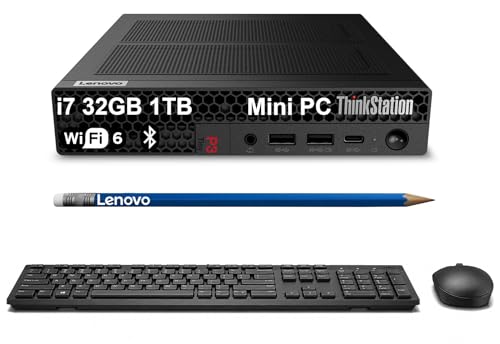
The ThinkStation P3 Tiny packages workstation-grade components in a 1-liter chassis, making it one of the most powerful small-form-factor Windows options for ProPresenter 7. This machine measures just 7 inches by 7 inches by 1.8 inches, yet it can be configured with an Intel Core i7 or i9 processor, up to 64 GB of DDR5 RAM, and an optional Nvidia T1000 or RTX A2000 GPU. The combination of a high-performance CPU and a professional-grade GPU gives the ThinkStation P3 Tiny more headroom than a typical OptiPlex for demanding A/V production environments, including multi-screen 4K output, live camera feeds, and NDI streaming. The workstation-grade components are also validated for 24/7 operation, which is important for fixed installations where the computer runs for extended periods.
The compact size of the ThinkStation P3 Tiny is a major advantage for A/V racks and tight spaces. It comes with a VESA mount bracket that allows you to attach it directly to the back of a monitor or inside a rack enclosure, saving valuable shelf space. The machine includes multiple display outputs via HDMI and DisplayPort, and you can add an adapter for additional displays if needed. Lenovo’s ThinkStation line is known for rigorous testing and reliability, and the P3 Tiny includes features like dust filters and a tool-less chassis design for easy maintenance. For Windows-based organizations that need a small, powerful, and reliable ProPresenter machine, the ThinkStation P3 Tiny is a strong contender that outperforms most consumer desktops and many business-class machines.
One honest limitation of the Lenovo ThinkStation P3 Tiny is that it is more expensive than the Dell OptiPlex 7020, especially when configured with the Nvidia RTX A2000 GPU. The premium price is justified by the workstation-grade components and compact size, but it may not fit a tight budget. Another limitation is that the ThinkStation P3 Tiny uses active cooling with a small fan, which can be audible under load. In a quiet sanctuary, the fan noise may be noticeable, though it is generally quieter than a full-size desktop tower. For organizations that prioritize absolute silence, the fanless Mac Mini M4 Pro is a better choice. The ThinkStation P3 Tiny is best for Windows-based teams that need a compact, powerful machine for multi-screen ProPresenter setups in rack-mounted or space-constrained environments.
What to look for
When choosing a computer for ProPresenter 7, focus on these key factors:
- GPU performance: ProPresenter relies heavily on the GPU for video playback, compositing, and display output. A dedicated GPU with at least 4 GB of VRAM is recommended for 4K content and multiple displays. Integrated graphics will struggle with anything beyond basic single-screen use.
- Display output support: Count the number of displays you need to drive simultaneously, and check that the computer has enough ports (HDMI, DisplayPort, Thunderbolt) to support them without adapters. Some machines support up to three or four displays, while others are limited to two.
- Thermal management: ProPresenter often runs for hours at a time. A computer that throttles due to heat will drop frames and cause stuttering. Look for machines with efficient cooling systems, especially in compact or fanless designs.
- Form factor and mounting: For fixed installations, consider whether the computer fits in a standard 19-inch rack or can be VESA-mounted behind a display. For portable use, weight and battery life are critical factors.
- Operating system and ecosystem: ProPresenter 7 runs on both macOS and Windows, but the performance characteristics differ. Apple Silicon Macs generally offer better thermal efficiency and GPU performance per watt, while Windows machines offer more GPU upgrade options and commercial support plans.
- Warranty and support: For mission-critical use, look for commercial-grade warranties with next-business-day on-site support. Consumer warranties may leave you without a working computer during a service or event.
The verdict
For most fixed installations, the Apple Mac Mini M4 Pro is the best overall choice because it delivers reliable multi-screen output, silent operation, and a compact form factor at the lowest price for a dedicated ProPresenter machine. If you need portability for touring or multi-venue work, the Apple MacBook Pro M4 Pro 14-inch offers the same processor performance with a long battery life and integrated display. For large venues that push ProPresenter to its limits with multiple 4K outputs, HDR content, and live camera feeds, the Apple Mac Studio M4 Max provides the necessary headroom. On the Windows side, the Dell OptiPlex 7020 is a solid budget option for simple setups with commercial support, while the Lenovo ThinkStation P3 Tiny offers workstation-grade power in a compact chassis for demanding Windows-based A/V environments. Choose the machine that matches your venue size, portability needs, and operating system preference, and you will have a reliable ProPresenter 7 computer that delivers consistent output without dropped frames.
Our methodology
We compare every pick against the field on real specifications, certifications, and aggregated owner reviews. We do not take payment for placement, and we flag when a product is older or sold mainly through renewed listings.
Side by side
The full reviews
Apple Mac Mini M4 Pro -- Best Value Desktop for ProPresenter 7
The Mac Mini M4 Pro is the most cost-effective dedicated ProPresenter 7 machine for fixed installations. The M4 Pro chip handles 4K video playback, multi-screen output to 2-3 displays, and NDI streaming simultaneously without thermal performance degradation -- the fanless efficiency cores maintain stable output during multi-hour services. The compact footprint fits in A/V rack spaces and behind displays.

Apple MacBook Pro M4 Pro 14-inch -- Best for Portable ProPresenter Setups
For touring ministries, conference A/V teams, or organizations that move their ProPresenter machine between venues, the MacBook Pro M4 Pro 14-inch combines dedicated performance with genuine portability. Battery life at 18+ hours covers a full event day without power, which is valuable in temporary venue setups where outlet access is limited.
Apple Mac Studio M4 Max -- Best for Large Venue ProPresenter Installs
For large venues requiring three or more simultaneous display outputs, HDR video content, live camera feeds, and NDI output streams all running together, the Mac Studio M4 Max provides the headroom that smaller machines approach their limits. The M4 Max's 30-core GPU handles complex multi-screen rendering without frame drops even with multiple HD video layers playing simultaneously.

Dell OptiPlex 7020 -- Best Budget Windows Desktop for ProPresenter 7
For organizations with a tight budget and an existing Windows infrastructure, the Dell OptiPlex 7020 with an Intel Core i5 or i7 processor and a discrete GPU (Nvidia GTX 1650 or better) runs ProPresenter 7 reliably for standard single-screen and dual-screen setups. Dell's commercial warranty and next-business-day support option reduce risk for organizations without dedicated IT staff.
Lenovo ThinkStation P3 Tiny -- Best Windows Compact Workstation
The ThinkStation P3 Tiny packages workstation-grade components in a 1-liter chassis, making it one of the most powerful small-form-factor Windows options for ProPresenter 7. Intel Core i7 or i9 processors, up to 64 GB DDR5, and an optional Nvidia T1000 or RTX A2000 GPU give it more headroom than a typical OptiPlex for demanding A/V production environments.
What matters most
What to consider
For ProPresenter 7, the GPU is the most important component -- specifically its ability to drive multiple displays at your required resolution while simultaneously decoding video content. Integrated graphics handles simple text and still-image slides but struggles with multiple HD video layers or 4K content. Any discrete GPU in the Nvidia GTX 1650 class or above handles standard church production; larger venues need more GPU VRAM.
What to consider
Thermal stability under sustained load matters more than peak benchmarks for live use. A machine that throttles after 30 minutes of operation will produce frame drops mid-service. Mac Silicon chips are reliable here because their efficiency architecture avoids the high-heat states that cause throttling. On Windows, choose adequate cooling for any discrete GPU you specify. Verify display output count against your venue's screen layout before purchasing.
What to consider
For related equipment, see our guide to the [best computers for PowerPoint presentations](/articles/best-computer-for-powerpoint-presentations) and the [best computers for productivity](/articles/best-computer-for-productivity). Our [methodology](/methodology) explains how we evaluate products for specific use cases.
Frequently asked
ProPresenter 7 was originally a Mac application and its Mac version has historically been more stable, particularly for multi-screen output and live NDI streaming. The Windows version has improved significantly and is fully functional for most church and event use cases. Mac is generally recommended for mission-critical live environments where stability is paramount. Windows is a viable choice and often lower cost for organizations already standardized on Windows hardware.
ProPresenter 7 can drive multiple output screens using the available display outputs on the computer or through NDI network video output to additional display devices. In practice, most computers can drive 2-3 physical displays (confidence monitor, main screen, stage display) using a combination of HDMI, DisplayPort, and Thunderbolt ports. Adding an NDI-capable receiver or a video capture card expands output count further without adding physical cables to the presentation computer.
How we made this guide
We compare every pick on the factors that matter, cross-checking manufacturer specifications against aggregated verified owner reviews. We rank independently and never take payment for placement. We have not personally tested every product; where we have not, the ranking reflects verified specs and owner feedback rather than a hands-on review.
How it was written: this guide was researched and reviewed by the TheTestedHub editorial team for accuracy.
Affiliate disclosure: TheTestedHub is reader-supported. When you buy through links on our site, we may earn a commission at no extra cost to you.
You might also like

Your Docking Station Match: CalDigit TS4 and More

Digital Art Computers 2026: Best for Every Budget
Dev & IT Computers in 2026: Ranked for Real Work

Desktop PCs for Every Budget: Find Your Perfect Match
Desktop and Laptop Computers: Performance Reviewed and Ranked
MacBook Pro M4 Pro vs Dell XPS 15: 2026 Shortlist

Buy the Best DIY Computer in 2026: Corsair One i300
