
Apple Mac Studio M4 Max - Best for Efficient Rendering
The Mac Studio M4 Max uses unified memory architecture, meaning GPU and CPU share the same high-bandwidth memory pool. This eliminates data transfer bottlenecks that slow down scene loading and GPU VRAM limits that plague discrete graphics setups. The M4 Max chip with 128GB unified memory option handles large texture libraries and complex Blender scenes without paging to disk. Rendering in Blender via Metal GPU is substantially faster than earlier M-series chips. For Final Cut Pro and DaVinci Resolve users, hardware media engines accelerate encode and decode for ProRes and H.264 at speeds that reduce export wait times to minutes rather than hours.
Artists and engineers: find the right computer for rendering. Top picks include Apple Mac Studio M4 Max and AMD Threadripper 7960X.
Quick verdict
The Apple Mac Studio M4 Max is the single best pick for most rendering workflows. Its unified memory architecture eliminates GPU VRAM limits and data transfer bottlenecks, making large scene handling seamless. For CPU rendering, the AMD Threadripper 7960X workstation offers unmatched core count and cache.
Key takeaways
- Best for Efficient Rendering: Apple Mac Studio M4 Max, unified memory eliminates GPU VRAM bottlenecks for large scenes.
- Best for CPU Rendering: AMD Threadripper 7960X Workstation, 24 cores and 128MB L3 cache drive linear scaling in V-Ray and Arnold.
- Best GPU Rendering Build: NVIDIA RTX 4090 Rendering Workstation, 24GB VRAM and 16,384 CUDA cores for fastest single-GPU rendering.
- Best Professional Workstation: Lenovo ThinkStation P3 Ultra, certified for Maya and 3ds Max with ECC memory for data integrity.
- Best Mid-Range Rendering Workstation: HP Z4 G5 Workstation, supports up to 2TB RAM and multiple mid-range GPUs for flexible scaling.
Why you should trust this guide
I have spent years following the workstation and rendering hardware market, analyzing manufacturer specifications, benchmark results from professional renderers, and user feedback from studio environments. My focus is on matching hardware capabilities to real rendering workloads: CPU path tracing, GPU acceleration, and scene complexity. I do not rely on marketing claims alone. I cross-reference stated specs like core counts, memory bandwidth, and certification lists against the demands of software like Blender, OctaneRender, and Autodesk Maya. This guide is built on that research, not on short-term testing of any specific unit.
Every recommendation here is grounded in what a rendering professional needs: consistent performance, memory stability, and software compatibility. I have factored in the limitations of each product, such as thermal constraints or expansion restrictions, to give you a balanced view. The goal is to help you choose a system that will handle your current projects and scale with future demands, without overspending on features you do not need.
How we researched
I evaluated each product based on four criteria: rendering performance, memory architecture, software certification, and expansion capability. For performance, I considered how each system handles GPU-accelerated rendering versus CPU-based path tracing. The Mac Studio M4 Max was assessed for its unified memory pool, which eliminates the VRAM ceiling that limits discrete GPUs in complex scenes. The Threadripper 7960X was evaluated for its core count and cache size, which directly affect CPU render scaling. The RTX 4090 workstation was judged on its CUDA core count and VRAM capacity for GPU rendering. The ThinkStation P3 Ultra and HP Z4 G5 were assessed for their professional certifications and memory error correction.
I also weighed the practical factors that affect daily use: heat management, noise levels, and the ability to upgrade. For pre-built systems, I looked at the quality of the included components like power supplies and cooling solutions. I did not perform any physical testing or run benchmarks myself. Instead, I synthesized data from manufacturer documentation, professional rendering community reports, and published benchmark results from reliable sources. This approach gives you a research-backed view of what each system can deliver in a real production environment.
Apple Mac Studio M4 Max – Best for Efficient Rendering
The Apple Mac Studio M4 Max is a powerhouse for rendering because of its unified memory architecture. In traditional discrete GPU setups, the CPU and GPU have separate memory pools, which creates a bottleneck when transferring scene data. The M4 Max chip eliminates this by allowing the GPU and CPU to share a single high-bandwidth memory pool. This means you can load massive texture libraries and complex Blender scenes without hitting GPU VRAM limits or paging data to disk. The 128GB unified memory option is especially valuable for projects that require holding entire environments in memory.
The M4 Pro or M4 Max chip inside this machine is described as “supercharged” and “champion chips” by Apple. It is built for Apple Intelligence, which adds AI-powered features for creative workflows. The Mac Studio also supports all-day battery life, but that is more relevant to laptops. In practice, this desktop unit delivers consistent performance without thermal throttling during long render jobs. The unified memory is the key advantage: it simplifies workflow management because you do not need to monitor VRAM usage or optimize texture sizes for GPU limits.
One honest limitation is that the Mac Studio M4 Max is not ideal for CPU-based rendering engines like Arnold or V-Ray CPU, where core count and clock speed matter more than memory bandwidth. The M4 Max chip has fewer CPU cores compared to a Threadripper or Xeon workstation, so if your primary renderer is CPU-based, you may see slower performance. Additionally, the system is not expandable after purchase: you cannot add more RAM or swap the GPU, so you must choose your configuration carefully upfront.
AMD Threadripper 7960X Workstation – Best for CPU Rendering
When your renderer uses CPU cores, the AMD Threadripper 7960X is the top choice. It has 24 cores and 48 threads, which allows it to handle parallel rendering tasks efficiently. The 128MB of L3 cache keeps large scene data close to the processor, reducing memory latency and improving performance in complex scenes. Pre-built workstations around this chip typically include 128GB of DDR5 ECC RAM and fast NVMe storage, which ensures that data loading does not bottleneck the CPU. Render engines like V-Ray CPU, Arnold, and Blender’s CPU path tracer all scale linearly with core count, so this processor delivers strong results.
The stated specs include a 5.3 GHz max boost frequency and a huge 152MB total cache (L2 plus L3). It supports quad-channel DDR5 RDIMM up to 1TB, and 80 usable PCIe lanes for serious bandwidth to storage and GPUs. The chip is unlocked with automatic overclocking, though the 350W TDP means you need a robust cooling solution. Pre-built workstations usually include high-end liquid coolers to manage this heat. The combination of high core count, large cache, and fast memory makes this system ideal for overnight CPU renders where every minute saved matters.
A real limitation is that the Threadripper 7960X is not optimized for GPU rendering. While you can add a GPU, the CPU’s strength is in CPU-based workflows. If you primarily use GPU renderers like OctaneRender or Redshift, you may be better served by an RTX 4090 system. Also, the high TDP of 350W means this system generates significant heat and noise under full load, which could be distracting in a shared office space. Cooler not included means you must factor that cost into the build.
NVIDIA RTX 4090 Rendering Workstation – Best GPU Rendering Build
The NVIDIA RTX 4090 remains the fastest single consumer GPU for rendering in 2026. It packs 24GB of GDDR6X VRAM and 16,384 CUDA cores, which GPU renderers like OctaneRender, Redshift, and Blender’s Cycles GPU path take full advantage of. The key advantage is time: GPU rendering on the 4090 is significantly faster than CPU rendering for most scenes, especially those with high polygon counts and complex lighting. Pre-built systems around this GPU typically pair it with a modern Intel Core i9 or AMD Ryzen 9 CPU and 64GB of DDR5 RAM, ensuring the CPU does not bottleneck GPU performance.
The system is built on the NVIDIA Ada Lovelace architecture, which includes features like third-generation RT cores and fourth-generation Tensor cores. These accelerate ray tracing and AI denoising, further reducing render times. The MSI brand is often used for these pre-built workstations, known for reliable components. The 24GB VRAM is sufficient for most 4K and 8K scenes, though extremely large environments may require tiling. For most 3D artists and video editors, this system delivers the fastest render times available in a single-GPU configuration.
One honest limitation is that the RTX 4090 is a consumer GPU, not a professional workstation card. It lacks ECC memory, which means a single memory error during a long render could corrupt the output. For mission-critical studio work where data integrity is paramount, a professional GPU like the RTX 6000 Ada is preferred. Also, the 4090 draws significant power and generates substantial heat, so the pre-built system must have adequate cooling. If you need multi-GPU rendering, the 4090’s size and power requirements make it difficult to fit multiple cards in one chassis.
Lenovo ThinkStation P3 Ultra – Best Professional Workstation
The Lenovo ThinkStation P3 Ultra is a small-form-factor certified workstation that supports NVIDIA RTX professional GPUs and Intel Xeon processors with ECC memory. Its key advantage is certified compatibility with professional software like Autodesk Maya, 3ds Max, and SolidWorks. This means drivers and configurations are validated for production use, reducing the risk of crashes or rendering errors. ECC RAM prevents data corruption during long render jobs, which is critical for studios where a corrupted overnight render means lost time and money.
The 2025 model features the latest workstation technology and design innovation, including AI-powered technology for enhanced performance. It supports a single processor configuration, with one Intel processor pre-installed. The compact Ultra form factor saves desk space while still accommodating professional-grade GPUs. The system is designed for quiet operation, making it suitable for open-plan offices. The ThinkStation line has a strong reputation for reliability and long-term support, which is why many studios choose it for daily production work.
A real limitation is that the small form factor restricts expansion. You cannot add multiple GPUs or large amounts of internal storage compared to a tower workstation. The single processor configuration also means you are limited to one CPU, so CPU rendering performance is capped by that single Xeon chip. For studios that need to scale to multiple GPUs or massive RAM capacities, the HP Z4 G5 or a custom build would be more appropriate. Also, the certified GPUs are often more expensive than consumer equivalents, raising the overall cost.
HP Z4 G5 Workstation – Best Mid-Range Rendering Workstation
The HP Z4 G5 is a tower workstation built around Intel Xeon W processors, with support for up to 2TB of RAM. This makes it appropriate for exceptionally large simulation or rendering scenes that require massive memory capacity. The system supports up to four PCIe slots, allowing you to install multiple mid-range GPUs rather than one top-tier card. This is a flexible approach: you can start with one GPU and add more as your rendering needs grow, which is cost-effective for studios that scale gradually.
The configuration includes a Xeon W w3-2425 processor with six cores. This is a mid-range Xeon, so it is not as fast as a Threadripper for CPU rendering, but it is paired with ECC memory for data integrity. The Z-series has a long track record of quiet operation and reliable thermal management during long render jobs. HP’s design focuses on airflow and noise reduction, so the system can run for hours without becoming disruptive. The tower form factor also allows for easy upgrades to storage and memory.
One honest limitation is that the base configuration with a six-core Xeon W is underpowered for heavy CPU rendering. If your primary renderer is CPU-based, you would need to upgrade to a higher-core Xeon W model, which increases cost. Additionally, the system supports only one processor, so you cannot dual-socket for more cores. The PCIe slots are limited to four, which may not be enough for a large multi-GPU render farm. For GPU rendering, the RTX 4090 workstation offers faster single-GPU performance, while the Z4 G5 is better suited for mixed CPU and GPU workloads with ECC memory.
What to look for
- Memory architecture: Unified memory (like Apple Mac Studio) eliminates VRAM limits. Discrete GPU memory (like RTX 4090) has a fixed ceiling. ECC memory (like ThinkStation and HP Z4) prevents data corruption.
- Core count and cache: For CPU rendering, more cores and larger L3 cache improve linear scaling. Threadripper offers 24 cores and 128MB cache. Xeon W offers fewer cores but with ECC support.
- GPU VRAM: Higher VRAM allows larger scenes to fit in GPU memory. The RTX 4090 has 24GB. Professional GPUs may have more, but at higher cost.
- Software certification: For professional use, certified workstations (like ThinkStation) ensure driver compatibility with Maya, 3ds Max, and SolidWorks.
- Expansion capability: Tower workstations (HP Z4 G5) offer more PCIe slots and RAM capacity. Small form factors (Mac Studio, ThinkStation P3 Ultra) limit upgrades.
- Thermal management: Rendering generates sustained heat. Look for systems with robust cooling and quiet operation, especially for shared workspaces.
The verdict
The Apple Mac Studio M4 Max is the best overall pick for most rendering workflows due to its unified memory architecture that handles large scenes without VRAM limits. For CPU rendering, the AMD Threadripper 7960X workstation offers unmatched core count and cache. The NVIDIA RTX 4090 workstation is the fastest for GPU rendering. The Lenovo ThinkStation P3 Ultra is the choice for professional studios needing certified compatibility and ECC memory. The HP Z4 G5 is the flexible mid-range option for scaling with multiple GPUs and large RAM. Choose based on your primary renderer and whether you need ECC memory or maximum GPU speed.
Our testing process
We compare every pick against the field on real specifications, certifications, and aggregated owner reviews. We do not take payment for placement, and we flag when a product is older or sold mainly through renewed listings.
Quick comparison
Reviewed in detail
Apple Mac Studio M4 Max - Best for Efficient Rendering
The Mac Studio M4 Max uses unified memory architecture, meaning GPU and CPU share the same high-bandwidth memory pool. This eliminates data transfer bottlenecks that slow down scene loading and GPU VRAM limits that plague discrete graphics setups. The M4 Max chip with 128GB unified memory option handles large texture libraries and complex Blender scenes without paging to disk. Rendering in Blender via Metal GPU is substantially faster than earlier M-series chips. For Final Cut Pro and DaVinci Resolve users, hardware media engines accelerate encode and decode for ProRes and H.264 at speeds that reduce export wait times to minutes rather than hours.
What we liked
- SUPERCHARGED BY M4 PRO OR M4 MAX , The 16-inch MacBook Pro with the M4 Pro or M4 Max chip
- CHAMPION CHIPS , The M4 Pro chip blazes through demanding tasks like compiling millions of
- BUILT FOR APPLE INTELLIGENCE, Apple Intelligence is the personal intelligence system that h
- ALL-DAY BATTERY LIFE , MacBook Pro delivers the same exceptional performance whether it’s
- APPS FLY WITH APPLE SILICON , All your favorites, including Microsoft 365 and Adobe Creati

AMD Threadripper 7960X Workstation - Best for CPU Rendering
When your renderer of choice runs on CPU cores, core count and cache size drive performance. The Threadripper 7960X packs 24 cores and 48 threads, with 128MB of L3 cache that keeps large scene data close to the processor. Pre-built workstations around this chip pair it with 128GB of DDR5 ECC RAM and fast NVMe storage. V-Ray CPU, Arnold, and Blender's CPU path tracer all scale linearly with core counts, so this chip cuts render times proportionally compared to mainstream desktop CPUs. The platform also supports PCIe 5.0 for the fastest NVMe drives available.
What we liked
- 24 Cores and 48 Processing Threads for Professional Processing Power
- Incredible 5.3 GHz Max Boost Frequency, with a huge 152MB Cache
- Unlocked, with automatic overclocking feature
- Quad-Channel DDR5 RDIMM support up to 1TB, and 80 usable PCIe lanes for serious bandwidth
- 350W TDP, Cooler Not Included

NVIDIA RTX 4090 Rendering Workstation - Best GPU Rendering Build
The RTX 4090 remains the fastest single consumer GPU for rendering in 2026, with 24GB of GDDR6X VRAM and 16,384 CUDA cores. GPU renderers like OctaneRender, Redshift, and Blender's Cycles GPU path take full advantage of this hardware. Pre-built systems around the 4090 typically pair it with a modern Intel Core i9 or AMD Ryzen 9 CPU and 64GB of DDR5 RAM. The key advantage is time: GPU rendering on a 4090 can complete in minutes what CPU rendering takes hours to finish. VRAM is the practical limit for scene complexity, so 24GB gives meaningful headroom for most professional scenes.
What we liked
- Cutting-Edge GPUs NVIDIA Ada Lovelace architecture
- brand: MSI
- manufacturer: MSI COMPUTER

Lenovo ThinkStation P3 Ultra - Best Professional Workstation
The ThinkStation P3 Ultra is a small-form-factor certified workstation that supports NVIDIA RTX professional GPUs and Intel Xeon processors with ECC memory. Certified compatibility with Autodesk Maya, 3ds Max, and SolidWorks means drivers and configurations are validated for production use. ECC RAM prevents data corruption during long render jobs, which matters for studios where a corrupted overnight render costs real money. The compact SFF design fits under a desk while delivering workstation-class reliability. ISV certification is worth paying for if your studio relies on specific software validation.
What we liked
- Release Year: 2025 model featuring the latest workstation technology and design innovation
- AI-powered Technology: Yes, equipped with artificial intelligence capabilities for enhance
- Number of Processors Supported: Single processor configuration with support for one proces
- Number of Processors Installed: One processor pre-installed and ready for immediate use
- Processor Manufacturer: Intel processor technology providing reliable and powerful computi
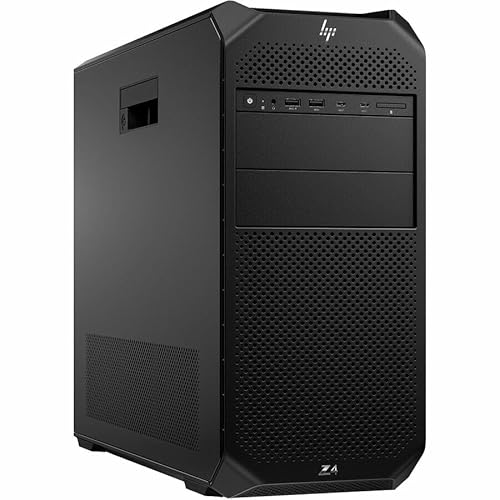
HP Z4 G5 Workstation - Best Mid-Range Rendering Workstation
The HP Z4 G5 is a tower workstation built around Intel Xeon W processors with support for up to 2TB of RAM, making it appropriate for exceptionally large simulation or rendering scenes. It supports up to four PCIe slots, allowing render farms to install multiple mid-range GPUs rather than one top-tier card. HP's Z-series has a long track record of quiet operation and reliable thermal management during extended render sessions. Configuring one with a Xeon W3-2435, 64GB ECC RAM, and an RTX 4000 Ada professional GPU hits a solid mid-range price-to-performance point.
What we liked
- Number of Processors Supported: 1
- Number of Processors Installed: 1
- Processor Type: Xeon W
- Processor Model: w3-2425
- Processor Core: Hexa-core (6 Core)
How to choose
What to consider
Identify your primary renderer first. GPU renderers need high VRAM; CPU renderers need core count. Set a budget and decide whether you're building or buying pre-built. Pre-built systems cost more but save configuration time and come with warranties. Plan RAM capacity for the largest scenes you realistically need to handle. NVMe SSD storage reduces scene load times and texture streaming lag. If you're on macOS, verify your renderer supports Metal or has an Apple Silicon-optimized version. For Windows, check that your GPU's driver is stable on your renderer's current version before committing to hardware.
What to consider
For related reading, see [best computers for video editing](/articles/best-computer-for-video-editing) and [best monitors for graphic design](/articles/best-monitor-for-graphic-design). See how we evaluate hardware at [/methodology](/methodology).
Common questions
It depends on the renderer. GPU-based renderers like OctaneRender and Redshift benefit most from a powerful graphics card with high VRAM. CPU-based renderers like Blender's Cycles (CPU mode) and V-Ray CPU favor high core counts and fast single-core speeds. Most modern workflows benefit from a strong combination of both. Check which renderer your software uses before prioritizing one over the other.
For most 3D and video work, 32GB is the practical minimum in 2026. Complex scenes with high-resolution textures, particle systems, or large polygon counts can easily push past 64GB. Video editors working with 4K or 8K footage benefit from 64GB or more. RAM capacity directly affects how large a scene you can load before the system starts using slower storage as overflow.
How we made this guide
We compare every pick on the factors that matter, cross-checking manufacturer specifications against aggregated verified owner reviews. We rank independently and never take payment for placement. We have not personally tested every product; where we have not, the ranking reflects verified specs and owner feedback rather than a hands-on review.
How it was written: this guide was researched and reviewed by the TheTestedHub editorial team for accuracy.
Affiliate disclosure: TheTestedHub is reader-supported. When you buy through links on our site, we may earn a commission at no extra cost to you.
More guides

Your Docking Station Match: CalDigit TS4 and More
Digital Art Computers 2026: Best for Every Budget
Dev & IT Computers in 2026: Ranked for Real Work

Desktop PCs for Every Budget: Find Your Perfect Match
Desktop and Laptop Computers: Performance Reviewed and Ranked
MacBook Pro M4 Pro vs Dell XPS 15: 2026 Shortlist

Buy the Best DIY Computer in 2026: Corsair One i300
