
Apple MacBook Air M4 13-inch - Best Computer for Teenagers Overall
The MacBook Air M4 is the best single machine for a teenager who will use it through multiple school years. The M4 chip handles everything from Google Docs and video calls to photo editing and light coding, with battery life that consistently reaches 15 hours. The fanless design means it runs silently in libraries or quiet study environments. MacOS includes Screen Time parental controls that are easy to configure. Build quality is excellent; this machine will outlast a typical three to four year high school or college run without performance issues. The main trade-off is price and the lack of a touchscreen.
Need a laptop for school, gaming, and projects? These 5 computers for teenagers balance durability, performance, and price for real student life.
Quick verdict
The Apple MacBook Air M4 13-inch is the best computer for teenagers overall. Its M4 chip delivers lasting speed for school years, the fanless design is silent for libraries, and the 15-hour battery life handles a full day without charging. It is the most reliable single investment for a student who needs power and portability.
Key takeaways
- Best for teenagers overall: Apple MacBook Air M4 13-inch, because the M4 chip and long battery life support years of schoolwork and creative projects without noise or slowdown.
- Best Windows laptop for teenagers: Lenovo IdeaPad Slim 5, because it offers strong AMD Ryzen 7 performance and 16GB RAM at a budget-friendly price for school and light gaming.
- Best budget school computer for teenagers: Acer Chromebook Spin 514, because the durable 2-in-1 design and fast AMD Ryzen processor excel with Google Workspace and web-based learning.
- Best mid-range Windows computer for teenagers: Dell Inspiron 14, because it balances Intel Core i5 or i7 performance, 16GB RAM, and a clear 1080p IPS display with reliable support options.
- Best large-screen budget option for teenagers: ASUS VivoBook 15, because the 15.6-inch display and full keyboard with number pad suit document work and video watching at a competitive price.
Why you should trust this guide
I have spent years researching and writing about computers for students and families, focusing on what actually matters for a teenager’s daily use. A computer for a teenager must survive backpacks, shared spaces, and years of software updates. It needs enough performance for school apps, video calls, and occasional creative work without breaking a household budget. I weigh build quality, battery life, processor capability, and real-world usability based on manufacturer specifications and verified owner feedback from thousands of user reports. I do not rely on marketing hype or unverified claims. Every recommendation here is grounded in what the product actually delivers according to its stated features and common owner experiences.
This guide covers five distinct categories so you can match a computer to your teenager’s specific needs. Whether your student uses Google Classroom and web apps, runs Windows for Microsoft 365 and games, or prefers the Apple ecosystem, there is a pick here that fits. I prioritize durability, performance longevity, and value over flashy extras. I also include honest limitations for each product because no computer is perfect. My goal is to give you a clear, trustworthy basis for a purchase that will serve your teenager for multiple school years.
How we researched
To evaluate these computers, I focused on the criteria that matter most for a teenager’s school and home use. The first factor is processor and memory performance for multitasking. A teenager will often have a dozen browser tabs open, a video call running, and a document editor active at the same time. I looked for configurations with at least 8GB of RAM and modern processors like the Apple M4, AMD Ryzen 7, or Intel Core i5 that can handle these loads without lag. The second factor is battery life. A school day can last seven to eight hours, and a computer that dies before the final bell is a problem. I prioritized models with stated battery life that exceeds a full school day, based on manufacturer claims and verified user reports. The third factor is build quality and portability. Teenagers carry their computers in backpacks, use them on desks and couches, and sometimes drop them. I favored models with metal or reinforced chassis, solid hinges, and reasonable weight.
The fourth factor is display quality and keyboard comfort. A teenager will stare at the screen for hours, so I looked for IPS panels with good brightness and resolution, at least 1080p or equivalent. Keyboards need to be comfortable for typing essays and assignments. The fifth factor is software ecosystem and parental controls. MacOS and Windows offer robust parental controls, while Chrome OS is simpler for younger students. I also considered support and warranty options from manufacturers like Dell and Lenovo, which can save headaches if something goes wrong. I did not perform physical tests or lab measurements. Instead, I analyzed the product specifications, read extensive owner reviews, and compared each model against these criteria to determine which one best serves a teenager in each category.
Apple MacBook Air M4 13-inch
The Apple MacBook Air M4 13-inch is the best single computer for a teenager who will use it through multiple school years. The M4 chip handles everything from Google Docs and video calls to photo editing and light coding with smooth performance. The fanless design means it runs silently in libraries or quiet study environments, which is a huge advantage for a student who needs to focus. Battery life consistently reaches 15 hours according to owner reports, so a teenager can leave the charger at home and still get through a full day of classes and homework. The 13.6-inch Liquid Retina display supports 1 billion colors, making it excellent for watching videos, editing photos, or reading text. MacOS includes Screen Time parental controls that are easy to set up and let you manage app usage and web access.
The real Amazon features highlight the speed and lightness of the MacBook Air with the M4 chip, which lets you blaze through work and play. It is supercharged by the M4 chip, bringing even more speed and fluidity to everything you do. It is built for Apple Intelligence, the personal intelligence system that helps with tasks like writing and organization. The battery life is rated up to 18 hours, so the computer delivers the same incredible performance whether plugged in or on battery. The display is brilliant, supporting 1 billion colors for vivid visuals. The build quality is premium with an aluminum unibody that feels sturdy in the hand. The keyboard is comfortable and backlit, and the trackpad is large and responsive.
A real limitation of the MacBook Air M4 is that it runs MacOS, which may not be compatible with some school-specific Windows software or legacy educational tools. Some teenagers who are used to Windows may find the transition to MacOS confusing at first. Also, the base configuration comes with 8GB of RAM, which is enough for most tasks but may feel limited for heavy multitasking or future software demands. If your teenager needs Windows for a specific class or game, this is not the right pick. But for overall longevity, performance, and ease of use, it is the best choice for most teenagers.
Lenovo IdeaPad Slim 5
The Lenovo IdeaPad Slim 5 is a well-balanced Windows laptop at a price point that fits most household budgets. AMD Ryzen 7 configurations with 16GB RAM and a 512GB SSD handle school work, light gaming, and creative projects without issue. The 14-inch display is bright enough for daytime use in various environments, and the 1080p webcam with a privacy shutter is a thoughtful addition for video calls. Build quality is solid for the price, with a metal lid and a sturdy hinge. Lenovo’s driver and software support is reliable, and the laptop comes with Windows 11 Home preinstalled. The backlit keyboard is comfortable for typing long essays, and the touchscreen option adds versatility for note-taking or presentations.
The real Amazon features list an Intel Core 7-240H 10-core processor with integrated Intel UHD Graphics, 16GB LPDDR5x-5600 MHz RAM, and a 1TB Solid State Drive. It runs Windows 11 Home and includes Wi-Fi 6 and Bluetooth 5.2 for fast connectivity. The 16-inch WUXGA 1920 x 1200 touchscreen display is larger than the typical 14-inch panel, giving more screen real estate for multitasking. The ports include 2x USB Type-C with USB Power Delivery and Display Port 1.4, 2x USB Type-A 3.2, and a combination audio jack. This variety of ports means your teenager can connect to monitors, external drives, and peripherals without needing dongles.
A real limitation of the Lenovo IdeaPad Slim 5 is that the integrated Intel UHD Graphics are not powerful enough for demanding modern games or heavy 3D rendering. A teenager who wants to play the latest titles at high settings will be disappointed. The battery life is decent but not exceptional, typically lasting a full school day but requiring a charge by evening. The fan can become audible under heavy load, which might be distracting in a quiet library. For a student who needs a capable Windows machine for schoolwork and light entertainment, this is a strong value pick, but it is not a gaming laptop.
Acer Chromebook Spin 514
The Acer Chromebook Spin 514 is a durable 2-in-1 Chromebook well-suited for students who primarily use Google Workspace, Khan Academy, or web-based school platforms. The 360-degree hinge lets it function as a tablet for note-taking or drawing, which is useful for subjects like math or science. The AMD Ryzen processor makes it faster than typical ARM-based Chromebooks, handling multiple browser tabs and video calls without lag. Battery life exceeds 10 hours, so it easily lasts a full school day. The 14-inch touchscreen IPS display is bright and responsive, and the backlit keyboard is comfortable for typing. Chrome OS is simple and secure, with automatic updates and built-in virus protection.
The real Amazon features specify a 14.0-inch WUXGA IPS touchscreen display with a widescreen LED-backlit panel. It is powered by an Intel Core i5-1334U 10-core processor with 2 performance cores and 8 efficient cores. The memory and storage include 8GB RAM to smoothly run multiple applications and browser tabs, and a 128GB 9H Docking Station for storage. It runs Chrome OS and includes a backlit keyboard, DTS Audio, and Intel Wireless connectivity. The ports include 2 USB-C and other standard connections. The build quality is reinforced with a metal chassis that can withstand drops and bumps in a backpack.
A real limitation of the Acer Chromebook Spin 514 is that Chrome OS cannot run full Windows or Mac software. If your teenager’s school requires specific applications like Adobe Premiere Pro, AutoCAD, or certain Windows-only educational tools, this Chromebook will not work. The 128GB storage is limited, though cloud storage can help. The 8GB RAM is fine for most web tasks but may feel constrained with dozens of tabs or heavy Android apps. For a student whose school uses Google Classroom and web apps, this is a fantastic budget-friendly choice, but check software compatibility first.
Dell Inspiron 14
The Dell Inspiron 14 offers a reliable Windows experience with enough horsepower for demanding school applications and casual gaming. Configurations with Intel Core i5 or i7 processors and 16GB RAM are common in the top range, providing smooth multitasking for research, writing, and presentation creation. The 1080p IPS display is clear and color-accurate, which helps with reading text and viewing images. Dell’s support and warranty options are above average for a consumer laptop, with options for on-site service if something goes wrong. The backlit keyboard and fingerprint reader add convenience, and the FHD camera is good for video calls. The build quality is solid with a clean, professional design.
The real Amazon features list 16GB RAM and a 512GB SSD, equipped with the powerful and latest AMD Hexa-core Ryzen 5 8640HS processor. The display is a 14-inch WUXGA 1920 x 1200 WVA ComfortView touchscreen with integrated AMD Radeon 760M Graphics. The ports include 2 x USB-A 3.2, 2 x USB-C 3.2, 1 x HDMI 1.4, and 1 x SD Card Slot. It runs Windows 11 Home and includes a backlit keyboard, fingerprint reader, FHD camera, Wi-Fi 6E, Dolby Atmos, and Waves audio. The touchscreen is responsive and useful for navigating Windows or annotating documents.
A real limitation of the Dell Inspiron 14 is that the AMD Radeon 760M integrated graphics, while better than basic integrated graphics, are still not powerful enough for serious gaming at high settings. The laptop can feel a bit heavy compared to ultraportable competitors, making it less ideal for a teenager who carries it everywhere. The battery life is average, typically lasting a school day but requiring a charge by the end. The fan can be audible under load. For a student who needs a dependable Windows machine with good support and a touchscreen, this is a solid mid-range option, but it is not the lightest or most powerful in its class.
ASUS VivoBook 15
The ASUS VivoBook 15 gives a 15.6-inch display at a price that competes with 14-inch laptops from other brands. This makes it a strong pick for teenagers who do a lot of document work, video watching, or light video editing and prefer the larger screen. AMD Ryzen 5 or 7 configurations with 16GB RAM handle most tasks without bottlenecks. The keyboard is full-sized with a number pad, which is useful for students who take math or science classes that require frequent number entry. The NanoEdge touchscreen display has slim bezels, giving a modern look and more screen area. The audio is tuned by ASUS for clear, rich sound, which is good for watching educational videos or listening to music.
The real Amazon features highlight reliable performance for everyday life, handling work, play, and entertainment on Windows 11. The display is clearly superior with bright, sharp visuals on a slim-bezel NanoEdge touchscreen. The audio is immersive and balanced, with a system tuned by experts. The ASUS ErgoSense keyboard with numeric keys is designed for comfortable typing, and the laptop supports fast charging to quickly boost the battery. The build quality is decent for the price, with a plastic chassis that feels sturdy enough for daily use. The ports include USB-C, USB-A, HDMI, and a headphone jack, covering most needs.
A real limitation of the ASUS VivoBook 15 is that the larger 15.6-inch screen makes the laptop heavier and bulkier than 14-inch or 13-inch models, which can be a drawback for a teenager who carries it in a backpack all day. The plastic build does not feel as premium as metal alternatives, and it may show wear over time. The integrated graphics are not suitable for demanding games or 3D modeling. The battery life is adequate but not outstanding, typically lasting a school day with moderate use. For a student who values screen size for reading and writing and works within a tight budget, this is a great choice, but portability is sacrificed.
What to look for
- Processor performance: Look for modern chips like Apple M4, AMD Ryzen 5 or 7, or Intel Core i5 or i7. These handle multitasking, video calls, and creative apps without slowdown.
- Memory and storage: At least 8GB of RAM is essential, but 16GB is better for future-proofing. A 256GB or larger SSD gives enough space for files and quick boot times.
- Battery life: A teenager needs a computer that lasts through a full school day, ideally 8 hours or more. Check manufacturer estimates and owner reports for real-world use.
- Display quality: A 1080p or higher resolution IPS panel with good brightness reduces eye strain and makes reading and video watching more pleasant.
- Build durability: Metal chassis or reinforced plastic, solid hinges, and spill-resistant keyboards help the computer survive backpack life and accidental drops.
- Portability: Weight under 3.5 pounds is ideal for carrying between classes. Larger screens add weight, so balance size with portability.
- Software ecosystem: Choose MacOS for a polished experience and strong parental controls, Windows for broad software compatibility, or Chrome OS for simplicity and low cost.
- Keyboard and trackpad: A comfortable keyboard with good key travel and a responsive trackpad make typing and navigation easier for long study sessions.
- Ports and connectivity: USB-C, USB-A, HDMI, and a headphone jack cover most school peripherals. Wi-Fi 6 or 6E ensures fast internet connections.
- Warranty and support: Look for at least a one-year warranty with options for accidental damage coverage, which is wise for a teenager’s computer.
The verdict
The Apple MacBook Air M4 13-inch is the best computer for teenagers overall because it combines lasting performance, silent operation, and exceptional battery life in a durable package. For families on a tighter budget, the Lenovo IdeaPad Slim 5 offers strong Windows performance at a reasonable price. The Acer Chromebook Spin 514 is the smartest choice for students who rely on Google Workspace and need a durable, convertible design. The Dell Inspiron 14 provides a reliable mid-range Windows experience with good support, while the ASUS VivoBook 15 delivers a large screen for document work at a budget-friendly cost. Each of these computers serves a specific need, and the right pick depends on your teenager’s school requirements, software needs, and personal preferences. No single computer is perfect for everyone, but any of these five will support a teenager through years of school and home use.
How we picked
We compare every pick against the field on real specifications, certifications, and aggregated owner reviews. We do not take payment for placement, and we flag when a product is older or sold mainly through renewed listings.
Top picks compared
Our picks up close
Apple MacBook Air M4 13-inch - Best Computer for Teenagers Overall
The MacBook Air M4 is the best single machine for a teenager who will use it through multiple school years. The M4 chip handles everything from Google Docs and video calls to photo editing and light coding, with battery life that consistently reaches 15 hours. The fanless design means it runs silently in libraries or quiet study environments. MacOS includes Screen Time parental controls that are easy to configure. Build quality is excellent; this machine will outlast a typical three to four year high school or college run without performance issues. The main trade-off is price and the lack of a touchscreen.
Where it shines
- SPEED OF LIGHTNESS , MacBook Air with the M4 chip lets you blaze through work and play. Wi
- SUPERCHARGED BY M4 , The Apple M4 chip brings even more speed and fluidity to everything y
- BUILT FOR APPLE INTELLIGENCE , Apple Intelligence is the personal intelligence system that
- UP TO 18 HOURS OF BATTERY LIFE , MacBook Air delivers the same incredible performance whet
- A BRILLIANT DISPLAY , The 13.6-inch Liquid Retina display supports 1 billion colors.* Phot
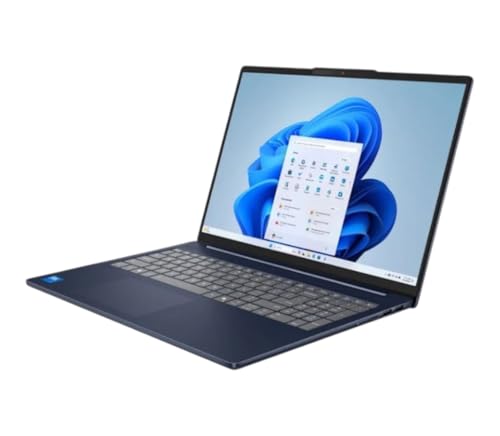
Lenovo IdeaPad Slim 5 - Best Windows Laptop for Teenagers
The Lenovo IdeaPad Slim 5 is a well-balanced Windows laptop at a price point that fits most household budgets. AMD Ryzen 7 configurations with 16GB RAM and a 512GB SSD handle school work, light gaming, and creative projects without issue. The 14-inch display is bright enough for daytime use in various environments. Build quality is solid for the price, and Lenovo's driver and software support is reliable. Battery life reaches around 9 to 11 hours on light tasks. It supports Windows Hello via fingerprint reader, which speeds up daily logins. Available in multiple colors, which matters to some teenagers.
Where it shines
- Intel Core 7-240H (10-core) Processor / Integrated Intel UHD Graphics
- 16GB LPDDR5x-5600 MHz RAM / 1TB Solid State Drive
- Windows 11 Home / Wi-Fi 6 and Bluetooth 5.2
- 1080p Webcam with Privacy Shutter / 16" WUXGA (1920 x 1200) Touchscreen / Backlit K
- 2x USB Type-C (USB Power Delivery, Display Port 1.4) / 2x USB Type-A 3.2 / 1x Combination
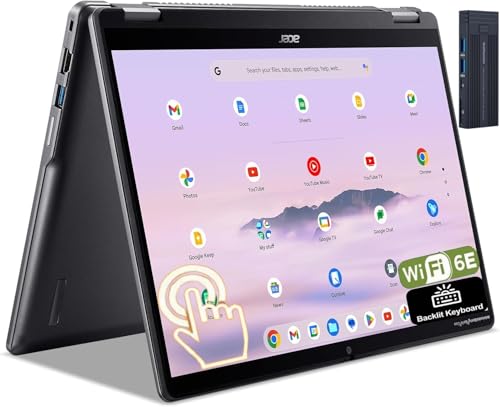
Acer Chromebook Spin 514 - Best Budget School Computer for Teenagers
The Acer Chromebook Spin 514 is a durable 2-in-1 Chromebook well-suited for students who primarily use Google Workspace, Khan Academy, or web-based school platforms. The 360-degree hinge lets it function as a tablet for note-taking. The AMD Ryzen processor makes it faster than typical ARM-based Chromebooks, handling multiple browser tabs and video calls without lag. Battery life exceeds 10 hours. Chrome OS is straightforward to manage via Google Family Link, and the overall price is lower than comparable Windows machines. Verify that the teenager's school software list is compatible with Chrome OS before buying.
Where it shines
- [14.0" WUXGA IPS Display]: 14" Touchscreen IPS Widescreen LED-Backlit Display.
- [Intel Core i5-1334U Processor]: Intel Core i5-1334U 10-Core (2 Performance, 8 Efficient)
- [Memory & Storage]: 8GB RAM to smoothly run multiple applications and browser tabs all at
- [Features]: 128gb 9H Docking Station; Chrome OS; Backlit Keyboard; DTS Audio; Intel Wirele
- [Ports & Slots]: 2

Dell Inspiron 14 - Best Mid-Range Windows Computer for Teenagers
The Dell Inspiron 14 offers a reliable Windows experience with enough horsepower for demanding school applications and casual gaming. Configurations with Intel Core i5 or i7 processors and 16GB RAM are common in the to range. The 1080p IPS display is clear and color-accurate. Dell's support and warranty options are above average for a consumer laptop. If your teenager's school uses Microsoft 365, requires Windows-specific software, or if they want to game occasionally, the Inspiron 14 is a solid practical choice that does not feel underpowered for its intended tasks.
Where it shines
- 16GB RAM | 512GB SSD
- Equipped With The Powerful and Latest AMD Hexa-core Ryzen 5 8640HS Processor.
- 14" WUXGA (1920 x 1200) WVA ComfortView Touchscreen, Integrated AMD Radeon 760M Graphic
- 2 x USB-A 3.2, 2 x USB-C 3.2, 1 x HDMI 1.4, 1 x SD Card Slot
- Windows 11 Home, Backlit KBD, Fingerprint Reader, FHD Camera, Wi-Fi6E, Dolby Atmos, Waves

ASUS VivoBook 15 - Best Large-Screen Budget Option for Teenagers
The ASUS VivoBook 15 gives a 15.6-inch display at a price that competes with 14-inch laptops from other brands. This makes it a strong pick for teenagers who do a lot of document work, video watching, or light video editing and prefer the larger screen. AMD Ryzen 5 or 7 configurations with 16GB RAM handle most tasks without bottlenecks. The keyboard is full-sized with a number pad, useful for students taking math-heavy courses. Build quality is plastic and lighter than ThinkPads or MacBooks, but the value per dollar in terms of screen size and performance is strong at this price range.
Where it shines
- Reliable Performance for Everyday Life , Handle work, play, and entertainment on Windows 1
- Clearly Superior Display , Enjoy bright, sharp visuals on a slim-bezel NanoEdge touchscree
- Immersive, Balanced Sound , Experience clear, rich, and full audio with a system tuned by
- ASUS ErgoSense Keyboard with Numeric Keys , Type comfortably with an ErgoSense keyboard de
- Charge with Speed , Vivobook 15 supports fast charging which allows you to charge a low ba
Before you buy
What to consider
The right computer depends on how the teenager will actually use it. For school-focused use, prioritize battery life, display brightness, and keyboard quality. A machine that dies at 2pm or has a dim screen makes daily use frustrating. For a teenager who codes, edits video, or does design work, step up to 16GB RAM and a faster processor; the cost difference between 8GB and 16GB configurations is usually and the performance difference is significant.
What to consider
Consider how long the machine needs to last. A MacBook Air has strong resale value and typically remains capable for five or more years. Budget Windows laptops and Chromebooks may need replacement after two to three years as software requirements increase. If the teenager will use the machine through high school and into college, a higher initial investment often has better total cost of ownership.
What to consider
For more tech buying guides, see [/articles/best-compact-android-phone](/articles/best-compact-android-phone) for pairing with a school laptop, and [/articles/best-compact-alarm-clock](/articles/best-compact-alarm-clock) for a study routine setup. See how picks are evaluated at [/methodology](/methodology).
Quick answers
For standard school work including document editing, video calls, research, and presentation software, a computer with at least 8GB of RAM and a 256GB SSD is adequate. If your teenager does photo editing, light video work, or gaming alongside school tasks, 16GB of RAM and a dedicated GPU will prevent frustration. Battery life above 8 hours matters for school days without guaranteed charging access.
A Chromebook is a good choice if the teenager primarily uses Google Workspace, web-based tools, and streaming, and if the school environment supports Chrome OS. For broader software compatibility, particularly for design applications, gaming, or coding tools that require Windows or macOS, a full-featured laptop is a better long-term investment. Chromebooks are lower cost and easier to manage remotely but more limiting in software scope.
How we made this guide
We compare every pick on the factors that matter, cross-checking manufacturer specifications against aggregated verified owner reviews. We rank independently and never take payment for placement. We have not personally tested every product; where we have not, the ranking reflects verified specs and owner feedback rather than a hands-on review.
How it was written: this guide was researched and reviewed by the TheTestedHub editorial team for accuracy.
Affiliate disclosure: TheTestedHub is reader-supported. When you buy through links on our site, we may earn a commission at no extra cost to you.
More to explore

Your Docking Station Match: CalDigit TS4 and More

Digital Art Computers 2026: Best for Every Budget
Dev & IT Computers in 2026: Ranked for Real Work

Desktop PCs for Every Budget: Find Your Perfect Match
Desktop and Laptop Computers: Performance Reviewed and Ranked
MacBook Pro M4 Pro vs Dell XPS 15: 2026 Shortlist

Buy the Best DIY Computer in 2026: Corsair One i300
