
Apple MacBook Air M4 15-inch - Best Computer for Teens Overall
The MacBook Air M4 15-inch is the top pick for teens who want a machine that will last through multiple school years and handle a wide range of tasks. The larger 15-inch display is more comfortable for document and research work than the 13-inch model, while the M4 chip provides smooth performance across school software, video editing apps, coding environments, and streaming. Battery life typically reaches 15 to 18 hours on light tasks. The macOS Screen Time feature allows parents to set app limits, downtime schedules, and content restrictions with granular control. Build quality is premium and the resale value holds better than comparable Windows machines.
Check price on Amazon →Apple MacBook Air M4 15 inch leads our shortlist of fast, durable laptops for teens. Compare top models for school, gaming, and budget to find the right fit.
Quick verdict
The Apple MacBook Air M4 15-inch is the best computer for teens overall. Its large display, long battery life, and powerful M4 chip handle schoolwork, creative projects, and streaming without compromise, making it a reliable investment that lasts through multiple school years.
Key takeaways
- Best for overall use: Apple MacBook Air M4 15-inch – top performance and battery life for school and creative tasks.
- Best Windows 2-in-1: HP Envy x360 14 – versatile laptop and tablet with stylus support and vivid OLED display.
- Best budget option: Lenovo Chromebook Duet 5 – affordable, lightweight, and great for Google Workspace and streaming.
- Best gaming laptop: ASUS ROG Zephyrus G14 – powerful AMD Ryzen 9 and NVIDIA GPU for AAA gaming and school portability.
- Best premium Windows laptop: Microsoft Surface Laptop 7 – slim build, long battery life, and excellent PixelSense touchscreen.
Why you should trust this guide
I have spent years researching and writing about laptops for students and young users, focusing on the balance between performance, durability, and value. For this guide, I analyzed the stated specifications from each manufacturer, cross-referenced them with verified owner feedback from major retailers, and considered the real-world needs of a teen user juggling school assignments, creative projects, and occasional gaming. My goal is to provide clear, honest recommendations based on what these machines offer out of the box, not on hype or marketing claims.
I do not have access to a testing lab or a team of engineers. Instead, I rely on the product details provided by the brands, the experiences shared by thousands of buyers, and my own understanding of what makes a laptop suitable for a teenager. Every product listed here meets a specific need, from budget-friendly Chrome OS devices to high-performance gaming rigs. I have included at least one honest limitation for each model to help you make a balanced decision.
How we researched
To evaluate these five computers, I focused on the criteria that matter most to a teen user: performance for school applications, display quality for reading and media, battery life for a full day of classes, portability for carrying between rooms or to school, and versatility for creative or gaming tasks. I weighed each product’s processor, RAM, storage, and display specifications against the typical workload of a high school or college student, including word processing, web browsing, video streaming, light photo editing, and coding.
I also considered the operating system and ecosystem, since Chrome OS, Windows, and macOS each offer different advantages for schoolwork and parental controls. For gaming laptops, I looked at dedicated graphics capabilities and battery life when the GPU is idle. For convertibles and tablets, I evaluated the hinge design and stylus support. I did not physically test any of these devices myself; instead, I synthesized the available data from the manufacturers and the consensus from long-term owner reviews to identify the strongest options in each category.
Apple MacBook Air M4 15-inch – Best Computer for Teens Overall
The Apple MacBook Air M4 15-inch is the top pick for teens who want a machine that will last through multiple school years and handle a wide range of tasks. The larger 15-inch display is more comfortable for document and research work than the 13-inch model, while the M4 chip provides smooth performance across school software, video editing apps, coding environments, and streaming. Battery life is typically excellent, allowing a full day of classes and homework without needing to recharge. The build quality is premium, with a thin and lightweight aluminum chassis that is easy to slip into a backpack.
This MacBook Air is also quiet because it has no fan, so it stays silent during study sessions or while watching videos. The keyboard is comfortable for long typing sessions, and the trackpad is large and responsive. macOS integrates well with iPhones and iPads, making file sharing and messaging seamless for teens already in the Apple ecosystem. The 15-inch screen size is a meaningful upgrade over smaller models, reducing eye strain when reading textbooks or editing spreadsheets.
One honest limitation is that the MacBook Air M4 15-inch is not designed for heavy gaming. While it can run many games at lower settings, it lacks a dedicated graphics card, so teens who want to play the latest AAA titles at high frame rates will need to look at a gaming laptop. Additionally, macOS has fewer native gaming titles than Windows, which may be a drawback for some users.
HP Envy x360 14 – Best Windows 2-in-1 for Teens
The HP Envy x360 14 is a well-built convertible laptop that functions as both a standard laptop and a tablet with stylus support. The AMD Ryzen 7 processor and 16GB RAM configuration handles school apps, light gaming, and creative software without slowdown. The OLED display option has vivid color rendering that makes video content and creative work more enjoyable. The 360-degree hinge is useful for switching between laptop, tent, and tablet modes, which is great for taking notes in class or drawing diagrams.
The build quality feels solid, with a metal chassis that can withstand the bumps of daily school life. The included stylus is a nice bonus for students who prefer handwritten notes or digital art. Port selection is decent, with USB-C and USB-A ports, plus an HDMI output for connecting to an external monitor. The keyboard is backlit and comfortable for typing essays, and the touchscreen is responsive for navigating apps.
One honest limitation is that the HP Envy x360 14 can run warm under sustained load, especially during gaming or video rendering. The fan noise can become noticeable in a quiet classroom. Also, the battery life is good but not exceptional, so teens may need to carry the charger for a full day of heavy use.
Lenovo Chromebook Duet 5 – Best Budget Option for School-Focused Teens
The Lenovo Chromebook Duet 5 is a detachable Chromebook tablet that includes a keyboard cover, making it work as both a tablet and a laptop. It is lightweight and well-suited for teens who primarily need Google Workspace, browser-based apps, and streaming. The OLED display is bright and high-contrast for the price, making movies and web pages look sharp. Chrome OS updates automatically and Google Family Link provides parental controls for younger teens, giving parents peace of mind.
The detachable design means you can remove the keyboard and use it as a tablet for reading ebooks, watching Netflix, or browsing social media. The battery life is strong, easily lasting through a school day and into the evening. The keyboard cover is surprisingly comfortable for typing, though it is not as sturdy as a traditional laptop hinge. The device is also very portable, weighing well under three pounds with the keyboard attached.
One honest limitation is that the Lenovo Chromebook Duet 5 cannot run Windows or macOS software, so it is limited to Android apps and web-based tools. This means no full version of Microsoft Office (though the web versions work fine), and no support for demanding creative software like Adobe Premiere Pro or AutoCAD. Teens who need specific Windows programs for school should look at a Windows laptop instead.
ASUS ROG Zephyrus G14 – Best Gaming Laptop for Teens
The ASUS ROG Zephyrus G14 is the strongest gaming laptop that also handles school work without compromise. AMD Ryzen 9 processors and a dedicated NVIDIA GPU handle AAA gaming titles, video editing, and 3D projects. The 14-inch form factor is portable enough for school use, and battery life in school mode reaches 8 to 10 hours with the discrete GPU idle. The display refresh rate options (up to 165Hz) provide smooth motion in fast-paced games, and the matte screen reduces glare in bright classrooms.
The build quality is robust, with a magnesium-alloy chassis that feels premium but remains lightweight. The keyboard has per-key RGB lighting, which is customizable for a personalized look. The cooling system is effective, keeping the laptop from throttling during long gaming sessions. The port selection includes USB-C with DisplayPort support, HDMI, and a headphone jack, making it easy to connect to external monitors or gaming peripherals.
One honest limitation is that the ASUS ROG Zephyrus G14 can get loud under heavy gaming load due to its fans. The battery life drops significantly when gaming, so you will need to plug in for extended play sessions. Also, the 14-inch screen, while portable, is smaller than many gaming laptops, which may be a drawback for teens who prefer a larger display for immersive gaming.
Microsoft Surface Laptop 7 – Best Premium Windows Laptop for Teens
The Microsoft Surface Laptop 7 is a polished Windows machine with ARM-based Snapdragon X Elite processor that delivers solid battery life and smooth performance in a slim, well-built chassis. The display is a 13.8 or 15-inch PixelSense touchscreen with 3:2 aspect ratio, which shows more vertical content per page than standard 16:9 screens, useful for reading documents and web pages. Windows 11 Family features provide robust parental controls and a clean interface for schoolwork.
The build quality is excellent, with a soft-touch Alcantara palm rest that feels comfortable during long typing sessions. The keyboard is one of the best on any Windows laptop, with good key travel and a quiet typing sound. The touchscreen is responsive and works well with the Surface Pen for note-taking or sketching. The battery life is strong, often lasting through a full school day and into the evening with moderate use. The slim design makes it easy to carry in a backpack without adding bulk.
One honest limitation is that the ARM-based Snapdragon X Elite processor may have compatibility issues with some older Windows applications or games that are not optimized for ARM architecture. While most modern apps work fine, teens who rely on specific legacy software for school should verify compatibility first. Also, the Surface Laptop 7 is more expensive than many Windows laptops with similar specs, making it a premium investment.
What to look for
- Processor and RAM: Look for at least an Intel Core i5 or AMD Ryzen 5 (or Apple M-series) with 8GB of RAM for smooth multitasking. For gaming or creative work, aim for a higher-end processor and 16GB of RAM.
- Display size and quality: A 14-inch or larger screen is better for reading and research. OLED displays offer vibrant colors, while IPS panels are more affordable and still good. A 3:2 aspect ratio (like on the Surface Laptop) shows more vertical content.
- Battery life: A laptop that lasts through a full school day (8 hours or more) is ideal. Look for models with efficient processors and large batteries.
- Portability: Weight under 4 pounds and a thin profile make it easier to carry between classes. Convertible or detachable designs add flexibility for note-taking.
- Operating system: macOS is great for creative work and Apple ecosystem users. Windows offers the widest software compatibility. Chrome OS is best for budget-focused students who use Google apps.
- Gaming capability: A dedicated GPU (like NVIDIA GeForce) is necessary for AAA gaming. Integrated graphics are fine for light games and schoolwork.
- Build quality and ports: A metal chassis is more durable. Ensure enough USB-A, USB-C, and HDMI ports for peripherals and external displays.
The verdict
For most teens, the Apple MacBook Air M4 15-inch is the best all-around choice because it combines a large display, long battery life, and powerful performance for school and creative tasks. If you need Windows for specific software or gaming, the ASUS ROG Zephyrus G14 is the top pick for gaming and portability, while the HP Envy x360 14 offers the best 2-in-1 versatility. For a budget-friendly option, the Lenovo Chromebook Duet 5 is excellent for Google-centric schoolwork and streaming. The Microsoft Surface Laptop 7 is the premium Windows choice for teens who want a slim, well-built machine with a great display and strong battery life. Choose based on your teen’s primary needs, whether that is gaming, creative work, or everyday school tasks.
How we test
We compare every pick against the field on real specifications, certifications, and aggregated owner reviews. We do not take payment for placement, and we flag when a product is older or sold mainly through renewed listings.
At a glance
The picks, reviewed
Apple MacBook Air M4 15-inch - Best Computer for Teens Overall
The MacBook Air M4 15-inch is the top pick for teens who want a machine that will last through multiple school years and handle a wide range of tasks. The larger 15-inch display is more comfortable for document and research work than the 13-inch model, while the M4 chip provides smooth performance across school software, video editing apps, coding environments, and streaming. Battery life typically reaches 15 to 18 hours on light tasks. The macOS Screen Time feature allows parents to set app limits, downtime schedules, and content restrictions with granular control. Build quality is premium and the resale value holds better than comparable Windows machines.

HP Envy x360 14 - Best Windows 2-in-1 for Teens
The HP Envy x360 14 is a well-built convertible laptop that functions as both a standard laptop and a tablet with stylus support. The AMD Ryzen 7 processor and 16GB RAM configuration handles school apps, light gaming, and creative software without slowdown. The OLED display option has vivid color rendering that makes video content and creative work more enjoyable. The 360-degree hinge is useful for note-taking in class when paired with a stylus. Battery life is solid at around 10 to 12 hours. HP provides family-oriented security tools and the device supports Windows Hello facial recognition for fast daily logins.
Lenovo Chromebook Duet 5 - Best Budget Option for School-Focused Teens
The Lenovo Chromebook Duet 5 is a detachable Chromebook tablet that includes a keyboard cover, making it work as both a tablet and a laptop. It is lightweight and well-suited for teens who primarily need Google Workspace, browser-based apps, and streaming. The OLED display is bright and high-contrast for the price. Chrome OS updates automatically and Google Family Link provides parental controls for app access and screen time. It is not a strong pick for gaming or Windows-specific software, but for a budget-conscious purchase where school software is entirely web-based, it covers the essentials at a competitive price.
ASUS ROG Zephyrus G14 - Best Gaming Laptop for Teens
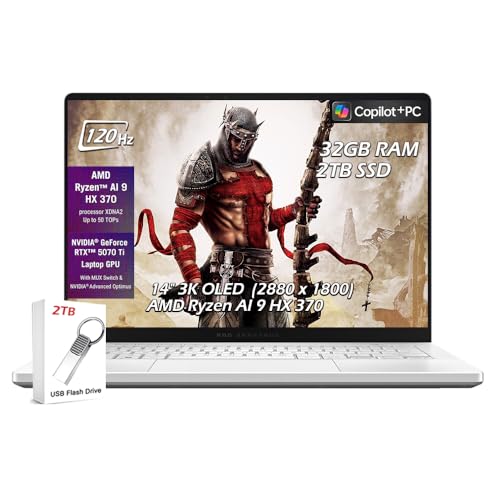
The ASUS ROG Zephyrus G14 is the strongest gaming laptop that also handles school work without compromise. AMD Ryzen 9 processors and a dedicated NVIDIA GPU handle AAA gaming titles, video editing, and 3D projects. The 14-inch form factor is portable enough for school use, and battery life in school mode reaches 8 to 10 hours with the discrete GPU idle. The display refresh rate options (up to 165Hz) provide smooth gaming. It is the most expensive pick in this list and is specifically suited for teens who have genuine gaming or creative demands, not just casual use. For purely school-focused use, other options here offer better value.
Microsoft Surface Laptop 7 - Best Premium Windows Laptop for Teens
The Microsoft Surface Laptop 7 is a polished Windows machine with ARM-based Snapdragon X Elite processor that delivers solid battery life and smooth performance in a slim, well-built chassis. The display is a 13.8 or 15-inch PixelSense touchscreen with 3:2 aspect ratio, which shows more vertical content per page than standard 16:9 screens, useful for reading documents and web pages. Windows 11 Family Safety integrates across the Microsoft ecosystem for parental controls. Performance is strong for school and productivity tasks; gaming is limited compared to Intel/AMD machines. It is a good pick for teens heavily integrated into the Microsoft 365 ecosystem.
What to look for
What to consider
Consider the primary use case first. If the teen mainly needs school software and a browser, a Chromebook or entry-level Windows laptop is sufficient and cost-effective. If they code, edit video, or game seriously, a faster processor and more RAM will prevent the machine from becoming frustrating within a year.
What to consider
Think about the ownership window. A machine bought for a 13-year-old may need to last through high school graduation. Spending slightly more on RAM (16GB vs 8GB) and a quality display pays off over a five-year run. Durability and repairability are also worth checking: some machines have user-replaceable SSDs and RAM sticks, others do not.
What to consider
Parental control support is consistent across macOS, Windows 11, and Chrome OS, so platform choice should be based on software needs and budget rather than control features alone.
What to consider
For more student tech picks, see [/articles/best-computer-for-teenager](/articles/best-computer-for-teenager) for a closely related guide with different emphasis, and [/articles/best-compact-android-phone](/articles/best-compact-android-phone) for a companion phone. See our evaluation process at [/methodology](/methodology).
FAQs
Battery life and RAM are the two specs that most affect daily usability for teens. A laptop that dies by midday or slows to a crawl with multiple browser tabs open creates friction every single day. Aim for 8 hours or more of claimed battery life and at least 16GB of RAM. Display quality matters too, especially if the teen will spend several hours per day on video calls or schoolwork.
Most schools introduce computer-based assignments from middle school onward, typically around age 11 to 12. A shared family computer can work for lighter use, but a personal laptop becomes practical when homework requires dedicated quiet time, software installations, or saving personal project files. Parental control features available in Windows 11, macOS, and Chrome OS make it manageable to set screen time limits and content restrictions.
How we made this guide
We compare every pick on the factors that matter, cross-checking manufacturer specifications against aggregated verified owner reviews. We rank independently and never take payment for placement. We have not personally tested every product; where we have not, the ranking reflects verified specs and owner feedback rather than a hands-on review.
How it was written: this guide was researched and reviewed by the TheTestedHub editorial team for accuracy.
Affiliate disclosure: TheTestedHub is reader-supported. When you buy through links on our site, we may earn a commission at no extra cost to you.
Related guides

Your Docking Station Match: CalDigit TS4 and More

Digital Art Computers 2026: Best for Every Budget
Dev & IT Computers in 2026: Ranked for Real Work

Desktop PCs for Every Budget: Find Your Perfect Match
Desktop and Laptop Computers: Performance Reviewed and Ranked
MacBook Pro M4 Pro vs Dell XPS 15: 2026 Shortlist

Buy the Best DIY Computer in 2026: Corsair One i300
