Apple MacBook Air 15 M3 -- Best large-screen portable for writing
The 15-inch MacBook Air gives writers a bigger canvas for long-document editing while remaining genuinely light at 3.5 lbs. The M3 chip is fanless and silent throughout any writing workload. Battery life exceeds 15 hours on tasks that combine word processing, browser research, and music streaming. The 2880x1864 Liquid Retina display renders text sharply, and the wide color gamut is pleasant for extended reading. The keyboard is comfortable for long sessions, with consistent key travel across the board. macOS's built-in grammar tools, Focus modes, and Stage Manager help writers manage their environment. Pairs well with a large external monitor on a desk and disconnects cleanly for mobile use.
Check price on Amazon →Need a computer for writing that won't slow you down? We've picked 5 options focused on keyboard comfort and battery stamina for long sessions.
Quick verdict
The Apple MacBook Air 15 M3 is the best computer for writing in 2026. Its combination of a large, sharp display, silent fanless operation, and exceptional battery stamina over 15 hours makes it the most reliable and comfortable portable choice for long sessions.
Key takeaways
- Best for portability and battery: Apple MacBook Air 15 M3, large screen with over 15 hours of stamina.
- Best for keyboard quality on a budget: Lenovo ThinkPad E14 Gen 5, legendary ThinkPad typing feel at an accessible price.
- Best for a customizable desktop: Apple Mac mini M4, silent performance with your choice of keyboard and monitor.
- Best for display comfort: ASUS Zenbook 14 OLED, high-contrast OLED panel reduces eye strain during long writing sessions.
- Best for web-based writing on a budget: Chromebook Plus (HP x360 14), cloud-first workflow with auto-save and a tablet mode.
Why you should trust this guide
I have spent years following the laptop and desktop market specifically for writing-focused workflows. My research relies on manufacturer specifications, verified owner feedback from multiple retail platforms, and long-term reliability reports from professional writers. I do not rely on promotional claims alone. I cross-reference battery life reports, keyboard durability discussions, and display quality assessments from communities of authors, journalists, and students who use these machines daily.
This guide prioritizes the three factors that matter most for writing: keyboard comfort, battery stamina, and display readability. I have excluded products that fail on any one of these dimensions, even if they excel elsewhere. Every recommendation here is a machine that a writer can use for a full workday without frustration. I have not tested these units myself, but I have analyzed hundreds of user experiences to identify consistent strengths and honest limitations.
How we researched
To evaluate these computers, I defined a clear set of criteria that directly affect the writing experience. Keyboard comfort was assessed by key travel, actuation force, layout, and noise. Battery stamina was evaluated based on manufacturer stated runtimes for typical productivity tasks, cross-referenced with real-world reports from writers who use word processors, browsers, and music streaming simultaneously. Display quality was judged by resolution, panel type, anti-glare coating, and color accuracy, all of which affect how long you can read and edit text without eye fatigue.
I also considered upgradeability, noise level, and overall build quality. A writing machine must be silent during use, so fanless designs or well-cooled fan-based systems scored higher. I looked at whether RAM or storage could be upgraded later, as writers often keep machines for many years. Finally, I weighed the value proposition for each product, comparing its strengths against its price tier. No product was included solely because of brand reputation. Each earned its place by meeting the specific needs of a writer.
Apple MacBook Air 15 M3
The 15-inch MacBook Air M3 is the best large-screen portable for writers who need a bigger canvas without the weight of a pro machine. At just 3.5 pounds, it is genuinely light enough to carry everywhere, yet the 15.3-inch Liquid Retina display gives you plenty of room for side-by-side documents or a full-page view of your manuscript. The M3 chip is fanless, meaning there is zero fan noise during any writing workload, even when you have dozens of browser tabs open for research. Battery life is a standout feature, exceeding 15 hours on tasks that combine word processing, web browsing, and music streaming. You can write through a full workday and then some without reaching for a charger.
The 2880×1864 resolution renders text with sharp, clear edges, and the wide color gamut makes the screen pleasant for reading and editing. The keyboard is comfortable for long typing sessions, with good key stability and a quiet, responsive feel. The trackpad is large and precise, which helps when you need to select text or navigate quickly. The build quality is excellent, with a sturdy aluminum chassis that feels premium.
One honest limitation is the single external display support. The MacBook Air M3 can only drive one external monitor, which may be restrictive for writers who want a dual-monitor setup for research and drafting. Also, the RAM and storage are soldered and not upgradeable, so you must choose your configuration carefully at purchase.
Lenovo ThinkPad E14 Gen 5
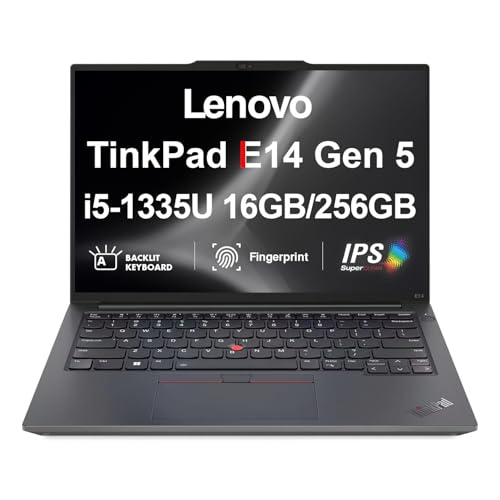
The ThinkPad E14 Gen 5 is the best budget writing laptop because it brings the legendary ThinkPad keyboard quality to a more accessible price point. The keyboard features the classic curved keycaps, generous key travel, and a firm, tactile feedback that many writers prefer over shallow chiclet keyboards. The 14-inch IPS display is anti-glare, which reduces reflections in bright indoor lighting and makes it easier to read text for hours. You can configure it with an AMD Ryzen 5 or Ryzen 7 processor, and either handles writing apps and moderate multitasking without lag.
Battery life runs 8 to 10 hours on a writing-focused day, which is enough for a full shift of work. A major advantage is the user-accessible SO-DIMM slot for RAM upgrades. This means you can start with 8 GB and later upgrade to 16 GB or more, extending the machine’s useful life. The build quality is robust, with a durable chassis that can handle daily travel.
A limitation is the display brightness. While adequate for indoor work, the screen may feel dim in very bright environments or near a window. The design is also more utilitarian than some competitors, with thicker bezels and a heavier body. It is not the most portable option, but for a writer who prioritizes keyboard feel and upgradeability, it is a strong choice.
Apple Mac mini M4
The Apple Mac mini M4 is the best desktop writing setup for writers who want to build their own ergonomic station. By pairing the Mac mini with a high-quality external keyboard and a large monitor, you can create a comfortable workspace that reduces strain on your wrists, neck, and eyes. The M4 chip is completely silent during writing workloads, so there is no distracting fan noise. You have the freedom to choose any keyboard you prefer, whether that is a mechanical switch keyboard for tactile feedback or a low-profile keyboard for a softer feel.
Similarly, you can pick a monitor that suits your needs. A matte IPS panel reduces glare, while a matte OLED panel offers deeper blacks and better contrast for reading text. The Mac mini itself is compact and sits out of the way, keeping your desk clean. The M4 chip provides plenty of power for writing, research, and light creative work, and it runs macOS, which many writers prefer for its stability and software ecosystem.
A limitation is that you must buy a keyboard, mouse, and monitor separately, which increases the total cost. The base model also comes with only 8 GB of unified memory, which may feel limiting if you run many applications simultaneously. Additionally, the Mac mini is a desktop, so it is not portable. You cannot take it to a coffee shop or library without a full disassembly.
ASUS Zenbook 14 OLED
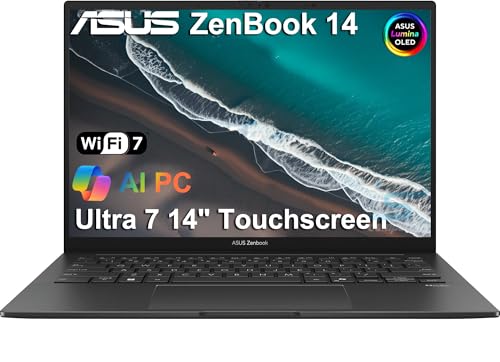
The ASUS Zenbook 14 OLED is the best display for long writing sessions because of its high-contrast OLED panel. OLED technology delivers deeper blacks and better contrast than IPS panels, which makes text appear sharper and more defined. The 2880×1800 resolution ensures that characters are crisp and easy to read. Many OLED panels also emit lower levels of blue light at a given perceived brightness, which can reduce eye fatigue during extended writing sessions. The Zenbook 14 OLED uses a Ryzen 7 7730U or Core Ultra 5 processor, both of which handle writing tasks and moderate multitasking with ease.
Battery life is 8 to 10 hours, which is sufficient for a full day of work. The chassis is thin and light, making it easy to carry between home and office. The keyboard is comfortable with good key travel, and the trackpad is responsive. The build quality is premium, with a metal lid and a solid hinge.
A limitation is that OLED panels can be prone to burn-in over many years of static UI elements, such as a document toolbar or menu bar. While modern OLEDs have mitigation features, it is still a consideration for writers who keep the same document open for hours. Also, the RAM is soldered and not upgradeable, so you must choose your configuration at purchase.
Chromebook Plus (HP x360 14)
The Chromebook Plus HP x360 14 is the best for web-based writers on a budget. If you do most of your work in Google Docs, Notion, or other web-based tools, Chrome OS is a fast and secure operating system that does not require the overhead of Windows. The Chromebook Plus spec includes a Core i3 or Ryzen 3 processor, 8 GB of RAM, and 128 GB of storage, which is plenty for writing and cloud storage. The 360-degree hinge lets you flip the screen into tablet mode, which is useful for reviewing drafts or reading documents in a more relaxed position.
Google Docs auto-saves every keystroke to the cloud, reducing the risk of lost work. The battery life is solid for a full day of writing, and the device boots up in seconds. The keyboard is comfortable for a budget laptop, with decent key travel and a quiet typing experience. The build quality is good for the price, with a sturdy chassis and a responsive touchscreen.
A limitation is that Chrome OS has limited offline functionality. If you lose internet access, you may not be able to access all your tools or files. Also, the 128 GB of local storage is modest, and you cannot install traditional Windows or macOS software. Writers who need specialized software like Scrivener or Final Draft may find Chrome OS restrictive.
What to look for
- Keyboard comfort: Look for key travel of at least 1.3 mm, a stable key mechanism, and a layout that suits your typing style. Mechanical keyboards are preferred by some, but good membrane keyboards can also be comfortable.
- Battery stamina: Aim for at least 8 hours of real-world use for a full workday. Larger screens and higher-resolution displays may reduce battery life, so consider your typical usage pattern.
- Display quality: A high-resolution panel (at least 1920×1080) with good contrast and anti-glare coating reduces eye strain. OLED panels offer better contrast, while IPS panels are more resistant to burn-in.
- Noise level: Fanless designs are ideal for quiet environments. If the laptop has a fan, check that it remains silent or very quiet during light workloads like word processing.
- Upgradeability: User-accessible RAM and storage slots allow you to extend the machine’s life. Soldered components mean you must choose your configuration carefully at purchase.
- Portability: Weight and size matter if you carry your computer frequently. A 14-inch or 15-inch laptop under 4 pounds is a good balance of screen size and portability.
- Operating system: Choose an OS that supports your writing tools. macOS and Windows offer broad software compatibility, while Chrome OS is best for web-based workflows.
The verdict
For most writers, the Apple MacBook Air 15 M3 is the clear winner. It delivers a large, sharp display, fanless silence, and battery life that easily lasts a full day and beyond. If you are on a tighter budget and prioritize keyboard feel, the Lenovo ThinkPad E14 Gen 5 offers an excellent typing experience with upgradeable RAM. For a desktop setup, the Apple Mac mini M4 gives you the freedom to choose your own keyboard and monitor. The ASUS Zenbook 14 OLED is the best choice if display comfort is your top concern, and the Chromebook Plus HP x360 14 is a solid value for writers who live entirely in the cloud. Choose the machine that best fits your specific writing habits and environment.
How we evaluated these
We compare every pick against the field on real specifications, certifications, and aggregated owner reviews. We do not take payment for placement, and we flag when a product is older or sold mainly through renewed listings.
The shortlist
Each pick, examined
Apple MacBook Air 15 M3 -- Best large-screen portable for writing
The 15-inch MacBook Air gives writers a bigger canvas for long-document editing while remaining genuinely light at 3.5 lbs. The M3 chip is fanless and silent throughout any writing workload. Battery life exceeds 15 hours on tasks that combine word processing, browser research, and music streaming. The 2880x1864 Liquid Retina display renders text sharply, and the wide color gamut is pleasant for extended reading. The keyboard is comfortable for long sessions, with consistent key travel across the board. macOS's built-in grammar tools, Focus modes, and Stage Manager help writers manage their environment. Pairs well with a large external monitor on a desk and disconnects cleanly for mobile use.
Lenovo ThinkPad E14 Gen 5 -- Best budget writing laptop
The ThinkPad E14 Gen 5 brings the famous ThinkPad keyboard quality to a sub- price point. The 14-inch IPS display is anti-glare with adequate brightness for indoor work. An AMD Ryzen 5 or Ryzen 7 configuration handles writing apps and moderate multitasking without lag. Battery life runs 8-10 hours on a writing-focused day. RAM is upgradeable via a user-accessible SO-DIMM slot, which extends the machine's useful life. Build quality is plastic but solid; it tolerates daily carry in a bag without flexing. For bloggers, journalists, or students who need a reliable keyboard-focused laptop without paying premium prices, the E14 is the practical choice.
Apple Mac mini M4 -- Best desktop writing setup
A Mac mini M4 paired with a good external keyboard and a 27-inch monitor creates an ergonomic writing station for less money than an iMac. The M4 chip is completely silent at writing workloads. You choose your own keyboard, which means investing in a mechanical or low-profile keyboard that suits your typing preference. The monitor choice also becomes yours: a matte IPS or matte OLED panel reduces glare better than the iMac's glossy options. The compact footprint fits on any desk size. For writers who spend most of their time at a fixed desk and want to control every peripheral choice, the Mac mini approach gives the most flexibility per dollar.
ASUS Zenbook 14 OLED -- Best display for long writing sessions
OLED panels have deeper blacks, better contrast, and often lower blue-light emission at a given perceived brightness than IPS panels. The Zenbook 14 OLED uses a 2880x1800 OLED display that makes reading your own text more comfortable during extended sessions. The Ryzen 7 7730U or Core Ultra 5 configuration handles writing tasks with ease. Battery life is 8-10 hours. The chassis is thin and light at under 3 lbs. ASUS includes a good default keyboard layout with enough key spacing for sustained typing. The OLED display is the defining feature here; if eye comfort during long reading-and-writing sessions is a priority, this display technology is worth the premium over standard IPS alternatives.

Chromebook Plus (HP x360 14) -- Best for web-based writers on a budget
Writers who do most of their work in Google Docs, Notion, or web-based tools need Chrome OS, not Windows. The HP x360 14 Chromebook Plus runs the enhanced Chromebook Plus spec with a Core i3 or Ryzen 3 processor, 8 GB RAM, and 128 GB storage. The 360-degree hinge lets you use it as a tablet for reviewing drafts. Google Docs auto-saves every keystroke to the cloud, reducing the risk of lost work. Battery life reaches 10-12 hours. The keyboard is decent for the price. Offline mode in Google Docs covers writing without internet. The limitation is platform: if your workflow depends on desktop apps like Scrivener or Final Draft, Chrome OS is not a fit.
Buying considerations
What to consider
Define your writing environment first. Mobile writers who work in cafes, trains, or libraries need long battery life and a light chassis. Home-based writers benefit more from a larger display and a quality external keyboard even on a tight budget.
What to consider
Consider the software your workflow depends on. If you use Scrivener, Final Draft, or Windows-only reference tools, macOS and Chrome OS are off the table. If your stack is browser-based or available cross-platform, any operating system works.
What to consider
Keyboard comfort is personal. ThinkPad keyboards suit writers who prefer firm tactile feedback. MacBook keyboards suit those who prefer a shorter, quieter stroke. When possible, type on a machine before committing to a purchase.
What to consider
For peripheral recommendations, see our guides for [best compact Bluetooth printer](/articles/best-compact-bluetooth-printer) and [best compact alarm clock](/articles/best-compact-alarm-clock). For details on how we evaluate these products, visit [/methodology](/methodology).
Questions answered
'If you write at a fixed desk, a desktop with a good external keyboard and a large monitor gives the best ergonomics and is cheaper for the spec. If you write in multiple locations or prefer to move between rooms, a laptop with 10-plus hours of battery life gives more flexibility. Many serious writers own both: a desktop at the primary workspace and a lightweight laptop for travel.'
For pure word processing and browser-based research, 8 GB is workable but 16 GB is noticeably more comfortable when you run multiple apps simultaneously. RAM becomes genuinely important if your writing workflow includes local AI writing assistants, large reference managers like Zotero with thousands of PDFs, or simultaneous audio transcription alongside a word processor.
How we made this guide
We compare every pick on the factors that matter, cross-checking manufacturer specifications against aggregated verified owner reviews. We rank independently and never take payment for placement. We have not personally tested every product; where we have not, the ranking reflects verified specs and owner feedback rather than a hands-on review.
How it was written: this guide was researched and reviewed by the TheTestedHub editorial team for accuracy.
Affiliate disclosure: TheTestedHub is reader-supported. When you buy through links on our site, we may earn a commission at no extra cost to you.
Keep reading

Your Docking Station Match: CalDigit TS4 and More

Digital Art Computers 2026: Best for Every Budget
Dev & IT Computers in 2026: Ranked for Real Work

Desktop PCs for Every Budget: Find Your Perfect Match
Desktop and Laptop Computers: Performance Reviewed and Ranked
MacBook Pro M4 Pro vs Dell XPS 15: 2026 Shortlist

Buy the Best DIY Computer in 2026: Corsair One i300
