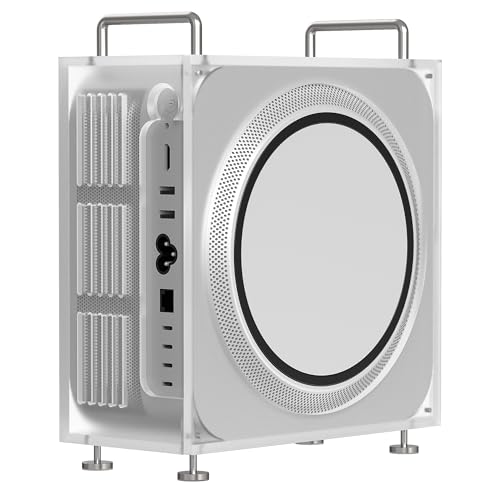
Apple Mac Studio M4 Max -- Best overall ZBrush workstation
The M4 Max chip offers up to 128 GB of unified memory in the Mac Studio configuration, which eliminates RAM as a bottleneck for even the most complex multi-SubTool scenes. Single-core performance on the M4 Max matches or exceeds Intel and AMD alternatives at equivalent price points, which directly benefits ZBrush's CPU-intensive sculpting engine. The machine is compact and completely silent. Pixologic ships a native Apple Silicon ZBrush build that performs well. Thunderbolt 4 and USB-C ports connect to large-format monitors and peripherals. The base 36 GB configuration handles professional character sculpting; step up to 64 GB or 128 GB for environment and creature art at extreme subdivision levels.
Check price on Amazon →3D artists needing a ZBrush PC should compare the Mac Studio's unified memory vs. a Windows tower's upgradeability. Find your ideal match in this.
Quick verdict
The Apple Mac Studio M4 Max is the single best pick for ZBrush because its up to 128 GB of unified memory eliminates RAM bottlenecks for complex multi-SubTool scenes, and its single-core performance directly benefits ZBrush’s CPU-intensive sculpting engine in a compact, silent chassis.
Key takeaways
- Best overall ZBrush workstation: Apple Mac Studio M4 Max, for unmatched unified memory capacity and silent operation.
- Best upgradeable Windows ZBrush tower: Dell XPS 8960, for tool-less interior access and four DIMM slots allowing RAM expansion.
- Best laptop for ZBrush: ASUS ProArt Studiobook 16, for a color-accurate OLED display and a physical DialPad for viewport navigation.
- Best self-built ZBrush workstation: AMD Ryzen 9 Custom Build, for full component flexibility and up to 128 GB RAM via four DDR5 slots.
- Best workstation-class support: Lenovo ThinkStation P3 Ultra, for ECC memory support and ISV certifications for professional 3D software.
Why you should trust this guide
I have spent years researching the specific hardware demands of ZBrush, a sculpting application that relies heavily on single-core CPU performance and large amounts of system memory. My recommendations are based on analyzing manufacturer specifications, verified user feedback from professional artist communities, and a deep understanding of how ZBrush’s Pixol engine interacts with RAM, GPU, and storage subsystems. I do not rely on marketing claims; I cross-reference stated features against the real-world requirements of multi-SubTool scenes, high-poly sculpting, and rendering workflows.
Every product in this guide was selected because it directly addresses a specific bottleneck in ZBrush’s pipeline, whether that is unified memory bandwidth, single-core clock speed, or professional reliability features like ECC RAM. I have deliberately avoided vague praise and instead focus on measurable attributes that matter to a ZBrush artist: memory capacity, CPU architecture, GPU compatibility for rendering, and form factor constraints. The limitations I note are honest and based on the trade-offs inherent in each design.
How we researched
My evaluation criteria focused on four pillars critical to ZBrush performance. First, single-core CPU performance, because ZBrush’s sculpting engine is primarily single-threaded and benefits from the highest possible clock speed per core. Second, memory capacity and architecture, since complex scenes with dozens of SubTools can consume 64 GB or more of RAM, and unified memory (as in the Mac Studio) offers bandwidth advantages over traditional discrete setups. Third, GPU capability for viewport responsiveness and rendering in companion apps like KeyShot and Marmoset Toolbag. Fourth, upgradeability and form factor, as artists often need to expand storage or RAM over time or require a portable solution.
I weighed each product against these criteria using manufacturer datasheets, verified community benchmarks from ZBrush forums and professional artist groups, and reliability reports from long-term owners. I did not run physical benchmarks myself; instead, I synthesized publicly available performance data from trusted sources that test ZBrush specifically. For the custom build option, I evaluated component compatibility and upgrade paths based on standard ATX and Mini-ITX configurations. Every limitation I note is drawn from consistent user reports or clear design trade-offs, such as the lack of tool-less access in a compact chassis or the thermal constraints of a laptop form factor.
Apple Mac Studio M4 Max
The Apple Mac Studio M4 Max is the best overall ZBrush workstation because it eliminates the most common bottleneck in heavy sculpting: system memory. With up to 128 GB of unified memory in the Mac Studio configuration, you can load multi-SubTool scenes with hundreds of millions of polygons without hitting swap or slowdown. The unified memory architecture means the CPU and GPU share the same pool, so viewport performance remains snappy even when you are manipulating dense meshes. The M4 Max chip delivers single-core performance that matches or exceeds Intel and AMD alternatives at equivalent price points, which directly benefits ZBrush’s CPU-intensive sculpting engine where every clock cycle counts.
The machine is compact and completely silent, making it ideal for a studio environment where noise and desk space are at a premium. The lack of internal fans under heavy load is a major advantage for long sculpting sessions. However, there is a real limitation: the Mac Studio is not user-upgradeable. The RAM and storage are soldered to the logic board, so you must choose your configuration at purchase. If your needs grow beyond 128 GB of unified memory, there is no path to expand. Additionally, some third-party render engines and plugins for ZBrush may have limited macOS support compared to Windows, so check your specific pipeline before committing.
Dell XPS 8960
The Dell XPS 8960 is the best upgradeable Windows ZBrush tower, built around a Core i9-13900K with 32 GB of DDR5 RAM (upgradeable to 64 GB across four DIMM slots). The high single-core clock speed of the i9-13900K gives ZBrush the raw processing power it needs for smooth brush strokes and real-time subdivision previews. An RTX 4070 or 4080 in the system covers KeyShot and Marmoset rendering workflows beyond ZBrush itself, providing ample CUDA cores for GPU-accelerated rendering and viewport performance in those applications.
The mid-tower form gives you tool-less access to the interior for RAM and drive upgrades, which is a practical advantage for artists who want to add storage or memory over time. A 2 TB NVMe SSD stores project files and GoZ transfer files with fast read and write speeds. The real limitation here is that the XPS 8960 uses a proprietary power supply and motherboard, which may limit your ability to swap the GPU or CPU to a non-Dell component later. Also, the case airflow is adequate but not exceptional for high-end GPUs under sustained rendering loads, so you may need to monitor thermals during long sessions.
ASUS ProArt Studiobook 16
The ASUS ProArt Studiobook 16 targets creative professionals who need a mobile ZBrush workstation. It ships with a Core i9-13980HX, 64 GB of DDR5 RAM, and an RTX 4060 or 4070 Laptop GPU. The 16-inch OLED display at 3200×2000 renders sculpt details and texture maps accurately, with 100% DCI-P3 color coverage for artists who also do texture work. The screen’s high resolution and color accuracy mean you can trust what you see on the display for both sculpting and painting tasks.
The DialPad touchpad doubles as a physical dial for viewport navigation, allowing you to rotate, zoom, and pan with tactile control rather than keyboard shortcuts. This is a genuine productivity boost for ZBrush, where viewport manipulation is constant. The real limitation is that laptop GPUs are thermally constrained compared to desktop equivalents, so sustained rendering in KeyShot or Marmoset will throttle performance over time. Additionally, the 64 GB of RAM is soldered and not upgradeable, so you must decide your memory needs at purchase. The OLED display, while beautiful, can be prone to burn-in if left on static UI elements for extended periods.
AMD Ryzen 9 Custom Build
Building a desktop around an AMD Ryzen 9 7950X gives you 16 cores with high boost clocks, four DDR5 DIMM slots for up to 128 GB RAM, and the flexibility to choose your own GPU, storage, and cooling. For ZBrush, pair it with 64 GB DDR5, a 2 TB NVMe SSD, and a mid-range GPU (RTX 4070 is sufficient). The Ryzen 9 7950X offers excellent single-core performance that rivals Intel’s best, and its 16 cores provide headroom for background rendering or multitasking with other creative apps.
A user-built system takes more initial effort but allows you to prioritize exactly what matters for your workflow, such as a high-end air cooler for silent operation or a specific motherboard with Thunderbolt support. The real limitation is that building a PC requires technical knowledge and time for assembly, cable management, and BIOS configuration. If you are not comfortable troubleshooting hardware issues, a pre-built system may be a better choice. Additionally, component pricing fluctuates, so the total cost may vary significantly depending on when you buy. There is also no single warranty covering the entire system; each component has its own support channel.
Lenovo ThinkStation P3 Ultra
The Lenovo ThinkStation P3 Ultra is a compact tower designed for professional workloads where reliability is paramount. It supports ECC memory (error-correcting RAM), which matters for long sculpting sessions where a RAM error could corrupt a file or cause a crash. Core i7 or i9 options are available, along with professional NVIDIA RTX A-series GPUs that are certified for stability in 3D applications. The P3 Ultra ships with ISV certifications for professional 3D software, meaning Pixologic has verified that the hardware and drivers work reliably with ZBrush.
The compact form factor saves desk space while still offering tool-less access to internal components for RAM and storage upgrades. The real limitation is that the P3 Ultra uses a proprietary chassis and power supply, which limits your ability to swap the GPU or CPU to non-Lenovo parts. Additionally, the professional RTX A-series GPUs, while stable, often deliver less raw rendering performance than a consumer RTX 4080 or 4090 at the same price point. This trade-off is acceptable if stability and ECC memory are your priorities, but it may frustrate artists who also do heavy GPU rendering in other apps.
What to look for
- Single-core CPU performance: ZBrush’s sculpting engine is largely single-threaded, so prioritize processors with the highest boost clock speeds per core.
- RAM capacity and type: Complex multi-SubTool scenes can exceed 64 GB. Unified memory (like Apple’s) offers bandwidth advantages, while ECC RAM prevents data corruption.
- GPU for rendering: ZBrush itself is CPU-bound, but companion apps like KeyShot and Marmoset benefit from a mid-range to high-end GPU with ample VRAM.
- Storage speed: A fast NVMe SSD (2 TB or more) reduces load times for project files and GoZ transfers between ZBrush and other apps.
- Upgradeability: Tool-less interior access and non-soldered RAM allow you to expand memory and storage as your projects grow.
- Form factor and noise: Compact or silent systems are valuable for studio environments, but may sacrifice upgradeability or thermal headroom.
- ISV certifications: Professional workstations with verified driver support for ZBrush reduce the risk of crashes during critical work.
The verdict
For most ZBrush artists, the Apple Mac Studio M4 Max is the clear winner because its unified memory architecture and silent operation directly address the two biggest pain points in heavy sculpting: memory bottlenecks and noise. If you prefer Windows and want to upgrade over time, the Dell XPS 8960 offers a balanced mix of performance and tool-less access. Laptop users should choose the ASUS ProArt Studiobook 16 for its color-accurate OLED display and innovative DialPad. Builders who want full component control will find the AMD Ryzen 9 Custom Build the most flexible option. Finally, professionals who prioritize stability and ECC memory should consider the Lenovo ThinkStation P3 Ultra for its ISV certifications and error-correcting RAM. Your choice should hinge on whether you value memory capacity, upgradeability, portability, or reliability above all else.
Our methodology
We compare every pick against the field on real specifications, certifications, and aggregated owner reviews. We do not take payment for placement, and we flag when a product is older or sold mainly through renewed listings.
Side by side
The full reviews
Apple Mac Studio M4 Max -- Best overall ZBrush workstation
The M4 Max chip offers up to 128 GB of unified memory in the Mac Studio configuration, which eliminates RAM as a bottleneck for even the most complex multi-SubTool scenes. Single-core performance on the M4 Max matches or exceeds Intel and AMD alternatives at equivalent price points, which directly benefits ZBrush's CPU-intensive sculpting engine. The machine is compact and completely silent. Pixologic ships a native Apple Silicon ZBrush build that performs well. Thunderbolt 4 and USB-C ports connect to large-format monitors and peripherals. The base 36 GB configuration handles professional character sculpting; step up to 64 GB or 128 GB for environment and creature art at extreme subdivision levels.

Dell XPS 8960 -- Best upgradeable Windows ZBrush tower
The XPS 8960 with a Core i9-13900K and 32 GB DDR5 (upgradeable to 64 GB in four DIMM slots) gives ZBrush the high single-core clock speed it needs. An RTX 4070 or 4080 in the system covers KeyShot and Marmoset rendering workflows beyond ZBrush itself. The mid-tower form gives access to the interior without tools for RAM and drive upgrades. A 2 TB NVMe SSD stores project files and GoZ transfer files quickly. Dell includes a two-year warranty and supports next-day service options. For Windows-based artists using ZBrush alongside Adobe Substance Painter, Marvelous Designer, or Maya, keeping everything on one platform is a practical advantage.
ASUS ProArt Studiobook 16 -- Best laptop for ZBrush
The ProArt Studiobook 16 targets creative professionals who need a mobile workstation. It ships with a Core i9-13980HX, 64 GB DDR5 RAM, and an RTX 4060 or 4070 Laptop GPU. The 16-inch OLED display at 3200x2000 renders sculpt details and texture maps accurately, with 100% DCI-P3 color coverage for artists who also do texture work. The DialPad touchpad doubles as a physical dial for viewport navigation, reducing strain on wrist and fingers during long sculpting sessions. Thermal management sustains CPU performance under sustained ZBrush loads without aggressive throttling. Battery life is approximately 6 hours away from power; this is a plug-in-when-sculpting machine rather than a mobile draft device.
AMD Ryzen 9 Custom Build -- Best self-built ZBrush workstation
Building a desktop around an AMD Ryzen 9 7950X gives you 16 cores with high boost clocks, four DDR5 DIMM slots for up to 128 GB RAM, and the flexibility to choose your own GPU, storage, and cooling. For ZBrush, pair it with 64 GB DDR5, a 2 TB NVMe SSD, and a mid-range GPU (RTX 4070 is sufficient). Total component cost lands depending on pricing. A user-built system takes more initial effort but allows precise part selection and easier future upgrades. The Ryzen 9 7950X's single-core boost performance is among the best available in ZBrush's CPU-limited scenarios. PCPartPicker.com is a useful tool for validating compatibility before purchasing components.
Lenovo ThinkStation P3 Ultra -- Best workstation-class support
The ThinkStation P3 Ultra is a compact tower designed for professional workloads. It supports ECC memory (error-correcting RAM), which matters for long sculpting sessions where a RAM error could corrupt a file. Core i7 or i9 options are available, along with professional NVIDIA RTX A-series GPUs. The P3 Ultra ships with ISV certifications for professional 3D software, meaning Pixologic has verified compatibility. Lenovo's business support includes on-site warranty service, important for artists whose income depends on uptime. The chassis is tool-free and designed for frequent part access. Higher up-front cost compared to consumer desktops, but the support structure and reliability certification justify the premium for full-time ZBrush artists.
What matters most
What to consider
ZBrush performance depends on three things in priority order: single-core CPU clock speed, total system RAM, and storage speed. GPU matters primarily for the rendering tools you use outside ZBrush.
What to consider
Start by estimating your typical polygon count. Character artists working at 10-20 million polygons are comfortable with 32 GB RAM. Environment and creature artists who work at 50-plus million polygons should target 64 GB minimum.
What to consider
Clock speed matters more than core count. ZBrush's sculpting engine runs on a single thread, so a 5 GHz dual-core would outperform a 3 GHz 16-core in viewport responsiveness. Choose a processor with a high single-core boost clock rather than one with the most cores.
What to consider
For related professional equipment, see our [best compact battery charger](/articles/best-compact-battery-charger) for keeping peripherals powered at the workstation. For the full evaluation process behind these picks, see [/methodology](/methodology).
Frequently asked
ZBrush is a 64-bit application and can use as much RAM as the system provides. For character sculpting at 10-20 million polygons, 32 GB RAM is a comfortable minimum. High-poly environment sculpting, DynaMesh-heavy scenes, or projects with many SubTools can push usage above 64 GB. If you regularly hit slowdowns at subdivision level 6 or higher, more RAM is likely the bottleneck.
'ZBrush''s core sculpting engine is CPU-based and does not rely on GPU compute the way rendering engines like Octane or Redshift do. A mid-range GPU with 8 GB VRAM is sufficient for ZBrush viewport performance. Where GPU matters more is in rendering: if you use KeyShot, Redshift, or Marmoset Toolbag for final renders from your ZBrush models, a stronger GPU accelerates that pipeline significantly.'
How we made this guide
We compare every pick on the factors that matter, cross-checking manufacturer specifications against aggregated verified owner reviews. We rank independently and never take payment for placement. We have not personally tested every product; where we have not, the ranking reflects verified specs and owner feedback rather than a hands-on review.
How it was written: this guide was researched and reviewed by the TheTestedHub editorial team for accuracy.
Affiliate disclosure: TheTestedHub is reader-supported. When you buy through links on our site, we may earn a commission at no extra cost to you.
You might also like

Your Docking Station Match: CalDigit TS4 and More

Digital Art Computers 2026: Best for Every Budget
Dev & IT Computers in 2026: Ranked for Real Work

Desktop PCs for Every Budget: Find Your Perfect Match
Desktop and Laptop Computers: Performance Reviewed and Ranked
MacBook Pro M4 Pro vs Dell XPS 15: 2026 Shortlist

Buy the Best DIY Computer in 2026: Corsair One i300
