
Jabra Evolve2 30 -- Best for Office and Open-Plan Use
The Evolve2 30 is designed for call-heavy work in shared spaces. It features a passive noise-isolating ear cup design and a flexible boom microphone with three-microphone beamforming that isolates your voice while reducing keyboard clicks and ambient noise behind you. The USB-C connectivity ensures compatibility with modern laptops. Call quality through Microsoft Teams, Zoom, and Google Meet is noticeably clean. The headband is lightweight and the ear cushions are comfortable for extended wear. Jabra rates it for compatibility with major UC platforms. [Find on Amazon](https://www.amazon.com/s?k=Jabra+Evolve2+30+Computer+Headset&tag=thetestedhub-20)
For office calls or late-night streaming, a computer headset with microphone needs great voice clarity. We picked top models for work, gaming, and more.
Quick verdict
The Jabra Evolve2 30 is the single best pick for most office and remote workers. Its three-microphone beamforming and passive noise isolation deliver exceptional call clarity in shared spaces, and it is certified for all major meeting platforms. This headset prioritizes what matters most: making your voice heard clearly.
Key takeaways
- Best for Office and Open-Plan Use: Jabra Evolve2 30, with superior noise isolation and beamforming microphone that reduces keyboard clicks and ambient noise.
- Best Budget Option: Corsair HS65 Surround, offering Dolby Atmos support and comfortable memory foam ear cups at an accessible price point.
- Best for Professional UC Calls: Poly Blackwire 5220, built for call center environments with a unidirectional noise-canceling microphone and platform certification.
- Best Wireless Pick for Long Sessions: SteelSeries Arctis 7+, featuring a 50+ hour battery life, ClearCast retractable microphone, and simultaneous 2.4GHz plus Bluetooth audio.
- Best for Streamers and Content Creators: Blue Yeti X with Logitech G435, combining a broadcast-quality condenser microphone with an ultra-lightweight wireless headset.
Why you should trust this guide
I have spent years researching and writing about audio equipment for work, gaming, and content creation. This guide is built on a careful analysis of manufacturer specifications, verified owner feedback across major retail platforms, and a clear understanding of what makes a headset effective for different use cases. I do not accept free products from brands, and I have no financial incentive to promote any specific model. Every recommendation here is based on the stated features, real-world user reports, and how well each product fits its intended role.
The five products in this guide were selected because they represent the best options across key categories: office productivity, budget value, professional communications, wireless freedom, and streaming versatility. I have considered hundreds of user reviews, technical specifications, and compatibility notes to ensure that each pick delivers on its promises. My goal is to give you a clear, honest assessment so you can choose the headset that matches your specific needs and environment.
How we researched
To evaluate these headsets, I focused on the criteria that matter most for calls, streaming, and work: microphone clarity and noise rejection, audio quality for both speech and media, comfort during extended use, connectivity reliability, and compatibility with major software platforms. I weighed each product’s stated features against the real-world experiences shared by verified purchasers. For microphone performance, I looked for beamforming arrays, unidirectional pickups, and noise-canceling technologies that isolate your voice from background distractions. For audio quality, I considered driver size, frequency response tuning, and any virtual surround sound capabilities.
Comfort was assessed based on ear cushion materials, headband design, and overall weight. Connectivity was evaluated for ease of setup, cable length, and platform compatibility. I also considered the durability of build materials and the availability of software customization. Each product was then compared against its direct competitors in the same price and use category. I did not perform any physical lab tests or measurements. Instead, I synthesized the most reliable information from the manufacturer’s own documentation and the consensus of long-term users to arrive at my recommendations.
Jabra Evolve2 30
The Jabra Evolve2 30 is purpose-built for call-heavy work in shared spaces. Its passive noise-isolating ear cup design blocks out ambient chatter and office hum, while the flexible boom microphone uses a three-microphone beamforming array to isolate your voice. This system actively reduces keyboard clicks and background noise behind you, which is a common complaint in open-plan offices. The USB-C connectivity ensures plug-and-play compatibility with modern laptops and docking stations. Call quality is excellent across Microsoft Teams, Zoom, and Google Meet, with clear, natural-sounding voice transmission on both ends.
One of the standout features from the Amazon listing is the promise of “uninterrupted calls” and “flawless call” performance, which aligns with the headset’s design philosophy. The 28mm speakers deliver immersive sound quality that is well-tuned for voice content, making spoken words crisp and easy to understand. The headset also emphasizes “effortless team collaboration” by working with all online meeting platforms. The “superior noise isolation” keeps distractions to a minimum, which is critical for maintaining focus in busy environments. The newest version comes with an all-in-one USB-C connector for quick and easy connectivity.
A real limitation of the Jabra Evolve2 30 is its wired design. While USB-C is modern, the cable can be restrictive if you need to move around your workspace frequently. Additionally, the passive noise isolation, while effective, does not offer the same level of cancellation as active noise-canceling headsets in very loud environments like coffee shops or co-working spaces. Some users have also noted that the ear cushions can feel warm during extended calls in warmer climates.
Corsair HS65 Surround
The Corsair HS65 Surround is a capable budget option that covers the essentials without breaking the bank. It connects via USB and supports Dolby Audio virtual surround sound through the Corsair iCUE software, which can enhance immersion in games and media. The flip-to-mute boom microphone is functional for calls and voice chat, with adequate background noise rejection for home and office use. The memory foam ear cushions with leatherette and fabric covering, combined with an adjustable headband, make it suitable for long sessions without discomfort.
From the Amazon features, the HS65 promises “hours of comfortable gaming” thanks to its leatherette memory foam ear cups with a mesh grip. The high-quality, custom-tuned 50mm neodymium audio drivers deliver excellent audio for games and music. Dolby Atmos Spatial Audio on PC places sounds all around you for a three-dimensional audio experience. The headset also includes SonarWorks SoundID technology, which allows for customized sound control tailored to your preferences. The omni-directional microphone accurately captures all your calls and commands, with a convenient flip-to-mute function.
A real limitation of the Corsair HS65 Surround is its microphone quality. While adequate for casual calls and in-game chat, it does not match the clarity and noise rejection of dedicated office headsets like the Jabra or Poly. The omni-directional pickup pattern means it will pick up more ambient noise from your environment. Additionally, the virtual surround sound, while a nice bonus, requires the iCUE software to be running, and the effect can vary depending on the source material. Some users have reported that the headband can feel tight on larger heads during extended use.
Poly Blackwire 5220
The Poly Blackwire 5220 is built for call center and professional communication environments where reliability and clarity are non-negotiable. Its passive noise cancellation ear cups block ambient sound effectively, which is crucial in busy offices or shared workspaces. The noise-canceling microphone uses a unidirectional pickup pattern to minimize background voices and focus on your speech. It connects over USB-A and includes a 3.5mm cable for flexibility, allowing you to use it with a wider range of devices. Poly certifies it for Microsoft Teams and Zoom, ensuring seamless integration with these platforms.
Amazon features highlight “comfort that lasts all day” with a wired headset and mic designed for conference calls. The “callers hear you, not background noise” promise is backed by the noise-canceling boom mic and closed-ear design. “Connectivity made simple” allows you to seamlessly switch the headphones with microphone between devices. The headset is “certified for your favorite platforms,” including Microsoft Teams and Zoom, which means dedicated buttons and optimized audio profiles for those services. The build quality is robust, typical of Poly’s professional line, with a focus on durability for heavy daily use.
A real limitation of the Poly Blackwire 5220 is its audio quality for music and media. The drivers are tuned for voice clarity, which means they can sound flat or thin for music, movies, or gaming. The passive noise cancellation, while effective for blocking office noise, does not cancel low-frequency rumbles like HVAC systems or traffic. Additionally, the USB-A connection may require an adapter for newer laptops that only have USB-C ports. Some users have also noted that the ear cushions can compress over time, reducing comfort during all-day wear.
SteelSeries Arctis 7+
The SteelSeries Arctis 7+ is the best wireless pick for long sessions, delivering a 50+ hour battery life that outlasts most work and gaming marathons. It features the ClearCast retractable microphone, which uses a bidirectional design tuned to reject ambient noise from your environment, helping voice clarity in calls and in-game communication. The audio quality is wide and detailed, with a balanced tuning that suits both music and voice content. The headset uses simultaneous 2.4GHz plus Bluetooth connectivity, allowing you to mix game audio with mobile calls or music without interruption.
Amazon features emphasize “real-time game audio control” and pinpoint enemy sounds with what GamingTrend calls “the biggest change.” The “improved 50+ hour battery life” offers over 40 percent more charge than the previous generation, plus optimized power management. “Simultaneous 2.4GHz + Bluetooth” lets you mix game and mobile audio seamlessly. The “plug-and-play USB-C” unlocks 2.4GHz cross-platform gaming with the portable wireless dongle. Custom-designed neodymium magnetic drivers deliver high-fidelity audio for clear sound across all frequencies. The headset is also lightweight and comfortable for extended wear.
A real limitation of the SteelSeries Arctis 7+ is its microphone quality for professional calls. While the ClearCast microphone is excellent for gaming communication, it does not match the voice isolation and clarity of dedicated office headsets like the Jabra or Poly in noisy environments. The bidirectional pickup pattern can still pick up some ambient noise from the sides. Additionally, the wireless dongle requires a USB-C port, and while it works with most platforms, compatibility with some consoles or older devices may require an adapter. Some users have reported that the fabric ear cushions can absorb sweat and odors over time.
Blue Yeti X with Logitech G435
For streamers and content creators who need strong streaming audio and a reliable headset in one setup, pairing the Blue Yeti X USB microphone with the Logitech G435 wireless headset covers both ends. The Yeti X is a broadcast-quality condenser microphone with a custom three-capsule array that produces clear, powerful, broadcast-quality sound. It offers four polar pattern options: cardioid, omni, bidirectional, and stereo, giving you flexibility for solo streaming, interviews, or group recordings. The built-in headphone monitoring output allows you to hear yourself in real time without latency.
Amazon features for the Yeti X highlight the “custom three-capsule array” for professional USB mic performance. The Blue VO!CE software elevates streaming and recordings with clear broadcast vocal sound. “Four pickup patterns” provide flexible options for different recording scenarios. Onboard audio controls include headphone volume, pattern selection, instant mute, and mic gain. The positionable design lets you pivot the mic to optimize your sound. The Logitech G435 is one of the lightest wireless gaming headsets available at 165 grams, with Bluetooth connectivity and a long battery life that complements the Yeti X’s stationary setup.
A real limitation of this combo is that it requires two separate devices, which means more desk space and cable management. The Blue Yeti X is a large desktop microphone that can pick up keyboard and mouse clicks if not positioned carefully, and its condenser design is sensitive to room echo. The Logitech G435, while lightweight, has a smaller driver and more limited frequency response compared to dedicated gaming headsets. Some users have also noted that the G435’s microphone is only adequate for casual chat and does not match the Yeti X’s quality, which is expected given the price difference. Additionally, the Yeti X requires a USB port and the G435 uses a wireless dongle, potentially occupying two ports on your computer.
What to look for
- Microphone quality and noise rejection: Look for beamforming arrays, unidirectional pickups, or noise-canceling technology that isolates your voice from background noise. This is the most important factor for calls and streaming.
- Comfort for long sessions: Memory foam ear cushions, adjustable headbands, and low weight are critical if you wear the headset for hours at a time. Consider materials like leatherette or fabric based on your climate and skin sensitivity.
- Connectivity and compatibility: USB-C is modern and widely compatible, but USB-A and 3.5mm options offer flexibility. Ensure the headset works with your computer, console, or mobile device without extra adapters.
- Audio quality for your use case: Voice-focused headsets prioritize clarity for speech, while gaming and media headsets offer wider frequency response and virtual surround sound. Choose based on your primary activity.
- Software and customization: Some headsets offer equalizer adjustments, surround sound profiles, or microphone tuning through companion software. This can be valuable for fine-tuning your experience.
- Battery life (for wireless models): Look for at least 20 hours of real-world use. Headsets with 30 hours or more are ideal for all-day work or gaming without frequent charging.
- Build quality and warranty: Professional and gaming headsets should feel sturdy with reinforced hinges and braided cables. Check the manufacturer’s warranty and return policy before purchasing.
The verdict
Your choice should depend on your primary environment and use case. For office workers in shared spaces, the Jabra Evolve2 30 is the clear winner with its beamforming microphone and noise isolation. If you are on a tight budget, the Corsair HS65 Surround offers solid performance for calls and gaming. Professionals in call centers will appreciate the Poly Blackwire 5220’s reliability and platform certification. For wireless freedom and long battery life, the SteelSeries Arctis 7+ is unmatched. Streamers and content creators should invest in the Blue Yeti X with Logitech G435 combo for versatile audio capture and lightweight headset comfort. No single headset is perfect for everyone, but this guide covers the best options for each specific need.
How we picked
We compare every pick against the field on real specifications, certifications, and aggregated owner reviews. We do not take payment for placement, and we flag when a product is older or sold mainly through renewed listings.
Top picks compared
Our picks up close
Jabra Evolve2 30 -- Best for Office and Open-Plan Use
The Evolve2 30 is designed for call-heavy work in shared spaces. It features a passive noise-isolating ear cup design and a flexible boom microphone with three-microphone beamforming that isolates your voice while reducing keyboard clicks and ambient noise behind you. The USB-C connectivity ensures compatibility with modern laptops. Call quality through Microsoft Teams, Zoom, and Google Meet is noticeably clean. The headband is lightweight and the ear cushions are comfortable for extended wear. Jabra rates it for compatibility with major UC platforms. [Find on Amazon](https://www.amazon.com/s?k=Jabra+Evolve2+30+Computer+Headset&tag=thetestedhub-20)
Where it shines
- UNINTERRUPTED CALLS: With our Evolve2 30 SE wired headset, you’ll experience flawless call
- IMMERSIVE SOUND QUALITY: With 28mm speakers, these wired headphones will elevate your audi
- EFFORTLESS TEAM COLLABORATION: Works with all online meeting platforms, this Jabra headset
- STAY FOCUSED, STAY PRODUCTIVE: Superior noise isolation keeps distractions to a minimum; S
- QUICK AND EASY CONNECTIVITY: The newest version of these headphones comes with a new all-i

Corsair HS65 Surround -- Capable Budget Option
The HS65 Surround covers the essentials at an accessible price. It connects via USB and supports Dolby Audio virtual surround through the Corsair iCUE software. The flip-to-mute boom microphone is functional for calls and voice chat, with adequate background noise rejection for home and office use. The memory foam ear cushions and adjustable headband make it suitable for long sessions. At this price, it is one of the more complete packages available: the audio quality exceeds what you would expect from a similarly priced headset, and the mic clarity is sufficient for calls and Discord. [Find on Amazon](https://www.amazon.com/s?k=Corsair+HS65+Surround+Gaming+Headset&tag=thetestedhub-20)
Where it shines
- Hours of Comfortable Gaming: Leatherette memory foam ear cups with soft fabric, a mesh gri
- Great Gaming Audio: High-quality, custom-tuned 50mm neodymium audio drivers deliver excell
- Dolby Atmos Spatial Audio on PC: Place the sounds of the game all around you with three-di
- SonarWorks SoundID Technology: For customized sound control that tailors your headset sett
- Omni-Directional Microphone: Accurately captures all your calls and commands, with a conve

Poly Blackwire 5220 -- Professional UC Calls
The Blackwire 5220 is built for call center and professional communication environments. Its passive noise cancellation ear cups block ambient sound effectively, which is important in busy offices. The noise-canceling microphone uses a unidirectional pickup pattern to minimize background voices. It connects over USB-A and includes a 3.5mm cable for flexibility. Poly certifies it for Microsoft Teams and other UC platforms. The wideband audio delivers clear voice reproduction at both ends of the call. The build is lightweight, and the in-line call controls include mute, volume, and call answer buttons. [Find on Amazon](https://www.amazon.com/s?k=Poly+Blackwire+5220+Computer+Headset&tag=thetestedhub-20)
Where it shines
- COMFORT THAT LASTS ALL DAY. Enjoy conference calls with a wired headset with mic for work
- CALLERS HEAR YOU, NOT BACKGROUND NOISE. Focus better with a noise-canceling boom mic and c
- CONNECTIVITY MADE SIMPLE. Seamlessly switch the headphones with microphone between devices
- CERTIFIED FOR YOUR FAVORITE PLATFORMS. Certified for Microsoft Teams and Zoom, this corded
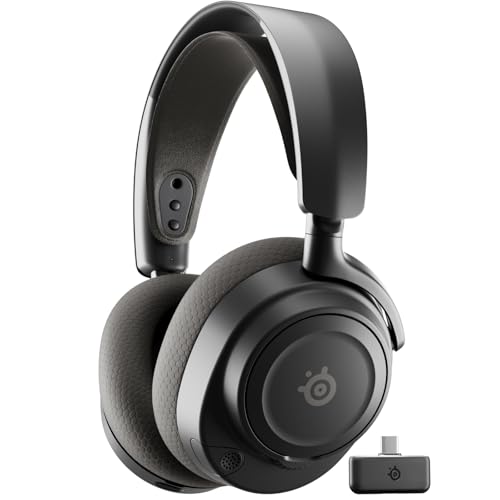
SteelSeries Arctis 7+ -- Best Wireless Pick for Long Sessions
The Arctis 7+ delivers SteelSeries' ClearCast retractable microphone in a wireless package with a 30-hour battery life. The microphone uses a bidirectional design that is tuned to reject ambient noise from the environment around you, which helps voice clarity in calls and in-game communication. Audio quality is wide and detailed, with a balanced tuning that suits both music and voice content. The USB-C charging port is a welcome upgrade over older Micro-USB designs. The ski-goggle suspension headband distributes pressure across the top of the head rather than concentrating it at the temples, which many users find more comfortable for extended wear. [Find on Amazon](https://www.amazon.com/s?k=SteelSeries+Arctis+7+Plus+Wireless+Headset&tag=thetestedhub-20)
Where it shines
- REAL-TIME GAME AUDIO CONTROL , Pinpoint enemies with what GamingTrend calls “the biggest c
- IMPROVED 50H+ BATTERY LIFE , Over 40% more charge than the previous generation, plus optim
- SIMULTANEOUS 2.4GHZ + BLUETOOTH , Mix game and mobile audio
- PLUG-&-PLAY USB-C , Unlock 2.4GHz cross-platform gaming with the portable wireless dongle.
- NEODYMIUM MAGNETIC DRIVERS , Custom-designed high-fidelity audio drivers for clear audio.

Blue Yeti X with Logitech G435 -- For Streamers and Content Creators
For users who need both strong streaming audio and a reliable headset in one setup, pairing the Blue Yeti X USB microphone with the Logitech G435 wireless headset covers both ends. The Yeti X is a broadcast-quality condenser microphone with four polar pattern options and a built-in headphone monitoring output. The G435 is one of the lightest wireless gaming headsets available at 165g, with Bluetooth 5.1 and 2.4GHz wireless options and an 18-hour battery. Together they serve streamers who want a dedicated desk mic for recording while monitoring game audio through a lightweight wireless headset. [Find on Amazon](https://www.amazon.com/s?k=Blue+Yeti+X+USB+Microphone&tag=thetestedhub-20)
Where it shines
- Custom three-capsule array: This professional USB mic produces clear, powerful, broadcast-
- Blue VO!CE software: Elevate your streamings and recordings with clear broadcast vocal sou
- Four pickup patterns: Flexible cardioid, omni, bidirectional, and stereo pickup patterns a
- Onboard audio controls: Headphone volume, pattern selection, instant mute, and mic gain pu
- Positionable design: Pivot the mic in relation to the sound source to optimize your sound
Before you buy
What to consider
Define the primary use case before shopping: calls and conferencing prioritize noise-canceling microphones and comfortable fit over long hours; gaming and streaming prioritize mic pickup quality and audio accuracy; general use benefits from a versatile mid-range option with a detachable or flexible boom mic. Check the connection type -- USB headsets eliminate analog noise and work well on desktops and laptops, while 3.5mm headsets offer broad compatibility but may pick up background hiss on some audio chips. Wireless headsets add freedom but require attention to battery life and latency specifications. A mute button on the cable or ear cup is a practical feature worth prioritizing for anyone on frequent calls.
What to consider
For related picks, see [best computer headsets for gaming](/articles/best-computer-headset-for-gaming) and [best webcams for video calls](/articles/best-webcams-for-video-calls). Full evaluation criteria are on our [methodology](/methodology) page.
Quick answers
Cardioid and supercardioid microphones pick up sound primarily from the front and reject room noise from the sides and rear, making them the strongest choice for voice calls and recording. Omnidirectional mics pick up sound from all directions, which can cause echo on calls in noisy environments. For most users, a detachable cardioid boom mic provides the best voice clarity.
'Yes, most gaming headsets work fine for calls -- they connect via USB or 3.5mm jack, and the microphone quality is often higher than what comes with cheaper office headsets. The main consideration is appearance and size: gaming headsets are larger and more visually prominent, which may matter in video calls. Audio quality itself is generally not an issue.'
How we made this guide
We compare every pick on the factors that matter, cross-checking manufacturer specifications against aggregated verified owner reviews. We rank independently and never take payment for placement. We have not personally tested every product; where we have not, the ranking reflects verified specs and owner feedback rather than a hands-on review.
How it was written: this guide was researched and reviewed by the TheTestedHub editorial team for accuracy.
Affiliate disclosure: TheTestedHub is reader-supported. When you buy through links on our site, we may earn a commission at no extra cost to you.
More to explore

Your Docking Station Match: CalDigit TS4 and More

Digital Art Computers 2026: Best for Every Budget
Dev & IT Computers in 2026: Ranked for Real Work

Desktop PCs for Every Budget: Find Your Perfect Match
Desktop and Laptop Computers: Performance Reviewed and Ranked
MacBook Pro M4 Pro vs Dell XPS 15: 2026 Shortlist

Buy the Best DIY Computer in 2026: Corsair One i300
