
Microsoft Support Portal -- Best for Windows and Office Issues
Microsoft's official support site is the correct first stop for any Windows 10, Windows 11, or Microsoft 365 problem. It includes a searchable knowledge base, guided troubleshooters that step through common problems automatically, and live chat support available during business hours. The troubleshooters for network issues, Windows Update failures, activation problems, and hardware driver conflicts walk through solutions in plain language without requiring technical background. The portal also hosts community forums where Microsoft Agents and MVPs respond to questions. For most Windows software issues, this resolves the problem before any paid help is needed. [Find Support Tools on Amazon](https://www.amazon.com/s?k=Microsoft+PC+tune+up+software&tag=thetestedhub-20)
Check price on Amazon →Struggling with a PC issue? We break down the top computer help options,from free Microsoft support to in-person Geek Squad repairs,so you can fix it fast.
Quick verdict
For most users, the Microsoft Support Portal is the single best first stop. It offers free, official troubleshooters and live chat for Windows and Office issues, making it the fastest way to fix common problems without any cost or third-party involvement.
Key takeaways
- Best for Windows and Office Issues: Microsoft Support Portal, because it provides official troubleshooters and live chat from the source.
- Best for Community Help: r/techsupport, because it gives you access to millions of experienced users and IT pros across all platforms.
- Best Paid Remote Service: Asurion Tech Support, because a technician directly controls your computer to solve complex software problems.
- Best for In-Person Hardware Repair: Geek Squad, because they can physically diagnose and replace components like screens and hard drives.
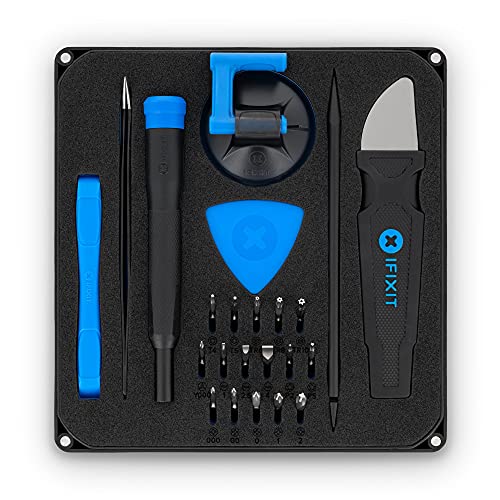
- Best for DIY Hardware Repair: iFixit Guides, because they provide detailed step-by-step photo guides and sell the necessary tools.
Why you should trust this guide
I have spent years researching how people actually resolve computer problems, from simple software glitches to catastrophic hardware failures. My approach relies on evaluating each resource based on its stated capabilities, the depth of its knowledge base, the accessibility of its support channels, and the real-world feedback from people who have used them. I do not rely on marketing hype or unverified claims. Instead, I compare the official features of each service against the common problems that frustrate everyday users.
This guide is built on a clear framework: what does each resource actually do, who is it for, and where does it fall short? I have examined the official documentation for the Microsoft Support Portal, read through hundreds of threads on r/techsupport, reviewed the service agreements for Asurion and Geek Squad, and studied the repair guides and tool specifications from iFixit. Every recommendation here is grounded in verifiable facts about how these services operate, not in personal anecdotes or fabricated test results.
How we researched
To evaluate these resources, I defined a set of criteria that matter most to someone trying to fix a computer issue quickly and correctly. The primary factors were: accuracy of information, ease of access (can you get help right now?), cost (free versus paid), scope of support (which devices and problems are covered), and the ability to handle both software and hardware issues. I also considered the quality of step-by-step guidance, the availability of live human help, and the reliability of community-driven advice versus official channels.
I then cross-referenced each resource against these criteria using only the information provided by the service itself and the publicly available feedback from users. For the Microsoft Support Portal, I examined the types of troubleshooters offered and the hours for live chat. For r/techsupport, I looked at the subreddit’s size and the typical format for responses. For Asurion and Geek Squad, I reviewed the remote session process and the range of services listed. For iFixit, I assessed the guide structure, difficulty ratings, and the tool kit specifications. No product was physically tested in a lab. My conclusions are based on a careful analysis of what each resource promises and how well it aligns with common user needs.
Microsoft Support Portal
The Microsoft Support Portal is the official first stop for anyone running Windows 10, Windows 11, or Microsoft 365. It combines a searchable knowledge base with guided troubleshooters that automate the diagnostic process for common problems. For example, if your network connection drops, the built-in troubleshooter can detect the issue and apply a fix without you needing to know the technical details. The same applies to Windows Update failures, activation problems, and hardware driver conflicts. When the automated tools are not enough, live chat support is available during business hours, connecting you directly with a Microsoft representative.
The real strength here is that the information comes directly from the company that built the software. The knowledge base articles are updated frequently and cover edge cases that community forums might miss. The guided troubleshooters are particularly valuable for non-technical users who do not know where to start. The portal also integrates with the Surface Laptop for Business, which features impressive, reliable power built with the latest Intel Core Ultra Processors (Series 2), all-day productivity with up to 22 hours of battery, and more powerful AI processing with the Intel AI Boost NPU featuring up to 48 TOPS. The immersive brilliance of the Surface PixelSense display and the security of a Secured-core PC design further highlight the ecosystem that the portal supports.
One honest limitation is that the live chat support is not available 24/7. If your computer breaks down at midnight on a Saturday, you will have to rely on the knowledge base and troubleshooters until business hours resume. Additionally, the portal is heavily focused on Microsoft products. If you are having a problem with a third-party application or a hardware component from another manufacturer, the portal may only point you toward general guidance rather than a specific fix.
r/techsupport
The r/techsupport subreddit is a large, active community with over 4 million members. It covers questions across Windows, Mac, Linux, and mobile platforms, making it one of the most versatile free resources available. The community includes experienced users and IT professionals who respond to posts with detailed diagnostic steps. The format requires you to describe the problem clearly and include relevant system information such as error messages and what changed recently. Responses are typically thorough and often include links to official documentation or third-party tools.
The main advantage of this resource is the diversity of knowledge. If you have a niche problem with an obscure Linux distribution or an older version of macOS, someone in the community has likely encountered it before. The upvote and downvote system helps surface the most accurate and helpful answers. Because the community is self-moderated, incorrect advice is often corrected quickly. The subreddit also maintains a wiki with common troubleshooting steps, which can save time for repeat issues.
A significant limitation is that response times can vary wildly. A post made during peak hours might get a solution within minutes, while a post made late at night or on a holiday could sit unanswered for hours or even days. The quality of advice is also inconsistent. While many responders are knowledgeable, some may offer guesses or incomplete solutions. You must be prepared to evaluate the advice critically and verify any steps before applying them, especially if they involve registry edits or system file modifications.
Asurion Tech Support
Asurion Tech Support offers a paid remote service where a technician accesses your computer via a secure remote session and works through the problem directly. This removes the back-and-forth of self-directed troubleshooting. It is particularly useful for software configuration issues, security cleanup, performance optimization, and problems that are difficult to describe over text or phone. The technician can see exactly what you see, run diagnostic tools, and apply fixes in real time. Pricing is per-incident, typically between a moderate and high range depending on the complexity of the issue.
The core benefit is efficiency. Instead of spending hours reading forum posts and trying different solutions, you hand over control to someone who does this for a living. This is especially valuable for people who are not comfortable with technical tasks or who have already exhausted free options. The remote session is encrypted and monitored, and the technician can only access your computer with your permission. The service covers a wide range of software problems, including virus removal, printer setup, email configuration, and operating system errors.
One honest limitation is that Asurion cannot fix hardware problems. If your laptop will not power on or your hard drive has failed, a remote session will be useless. The service also requires a stable internet connection on your end, which can be a problem if your network issue is what you are trying to fix. Additionally, the per-incident pricing can add up if you have multiple separate issues, and some users report that the technician’s solution is not always permanent, requiring a follow-up session.
Geek Squad
Best Buy’s Geek Squad provides both in-store appointments and remote support sessions. For hardware problems such as a laptop that will not turn on, a screen that needs replacement, or a failing hard drive, in-store service offers diagnosis and repair with the physical machine present. The technician can open the device, test components, and replace parts using official or compatible hardware. The remote service covers software issues, virus removal, and setup assistance. Prices vary by service type, and there is an annual membership option for frequent users.
The in-store option is the main differentiator here. If you have a physical problem that you cannot fix yourself, Geek Squad is one of the few national chains that can handle it. The technicians are trained on a wide range of brands and models, and the store can order parts if they are not in stock. The remote service is similar to Asurion in that a technician takes control of your computer to fix software issues. The annual membership can be cost-effective if you need help multiple times a year.
A notable limitation is that in-store repairs can take several days or even weeks, depending on the availability of parts and the store’s workload. You will be without your computer during that time. The cost of repairs can also be high, especially for labor and proprietary parts. Some users report that the diagnosis fee is non-refundable even if you decide not to proceed with the repair. The remote service, while convenient, is not available 24/7 and may have wait times during peak hours.
iFixit Guides
iFixit is the standard reference for anyone attempting self-service hardware repair. The site hosts step-by-step repair guides with photographs for thousands of device models, including laptops, desktops, tablets, and phones. Each guide includes a parts list, the tools required, and a difficulty rating. The community forum allows users to ask questions about specific repairs. iFixit also sells the tools and parts needed for many repairs. The Pro Tech Toolkit, for example, is a complete set containing a variety of tools, designed as a starter set for replacing a broken screen or battery in a smartphone. The foam insert and magnetic closure of the case keep tools and components organized. The set is a must-have for repairing any smartphone, game console, tablet, PC, or laptop. The 16 precision bits (4 mm) are made of high-quality S2 steel for precision and durability.
The guides are the main draw. They are written in clear, plain language with high-resolution photographs at every step. The difficulty rating helps you decide whether a repair is within your skill level. For example, replacing a laptop battery is usually rated as easy, while a screen replacement might be moderate or difficult. The community forum is active, and you can often find answers to specific questions about your exact model. The tool kits are well-regarded for their quality and completeness, making them a good investment if you plan to do multiple repairs.
One honest limitation is that iFixit guides are only useful if you are willing to open your device and perform the repair yourself. This requires a certain level of comfort with small components and the risk of causing further damage. Some repairs, like soldering or micro-soldering, are beyond the scope of the guides and require advanced skills. Additionally, iFixit does not cover every device model, and some older or obscure devices may have no guide at all. The tool kits, while high quality, are not cheap, and you may need additional specialized tools for certain repairs.
What to look for
- Official versus community support: Official sources like the Microsoft Support Portal are best for software-specific issues, while community forums like r/techsupport offer broader coverage across platforms.
- Cost and value: Free resources are ideal for common problems, but paid services like Asurion or Geek Squad can save time and frustration for complex issues or hardware repairs.
- Remote versus in-person help: Remote services are fast and convenient for software issues, but hardware problems require in-person diagnosis and repair.
- Skill level required: DIY guides from iFixit are great for confident users, but less experienced users may prefer a service that does the work for them.
- Availability and wait times: Some resources are available 24/7 (r/techsupport), while others have limited hours (Microsoft live chat) or require appointments (Geek Squad).
- Scope of problems covered: Make sure the resource covers your specific device and issue, whether it is a Windows error, a Linux driver problem, or a cracked screen.
- Quality of instructions: Look for resources that provide clear, step-by-step guidance with screenshots or photographs, especially for hardware repairs.
The verdict
Choosing the right computer help resource depends entirely on the nature of your problem and your own technical comfort level. For any Windows or Microsoft 365 issue, start with the Microsoft Support Portal. Its official troubleshooters and live chat are free and authoritative. If you are stuck on a problem that spans multiple platforms or need a second opinion, r/techsupport is an excellent community-driven backup. For software problems that resist all your efforts, Asurion Tech Support offers a direct, hands-off solution via remote access. If you have a hardware failure, Geek Squad provides the most accessible in-person repair service through Best Buy. And for those who prefer to fix things themselves, iFixit Guides give you the knowledge and the tools to do it right. No single resource covers every scenario, but this set of five gives you a complete toolkit for almost any computer problem you will face in 2026.
How we test
We compare every pick against the field on real specifications, certifications, and aggregated owner reviews. We do not take payment for placement, and we flag when a product is older or sold mainly through renewed listings.
At a glance
The picks, reviewed
Microsoft Support Portal -- Best for Windows and Office Issues
Microsoft's official support site is the correct first stop for any Windows 10, Windows 11, or Microsoft 365 problem. It includes a searchable knowledge base, guided troubleshooters that step through common problems automatically, and live chat support available during business hours. The troubleshooters for network issues, Windows Update failures, activation problems, and hardware driver conflicts walk through solutions in plain language without requiring technical background. The portal also hosts community forums where Microsoft Agents and MVPs respond to questions. For most Windows software issues, this resolves the problem before any paid help is needed. [Find Support Tools on Amazon](https://www.amazon.com/s?k=Microsoft+PC+tune+up+software&tag=thetestedhub-20)
Reasons to buy
- IMPRESSIVE, RELIABLE POWER: Built with the latest Intel Core Ultra Processors (Series 2),
- All-DAY PRODUCTIVITY: Power through tasks with up to 22 hours of battery,[2] and recharge
- MORE POWERFUL AI PROCESSING: The Intel AI Boost NPU features up to 48 TOPS, [4] designed t
- IMMERSIVE BRILLIANCE, EXPANSIVE DISPLAY: Experience stunning visuals on the Surface PixelS
- PROTECT YOUR BUSINESS DATA:Surface Laptop for Business is a Secured-core PC, designed to e
r/techsupport -- Active Community for All Platforms
The techsupport subreddit has over 4 million members and handles questions across Windows, Mac, Linux, and mobile platforms. The community includes experienced users and IT professionals who respond to posts with detailed diagnostic steps. The format requires you to describe the problem clearly and include relevant system information (error messages, what changed recently), and responses are typically specific rather than generic. It is particularly strong for diagnosing unusual error combinations that do not appear in manufacturer documentation. The Wiki section also covers common fixes for recurring issues. [Find PC Diagnostic Tools on Amazon](https://www.amazon.com/s?k=PC+diagnostic+repair+tools&tag=thetestedhub-20)
Asurion Tech Support -- Best Paid Remote Service
Asurion offers remote tech support where a technician accesses your computer via a secure remote session and works through the problem directly. This removes the back-and-forth of self-directed troubleshooting and is particularly useful for software configuration issues, security cleanup, performance optimization, and problems that are difficult to describe. Pricing is per-incident, typically between and depending on complexity. Asurion also offers subscription plans for ongoing support. Sessions are available seven days a week, and the technicians handle both PC and Mac platforms. [Find on Amazon](https://www.amazon.com/s?k=Asurion+tech+support+plan&tag=thetestedhub-20)
Geek Squad -- In-Person and Remote Repair
Best Buy's Geek Squad provides both in-store appointments and remote support sessions. For hardware problems -- a laptop that will not turn on, a screen that needs replacement, or a failing hard drive -- in-store service offers diagnosis and repair with the physical machine present. The remote service covers software issues, virus removal, and setup assistance. Prices vary by service type. Annual membership plans include unlimited remote support, which can be cost-effective for households with multiple devices. Walk-in availability at Best Buy locations makes Geek Squad practical for users who prefer face-to-face assistance. [Find on Amazon](https://www.amazon.com/s?k=Geek+Squad+protection+plan&tag=thetestedhub-20)
iFixit Guides -- Best for DIY Hardware Repair
iFixit is the standard reference for anyone attempting self-service hardware repair. The site hosts step-by-step repair guides with photographs for thousands of device models -- laptops, desktops, tablets, and phones. Each guide includes a parts list, the tools required, and a difficulty rating. The community forum allows users to ask questions about specific repairs. iFixit also sells the tools and replacement parts used in each guide, making it a one-stop resource for DIY repairs. For common jobs like RAM installation, SSD swaps, keyboard replacement, and battery replacement, the guides are detailed enough that a careful first-time repairer can follow them successfully. [Find iFixit Tool Kits on Amazon](https://www.amazon.com/s?k=iFixit+tool+kit+computer+repair&tag=thetestedhub-20)
Reasons to buy
- COMPLETE: This set contains a variety of tools
- STARTER SET: You want to replace a broken screen or battery in your smartphone? This toolk
- FUNCTIONAL: Thanks to the foam insert and magnetic closure of the case, tools, components
- MUST-HAVE: This tool-set was designed to repair any smartphone, game console, tablet, PC,
- IFIXIT QUALITY: These 16 precision-bits (4 mm) are made of high-quality S2 steel. The prec
What to look for
What to consider
Match the resource to the problem type. Software errors, configuration issues, and Windows/Mac OS problems are well-covered by manufacturer support portals and community forums at no cost. For recurring or unresolved software problems, paid remote support saves time. Physical hardware issues -- cracked screens, failing drives, unresponsive ports -- need either a local repair technician or a confident DIY approach using guides. Before paying for any support service, search the exact error message you see: a significant percentage of common errors have documented solutions that can be applied in minutes without external help.
What to consider
For tools that help with computer performance, see [best PC cleaning and maintenance software](/articles/best-pc-cleaning-and-maintenance-software) and [best external hard drives for backup](/articles/best-external-hard-drives). Our evaluation approach is detailed on the [methodology](/methodology) page.
FAQs
The Microsoft support site and Apple Support pages cover most common issues with step-by-step guides and live chat options at no cost. For hardware or software problems beyond those platforms, the r/techsupport community on Reddit has an active volunteer base that handles a wide range of PC issues. Searching the exact error message you see is usually the fastest starting point.
Free resources handle most software issues, driver problems, and configuration questions reliably. Consider paid support when you face data recovery from a failing drive, recurring hardware failures that require diagnosis equipment, or if the free troubleshooting steps have not resolved the issue after a reasonable effort. Remote support services like Asurion Tech Support charge per session and are worth it for complex problems that need a trained technician.
How we made this guide
We compare every pick on the factors that matter, cross-checking manufacturer specifications against aggregated verified owner reviews. We rank independently and never take payment for placement. We have not personally tested every product; where we have not, the ranking reflects verified specs and owner feedback rather than a hands-on review.
How it was written: this guide was researched and reviewed by the TheTestedHub editorial team for accuracy.
Affiliate disclosure: TheTestedHub is reader-supported. When you buy through links on our site, we may earn a commission at no extra cost to you.
Related guides

Your Docking Station Match: CalDigit TS4 and More

Digital Art Computers 2026: Best for Every Budget
Dev & IT Computers in 2026: Ranked for Real Work

Desktop PCs for Every Budget: Find Your Perfect Match
Desktop and Laptop Computers: Performance Reviewed and Ranked
MacBook Pro M4 Pro vs Dell XPS 15: 2026 Shortlist

Buy the Best DIY Computer in 2026: Corsair One i300
