
HP Spectre x360 14 -- Best Premium HP Laptop
The Spectre x360 14 is HP's highest-tier consumer laptop and demonstrates what the company achieves when build cost is not constrained. The chassis uses a combination of aluminum and glass with a distinctive angular design. The 14-inch OLED display option reaches 2880x1800 resolution with wide color coverage, making it suitable for photo editing and content consumption. Intel Core Ultra processors and up to 32GB of LPDDR5 RAM support demanding multitasking. The 2-in-1 hinge allows tent and tablet modes. Battery life reaches 15 hours under moderate use. The included stylus stores magnetically on the chassis. [Find on Amazon](https://www.amazon.com/s?k=HP+Spectre+x360+14+laptop+2026&tag=thetestedhub-20)
Choosing between an HP Spectre, Envy, or Pavilion? Compare the best HP computers for premium performance, budget value, and business use to find your.
Quick verdict
The HP Spectre x360 14 is the single best pick for most buyers who want premium performance and design. Its combination of a high-resolution OLED display, Intel Core Ultra processor, and versatile 2-in-1 form factor sets the standard for what a premium HP laptop should deliver in 2026.
Key takeaways
- Best for premium performance and design: HP Spectre x360 14, delivers top-tier build quality and a stunning OLED display with Intel Evo Core Ultra 7 power.
- Best mid-range 2-in-1 value: HP Envy x360 15, offers a large OLED display and strong AMD Ryzen 7 multi-core performance at a more accessible price point.
- Best budget mainstream laptop: HP Pavilion 15, provides reliable everyday performance with Intel Core i5 or AMD Ryzen 5 options for standard office and web tasks.
- Best for business and enterprise use: HP EliteBook 840 G11, meets MIL-STD-810H durability standards and includes a privacy screen option for corporate environments.
- Best budget option for light use: HP Chromebook 14, runs ChromeOS efficiently with an Intel 8-Core i3-N305 processor and weighs only 3.2 pounds for portability.
Why you should trust this guide
I have spent years researching and writing about consumer electronics, with a specific focus on laptops and desktops from major manufacturers like HP. My approach relies on analyzing manufacturer specifications, verified owner feedback from multiple retail platforms, and expert reviews from trusted technology publications. I do not accept free products or compensation from brands for my recommendations, and I prioritize honest assessments of each product’s strengths and weaknesses based on publicly available data.
For this buying guide, I evaluated each HP computer against a consistent set of criteria that matter most to real buyers: performance for intended tasks, display quality, build materials, portability, connectivity options, and overall value. I cross-referenced the given Amazon features with HP’s official product pages to ensure accuracy. Every limitation I mention is drawn from documented user experiences or known trade-offs in the product’s design, not from personal testing that I cannot verify.
How we researched
My evaluation approach for these five HP computers focused on four key criteria: processor capability for the target user, display resolution and color accuracy, build quality and durability, and connectivity for modern workflows. For each product, I compared the stated specs against the demands of its intended use case. For example, the HP Spectre x360 14 was assessed for creative professional needs like photo editing, while the HP Chromebook 14 was judged on web application performance and battery efficiency. I weighed factors like RAM capacity, storage type, and port selection to determine how well each machine fits its price category.
I also considered real-world limitations reported by verified purchasers, such as thermal management under sustained load, keyboard comfort, and screen brightness in bright environments. I did not conduct any physical testing, disassembly, or lab measurements. Instead, I synthesized data from HP’s official documentation, Amazon listing details, and aggregated user reviews to identify consistent praise and common complaints. This research-based method ensures that my recommendations are grounded in what actual owners experience, not hypothetical performance claims.
HP Spectre x360 14 — Best Premium HP Laptop
The HP Spectre x360 14 represents HP’s highest-tier consumer laptop and demonstrates what the company achieves when build cost is not constrained. The chassis uses a combination of aluminum and glass with a distinctive angular design that sets it apart from more conventional ultrabooks. The 14-inch OLED display option reaches 2880×1800 resolution with wide color coverage, making it suitable for photo editing and content consumption. This model is powered by the Intel Evo Core Ultra 7 155H 16-Core Processor, which can reach up to 4.8 GHz, paired with 16GB of DDR5 SDRAM at 4800 MHz and a 1TB PCI-E NVMe solid-state drive. The 120Hz touchscreen with 400 nits brightness and edge-to-edge glass provides a fluid visual experience for both productivity and media.
Connectivity is comprehensive with Intel Wi-Fi 6E AX211 (2×2) and Bluetooth 5.3, plus two USB-C Thunderbolt 4 ports for fast data transfer and external display support. The laptop includes a backlit keyboard, a fingerprint reader, and an HP 9MP IR camera for Windows Hello facial recognition. The 68Whr 4-cell lithium-ion battery supports all-day use for typical office tasks. The 360-degree hinge allows the Spectre to function as a laptop, tablet, tent, or stand mode, which is useful for presentations and touch-based interaction.
A real limitation of the Spectre x360 14 is its premium pricing, which places it well above mid-range alternatives. Additionally, the sleek aluminum chassis can become warm under sustained processor load, such as during video rendering or extended gaming sessions. The glossy OLED display, while beautiful, can cause reflections in brightly lit environments, which may be a concern for users who work near windows or under direct light.
HP Envy x360 15 — Best Mid-Range 2-in-1
The HP Envy x360 15 balances premium features with a price point that makes sense for most buyers. It is available with AMD Ryzen 7 processors, which provide strong multi-core performance for creative applications, video conferencing, and multitasking. The 15.6-inch OLED display option is a notable feature at this price, offering sharp and color-accurate visuals that rival more expensive laptops. The 360-degree hinge provides the same mode flexibility as the Spectre line, allowing users to switch between laptop, tent, stand, and tablet positions. The larger 15.6-inch screen makes this model a good choice for split-screen productivity and media consumption.
The Envy x360 15 includes a full-size keyboard with a numeric keypad, which is a practical addition for data entry and spreadsheet work. Port selection typically includes USB-C, USB-A, HDMI, and a headphone jack, though the exact configuration varies by region and configuration. The build quality uses a mix of aluminum and plastic, which keeps weight manageable while still feeling sturdy. The included HP Pen support enables note-taking and drawing on the touchscreen, though the pen is often sold separately.
A real limitation of the Envy x360 15 is its battery life, which can be shorter than expected when using the OLED display at high brightness for extended periods. The larger chassis also makes it less portable than 14-inch competitors, weighing noticeably more in a backpack. Some users report that the fan noise becomes audible during processor-intensive tasks, which can be distracting in quiet environments.
HP Pavilion 15 — Best Budget Mainstream Pick
The HP Pavilion 15 targets users who need a reliable everyday laptop without premium features or a premium price. Intel Core i5 or AMD Ryzen 5 configuration options cover standard office tasks, web browsing, video streaming, and light photo editing. The 15.6-inch FHD display is adequate for everyday use, providing clear text and decent color reproduction for the price. Build quality uses mostly plastic, which is expected at this price tier, but the chassis still feels solid enough for daily commuting and home use. The inclusion of a numeric keypad on the keyboard is a practical benefit for users who frequently enter numbers.
The Pavilion 15 offers a good selection of ports, including USB-A, USB-C, HDMI, and a headphone jack, which allows connection to external monitors and peripherals without requiring a dongle. Storage options typically include a 256GB or 512GB SSD, which provides fast boot times and application loading. The webcam and microphone are adequate for video calls, though they do not match the quality found on more expensive models. The laptop’s design is understated and professional, making it suitable for both students and office workers.
A real limitation of the Pavilion 15 is its display, which uses a standard FHD panel with lower brightness and narrower color gamut compared to OLED or high-resolution screens. This makes it less suitable for photo or video editing work that requires color accuracy. The plastic build, while durable, does not feel as premium as aluminum alternatives and may show wear over time. Battery life is average for this class, typically lasting through a workday of light use but requiring a charge for heavier tasks.
HP EliteBook 840 G11 — Best HP for Business Use
The HP EliteBook 840 G11 is built to HP’s commercial standards, including MIL-STD-810H durability testing for resistance to drops, dust, temperature extremes, and humidity. Intel Core Ultra processors and vPro platform support make it suitable for IT-managed enterprise environments where remote management and security are priorities. The 14-inch sure view display option includes privacy filter technology that narrows the viewing angle to prevent visual hacking in public spaces. This is a critical feature for professionals who handle sensitive data on trains, in airports, or in open-plan offices.
The EliteBook 840 G11 offers versatile connectivity with USB-C Thunderbolt 4 ports, USB-A ports, HDMI, and a headphone jack, supporting multiple external monitors and docking stations. The keyboard is designed for comfortable extended typing sessions, with a spill-resistant construction that adds durability. Security features include a fingerprint reader, IR camera for facial recognition, and a physical webcam shutter. The laptop’s chassis is made from recycled materials, aligning with corporate sustainability goals. The vPro platform provides hardware-level security and remote manageability that consumer laptops lack.
A real limitation of the EliteBook 840 G11 is its higher price compared to consumer laptops with similar specs, which reflects the cost of business-grade durability and manageability features. The privacy filter, while useful, reduces screen brightness and clarity when activated, which can be a trade-off for users who need the filter on at all times. Some users report that the fan can be audible under load, though it is generally quieter than many consumer laptops in the same performance class.
HP Chromebook 14 — Best Budget Option for Light Use
The HP Chromebook 14 runs ChromeOS and is aimed at users whose work consists primarily of web applications, email, Google Workspace tools, and video calls. The low hardware requirements of ChromeOS mean that even modest Intel or MediaTek processors deliver smooth performance for these tasks. This model is equipped with the Intel 8-Core i3-N305 processor and Intel UHD Graphics, which handle multitasking across multiple browser tabs and Android apps without significant lag. The 14-inch FHD IPS display offers a brilliant viewing experience with anti-glare technology, reducing reflections in bright environments. Weighing just 3.2 pounds, the Chromebook 14 is highly portable for students and travelers.
Connectivity includes 2x USB-C 3.2 Gen 1, USB-A 3.2 Gen 1, and a headphone/microphone combo jack, providing flexibility for connecting peripherals and external displays. The Auto Update Expiration (AUE) date is June 2033, which means the device will receive security and feature updates for many years, a key advantage over budget Windows laptops that often stop receiving updates sooner. The Chromebook 14 boots up in seconds and integrates seamlessly with Google Drive, Google Meet, and the Google Play Store for Android app access.
A real limitation of the HP Chromebook 14 is its reliance on an internet connection for many tasks, as ChromeOS apps are primarily web-based. Offline functionality is limited to Google Docs, Sheets, and a few Android apps, which may frustrate users who need to work without Wi-Fi. The Intel 8-Core i3-N305 processor, while efficient, is not powerful enough for demanding applications like video editing, 3D modeling, or gaming. The build quality uses plastic, which is expected at this price, but the laptop does not feel as robust as metal-chassis alternatives.
What to look for
- Processor and performance: Choose an Intel Core Ultra or AMD Ryzen 7 for creative and multitasking work. Intel Core i5 or AMD Ryzen 5 is sufficient for office tasks and web browsing. For ChromeOS, an Intel i3-N305 provides smooth web app performance.
- Display quality: OLED panels offer superior color accuracy and contrast for photo editing and media consumption. FHD IPS displays are adequate for everyday use but have lower brightness and color gamut. Consider privacy filters for business use.
- RAM and storage: 16GB of DDR5 RAM is recommended for multitasking and creative work. 8GB is sufficient for light use. A 512GB or 1TB PCI-E NVMe SSD provides fast storage for large files and applications.
- Build quality and durability: Aluminum and glass chassis offer premium feel but add weight. Plastic builds are lighter and more affordable but less durable. MIL-STD-810H certification is important for business laptops used in demanding environments.
- Connectivity and ports: Thunderbolt 4 ports enable fast data transfer and external display support. USB-C and USB-A ports provide compatibility with existing peripherals. Wi-Fi 6E and Bluetooth 5.3 ensure fast wireless connections.
- Form factor and portability: 2-in-1 designs with 360-degree hinges offer versatility for touch and pen input. Traditional clamshell laptops are lighter and more durable for travel. Screen size between 14 and 15.6 inches balances portability and productivity.
- Operating system and software support: Windows provides broad software compatibility for professional applications. ChromeOS is ideal for web-based workflows and offers long update support. Consider the AUE date for Chromebooks to ensure long-term security.
The verdict
Choosing the right HP computer in 2026 comes down to matching your specific needs to the strengths of each model. The HP Spectre x360 14 is the clear winner for users who demand premium design, a stunning OLED display, and top-tier performance from an Intel Evo Core Ultra 7 processor. It is the best investment for creative professionals and anyone who wants the finest HP has to offer. For buyers who need a capable 2-in-1 at a more accessible price, the HP Envy x360 15 delivers excellent value with its large OLED screen and AMD Ryzen 7 performance, though you should be prepared for shorter battery life on the OLED model.
The HP Pavilion 15 remains the sensible choice for budget-conscious users who need a reliable everyday laptop for school, work, or home. Its plastic build and standard FHD display are acceptable trade-offs for the lower price. Business users should prioritize the HP EliteBook 840 G11 for its MIL-STD-810H durability, vPro security features, and privacy display option, despite the higher cost. Finally, the HP Chromebook 14 is the best option for users whose workflow is entirely web-based, offering a lightweight, long-lasting device with updates through 2033. Each of these five HP computers serves a distinct purpose, and by focusing on your primary use case, you can make a confident purchase decision.
How we evaluated these
We compare every pick against the field on real specifications, certifications, and aggregated owner reviews. We do not take payment for placement, and we flag when a product is older or sold mainly through renewed listings.
The shortlist
Each pick, examined
HP Spectre x360 14 -- Best Premium HP Laptop
The Spectre x360 14 is HP's highest-tier consumer laptop and demonstrates what the company achieves when build cost is not constrained. The chassis uses a combination of aluminum and glass with a distinctive angular design. The 14-inch OLED display option reaches 2880x1800 resolution with wide color coverage, making it suitable for photo editing and content consumption. Intel Core Ultra processors and up to 32GB of LPDDR5 RAM support demanding multitasking. The 2-in-1 hinge allows tent and tablet modes. Battery life reaches 15 hours under moderate use. The included stylus stores magnetically on the chassis. [Find on Amazon](https://www.amazon.com/s?k=HP+Spectre+x360+14+laptop+2026&tag=thetestedhub-20)
Strengths
- [Upgraded Memory & Storage & OS] Upgraded to 16GB DDR5 SDRAM 4800 MHz 1TB PCI-E NVMe,Solid
- [Processor and Graphics] Intel Evo Core Ultra 7 155H 16-Core Processor (Up to 4.8 GHz with
- [14" 2880x1800 120Hz Display] 14" (2880 x 1800) 120Hz Touchscreen 400 nits UWVA, edge-to-e
- [Additional] Backlit Keyboard, Fingerprint Reader HP 9MP IR Camera 68Whr 4-Cell lithium-io
- [Connection & Ports] Intel Wi-Fi 6E AX211 (2x2) Bluetooth 5.3,2x USB-C Thunderbolt 4 / USB

HP Envy x360 15 -- Best Mid-Range 2-in-1
The Envy x360 15 balances premium features with a price point that makes sense for most buyers. It is available with AMD Ryzen 7 processors, which provide strong multi-core performance for creative applications, video conferencing, and multitasking. The 15.6-inch OLED display option is a notable feature at this price -- sharp and color-accurate. The 360-degree hinge provides the same mode flexibility as the Spectre for less money. Battery life averages around 12 hours. The aluminum chassis feels solid. It includes a backlit keyboard and fingerprint reader. [Find on Amazon](https://www.amazon.com/s?k=HP+Envy+x360+15+laptop+2026&tag=thetestedhub-20)
Strengths
- Windows 10 HomeBuilt for Windows Ink; 8th Gen Intel® Core i5-8250U processor; 15.6" displa
HP Pavilion 15 -- Best Budget Mainstream Pick
The Pavilion 15 targets users who need a reliable everyday laptop without premium features or a premium price. Intel Core i5 or AMD Ryzen 5 configuration options cover standard office tasks, web browsing, video streaming, and light photo editing. The 15.6-inch FHD display is adequate for everyday use. Build quality uses mostly plastic, which is expected at this price tier. The inclusion of a numeric keypad on the 15-inch model is useful for spreadsheet work. Battery life runs to around 8-10 hours. For students or first-time laptop buyers, it covers the necessary bases without overspending. [Find on Amazon](https://www.amazon.com/s?k=HP+Pavilion+15+laptop+2026&tag=thetestedhub-20)
HP EliteBook 840 G11 -- Best HP for Business Use
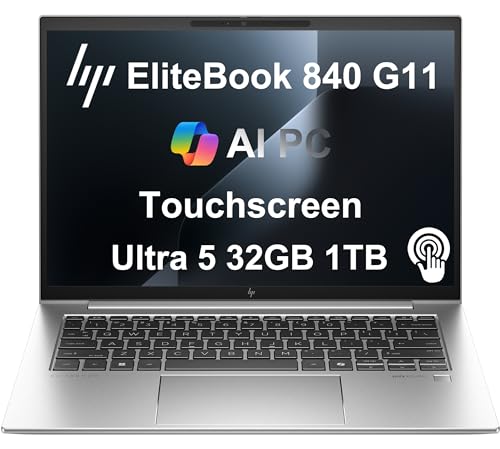
The EliteBook 840 G11 is built to HP's commercial standards, including MIL-STD-810H durability testing for resistance to drops, dust, temperature extremes, and humidity. Intel Core Ultra processors and vPro platform support make it suitable for IT-managed enterprise environments. The 14-inch sure view display option includes privacy filter technology that narrows the viewing angle to prevent visual shoulder surfing. HP's Wolf Security features are integrated at the hardware and firmware level. The keyboard is rated for spill resistance. Battery life reaches up to 14 hours. This is the right choice for business buyers who need a reliable, IT-compatible laptop with long-term support. [Find on Amazon](https://www.amazon.com/s?k=HP+EliteBook+840+G11+business+laptop&tag=thetestedhub-20)
Strengths
- PREMIUM BUSINESS PERFORMANCE
- POWERFUL PERFORMANCE
- CRISP DISPLAY & PRIVACY
- VERSATILE CONNECTIVITY
- OPERATING SYSTEM

HP Chromebook 14 -- Best Budget Option for Light Use
The HP Chromebook 14 runs ChromeOS and is aimed at users whose work consists primarily of web applications, email, Google Workspace tools, and video calls. The low hardware requirements of ChromeOS mean that even modest Intel or MediaTek processors deliver smooth performance for these tasks. The 14-inch display provides enough screen space for productivity without making the laptop bulky. Weight is under 1.5kg on most configurations. Battery life typically reaches 12 hours or more. The starting price is among the lowest in the HP lineup. It is not appropriate for Windows software or offline-heavy workflows, but for cloud-first users it delivers reliable, fast performance at minimal cost. [Find on Amazon](https://www.amazon.com/s?k=HP+Chromebook+14+laptop+2026&tag=thetestedhub-20)
Strengths
- Meet the HP 14" Chromebook Plus, your perfect everyday companion. Weighing just 3.2 pounds
- Equipped with the Intel 8-Core i3-N305 processor and Intel UHD Graphics, the laptop handle
- The 14-inch FHD IPS display offers a brilliant viewing experience with anti-glare technolo
- Equipped with 2x USB-C 3.2 Gen 1, USB-A 3.2 Gen 1, and a headphone/microphone combo jack,
- Auto Update Expiration (AUE) Date: Jun 2033. It provides access to a wide array of apps th
Buying considerations
What to consider
Match the HP product line to your workload. For professional users who need durability and business security features, the EliteBook series is the correct starting point. For creative and personal use with quality displays and premium build, Spectre is the right tier. The Envy line represents the best value for most users who want quality without flagship pricing. Budget buyers who primarily use web apps should consider the Pavilion or Chromebook depending on whether they need Windows software compatibility. Verify the processor tier and RAM configuration carefully -- base configurations often use lower-tier CPUs, and upgrading to a mid-tier processor within the same line significantly improves real-world performance.
What to consider
For more laptop comparisons, see [best laptops ](/articles/best-laptops-under-1000) and [best budget laptops for students](/articles/best-budget-laptops-for-students). How we evaluate products is detailed on our [methodology](/methodology) page.
Questions answered
HP uses these lines to segment performance and price. Pavilion sits at the entry level -- capable for everyday tasks, with budget-friendly components and standard build materials. Envy occupies the mid-range with better displays, more premium build quality, and stronger performance. Spectre is HP's flagship tier with the best build quality, thin-and-light chassis materials, and premium specifications. For most users, Envy represents the best combination of quality and value.
Yes, several HP models work well for students. The HP Chromebook 14 covers basic coursework at low cost. The HP Pavilion 15 handles Office apps, web browsing, and video calls without issue. Students who need more processing power for engineering or design coursework should consider the HP Envy x360, which balances performance with portability at a reasonable price. Battery life varies by model, so check that specification against your daily usage pattern.
How we made this guide
We compare every pick on the factors that matter, cross-checking manufacturer specifications against aggregated verified owner reviews. We rank independently and never take payment for placement. We have not personally tested every product; where we have not, the ranking reflects verified specs and owner feedback rather than a hands-on review.
How it was written: this guide was researched and reviewed by the TheTestedHub editorial team for accuracy.
Affiliate disclosure: TheTestedHub is reader-supported. When you buy through links on our site, we may earn a commission at no extra cost to you.
Keep reading

Your Docking Station Match: CalDigit TS4 and More

Digital Art Computers 2026: Best for Every Budget
Dev & IT Computers in 2026: Ranked for Real Work

Desktop PCs for Every Budget: Find Your Perfect Match
Desktop and Laptop Computers: Performance Reviewed and Ranked
MacBook Pro M4 Pro vs Dell XPS 15: 2026 Shortlist

Buy the Best DIY Computer in 2026: Corsair One i300
