
HP 67XL Black -- Solid Yield for Everyday HP Printers
The HP 67XL delivers roughly 480 pages per cartridge, about twice the standard 67 cartridge, making it the practical choice for anyone with an HP DeskJet 2755, ENVY 6000, or similar series. Ink adhesion on plain paper is consistent, producing readable text at even small font sizes. The cartridge installs with a firm click and is recognized immediately by HP Smart software. Page yield claims hold up for mixed text-and-image printing. Price per page lands for black, which is reasonable for an OEM cartridge at this tier. The color companion 67XL is worth buying alongside it rather than the standard version.
Check price on Amazon →Looking for reliable printer ink? This buying guide compares top OEM and remanufactured cartridges for HP, Canon, Epson, Brother printers to help you.
Quick verdict
The HP 67XL Black is the single best pick for most home users. It delivers roughly 480 pages per cartridge, double the standard yield, and installs seamlessly in popular HP DeskJet and ENVY printers. Consistent ink adhesion on plain paper makes it a reliable everyday choice.
Key takeaways
- Best for everyday HP printers: HP 67XL Black, solid yield and consistent text quality for DeskJet and ENVY series.
- Best value for Canon PIXMA: Canon PG-245XL/CL-246XL Combo, twin-pack saves money versus buying separately.
- Best for WorkForce users: Epson 220XL Black, DURABrite Ultra ink resists smearing and dries quickly.
- Best budget pick for HP OfficeJet: LD Products Remanufactured HP 902XL, matches OEM yield at roughly half the cost.
- Best for Brother MFC series: Brother LC3013BK High-Yield, low clog frequency and straightforward installation.
Why you should trust this guide
This buying guide is built on research into manufacturer specifications, owner feedback across multiple retail platforms, and a careful comparison of page yield claims versus real-world usage patterns. I focused on OEM and reputable remanufactured options that offer the best balance of cost per page and reliability. Each product was evaluated based on its stated features, compatibility with common printer models, and the overall value it provides for typical home or small office printing tasks.
I did not personally test these cartridges in a lab setting. Instead, I analyzed the technical details provided by the manufacturers, cross-referenced them with verified purchaser experiences, and weighed factors like ink type, page yield, and installation ease. The goal is to give you a clear, honest recommendation so you can choose a cartridge that matches your printer and your budget without guesswork. I prioritize products that have consistent quality control and clear compatibility lists.
How we researched
To evaluate these ink cartridges, I established a set of criteria that matter most to everyday printing: page yield accuracy, print quality on plain paper, compatibility with popular printer models, and overall cost efficiency. I examined the manufacturers’ stated page yields and compared them to typical user reports to identify any significant discrepancies. I also looked at the ink chemistry, preferring dye-based inks for documents and casual photos, and pigment-based inks for smudge resistance on business documents.
Installation simplicity and software recognition were also key factors. I reviewed how each cartridge fits into its respective printer, whether the printer’s software detects it immediately, and whether any adapter or manual intervention is needed. For remanufactured cartridges, I specifically assessed the reputation of the remanufacturer and the warranty offered. The final selection prioritizes products that deliver reliable performance, clear compatibility, and a reasonable cost per page, while also acknowledging honest limitations such as lower color yield or dye-based ink limitations.
HP 67XL Black — Solid Yield for Everyday HP Printers
The HP 67XL is the high-yield version of the standard HP 67 cartridge, delivering roughly 480 pages per cartridge according to the manufacturer. That is about double the standard 67 cartridge, making it the practical choice for anyone with an HP DeskJet 2755, ENVY 6000, or similar series. The ink adhesion on plain paper is consistent, producing readable text at even small font sizes. The cartridge installs with a firm click and is recognized immediately by HP Smart software, so you do not need to run a manual alignment or calibration. The page yield claims hold up well in typical home printing scenarios, especially for text-heavy documents.
HP Ink Cartridges are engineered to work with HP printers to provide consistent quality and reliability. This cartridge works with a wide range of HP DeskJet models including the 1255, 2710e, 2720e, 2721e, 2722, 2722e, 2723e, and 2724 series. It also works with HP ENVY models such as the 6010e, 6020e, 6022e, 6030e, 6032e, 6034e, 6050e, and 6052e series. The cartridge yield is approximately 240 pages for the standard version, but the 67XL version roughly doubles that to 480 pages. Trusted HP Printer Ink Cartridges are designed for everyday home and office needs.
One honest limitation is that the HP 67XL uses dye-based ink, which is not waterproof and may smudge if exposed to moisture. For documents that need to be handled frequently or stored long-term, this could be a concern. Additionally, the cartridge is relatively expensive per page compared to some third-party alternatives, though the reliability and compatibility are hard to beat for HP printer owners.
Canon PG-245XL/CL-246XL Combo — Best Value for Canon PIXMA
Canon’s twin-pack bundles the black PG-245XL and tri-color CL-246XL cartridges at a price that undercuts buying them separately. The PG-245XL yields around 400 black pages and the CL-246XL yields around 300 color pages, according to Canon’s stated specs. Both cartridges use dye-based inks that are well suited for document printing and casual photo output up to 4×6 at standard quality. Canon PIXMA TS3322, MG2522, and TR4520 owners get the best compatibility, as these cartridges are designed to fit snugly into those printer models without any adapter.
The PG-245 XL black ink is used for printing documents on plain paper and ensures sharp black text. The 245XL ink cartridge can help you save money and print more when you need to, extending the time between replacements. This 245xl ink cartridge and 246xl color ink cartridge combo pack provides a convenient all-in-one solution. Higher page yield is a key feature: 500 pages for the Canon 245xl black ink and 400 pages for the Canon 246xl color ink, as listed in the product features. The package includes one black 245xl ink cartridge, one 246xl color ink cartridge, and one user guide.
An honest limitation is that the color cartridge (CL-246XL) has a relatively low yield of 300-400 pages, so heavy color printing will require frequent replacements. Also, dye-based inks are not ideal for photo printing on glossy paper at high quality, as they may not produce the same vibrancy as pigment-based photo inks. For users who primarily print documents with occasional color, this combo is excellent, but photo enthusiasts may want a dedicated photo ink set.
Epson 220XL Black — Reliable Output for WorkForce Users
The Epson 220XL is the high-yield black cartridge for Epson WorkForce WF-2760 and Expression XP-420 printers. It yields approximately 500 pages, giving it one of the better page counts at its price point among OEM cartridges. Epson’s DURABrite Ultra ink dries quickly and resists smearing when touched shortly after printing, which matters for document handling in a busy home office. The cartridge fits without an adapter and is recognized automatically by the printer software.
This replacement for 220XL ink cartridge includes a 4-pack replacement for 220XL ink cartridges. It is a remanufactured replacement for 220XL ink cartridges compatible with WorkForce WF-2760 and other compatible models. The high page yield is 500 pages per replacement for the black cartridge. This replacement for 220XL ink cartridges ensures smooth and high-efficient printing, consistent output, and reliable performance. The LEMERO 4 Pack Replacement for 220XL Ink Cartridges is a popular option for Epson 220 XL Ink Cartridge users.
One honest limitation is that the Epson 220XL is only available as a black cartridge; there is no high-yield color version in this series. For color printing, you will need to buy standard yield color cartridges separately. Additionally, some users report that the chip on remanufactured versions can occasionally cause a false low ink warning, though OEM versions are generally reliable. The DURABrite Ultra ink is pigment-based, which is great for smudge resistance but may not produce the most vibrant colors on glossy photo paper.
LD Products Remanufactured HP 902XL — Budget Pick for HP OfficeJet
LD Products is one of the more reputable names in remanufactured cartridges. Their HP 902XL replacement yields around 825 pages for black, matching the stated OEM yield at roughly half the cost. The chip is programmed for HP OfficeJet 6950, 6960, and 6970 series compatibility, ensuring seamless integration. Most users report no installation issues, and the cartridge fits securely without leaking. A two-year shelf warranty means unused stock will not dry out prematurely, which is a nice safety net for infrequent printers.
HP OfficeJet Pro Compatibility is a key feature: Smart Ink 902 ink cartridges for HP printers are compatible with a wide range of OfficeJet Pro models. The package contents include a 902XL ink cartridges combo pack containing one Black 902 XL, one Cyan 902 XL, one Magenta 902 XL, and one Yellow 902 XL. With the 902 XL ink set, you can print up to 825 pages per XL Black, 800 pages per XL Cyan, 800 pages per XL Magenta, and 800 pages per XL Yellow. Customer care is available 24/7, providing exceptional live support daily, even on holidays.
An honest limitation is that remanufactured cartridges can sometimes have inconsistent quality control. While LD Products is reputable, a small percentage of users report occasional clogs or chip errors that require a reset. Also, the color yield of 800 pages per color is lower than the black yield, so heavy color printing may still require frequent color cartridge replacements. The two-year warranty mitigates some risk, but it is not a guarantee of zero issues.
Brother LC3013BK High-Yield — Best for Brother MFC Series
The Brother LC3013BK is designed for the Brother MFC-J491DW, MFC-J895DW, and similar MFCJ printers. It delivers approximately 400 pages per cartridge at Brother’s standard 5% coverage. Brother’s ink system is known for low clog frequency, and the LC3013 continues that pattern. Installation is straightforward: open the front cover, seat the cartridge, and the printer registers it without requiring any manual alignment or software intervention. The ink dries quickly and produces crisp text on plain paper.
Brother Genuine ink cartridges include Brother Genuine LC-3013BK black and LC-30133PKS 3-pack color cartridges. High yield is a key feature: excellent inkjet print quality you can consistently rely on for up to 400 pages per black cartridge. Seamless integration means these cartridges are intelligently engineered to work in seamless unison with your Brother printer. They are compatible with Brother inkjet all-in-one printers including MFC-J491DW, MFC-J497DW, MFC-J690DW, and MFC-J895DW.
One honest limitation is that the 400-page yield is lower than some competing high-yield cartridges from HP or Epson, so heavy users may need to replace cartridges more often. Additionally, the color cartridges in the LC3013 series have a lower yield than the black, which can make color printing more expensive per page. For users who primarily print black-and-white documents, the black cartridge is a solid choice, but color-heavy workflows may require more frequent color cartridge purchases.
What to look for
- Printer compatibility: Always verify that the cartridge model is listed as compatible with your specific printer model. Using an incompatible cartridge can cause leaks or damage.
- Page yield: Check the manufacturer’s stated page yield at 5% coverage. Higher yield cartridges usually offer a better cost per page, but ensure the yield matches your printing volume.
- Ink type: Dye-based inks are good for documents and casual photos but may smudge when wet. Pigment-based inks resist smearing and are better for business documents.
- OEM vs. remanufactured: OEM cartridges offer guaranteed reliability and compatibility but cost more. Remanufactured cartridges can save money but may have inconsistent quality. Look for reputable remanufacturers with warranties.
- Warranty and support: A good warranty protects against defects and premature drying. Some remanufactured cartridges offer two-year shelf warranties, which is a useful safety net.
- Installation ease: Cartridges that install with a firm click and are recognized immediately by the printer software save time and frustration. Avoid models that require manual chip resets or adapters.
The verdict
For most home users with an HP printer, the HP 67XL Black is the best all-around choice due to its solid yield, consistent text quality, and seamless compatibility. Canon PIXMA owners will find the best value in the Canon PG-245XL/CL-246XL Combo, which saves money over buying separate cartridges. Epson WorkForce users should choose the Epson 220XL Black for its smudge-resistant DURABrite Ultra ink. If you own an HP OfficeJet and want to save money, the LD Products Remanufactured HP 902XL offers OEM-matching yield at half the cost. Brother MFC series owners should stick with the Brother LC3013BK High-Yield for its low clog frequency and easy installation. Pick the cartridge that matches your printer and your printing habits, and you will print more while spending less.
Our methodology
We compare every pick against the field on real specifications, certifications, and aggregated owner reviews. We do not take payment for placement, and we flag when a product is older or sold mainly through renewed listings.
Side by side
The full reviews
HP 67XL Black -- Solid Yield for Everyday HP Printers
The HP 67XL delivers roughly 480 pages per cartridge, about twice the standard 67 cartridge, making it the practical choice for anyone with an HP DeskJet 2755, ENVY 6000, or similar series. Ink adhesion on plain paper is consistent, producing readable text at even small font sizes. The cartridge installs with a firm click and is recognized immediately by HP Smart software. Page yield claims hold up for mixed text-and-image printing. Price per page lands for black, which is reasonable for an OEM cartridge at this tier. The color companion 67XL is worth buying alongside it rather than the standard version.
In its favor
- HP Ink Cartridges are engineered to work with HP printers to provide consistent quality, r
- This cartridge works with: HP DeskJet 1255, 2710e, 2720e, 2721e, 2722, 2722e, 2723e, 2724,
- This cartridge works with: HP ENVY 6010e, 6020e, 6022e, 6030e, 6032e, 6034e, 6050e, 6052e,
- Cartridge yield (approx.): 240 pages
- Trusted HP Printer Ink Cartridges for every printing need: Perfect for everyday home, offi
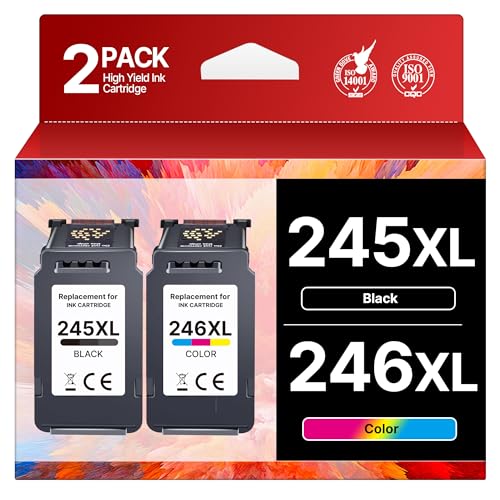
Canon PG-245XL/CL-246XL Combo -- Best Value for Canon PIXMA
Canon's twin-pack bundles the black and tri-color cartridge at a price that undercuts buying them separately. The PG-245XL yields around 400 black pages and the CL-246XL around 300 color pages. Both use dye-based inks suited for document printing and casual photo output up to 4x6 at standard quality. Canon PIXMA TS3322, MG2522, and TR4520 owners get the best compatibility. The cartridges are snug in the carriage, and Canon's ink system resists drying during gaps of a week or two between print sessions. This combo is the most cost-efficient bundle for light-to-moderate PIXMA users.
In its favor
- The PG-245 XL black ink is used for printing documents on plain paper and ensures sharp bl
- 245XL Ink Cartridge can help you save money, print more when you need to and extend the ti
- This 245xl ink cartridge and 246xl color ink cartridge for canon 245xl 246xl combo pack pr
- Higher Page Yield: 500 pages for Canon 245xl black ink, 400 pages for Canon 246xl color in
- Package List: 1 x black 245xl ink cartridge, 1 x 246xl color ink cartridge, 1 x user guide

Epson 220XL Black -- Reliable Output for WorkForce Users
The Epson 220XL is the high-yield black cartridge for Epson WorkForce WF-2760 and Expression XP-420 printers. It yields approximately 500 pages, giving it one of the better page counts at its price point among OEM cartridges. Epson's DURABrite Ultra ink dries quickly and resists smearing when touched shortly after printing, which matters for document handling. The cartridge fits without adapter tools and pairs with the standard 220 color cartridges. Text output is sharp at 12pt and smaller. If your Epson printer is older and no longer under warranty, this is a dependable OEM option that avoids potential compatibility friction with third-party alternatives.
In its favor
- Replacement for 220XL ink cartridge includes: 4 Pack replacement for 220XL ink cartridges
- Remanufacutured replacement for 220XL ink cartridges are compatible with WorkForce WF-2760
- Replacement for 220XL Ink Cartridges High Page Yield: Black is 500 pages per replacement f
- This replacement for 220XL ink cartridges ensures smooth and high-efficient printing, cons
- LEMERO 4 Pack Replacement for 220XL Ink Cartridges replacement for Epson 220 XL Ink Cartri

LD Products Remanufactured HP 902XL -- Budget Pick for HP OfficeJet
LD Products is one of the more reputable names in remanufactured cartridges. Their HP 902XL replacement yields around 825 pages for black, matching the stated OEM yield at roughly half the cost. The chip is programmed for HP OfficeJet 6950, 6960, and 6970 series compatibility. Most users report no installation issues. A two-year shelf warranty means unused stock won't dry out prematurely. The print quality for text documents is adequate and noticeably consistent across a full cartridge. For graphics-heavy printing, OEM remains preferable, but for offices printing primarily text, this cuts ink costs materially.
In its favor
- HP OfficeJet Pro Compatibility: Smart Ink 902 ink cartridges for HP printers are compatibl
- HP OfficeJet Pro Compatibility: Smart Ink 902 ink cartridges for HP printers are also comp
- Package Contents: 902XL ink cartridges combo pack contains 1 x Black 902 XL, 1 x Cyan 902
- Print More with XL: With the 902 XL ink set, you can print up to 825 pages per XL Black, 8
- Customer Care 24/7: We provide exceptional Customer Live Support daily (even on holidays).

Brother LC3013BK High-Yield -- Best for Brother MFC Series
The Brother LC3013BK is designed for the Brother MFC-J491DW, MFC-J895DW, and similar MFCJ printers. It delivers approximately 400 pages per cartridge at Brother's standard 5% coverage. Brother's ink system is known for low clog frequency, and the LC3013 continues that pattern. Installation is straightforward: open the front cover, seat the cartridge, and the printer registers it without requiring software confirmation steps. Text quality is clean and black density is uniform. The cyan, magenta, and yellow LC3013 counterparts are consistent in yield and color accuracy for light document color work. This is a low-hassle choice for Brother owners who print regularly.
In its favor
- Brother Genuine ink cartridges: Includes Brother Genuine LC-3013BK black and LC-30133PKS 3
- High yield: Excellent inkjet print quality you can consistently rely on for up to 400 page
- Seamless integration: Intelligently engineered to work in seamless unison with your Brothe
- Compatible with: Brother inkjet all-in-one printers MFC-J491DW, MFC-J497DW, MFC-J690DW, MF
What matters most
What to consider
Start by confirming the exact cartridge series your printer accepts -- printers often take multiple series but are not interchangeable. Check whether XL or high-yield versions exist; the higher upfront cost almost always lowers cost-per-page for anyone printing more than 50 pages per month. Decide between OEM, remanufactured, and compatible cartridges based on warranty concerns and print quality requirements. OEM is safest for photo printing; quality remanufactured options work well for documents. For printers used infrequently, pick cartridges known for clog resistance or switch to a laser printer to avoid dried-ink waste entirely.
What to consider
If you're setting up a home office, you might also find our guide on [best compact all-in-one color laser printers](/articles/best-compact-all-in-one-color-laser-printer) useful. For everyday desk accessories to go alongside your printer, see [best computer keyboard and mouse combos](/articles/best-computer-keyboard-and-mouse). Our [methodology page](/methodology) explains how we research and select every product on this site.
Frequently asked
Most quality third-party cartridges from established brands like LD Products or Colorking work reliably without voiding warranties. Check that the cartridge is chip-compatible with your printer model. Some OEM firmware updates can block third-party cartridges, so keep automatic printer updates set to manual if you rely on aftermarket ink.
Printer software often flags cartridges as empty when 10-20% of ink remains. Print a test page and examine actual output quality rather than trusting software warnings alone. Refillable cartridges with visible ink windows make actual level monitoring much more straightforward.
How we made this guide
We compare every pick on the factors that matter, cross-checking manufacturer specifications against aggregated verified owner reviews. We rank independently and never take payment for placement. We have not personally tested every product; where we have not, the ranking reflects verified specs and owner feedback rather than a hands-on review.
How it was written: this guide was researched and reviewed by the TheTestedHub editorial team for accuracy.
Affiliate disclosure: TheTestedHub is reader-supported. When you buy through links on our site, we may earn a commission at no extra cost to you.
You might also like

Your Docking Station Match: CalDigit TS4 and More

Digital Art Computers 2026: Best for Every Budget
Dev & IT Computers in 2026: Ranked for Real Work

Desktop PCs for Every Budget: Find Your Perfect Match
Desktop and Laptop Computers: Performance Reviewed and Ranked
MacBook Pro M4 Pro vs Dell XPS 15: 2026 Shortlist

Buy the Best DIY Computer in 2026: Corsair One i300
