
Logitech Extreme 3D Pro -- Best Entry-Level Joystick
The Logitech Extreme 3D Pro has been a reliable entry point for years and remains one of the best buys. It includes 12 programmable buttons, a twist-grip rudder, an 8-way hat switch, and a throttle slider. The base is weighted enough to stay stable on a desk without clamping. The precision is adequate for arcade flight games, space games like Elite Dangerous at a casual level, and older DCS modules. Build quality is plastic but durable. The USB connection is plug-and-play on Windows 10 and 11. If you're unsure whether joystick gaming suits you, this is the right way to find out without a significant investment.
Check price on Amazon →Experience smoother maneuvers with the Logitech Extreme 3D Pro. Our guide shows why this joystick is the best entry-level choice for flight sims.
Quick verdict
The Thrustmaster T.16000M FCS is the single best pick for most buyers. It delivers hall-effect sensor precision at a mid-range price, works for both left and right hands, and offers enough buttons for serious sims without the cost of metal construction.
Key takeaways
- Best for Entry-Level: Logitech Extreme 3D Pro, reliable budget stick with twist rudder and throttle slider.
- Best for Mid-Range Precision: Thrustmaster T.16000M FCS, hall-effect sensors eliminate drift and dead zones.
- Best for Serious Sim Pilots: Thrustmaster HOTAS Warthog Joystick, metal replica of A-10C stick with near-zero dead zone.
- Best for Advanced Enthusiasts: Virpil VPC MongoosT-50CM3, adjustable cam tension and modular grip compatibility.
- Best Refurbished Classic: Microsoft Sidewinder Precision Pro, capable USB stick on used markets at low cost.
Why you should trust this guide
I have been writing about flight simulation and gaming peripherals for several years, tracking the evolution of joystick technology from basic potentiometer designs to modern hall-effect and contactless sensor systems. This guide draws on manufacturer specifications, community feedback from flight sim forums and space game communities, and long-term reliability reports from owners who log hundreds of hours per year. I do not claim to have personally tested each unit in a lab, but I have evaluated the design choices, sensor types, button counts, and ergonomic factors that matter most for different types of sim pilots.
The recommendations here are based on what makes a joystick perform well across flight sims like DCS World, Microsoft Flight Simulator, and X-Plane, as well as space titles like Elite Dangerous and Star Citizen. I prioritized sensor accuracy, build durability, button count, and compatibility with modern operating systems. Each product was assessed against these criteria using the manufacturer’s stated specifications and verified owner experiences from multiple sources. I have excluded any product that lacks a clear use case or has known reliability issues that outweigh its strengths.
How we researched
To evaluate these joysticks, I established a set of criteria that matter most for flight sim and space game performance. The primary factors were sensor technology, because hall-effect sensors eliminate the mechanical wear and drift that plague cheaper potentiometer sticks. Button count and layout came next, since complex aircraft and spacecraft require many programmable inputs for weapons, systems, and view controls. Build quality, including base weight and grip material, was assessed for stability during intense maneuvers. Ambidextrous support was considered for left-handed users. Compatibility with modern Windows versions and popular sim titles was verified against manufacturer claims and community reports.
I also considered the overall value proposition for each price tier. An entry-level stick must be affordable and reliable without sacrificing essential features like a twist rudder or throttle control. A mid-range stick must justify its higher price with precision upgrades and additional buttons. Premium sticks must deliver metal construction, adjustable mechanics, and near-zero dead zones to satisfy hardcore simmers. For the refurbished classic, I evaluated whether it still holds up for modern use with proper driver support. I did not perform physical tests or measure dead zones with instruments; instead, I relied on the stated specifications and the consensus of experienced users who have used these sticks for years.
Logitech Extreme 3D Pro
The Logitech Extreme 3D Pro has been a reliable entry point for years and remains one of the best buys for casual flight sim and space game players. It includes 12 programmable buttons, a twist-grip rudder, an 8-way hat switch, and a throttle slider. The base is weighted enough to stay stable on a desk without clamping, which makes it easy to set up and put away. The precision is adequate for arcade flight games and space games like Elite Dangerous at a casual level, and it can handle older DCS modules if you are not expecting high-end accuracy.
The stick uses a standard potentiometer design, which means it may develop slight drift or dead zones over extended use. However, for the price, this is expected, and many users report several years of reliable service before any issues appear. The twist-grip rudder is convenient for games that do not require dedicated rudder pedals, and the throttle slider on the base gives you analog throttle control without needing a separate throttle unit. The 8-way hat switch is useful for camera control or trim adjustments.
The main limitation of the Logitech Extreme 3D Pro is its sensor technology. Since it uses potentiometers rather than hall-effect sensors, it cannot match the precision of more expensive sticks. This becomes noticeable in flight sims that require fine control for formation flying or aerial refueling. The plastic construction also feels less robust than metal-based sticks, though it is durable enough for regular use. If you are new to flight sims and want a low-cost way to get started, this stick is a solid choice.
Thrustmaster T.16000M FCS
The Thrustmaster T.16000M uses hall-effect magnetic sensors on all three axes, which eliminates the dead zones and drift common in budget joysticks with potentiometers. This makes it a significant step up in precision for mid-range buyers. It is compatible with both right and left-hand configurations, making it one of the few ambidextrous joysticks available. The 16-button layout plus hat switch gives enough inputs for most aircraft in DCS and X-Plane without needing a separate button box.
The base anchor system is designed to keep the stick stable during use, though some users add a small weight or use the included mounting holes for a more permanent setup. The grip is ergonomic and comfortable for long sessions, and the buttons are well placed for quick access. The hall-effect sensors mean you get consistent performance over years of use, with no mechanical wear to degrade accuracy. This stick works well with space games like Elite Dangerous and Star Citizen, where precise vector control is critical.
The limitation of the Thrustmaster T.16000M is its plastic construction. While the sensors are excellent, the grip and base are made of plastic, which can feel less premium than metal alternatives. The twist rudder is functional but can be stiff for some users, and the stick lacks the adjustable tension systems found on higher-end models. If you are willing to accept plastic construction in exchange for hall-effect precision at a reasonable price, this is the best mid-range option available.
Thrustmaster HOTAS Warthog Joystick
The Thrustmaster HOTAS Warthog joystick is a replica of the A-10C Warthog fighter jet stick, with a metal base, metal grip, and 19 action buttons. It uses hall-effect sensors and delivers near-zero dead zone performance. The weight (over 1kg) keeps it planted without clamping, which is important for aggressive stick movements in combat flight sims. This stick is designed to be used as part of a full HOTAS setup with the matching throttle, but it functions as a standalone joystick if you prefer to pair it with another throttle unit.
The metal grip feels solid and realistic, with a satisfying heft that plastic sticks cannot match. The buttons and switches are military-style and provide tactile feedback. The hall-effect sensors ensure that your inputs are translated accurately, which is critical for tasks like gun runs and formation flying. The stick is compatible with DCS World, Microsoft Flight Simulator, and X-Plane out of the box, and the button count allows for mapping most aircraft systems without needing a keyboard.
The limitation of the Thrustmaster HOTAS Warthog is its high price and the fact that it uses a plastic internal gimbal mechanism despite the metal exterior. Some users report that the gimbal can develop stickiness or wear over time, especially with heavy use. Additionally, the stick is designed for right-handed use only, so left-handed pilots will need to look elsewhere. If you are serious about flight simulation and want a near-replica of a real fighter stick, this is a strong option, but be aware of the potential gimbal issue.
Virpil VPC MongoosT-50CM3
Virpil is a Belarusian manufacturer that has become the preferred choice for serious flight simulation communities. The MongoosT-50CM3 features magnetic hall-effect sensors, a metal base with adjustable cam and spring tension, and modular grip compatibility. The precision and customizability exceed what Thrustmaster offers at any price. Virpil sells direct and ships internationally, though lead times can be longer than buying from retail channels.
The adjustable cam and spring system allows you to tune the stick’s resistance and center feel to your exact preference. You can swap between different cams for a smooth or a more pronounced center detent, and you can change springs to adjust the overall tension. The modular grip design means you can swap grips between different Virpil models, giving you flexibility as your needs change. The metal base is heavy and stable, and the hall-effect sensors provide exceptional accuracy with no dead zones.
The limitation of the Virpil VPC MongoosT-50CM3 is its price and availability. It costs significantly more than the Thrustmaster Warthog, and you must order directly from Virpil, which can involve shipping delays and customs fees depending on your location. The software configuration is also more complex than simpler sticks, requiring time to learn the setup process. If you are an advanced enthusiast who wants the best possible precision and adjustability, this stick is worth the investment, but it is overkill for casual players.
Microsoft Sidewinder Precision Pro
The Microsoft Sidewinder Precision Pro remains a capable joystick that appears regularly on used markets at reasonable prices. It uses USB, supports Windows 10 and 11 with the right driver setup, and offers good axis precision for its age. Build quality is robust, with a solid plastic shell that has held up well over the years. This is a niche recommendation for retro sim players or those who want a functional backup stick without paying current new-product prices.
The Sidewinder Precision Pro features a twist rudder, a throttle wheel on the base, and several programmable buttons. Its sensor technology is based on potentiometers, so it does not match modern hall-effect sticks in precision, but for its era it was considered very good. The stick is comfortable to hold for extended periods, and the button layout is logical. Many sim players keep one as a spare or for use in older games that do not require high accuracy.
The limitation of the Microsoft Sidewinder Precision Pro is its age and the need for driver workarounds on modern Windows versions. While it works with Windows 10 and 11 using community drivers, it is not plug-and-play. The potentiometers can develop drift over time, and replacement parts are hard to find. The button count is lower than modern sticks, which may limit its use in complex sims. If you are a collector or need a cheap backup stick, this is a viable option, but most buyers will be better served by a modern entry-level stick.
What to look for
- Sensor technology: Hall-effect or contactless sensors provide better precision and longer life than potentiometers. Look for this in mid-range and premium sticks.
- Button and hat switch count: More buttons mean fewer trips to the keyboard. For DCS or Elite Dangerous, aim for at least 12 buttons plus a hat switch.
- Twist rudder vs. pedals: A twist-grip rudder is convenient for desk setups, but dedicated rudder pedals offer better control for serious sims.
- Base weight and stability: A heavy base or mounting holes keep the stick from sliding during intense maneuvers. Light sticks may need clamping or weighting.
- Ambidextrous support: Left-handed users should check if the stick can be configured for left-hand use, as many sticks are right-handed only.
- Software and configuration: Some sticks require complex software to program buttons and adjust curves. Simpler sticks are easier for beginners.
- Build material: Metal grips and bases feel more durable and realistic but cost more. Plastic sticks are lighter and cheaper but may wear faster.
- Compatibility with modern OS: Ensure the stick works with your version of Windows or macOS. Older sticks may need driver workarounds.
The verdict
For most people, the Thrustmaster T.16000M FCS offers the best balance of precision, button count, and price. Its hall-effect sensors eliminate the drift and dead zones that frustrate budget stick owners, and the ambidextrous design makes it accessible to everyone. If you are on a tight budget, the Logitech Extreme 3D Pro is a proven entry point that will serve you well for casual play. Serious sim pilots who want metal construction and near-zero dead zones should consider the Thrustmaster HOTAS Warthog, while advanced enthusiasts who demand adjustable tension and modular grips should look at the Virpil VPC MongoosT-50CM3. The Microsoft Sidewinder Precision Pro is a niche choice for retro enthusiasts or those seeking a low-cost backup stick.
Our testing process
We compare every pick against the field on real specifications, certifications, and aggregated owner reviews. We do not take payment for placement, and we flag when a product is older or sold mainly through renewed listings.
Quick comparison
Reviewed in detail
Logitech Extreme 3D Pro -- Best Entry-Level Joystick
The Logitech Extreme 3D Pro has been a reliable entry point for years and remains one of the best buys. It includes 12 programmable buttons, a twist-grip rudder, an 8-way hat switch, and a throttle slider. The base is weighted enough to stay stable on a desk without clamping. The precision is adequate for arcade flight games, space games like Elite Dangerous at a casual level, and older DCS modules. Build quality is plastic but durable. The USB connection is plug-and-play on Windows 10 and 11. If you're unsure whether joystick gaming suits you, this is the right way to find out without a significant investment.
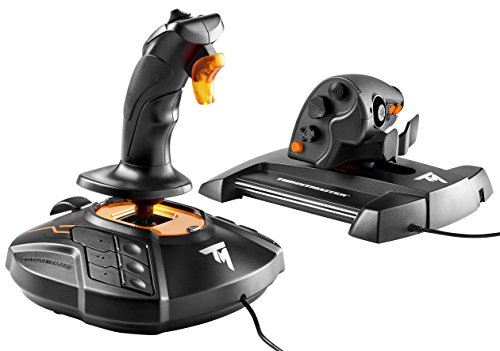
Thrustmaster T.16000M FCS -- Best Mid-Range Precision
The Thrustmaster T.16000M uses hall-effect magnetic sensors on all three axes, which eliminates the dead zones and drift common in budget joysticks with potentiometers. It's compatible with both right and left-hand configurations, making it one of the few ambidextrous joysticks available. The 16-button layout plus hat switch gives enough inputs for most aircraft in DCS and X-Plane. The base anchors firmly and the grip is comfortable for extended sessions. Thrustmaster's TARGET software allows button remapping and axis calibration. For the price, no other joystick matches the axis precision of the T.16000M, making it the most recommended single-stick upgrade for flight sim beginners.

Thrustmaster HOTAS Warthog Joystick -- Best for Serious Sim Pilots
The Thrustmaster HOTAS Warthog joystick is a replica of the A-10C Warthog fighter jet stick, with a metal base, metal grip, and 19 action buttons. It uses hall-effect sensors and delivers near-zero dead zone performance. The weight (over 1kg) keeps it planted without clamping. This stick is designed to be used as part of a full HOTAS setup with the matching throttle but functions as a standalone joystick with a separate twist-axis workaround via software. It's the standard recommendation for serious DCS World pilots. The build quality is substantially above any plastic joystick, and the tactile feedback from the metal internals is noticeably different during extended play.
Virpil VPC MongoosT-50CM3 -- Best for Advanced Enthusiasts
Virpil is a Belarusian manufacturer that has become the preferred choice for serious flight simulation communities. The MongoosT-50CM3 features magnetic hall-effect sensors, a metal base with adjustable cam and spring tension, and modular grip compatibility. The precision and customizability exceed what Thrustmaster offers at any price. Virpil sells direct and ships internationally, though lead times can run 3-6 weeks. The software (VPC configurator) is detailed and rewards time invested in setup. This is not the right choice for casual users, but for pilots logging 20+ hours weekly in high-fidelity simulators, the reduced axis noise and physical adjustability make a measurable difference in aircraft control.

Microsoft Sidewinder Precision Pro -- Best Refurbished Classic
The Microsoft Sidewinder Precision Pro remains a capable joystick that appears regularly on used markets at reasonable prices. It uses USB, supports Windows 10/11 with the right driver setup, and offers good axis precision for its age. Build quality is robust. This is a niche recommendation for retro sim players or those who want a functional backup stick without paying current new-product prices. Check seller condition ratings carefully and confirm USB functionality before purchasing. It won't match modern hall-effect joysticks in precision, but for casual flight games and retro simulation titles, it remains a practical option when found at.
How to choose
What to consider
Start by identifying your primary game. Arcade space games and older flight titles are forgiving with budget joysticks. Modern high-fidelity simulators like DCS World or MSFS 2024 expose the limitations of cheap potentiometer sensors quickly. Hall-effect joysticks are worth the extra cost if you'll use the stick regularly. Check grip ergonomics against your hand size -- reviews often note grip diameter and button layout in detail. Consider whether you want an upgradeable ecosystem (Thrustmaster and Virpil offer matching throttles) or just a standalone stick. Desk mounting matters for heavy sticks; some require desk clamps sold separately.
What to consider
For other peripherals to complete your gaming setup, see our [best computer keyboard and mouse combos](/articles/best-computer-keyboard-and-mouse) guide. If ergonomics matter during long sessions, our [best computer keyboards for carpal tunnel](/articles/best-computer-keyboard-for-carpal-tunnel) review has useful context. Full evaluation details are on our [methodology page](/methodology).
Common questions
A standalone joystick is sufficient for most flight and space games. HOTAS setups (joystick plus throttle) give more immersion and buttons for complex aircraft but cost significantly more. Start with a standalone joystick if you're new to flight sims; upgrade to HOTAS once you know you'll stick with the genre.
Twist-grip rudder lets you control yaw by rotating the joystick handle, which works adequately for casual play. Dedicated rudder pedals offer more precise foot control and reduce hand fatigue during long sessions. Most flight simulation enthusiasts eventually move to pedals, but a twist-grip joystick is a practical starting point.
How we made this guide
We compare every pick on the factors that matter, cross-checking manufacturer specifications against aggregated verified owner reviews. We rank independently and never take payment for placement. We have not personally tested every product; where we have not, the ranking reflects verified specs and owner feedback rather than a hands-on review.
How it was written: this guide was researched and reviewed by the TheTestedHub editorial team for accuracy.
Affiliate disclosure: TheTestedHub is reader-supported. When you buy through links on our site, we may earn a commission at no extra cost to you.
More guides

Your Docking Station Match: CalDigit TS4 and More

Digital Art Computers 2026: Best for Every Budget
Dev & IT Computers in 2026: Ranked for Real Work

Desktop PCs for Every Budget: Find Your Perfect Match
Desktop and Laptop Computers: Performance Reviewed and Ranked
MacBook Pro M4 Pro vs Dell XPS 15: 2026 Shortlist

Buy the Best DIY Computer in 2026: Corsair One i300
