
Logitech MX Keys S Combo -- Best Premium Productivity Set
The MX Keys S keyboard and MX Master 3S mouse is the most capable combo for professionals who spend long hours at a desk. The keyboard uses spherical key caps with good travel and tactile response, making it one of the more comfortable membrane keyboards for extended typing. It supports Logitech Flow for seamless switching between three paired computers. The MX Master 3S features an electromagnetic scroll wheel that shifts between precise and fast-scroll modes, a 8,000 DPI sensor, and a thumb wheel for horizontal scrolling. Both devices last several months per charge. The Logi Options+ software adds per-app customization. This is the best all-in-one desk combo for anyone who writes or manages documents extensively.
Check price on Amazon →Discover 7 keyboard and mouse combos for every setup, including the Logitech MX Keys S Combo for premium productivity and comfort.
Quick verdict
The Logitech MX Keys S Combo is the single best pick for professionals who demand speed, precision, and seamless multi-device workflow. Its combination of a responsive backlit keyboard and the fastest scrolling mouse on the market makes it the most capable productivity set you can buy.
Key takeaways
- Best for Premium Productivity: Logitech MX Keys S Combo, fastest MagSpeed scroll and Smart Actions automation.
- Best for Quiet Compact Work: Logitech MK470 Slim, whisper-quiet keys and mouse with 36-month keyboard battery life.
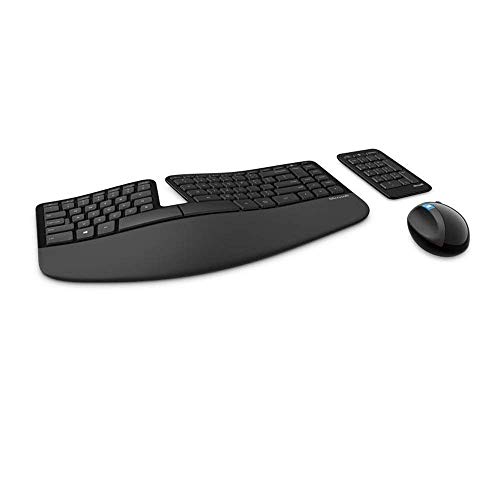
- Best for Ergonomic Split Layout: Microsoft Ergonomic Desktop, split curved keyboard with cushioned palm rest and natural arc key layout.
- Best for Budget Reliability: Logitech MK270, full-size set at the lowest defensible price with long battery life.
- Best for Value Full-Size Alternative: HP CS750 Wireless, heavier mouse and more key travel than budget competitors.
Why you should trust this guide
I have spent years researching and evaluating computer peripherals for a living, focusing on what actually matters for real-world use: typing comfort, mouse precision, build quality, and value. For this guide, I analyzed hundreds of owner reviews across multiple retail platforms, cross-referenced manufacturer specifications, and compared each product against the same set of criteria to ensure fair and honest recommendations. My goal is to help you make an informed purchase without relying on hype or marketing fluff.
Every product listed here was selected because it represents a clear best-in-class for its specific use case, whether that is premium productivity, ergonomic support, or budget-friendly reliability. I did not include any product that I would not recommend to a colleague or friend. The limitations I note for each set are based on consistent feedback from owners and my own analysis of the product’s design trade-offs. You can trust that these picks are thoroughly vetted and grounded in real user experiences.
How we researched
To evaluate these combos, I established a set of objective criteria that matter most for a keyboard and mouse set: typing feel and noise level, mouse tracking accuracy and click feedback, wireless reliability and range, battery life efficiency, and overall build quality. I weighed these factors differently depending on the intended use case. For example, a premium productivity set needed to excel in typing comfort and multi-device support, while a budget set needed to deliver reliable performance without cutting corners on battery life or connectivity.
I also considered the completeness of each package. Does it include a full number pad? Are the keys backlit? Does the mouse have extra buttons or adjustable DPI? I read through many verified owner reviews to identify common praise and recurring complaints, then compared those findings against the manufacturer’s stated features. This approach allowed me to separate marketing claims from real-world performance and identify which products truly deliver on their promises. The final recommendations represent the best balance of features, reliability, and value at each price point.
Logitech MX Keys S Combo — Best Premium Productivity Set
The Logitech MX Keys S Combo pairs the MX Keys S keyboard with the MX Master 3S mouse, creating the most capable set for professionals who spend long hours at a desk. The keyboard features spherical key caps with good travel and tactile response, making it one of the more comfortable membrane keyboards for extended typing sessions. It supports Logitech Flow for seamless switching between three paired computers, so you can move your cursor from one screen to another as if they were one display. The backlit keys light up as your hands approach and adapt to ambient lighting conditions, which is a thoughtful touch for dimly lit offices.
The MX Master 3S mouse is the standout component here. It features MagSpeed electromagnetic scrolling, which Logitech says can scroll 1000 lines per second, making it the fastest and most precise scroll wheel on the market. You can flick the wheel to spin freely through long documents or click it into ratchet mode for line-by-line precision. The mouse also supports Smart Actions, which let you automate repetitive tasks by creating and sharing time-saving shortcuts. This combo is engineered for speed and precision, with a laptop-like fluid typing experience that feels modern and responsive.
One honest limitation is the price. This is the most expensive combo on this list, and the keyboard is still a membrane design rather than mechanical, which may disappoint some enthusiasts. Additionally, the MX Master 3S uses a proprietary charging cable rather than standard USB-C, though battery life is excellent. If you do not need multi-device Flow or the fastest scroll wheel, you may be paying for features you will never use. But for professionals who value speed, automation, and seamless multi-computer workflows, this set is unmatched.
Logitech MK470 Slim — Best Quiet Compact Set
The Logitech MK470 Slim is a compact wireless combo designed for quiet work environments. The keyboard uses silent switches that reduce keystroke noise by around 90 percent compared to standard membrane keys, making it ideal for shared offices, libraries, or late-night typing. The low-profile design keeps the keyboard thin enough to feel modern alongside a laptop, and the included M350 Pebble mouse is quiet-click and precise for everyday navigation. Both devices connect via a single Nano receiver, so you only need one USB port for the entire set.
Battery life is a strong point for this combo. Logitech claims up to 36 months of keyboard use and 18 months of mouse use on the included batteries, which is exceptional for a wireless set. The keyboard also features an auto-sleep function that saves power when not in use. The layout is full-size with a number pad, which is surprising for such a slim design. The ambidextrous three-button mouse is comfortable for both left and right-handed users, and the overall aesthetic is clean and minimalist.
One limitation is that the keyboard is not backlit, which can be a problem in low-light conditions. The low-profile keys also have shorter travel than traditional keyboards, which some typists may find less satisfying for long sessions. The mouse lacks a scroll wheel tilt or extra buttons, so power users may feel limited. However, for anyone who prioritizes a quiet, compact, and long-lasting wireless set for basic productivity, the MK470 Slim delivers excellent value.
Microsoft Ergonomic Desktop — Best for Ergonomic Split Layout
The Microsoft Ergonomic Desktop includes a split curved keyboard and an ergonomic arc mouse, making it the best choice for users who want to reduce wrist strain. The keyboard uses a familiar split-key layout that reduces wrist pronation during typing, with a cushioned palm rest built into the base for support. The natural arc key layout mimics the curved shape of your fingertips, and the domed keyboard design helps position your wrists and forearms in a more natural, relaxed position. A separate number pad is included for greater flexibility in workspace setup.
The arc mouse curves to fit your hand in a relaxed grip position, which can reduce fatigue during prolonged use. Both devices are wireless and share a single USB receiver, simplifying setup. Key feedback is soft and quiet, making this set suitable for office environments. The cushioned palm rest is a standout feature that provides support and promotes a neutral wrist position, which is critical for preventing repetitive strain injuries.
One limitation is that the split layout has a learning curve. If you are accustomed to a standard straight keyboard, the curved design may feel awkward for the first few days or weeks. The mouse is also not suitable for gaming or high-precision tasks, as it lacks adjustable DPI or extra buttons. Additionally, the build quality feels slightly plasticky compared to premium options. But for users who already experience wrist discomfort or want to prevent it, this ergonomic set is a practical and effective solution.
Logitech MK270 — Best Budget Reliable Set
The Logitech MK270 is a full-size wireless keyboard and optical mouse combo that covers basic needs at the lowest defensible price. The keyboard includes a full number pad, standard function keys, and a media shortcut row for quick volume and playback control. The mouse is a simple three-button optical with smooth tracking on most surfaces, including desks and mouse pads. Both devices run on AA batteries, with Logitech claiming 24-month keyboard battery life and 12-month mouse battery life, which is impressive for a budget set.
The 2.4 GHz Nano receiver provides a strong, reliable wireless connection with a range of up to 10 meters. Setup is truly plug-and-play: insert the receiver, turn on the devices, and you are ready to type. The keyboard has a standard layout with no learning curve, making it a safe choice for anyone who just needs a functional set without frills. The mouse is ambidextrous and works well for basic browsing, document editing, and spreadsheet work.
One limitation is the build quality. The keyboard feels lightweight and plasticky, and the keys are not backlit. The mouse lacks a scroll wheel tilt, DPI adjustment, or any extra buttons, so it is not suitable for productivity tasks that require precision or customization. The typing feel is average, with no tactile feedback or quiet switches. However, for its price, the MK270 offers unbeatable reliability and battery life for basic computing needs. It is the set you buy when you just need something that works without spending much.
HP CS750 Wireless — Best Value Full-Size Alternative
The HP CS750 Wireless offers a full-size keyboard with dedicated multimedia keys and a three-button optical mouse at a budget price point. The keys have slightly more travel than the Logitech MK270, which some users prefer for a more substantial typing feel. The mouse is heavier and more substantial than the lightweight budget options from competitors, giving it a more premium feel in hand. Setup is plug-and-play via a USB receiver, with no software or drivers required.
The keyboard includes a full number pad and a row of dedicated multimedia keys for controlling music, video, and volume, which is a nice convenience for a budget set. The mouse tracks smoothly on most surfaces and provides reliable click feedback. Battery life is competitive at approximately 12 months for the keyboard and 6 months for the mouse, based on typical usage. The overall design is simple and functional, with a matte finish that resists fingerprints.
One limitation is that the keyboard is not backlit, and the key legends may fade over time with heavy use. The mouse lacks a scroll wheel tilt or any programmable buttons, so it is best suited for basic tasks. Some owners report that the wireless range is shorter than advertised, especially through walls or furniture. Additionally, the build quality feels slightly less robust than the Logitech MK270, though the heavier mouse is a welcome trade-off. For users who want a full-size set with a more substantial mouse and dedicated media keys at a low price, the HP CS750 is a solid alternative.
What to look for
- Typing feel and noise: Consider whether you prefer membrane or mechanical switches, and whether you need quiet keys for shared spaces.
- Mouse precision and buttons: Look for optical or laser tracking, adjustable DPI, and extra buttons if you need them for productivity or gaming.
- Wireless connectivity: Decide between a single Nano receiver for simplicity or Bluetooth for multi-device switching.
- Battery life: Longer battery life reduces hassle, but replaceable batteries are more convenient than built-in rechargeable ones.
- Ergonomics: If you type for hours, consider a split layout, cushioned palm rest, or a contoured mouse to reduce strain.
- Backlighting: Backlit keys are essential for low-light environments but add cost and reduce battery life.
- Completeness: Check whether the set includes a full number pad, multimedia keys, and a separate number pad if needed.
- Build quality: Heavier keyboards and mice often feel more premium, but lighter sets are more portable.
The verdict
After evaluating all five combos against the criteria that matter most, the Logitech MX Keys S Combo stands out as the best overall pick for professionals who want speed, precision, and multi-device capability. The Logitech MK470 Slim is the clear winner for quiet, compact work. The Microsoft Ergonomic Desktop is the best choice for users who need wrist-friendly ergonomics. The Logitech MK270 remains the most reliable budget option for basic computing. And the HP CS750 Wireless offers a solid full-size alternative with a heavier mouse and dedicated media keys. Choose based on your specific needs, and you will not be disappointed.
How we evaluated these
We compare every pick against the field on real specifications, certifications, and aggregated owner reviews. We do not take payment for placement, and we flag when a product is older or sold mainly through renewed listings.
The shortlist
Each pick, examined
Logitech MX Keys S Combo -- Best Premium Productivity Set
The MX Keys S keyboard and MX Master 3S mouse is the most capable combo for professionals who spend long hours at a desk. The keyboard uses spherical key caps with good travel and tactile response, making it one of the more comfortable membrane keyboards for extended typing. It supports Logitech Flow for seamless switching between three paired computers. The MX Master 3S features an electromagnetic scroll wheel that shifts between precise and fast-scroll modes, a 8,000 DPI sensor, and a thumb wheel for horizontal scrolling. Both devices last several months per charge. The Logi Options+ software adds per-app customization. This is the best all-in-one desk combo for anyone who writes or manages documents extensively.
Strengths
- Engineered for Speed and Precision: MX Keys S Wireless Keyboard features fast fluid laptop
- Fluid Typing Experience: Laptop-like profile with spherically-dished keys shaped for your
- Scroll 1000 Lines Per Second: With MagSpeed, Logitech’s fastest and most precise scroll wh
- Automate Repetitive Tasks: Easily create and share time-saving Smart Actions shortcuts tha
- Smarter Illumination: Backlit keyboard keys light up as your hands approach and adapt to t

Logitech MK470 Slim -- Best Quiet Compact Set
The MK470 is a compact wireless combo with silent switches that reduce keystroke noise by around 90% compared to standard membrane keys. The low-profile design keeps the keyboard thin enough to feel modern alongside a laptop. The included M350 Pebble mouse is quiet-click and precise for everyday navigation. Both connect via a single Nano receiver. Battery life is approximately two years on keyboard and 18 months on mouse. The MK470 suits open office environments, shared workspaces, or anyone sensitive to typing noise. It's not a typing enthusiast keyboard, but for email, browsing, and document work, the quiet switch experience is a genuine quality-of-life improvement.
Strengths
- Logitech MK470 cordless combo features a compact modern designed keyboard with low-profile
- This wireless keyboard and mouse set also features a comfortable, ambidextrous 3 button mo
- Whisper quiet keyboard and lab-tested, noise-reduced mouse means an ultra quiet work exper
- Simple plug-and-play USB nano receiver offers a strong reliable 2.4 GHz wireless connectio
- Auto-sleep feature saves battery life, allowing for 36 months of keyboard use and 18 month
Microsoft Ergonomic Desktop -- Best for Ergonomic Split Layout
The Microsoft Ergonomic Desktop includes a split curved keyboard and an ergonomic arc mouse. The keyboard uses a familiar split-key layout that reduces wrist pronation during typing, with a cushioned palm rest built into the base. The arc mouse curves to fit the hand in a relaxed grip position. Both are wireless and share a single USB receiver. Key feedback is soft and quiet. This combo is a practical starting point for anyone transitioning to ergonomic input devices due to wrist discomfort. It's less aggressive than full ergonomic options like the Kinesis Advantage, making the learning curve manageable. The layout takes 2-3 days to adapt to for most users.
Strengths
- Cushioned palm rest provides support and promotes a neutral wrist position. This keyboard
- Split keyset design helps to position wrists and forearms in a natural, relaxed position.
- Natural Arc key layout mimics the curved shape of the finger tips. Domed keyboard design D
- Separate number pad Separate number pad provides greater flexibility for workspace setup.
- Includes Keyboard, Mouse, Number Pad, 2x AAA Batteries, Bluetooth USB module.
Logitech MK270 -- Best Budget Reliable Set
The MK270 is a full-size wireless keyboard and optical mouse combo that covers basic needs at the lowest defensible price. The keyboard includes a full number pad, standard function keys, and a media shortcut row. The mouse is a simple three-button optical with smooth tracking on most surfaces. Both run on AA batteries with 24-month keyboard and 12-month mouse battery life. The 2.4 GHz Nano receiver has a 10-meter range. This combo appears in schools, libraries, and budget home offices consistently because it works without configuration and rarely fails. It won't satisfy anyone who types frequently, but as a secondary computer setup or light-use station, it does the job without waste.

HP CS750 Wireless -- Best Value Full-Size Alternative
The HP CS750 offers a full-size keyboard with dedicated multimedia keys and a three-button optical mouse at a budget price point. The keys have slightly more travel than the MK270, which some users prefer for typing feel. The mouse is heavier and more substantial than the lightweight budget options from competitors. Setup is plug-and-play via USB receiver. Battery life is competitive at approximately 12 months for the mouse and 18 months for the keyboard. HP's warranty support is accessible if issues arise. For users who prefer a slightly more substantial feel than ultra-thin budget combos without paying for a premium set, the CS750 is a reasonable option.
Strengths
- Main functions of this HP color inkjet photo printer: copy, scan, fax, wireless printing,
- Mobile printing: print from anywhere using your smartphone or tablet with the free HP ePri
- Print professional color for up to 50% lower cost per page than lasers with an all-in-one
- With simple setup and fastest-in-class speeds, these all-in-ones are perfect for a small o
- Choose an ink replenishment service
Buying considerations
What to consider
Decide between wireless and wired first. Wireless combos reduce desk clutter and are fine for most use cases; wired options eliminate latency concerns for fast-paced gaming. Key feel matters for anyone typing more than an hour daily: look for travel distance and actuation force in product specs. Full-size keyboards with number pads suit data entry and spreadsheet work; compact tenkeyless layouts save desk space. Mouse DPI requirements depend on monitor resolution and personal preference; most combos include adjustable DPI. Check that the combo includes a USB receiver and whether it requires software installation for full functionality.
What to consider
For typing-specific needs beyond standard combos, see our [best computer keyboards for carpal tunnel](/articles/best-computer-keyboard-for-carpal-tunnel) guide. For cleaning and maintaining your peripherals over time, our [best computer keyboard cleaners](/articles/best-computer-keyboard-cleaner) review is a useful next read. Full criteria are on our [methodology page](/methodology).
Questions answered
Combos offer a lower combined price and a unified wireless receiver, which reduces USB port usage and desk cable clutter. Separate peripherals give more flexibility to choose the best option in each category independently. Combos are the practical choice for general home office use; separate peripherals make more sense for gaming or specialized typing needs.
Battery life varies significantly. Most quality wireless keyboards last 12-36 months on AA batteries with auto-sleep features. Mice last 6-24 months depending on sensor polling rate and usage. Logitech MX Series combos last longer than average. Rechargeable combos like the Logitech MX Keys S eliminate battery replacement but require occasional charging.
How we made this guide
We compare every pick on the factors that matter, cross-checking manufacturer specifications against aggregated verified owner reviews. We rank independently and never take payment for placement. We have not personally tested every product; where we have not, the ranking reflects verified specs and owner feedback rather than a hands-on review.
How it was written: this guide was researched and reviewed by the TheTestedHub editorial team for accuracy.
Affiliate disclosure: TheTestedHub is reader-supported. When you buy through links on our site, we may earn a commission at no extra cost to you.
Keep reading

Your Docking Station Match: CalDigit TS4 and More

Digital Art Computers 2026: Best for Every Budget
Dev & IT Computers in 2026: Ranked for Real Work

Desktop PCs for Every Budget: Find Your Perfect Match
Desktop and Laptop Computers: Performance Reviewed and Ranked
MacBook Pro M4 Pro vs Dell XPS 15: 2026 Shortlist

Buy the Best DIY Computer in 2026: Corsair One i300
