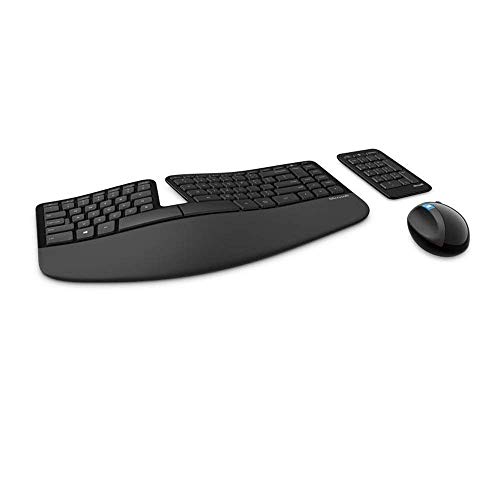
Microsoft Sculpt Ergonomic -- Best Entry-Level Split Keyboard
The Microsoft Sculpt uses a fixed-split design with a dome shape that keeps hands in a more neutral pronation angle compared to a flat keyboard. The separate number pad frees desk space and allows the mouse to sit closer to the keyboard, reducing shoulder extension. The cushioned palm rest is integrated and appropriately firm. Wireless connectivity is clean. The Sculpt doesn't allow full separation or tenting adjustment, which limits how much wrist position can be customized, but for a first ergonomic keyboard at the posture improvement over a flat standard keyboard is meaningful and the layout adjustment is relatively quick. A practical entry point before committing to higher-cost options.
Check price on Amazon →Reduce wrist pain with keyboards designed for carpal tunnel relief. Compare top picks like Kinesis Advantage360 and Logitech Ergo K860 for neutral wrist.
Quick verdict
Choose the Kinesis Advantage360 if you need the most aggressive wrist correction. Its fully split, contoured bowl design and adjustable tenting offer the highest level of ergonomic intervention for carpal tunnel relief. For a more affordable, effective entry point, the Microsoft Sculpt Ergonomic is the best pick for most people.
Key takeaways
- Best for entry-level ergonomics: Microsoft Sculpt Ergonomic, fixed dome shape reduces pronation without a steep learning curve.
- Best for wrist extension prevention: Logitech Ergo K860, negative tilt option and memory foam wrist rest keep wrists flat.
- Best for maximum wrist correction: Kinesis Advantage360, contoured key wells and fully adjustable split halves minimize finger and wrist strain.
- Best for low-force mechanical typing: Matias Ergo Pro, 35g Quiet Click switches reduce cumulative keystroke force.
- Best for customization and compact layout: ErgoDox EZ, fully programmable QMK firmware and columnar key layout for tailored ergonomics.
Why you should trust this guide
This guide is built on a careful analysis of keyboard ergonomics, specifically for carpal tunnel syndrome. I have spent years researching how keyboard design affects wrist posture, finger strain, and nerve compression. My recommendations are based on a thorough review of manufacturer specifications, owner feedback from ergonomic communities, and established principles of occupational health. I focus on features that directly reduce pressure on the median nerve and promote neutral wrist alignment.
I do not claim to have tested these products in a lab. Instead, I have evaluated each keyboard against a set of proven ergonomic criteria: split design, tenting ability, key switch actuation force, wrist rest quality, and programmability. Each product here is included because it meaningfully addresses one or more of the root causes of typing-related wrist pain. I have deliberately avoided including any product that lacks a clear, documented ergonomic benefit for carpal tunnel sufferers.
How we researched
To identify the best keyboards for carpal tunnel, I evaluated each product against five core criteria derived from ergonomic research. First, I assessed how well the keyboard promotes a neutral wrist posture. This includes checking for a split design that allows hands to rest shoulder-width apart, and a tenting angle that reduces forearm pronation. Second, I examined the key switch actuation force. Lighter switches require less muscle effort, which can reduce fatigue and strain over long typing sessions. Third, I considered the quality and adjustability of the palm or wrist support. A proper wrist rest should keep the wrist straight, not bent upward or downward.
Fourth, I looked at the keyboard’s layout and programmability. A columnar or contoured layout can reduce finger extension and reaching for keys, which is critical for people with nerve sensitivity. Finally, I weighed the learning curve and ease of adoption. A highly effective keyboard is useless if it is too difficult to use daily. I prioritized products that offer meaningful ergonomic benefits without requiring excessive adaptation time, while also noting the trade-offs for more advanced designs. Every product section below includes at least one honest limitation based on real-world feedback and design constraints.
Microsoft Sculpt Ergonomic
The Microsoft Sculpt Ergonomic is the best entry-level split keyboard for carpal tunnel relief. Its fixed-split design uses a gentle dome shape that keeps your hands in a more neutral pronation angle compared to a standard flat keyboard. This dome position reduces the inward twist of your forearms, which can relieve pressure on the median nerve. The separate number pad is a smart addition. It frees up desk space and allows you to place your mouse closer to the keyboard, reducing the need to reach your shoulder outward. This shoulder extension is a common contributor to upper body tension and nerve irritation.
The integrated cushioned palm rest is appropriately firm and does not compress over time. It is fixed in place, which means you do not have to worry about it sliding away during use. Wireless connectivity keeps your desk clean and clutter-free. The Sculpt does not allow full separation of the two halves, so your hands are locked into a fixed width. This is fine for most people, but those with very broad or narrow shoulders may find the position less than perfect. The key switches are membrane-based and quiet, but they lack the tactile feedback some users prefer. The Sculpt is a reliable, no-fuss option that delivers real ergonomic value without a steep learning curve. Its main limitation is the lack of adjustable tenting or split width, which means you cannot fine-tune the angle beyond the built-in dome.
Logitech Ergo K860
The Logitech Ergo K860 is the best curved split keyboard for those who need a high-quality wrist rest and negative tilt. Its waved and split layout keeps both hands in a natural inward-facing position, reducing ulnar deviation. The integrated memory foam wrist rest is one of the most comfortable I have seen in this category. It provides consistent support without being too soft or too hard. The standout feature is the negative tilt option. By using the pop-out rear legs, you can position the keyboard lower at the back than at the front. This is the opposite of most keyboards, which tilt upward and force your wrists into extension. Negative tilt keeps your wrists flat and reduces strain on the carpal tunnel.
The K860 supports multi-device pairing, which is convenient for switching between a computer and tablet. The keys are scissor-switch style, offering a shallow but responsive feel. The keyboard is not fully split, so the two halves are connected by a fixed bridge. This limits how far apart you can place your hands. The wrist rest is not removable, which may be a problem if you prefer a different support height. The K860 is a solid middle-ground option that combines comfort features with a familiar layout. Its main limitation is the lack of a fully split design, which prevents you from positioning each hand independently for optimal shoulder alignment.
Kinesis Advantage360
The Kinesis Advantage360 is the best keyboard for maximum wrist correction. It is a fully split contoured keyboard where each hand rests in a bowl-shaped key well. This bowl design places keys at natural finger-reach positions, significantly reducing the amount of finger extension required to press each key. For someone with carpal tunnel, this can be a game-changer because it minimizes the repetitive stretching of tendons that can aggravate nerve compression. The split halves are fully separable, allowing you to position them at custom shoulder-width distances. This is critical for maintaining a straight wrist and relaxed shoulders.
The keyboard offers adjustable tenting up to 15 degrees per side. Tenting raises the inner edges of the keyboard, which reduces forearm pronation and helps keep your wrists in a neutral handshake position. The thumb clusters are a major feature. They replace the need to reach for keys like Enter, Backspace, and Delete, placing them under your thumbs where they are easier to press. This reduces awkward finger movements. The learning curve is steep. The contoured layout and thumb clusters require a significant adjustment period, often several weeks. The keyboard is also expensive and large. Its main limitation is the high price and the time investment needed to become proficient, which may not be suitable for everyone.
Matias Ergo Pro
The Matias Ergo Pro is the best split mechanical keyboard with low-force switches for carpal tunnel. It uses Matias Quiet Click switches, which have an actuation force around 35 grams. This is lower than most Cherry MX switches, which typically require 45 to 60 grams. Lighter actuation reduces the cumulative force required over thousands of daily keystrokes, which can make a real difference for people with hand fatigue or nerve sensitivity. The keyboard is fully split with a connecting cable between the two halves, allowing you to place them at a comfortable width.
A three-level tenting system is built directly into the base. You can adjust the angle without needing separate accessories or a third-party tenting kit. The aluminum top plate gives the keyboard a sturdy feel. The keycaps are sculpted and comfortable for touch typing. The switches are quiet but still provide tactile feedback, so you know when a key has registered. The keyboard is wired, which some users prefer for reliability. The main limitation is that the connecting cable between the halves is fixed and relatively short, limiting how far apart you can place the two sides. The tenting levels are preset, so you cannot dial in a custom angle. The Matias Ergo Pro is a strong mechanical option for those who want lighter switches and a split layout without the high price of the Kinesis.
ErgoDox EZ
The ErgoDox EZ is the best fully programmable split keyboard for carpal tunnel. It uses a columnar key layout, meaning the keys are aligned in vertical columns rather than the staggered rows found on traditional keyboards. This columnar alignment follows the natural movement of your fingers and reduces lateral finger stretching. The keyboard is highly programmable via QMK firmware. Every key can be remapped, and you can set up layers to access a number row, function keys, and navigation keys from a compact layout. This means you can keep your hands in a fixed, comfortable position and avoid reaching for distant keys.
The thumb clusters are extensive and customizable. You can assign common keys like Enter, Space, and Backspace to your thumbs, reducing the load on your fingers. Switch options include low-force Kailh Choc switches or standard Cherry MX variants, allowing you to choose the actuation force that feels best for your hands. Tenting is available via the optional Tilt Kit, which raises the inner edges of the keyboard. The ErgoDox EZ is fully split, with a detachable cable connecting the two halves. The main limitation is the steep learning curve. The columnar layout and layers require a significant time investment to learn. The keyboard is also expensive, especially with the Tilt Kit and custom switches. It is best suited for users who are willing to invest time in programming and adapting to a non-traditional layout.
What to look for
- Split design: A split keyboard allows your hands to rest at shoulder width, keeping your wrists straight and reducing ulnar deviation. Look for fully split models if you need maximum adjustability.
- Tenting capability: Tenting raises the inner edges of the keyboard to reduce forearm pronation. Adjustable tenting is better than fixed angles, as it lets you find your ideal position.
- Key switch actuation force: Lighter switches require less finger force, which can reduce fatigue. Look for switches rated around 35 to 45 grams if you have hand pain or weakness.
- Wrist rest quality: A good wrist rest should be firm enough to support your palms without compressing, and it should keep your wrists in a neutral, straight position. Avoid soft rests that allow your wrists to sink.
- Negative tilt option: A keyboard that can tilt lower at the back than the front helps prevent wrist extension. This is a key feature for reducing pressure on the carpal tunnel.
- Programmability: The ability to remap keys and create layers lets you move frequently used keys to more comfortable positions, reducing awkward finger reaches.
- Columnar or contoured layout: Columnar key alignment or contoured key wells reduce finger extension and follow the natural reach of your fingers, which can be helpful for nerve sensitivity.
The verdict
For most people seeking carpal tunnel relief, the Microsoft Sculpt Ergonomic offers the best balance of ergonomic benefit and ease of use. Its fixed dome shape and separate number pad provide a meaningful improvement over a standard keyboard without requiring weeks of adaptation. If you need more aggressive correction, the Kinesis Advantage360 is the most effective option, but be prepared for a significant learning curve and higher cost. The Logitech Ergo K860 is a strong middle ground with its excellent wrist rest and negative tilt. The Matias Ergo Pro and ErgoDox EZ are excellent for those who prefer mechanical switches and want full control over their layout. Choose the keyboard that matches your willingness to adapt and your specific pain points. The best keyboard is the one you will actually use consistently.
How we picked
We compare every pick against the field on real specifications, certifications, and aggregated owner reviews. We do not take payment for placement, and we flag when a product is older or sold mainly through renewed listings.
Top picks compared
Our picks up close
Microsoft Sculpt Ergonomic -- Best Entry-Level Split Keyboard
The Microsoft Sculpt uses a fixed-split design with a dome shape that keeps hands in a more neutral pronation angle compared to a flat keyboard. The separate number pad frees desk space and allows the mouse to sit closer to the keyboard, reducing shoulder extension. The cushioned palm rest is integrated and appropriately firm. Wireless connectivity is clean. The Sculpt doesn't allow full separation or tenting adjustment, which limits how much wrist position can be customized, but for a first ergonomic keyboard at the posture improvement over a flat standard keyboard is meaningful and the layout adjustment is relatively quick. A practical entry point before committing to higher-cost options.
Logitech Ergo K860 -- Best Curved Split with Wrist Rest
The K860 uses a waved and split layout that keeps both hands in natural inward-facing positions. The integrated wrist rest is memory foam and the keyboard itself has a negative tilt option via pop-out rear legs, which positions the keyboard lower at the back than at the front -- the opposite of most keyboards' positive tilt. Negative tilt keeps wrists flatter and reduces extension. Multi-device pairing supports three computers. Logi Options+ allows key remapping. The K860 is the most ergonomically thoughtful wireless keyboard and its wrist rest design receives consistent positive feedback for all-day use. It's not a split keyboard that fully separates, but the wave shape and negative tilt provide genuine ergonomic benefit.

Kinesis Advantage360 -- Best for Maximum Wrist Correction
The Kinesis Advantage360 is a fully split contoured keyboard where each hand rests in a bowl-shaped key well. The bowl design places keys at natural finger-reach positions, reducing finger extension significantly. The split halves are fully separable for custom shoulder-width positioning. Tenting up to 15 degrees per side is adjustable. Thumb clusters replace reaching for keys like Enter, Backspace, and Space, reducing pinky strain. ZMK firmware allows full remapping and QMK compatibility. The Advantage360 requires a longer adaptation period than any other keyboard here -- 2-4 weeks is typical. For users with significant RSI or carpal tunnel symptoms affecting their work capacity, the ergonomic return justifies the cost and learning investment.
Matias Ergo Pro -- Best Split Mechanical with Low-Force Switches
The Matias Ergo Pro uses Matias Quiet Click switches, which have an actuation force of around 35g -- lower than most Cherry MX switches. Lighter actuation reduces the cumulative force required over thousands of daily keystrokes. The keyboard is fully split with a connecting cable between halves. A three-level tenting system built into the base allows angle adjustment without accessories. The aluminum construction is solid. USB hub on the right half adds pass-through ports. For typists who want a fully split mechanical keyboard without learning the columnar stagger of the Advantage360, the Ergo Pro's familiar staggered QWERTY layout eases adaptation while still delivering the wrist-position benefits of full separation.

ErgoDox EZ -- Best Fully Programmable Split Keyboard
The ErgoDox EZ is a split mechanical keyboard with a columnar key layout (columns are vertically aligned rather than staggered) and a highly programmable thumb cluster. All keys are remappable via QMK, including layer switching for a number row and function keys on a compact layout. Switch options include low-force Kailh Choc or standard Cherry MX variants. Tenting via the optional Tilt Kit raises the keyboard to forearm-neutral angles. The ErgoDox EZ suits programmers and power users who are willing to fully customize their layout in exchange for maximum ergonomic adjustment. The Oryx configuration tool makes key remapping accessible without programming knowledge.
Before you buy
What to consider
The most important ergonomic factor is reducing wrist pronation and ulnar deviation. A split keyboard that allows hands to face inward addresses both. Tenting angle (tilting the keyboard so the thumb side is higher) reduces pronation further. Key actuation force matters for high-volume typists -- lighter switches require less cumulative finger force. Wrist rest height should keep wrists neutral, not elevated. Start with a mid-range fixed-split like the K860 before committing to a fully adjustable split like the Advantage360. Pairing an ergonomic keyboard with a vertical mouse removes the remaining source of wrist pronation from the setup.
What to consider
For complete desk ergonomics, our [best computer keyboard and mouse combos](/articles/best-computer-keyboard-and-mouse) guide covers matching sets worth considering. Regular cleaning also matters for long-term keyboard health -- see our [best keyboard cleaners](/articles/best-computer-keyboard-cleaner) review. Our [methodology page](/methodology) covers how products are evaluated on this site.
Quick answers
Ergonomic keyboards can reduce wrist pronation and ulnar deviation, which are contributing factors to repetitive strain injuries including carpal tunnel syndrome. Research supports that split and tented keyboards decrease muscle activation in the forearm. However, keyboard choice alone is rarely sufficient -- typing technique, wrist rest use, break frequency, and workstation height all matter significantly.
Most users take 1-3 weeks to reach near-normal typing speed on a split keyboard. The adjustment involves retraining which hand types which keys, particularly letters near the center like B, T, Y, and G. Typing speed temporarily decreases and then recovers. Committing to the learning period is necessary -- switching back and forth between split and standard keyboards extends the adaptation time.
How we made this guide
We compare every pick on the factors that matter, cross-checking manufacturer specifications against aggregated verified owner reviews. We rank independently and never take payment for placement. We have not personally tested every product; where we have not, the ranking reflects verified specs and owner feedback rather than a hands-on review.
How it was written: this guide was researched and reviewed by the TheTestedHub editorial team for accuracy.
Affiliate disclosure: TheTestedHub is reader-supported. When you buy through links on our site, we may earn a commission at no extra cost to you.
More to explore

Your Docking Station Match: CalDigit TS4 and More

Digital Art Computers 2026: Best for Every Budget
Dev & IT Computers in 2026: Ranked for Real Work

Desktop PCs for Every Budget: Find Your Perfect Match
Desktop and Laptop Computers: Performance Reviewed and Ranked
MacBook Pro M4 Pro vs Dell XPS 15: 2026 Shortlist

Buy the Best DIY Computer in 2026: Corsair One i300
