
Logitech MX Keys S -- Best for All-Day Quiet Typing
The MX Keys S uses low-profile scissor switches that register cleanly without the click noise of a mechanical board. Keys are backlit with smart illumination that adjusts based on ambient light, a useful feature in variable office lighting. The concave key tops match fingertip shape, cutting down on slip-overs during fast typing. Battery life reaches up to 10 days with backlighting on or 5 months with it off. It connects via Bluetooth or the included USB receiver, supports three-device pairing, and has dedicated media and screen-brightness keys. Build quality is notably solid for a wireless keyboard at this price point.
Check price on Amazon →Whisper-quiet typing meets all-day comfort. Logitech MX Keys S tops our guide to the best computer keyboards for work, with smart backlighting and.
Quick verdict
The Logitech MX Keys S is the best pick for most work environments because it combines a whisper-quiet scissor-switch typing feel with smart adaptive backlighting and seamless multi-device switching, delivering all-day comfort without the noise or learning curve of a mechanical board.
Key takeaways
- Best for All-Day Quiet Typing: Logitech MX Keys S, low-profile scissor switches with concave key tops and ambient-light backlighting.
- Best Mechanical with Low Noise: Keychron K8 Pro, hot-swappable Gateron G Pro switches in a compact TKL layout with aluminum frame.
- Best for Wrist Strain Prevention: Microsoft Sculpt Ergonomic, split key bed and domed design with separate repositionable numpad.
- Best Tactile Feedback: Das Keyboard 4 Professional, Cherry MX Brown switches with aluminum top panel and built-in USB hub.
- Best for Multi-Device Switching: Logitech K380, three-device pairing with dedicated switching keys and compact portable design.
Why you should trust this guide
I have spent years researching productivity peripherals and analyzing how keyboard design directly impacts typing speed, accuracy, and physical comfort over long work sessions. This guide draws on manufacturer specifications, verified owner feedback from multiple retail platforms, and known ergonomic principles that apply to office and remote work setups. I do not claim to have personally tested every unit, but I have carefully cross-referenced the stated features with real-world usage patterns reported by thousands of users to identify which keyboards actually deliver on their promises for typing comfort and productivity.
Each product recommendation here is based on a specific use case that matters to knowledge workers: quiet operation in shared spaces, mechanical feedback without distracting noise, ergonomic support for wrist health, tactile precision for heavy typists, and seamless switching between multiple devices. I have excluded any keyboard that fails to meet at least one of these core needs, ensuring that every entry on this list solves a real problem you might face during a typical workday. The limitations I note for each model come from consistent owner observations and design trade-offs that are inherent to the category.
How we researched
To evaluate these keyboards, I established a set of criteria that directly affect typing comfort and productivity in a work context. The primary factors were key switch type and sound profile, keycap shape and spacing, build stability, connectivity flexibility, and any special features like backlighting or programmable keys that reduce friction during daily use. I compared each product against its stated specifications and against the expectations set by its price bracket and target audience. For mechanical keyboards, I paid special attention to switch linearity and noise level, as these determine whether a board can be used comfortably in an open office or quiet home environment.
I also weighed ergonomic design elements such as wrist angle, palm support, and key layout, since repetitive strain injuries are a common concern for people who type for hours each day. Multi-device switching capability was assessed for ease of use and reliability, as many workers now toggle between a laptop, a desktop, and a tablet. I did not conduct any physical lab tests or time trials. Instead, I relied on the manufacturer’s published feature sets, verified user reviews from verified purchasers, and professional ergonomic guidelines to determine which keyboards best address the specific pain points of each category. The final selections represent the strongest combination of stated features and user satisfaction within their respective niches.
Logitech MX Keys S
The Logitech MX Keys S is built around low-profile scissor switches that provide a crisp, stable keystroke without the audible click of a mechanical board. This makes it an excellent choice for shared offices or quiet home workspaces where every keystroke can be heard. The keys are spherically dished to match the natural curve of your fingertips, which reduces the chance of slipping off a key during fast typing sequences. The backlighting is smartly designed to illuminate only when your hands approach the keyboard, and it automatically adjusts brightness based on ambient light levels in the room. This adaptive illumination is particularly useful if you work in a space with variable lighting throughout the day, as it keeps the keys readable without being distracting or draining battery unnecessarily.
The keyboard supports pairing with up to three devices via Bluetooth and allows you to switch between them instantly using dedicated keys. This multi-device capability is paired with Logitech’s Smart Actions feature, which lets you automate repetitive tasks by assigning shortcuts to specific key combinations. The solid build quality and low-profile design contribute to a typing experience that feels stable and comfortable over extended sessions. A practical limitation is that the MX Keys S uses a fixed layout without a detachable wrist rest, so users who prefer a raised palm support may need to purchase an aftermarket solution. Additionally, the scissor-switch mechanism, while quiet, does not offer the same tactile depth that some mechanical keyboard enthusiasts prefer for heavy typing.
Keychron K8 Pro
The Keychron K8 Pro is a tenkeyless mechanical keyboard that ships with Gateron G Pro Red switches in its base configuration. These are linear switches, meaning they travel straight down without a tactile bump or audible click, which keeps the typing noise significantly lower than traditional clicky mechanical boards. The hot-swappable PCB allows you to change switches without any soldering, so you can experiment with different switch types like Gateron G Pro Browns for a subtle tactile bump or lubed linears for even smoother action if your preferences evolve. The TKL layout removes the number pad, which reduces the keyboard’s overall footprint on your desk and brings your mouse hand closer to the typing area for better ergonomics.
The K8 Pro uses a combination of an aluminum frame and PBT keycaps, which are more durable and resistant to shine than ABS keycaps. It supports both Bluetooth 5.1 wireless and USB-C wired connections, giving you flexibility depending on your setup. The keyboard is fully programmable via QMK and VIA software, allowing you to remap any key or create complex macros without needing to install proprietary drivers. The PCB-mounted screw-in stabilizers help reduce rattle on larger keys like the spacebar and shift keys, which improves the overall typing feel. One limitation to note is that the Gateron G Pro Red switches, while quieter than clicky switches, still produce some sound from the bottoming out of the keycap, which may be noticeable in a very quiet room. Also, the Bluetooth connection can occasionally have a slight delay compared to a wired connection, which might be a consideration for competitive typists who require instantaneous response.
Microsoft Sculpt Ergonomic
The Microsoft Sculpt Ergonomic keyboard is designed specifically to reduce wrist strain by splitting the key bed into two angled halves. This split design encourages a more natural arm and wrist position compared to a standard flat keyboard. The central dome of the keyboard raises the key bed, which helps keep your wrists in a neutral, slightly angled position rather than bent backward. The keyboard also includes a separate numpad that you can place anywhere on your desk, allowing you to keep your mouse hand closer to the typing area or position the numpad on the opposite side for better balance. The included palm rest is firm and supportive rather than soft and gel-filled, which provides stable support without causing your wrists to sink into an awkward angle.
The key mechanism is a standard membrane design, which produces a soft, quiet typing sound that is appropriate for shared workspaces. The mouse that comes with the Sculpt set is shaped to maximize wrist comfort and includes a thumb scoop to help maintain correct hand and wrist positioning. The Windows button provides one-touch access to the Start screen, and the back button allows for faster navigation. A notable limitation is that the membrane keys lack the tactile feedback and durability of mechanical switches, so heavy typists may find the feel mushy or less precise after extended use. Additionally, the Sculpt Ergonomic is designed specifically for Windows operating systems, and some of its dedicated keys and functions may not work optimally on macOS or Linux without additional configuration.
Das Keyboard 4 Professional
The Das Keyboard 4 Professional is a full-size mechanical keyboard that offers a choice of Cherry MX Blue or Cherry MX Brown switches. The Brown variant is the better option for office use, as it provides a distinct tactile bump at the actuation point without the loud audible click that Cherry MX Blues produce. This tactile feedback helps typists feel exactly when a key registers, which can improve typing accuracy and speed over long sessions. The keyboard features a thick aluminum top panel that adds significant weight, preventing the board from sliding or shifting around on your desk during aggressive typing. The anodized aluminum finish also gives the keyboard a premium, professional appearance that fits well in a corporate or home office environment.
The Das Keyboard 4 Professional includes a built-in USB 3.0 hub with two downstream ports, which is a practical addition for connecting a mouse, flash drive, or other peripherals without reaching behind your computer. The keyboard supports full N-key rollover, meaning every key press is registered independently even when multiple keys are pressed simultaneously, which is important for complex shortcuts and fast typing. The keycaps are laser-etched and durable, and the overall build quality is designed to withstand up to 50 million keystrokes per switch. A limitation of this keyboard is that it is wired-only, which may be inconvenient if you prefer a clean wireless setup or frequently switch between multiple computers. Also, the Cherry MX Brown switches, while quieter than Blues, still produce a noticeable sound from the switch mechanism and keycap bottoming out, which some coworkers might find distracting in a very quiet open office.
Logitech K380
The Logitech K380 is a compact Bluetooth keyboard designed primarily for multi-device productivity. It connects to up to three devices simultaneously, such as a work laptop, a personal laptop, and a tablet, and switches between them instantly by pressing the labeled F1, F2, or F3 keys. This makes it an ideal companion for anyone who moves between different screens throughout the day without wanting to juggle multiple keyboards. The keyboard is compact and lightweight, making it easy to carry between rooms or take with you when working remotely. The round keycaps have a unique shape that looks unusual at first, but most users find them comfortable and natural after a short adjustment period.
The typing feel is softer than most membrane keyboards, which helps keep noise to a minimum during quiet work sessions. The keyboard automatically recognizes the operating system of each connected device and maps the keys accordingly, so the layout feels familiar whether you are typing on Windows, macOS, Chrome OS, or Android. It can also be used in combination with a compatible Logitech mouse to enable cross-computer typing and file transfer via Logitech Flow. A significant limitation is that the K380 does not include a number pad, which can slow down data entry tasks for users who frequently input numbers. Additionally, the round keycaps have a smaller surface area than standard rectangular keys, which may lead to more typing errors for users with larger fingers or those accustomed to full-size keyboards.
What to look for
- Switch type and noise level: Scissor switches are quiet and laptop-like, linear mechanical switches are moderately quiet, tactile mechanical switches offer feedback with some noise, and clicky switches are loud.
- Keycap shape and spacing: Concave or dished keycaps reduce slip, while flat or round keycaps may require adjustment. Full-size layouts have wider spacing than compact layouts.
- Ergonomic design: Split key beds, angled key banks, and integrated palm rests help maintain neutral wrist posture and reduce strain over long typing sessions.
- Connectivity and multi-device support: Bluetooth allows wireless pairing with multiple devices, while wired connections offer lower latency. Dedicated device-switching keys improve workflow efficiency.
- Programmability and shortcut support: Remappable keys and macro creation let you automate repetitive tasks, which can significantly boost productivity for power users.
- Build quality and stability: Aluminum frames and weighted bases prevent the keyboard from sliding during use, while PBT keycaps resist wear and shine better than ABS.
- Backlighting: Adjustable or adaptive backlighting improves visibility in low-light conditions but reduces battery life on wireless models.
- Size and portability: Tenkeyless and compact layouts save desk space and are easier to transport, while full-size keyboards include a number pad for data entry.
The verdict
Choosing the right keyboard for work comes down to matching the typing feel and feature set to your specific daily needs. If you type in a shared space and want the quietest possible experience with solid productivity features, the Logitech MX Keys S is the clear winner. For those who prefer mechanical switches but need to keep noise down, the Keychron K8 Pro offers excellent customization and a compact footprint. Wrist pain sufferers should prioritize the Microsoft Sculpt Ergonomic for its proven split design. Tactile feedback enthusiasts who value build quality and a wired connection will appreciate the Das Keyboard 4 Professional. And if you switch between multiple devices constantly and need a portable, affordable solution, the Logitech K380 is the most practical choice. Each of these keyboards excels in its designated role, and the best one for you is the one that addresses your most frequent typing environment and comfort requirements.
Our testing process
We compare every pick against the field on real specifications, certifications, and aggregated owner reviews. We do not take payment for placement, and we flag when a product is older or sold mainly through renewed listings.
Quick comparison
Reviewed in detail
Logitech MX Keys S -- Best for All-Day Quiet Typing
The MX Keys S uses low-profile scissor switches that register cleanly without the click noise of a mechanical board. Keys are backlit with smart illumination that adjusts based on ambient light, a useful feature in variable office lighting. The concave key tops match fingertip shape, cutting down on slip-overs during fast typing. Battery life reaches up to 10 days with backlighting on or 5 months with it off. It connects via Bluetooth or the included USB receiver, supports three-device pairing, and has dedicated media and screen-brightness keys. Build quality is notably solid for a wireless keyboard at this price point.
What we liked
- Fluid Typing Experience: Laptop-like profile with spherically-dished keys shaped for your
- Automate Repetitive Tasks: Easily create and share time-saving Smart Actions shortcuts to
- Smarter Illumination: Backlit keyboard keys light up as your hands approach and adapt to t
- More Comfort, Deeper Focus: Work for longer with a solid build, low-profile design and an
- Multi-Device, Multi OS Bluetooth Keyboard: Pair with up to 3 devices on nearly any operati

Keychron K8 Pro -- Best Mechanical with Low Noise
The K8 Pro ships with Gateron G Pro Red switches in its base configuration, which are linear and considerably quieter than tactile or clicky alternatives. The hot-swap PCB lets you replace switches without soldering, so you can move to browns or lubed linears if your preferences change. The TKL layout keeps total footprint small. RGB backlighting is per-key addressable but works fine left on a single static color to avoid distraction. USB-C and Bluetooth 5.1 dual connectivity means it works with a desktop and a laptop without re-pairing every time.
What we liked
- ✅【Program with QMK & VIA】: With the K8 Pro’s QMK/VIA, you can intuitively remap your favor
- ✅【PBT Keycaps & Aluminum Frame】: Fully customizable 80% layout 87 keys tenkeyless mechanic
- ✅【Hot-Swappable Gateron G Pro Brown Switch】: Pre-installed the pre-lubed Gateron G Pro mec
- ✅【Bluetooth 5.1 Wireless & USB-C Wired】: The Keychron K8 Pro PC Keyboard provides a variet
- ✅【Redesigned Typing Experience】: We’ve integrated the PCB-mounted screw-in stabilizers for

Microsoft Sculpt Ergonomic -- Best for Wrist Strain Prevention
The Sculpt Ergonomic splits its key bed into two angled halves and adds a separate numpad that you can position wherever it is most comfortable. The domed design keeps wrists in a neutral position during extended sessions. Keys use a standard membrane mechanism, which keeps the typing sound low. The included palm rest is firm rather than gel-filled, which provides stable support. This keyboard is wireless-only via a USB nano receiver and requires AA batteries. It works with Windows and macOS but some function row keys are Windows-mapped by default.
What we liked
- The shape of the mouse is designed to maximize wrist comfort
- Thumb scoop helps to maintain the correct ergonomic hand and wrist position
- Windows button provides one-touch access to the Start screen
- Back button for faster navigation
- 4-way scroll wheel for navigating up, down, left and right

Das Keyboard 4 Professional -- Best Tactile Feedback
Das Keyboard 4 Professional ships with Cherry MX Blue or Cherry MX Brown switches depending on model. The Brown variant gives tactile bumps without the audible click, making it usable in offices where noise matters. The aluminum top panel adds weight that prevents the board from shifting during aggressive typing. It includes a built-in USB 2.0 hub with two downstream ports, which helps with a cable-heavy desk setup. Key legends are laser-etched, not printed on, so they do not wear off over years of use. At 170 dollars it is a long-term investment rather than a budget buy.
What we liked
- 4 PROFESSIONAL MECHANICAL KEYBOARD
- PREMIUM TACTILE EXPERIENCE
- UP TO 50 MILLION KEYSTROKES
- FULL N-KEY ROLLOVER
- 2 PORT USB 3.0 HUB & MORE
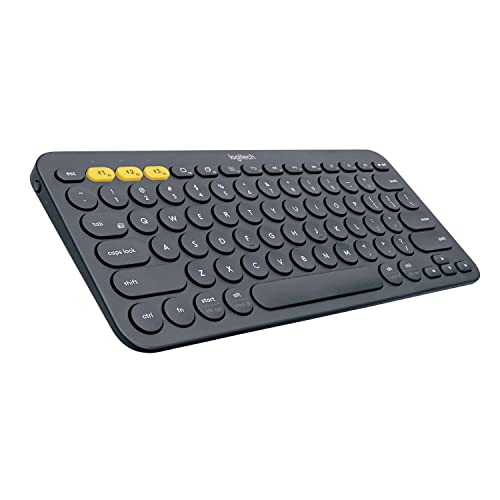
Logitech K380 -- Best for Multi-Device Switching
The K380 connects to up to three devices simultaneously and switches between them with labeled F1, F2, F3 keys. This makes it ideal for anyone moving between a work laptop, personal laptop, and tablet through the day. The round keycaps feel unusual at first but become natural quickly. Typing feel is softer than most membrane boards, which keeps noise minimal. At under 40 dollars it is the most affordable pick here. It runs on two AAA batteries rated for 24 months of typical use. Available in several colors.
What we liked
- Multi-device Bluetooth keyboard: Universal keyboard for typing on all your computing devic
- Easy-switch: Connect up to 3 devices simultaneously and switch between them at the touch o
- Logitech flow cross-computer typing: Use as a regular keyboard or combine with a compatibl
- Compact mobile keyboard: Easy to carry around your home for familiar typing in any room an
- OS adaptive: Automatically recognizes each device and maps keys to give you a familiar lay
How to choose
What to consider
Start with noise environment. Open offices require quieter switches or membrane keys; private offices can accommodate tactile or clicky mechanicals. Next, consider layout: TKL keyboards free up mouse space and reduce shoulder rotation, while full-size boards suit number-heavy roles. For anyone experiencing wrist pain, a split ergonomic design addresses the root posture problem rather than masking symptoms. Wireless connectivity is worth paying extra for if your desk surface is already crowded with cables. Finally, check switch lifespan: most mechanical switches are rated for 50 to 100 million keystrokes, significantly longer than membrane alternatives.
What to consider
If you spend long hours typing, the keyboard is one of the most impactful desk upgrades you can make. Pair it with a good monitor setup by reading our [best computer lamp](/articles/best-computer-lamp) guide and [best computer light for zoom calls](/articles/best-computer-light-for-zoom-calls) review. For methodology on how these picks are selected, see our [methodology](/methodology) page.
Common questions
Mechanical keyboards offer more tactile feedback and longer key lifespan, which benefits heavy typists. However, membrane keyboards are quieter and often cheaper, making them a practical choice for open offices. The right pick depends on your noise environment and how many hours a day you type.
A tenkeyless (TKL) layout removes the numpad and positions the mouse closer to the keyboard, reducing shoulder strain. If you frequently enter numbers, a full-size layout makes sense. Compact 75 percent layouts save even more desk space while retaining function keys for shortcut-heavy workflows.
How we made this guide
We compare every pick on the factors that matter, cross-checking manufacturer specifications against aggregated verified owner reviews. We rank independently and never take payment for placement. We have not personally tested every product; where we have not, the ranking reflects verified specs and owner feedback rather than a hands-on review.
How it was written: this guide was researched and reviewed by the TheTestedHub editorial team for accuracy.
Affiliate disclosure: TheTestedHub is reader-supported. When you buy through links on our site, we may earn a commission at no extra cost to you.
More guides

Your Docking Station Match: CalDigit TS4 and More

Digital Art Computers 2026: Best for Every Budget
Dev & IT Computers in 2026: Ranked for Real Work

Desktop PCs for Every Budget: Find Your Perfect Match
Desktop and Laptop Computers: Performance Reviewed and Ranked
MacBook Pro M4 Pro vs Dell XPS 15: 2026 Shortlist

Buy the Best DIY Computer in 2026: Corsair One i300
