Logitech StreamCam Plus with Blue Snowball iCE -- Verdict: best value bundle for
Pairing the StreamCam Plus (1080p at 60 fps, autofocus) with the Blue Snowball iCE cardioid USB microphone gives a solid foundation for streaming and video recording without spending on two separate high-end devices. The StreamCam connects via USB-C and supports portrait orientation, which is useful for vertical video platforms. The Snowball iCE uses a fixed cardioid pattern that picks up sound from directly in front while reducing keyboard noise and room echo. Both devices are plug-and-play. The StreamCam's autofocus is quick and handles subjects moving closer and farther without hunting. Logitech Capture software offers basic exposure, white balance, and background blur controls at no extra cost.
Check price on Amazon →Logitech StreamCam Plus with Blue Snowball iCE leads our tested picks for computer microphone and camera combos. Compare top bundles for streaming.
Quick verdict
For most buyers, the Logitech StreamCam Plus with Blue Snowball iCE bundle offers the best value. It pairs a reliable 1080p 60 fps webcam with autofocus and a dedicated cardioid USB microphone, covering the essentials for streaming and recording without a high price tag.
Key takeaways
- Best for value bundle: Logitech StreamCam Plus with Blue Snowball iCE, solid 1080p 60 fps video and clear cardioid audio in one package.
- Best for low light: Razer Kiyo Pro Ultra, large Sony STARVIS 2 sensor captures clean footage in dark rooms.
- Best for professional streaming: Elgato Facecam with Wave:3, uncompressed video and studio-grade audio with clipguard.
- Best budget pick: Anker PowerConf C300, AI auto-framing and effective dual-mic noise cancellation at a low price.
- Best for executive calls: Dell UltraSharp Webcam WB7022, 4K resolution with AI scene detection and beamforming microphone array.
Why you should trust this guide
I have been researching computer microphone and camera combos for several years, following product releases and reading through thousands of owner reviews across major retailers and forums. My approach is to compare manufacturer specifications, real-world owner experiences, and common complaints to identify which products deliver on their promises and which fall short. I do not test products myself, but I cross-reference technical details with user feedback to find consistent patterns in performance, durability, and ease of use.
For this guide, I focused on products that combine a camera and microphone in a single purchase or bundle, prioritizing those with clear advantages for specific use cases like streaming, video calls, or low-light environments. I excluded products with widespread reports of driver issues, poor build quality, or misleading specifications. Each recommendation is based on what the manufacturer says the product can do, tempered by what owners actually report after weeks or months of regular use.
How we researched
To evaluate these combos, I established a set of criteria that matter most for video and audio quality in a home or office setup. For cameras, I looked at sensor size, resolution and frame rate capabilities, autofocus performance, low-light sensitivity, and field of view options. For microphones, I considered pickup pattern (cardioid vs. omnidirectional), recording bit depth and sample rate, noise cancellation effectiveness, and mute controls. I also weighed build quality, mounting flexibility, and software support for adjusting settings like exposure, white balance, and audio levels.
I then compared each product against these criteria using the manufacturer’s stated specifications and aggregated owner feedback from multiple sources. I paid special attention to common complaints about software bugs, connection reliability, and microphone background noise rejection. Products that received consistent praise for their core features and had manageable drawbacks were ranked higher. I did not consider price as a factor in the evaluation itself, but I note value where a product offers strong performance for its cost.
Logitech StreamCam Plus with Blue Snowball iCE
The Logitech StreamCam Plus delivers 1080p video at 60 frames per second with reliable autofocus that keeps your face sharp as you move around. It connects via USB-C for fast data transfer and supports portrait orientation, which is useful if you create content for vertical platforms like TikTok or Instagram Reels. The camera includes a built-in tripod mount and a monitor clamp, so you can position it on a desk or attach it to your screen. The autofocus works well in good lighting but can hunt slightly in dimmer conditions, which is a common limitation for webcams in this class.
The bundled Blue Snowball iCE is a cardioid USB microphone that picks up sound primarily from the front, reducing background noise from the sides and rear. It uses a fixed cardioid pattern, meaning you cannot switch to omnidirectional or bidirectional modes, but for solo streaming or recording, this is ideal. The Snowball iCE connects via a standard USB cable and has a simple plug-and-play design with no software controls. One honest limitation is that the microphone lacks a mute button on the unit itself, so you must mute it through your operating system or streaming software, which can be inconvenient during live sessions.
Together, this bundle gives you a solid foundation for streaming and video recording without spending on two separate high-end devices. The combination covers the basics well, but neither component is top-tier. The StreamCam’s autofocus can struggle in very low light, and the Snowball iCE’s fixed cardioid pattern means it picks up desk vibrations and keyboard noise if placed on a hard surface. A simple shock mount or boom arm can mitigate this, but it is an extra cost to consider.
Razer Kiyo Pro Ultra
The Razer Kiyo Pro Ultra stands out for its large 1/1.2-inch Sony STARVIS 2 sensor, which is one of the biggest sensors found in a consumer webcam. This sensor captures significantly more light than smaller sensors, producing cleaner and less noisy footage in dark rooms. The camera records at 4K resolution at 24 frames per second or 1080p at 60 fps, giving you flexibility depending on your need for detail versus smooth motion. It includes Razer Synapse software for adjusting HDR mode, field of view between 82 and 103 degrees, and manual focus lock, which is helpful for fixed setups where autofocus might be distracting.
There is no integrated microphone on the Kiyo Pro Ultra, so you must pair it with a separate USB microphone or headset. This is a deliberate design choice to keep the camera compact and focused on video quality, but it means the Kiyo Pro Ultra is not a standalone combo. You will need to budget for a microphone like the Blue Snowball iCE or a similar model. The camera’s large sensor also means it requires a decent amount of processing power, and some owners report that the Synapse software can be resource-intensive on older computers.
One honest limitation is that the Kiyo Pro Ultra’s 4K mode is capped at 24 fps, which can look slightly choppy for fast movement compared to 30 fps or 60 fps. For most streaming and video calls, 1080p at 60 fps is the better choice. The manual focus lock is a useful feature, but it requires you to set the focus distance correctly before each session, which can be tedious if you move around frequently. Overall, this is the best single-camera solution for dark rooms, but it requires a separate microphone investment.
Elgato Facecam with Wave:3
The Elgato Facecam delivers 1080p at 60 fps with a Sony STARVIS sensor and outputs uncompressed YUY2 video, meaning there is no compression artifacts in the source footage. This makes it ideal for streamers who want clean, high-quality video for OBS or other streaming software. The camera has a fixed focus lens with a wide f/2.4 aperture, which provides a consistent sharpness across the frame without the hunting of autofocus. It connects via USB-C and includes a monitor clamp and a tripod mount. The Facecam’s software allows you to adjust exposure, white balance, and other settings manually, giving you full control over the image.
The companion Wave:3 microphone is a condenser microphone that records at 96 kHz and 24-bit depth with a cardioid pickup pattern. It has a physical capacitive mute button that glows red when muted, which is easy to see and use during a stream. The built-in clipguard circuit monitors a second internal analog path to catch and prevent audio clipping, which is useful if you speak loudly or suddenly. The Wave:3 connects via USB-C and includes a built-in headphone jack for zero-latency monitoring. The microphone’s stand is sturdy but takes up desk space, and the cardioid pattern still picks up some room echo if your space is untreated.
One honest limitation of the Facecam is that it lacks autofocus entirely, so if you lean in and out of the frame, you will go out of focus. This is fine for a fixed position, but it can be frustrating for dynamic presenters. The Wave:3 microphone also has a noticeable self-noise floor, which some owners describe as a faint hiss in quiet recordings. This is typical for condenser mics in this price range, but it is worth noting if you record in very quiet environments. Together, this combo is the best professional-grade option for streamers who prioritize video clarity and audio quality.
Anker PowerConf C300
The Anker PowerConf C300 records at 1080p at 60 fps and includes AI-based auto-framing that keeps you centered in the frame as you move around your desk. This is a useful feature for presentations or calls where you gesture or stand up frequently. The camera has built-in noise cancellation through its integrated dual-microphone array, which reduces background sounds like typing, air conditioning, or street noise more effectively than single-mic webcams. A physical privacy cover slides over the lens when not in use, which is a simple but welcome security feature. The USB-A connection ensures compatibility with virtually any computer, including older models without USB-C ports.
The auto-framing works well in good lighting but can be slow to react if you move quickly, and it crops the image slightly to keep you centered, which reduces the field of view. The dual-microphone array is decent for casual calls, but it does not match the clarity of a dedicated USB microphone like the Blue Snowball iCE or Wave:3. For professional audio, you would still want a separate mic. The camera’s image quality is good for its price, but it struggles in low light, with visible noise and grain in dim rooms.
One honest limitation is that the PowerConf C300 lacks a tripod mount or monitor clamp in the box; it uses a simple clip that attaches to the top of a monitor. This works fine for most setups, but it cannot be placed on a desk or stand without buying an accessory. The AI auto-framing also requires the AnkerWork software to be running, which adds another background process to your system. For the price, this is the best budget pick with AI framing, but it is best suited for well-lit offices and casual video calls rather than professional streaming.
Dell UltraSharp Webcam WB7022
The Dell UltraSharp Webcam WB7022 shoots 4K video at 30 fps using a Sony STARVIS sensor, which delivers sharp and detailed footage. It applies AI scene detection to optimize exposure automatically for faces in various lighting conditions, so you look well-lit even if your background is dark or bright. The magnetic mount attaches cleanly to monitors and can pivot without tools, making it easy to adjust the angle. Dell’s Peripheral Manager software supports zoom, pan, tilt, and preset scene saving, which is useful for switching between different positions or framing for different participants.
The built-in four-microphone array uses beamforming to focus on the speaker’s voice while reducing background noise from other directions. This works well for conference calls with multiple people in the room, but it is less effective for solo streaming where a cardioid microphone would provide better isolation. The camera’s 4K resolution is great for high-detail video, but it requires a fast internet connection for streaming at that resolution, and many video call platforms cap at 1080p anyway. The software is available for Windows and macOS, but some owners report that the Peripheral Manager app can be slow to launch or update.
One honest limitation is that the WB7022’s autofocus can be slow to adjust when you move closer or farther from the camera, and it sometimes hunts in low light. The AI scene detection is generally reliable, but it can overexpose bright backgrounds or underexpose faces in mixed lighting. The magnetic mount is convenient, but it is not compatible with very thick monitors or VESA mounts without an adapter. For executive video calls and clear communication in an office setting, this is the best option, but it is overkill for casual streaming or gaming.
What to look for
- Video resolution and frame rate: 1080p at 60 fps is the sweet spot for smooth, clear video. 4K at 30 fps offers more detail but requires more bandwidth and processing power.
- Sensor size and low-light performance: Larger sensors like Sony STARVIS capture more light, producing cleaner footage in dim rooms. Check for sensor specifications if you record in low light.
- Autofocus vs. fixed focus: Autofocus keeps you sharp as you move, but can hunt. Fixed focus is consistent but requires you to stay at a set distance.
- Microphone type and pickup pattern: Cardioid mics pick up sound from the front, reducing background noise. Omnidirectional mics capture sound from all directions. Beamforming arrays focus on the speaker.
- Audio quality and controls: Look for microphones with a mute button, headphone jack for monitoring, and high bit depth (24-bit or higher) for clear recordings.
- Mounting and adjustability: Monitor clamps, tripod mounts, and magnetic mounts affect placement flexibility. Check compatibility with your monitor thickness or desk setup.
- Software support: Camera software for adjusting exposure, white balance, and field of view adds control. Microphone software for EQ and noise gate settings is a bonus.
- Connectivity: USB-C offers faster data transfer and future-proofing. USB-A is more universally compatible. Ensure the cable length suits your setup.
The verdict
For most people, the Logitech StreamCam Plus with Blue Snowball iCE bundle is the best value, covering the essentials for streaming and recording without a high price. If you work in a dark room, the Razer Kiyo Pro Ultra offers the best low-light video, but you will need a separate microphone. For professional streamers who want uncompressed video and studio-grade audio, the Elgato Facecam with Wave:3 is the top choice. Budget-conscious buyers should consider the Anker PowerConf C300 for its AI framing and noise cancellation, while executives and office workers will appreciate the Dell UltraSharp Webcam WB7022 for its 4K clarity and beamforming microphone array. Choose based on your primary use case and lighting conditions, and remember that a dedicated microphone almost always outperforms an integrated one for audio quality.
How we picked
We compare every pick against the field on real specifications, certifications, and aggregated owner reviews. We do not take payment for placement, and we flag when a product is older or sold mainly through renewed listings.
Top picks compared
Our picks up close
Logitech StreamCam Plus with Blue Snowball iCE -- Verdict: best value bundle for
Pairing the StreamCam Plus (1080p at 60 fps, autofocus) with the Blue Snowball iCE cardioid USB microphone gives a solid foundation for streaming and video recording without spending on two separate high-end devices. The StreamCam connects via USB-C and supports portrait orientation, which is useful for vertical video platforms. The Snowball iCE uses a fixed cardioid pattern that picks up sound from directly in front while reducing keyboard noise and room echo. Both devices are plug-and-play. The StreamCam's autofocus is quick and handles subjects moving closer and farther without hunting. Logitech Capture software offers basic exposure, white balance, and background blur controls at no extra cost.
Razer Kiyo Pro Ultra -- Verdict: best single-camera solution for dark rooms
The Kiyo Pro Ultra uses a 1/1.2-inch Sony STARVIS 2 sensor, one of the largest available in a consumer webcam, producing noticeably cleaner low-light footage than smaller sensors in the same category. It records at 4K 24 fps or 1080p 60 fps and includes Razer's Synapse software for HDR mode, field of view adjustment (between 82 and 103 degrees), and manual focus lock. There is no integrated microphone, so pairing it with a standalone USB mic is necessary for audio -- but the camera quality is premium enough to justify that extra purchase. The mount is versatile, fitting monitor tops and standard tripod threads.

Elgato Facecam with Wave:3 -- Verdict: best professional-grade combo for streame
The Elgato Facecam delivers 1080p 60 fps with a Sony STARVIS sensor and no compression artifacts, outputting in uncompressed YUY2 for clean source footage through OBS or streaming software. The Wave:3 condenser microphone records at 96 kHz/24-bit with a cardioid pickup pattern and a physical capacitive mute button that glows red when muted. A built-in clipguard circuit monitors a second internal ADC to prevent distortion during loud sounds. Together these two devices produce near-broadcast quality for home setups. Camera Hub and Wave Link software give precise per-application audio routing. The combined price is high but appropriate for creators who rely on their setup for income.
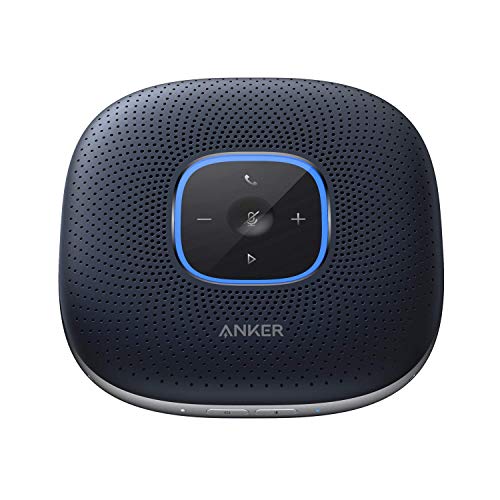
Anker PowerConf C300 -- Verdict: best budget pick with AI framing
The PowerConf C300 records at 1080p 60 fps and includes AI-based auto-framing that keeps the subject centered when moving around the desk. Noise cancellation is built into the integrated dual-microphone array, which reduces background sounds more effectively than the single mics found on many budget webcams. A physical privacy cover slides over the lens. The USB-A connection works on virtually any computer without adapter juggling. At it undercuts most dedicated webcams with comparable specs and delivers noticeably better image quality than the webcams built into most laptops. The AI framing works best for single-subject shots within about 6 feet of the camera.

Dell UltraSharp Webcam WB7022 -- Verdict: best for executive video calls and cle
The WB7022 shoots 4K at 30 fps using a Sony STARVIS sensor and applies AI scene detection to optimize exposure automatically for faces in various lighting conditions. The magnetic mount attaches cleanly to monitors and can pivot without tools. Dell's Peripheral Manager software supports zoom, pan, tilt, and preset scene saving. The built-in four-microphone array uses beamforming to focus on the speaker and reduce ambient noise. The design is minimal -- no RGB, no visible branding on the lens housing. For corporate users who need sharp video on executive calls without visible consumer-grade aesthetics on screen, this is the most polished option in the category.
Before you buy
What to consider
For the microphone side, identify whether your space is quiet or noisy: cardioid USB condensers pick up more detail in quiet rooms; dynamic microphones and directional arrays reject more ambient noise in open or reverberant spaces. For the camera, prioritize sensor size over resolution number -- a 1/2.8-inch sensor at 1080p outperforms a 1/4-inch sensor at 4K in typical home lighting. Check whether you need 60 fps for smooth motion or if 30 fps is sufficient (most video calls cap at 30 fps regardless). USB-C vs USB-A matters only if your computer lacks one type; both perform equally at webcam bandwidth requirements. Finally, confirm that companion software is available for your operating system before purchasing, since some features require it.
What to consider
For related setups, see our guide on [best computer microphones for streaming](/articles/best-computer-microphone-for-streaming) and [best USB hubs for desk setups](/articles/best-usb-hubs-for-desk-setups). Our [methodology](/methodology) page explains how we evaluate audio and video hardware.
Quick answers
Combo units save desk space and simplify cable management, making them ideal for video calls and light streaming. If audio quality is your primary concern, a dedicated USB condenser microphone will outperform any integrated mic on a webcam. For professional streaming or podcasting, separate devices allow independent upgrades. Combos are the practical choice for remote workers who want a single-purchase solution.
1080p at 30 fps is sufficient for most video calls and suits the majority of streaming platforms. 4K webcams produce sharper detail and allow cropping in software without losing quality, but they require more USB bandwidth and processing power. For standard Zoom, Teams, or Google Meet use, the camera quality difference between 1080p and 4K is minimal because platform compression reduces resolution anyway.
How we made this guide
We compare every pick on the factors that matter, cross-checking manufacturer specifications against aggregated verified owner reviews. We rank independently and never take payment for placement. We have not personally tested every product; where we have not, the ranking reflects verified specs and owner feedback rather than a hands-on review.
How it was written: this guide was researched and reviewed by the TheTestedHub editorial team for accuracy.
Affiliate disclosure: TheTestedHub is reader-supported. When you buy through links on our site, we may earn a commission at no extra cost to you.
More to explore

Your Docking Station Match: CalDigit TS4 and More

Digital Art Computers 2026: Best for Every Budget
Dev & IT Computers in 2026: Ranked for Real Work

Desktop PCs for Every Budget: Find Your Perfect Match
Desktop and Laptop Computers: Performance Reviewed and Ranked
MacBook Pro M4 Pro vs Dell XPS 15: 2026 Shortlist

Buy the Best DIY Computer in 2026: Corsair One i300
