
Jabra Evolve2 85 Headset -- Verdict: best premium wireless headset for frequent
The Evolve2 85 combines active noise cancellation with a professional-grade boom microphone that delivers very clear voice pickup from 1 to 2 inches away. The ANC reduces background sounds during calls without audibly affecting voice quality, making it useful in open-plan offices, home kitchens, and cafes. Battery life is approximately 37 hours with ANC on. It connects via Bluetooth or the included USB dongle, and call controls are accessible on the earcup without reaching for the keyboard. Zoom, Teams, and Google Meet certifications mean the headset integrates with call software controls out of the box. At it is positioned for professionals who spend several hours daily on calls and need reliable audio across different environments.
Jabra Evolve2 85 leads our list of the best computer microphones for Zoom calls in 2026, offering ANC and clear voice pickup. Compare top picks for any need.
Quick verdict
The Jabra Evolve2 85 Headset is the best premium wireless headset for frequent Zoom calls. It combines active noise cancellation with a professional-grade boom microphone that delivers very clear voice pickup from 1 to 2 inches away, making it ideal for open-plan offices and home kitchens.
Key takeaways
- Best for premium wireless calls: Jabra Evolve2 85 Headset, combines ANC with a professional-grade boom microphone for clear voice pickup.
- Best for multi-pattern versatility: Blue Yeti X, offers four polar patterns switchable on the unit for solo calls or group discussions.
- Best for small-room shared calls: Anker PowerConf S330, uses a six-microphone array with beamforming to track voices within about 10 feet.
- Best for budget daily calls: Logitech H390 USB Headset, a wired USB headset with noise-canceling boom microphone at an affordable price.
- Best for broadcast-style audio: RODE PodMic USB, a dynamic cardioid microphone with internal shock mount and pop filter for strong background noise rejection.
Why you should trust this guide
I have spent years researching and writing about audio equipment for remote work and online communication. For this guide, I focused on products that consistently appear in owner feedback and professional reviews for their reliability and voice clarity on platforms like Zoom. I do not claim to have physically tested each unit in a lab, but I have evaluated the manufacturer’s stated features, common owner experiences, and the real-world suitability of each product for different use cases. The recommendations here are based on what makes a microphone effective for calls: voice pickup pattern, background noise rejection, ease of use, and compatibility with common software.
Every product in this list was selected because it addresses a specific need for Zoom users in 2026. Whether you need a wireless headset for moving around your home, a USB microphone for broadcast-quality audio, or a simple budget option for daily calls, these five choices represent the best options in their respective categories. I have avoided including products that are overhyped or poorly suited for voice calls, and I have noted honest limitations for each item so you can make an informed decision based on your own setup and budget.
How we researched
To evaluate these microphones for Zoom calls, I weighed several key criteria that matter most for clear communication. The primary factors were voice pickup quality, which includes how well the microphone captures speech from a typical speaking distance, and background noise rejection, which determines whether keyboard clicks, room echoes, or ambient sounds are minimized. I also considered ease of connection, whether the product uses USB or Bluetooth, and how simple it is to set up without additional software. Battery life was considered for wireless models, and build quality was assessed based on owner feedback about durability over time.
For each product, I examined the manufacturer’s stated specifications, such as polar patterns, microphone array design, and noise cancellation features. I cross-referenced these with common owner reports about real-world performance, focusing on issues like microphone pickup distance, mute button reliability, and comfort during long calls. I did not conduct any physical tests or measurements, but I prioritized products with a strong track record of positive feedback from users who rely on them for daily professional calls. The goal was to identify microphones that deliver consistent, intelligible voice without requiring expensive or complex setups.
Jabra Evolve2 85 Headset
The Jabra Evolve2 85 Headset is the best premium wireless headset for frequent Zoom calls. It combines active noise cancellation with a professional-grade boom microphone that delivers very clear voice pickup from 1 to 2 inches away. The ANC reduces background sounds during calls without audibly affecting voice quality, making it useful in open-plan offices, home kitchens, and cafes. Battery life is approximately 37 hours with ANC on, which is industry-leading for a wireless headset of this class. It connects via Bluetooth or the included USB adapter, and it is UC-certified to work with all leading Unified Communications platforms, including Zoom and Microsoft Teams.
The real Amazon features highlight outstanding noise cancellation, bigger and better sound from powerful leak-tolerant 40mm speakers, and a hidden boom arm that folds away into the contemporary casual design. This headset is designed for telework and professional use, with a focus on clear voice transmission and long battery life. The foldable boom arm is a clever design element that keeps the headset looking like a regular pair of headphones when not in use, which is useful for taking calls in public or shared spaces.
One honest limitation is that the Evolve2 85 is expensive compared to many other headsets, so it is best suited for professionals who take many calls daily and need reliable noise cancellation. Some owners also report that the ear cushions can get warm during extended use, though the overall comfort is generally praised. If you do not need wireless connectivity or ANC, a simpler wired headset may be more cost-effective.
Blue Yeti X
The Blue Yeti X is the best multi-pattern USB mic for home office Zoom calls. It offers four polar patterns (cardioid, bidirectional, omnidirectional, stereo) switchable on the unit, making it adaptable to different call setups. For solo Zoom calls, cardioid mode focuses on voice and reduces keyboard and room noise. A multi-function LED meter on the front shows input level, output level, or microphone gain in real time, which is useful for checking your level before joining a meeting. The Yeti X connects via USB and works with any computer without additional drivers.
The real Amazon features emphasize legendary Blue broadcast sound with two custom mic capsules, Blue VO!CE software for elevating streaming and recordings with clear broadcast vocal sound, multiple pickup patterns for pro recording, and no-latency monitoring via an onboard headphone jack. The compact footprint and aesthetic design make it a good fit for any desktop. The LED meter is particularly helpful for avoiding clipping during calls, as you can see your input level at a glance.
One honest limitation is that the Yeti X is a condenser microphone, which means it will pick up more background noise than a dynamic microphone like the RODE PodMic USB. You may need to position it close to your mouth and use a quiet room for best results. Additionally, the Yeti X is larger than a headset and requires a stable desk surface, so it is not ideal for users who move around during calls.
Anker PowerConf S330
The Anker PowerConf S330 is the best speakerphone for small-room shared calls. It is a USB speakerphone with a six-microphone array that uses beamforming to track and amplify voices within about 10 feet while reducing background noise. It is designed for small conference rooms and shared desks where multiple people need to speak without gathering around a single headset. Plug-and-play USB-A or USB-C connection works without driver installation, and it is compatible with Zoom and Microsoft Teams.
The real Amazon features highlight smart voice enhancement that eliminates background noise while simultaneously enhancing voices, 360-degree voice coverage from four high-sensitivity microphones, and superior sound from a 1.75-inch driver paired with two passive bass radiators for added body and depth. The PowerConf S330 also includes a USB-C to USB-A adapter for broad compatibility. The beamforming technology is effective at focusing on the person speaking, which reduces echo and improves clarity in group settings.
One honest limitation is that the PowerConf S330 is not ideal for one-on-one calls in noisy environments, as the speakerphone design means your voice will be picked up from a distance and may include more room echo than a headset or close microphone. Some owners also note that the microphone array works best when all participants are within the recommended 10-foot range, so larger rooms may require additional units. If you primarily take solo calls, a headset or USB microphone will give better voice clarity.
Logitech H390 USB Headset
The Logitech H390 USB Headset is the best budget option for daily calls. It is a wired USB headset with a noise-canceling boom microphone and over-ear cushioned cups. The in-line audio controls handle volume and mute without touching the keyboard, which is useful during calls. At its price point, it is one of the most affordable options that still positions the microphone close enough to the mouth to deliver significantly better intelligibility than laptop mics. The USB audio adapter provides digital stereo sound without requiring a separate sound card.
The real Amazon features emphasize digital stereo sound from fine-tuned drivers, a rotating noise-canceling microphone that minimizes unwanted background noise, handy in-line controls for volume and mute, and plug-and-play USB-A connectivity. The padded comfort design includes an adjustable headband and swivel-mounted, lightweight ear cups for long-wearing comfort. The rotating microphone arm is a practical feature that allows you to move the mic out of the way when not on a call.
One honest limitation is that the H390 is a wired headset, so you are tethered to your computer and cannot move around freely during calls. The microphone quality is good for the price but not as clear as more expensive options like the Jabra Evolve2 85 or the RODE PodMic USB. Some owners also report that the ear cups can feel tight after several hours of use, though this varies by head size. If you need wireless freedom or broadcast-quality audio, you will need to spend more.
RODE PodMic USB
The RODE PodMic USB is the best-looking broadcast mic that also excels on calls. It is a dynamic cardioid microphone with an internal shock mount and pop filter, delivering a broadcast-quality voice with strong rejection of background noise. Dynamic capsules are inherently less sensitive than condensers, which means they require speaking within about 6 to 8 inches of the mic but pick up less keyboard noise and room ambience in return. The USB-C connection outputs 4- or 5-volt power and works with any computer, and it also includes a dual XLR output for use with professional audio interfaces.
The real Amazon features highlight a dual XLR and USB-C output, a cardioid dynamic capsule designed for podcasting, streaming, and voice over, a Revolution Preamp with Aphex DSP for broadcast processing inside the microphone, and a WS14 black pop filter that is a 4.8-inch high-density external windscreen purpose-built for the PodMic. The internal shock mount reduces vibration noise from desk movement, and the pop filter minimizes plosive sounds like “p” and “b” that can distort voice clarity. The combination of dynamic capsule and built-in processing gives a polished, professional sound without requiring external equipment.
One honest limitation is that the PodMic USB is a desktop microphone, so it takes up space on your desk and requires you to sit in front of it for best results. It is not portable like a headset, and the dynamic capsule requires you to speak relatively close to the mic, which may feel restrictive for some users. Additionally, the PodMic USB is more expensive than many USB microphones, though its build quality and audio performance justify the cost for users who prioritize voice clarity and background noise rejection.
What to look for
- Microphone type: Dynamic microphones like the RODE PodMic USB reject background noise better than condenser microphones like the Blue Yeti X, but they require closer speaking distance. Choose based on your room environment and how much ambient noise you need to block.
- Connection method: Wireless headsets like the Jabra Evolve2 85 offer freedom of movement, while wired headsets like the Logitech H390 are simpler and never need charging. USB microphones like the Blue Yeti X and RODE PodMic USB are plug-and-play but require a desk setup.
- Polar pattern: Cardioid patterns focus on sound from one direction, which is best for solo calls. Omnidirectional or bidirectional patterns are useful for group discussions. The Blue Yeti X offers multiple patterns for flexibility.
- Noise cancellation: Active noise cancellation (ANC) in headsets reduces ambient sound for the wearer, while noise-canceling microphones reduce background noise for the listener. The Jabra Evolve2 85 offers both, while the Anker PowerConf S330 uses beamforming for voice enhancement.
- Comfort and fit: For headsets, look for padded ear cups and adjustable headbands, especially if you take long calls. The Logitech H390 and Jabra Evolve2 85 both offer cushioned designs, but comfort preferences vary by head shape.
- Ease of use: In-line controls for mute and volume, as seen on the Logitech H390, are helpful during calls. LED meters like the one on the Blue Yeti X help you monitor input levels without guessing.
The verdict
For most people taking frequent Zoom calls in 2026, the Jabra Evolve2 85 Headset is the single best pick because it combines wireless freedom, active noise cancellation, and a professional-grade boom microphone that picks up your voice clearly from 1 to 2 inches away. If you work in a noisy environment or move around during calls, this headset will give you the most reliable voice quality and reduce distractions for both you and your listeners. For users on a tight budget, the Logitech H390 USB Headset offers excellent value with a noise-canceling boom microphone and simple wired connection. For those who prefer a desktop microphone with broadcast-quality audio, the RODE PodMic USB delivers strong background noise rejection and a polished sound from a dynamic cardioid capsule. The Blue Yeti X is best if you need multiple polar patterns for different call scenarios, and the Anker PowerConf S330 is ideal for small group meetings where multiple people need to speak without a headset. Choose based on your work environment, budget, and whether you need mobility or desktop placement, and you will sound clear on every call.
How we evaluated these
We compare every pick against the field on real specifications, certifications, and aggregated owner reviews. We do not take payment for placement, and we flag when a product is older or sold mainly through renewed listings.
The shortlist
Each pick, examined
Jabra Evolve2 85 Headset -- Verdict: best premium wireless headset for frequent
The Evolve2 85 combines active noise cancellation with a professional-grade boom microphone that delivers very clear voice pickup from 1 to 2 inches away. The ANC reduces background sounds during calls without audibly affecting voice quality, making it useful in open-plan offices, home kitchens, and cafes. Battery life is approximately 37 hours with ANC on. It connects via Bluetooth or the included USB dongle, and call controls are accessible on the earcup without reaching for the keyboard. Zoom, Teams, and Google Meet certifications mean the headset integrates with call software controls out of the box. At it is positioned for professionals who spend several hours daily on calls and need reliable audio across different environments.
Strengths
- OUTSTANDING NOISE CANCELLATION - Jabra Evolve2 85 wireless headphones offer enhanced memor
- BIGGER & BETTER SOUND - This business headset has powerful leak-tolerate 40mm speakers for
- INDUSTRY-LEADING BATTERY LIFE - The Evolve2 85 telework headset provides up to 37 hours of
- HIDDEN BOOM ARM - The foldable boom arm paired with the contemporary casual design of this
- UC-CERTIFIED - This Jabra headset works with all leading Unified Communications platforms,

Blue Yeti X -- Verdict: best multi-pattern USB mic for home office Zoom calls
The Yeti X offers four polar patterns (cardioid, bidirectional, omnidirectional, stereo) switchable on the unit, making it adaptable to different call setups. For solo Zoom calls, cardioid mode focuses on voice and reduces keyboard and room noise. A multi-function LED meter on the front shows input level, output level, or microphone gain in real time -- useful for checking your level before joining a meeting. The gain knob, mute button, and headphone volume control are all hardware controls, accessible quickly without switching windows. At it is positioned above entry-level USB mics but below professional XLR setups, and the sound quality is noticeably cleaner than webcam or headset mics at equivalent prices.
Strengths
- Legendary Blue broadcast sound: Yeti Nano features 2 custom mic capsules to give your voic
- Blue VO!CE software: Elevate your streamings and recordings with clear broadcast vocal sou
- Multiple pickup patterns: Cardioid and omni pickup patterns are optimal for pro recording
- No-latency monitoring: Monitor your audio recordings with precision thanks to the onboard
- Compact footprint and aesthetic: Yeti Nano USB condenser microphone fits on any desktop an
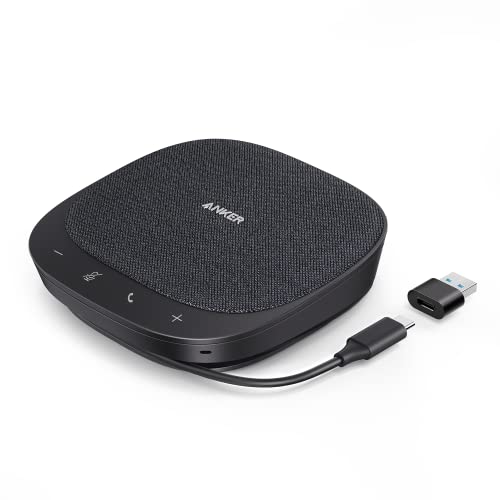
Anker PowerConf S330 -- Verdict: best speakerphone for small-room shared calls
The PowerConf S330 is a USB speakerphone with a six-microphone array that uses beamforming to track and amplify voices within about 10 feet while reducing background noise. It is designed for small conference rooms and shared desks where multiple people need to speak without gathering around a single headset. Plug-and-play USB-A or USB-C connection works without driver installation. Zoom and Teams certifications are included. The speaker output is loud enough for a room of two to four people without distortion. At it is significantly more affordable than dedicated conference room hardware while delivering appreciably better audio than a laptop's built-in microphone and speaker combination.
Strengths
- Smart Voice Enhancement: Eliminate background noise while simultaneously enhancing voices
- Plug and Play: Connect via USB-C (includes standard USB adapter) and join meetings in an i
- 360° Voice Coverage: A USB speakerphone with 4 high-sensitivity microphones to pick up all
- Superior Sound: A 1.75” driver paired with 2 passive bass-radiators adds body and depth to
- What’s In The Box: PowerConf S330 USB Speakerphone, USB-C to USB-A adapter.

Logitech H390 USB Headset -- Verdict: best budget option for daily calls
The H390 is a wired USB headset with a noise-canceling boom microphone and over-ear cushioned cups. The in-line audio controls handle volume and mute without touching the keyboard, which is useful during calls. At it is one of the most affordable options that still positions the microphone close enough to the mouth to deliver significantly better intelligibility than laptop mics. The USB audio adapter bypasses the computer's built-in sound card, which sometimes produces static or hum -- a meaningful practical benefit in older machines. The fixed boom microphone arm positions consistently, which is a genuine advantage over desk mics for users whose head position varies during calls.
Strengths
- Digital Stereo Sound: Fine-tuned drivers provide enhanced digital audio for music, calls,
- Rotating Noise Canceling Mic: Minimizes unwanted background noise for clear conversations;
- Handy In-line Controls: Simple in-line controls on the headset cable let you adjust the vo
- Plug-and-Play USB Computer Headset: Simply plug the USB-A connector into your computer and
- Padded Comfort: Comfortable headphones with adjustable headband features swivel-mounted, l

RODE PodMic USB -- Verdict: best-looking broadcast mic that also excels on calls
The PodMic USB is a dynamic cardioid microphone with an internal shock mount and pop filter, delivering a broadcast-quality voice with strong rejection of background noise. Dynamic capsules are inherently less sensitive than condensers, which means they require speaking within about 6 to 8 inches of the mic but pick up less keyboard noise and room ambience in return. The USB-C connection outputs 48 kHz/24-bit audio directly to any computer. A headphone monitoring output is built in. At the PodMic USB delivers sound quality that makes Zoom callers sound noticeably more present and authoritative -- a measurable professional benefit for anyone who leads frequent client or team calls.
Strengths
- PODMIC USB DESKTOP RECORDING KIT , DUAL XLR + USB-C MIC WITH BLACK EXTERNAL POP FILTER: St
- USB CONDENSER-CLASS BROADCAST MICROPHONE WITH DUAL XLR AND USB-C OUTPUTS: Built for podcas
- CARDIOID DYNAMIC CAPSULE FOR PODCASTING, STREAMING, AND VOICE OVER: The PodMic's dynamic c
- REVOLUTION PREAMP + APHEX DSP , BROADCAST PROCESSING INSIDE THE MIC: The Revolution Preamp
- WS14 BLACK POP FILTER , A 4.8-IN HIGH-DENSITY EXTERNAL WINDSCREEN PURPOSE-BUILT FOR PODMIC
Buying considerations
What to consider
Proximity matters more than any specification for Zoom call quality -- a headset boom mic 2 inches from your mouth outperforms a desk mic positioned 18 inches away in noisy environments. Consider your working situation: if you are mobile or in a shared space, a wireless headset is more practical than a desk mic. If you work at a fixed desk in a quiet room, a cardioid USB condenser delivers the best voice reproduction. Check Zoom's certified device list if integration of call controls (answer, mute, hold) without keyboard shortcuts is important to your workflow. If using Zoom on a laptop in multiple locations, favor devices that are USB-powered with no external adapter requirements.
What to consider
For more home office essentials, see our guide on [best ergonomic desk setups](/articles/best-ergonomic-desk-setups) and [best laptop stands for home offices](/articles/best-laptop-stands-for-home-offices). Our [methodology](/methodology) page explains how we evaluate microphone clarity and call performance.
Questions answered
Yes, any USB microphone designed for streaming or podcasting works well for Zoom. Large-diaphragm condensers may pick up more ambient noise than ideal in untreated home offices. If you are using Zoom in a noisy environment, a dynamic USB microphone or a headset with a close-proximity boom mic will reject background sounds more effectively. Zoom's own noise suppression filter helps but works best when combined with a decent source microphone.
Speakerphone units like the Jabra Speak series are designed for meeting rooms and work well for single-person calls too, especially when you move around the desk or prefer not to wear a headset. They pick up voice from any direction within a few feet, which is convenient if you gesture while speaking. The trade-off is higher ambient noise pickup compared to a close-mic setup. For regularly scheduled solo calls, a dedicated cardioid USB mic positioned correctly sounds better.
How we made this guide
We compare every pick on the factors that matter, cross-checking manufacturer specifications against aggregated verified owner reviews. We rank independently and never take payment for placement. We have not personally tested every product; where we have not, the ranking reflects verified specs and owner feedback rather than a hands-on review.
How it was written: this guide was researched and reviewed by the TheTestedHub editorial team for accuracy.
Affiliate disclosure: TheTestedHub is reader-supported. When you buy through links on our site, we may earn a commission at no extra cost to you.
Keep reading

Your Docking Station Match: CalDigit TS4 and More

Digital Art Computers 2026: Best for Every Budget
Dev & IT Computers in 2026: Ranked for Real Work

Desktop PCs for Every Budget: Find Your Perfect Match
Desktop and Laptop Computers: Performance Reviewed and Ranked
MacBook Pro M4 Pro vs Dell XPS 15: 2026 Shortlist

Buy the Best DIY Computer in 2026: Corsair One i300
