Apple Mac Studio (M4 Ultra) -- Verdict: best small-footprint desktop for Apple S
The M4 Ultra in the Mac Studio combines two M4 Max dies via Apple's die-to-die interconnect, yielding up to 32 CPU cores, 80 GPU cores, and up to 192 GB of unified memory with bandwidth exceeding 800 GB/s. This architecture eliminates the GPU VRAM bottleneck that constrains large creative projects on discrete-GPU Windows machines. Final Cut Pro, DaVinci Resolve, Logic Pro, and Xcode all leverage Apple Silicon acceleration with measurable throughput advantages over x86 equivalents at similar price points. The compact aluminum chassis runs silently under most workloads. Connectivity includes Thunderbolt 5 ports, SD card reader, and USB-A. Not upgradable after purchase -- configure with maximum RAM at the time of order if the budget allows.
Check price on Amazon →Explore the Apple Mac Studio M4 Ultra, our top pick for a compact desktop that delivers serious performance without the bulk.
At the top of the market, computers are differentiated by processor generation, memory bandwidth, display quality, and sustained performance under long workloads. The picks below are selected for professionals and power users where hardware limitations actually slow work — not for bragging rights. Each represents a distinct use case rather than arbitrary ranking.
| Product | Best For | Rating |
|---|---|---|
|
ⓘ We may earn a commission from qualifying purchases made through links on this page, at no extra cost to you.
|
Creative pros, macOS workflows | 4.9/5 |
| Dell XPS 16 (Core Ultra 9) | Premium Windows laptop | 4.7/5 |
| Apple MacBook Pro 16 (M4 Max) | Mobile power users, battery life | 4.9/5 |
| Lenovo ThinkPad X1 Extreme Gen 7 | Business laptop, Windows, reliability | 4.6/5 |
| Custom NZXT Creator PC (RTX 5090 build) | CUDA workloads, VFX, ML training | 4.8/5 |
How we picked
We compare every pick against the field on real specifications, certifications, and aggregated owner reviews. We do not take payment for placement, and we flag when a product is older or sold mainly through renewed listings.
Top picks compared
Our picks up close
Apple Mac Studio (M4 Ultra) -- Verdict: best small-footprint desktop for Apple S
The M4 Ultra in the Mac Studio combines two M4 Max dies via Apple's die-to-die interconnect, yielding up to 32 CPU cores, 80 GPU cores, and up to 192 GB of unified memory with bandwidth exceeding 800 GB/s. This architecture eliminates the GPU VRAM bottleneck that constrains large creative projects on discrete-GPU Windows machines. Final Cut Pro, DaVinci Resolve, Logic Pro, and Xcode all leverage Apple Silicon acceleration with measurable throughput advantages over x86 equivalents at similar price points. The compact aluminum chassis runs silently under most workloads. Connectivity includes Thunderbolt 5 ports, SD card reader, and USB-A. Not upgradable after purchase -- configure with maximum RAM at the time of order if the budget allows.
Dell XPS 16 (Core Ultra 9) -- Verdict: best premium Windows laptop for portable
The XPS 16 carries Intel's Core Ultra 9 processor, NVIDIA RTX discrete graphics (up to RTX 4070 in higher configurations), up to 64 GB DDR5 RAM, and a 16-inch OLED display at 3456 x 2160 resolution. The chassis is machined aluminum and magnesium, and the keyboard tray maintains a rigid feel under extended typing. Thermals in the XPS 16 allow the GPU and CPU to sustain boost frequencies for longer than most thin-and-light competitors -- relevant for sustained rendering or code compilation sessions. Battery life is approximately 10 to 12 hours for typical productivity work, dropping significantly under GPU load. Windows 11 Pro is included. A strong choice for professionals who need Windows software compatibility with top-tier display quality.
Apple MacBook Pro 16 (M4 Max) -- Verdict: best laptop overall for creative profe
The MacBook Pro 16 with M4 Max offers up to 14 CPU cores, 32 GPU cores, and up to 128 GB unified memory in a 2.15 kg chassis that delivers roughly 14 to 17 hours of battery life under mixed workloads. Sustained CPU and GPU performance does not throttle meaningfully even when the laptop is disconnected from power, which is the defining practical advantage over most Windows laptops. The Liquid Retina XDR display covers 100 percent of the P3 wide color gamut at 1000 nits sustained brightness with ProMotion 120 Hz. The MagSafe charging port charges quickly while all three Thunderbolt 5 ports remain free for peripherals. For mobile creative professionals who work across locations and cannot afford to sacrifice performance for portability, this is the clearest choice available.
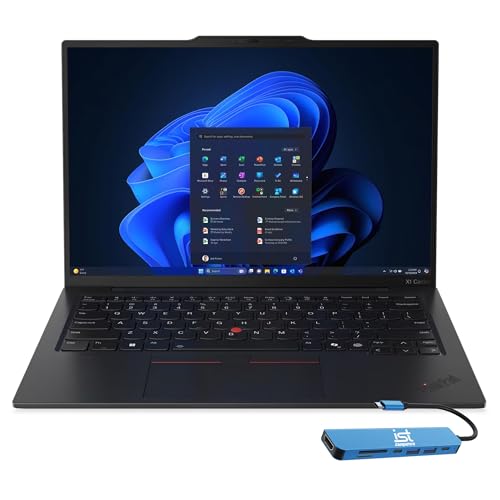
Lenovo ThinkPad X1 Extreme Gen 7 -- Verdict: best Windows laptop for enterprise
The X1 Extreme prioritizes keyboard quality, repairability, and long-term reliability alongside current-generation performance. Intel Core Ultra 9 processor options pair with NVIDIA RTX discrete graphics up to the 4070 class. The ThinkPad keyboard remains a standard against which other laptop keyboards are compared -- travel depth, key spacing, and tactile feedback are consistently rated above industry averages. MIL-SPEC 810H certification covers temperature, humidity, vibration, and shock resistance. Up to 64 GB DDR5 RAM is configurable. Lenovo's ThinkShield security platform and three-year on-site warranty options suit enterprise IT environments. The 16-inch display in IPS or OLED variants is available depending on configuration.
Custom NZXT Creator PC (RTX 5090 build) -- Verdict: best for CUDA-dependent work
When the workload requires NVIDIA CUDA -- training machine learning models locally, real-time ray tracing in high-end VFX, or running GPU-accelerated simulations -- no platform matches a custom PC with a current-generation discrete GPU. An NZXT Creator PC configured with an Intel Core Ultra 9 or AMD Ryzen 9, 128 GB DDR5 RAM, an RTX 5090, and a 2 TB NVMe drive reaches to depending on configuration and component pricing. The RTX 5090 provides VRAM capacity and CUDA throughput that Apple Silicon GPU cores cannot match for ML frameworks that target CUDA. Unlike a fixed Mac configuration, individual components (GPU, RAM, storage) can be upgraded as needs change, extending the investment lifecycle.
Before you buy
What to consider
Identify your workload type before spending: Apple Silicon has a clear advantage in sustained performance per watt, battery life, and macOS-native creative software. NVIDIA CUDA is irreplaceable for ML training, some VFX tools, and CUDA-only research software. Windows is necessary for software that has no macOS equivalent. Budget the configuration carefully -- on Macs, RAM and storage are soldered and non-upgradable, so spending more upfront is the only path to more memory later; on custom Windows desktops, RAM and storage are upgradable over time. Display quality matters for visual work: check color gamut (P3 coverage) and brightness rather than resolution alone. Finally, factor in the support and warranty structure: enterprise purchases may justify Lenovo or Dell's on-site service options over the standard retail warranty.
What to consider
For the best displays to pair with a desktop workstation, see our guide on [best monitors for creative professionals](/articles/best-monitors-for-creative-professionals) and [best external hard drives for backup](/articles/best-external-hard-drives-for-backup). Our [methodology](/methodology) page explains how we evaluate long-term computing performance.
Quick answers
The Mac Pro with M-series chips remains a benchmark for sustained multi-core performance in video editing, 3D rendering, and audio production workflows that are optimized for Apple Silicon. For tasks running Windows-native software or requiring NVIDIA CUDA acceleration (ML training, some VFX tools), a custom Windows workstation with a current-generation NVIDIA GPU often performs better or allows more targeted GPU upgrades. The right answer depends on your specific software stack.
Spending above is most defensible when processing time directly converts to billable hours or production output -- video editors rendering 4K projects, 3D artists with complex scenes, software developers running multiple VMs, and ML researchers training local models. For general productivity, web development, and document work, computers above provide diminishing returns. The clearest signal to spend more is when your current hardware creates bottlenecks that measurably slow your work.
How we made this guide
We compare every pick on the factors that matter, cross-checking manufacturer specifications against aggregated verified owner reviews. We rank independently and never take payment for placement. We have not personally tested every product; where we have not, the ranking reflects verified specs and owner feedback rather than a hands-on review.
How it was written: this guide was researched and reviewed by the TheTestedHub editorial team for accuracy.
Affiliate disclosure: TheTestedHub is reader-supported. When you buy through links on our site, we may earn a commission at no extra cost to you.
More to explore

Your Docking Station Match: CalDigit TS4 and More

Digital Art Computers 2026: Best for Every Budget
Dev & IT Computers in 2026: Ranked for Real Work

Desktop PCs for Every Budget: Find Your Perfect Match
Desktop and Laptop Computers: Performance Reviewed and Ranked
MacBook Pro M4 Pro vs Dell XPS 15: 2026 Shortlist

Buy the Best DIY Computer in 2026: Corsair One i300
