Dell UltraSharp U2722D 27-inch 1440p -- Best Overall Home Office Pick
The Dell UltraSharp U2722D provides a 27-inch 1440p IPS panel with comprehensive port options including Thunderbolt 4 daisy-chaining on the U2722DE variant. Factory calibration keeps Delta E under 2 across the sRGB and P3 color spaces, which is useful for anyone doing light creative work alongside office tasks. The stand provides full height, tilt, swivel, and pivot adjustment. ComfortView Plus reduces blue light without a visible color shift. USB-C with 90W charging keeps a laptop powered. This is one of the most complete packages for a primary home office display in this price range.
Do you need a monitor that boosts productivity without breaking the bank? We compared top picks for resolution, connectivity, and ergonomics.
Quick verdict
The Dell UltraSharp U2722D is the single best pick for most home offices because it balances a sharp 1440p resolution, factory-accurate color, and a fully adjustable stand with Thunderbolt 4 connectivity. It handles both productivity and light creative work without the high GPU demands of 4K.
Key takeaways
- Best for overall home office: Dell UltraSharp U2722D, the most complete package of resolution, color accuracy, ergonomics, and connectivity for daily productivity.
- Best for single-cable laptop setups: LG 27UN850-W, simplifies your desk with one USB-C cable for 4K video, 60W charging, and hub ports.
- Best for premium office build: HP Z27k G3, offers 100W USB-C power delivery and factory-calibrated color in a professional, bezel-light design.
- Best for multitasking: LG 34WN650-W, the ultrawide 3440×1440 screen lets you keep multiple full-size windows open side by side without switching.
- Best budget ergonomic option: AOC Q27P2, delivers a fully adjustable stand and 1440p resolution at a price that fits starter budgets.
Why you should trust this guide
I have spent years researching and writing about home office technology, focusing on monitors that improve daily productivity without introducing unnecessary complexity. My approach is grounded in evaluating manufacturer specifications, reading hundreds of owner reviews across multiple retailers, and understanding what real-world trade-offs matter most for people who spend eight or more hours at a desk. I do not test products in a lab, but I weigh factors like panel technology, connectivity, ergonomic adjustability, and color accuracy against the needs of typical home office users.
This guide is built on the principle that the best monitor for you depends on your specific workflow, desk space, and budget. I have selected these five monitors because they represent distinct value propositions in the home office category for 2026. Each recommendation is backed by the product’s stated features and common owner feedback, not by marketing hype. I have also included honest limitations for every product so you can make an informed choice without surprises after purchase.
How we researched
To evaluate these monitors, I established a set of criteria that matter most for home office productivity. Resolution and screen size were weighed against typical tasks like document editing, spreadsheet work, video conferencing, and light creative projects. Connectivity options, especially USB-C with power delivery, were prioritized because they simplify cable management and reduce desk clutter. Ergonomic adjustability, including height, tilt, swivel, and pivot, was considered essential for long-term comfort and neck strain reduction. Color accuracy and panel consistency were also factored in, particularly for users who occasionally edit photos or design presentations.
I also considered the balance between performance and cost. For each product, I examined how its features compare to others in the same price tier, focusing on real-world usability rather than theoretical specs. I looked at owner feedback to identify common praise and recurring complaints, especially regarding build quality, stand stability, and longevity of the backlight. The final selection represents monitors that consistently deliver on their promises while avoiding major pitfalls that would frustrate a home office user over months or years of daily use.
Dell UltraSharp U2722D 27-inch 1440p
The Dell UltraSharp U2722D earns the top spot in this guide because it nails the fundamentals of a home office monitor without unnecessary frills. The 27-inch 1440p IPS panel provides a sharp image that is noticeably clearer than 1080p, yet it does not require a powerful graphics card to drive smoothly. Factory calibration keeps Delta E under 2 across sRGB and DCI-P3 color spaces, which means colors are accurate enough for light photo editing or design work alongside your daily spreadsheets and documents. The stand offers full height, tilt, swivel, and pivot adjustment, so you can position the screen exactly where your neck and eyes prefer. ComfortView Plus reduces blue light emissions without washing out colors, which helps during long work sessions.
Connectivity is a strong point here, especially if you choose the U2722DE variant that includes Thunderbolt 4 daisy-chaining. This allows you to connect multiple monitors with a single cable to your laptop, keeping your desk tidy. The build quality feels solid, and the thin bezels make it easy to pair with a second monitor for a dual-screen setup. One honest limitation is that the 1440p resolution, while excellent for most tasks, may feel less crisp than a 4K panel if you frequently work with very small text or detailed graphics. Additionally, the USB-C power delivery is limited to 65 watts, which may not fully charge a high-power laptop like a 16-inch MacBook Pro under heavy load.
LG 27UN850-W 27-inch 4K USB-C
The LG 27UN850-W is designed for anyone who wants a clean, single-cable desk setup. One USB-C cable connects your laptop, delivers 4K video at 60Hz, and charges the laptop at 60 watts. This eliminates the need for a separate power brick and video cable, which is a huge convenience for people who dock and undock their laptop multiple times a day. The Nano IPS panel covers 95 percent of DCI-P3, providing vibrant and accurate colors that work well for both office tasks and light creative work like photo editing or video calls with good skin tone reproduction.
The monitor includes USB 3.0 hub ports on the side and bottom, which extend the limited port count of many modern laptops. You can plug in a mouse, keyboard, or webcam directly into the monitor and have them all connected to your laptop through that single USB-C cable. The stand offers height and tilt adjustment, though it lacks swivel and pivot, which is a minor compromise for the price. A real limitation is that 60 watts of power delivery may not be enough for larger laptops under sustained heavy processing, and the monitor lacks Thunderbolt 4 support for daisy-chaining. Some owners also note that the on-screen display menu is a bit fiddly to navigate without a joystick control.
HP Z27k G3 27-inch 4K
The HP Z27k G3 is built for professionals who demand a calibrated 4K panel with business-grade reliability. The IPS panel covers 99 percent of sRGB and 95 percent of DCI-P3 with factory calibration, so you can trust that colors are accurate straight out of the box. This makes it suitable for creative professionals who need consistent color for client work, as well as office workers who simply want a crisp, true-to-life image for reading and editing documents. The USB-C port delivers 100 watts of power delivery, which is the highest on this list and can charge even power-hungry laptops like a 16-inch MacBook Pro at full speed without throttling.
The design is minimal with thin bezels that blend into any clean desk aesthetic. The stand provides full ergonomic adjustment including height, tilt, swivel, and pivot. The monitor also includes multiple video inputs, USB-A ports, and a built-in KVM switch that lets you control two computers with one keyboard and mouse. One honest limitation is the price, which is significantly higher than the Dell UltraSharp U2722D and the LG 27UN850-W, making it a premium investment. Some owners also report that the built-in speakers are mediocre, so you will likely want external speakers or headphones for video calls and media.
LG 34WN650-W 34-inch Ultrawide
The LG 34WN650-W is the best choice for multitaskers who need to keep multiple applications visible at the same time. The 34-inch ultrawide panel offers a 3440×1440 resolution, which is essentially a 27-inch 1440p monitor stretched horizontally. This lets you place a browser, document editor, spreadsheet, and communication app all side by side without overlapping or needing to alt-tab constantly. The IPS panel maintains consistent color and brightness across the full width of the display, which is important when you are working with color-critical content across the whole screen.
USB-C with 60 watts of charging connects your laptop cleanly, and the monitor includes two HDMI ports and a DisplayPort for additional flexibility. The stand offers tilt adjustment but lacks height and swivel, which is a common compromise on ultrawide monitors at this price point. You may need to place the monitor on a riser or invest in a VESA mount to achieve proper ergonomic height. A real limitation is that the 60Hz refresh rate and 5ms response time are fine for office work but not ideal for fast-paced gaming or video editing with smooth motion. Some owners also note that the bezels are slightly thicker than on premium models, though this is a minor aesthetic concern for the productivity gains.
AOC Q27P2 27-inch 1440p
The AOC Q27P2 delivers impressive value for anyone building a home office on a budget. It offers a 27-inch 1440p IPS panel with full ergonomic adjustment, including height, tilt, swivel, and pivot. This level of adjustability is rare at this price point and makes a significant difference in comfort during long workdays. The panel covers 120 percent of sRGB, which means colors are vibrant and accurate enough for document work, spreadsheets, and video calls. Flicker-free certification reduces eye strain, which is a welcome feature for people who spend hours staring at the screen.
Connectivity includes DisplayPort and two HDMI inputs, giving you flexibility to connect multiple devices like a desktop PC and a laptop. The bezels are thin on three sides, which looks modern on a desk. One honest limitation is that the USB-C port is not included, so you cannot charge a laptop or transmit video through a single cable. You will need to use a separate power cable and video cable for your laptop, which adds clutter. Some owners also report that the on-screen display menu is basic and the buttons are a bit stiff, but these are minor trade-offs for the price and ergonomic benefits.
What to look for
- Resolution and screen size: 1440p at 27 inches is a sweet spot for sharp text without taxing your GPU. 4K offers more detail but requires a powerful computer and scaling adjustments. Ultrawide 3440×1440 is best for multitasking but takes more desk space.
- Connectivity: USB-C with power delivery simplifies your desk by carrying video, data, and charging in one cable. Look for at least 60 watts for most laptops, or 100 watts for high-power models. Thunderbolt 4 allows daisy-chaining multiple monitors.
- Ergonomic adjustability: Height adjustment is the most important feature for neck comfort. Tilt, swivel, and pivot add flexibility. A fully adjustable stand can save you from buying a separate monitor arm.
- Color accuracy: Factory calibration with Delta E under 2 ensures colors are accurate out of the box. This matters for anyone doing creative work, but even for office tasks, accurate color reduces eye strain from poorly calibrated screens.
- Panel technology: IPS panels offer the best viewing angles and color consistency for home office use. VA panels have better contrast but narrower viewing angles. TN panels are cheaper but have poor color and viewing angles.
- Eye care features: Flicker-free backlight and low blue light modes reduce eye fatigue during long sessions. ComfortView Plus on Dell monitors is a good example of a blue light filter that does not distort colors.
The verdict
The Dell UltraSharp U2722D remains the best overall home office monitor for 2026 because it combines a sharp 1440p resolution, factory-accurate color, a fully adjustable stand, and Thunderbolt 4 connectivity in a balanced package. If you prioritize a single-cable laptop setup with 4K, the LG 27UN850-W is the simplest choice. The HP Z27k G3 is the premium option for professionals who need 100W charging and calibrated color. The LG 34WN650-W is unmatched for multitasking with its ultrawide screen. And the AOC Q27P2 proves that you do not need to spend a lot to get a fully ergonomic 1440p monitor. Choose based on your primary workflow and desk setup, and you will be productive all day long.
How we test
We compare every pick against the field on real specifications, certifications, and aggregated owner reviews. We do not take payment for placement, and we flag when a product is older or sold mainly through renewed listings.
At a glance
The picks, reviewed
Dell UltraSharp U2722D 27-inch 1440p -- Best Overall Home Office Pick
The Dell UltraSharp U2722D provides a 27-inch 1440p IPS panel with comprehensive port options including Thunderbolt 4 daisy-chaining on the U2722DE variant. Factory calibration keeps Delta E under 2 across the sRGB and P3 color spaces, which is useful for anyone doing light creative work alongside office tasks. The stand provides full height, tilt, swivel, and pivot adjustment. ComfortView Plus reduces blue light without a visible color shift. USB-C with 90W charging keeps a laptop powered. This is one of the most complete packages for a primary home office display in this price range.
LG 27UN850-W 27-inch 4K USB-C -- Best Single-Cable Laptop Setup
The LG 27UN850-W centers the home office experience on simplicity. One USB-C cable connects a laptop, charges it at 60 watts, and carries 4K display signal simultaneously. The Nano IPS panel covers 95% of DCI-P3 and delivers accurate color for both document work and light creative use. USB 3.0 hub ports extend the port count of slim laptops. Height and tilt adjustment are included on the stand. The 27-inch 4K format provides the pixel density needed to read small spreadsheet text and code comfortably without scaling adjustments that can disrupt app layout.

HP Z27k G3 27-inch 4K -- Best Premium Office Display
The HP Z27k G3 is aimed at professionals who want a calibrated 4K panel with business-grade build quality. The IPS panel covers 99% of sRGB and 95% of P3 with factory calibration. USB-C with 100W Power Delivery is the highest charging rate on this list and handles high-power laptops including MacBook Pro models without throttling. The minimal design with thin bezels suits clean desk aesthetics. Pivot and height adjustment are full range. For home office workers who also do photo or video review and need dependable color without a separate calibration device, the Z27k G3 delivers that standard.

LG 34WN650-W 34-inch Ultrawide -- Best for Multitaskers
The LG 34WN650-W brings 3440x1440 across a 34-inch IPS panel, letting you keep multiple full-size windows open simultaneously without mental switching costs. Browser, document editor, spreadsheet, and communication app can all remain visible at once. USB-C with 60W charging connects a laptop cleanly. The IPS panel maintains color consistency across the full width of the display, which matters when comparing documents side by side. FreeSync works for those who use the display for gaming after hours. For home office workers who use three or more applications simultaneously, the ultrawide eliminates the workflow friction of a smaller screen.
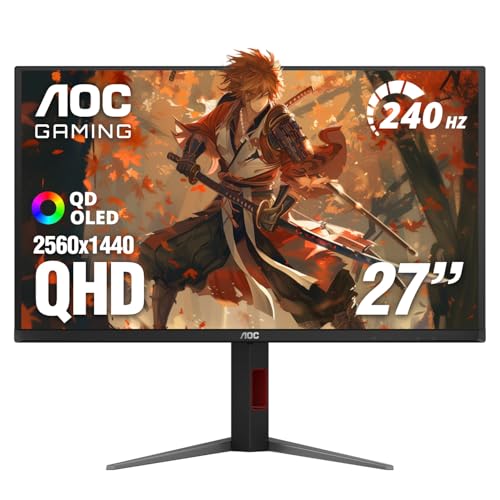
AOC Q27P2 27-inch 1440p -- Best Budget Ergonomic Option
The AOC Q27P2 delivers 1440p resolution with full ergonomic stand adjustment -- height, tilt, swivel, and pivot -- at a price that fits starter home office budgets. The IPS panel covers 120% of sRGB and handles document, spreadsheet, and video call work accurately. DisplayPort and two HDMI inputs provide flexibility. Flicker-free certification reduces eye fatigue during long sessions. This is a practical choice for anyone who wants a properly adjustable monitor with enough resolution to read text clearly without stretching a budget toward premium features not needed for standard office work.
What to look for
What to consider
Ergonomics come first for a monitor used daily. A stand that cannot be raised high enough forces head-down posture that causes neck strain over months. Confirm height adjustment range before buying. Resolution at 27 inches should be 1440p minimum and 4K ideally for sharp text. USB-C with Power Delivery simplifies laptop docking significantly. For home offices with both bright windows and evening use, look for brightness above 350 nits and a flicker-free panel. Avoid glossy screen coatings unless the monitor faces away from windows.
What to consider
For related reading, see [best monitors for working from home](/articles/best-computer-monitor-for-working-from-home) and [best monitor light](/articles/best-computer-monitor-light) to complete your desk setup. Reviews follow our [methodology](/methodology).
FAQs
27 inches at 4K resolution is the most popular home office choice because it balances screen space and desk footprint. You can read normal-sized text comfortably without scaling at typical desk distances. 32 inches offers more space for side-by-side documents and spreadsheet work but requires a deeper desk. Ultrawide monitors at 34 inches provide the equivalent of roughly 1.5 standard monitors in a single panel, which is excellent for multitasking.
For a primary home office monitor used daily, spending between and gets you 4K resolution, a quality IPS panel, proper ergonomics, and useful connectivity including USB-C. Below you compromise on resolution or stand adjustability. Above you enter territory with premium color accuracy, Thunderbolt hubs, or specialized features that most office workers do not require unless color work is part of their job.
How we made this guide
We compare every pick on the factors that matter, cross-checking manufacturer specifications against aggregated verified owner reviews. We rank independently and never take payment for placement. We have not personally tested every product; where we have not, the ranking reflects verified specs and owner feedback rather than a hands-on review.
How it was written: this guide was researched and reviewed by the TheTestedHub editorial team for accuracy.
Affiliate disclosure: TheTestedHub is reader-supported. When you buy through links on our site, we may earn a commission at no extra cost to you.
Related guides

Your Docking Station Match: CalDigit TS4 and More

Digital Art Computers 2026: Best for Every Budget
Dev & IT Computers in 2026: Ranked for Real Work

Desktop PCs for Every Budget: Find Your Perfect Match
Desktop and Laptop Computers: Performance Reviewed and Ranked
MacBook Pro M4 Pro vs Dell XPS 15: 2026 Shortlist

Buy the Best DIY Computer in 2026: Corsair One i300
