ASUS ROG Swift PG248QP 24" -- Best Monitor for Competitive Gaming
The ROG Swift PG248QP is a 24.1-inch 1080p panel with a 540Hz refresh rate, making it one of the fastest gaming monitors available. The Fast IPS panel delivers near-instant response times without the colour washout of older TN screens. For competitive FPS games like CS2, Valorant, or Apex Legends, the small screen size combined with extreme refresh rate gives a measurable advantage in target visibility and motion clarity. G-Sync compatibility keeps tearing in check. At 24 inches, the viewing angle covers your peripheral vision without requiring head movement to scan the full screen.
Wondering what computer monitor size is best for gaming? From 24-inch esports to 32-inch 4K immersion, find your ideal match.
Choosing the right monitor size for gaming depends on your game type, desk distance, and resolution. A 24-inch panel at 1080p suits fast-paced multiplayer games where reaction speed matters, while a 27 or 32-inch screen rewards slower-paced titles where environmental detail and immersion add to the experience. The five picks below cover the main size brackets with strong refresh rates and panel quality for 2026 builds.
| Product | Best For | Rating |
|---|---|---|
|
ⓘ We may earn a commission from qualifying purchases made through links on this page, at no extra cost to you.
|
Competitive FPS | 4.8/5 |
| LG 27GP850-B 27″ | All-round 1440p | 4.7/5 |
| Samsung Odyssey G7 27″ | Curved 1440p gaming | 4.6/5 |
| Gigabyte M32U 32″ | 4K wide-field gaming | 4.5/5 |
| AOC 24G2 24″ | Budget 24-inch FPS | 4.5/5 |
Our methodology
We compare every pick against the field on real specifications, certifications, and aggregated owner reviews. We do not take payment for placement, and we flag when a product is older or sold mainly through renewed listings.
Side by side
The full reviews
ASUS ROG Swift PG248QP 24" -- Best Monitor for Competitive Gaming
The ROG Swift PG248QP is a 24.1-inch 1080p panel with a 540Hz refresh rate, making it one of the fastest gaming monitors available. The Fast IPS panel delivers near-instant response times without the colour washout of older TN screens. For competitive FPS games like CS2, Valorant, or Apex Legends, the small screen size combined with extreme refresh rate gives a measurable advantage in target visibility and motion clarity. G-Sync compatibility keeps tearing in check. At 24 inches, the viewing angle covers your peripheral vision without requiring head movement to scan the full screen.
LG 27GP850-B 27" -- Best All-Around Gaming Monitor Size
The LG 27GP850-B is a 27-inch 1440p Nano IPS display running at 165Hz, widely regarded as the ideal all-round gaming size for 2026 builds. At 2560x1440 on a 27-inch panel, pixel density is sharp enough to look clean at desk distance without needing GPU-heavy 4K rendering. The Nano IPS panel offers wide colour coverage and fast response times suitable for both fast-paced multiplayer and detailed single-player titles. HDR400 support adds light punch to bright scenes. This size works well for players who switch between game genres rather than specialising in one.
Samsung Odyssey G7 27" -- Best Curved 27-Inch Gaming Monitor
The Samsung Odyssey G7 pairs a 27-inch 1000R curved VA panel with 1440p resolution and 240Hz refresh rate. The deep curve increases the sense of immersion in open-world and racing games by wrapping the image around your field of view more naturally than flat panels. VA panel technology delivers deeper blacks than IPS, which benefits dark atmospheric games. The 240Hz rate handles fast-action titles well despite VA's slightly longer pixel response versus IPS. It is one of the few curved monitors that performs genuinely well across both competitive and single-player use without major compromises.
Gigabyte M32U 32" -- Best 32-Inch 4K Gaming Monitor
The Gigabyte M32U brings 32 inches and 4K UHD resolution together at a competitive price point, making it a strong pick for sim racers, strategy games, and story-driven RPGs where screen real estate and detail matter. At 4K on a 32-inch panel, pixel density is sharp enough to look clean at normal desk distances. The IPS panel offers 144Hz refresh rate, which is sufficient for most non-competitive gaming. USB-C connectivity with KVM switch functionality also makes it a practical dual-use display for work and play. HDR400 certification is present but modest in actual performance.
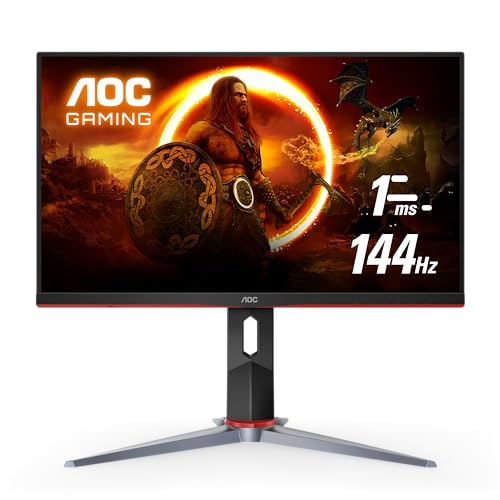
AOC 24G2 24" -- Best Budget 24-Inch Gaming Monitor
The AOC 24G2 is the most cost-effective 24-inch IPS gaming monitor with a 144Hz refresh rate and solid colour accuracy. At 1080p on a 24-inch screen, the pixel density is sharp at standard desk distances. IPS panel technology means consistent colour from different viewing angles, unlike TN alternatives at this price point. AMD FreeSync Premium keeps motion smooth on mid-range GPUs. For players building a first gaming setup on a tight budget, the 24G2 delivers the essentials -- fast refresh, IPS quality, and correct screen size for competitive play -- without unnecessary extras.
What matters most
What to consider
Match screen size to your primary game type. Fast-paced multiplayer and FPS titles benefit from 24 to 25-inch screens where the full display stays in peripheral vision without head movement. All-around or mixed-genre gaming is best served by 27 inches at 1440p, the most balanced size and resolution combination for 2026 hardware. Large single-player games, simulators, and strategy titles can justify 32 inches, particularly at 4K. Factor in your GPU capability too; a larger screen at higher resolution needs a more powerful graphics card to maintain target frame rates at the refresh rate you choose.
What to consider
For related reading, see [best computer monitors for work from home](/articles/best-computer-monitor-to-work-from-home) and [best USB-C computer monitors](/articles/best-computer-monitor-usb-c). Review our product evaluation process at [/methodology](/methodology).
Frequently asked
For competitive FPS gaming, a 24-inch monitor at 1080p or 1440p is widely preferred. The smaller screen means less eye movement to scan the full display, which improves reaction time and target tracking. Most professional esports players use 24 to 25-inch panels. Higher refresh rates matter more than screen size for this game type, so prioritize 144Hz or above alongside your size choice.
A 27-inch at 1440p is the most popular all-around gaming size because pixel density is high enough to look sharp from standard desk distances of 2 to 3 feet. A 32-inch at 1440p can feel immersive for single-player RPGs and simulators, but the lower pixel density is noticeable up close. At 4K resolution, 32 inches is excellent since pixel density recovers significantly.
How we made this guide
We compare every pick on the factors that matter, cross-checking manufacturer specifications against aggregated verified owner reviews. We rank independently and never take payment for placement. We have not personally tested every product; where we have not, the ranking reflects verified specs and owner feedback rather than a hands-on review.
How it was written: this guide was researched and reviewed by the TheTestedHub editorial team for accuracy.
Affiliate disclosure: TheTestedHub is reader-supported. When you buy through links on our site, we may earn a commission at no extra cost to you.
You might also like

Your Docking Station Match: CalDigit TS4 and More

Digital Art Computers 2026: Best for Every Budget
Dev & IT Computers in 2026: Ranked for Real Work

Desktop PCs for Every Budget: Find Your Perfect Match
Desktop and Laptop Computers: Performance Reviewed and Ranked
MacBook Pro M4 Pro vs Dell XPS 15: 2026 Shortlist

Buy the Best DIY Computer in 2026: Corsair One i300
