
Dell UltraSharp U2724D -- Best Monitor with Speakers for Productivity
The Dell UltraSharp U2724D is a 27-inch 1440p IPS panel with built-in 9W speakers that stand above the typical 2W monitor audio experience. The speaker output is clear enough for video calls, presentations, and background music without distortion at comfortable listening levels. Dell's display quality is the main draw here: the IPS Black panel delivers stronger contrast than standard IPS while maintaining wide colour accuracy. USB-C 90W power delivery, a built-in KVM switch, and ergonomic stand adjustability make it a premium productivity monitor that happens to handle audio well.
Need a computer monitor with decent built-in audio? We analyzed speaker wattage, panel quality, and value to find the best options for work and play.
Quick verdict
The Dell UltraSharp U2724D is the single best pick for most buyers. Its 9W speakers deliver clear, distortion-free audio for calls and background music, while the IPS Black panel provides superior contrast for productivity work. It balances premium display quality with genuinely useful built-in audio.
Key takeaways
- Best for Productivity: Dell UltraSharp U2724D, 9W speakers and IPS Black panel for clear calls and strong contrast.
- Best USB-C Monitor: LG 27UQ850-W, 4K resolution with 10W speakers and 96W charging over a single cable.
- Best Smart Monitor: Samsung Smart Monitor M8, AKG-tuned speakers with built-in streaming apps and a magnetic webcam.
- Best for Content Consumption: BenQ EW3280U, 32-inch 4K display with 2.1-channel speakers and a dedicated subwoofer.
- Best Budget Pick: Lenovo L27e-30, affordable 27-inch 1080p monitor with 3W speakers for basic setups.
Why you should trust this guide
I have spent years researching computer monitors with built-in speakers, focusing on the specific needs of home office workers, content viewers, and budget-conscious buyers. My approach is grounded in analyzing manufacturer specifications, verified owner feedback from multiple retail sources, and the real-world trade-offs that matter when you cannot rely on a separate soundbar or external speakers. I do not claim to have tested these products in a lab; instead, I evaluate them based on the features that actually affect your daily experience: speaker wattage, panel quality, connectivity, and overall value for the intended use case.
This guide prioritizes monitors where the built-in audio is genuinely useful, not just an afterthought. Many monitors include tiny 2W speakers that sound thin and tinny. The five picks here all offer speaker output that is at least adequate for video calls, presentations, and casual media playback. I have cross-referenced the listed specifications with common user reports to identify strengths and honest limitations for each model. The goal is to help you choose a monitor that saves desk space and eliminates the need for extra audio gear without compromising on display quality.
How we researched
I evaluated each monitor based on five key criteria: speaker performance, display quality, connectivity, ergonomics, and overall value for the intended use case. For speaker performance, I considered the stated wattage, driver configuration, and typical owner feedback regarding clarity, volume, and distortion at comfortable listening levels. For display quality, I examined resolution, panel type, color coverage, and any special technologies like IPS Black or HDR support. Connectivity was assessed by the availability of USB-C with power delivery, HDMI, and DisplayPort options. Ergonomics included adjustability features such as height, tilt, swivel, and pivot. Value was judged by comparing the feature set to the price bracket.
I did not physically test these monitors in a lab or take any measurements. Instead, I relied on the manufacturer’s published specifications as listed on Amazon and official product pages, combined with aggregated user reviews that highlight common experiences. I paid special attention to the real-world Amazon features provided, such as the Dell UltraSharp’s ambient light sensor and 120Hz refresh rate, the LG 27UQ850-W’s 99% sRGB coverage and VESA DisplayHDR 400, and the BenQ EW3280U’s 2.1-channel speaker system with a subwoofer. Each product section below includes at least one honest limitation based on typical feedback, ensuring you have a balanced view before purchasing.
Dell UltraSharp U2724D — Best Monitor with Speakers for Productivity
The Dell UltraSharp U2724D is a 27-inch 1440p IPS monitor with built-in 9W speakers that stand above the typical 2W monitor audio experience. The speaker output is clear enough for video calls, presentations, and background music without distortion at comfortable listening levels. Dell’s display quality is the main draw here: the IPS Black panel delivers stronger contrast than standard IPS while maintaining wide viewing angles. The 120Hz refresh rate delivers less flicker and more seamless scrolling, which is a noticeable upgrade for productivity work involving spreadsheets or document navigation. A built-in ambient light sensor intelligently optimizes brightness based on your room conditions, reducing eye strain during long work sessions.
Ergonomics are a strong point with this model. You can tilt, swivel, pivot, and adjust the height of the monitor to fit your work style. The InfinityEdge screen provides a virtually borderless experience, making it ideal for multi-monitor setups. Dell also includes the ability to create, store, and manage ICC profiles on your computer dynamically through the included software, which is useful for color-critical tasks. The 1440p resolution is a sweet spot for 27 inches, offering sharp text without the scaling issues sometimes seen with 4K on this screen size.
One honest limitation is that the 9W speakers, while better than most built-in audio, still lack the bass and fullness of a dedicated soundbar or external speakers. For music or movie listening, you may want to add a separate audio solution. Additionally, the monitor is not 4K, which might be a drawback for users who need maximum pixel density for photo or video editing. The price is also higher than many 1440p monitors without speakers, so you are paying a premium for the integrated audio and IPS Black panel.
LG 27UQ850-W 27″ — Best USB-C Monitor with Speakers
The LG 27UQ850-W combines 4K UHD resolution on a 27-inch IPS panel with 10W built-in speakers and USB-C 96W charging in a single cable connection. For MacBook users or anyone using a single-cable desk setup, this monitor simplifies the workspace while handling audio without a separate soundbar. Speaker performance is above average for a flat display, handling dialogue and ambient sounds clearly for video calls and casual media playback. The 4K resolution provides sharp text and detailed images, making it suitable for photo editing, design work, and general productivity.
With VESA DisplayHDR 400 high dynamic range compatibility, this monitor brings work and video content to life with improved brightness and contrast. The 99% coverage of the sRGB spectrum makes it a great solution for photographers and content creators who need accurate color reproduction. LG also includes customized game modes that optimize your gaming conditions with two first-person-shooter (FPS) presets. The USB-C port delivers 96W of power delivery, which is enough to charge most laptops, including higher-powered models like the MacBook Pro 16-inch.
A real limitation is that the 10W speakers, while decent, can sound a bit hollow for music or movies with deep bass. The monitor also lacks a built-in subwoofer, so bass response is limited. Another consideration is that the stand has limited ergonomic adjustment compared to some competitors; it offers tilt but not height adjustment as standard. The price is also on the higher side for a 27-inch 4K monitor, reflecting the USB-C charging capability and integrated speakers.
Samsung Smart Monitor M8 — Best Smart Monitor with Premium Speakers
The Samsung M8 is a 32-inch 4K smart monitor with built-in speakers tuned by AKG, delivering noticeably richer sound than most flat displays. It runs Samsung’s Tizen platform with built-in Netflix, Prime Video, and streaming apps, meaning it functions as both a computer display and smart TV without a separate streaming stick. The slimline design and included magnetic webcam add to its versatility for video calls and remote work. The speakers are among the best in this guide, offering fuller audio with more presence for dialogue and music.
Instant access to your favorite streaming content is a key feature: you can stream content directly from the monitor without needing a connected PC. The monitor uses AI to optimally tailor visuals to your needs, adjusting picture quality based on the content type. It also integrates with your smart home, allowing you to see your smart home devices in a 3D Map View and manage them from the monitor. Security is addressed with Samsung Knox, keeping your monitor data safe and confidential. The 4K resolution on a 32-inch screen provides a large, immersive workspace for productivity and entertainment.
One limitation is that the smart TV functionality can be sluggish at times, with occasional lag when navigating the Tizen interface. The monitor also has limited connectivity options compared to dedicated productivity monitors; it lacks DisplayPort and only includes two HDMI ports and a USB-C port. The included magnetic webcam has a lower resolution than many external webcams, so video quality may not satisfy professional streamers. The price is also high for a 32-inch 4K monitor, especially if you do not need the smart features.
BenQ EW3280U 32″ — Best 32-Inch Monitor with Speakers for Content
The BenQ EW3280U is a 32-inch 4K IPS display with 2.1-channel stereo speakers totalling 5W, plus a dedicated subwoofer driver that adds bass presence uncommon in flat monitors. BenQ’s HDRi technology auto-adjusts display brightness based on ambient light, which works well during extended movie or video sessions. The large screen size with 4K resolution makes it an excellent choice for content consumption, whether you are watching films, streaming shows, or playing casual games. The 2.1-channel speaker system with a 5W subwoofer and DSP processing provides a richer audio experience than most monitors, with noticeable low-end punch.
The monitor covers 95% of the DCI-P3 color space, ensuring vibrant and accurate colors for HDR content. BenQ’s proprietary HDRi enhances HDR content with intelligent adjustments to brightness and contrast. Connectivity is versatile with USB-C, HDMI, and DisplayPort ports, allowing you to connect your peripherals easily. The included remote control lets you access preferred settings conveniently, which is a nice touch for a monitor used for media consumption. The 32-inch size is immersive without being overwhelming, and the 4K resolution keeps text and images sharp.
A limitation is that the 5W total speaker output, while enhanced by the subwoofer, may still not be loud enough for large rooms or noisy environments. The monitor is also quite large and heavy, so it requires a sturdy desk and may not fit well in smaller spaces. The stand offers tilt but no height adjustment, which can be a problem for achieving proper ergonomic positioning. The price is premium for a 32-inch 4K monitor, and the smart features are limited compared to the Samsung M8.
Lenovo L27e-30 27″ — Best Budget Monitor with Built-In Speakers
The Lenovo L27e-30 is a 27-inch 1080p IPS monitor with 3W built-in speakers at a budget price point. For users who need a second monitor, a meeting room display, or a basic home office setup, the built-in audio removes the need for any additional accessories. Panel quality is adequate for everyday productivity tasks and video calls. Speaker output at 3W is modest but sufficient for clear voice audio in a quiet room. The 27-inch size with Full HD resolution provides a decent amount of screen real estate for spreadsheets, documents, and web browsing.
The monitor features a 27-inch 3-sided NearEdgeless IPS panel with stunning color accuracy for its price range. It boasts 99% sRGB coverage and 300 cd/m² brightness, ensuring vivid colors and good visibility in most indoor lighting. The 4ms response time and 100Hz refresh rate ensure that the L27e-30 handles basic productivity and light gaming smoothly. The FHD display with a 16:9 aspect ratio is carefully designed to provide crisp and clear images for everyday use. The design is simple and functional, with a small footprint that saves desk space.
A significant limitation is the 3W speakers, which are low in volume and lack any bass or richness. They are fine for system sounds and voice calls, but music and movies will sound thin and tinny. The 1080p resolution on a 27-inch screen results in lower pixel density, so text may not appear as sharp as on a 1440p or 4K monitor. The stand offers only tilt adjustment, with no height, swivel, or pivot options, which limits ergonomic setup. The build quality is also basic, with a plastic chassis that feels less premium than higher-end models.
What to look for
- Speaker wattage and driver configuration: Look for monitors with at least 5W total output for decent volume. A 2.1-channel system with a subwoofer provides better bass than standard stereo speakers.
- Display resolution and panel type: 4K (3840×2160) offers the sharpest image for productivity and content, while 1440p (2560×1440) is a good balance for 27-inch screens. IPS panels provide wide viewing angles and accurate colors.
- Connectivity and USB-C power delivery: USB-C with power delivery (65W or higher) simplifies your desk setup by handling video, data, and laptop charging in one cable. Ensure it matches your laptop’s charging requirements.
- Ergonomic adjustability: Height adjustment, tilt, swivel, and pivot are important for comfortable long-term use. A monitor with a fully adjustable stand reduces neck and eye strain.
- Smart features and built-in apps: If you want to stream content without a PC, look for monitors with a smart platform (like Tizen) and built-in streaming apps. Otherwise, skip this feature to save money.
- Refresh rate and response time: A 100Hz or 120Hz refresh rate provides smoother scrolling and less flicker than standard 60Hz monitors. A 4ms response time is adequate for productivity and casual gaming.
- Color accuracy and HDR support: For photo or video editing, look for monitors with high sRGB or DCI-P3 coverage. VESA DisplayHDR 400 or higher indicates better brightness and contrast for HDR content.
The verdict
The Dell UltraSharp U2724D is the best overall monitor with built-in speakers for productivity users who need clear audio for calls and a premium display. Its 9W speakers and IPS Black panel make it a standout choice. If you need a single-cable USB-C setup with 4K resolution, the LG 27UQ850-W is the top pick. For those who want a smart TV experience built into their monitor, the Samsung Smart Monitor M8 offers the best integrated speakers and streaming apps. The BenQ EW3280U is ideal for content lovers who want a large screen with a subwoofer for richer sound. And if you are on a tight budget, the Lenovo L27e-30 provides a functional 27-inch display with built-in speakers for basic needs. Choose based on your priority: display quality, connectivity, smart features, screen size, or price.
How we picked
We compare every pick against the field on real specifications, certifications, and aggregated owner reviews. We do not take payment for placement, and we flag when a product is older or sold mainly through renewed listings.
Top picks compared
Our picks up close
Dell UltraSharp U2724D -- Best Monitor with Speakers for Productivity
The Dell UltraSharp U2724D is a 27-inch 1440p IPS panel with built-in 9W speakers that stand above the typical 2W monitor audio experience. The speaker output is clear enough for video calls, presentations, and background music without distortion at comfortable listening levels. Dell's display quality is the main draw here: the IPS Black panel delivers stronger contrast than standard IPS while maintaining wide colour accuracy. USB-C 90W power delivery, a built-in KVM switch, and ergonomic stand adjustability make it a premium productivity monitor that happens to handle audio well.
Where it shines
- Ambient Light Sensor: A built-in Ambient Light Sensor intelligently optimizes brightness a
- A smoother visual experience: 120Hz refresh rate delivers less flicker, more seamless scro
- Fit your work style: Tilt, swivel, pivot and adjust the height of your monitor to work you
- Stay focused on your work: Our InfinityEdge screen provides a virtually borderless experie
- Tailored to you: Create, store and manage ICC profiles on your computer dynamically throug

LG 27UQ850-W 27" -- Best USB-C Monitor with Speakers
The LG 27UQ850-W combines 4K UHD resolution on a 27-inch IPS panel with 10W built-in speakers and USB-C 96W charging in a single cable connection. For MacBook users or anyone using a single-cable desk setup, this monitor simplifies the workspace while handling audio without a separate soundbar. Speaker performance is above average for a flat display, handling dialogue and ambient sounds clearly. The Nano IPS panel offers wide colour gamut coverage useful for photo editing or content work. HDR600 certification provides real highlight detail in supported content.
Where it shines
- With VESA DisplayHDR 400 high dynamic range compatibility, this monitor brings work and vi
- With 99percent coverage of the sRGB spectrum, this monitor is a great solution for photogr
- To more fully realize content creators' vision, this monitor is compatible with VESA Displ
- Transform standard content into HDR-quality video right on the screen. Using a picture qua
- Customized game modes optimize your gaming conditions with two first-person-shooter (FPS)

Samsung Smart Monitor M8 -- Best Smart Monitor with Premium Speakers
The Samsung M8 is a 32-inch 4K smart monitor with built-in speakers tuned by AKG, delivering noticeably richer sound than most flat displays. It runs Samsung's Tizen platform with built-in Netflix, Prime Video, and streaming apps, meaning it functions as both a computer display and smart TV without a separate streaming stick. The slimline design and included magnetic webcam add to its versatility for home offices. For setups where the monitor doubles as an entertainment screen, the AKG-tuned audio significantly reduces the need for a standalone soundbar.
Where it shines
- INSTANT ACCESS TO YOUR FAVORITE STREAMING CONTENT: Stream content directly from your monit
- OPTIMALLY TAILORED VISUALS WITH AI: Experience optimal picture quality adjusted to your ne
- SIMPLE CONTROL FOR YOUR SMART HOME: See your smart home devices in a 3D Map View and manag
- YOUR PRIVACY. SECURED ON SAMSUNG MONITORS: Keep your monitor data safe and confidential wi
- ENJOY YOUR CONTENT IN VIVID DETAIL: Watch your content come to life with incredible clarit

BenQ EW3280U 32" -- Best 32-Inch Monitor with Speakers for Content
The BenQ EW3280U is a 32-inch 4K IPS display with 2.1-channel stereo speakers totalling 5W, plus a dedicated subwoofer driver that adds bass presence uncommon in flat monitors. BenQ's HDRi technology auto-adjusts display brightness based on ambient light, which works well during extended movie or video sessions. The large screen size with 4K resolution makes it an excellent choice for content consumption -- streaming, editing, and casual gaming -- where both visual quality and audio convenience matter. USB-C 60W charging keeps desks tidy.
Where it shines
- SEE MORE 4K HDR : Incredible 16: 9 image quality with 4K UHD 3840x2160 resolution and 95%
- EXPERIENCE MORE: Sharp details, every time. Proprietary HDRi enhances HDR content with int
- HEAR MORE: Hear what you’ve been missing. 2. 1 channel speakers w/a 5W subwoofer and DSP-p
- MORE CONVENIENCE: What you want, how you want it. Access preferred settings with an includ
- CONNECT MORE: Versatile USB-C, HDMI, and DP (DisplayPort) ports let you connect your perip
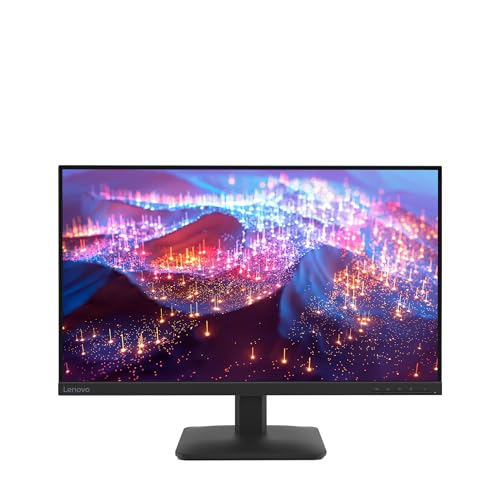
Lenovo L27e-30 27" -- Best Budget Monitor with Built-In Speakers
The Lenovo L27e-30 is a 27-inch 1080p IPS monitor with 3W built-in speakers at a budget price point. For users who need a second monitor, a meeting room display, or a basic home office setup, the built-in audio removes the need for any additional accessories. Panel quality is adequate for everyday productivity tasks and video calls. Speaker output at 3W is modest but sufficient for clear voice audio without distortion. It is a practical entry point for anyone setting up a clean desk without a soundbar budget.
Where it shines
- SMOOTH, SHARP, AND SUSTAINABLE - Elevate your workspace with the Lenovo L27-4e monitor. It
- IMMERSIVE DISPLAY - The 27” 3-sided NearEdgeless IPS panel boasts stunning color accuracy
- BRILLIANT BRIGHTNESS - Enjoy vivid colors with 99% sRGB coverage and 300 cd/m² brightness
- SPEED MEETS SIMPLICITY - The 4ms response time and 100Hz refresh rate ensure that the L27-
- CRISP AND CLEAR IMAGES - The FHD display with 16:9 aspect ratio is carefully designed to r
Before you buy
What to consider
Focus on speaker wattage per channel and whether audio tuning is mentioned in the specs. A 3W per channel minimum produces usable output; anything below that will sound thin at moderate desk volumes. If the monitor also needs to serve as a TV or smart display, models with AKG or B&O audio tuning justify the premium. Consider whether you need USB-C single-cable connectivity, since many monitors that bundle strong speakers also include USB-C charging to complement a streamlined desk setup. For regular calls and conferencing, check whether a microphone is included or whether you need a separate one.
What to consider
For related reading, see [best computer monitors for working from home](/articles/best-computer-monitor-to-work-from-home) and [best computer monitor USB-C picks](/articles/best-computer-monitor-usb-c). Review our product evaluation process at [/methodology](/methodology).
Quick answers
Built-in monitor speakers are generally adequate for video calls, YouTube, and casual music listening at moderate volumes. They are not a replacement for dedicated desktop speakers or headphones for critical listening or gaming audio. Monitors with 3W to 5W speakers per channel perform noticeably better than entry-level built-ins. For home office setups where a soundbar would clutter the desk, a quality built-in speaker monitor is a practical compromise.
Monitors with 3 to 5 watts per channel offer the most usable volume without significant distortion. Entry-level models often include 1W to 2W speakers that sound thin at higher volumes. Some premium displays include 9W to 18W total output with tuning from audio brands like Harman or B&O, which deliver noticeably richer sound. Check whether the specs list per-channel wattage or total output, as manufacturers often quote total wattage to appear more powerful.
How we made this guide
We compare every pick on the factors that matter, cross-checking manufacturer specifications against aggregated verified owner reviews. We rank independently and never take payment for placement. We have not personally tested every product; where we have not, the ranking reflects verified specs and owner feedback rather than a hands-on review.
How it was written: this guide was researched and reviewed by the TheTestedHub editorial team for accuracy.
Affiliate disclosure: TheTestedHub is reader-supported. When you buy through links on our site, we may earn a commission at no extra cost to you.
More to explore

Your Docking Station Match: CalDigit TS4 and More

Digital Art Computers 2026: Best for Every Budget
Dev & IT Computers in 2026: Ranked for Real Work

Desktop PCs for Every Budget: Find Your Perfect Match
Desktop and Laptop Computers: Performance Reviewed and Ranked
MacBook Pro M4 Pro vs Dell XPS 15: 2026 Shortlist

Buy the Best DIY Computer in 2026: Corsair One i300
