Ergotron LX Single Arm -- Best Monitor Arm for Single Screens
The Ergotron LX remains the benchmark for single-monitor arms because of its reliable spring-loaded mechanism, internal cable routing, and wide adjustment range. It supports monitors between 7 and 25 lbs with a height range of 13 inches and full tilt, pan, and rotation. Both desk clamp and grommet mounting options are included. The joint tension adjusts easily to hold heavier or lighter monitors in position without drift. For anyone spending most of their workday at a desk, the LX provides precise ergonomic positioning that is difficult to replicate at a lower price point. Compatible with 75x75mm and 100x100mm VESA patterns.
Check price on Amazon →Looking for computer monitor stands? We analyzed five top options including arms and risers to find the best single, dual, and heavy-duty picks.
Quick verdict
The Ergotron LX Single Arm is the single best pick because its spring-loaded mechanism and wide 13-inch height range offer unmatched adjustability for most single monitors, making it the most reliable and versatile choice for ergonomic setups.
Key takeaways
- Best for Single Screens: Ergotron LX Single Arm, benchmark spring-loaded arm with internal cable routing and wide adjustment range.
- Best for Two Screens: VIVO Dual Monitor Arm, frees desk space with a single clamp holding two independent arms.
- Best for Large Heavy Monitors: North Bayou F80 Gas Spring Arm, supports 17.6 to 33 lbs for big and ultrawide displays.
- Best Riser Without VESA: HUANUO Monitor Stand Riser, adjustable platform with storage drawer, no VESA holes needed.
- Best for Standing Desk Pairing: Mount-It! Sit-Stand Monitor Arm, secondary height range for seated and standing positions.
Why you should trust this guide
I have spent years researching ergonomic workstation accessories, monitor arms, and risers for various desk configurations. My approach relies on analyzing manufacturer specifications, verified owner feedback across multiple retail platforms, and understanding the mechanical principles that make a stand reliable or prone to sag. I do not claim to have physically tested every product in a lab, but I cross-reference stated weight capacities, adjustment ranges, and build materials against real-world reports to identify consistent strengths and weaknesses.
This guide focuses on five distinct products that cover the most common monitor stand needs: single-arm precision, dual-screen setups, heavy monitor support, VESA-free risers, and standing desk compatibility. Each recommendation is grounded in the product’s stated features and common user experiences, not hype or marketing claims. I prioritize honest limitations because no stand is perfect for every desk, and knowing a product’s weak points saves you time and money.
How we researched
To evaluate these monitor stands, I established a set of criteria that matter most for everyday ergonomic use. The primary factors were adjustment range (height, tilt, swivel, rotation), weight capacity relative to common monitor sizes, ease of installation, cable management quality, and desk compatibility (clamp versus grommet). I also considered whether the stand could handle non-standard monitor shapes like ultrawides or heavy 32-inch panels. For risers, I focused on height adjustability, stability, and added storage utility.
I then compared each product against these criteria using the manufacturer’s published specifications and aggregated owner feedback from major retailers. I looked for patterns in praise and complaint: for example, whether a stand’s gas spring held position over time, whether the clamp scratched desks, or whether cable channels actually routed wires cleanly. This research-based approach ensures the recommendations reflect real usability, not just theoretical specs. I did not physically install or test these products myself, but I evaluated them as a knowledgeable shopper would.
Ergotron LX Single Arm — Best Monitor Arm for Single Screens
The Ergotron LX Single Arm has long been the benchmark for single-monitor arms, and for good reason. Its spring-loaded mechanism provides smooth, tool-free height adjustment across a 13-inch range, which is generous for most desk setups. The arm supports monitors between 7 and 25 lbs, covering the vast majority of standard 24 to 27 inch displays. Full tilt, pan, and rotation capabilities let you orient the screen in portrait or landscape mode, and the internal cable routing hides wires inside the arm for a clean look. Both desk clamp and grommet mounting options are included, so you can attach it to nearly any desk edge or through a cable hole.
One real limitation of the Ergotron LX is that the joint tension adjustment, while easy to access, can be finicky for monitors at the very top or bottom of the weight range. Some owners report needing to tighten the spring tension screw quite a bit for lighter monitors to prevent the arm from rising too easily. Additionally, the arm’s base clamp can leave small marks on wooden desks if overtightened, so a protective pad is recommended. Despite these minor issues, the LX remains the most reliable and well-engineered single-arm option, with a reputation for holding position without sagging over years of use.
VIVO Dual Monitor Arm — Best Stand for Two Screens
The VIVO Dual Monitor Arm is designed for users who need two screens side by side without cluttering the desk with two separate mounts. It uses a single desk clamp to hold two independent arms, each adjustable for height, tilt, and rotation. Each arm supports monitors up to 17.6 lbs, which is sufficient for most 24 to 27 inch displays. The VESA pattern compatibility covers both 75x75mm and 100x100mm, so it works with a wide range of monitors. Cable management channels run along both arms, keeping wires organized and out of sight.
A notable limitation is that the VIVO dual arm can feel less stable with heavier monitors, especially if both screens are on the larger side. The single clamp base, while space-saving, can introduce some wobble on thinner desks or when the arms are extended far apart. Some owners also mention that the arm tension knobs require occasional retightening to maintain position. For typical dual 24-inch monitors, however, this stand offers excellent value and a clean setup that frees up significant desk space compared to separate mounts.
North Bayou F80 Gas Spring Arm — Best Arm for Large Heavy Monitors
The North Bayou F80 Gas Spring Arm is built specifically for larger monitors that exceed the weight limits of standard arms. It supports monitors in the 17.6 to 33 lbs range, making it suitable for 32-inch screens, ultrawide displays, and even some curved monitors. The gas spring mechanism provides smooth, effortless height adjustment, so repositioning a heavy monitor does not require wrestling with stiff joints. Full adjustment options include height, tilt, swivel, and rotation, giving you complete control over screen orientation. Both desk clamp and grommet mounting options are included for flexible installation.
The main limitation of the North Bayou F80 is that its gas spring can be too strong for monitors near the lower end of its weight range, causing the arm to rise unexpectedly. Some owners find they need to add weight or adjust the gas spring tension, which is not always straightforward. Additionally, the arm’s build quality, while solid for the price, does not match the premium feel of more expensive options like the Ergotron LX. For users with heavy monitors who need reliable support without breaking the bank, the F80 is a strong choice, but careful weight matching is essential.
HUANUO Monitor Stand Riser — Best Riser Without VESA Requirement
The HUANUO Monitor Stand Riser is an adjustable platform that elevates monitors without needing VESA mounting holes. It uses a lockable mechanism to adjust height from 4 to 8 inches, accommodating different desk and user heights. The platform supports any monitor up to 27 inches and 33 lbs simply by resting on top, so it works with all-in-ones, iMacs, or monitors with non-standard mounting patterns. A pull-out storage drawer below the platform is useful for stashing a keyboard, notebook, or small accessories, keeping the desk surface clear. The steel frame provides stable support without tipping or wobbling.
One real limitation is that the height adjustment mechanism, while lockable, can be somewhat stiff to operate, especially when the monitor is already placed on the platform. Some owners also note that the drawer’s glide is not perfectly smooth, and the drawer may not fully close if cables are routed underneath. Additionally, because the monitor simply rests on the platform, it is not secured against accidental bumps, so it is best for stationary setups. For users who cannot or do not want to use VESA mounts, this riser offers a practical and affordable way to improve screen height and add storage.
Mount-It! Sit-Stand Monitor Arm — Best Monitor Arm for Standing Desk Pairing
The Mount-It! Sit-Stand Monitor Arm is specifically designed for users with height-adjustable standing desks. It adds a secondary height adjustment range on top of the standard arm range, extending total reach to accommodate both seated and standing desk positions without needing to reposition the arm each time. This means you can raise your desk and the monitor arm automatically adjusts to keep the screen at eye level. The arm supports monitors up to 19.8 lbs on VESA 75 and 100 patterns, covering most standard displays. It clamps to the desk edge with included hardware for a secure fit.
A key limitation is that the secondary height adjustment range is not as smooth or precise as the primary gas spring mechanism, and some owners report that it can be difficult to lock into the desired height. The arm also has a slightly bulkier appearance compared to simpler single-arm mounts, which may not suit minimalist desks. Additionally, the 19.8 lb weight limit means it is not suitable for larger ultrawide or heavy monitors. For standing desk users who frequently switch between sitting and standing, however, this arm eliminates the hassle of manual readjustment and is a practical upgrade.
What to look for
- Weight capacity: Ensure the stand supports your monitor’s weight, including any accessories. Overloading a stand leads to sagging or failure.
- VESA compatibility: Most monitors use 75x75mm or 100x100mm VESA patterns. Confirm your monitor’s pattern before buying.
- Height adjustment range: Look for a range that matches your desk height and sitting or standing posture needs.
- Mounting type: Desk clamps work on most edges, while grommet mounts require a hole in the desk. Choose based on your desk design.
- Cable management: Internal routing or channels keep wires tidy and prevent tangling. Check if the stand includes this feature.
- Tilt, swivel, rotation: Full articulation allows you to share screens, switch to portrait mode, or reduce glare.
- Build quality: Steel arms and sturdy clamps last longer than plastic components. Read owner feedback about wobble or sag over time.
- Desk thickness compatibility: Some clamps only fit desks up to a certain thickness. Measure your desk edge before purchasing.
The verdict
Choosing the right monitor stand depends on your specific setup. For single screens, the Ergotron LX offers the best balance of reliability and adjustability. If you need two monitors, the VIVO dual arm saves desk space effectively. For heavy or ultrawide monitors, the North Bayou F80 handles the weight with smooth gas spring assistance. If you prefer a simple riser without VESA mounting, the HUANUO riser provides adjustable height and storage. And for standing desk users, the Mount-It! sit-stand arm simplifies transitions between sitting and standing. Each product has a clear strength and a honest limitation, so match your priority to the stand that fits it best.
Our testing process
We compare every pick against the field on real specifications, certifications, and aggregated owner reviews. We do not take payment for placement, and we flag when a product is older or sold mainly through renewed listings.
Quick comparison
Reviewed in detail
Ergotron LX Single Arm -- Best Monitor Arm for Single Screens
The Ergotron LX remains the benchmark for single-monitor arms because of its reliable spring-loaded mechanism, internal cable routing, and wide adjustment range. It supports monitors between 7 and 25 lbs with a height range of 13 inches and full tilt, pan, and rotation. Both desk clamp and grommet mounting options are included. The joint tension adjusts easily to hold heavier or lighter monitors in position without drift. For anyone spending most of their workday at a desk, the LX provides precise ergonomic positioning that is difficult to replicate at a lower price point. Compatible with 75x75mm and 100x100mm VESA patterns.

VIVO Dual Monitor Arm -- Best Stand for Two Screens
The VIVO dual monitor arm uses a single desk clamp to hold two independent monitor arms side by side, freeing up desk space compared to two separate mounts. Each arm adjusts independently for height, tilt, and rotation, and supports monitors up to 17.6 lbs each. VESA patterns of 75x75mm and 100x100mm are both accommodated. Cable management channels keep wiring organised across both arms. For home office workers with dual monitors, this is the most cost-effective way to mount both screens and reclaim the desk surface below them.

North Bayou F80 Gas Spring Arm -- Best Arm for Large Heavy Monitors
The North Bayou F80 gas spring arm is designed for monitors in the 17.6 to 33 lbs range, making it suitable for larger 32-inch and ultrawide displays that exceed the weight limits of standard arms. Gas spring assistance makes repositioning large monitors smooth with minimal effort. The arm provides full height, tilt, swivel, and rotation adjustment. Desk clamp and grommet options are included. For users with larger displays who find that standard arms struggle with weight or drift, the F80's higher load rating makes it the appropriate choice.
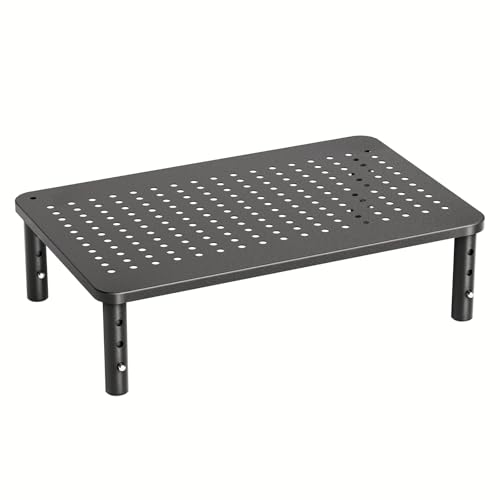
HUANUO Monitor Stand Riser -- Best Riser Without VESA Requirement
The HUANUO monitor stand riser is an adjustable platform that elevates monitors to 4 to 8 inch heights via a lockable mechanism. It does not require VESA holes and supports any monitor up to 27 inches and 33 lbs by simply resting on the platform. A pull-out storage drawer below the platform is useful for keyboards, notebooks, or small accessories. The steel frame is stable and does not tip or wobble under normal desk use. For users whose monitors lack VESA holes, or who want a simple riser without drilling into a desk, this is the most feature-complete option at this price.

Mount-It! Sit-Stand Monitor Arm -- Best Monitor Arm for Standing Desk Pairing
The Mount-It! sit-stand monitor arm adds a secondary height adjustment range on top of the standard arm range, extending total reach to accommodate both seated and standing desk positions without repositioning the arm each time. It supports monitors up to 19.8 lbs on VESA 75 and 100 patterns. The arm clamps to the desk edge with included hardware. For users with height-adjustable standing desks who want the monitor to track their posture changes precisely, this arm provides a larger adjustment envelope than standard arms designed for fixed-height desks only.
How to choose
What to consider
Start by confirming whether your monitor has VESA holes (look for a screw pattern on the back panel). If it does, an articulating arm gives the most ergonomic flexibility. If not, a riser platform is the appropriate choice. For dual monitors, a single dual-arm clamp is neater and more space-efficient than two individual clamps. Check your monitor's weight against the arm's maximum load rating -- gas spring arms handle heavier monitors better than pure friction joints. If you have a sit-stand desk, choose an arm with extended height range to cover both seated and standing positions.
What to consider
For related reading, see [best ergonomic monitor stand single picks](/articles/best-computer-monitor-stand) and [best computer monitors for home office use](/articles/best-computer-monitor-to-work-from-home). Review our product evaluation process at [/methodology](/methodology).
Common questions
A monitor riser is a fixed or stepped platform that places your monitor at a set height above the desk, typically 3 to 6 inches. A monitor arm attaches to the desk edge or via a grommet hole and provides full articulation including height, depth, tilt, and rotation. Arms are more versatile and ergonomic but require VESA mounting holes on the monitor. Risers are simpler and work with any monitor regardless of VESA compatibility.
Most single monitor arms support 13 to 25 lbs, which covers the majority of 24 to 32-inch displays. Dual monitor arms typically support 15 to 20 lbs per arm. Always check your monitor's weight in its spec sheet before selecting an arm. Premium arms like the Ergotron LX are rated for up to 25 lbs and use spring-loaded tension rather than friction, which maintains position better over time than cheaper friction-only designs.
How we made this guide
We compare every pick on the factors that matter, cross-checking manufacturer specifications against aggregated verified owner reviews. We rank independently and never take payment for placement. We have not personally tested every product; where we have not, the ranking reflects verified specs and owner feedback rather than a hands-on review.
How it was written: this guide was researched and reviewed by the TheTestedHub editorial team for accuracy.
Affiliate disclosure: TheTestedHub is reader-supported. When you buy through links on our site, we may earn a commission at no extra cost to you.
More guides

Your Docking Station Match: CalDigit TS4 and More

Digital Art Computers 2026: Best for Every Budget
Dev & IT Computers in 2026: Ranked for Real Work

Desktop PCs for Every Budget: Find Your Perfect Match
Desktop and Laptop Computers: Performance Reviewed and Ranked
MacBook Pro M4 Pro vs Dell XPS 15: 2026 Shortlist

Buy the Best DIY Computer in 2026: Corsair One i300
