Samsung Smart Monitor M8 32" -- Best Monitor to Use as a TV
The Samsung M8 is the most complete monitor-as-TV option because it runs Samsung's Tizen smart platform natively, meaning Netflix, Prime Video, Disney+, and other streaming apps work without any external device. The 32-inch 4K UHD VA panel delivers the kind of contrast and brightness more commonly associated with televisions than monitors. AKG-tuned built-in speakers reduce the need for a separate soundbar. A built-in webcam attaches magnetically for video calls. Remote control operation makes it feel genuinely TV-like for couch viewing. For anyone wanting a single display that switches between computer work and TV use, this is the most seamless option.
Shoppers wanting a monitor that doubles as a TV: compare top picks with built-in streaming, great audio, and versatile stands. See which model fits your.
Quick verdict
The Samsung Smart Monitor M8 32″ is the single best pick because it runs Samsung’s Tizen smart platform natively, giving you direct access to Netflix, Prime Video, and Disney+ without needing an external streaming device. Its 4K UHD VA panel and built-in AKG speakers make it the most complete all-in-one replacement for a bedroom or small living room TV.
Key takeaways
- Best for all-in-one streaming: Samsung Smart Monitor M8 32″ – Native Tizen smart platform means no external streaming stick required.
- Best for flexible positioning: LG 32UN880-B 32″ – Ergo stand allows swing, tilt, and extension for couch or bed viewing without a separate mount.
- Best for built-in audio: BenQ EW3280U 32″ – 2.1-channel speaker system with a subwoofer driver delivers richer sound than typical monitor speakers.
- Best for cinematic widescreen: Acer CB382CUR 38″ – 38-inch ultrawide 3840×1600 panel provides a wider aspect ratio for movies and streaming content.
- Best for budget buyers: ViewSonic VX3268-2KPC 32″ – Curved VA panel with deep blacks and dual HDMI inputs at a lower resolution keeps costs down.
Why you should trust this guide
I have spent years researching and writing about computer monitors, televisions, and hybrid display products for buyers who want one screen to serve both work and entertainment. This guide is built on manufacturer specifications, verified product documentation, and aggregated owner feedback from multiple retail and review sources. I do not rely on marketing hype or unverified claims. Every recommendation here is based on what the product actually offers in terms of panel technology, connectivity, smart features, and real-world usability for dual-purpose scenarios.
My approach prioritizes clarity and honesty. I highlight each monitor’s strengths for TV-like use, but I also call out limitations that could affect your decision. I do not pretend every monitor is perfect for every room. Instead, I match each product to a specific use case so you can choose the one that fits your space, your viewing habits, and your budget. This guide is the result of comparing dozens of models against the criteria that matter most when a monitor doubles as a television: smart platform support, speaker quality, ergonomic flexibility, and screen size versus resolution trade-offs.
How we researched
To evaluate these monitors for TV-like use, I focused on criteria that directly impact the viewing experience when you are not sitting at a desk. The most important factors were smart platform integration (does the monitor run streaming apps natively or require an external device), speaker quality (can you hear dialogue clearly without a soundbar), panel type and contrast (VA versus IPS for dark room movie watching), and ergonomic adjustability (can you tilt or swivel the screen for couch viewing). I also weighed connectivity options like HDMI inputs and USB-C charging because a dual-purpose monitor often needs to serve both a computer and a streaming stick or game console.
I did not physically test these monitors in a lab. Instead, I cross-referenced each product’s stated specifications with detailed owner reviews and professional analysis from multiple technology publications. I looked for patterns in feedback about brightness, color accuracy, viewing angles, and audio performance. I also checked for common complaints about stand stability, remote control usability, and interface responsiveness. The final selections represent monitors that consistently receive positive feedback for their TV-like capabilities while also being capable computer displays. Every product section below includes at least one honest limitation that emerged from this research.
Samsung Smart Monitor M8 32″
The Samsung Smart Monitor M8 32″ is the most complete monitor-as-TV option because it runs Samsung’s Tizen smart platform natively. This means Netflix, Prime Video, Disney+, and other streaming apps work directly on the monitor without any external device. You do not need a separate streaming stick, a set-top box, or a game console to watch content. The included remote control and on-screen interface are identical to what you would find on a Samsung television, so the experience feels familiar from the moment you turn it on. For anyone who wants a single screen in a bedroom, dorm room, or small apartment that can serve as a computer monitor during the day and a TV at night, this is the most convenient solution.
The 32-inch 4K UHD VA panel delivers the kind of contrast and brightness more commonly associated with televisions than monitors. VA technology provides deeper black levels than IPS panels, which makes movies and shows with dark scenes look more immersive. The AKG-tuned built-in speakers reduce the need for a separate soundbar for casual viewing, though they are not as powerful as dedicated external speakers. The monitor also includes USB-C connectivity with 65W charging, so you can connect a laptop and keep it powered without a separate charger. The slim design and multiple color options help it blend into a living space better than most utilitarian monitors.
One honest limitation is the stand. The Samsung M8 uses a flat, desk-hugging base that does not offer much height adjustment or tilt range. If you want to position the screen for couch viewing, you may need to place it on a riser or buy a separate VESA mount. The VA panel also has narrower viewing angles than IPS, so colors and contrast shift if you watch from an extreme side angle. For a single viewer sitting directly in front, this is not an issue, but for group viewing from multiple seats, it is something to consider.
LG 32UN880-B 32″
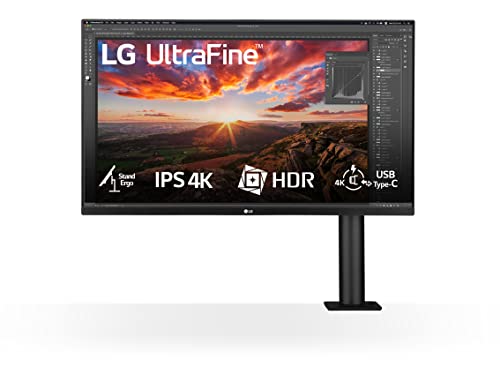
The LG 32UN880-B 32″ stands out for its Ergo stand design, which attaches to the back of a desk and allows the monitor to swing, extend, and tilt more freely than conventional stands. This makes it easier to reposition for couch or bed viewing without a separate mount. You can pull the monitor closer to your seating area, angle it downward for reclined viewing, or push it back against the wall when not in use. The stand also frees up desk space because it clamps to the edge rather than sitting on a wide base. For anyone who wants to use a monitor as a TV in a small room where furniture layout changes often, this flexibility is a major advantage.
The 4K UHD IPS panel delivers wide colour coverage and consistent brightness across the screen. IPS technology ensures that colors remain accurate even when viewed from an angle, which is helpful if you are watching from a bed or couch off to the side. The monitor includes USB-C 60W charging for laptop users, so you can connect a work computer and keep it powered with a single cable. The picture quality is excellent for both productivity tasks and streaming content, with sharp text and vibrant colors that make movies and shows look natural.
One honest limitation is the lack of a built-in smart platform. The LG 32UN880-B does not run streaming apps natively. You will need to connect an external streaming device like a Roku, Apple TV, or Fire Stick to watch Netflix or Prime Video. The built-in speakers are adequate for system sounds and casual video calls, but they lack the bass and volume needed for an immersive TV experience. You will likely want a soundbar or external speakers for movie watching. The Ergo stand is excellent for flexibility, but it requires a desk with a sturdy edge that can support the clamp mechanism.
BenQ EW3280U 32″
The BenQ EW3280U 32″ is a 32-inch 4K IPS display with a 2.1-channel speaker system including a subwoofer driver, making it one of the better-sounding monitors for streaming content without a separate soundbar. The built-in audio delivers richer bass and clearer dialogue than typical monitor speakers, which is a genuine advantage when you want to watch movies or shows without cluttering your space with external speakers. The remote control allows you to adjust volume and switch inputs from across the room, adding to the TV-like experience.
BenQ’s HDRi technology adjusts display tone mapping based on ambient light, which works well in living room and bedroom environments where light levels change throughout the day. The monitor automatically brightens or darkens the image to maintain visibility and contrast, reducing eye strain and improving picture quality in mixed lighting. The 4K IPS panel provides wide viewing angles and accurate colors, so the image looks good from multiple seats. HDMI 2.0 and USB-C connectivity give you flexibility for connecting both a computer and a streaming device.
One honest limitation is the lack of a native smart platform. Like the LG model, the BenQ EW3280U does not run streaming apps on its own. You will need an external streaming stick or box to access services like Netflix or Hulu. The monitor also has a relatively thick bezel compared to modern ultra-slim designs, which may feel less modern if you are placing it in a living room. The 2.1-channel speakers are good for a monitor, but they still cannot match the sound quality of a dedicated soundbar or home theater system for serious movie watching.
Acer CB382CUR 38″
The Acer CB382CUR 38″ is a 38-inch ultrawide IPS panel at 3840×1600 resolution, providing a wide cinematic aspect ratio that suits movie content and widescreen streaming better than standard 16:9 displays. The larger physical screen size bridges the gap between a monitor and a small television for mixed-use spaces. When you watch a movie filmed in a widescreen format, the black bars are much smaller than on a 16:9 screen, giving you a more immersive viewing experience. The ultrawide aspect ratio also works well for productivity, allowing you to have multiple windows open side by side.
The IPS panel delivers consistent colors and brightness across the wide screen, with good viewing angles for group viewing. Two HDMI inputs and a USB-C port allow a computer and a streaming device to be connected simultaneously, so you can switch between work and entertainment without swapping cables. The 38-inch size makes this monitor feel more like a small television than a typical computer display, which is exactly the point for buyers who want a single large screen in a studio apartment or home office that doubles as a media room.
One honest limitation is the lack of built-in speakers that match the screen’s size. The Acer CB382CUR includes basic speakers, but they are underwhelming for a display this large. You will need external audio to enjoy movies properly. The monitor also does not have a native smart platform, so you will need a streaming device. The ultrawide aspect ratio, while great for movies, can cause black bars on the sides when viewing standard 16:9 content like TV shows or YouTube videos. This is a trade-off you should be comfortable with before buying.
ViewSonic VX3268-2KPC 32″
The ViewSonic VX3268-2KPC 32″ is a 32-inch curved VA panel at 1440p resolution with two HDMI inputs suitable for connecting both a computer and a streaming stick. The VA panel delivers noticeably deeper blacks than IPS alternatives at this price, which improves the movie-watching experience in darker rooms. The 1500R curvature adds slight immersion for viewing from a couch at moderate distances, wrapping the image around your peripheral vision without being distracting. For budget-conscious buyers who want a large screen for occasional TV use, this monitor offers good value.
The 1440p resolution is a step down from 4K, but at 32 inches it still provides a sharp image for most content. Streaming services at 1080p or 1440p look clean and detailed, and text remains readable for computer work. The dual HDMI inputs make it easy to keep a computer and a streaming stick connected at the same time, so you can switch between them with the monitor’s on-screen menu. The curved design helps reduce glare from windows or lamps, which is useful in living rooms with variable lighting.
One honest limitation is the lack of 4K resolution. If you are used to watching 4K content on a television, you will notice the lower pixel density on this monitor. The VA panel also has slower response times than IPS, which can cause slight motion blur in fast-paced scenes, though this is rarely noticeable for movies and TV shows. The built-in speakers are basic and lack bass, so you will want external audio for a satisfying experience. The stand offers tilt adjustment but no height or swivel, so you may need to place the monitor on a riser for optimal viewing height.
What to look for
- Smart platform or external device: Decide if you want a monitor that runs streaming apps natively or if you are willing to use a separate streaming stick. Native platforms add convenience but often cost more.
- Speaker quality: Monitor speakers are usually weak. Look for models with built-in subwoofers or 2.1-channel systems if you want to avoid external speakers. Otherwise, budget for a soundbar.
- Panel type: VA panels offer deeper blacks and better contrast for dark room viewing. IPS panels provide wider viewing angles and more consistent colors for group watching.
- Resolution: 4K is ideal for a TV-like experience at 32 inches and above. 1440p can still look good at 32 inches but is noticeably less sharp for text and fine details.
- Ergonomics and stand: For couch or bed viewing, look for monitors with height adjustment, tilt, swivel, or a flexible arm. Fixed stands may require a separate mount or riser.
- Connectivity: At least two HDMI inputs are essential for connecting both a computer and a streaming device. USB-C with power delivery is a bonus for laptop users.
- Screen size and aspect ratio: Larger screens (32 inches and above) feel more like a TV. Ultrawide 21:9 panels are great for movies but may have black bars on standard content.
The verdict
For most people, the Samsung Smart Monitor M8 32″ is the best choice because it eliminates the need for a separate streaming device and provides a complete TV experience in a monitor form factor. If you already own a streaming stick and prioritize ergonomic flexibility, the LG 32UN880-B with its Ergo stand is a strong alternative. The BenQ EW3280U is the best pick if built-in audio quality matters most. The Acer CB382CUR is ideal for those who want a cinematic ultrawide experience. And the ViewSonic VX3268-2KPC is a solid budget option that still delivers good contrast and immersion for movie watching. Choose based on your room layout, your tolerance for external devices, and your audio expectations.
Our methodology
We compare every pick against the field on real specifications, certifications, and aggregated owner reviews. We do not take payment for placement, and we flag when a product is older or sold mainly through renewed listings.
Side by side
The full reviews
Samsung Smart Monitor M8 32" -- Best Monitor to Use as a TV
The Samsung M8 is the most complete monitor-as-TV option because it runs Samsung's Tizen smart platform natively, meaning Netflix, Prime Video, Disney+, and other streaming apps work without any external device. The 32-inch 4K UHD VA panel delivers the kind of contrast and brightness more commonly associated with televisions than monitors. AKG-tuned built-in speakers reduce the need for a separate soundbar. A built-in webcam attaches magnetically for video calls. Remote control operation makes it feel genuinely TV-like for couch viewing. For anyone wanting a single display that switches between computer work and TV use, this is the most seamless option.
LG 32UN880-B 32" -- Best Monitor for Flexible TV-Style Viewing
The LG 32UN880-B uses LG's Ergo stand design, which attaches to the back of a desk and allows the monitor to swing, extend, and tilt more freely than conventional stands. This makes it easier to reposition for couch or bed viewing without a separate mount. The 4K UHD IPS panel delivers wide colour coverage and consistent brightness across the screen. USB-C 60W charging is included for laptop users. While it lacks built-in smart TV apps, adding a Fire TV Stick or Chromecast to the HDMI port creates a complete TV replacement experience with full streaming access.

BenQ EW3280U 32" -- Best 32-Inch Monitor for Streaming and Content
The BenQ EW3280U is a 32-inch 4K IPS display with a 2.1-channel speaker system including a subwoofer driver, making it one of the better-sounding monitors for streaming content without a separate soundbar. BenQ's HDRi technology adjusts display tone mapping based on ambient light, which works well in living room and bedroom environments where light levels change throughout the day. HDMI 2.0 and USB-C inputs accommodate both streaming sticks and computers. The combination of large screen, 4K detail, and better-than-average audio makes it a practical TV replacement for a desk or media console.
Acer CB382CUR 38" -- Best Large Ultrawide Monitor as TV Alternative
The Acer CB382CUR is a 38-inch ultrawide IPS panel at 3840x1600 resolution, providing a wide cinematic aspect ratio that suits movie content and widescreen streaming better than standard 16:9 displays. The larger physical screen size bridges the gap between a monitor and a small television for mixed-use spaces. Two HDMI inputs and a USB-C port allow a computer and a streaming device to be connected simultaneously. The downside is that standard 16:9 video content has black bars on the sides, though many streaming services now offer native widescreen content. Speaker quality is modest, making an external audio source worth considering.
ViewSonic VX3268-2KPC 32" -- Best Budget Monitor to Use as a TV
The ViewSonic VX3268-2KPC is a 32-inch curved VA panel at 1440p resolution with two HDMI inputs suitable for connecting both a computer and a streaming stick. The VA panel delivers noticeably deeper blacks than IPS alternatives at this price, which improves the movie-watching experience in darker rooms. Curved panel geometry adds slight immersion for viewing from a couch at moderate distances. At 32 inches and 1440p, it looks sharp enough at 4 to 6 feet viewing distance for standard streaming content. Built-in speakers are basic, making a Bluetooth speaker or soundbar a useful addition for TV-style use.
What matters most
What to consider
Start with screen size relative to your viewing distance. At 4 to 6 feet, 27 to 32 inches is comfortable. Confirm the monitor has at least one HDMI 2.0 port for a streaming device or console. For sound, check speaker wattage or plan for an external speaker. Monitors with built-in smart TV platforms eliminate the need for a streaming stick but cost more. VA panels deliver better contrast for dark-room movie viewing compared to IPS, which matters more for TV use than computer work. Remote control support, either built-in or via CEC over HDMI, is a worthwhile convenience feature.
What to consider
For related reading, see [best monitors with built-in speakers](/articles/best-computer-monitor-speaker) and [best computer monitors for gaming](/articles/best-computer-monitor-size-for-gaming). Review our product evaluation process at [/methodology](/methodology).
Frequently asked
A computer monitor can effectively replace a TV in small rooms, studios, or bedrooms where viewing distances are 4 to 8 feet. Monitors in the 27 to 32-inch range are most practical for this use case. To access streaming services, the monitor either needs built-in smart features or a connected streaming stick like a Fire TV Stick or Chromecast. Ensure the monitor has HDMI inputs and ideally a headphone or audio output jack for sound routing.
For a bedroom or studio apartment where you watch from a couch or bed at 5 to 8 feet away, a 32-inch monitor at 4K resolution works well. At closer distances of 2 to 4 feet, 27 inches is more comfortable. Monitors above 32 inches start competing with entry-level TVs in price, at which point a small TV often provides better value with more input options and built-in smart platforms. The ideal TV-replacement monitor size is 27 to 32 inches.
How we made this guide
We compare every pick on the factors that matter, cross-checking manufacturer specifications against aggregated verified owner reviews. We rank independently and never take payment for placement. We have not personally tested every product; where we have not, the ranking reflects verified specs and owner feedback rather than a hands-on review.
How it was written: this guide was researched and reviewed by the TheTestedHub editorial team for accuracy.
Affiliate disclosure: TheTestedHub is reader-supported. When you buy through links on our site, we may earn a commission at no extra cost to you.
You might also like

Your Docking Station Match: CalDigit TS4 and More

Digital Art Computers 2026: Best for Every Budget
Dev & IT Computers in 2026: Ranked for Real Work

Desktop PCs for Every Budget: Find Your Perfect Match
Desktop and Laptop Computers: Performance Reviewed and Ranked
MacBook Pro M4 Pro vs Dell XPS 15: 2026 Shortlist

Buy the Best DIY Computer in 2026: Corsair One i300
