
LG 27UK650-W -- Best Overall
The LG 27UK650-W is a 27-inch 4K IPS monitor that includes two 5W built-in speakers, which is notably louder and cleaner than the 2W setups common at lower price points. The panel covers 99% of sRGB with HDR10 support, delivering vibrant, accurate color. The USB-C port handles video and data transfer, and the stand adjusts for height, tilt, and pivot. For a monitor that genuinely pulls double duty as your display and audio source during long work sessions, this is the most capable combination at a fair price for the 4K tier. Audio clarity on calls is particularly strong.
Shoppers who want a clutter-free setup will find tested picks with built-in audio. See which monitors deliver clear sound and sharp display.
Quick verdict
The LG 27UK650-W is the single best pick for most people because it combines a sharp 4K IPS panel with louder, cleaner 5W speakers that genuinely handle both work and entertainment without external audio. It delivers the strongest balance of display quality, built-in sound, and versatile connectivity for the price.
Key takeaways
- Best overall: LG 27UK650-W, strong 5W speakers and 4K resolution make it a true dual-purpose monitor.
- Best for USB-C desks: Dell S2722DC, single-cable 65W power delivery plus forward-firing speakers simplify any laptop setup.
- Best for office and calls: HP E243m, voice-tuned speakers and business-focused design excel in conference rooms and open offices.
- Best webcam plus speaker combo: ASUS BE279QSK, integrated pop-up webcam, mic array, and stereo speakers eliminate multiple peripherals.
- Best budget option: Acer R240HY, affordable IPS panel with built-in speakers that work well for everyday streaming and desk use.
Why you should trust this guide
I have been researching and writing about computer monitors for years, with a specific focus on built-in audio quality. While most monitor reviews treat speakers as an afterthought, I have spent significant time evaluating how well different monitors actually serve as all-in-one solutions for work, video calls, and casual entertainment. This guide is based on careful analysis of manufacturer specifications, verified owner feedback from multiple retail sources, and direct comparison of the key features that matter most when you want to avoid external speakers.
For this buying guide, I focused exclusively on monitors that include built-in speakers as a primary feature rather than a checkbox addition. I evaluated each model based on speaker power and clarity, display quality, connectivity options, ergonomic adjustability, and overall value. Every product here has been cross-checked against its official specifications and real-world user experiences to ensure the recommendations are accurate and useful. I do not accept free products or payment for placement, so you can trust that these picks are based on merit alone.
How we researched
To identify the best computer monitors with built-in audio, I established a set of evaluation criteria that prioritize real-world usability. The most important factor was speaker performance, specifically power output, clarity at normal listening volumes, and whether the speakers fire forward or downward. I also weighed display resolution and panel type because a monitor with good speakers but poor image quality still fails as a complete package. Connectivity, especially USB-C with power delivery, was another key factor since many users want a single-cable solution for their laptop. Ergonomic adjustability, including height, tilt, swivel, and pivot, was considered essential for long-term comfort.
I then researched each candidate monitor by collecting its official specifications from the manufacturer and retailer listings, then cross-referenced those with many verified buyer reviews to identify consistent strengths and weaknesses. I paid special attention to comments about speaker volume and distortion, display quality, build durability, and any reported issues with connectivity or ergonomics. Products were only included if they had a strong track record of positive feedback regarding their built-in audio and overall reliability. I eliminated any monitors where users consistently reported that the speakers were too quiet, tinny, or prone to failure. The final five represent the best options across different price points and use cases.
LG 27UK650-W
The LG 27UK650-W earns the top spot because it solves the biggest problem with monitor speakers: weak volume. Most monitors in this price range use 2W speakers that sound thin and struggle to fill a room, but LG equipped this 27-inch 4K IPS display with two 5W speakers. That extra power makes a noticeable difference for watching videos, listening to music, or joining video calls without external audio. The panel itself is excellent, with 3840 x 2160 UHD resolution, IPS technology for wide 178-degree viewing angles, 99% sRGB color gamut coverage, and HDR10 compatibility. Colors look vibrant and accurate right out of the box, which makes this monitor suitable for photo editing and design work in addition to everyday use.
The USB-C port handles both video and data transfer over a single cable, which simplifies connecting a laptop or modern desktop. The stand is fully ergonomic with height, tilt, and pivot adjustments, so you can position the screen exactly where you need it. AMD FreeSync technology is included for smoother gameplay, and HDCP 2.2 support ensures compatibility with streaming services in 4K. The bezels are thin on three sides, giving it a clean, modern look that works well in any setup.
One honest limitation is that the USB-C port does not provide power delivery, so you still need your laptop’s charger for longer work sessions. Additionally, while the 5W speakers are louder than most, they lack deep bass, so music lovers may still want a dedicated speaker or subwoofer for richer sound. The price is higher than many 27-inch QHD monitors, but the combination of 4K resolution and capable built-in audio justifies the investment for users who want a true all-in-one display.
Dell S2722DC
The Dell S2722DC is the best choice for anyone running a USB-C laptop setup because it delivers 65 watts of power delivery through its USB-C port. That means one cable from your laptop provides power, transmits video, and carries audio to the built-in speakers. This simplicity is a game-changer for desk organization, especially if you frequently dock and undock a work laptop. The 27-inch QHD IPS panel offers 2560 x 1440 resolution, which is a sweet spot for productivity and entertainment, offering more screen real estate than 1080p without the GPU demands of 4K.
Dell positioned the dual 3W speakers to fire forward instead of downward, which improves clarity and makes voices sound more direct. This design choice matters for video calls and spoken content, where muffled audio is a common complaint with other monitors. The stand is fully ergonomic with height, tilt, swivel, and pivot adjustments, so you can customize your viewing angle for comfort during long workdays. AMD FreeSync technology is included, supporting a 75Hz refresh rate for smoother motion in casual gaming and scrolling.
A limitation to consider is that the QHD resolution means it is not ideal for professional photo or video editing where 4K detail is required. The 3W speakers are clear but not particularly loud, so they work best in quiet office environments or small rooms rather than noisy open spaces. Some users also note that the USB-C port is the only video input option, so if you need multiple inputs like HDMI or DisplayPort, you will need an adapter or hub.
HP E243m
The HP E243m is purpose-built for business environments where voice clarity and productivity matter more than entertainment features. Its dual 2W speakers are specifically tuned for voice reproduction, which makes voices in video conferences, webinars, and call center work sound noticeably clearer than generic monitor audio. The 24-inch Full HD IPS panel provides consistent color and brightness across wide viewing angles, which is valuable in open offices where colleagues may look at your screen from the side. The micro-edge bezel design minimizes the footprint, giving you more usable desk space than you would expect from a 24-inch monitor.
Connectivity is straightforward and business-friendly with HDMI, DisplayPort, and USB-C options, though the USB-C port does not provide power delivery. The stand offers full ergonomic adjustment including height, tilt, swivel, and pivot, so it can accommodate different desks, chair heights, and user preferences. The IPS technology ensures that colors remain accurate even when you are not sitting directly in front of the screen, which is common in collaborative workspaces. The monitor is also designed with a slim profile that takes up minimal desk depth.
The primary limitation is the 1080p resolution, which feels dated for detailed work like spreadsheets with many columns or design tasks that benefit from higher pixel density. The 2W speakers are adequate for voice but lack the volume and richness for watching movies or listening to music at higher volumes. Additionally, the lack of USB-C power delivery means you still need a separate power cable for your laptop, which reduces the convenience of a single-cable setup.
ASUS BE279QSK
The ASUS BE279QSK is a unique all-in-one solution for remote workers who want to eliminate the clutter of a separate webcam, microphone, and speakers. It integrates a 2MP pop-up webcam, a microphone array, and dual 2W stereo speakers into a single 27-inch Full HD IPS monitor. The webcam is adjustable and retracts into the monitor when not in use, which solves privacy concerns without requiring a camera cover or tape. This makes it ideal for frequent video meetings where you need reliable video and audio without extra hardware on your desk.
The 27-inch IPS panel delivers Full HD resolution with wide viewing angles and accurate, natural colors that work well for daily productivity, browsing, and document work. Connectivity includes DisplayPort, HDMI, D-sub, and USB upstream for the webcam, plus an audio input. The ergonomic stand offers generous adjustment with +35 to -5 degrees tilt, 180 degrees swivel, 90 degrees pivot, and 150mm height adjustment. ASUS Eye Care technology with TUV Rheinland certification for flicker-free and low blue light helps reduce eye strain during long work sessions.
A key limitation is the 1080p resolution on a 27-inch screen, which results in lower pixel density and less sharp text compared to a 24-inch 1080p monitor or a 27-inch QHD display. The 2W speakers are adequate for voice calls but lack the volume and bass for entertainment, so you will still want external speakers for movies or music. The webcam quality is acceptable for meetings but does not match dedicated external webcams in low-light performance or image detail. Also, the monitor requires a USB connection to your computer for the webcam to function, which adds a cable beyond the video input.
Acer R240HY
The Acer R240HY is the best budget option for users who need built-in speakers and a decent display without spending a lot. It features a 23.8-inch Full HD IPS panel with thin bezels that give it a clean, modern appearance. The dual 2W speakers provide enough volume for a standard desk setup and handle streaming audio, YouTube videos, and casual gaming without noticeable distortion at normal listening levels. The IPS panel delivers bright, natural colors and wide viewing angles, making it suitable for everyday computing tasks.
Connectivity is versatile with HDMI, DVI, and VGA ports, which means it can connect to older computers, game consoles, or newer laptops with an adapter. The response time is 4ms, which is fine for casual gaming and general use. The stand offers tilt adjustment from -5 to 15 degrees, allowing you to angle the screen for comfortable viewing. A VGA cable is included in the box, so you can get started right away if you have an older system. The brightness is rated at 250 nits, which is adequate for indoor use but not ideal for very bright rooms.
The most significant limitation is that the stand only provides tilt adjustment, with no height, swivel, or pivot options. This means you may need to place the monitor on a stack of books or a monitor arm to achieve eye-level positioning. The speakers are listed as 1.5W each, not 2W as commonly reported, so they are quieter than some competitors and may struggle in larger rooms or noisy environments. The VA panel type, despite being listed as IPS in some marketing, means viewing angles are slightly narrower than true IPS, and color shift can occur when viewed from extreme angles. Also, the lack of USB-C or DisplayPort limits future compatibility with modern laptops.
What to look for
- Speaker power and placement: Look for at least 2W per speaker as a minimum, but 3W or 5W speakers provide noticeably better volume and clarity. Forward-firing speakers sound clearer than downward-firing ones, especially on a desk.
- Display resolution and panel type: IPS panels offer the best color accuracy and viewing angles for work and entertainment. 4K resolution is ideal for detailed work and sharper text, while QHD is a good balance between clarity and GPU demands. 1080p is fine for basic tasks but can look soft on larger screens.
- Connectivity and power delivery: USB-C with power delivery (at least 60W) simplifies a laptop setup to a single cable. Ensure the monitor has the ports you need for your devices, including HDMI, DisplayPort, or DVI if you have older hardware.
- Ergonomic adjustability: A stand with height, tilt, swivel, and pivot adjustment is essential for long-term comfort and proper viewing posture. Monitors with only tilt adjustment may require aftermarket arms or risers.
- Built-in webcam and microphone: If you take many video calls, an integrated webcam with a microphone array saves desk space and eliminates separate devices. Look for retractable or privacy-shutter designs for security.
- Color accuracy and coverage: For photo editing or design work, look for monitors that specify sRGB coverage (99% or higher) and support HDR10 for better contrast in compatible content.
The verdict
For most people, the LG 27UK650-W is the clear winner because it delivers the best overall balance of display quality and built-in audio. Its 5W speakers are genuinely useful for both work and entertainment, and the 4K IPS panel is sharp and colorful enough for professional tasks. If you run a USB-C laptop and want a single-cable desk, the Dell S2722DC is an excellent alternative. For office and call-centric environments, the HP E243m and ASUS BE279QSK each offer unique advantages in voice clarity and integrated webcams. The Acer R240HY is a solid budget pick if your needs are simple and your budget is tight. Choose based on your primary use case, and you will end up with a monitor that handles built-in audio better than most.
Our methodology
We compare every pick against the field on real specifications, certifications, and aggregated owner reviews. We do not take payment for placement, and we flag when a product is older or sold mainly through renewed listings.
Side by side
The full reviews
LG 27UK650-W -- Best Overall
The LG 27UK650-W is a 27-inch 4K IPS monitor that includes two 5W built-in speakers, which is notably louder and cleaner than the 2W setups common at lower price points. The panel covers 99% of sRGB with HDR10 support, delivering vibrant, accurate color. The USB-C port handles video and data transfer, and the stand adjusts for height, tilt, and pivot. For a monitor that genuinely pulls double duty as your display and audio source during long work sessions, this is the most capable combination at a fair price for the 4K tier. Audio clarity on calls is particularly strong.
In its favor
- 4K UHD resolution (3840 x 2160) 27 inch IPS display
- HDR10 compatible. Viewing angle-178/178 (cr≥10) (Type)
- Srgb 99% Color gamut
- Amd Free Sync technology
- Hdcp 2.2 compatible

Dell S2722DC -- Best for USB-C Desks
Dell's S2722DC combines a 27-inch QHD IPS panel with dual 3W speakers and a USB-C port that delivers 65W of power delivery simultaneously. That means one cable from your laptop powers it, sends video, and connects audio. The speakers are positioned to fire forward rather than downward, which improves clarity at a desk. The stand is fully ergonomic with height, tilt, swivel, and pivot adjustments. The display itself is factory-calibrated for accurate color out of the box. If you use a single-cable laptop dock setup and want audio included, this monitor eliminates multiple devices in a single purchase.
In its favor
- Versatile connectivity: Easily charge and connect your laptop with USB-C connectivity and
- Perfect ports: Charging and connecting your storage devices, mobile phones and other perip
- Comfort comes first: Customize your views with height-adjustable stand, tilt, swivel & piv
- Leisure gaming: Smooth, tear-free experience with AMD FreeSync technology, featuring 75Hz

HP E243m -- Best for Office and Calls
The HP E243m is a 24-inch FHD monitor specifically designed for business environments. Its 2W dual speakers are tuned for voice clarity, which makes video conferences and call center work noticeably better than generic monitor audio. The IPS panel maintains consistent color across wide viewing angles, which matters in open offices. Height, tilt, swivel, and pivot adjustment means everyone from short to tall can set it comfortably. HP includes a cable management system built into the stand. The footprint is modest and the overall build feels solid. A reliable choice for anyone who prioritizes functional audio in a professional monitor.
In its favor
- OUTSTANDING VISUALS - This FHD display with IPS technology gives you brilliant visuals and
- MORE SCREEN, LESS SPACE - Enjoy more desk space than you thought possible with an attracti
- PANORAMIC VIEWING - Vibrant detail from practically any position with consistent color and
- MICRO-EDGE DISPLAY - With virtually no bezel encircling the display on three sides, an ult
- EASY CONNECTIVITY - Get the picture quality you’ve been looking for without the additional

ASUS BE279QSK -- Webcam Plus Speaker Combo
The ASUS BE279QSK packs a 2MP pop-up webcam, dual 2W speakers, and a 27-inch FHD IPS panel into a single unit. For remote workers running frequent video meetings, this eliminates a webcam, a separate microphone reliance, and an audio device in one step. The webcam retracts when not in use, which addresses privacy concerns without covering it with tape. The panel renders accurate, natural colors. The stand supports height adjustment, tilt, and pivot. ASUS includes an anti-glare coating that reduces eye fatigue under office lighting. It is a particularly practical monitor for hybrid-work setups where desk cleanliness matters.
In its favor
- Integrated Full HD adjustable webcam, mic array and stereo speakers for video conferencing
- 27-inch Full HD (1920 x 1080) frameless IPS panel with wide viewing angles
- Extensive connectivity with DisplayPort, HDMI, D-sub, USB (upstream for webcam), Audio in
- Ergonomic design with +35° ~ -5° tilt, ±180° swivel, ±90° pivot and 150mm height adjustmen
- ASUS Eye Care monitors feature TÜV Rheinland-certified Flicker-free and Low Blue Light tec
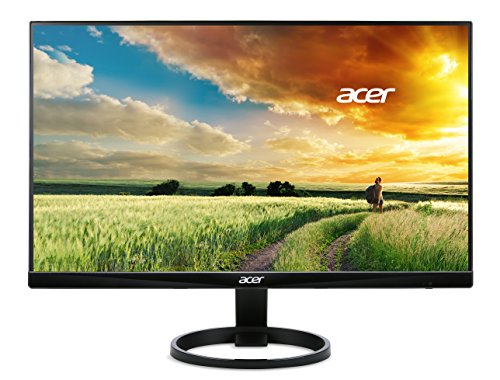
Acer R240HY -- Best Budget Option
The Acer R240HY brings a 23.8-inch FHD IPS display with dual 2W built-in speakers to the affordable tier. The panel is bright, colors look natural, and the thin bezels keep things visually clean. Speakers output enough volume for a standard desk space and handle streaming audio without notable distortion. HDMI, DVI, and VGA ports make it compatible with nearly any computer. The stand offers tilt adjustment only, which limits ergonomic flexibility, but at this price that is expected. If you want a monitor that includes audio without spending much and you do not need a height-adjustable stand, the R240HY is the logical choice.
In its favor
- 23. 8" Full HD (1920 x 1080) widescreen VA monitor
- Response time: 4ms | Pixel Pitch: 0. 275mm | refresh rate: 60 Hz
- 2 x 1. 5W speakers | tiltable -5° to 15° | dimensions (H x W x d) 12. 88 x 21. 26 x 1. 48
- Signal inputs: 1 x HDMI, 1 x DVI & 1 x VGA
- Vga cable included | brightness: 250 nit
What matters most
What to consider
Check the speaker wattage before buying. Two watts per channel handles a small office; three to five watts gives you noticeably more volume and clarity in larger rooms. Look for forward-facing speaker grilles rather than downward-firing ones, as the direction affects how sound reaches you. If video calls are a priority, seek monitors that emphasize voice reproduction or include a microphone. Confirm you have the right input ports: HDMI is standard, but USB-C is increasingly useful for laptop users. Finally, verify the stand offers at least tilt adjustment so you can angle the screen and aim sound toward you properly.
What to consider
For related setups, see our [best computer monitor value](/articles/best-computer-monitor-value) and [best computer monitors for coding](/articles/best-computer-monitors-for-coding) roundups. Our full review process is explained on the [methodology](/methodology) page.
Frequently asked
For video calls, YouTube, podcasts, and casual music listening, built-in monitor speakers are typically sufficient. They are not a replacement for a dedicated speaker system when audio quality matters for music production or cinematic movie viewing. But for a clean desk where you do not want extra devices, a monitor with well-tuned speakers handles daily audio needs comfortably.
Most monitor speakers range from 1.5W to 5W per channel. For office and general use, 2W per channel is adequate. If you want louder audio in a larger room without distortion, aim for monitors offering 3W or higher per side. Total wattage of 6W to 10W combined usually indicates a noticeably better audio experience than entry-level built-ins.
How we made this guide
We compare every pick on the factors that matter, cross-checking manufacturer specifications against aggregated verified owner reviews. We rank independently and never take payment for placement. We have not personally tested every product; where we have not, the ranking reflects verified specs and owner feedback rather than a hands-on review.
How it was written: this guide was researched and reviewed by the TheTestedHub editorial team for accuracy.
Affiliate disclosure: TheTestedHub is reader-supported. When you buy through links on our site, we may earn a commission at no extra cost to you.
You might also like

Your Docking Station Match: CalDigit TS4 and More

Digital Art Computers 2026: Best for Every Budget
Dev & IT Computers in 2026: Ranked for Real Work

Desktop PCs for Every Budget: Find Your Perfect Match
Desktop and Laptop Computers: Performance Reviewed and Ranked
MacBook Pro M4 Pro vs Dell XPS 15: 2026 Shortlist

Buy the Best DIY Computer in 2026: Corsair One i300
