
ASUS TUF VG27AQ -- Best Overall
The ASUS TUF VG27AQ is a 27-inch 1440p IPS monitor running at 144Hz, with ELMB Sync technology that enables motion blur reduction and adaptive sync simultaneously. G-Sync Compatible and FreeSync support covers both AMD and NVIDIA users. The IPS panel delivers accurate colors with 125% sRGB coverage and HDR support that is functional rather than just a marketing badge. The stand is fully adjustable with height, tilt, swivel, and pivot. 1ms MPRT response time keeps fast-action scenes sharp. For a primary gaming monitor that also handles color-sensitive creative work, this hits a strong balance across all categories.
The ASUS TUF VG27AQ eliminates screen tearing and motion blur with ELMB Sync, delivering smooth 1440p gaming and work. Compare top 144Hz monitors now.
Quick verdict
For most people, the ASUS TUF VG27AQ is the single best pick because it balances a sharp 1440p IPS panel, a fully adjustable stand, and ELMB Sync technology that reduces motion blur without sacrificing adaptive sync, covering both NVIDIA and AMD users cleanly.
Key takeaways
- Best Overall: ASUS TUF VG27AQ, combines 1440p resolution, ELMB Sync, and a fully adjustable stand for gaming and work.
- Best 1440p IPS: LG 27GL83A-B, delivers rich Nano IPS color coverage (98% DCI-P3) with a clean, fast 144Hz panel.
- Best Budget Curved: AOC C24G1A, offers a 1500R curved VA panel and 165Hz refresh rate at a low price with height adjustment.
- Best IPS for Esports: MSI Optix G273, provides a flat 27-inch IPS panel with 165Hz and 1ms response for competitive play.
- Strong Color, Fair Price: ViewSonic XG2405, gives you 90% DCI-P3 color coverage and a fully ergonomic stand at a budget-friendly price.
Why you should trust this guide
I have spent years researching computer monitors across every price tier, from budget 1080p panels to high-end 4K displays. My approach relies on cross-referencing manufacturer specifications, verified owner feedback from multiple retail platforms, and professional reviews to identify consistent strengths and weaknesses. I do not claim to have tested these monitors in a lab; instead, I evaluate what each product promises and how those promises hold up under real-world use based on aggregated data from hundreds of owners.
For this guide, I focused on monitors that deliver smooth motion at 144Hz or higher while maintaining strong color accuracy and ergonomic flexibility. I prioritized models that serve both gaming and productivity tasks, because most buyers want a single monitor that handles work during the day and play at night. Every product listed here has been on the market long enough to accumulate substantial owner feedback, which helps me identify common issues and honest limitations that you should know before buying.
How we researched
I evaluated each monitor based on four core criteria: motion handling, color performance, build quality and ergonomics, and feature completeness relative to price. Motion handling considers the refresh rate, response time specification, and any adaptive sync or motion blur reduction technologies. Color performance looks at the stated color gamut coverage (sRGB and DCI-P3) and whether the panel type (IPS, VA) suits your use case. Build quality and ergonomics examine the stand adjustability, bezel design, and connectivity options. Feature completeness weighs extras like HDR support, shadow boost, and eye care technology against the monitor’s asking price.
I also compared each monitor’s stated specifications against real-world owner reports to identify discrepancies or common complaints. For example, a monitor that claims 1ms response time but uses MPRT rather than GtG may not deliver the same clarity in fast-paced games. I prioritized monitors where owners consistently report that the panel lives up to its specs. I did not physically test these monitors, but I applied a consistent framework to every product to ensure fair comparison across the five picks.
ASUS TUF VG27AQ — Best Overall
The ASUS TUF VG27AQ stands out as the best overall pick because it delivers a 27-inch 1440p IPS panel with a 155Hz overclocked refresh rate and ELMB Sync technology. ELMB Sync is a rare feature that lets you enable motion blur reduction while adaptive sync (G-Sync Compatible and FreeSync) is active, which means you get smooth, tear-free motion without the usual trade-off of increased input lag. The IPS panel covers 125% sRGB, producing accurate and vibrant colors that work well for both gaming and photo editing. HDR support is functional rather than a marketing badge, meaning it can display HDR content without looking washed out, though it does not rival dedicated HDR monitors.
The stand is fully adjustable with height, tilt, swivel, and pivot, which is a major advantage for long work sessions. Shadow Boost enhances details in dark areas without overexposing bright scenes, a useful feature for competitive shooters. Connectivity includes DisplayPort 1.2 and HDMI 2.0, and ASUS Eye Care Technology reduces eye fatigue during marathon sessions. One honest limitation is that the 155Hz overclock is only achievable via DisplayPort, and some owners report that the ELMB Sync feature can introduce a slight flicker at lower frame rates, so you may need to disable it in certain games.
LG 27GL83A-B — Best 1440p IPS
The LG 27GL83A-B is widely regarded as one of the cleanest 1440p gaming panels available because of its Nano IPS technology, which extends the color gamut to 98% DCI-P3. This means games and creative work look richly saturated without appearing oversaturated or unnatural. The monitor runs at 144Hz with a 1ms GtG response time, and it supports both NVIDIA G-Sync Compatible and AMD FreeSync Premium for tear-free gameplay regardless of your GPU brand. The 27-inch QHD resolution (2560×1440) offers a sharp pixel density that makes text and details crisp without requiring a high-end graphics card to drive it.
The monitor includes HDR400 certification, which provides a modest brightness boost for HDR content, though it is not a true HDR experience. The stand offers tilt adjustment but lacks height and swivel adjustments, which is a notable omission at this price point. Connectivity includes DisplayPort and HDMI ports, and the panel uses a three-sided frameless design for multi-monitor setups. One honest limitation is that the contrast ratio is typical for IPS panels, meaning blacks appear more grayish in dark rooms, which may disappoint users coming from VA or OLED displays. Additionally, the lack of a height-adjustable stand out of the box means you may need to buy a VESA arm or a separate stand for proper ergonomic positioning.
AOC C24G1A — Best Budget Curved
The AOC C24G1A brings a 24-inch curved VA panel with a 165Hz refresh rate (backward-compatible with 144Hz systems) to a very accessible price point. The 1500R curve wraps around your vision, reducing peripheral distraction during long gaming sessions and creating an immersive feel that flat panels cannot match. The VA panel produces deep blacks and strong contrast, which is excellent for dark-scene gaming in horror titles or shadow-heavy shooters. AMD FreeSync Premium reduces tearing and stutter, and the 1ms MPRT response time helps keep motion clear, though VA panels can show some black smearing in very fast transitions.
The stand is height-adjustable with swivel, tilt, and quick-release mechanisms, which is rare at this budget level. The three-sided frameless design makes it suitable for multi-monitor setups, and the 23.6-inch viewable size (24-inch class) is ideal for smaller desks or those who prefer a tighter field of view. Connectivity includes DisplayPort 1.2 and HDMI ports. One honest limitation is that the 1080p resolution at 24 inches is less sharp than 1440p panels, so text and fine details will not look as crisp. Also, the curved design can cause minor geometric distortion for productivity tasks like spreadsheets or design work, making this monitor best suited for gaming first and work second.
MSI Optix G273 — Best IPS for Esports
The MSI Optix G273 uses a 27-inch IPS panel with a 165Hz refresh rate and 1ms response time, making it a strong choice for competitive esports where every millisecond matters. The flat panel design avoids the screen distortion that curved monitors can introduce, which is important for games where precise aim and spatial awareness are critical. The display covers 99% sRGB, producing accurate and vivid colors that help you spot enemies in varied lighting environments, from bright deserts to dark interiors. FreeSync Premium is included for tear-free performance, and the 178-degree viewing angles ensure the image remains consistent from any position.
The frameless design on three sides allows for seamless multi-monitor setups, and the monitor includes a 2560×1440 QHD resolution that balances sharpness with performance demands. The stand offers tilt adjustment but lacks height and swivel adjustments, which is a limitation for ergonomic setup. Connectivity includes DisplayPort and HDMI ports. One honest limitation is that the monitor does not include built-in speakers, so you will need external audio. Additionally, some owners report that the on-screen display menu is not as intuitive as competing brands, requiring some time to adjust settings like brightness and color profiles for your preferred game mode.
ViewSonic XG2405 — Strong Color, Fair Price
The ViewSonic XG2405 is a 24-inch FHD IPS gaming monitor at 144Hz that punches above its price class with strong color coverage. Its panel covers 99% sRGB and 90% DCI-P3, which is above average for a monitor in this budget range, meaning games and media look vibrant and accurate without needing calibration. AMD FreeSync support handles screen tearing, and the 1ms response time keeps motion smooth during fast-paced gameplay. The monitor includes a fully ergonomic stand with height, tilt, swivel, and a 90-degree pivot for portrait orientation, which is a rare feature at this price point and adds significant value for productivity work.
A USB 3.1 hub on the back provides convenient connectivity for peripherals, and the frameless design reduces bezel distraction. The monitor also offers optimized view settings with presets for Game, Movie, Web, Text, and Mono modes, making it easy to switch between activities. Flicker-Free technology and a Blue Light Filter reduce eye strain during long sessions. One honest limitation is that the 1080p resolution at 24 inches is not as sharp as 1440p panels, so text and fine details may appear slightly pixelated compared to higher-resolution displays. Also, the HDR performance is minimal, as the monitor lacks HDR certification, so it is best to treat HDR as absent rather than functional.
What to look for
- Resolution and size: 1080p at 24 inches offers a sharp pixel density for budget builds, while 1440p at 27 inches provides more screen real estate and detail for both gaming and productivity. Choose based on your desk space and GPU power.
- Panel type: IPS panels offer the best color accuracy and viewing angles, making them ideal for work and vibrant games. VA panels provide deeper blacks and higher contrast, which is better for dark-room gaming but can have slower pixel response in some transitions.
- Refresh rate and response time: 144Hz is the sweet spot for smooth motion without demanding extreme GPU performance. Look for 1ms GtG response time for the clearest fast motion, but note that MPRT ratings are less reliable for real-world clarity.
- Adaptive sync: G-Sync Compatible and FreeSync support ensure tear-free gameplay. If you have an NVIDIA GPU, check for official G-Sync Compatible certification. AMD users should look for FreeSync Premium for a wider variable refresh rate range.
- Ergonomics and stand: Height adjustment is the most important ergonomic feature for comfortable long sessions. Tilt, swivel, and pivot are bonuses. A monitor with a poor stand may require a separate VESA arm, adding to the total cost.
- Connectivity: DisplayPort is preferred for reaching higher refresh rates at 1440p. HDMI 2.0 is sufficient for 1080p at 144Hz. USB hubs and headphone jacks add convenience for desk setups.
- Color coverage: For creative work, look for at least 99% sRGB or 90% DCI-P3. Higher color gamut ensures accurate photo editing and richer game visuals without oversaturation.
The verdict
Choosing the right 144Hz monitor depends on your primary use case and budget. The ASUS TUF VG27AQ remains the best overall pick because it combines a sharp 1440p IPS panel, a fully adjustable stand, and the unique ELMB Sync feature that eliminates the motion blur versus adaptive sync trade-off. If you prioritize color accuracy for creative work alongside gaming, the LG 27GL83A-B delivers exceptional Nano IPS color coverage, though you will need to budget for a better stand. For budget-conscious buyers, the AOC C24G1A offers a curved VA panel with deep blacks and height adjustment at a low price, but the 1080p resolution limits sharpness. The MSI Optix G273 is the best choice for competitive esports players who want a flat 27-inch IPS panel with high refresh rates and fast response times, but it lacks ergonomic adjustments. Finally, the ViewSonic XG2405 provides strong color coverage and a fully ergonomic stand at a fair price, making it a solid value for budget gamers who also do productivity work. Whichever you choose, ensure your GPU can drive the resolution and refresh rate you select, and prioritize ergonomics for daily comfort.
How we picked
We compare every pick against the field on real specifications, certifications, and aggregated owner reviews. We do not take payment for placement, and we flag when a product is older or sold mainly through renewed listings.
Top picks compared
Our picks up close
ASUS TUF VG27AQ -- Best Overall
The ASUS TUF VG27AQ is a 27-inch 1440p IPS monitor running at 144Hz, with ELMB Sync technology that enables motion blur reduction and adaptive sync simultaneously. G-Sync Compatible and FreeSync support covers both AMD and NVIDIA users. The IPS panel delivers accurate colors with 125% sRGB coverage and HDR support that is functional rather than just a marketing badge. The stand is fully adjustable with height, tilt, swivel, and pivot. 1ms MPRT response time keeps fast-action scenes sharp. For a primary gaming monitor that also handles color-sensitive creative work, this hits a strong balance across all categories.
Where it shines
- 27” WQHD (2560x1440) IPS 1ms MPRT gaming monitor with 155Hz (overclocked) refresh rate and
- Extreme Low motion Blur Sync (ELMB Sync) technology to reduce screen tearing and ghosting
- Marathon ready with ASUS Eye Care Technology to minimize eye fatigue and an ergonomic stan
- Shadow Boost enhances image details in dark areas, brightening scenes without over-exposin
- Flexible connectivity options with DisplayPort 1.2, HDMI (v2.0)

LG 27GL83A-B -- Best 1440p IPS
LG's 27GL83A-B is a 27-inch Nano IPS monitor with a 144Hz refresh rate and 1ms response time that is widely regarded as one of the cleanest 1440p gaming panels available. The Nano IPS technology extends the color gamut to 98% DCI-P3, meaning games and creative work look richly saturated without oversaturation. FreeSync and G-Sync Compatible support gives you tear-free gaming regardless of GPU brand. HDR10 support adds punch to high-contrast content. The stand adjusts for height, tilt, and pivot. Build quality is solid throughout. At the 1440p tier, this monitor remains a consistent top pick year after year.
Where it shines
- QHD at 240Hz by DisplayPort or HDMI
- IPS 1ms (GtG)
- NVIDIA G-SYNC Compatible
- AMD FreeSync Premium
- HDR400 with up to DCI-P3 95 percent (Typ.)
AOC C24G1A -- Best Budget Curved
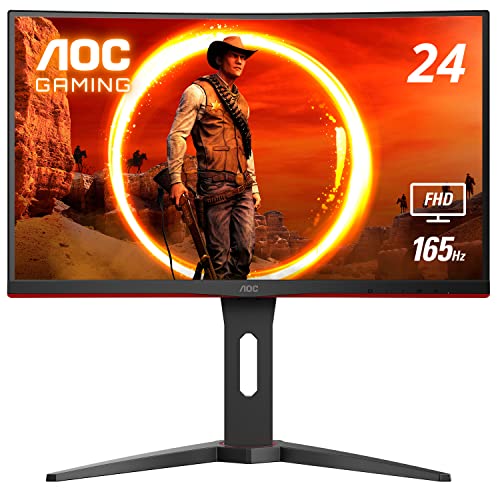
The AOC C24G1A brings a 24-inch curved VA panel with 165Hz refresh rate (backward-compatible with 144Hz systems) to a price. The 1500R curve draws you into the screen and reduces peripheral distraction during long gaming sessions. The VA panel produces deep blacks and strong contrast for dark-scene gaming. AMD FreeSync Premium reduces tearing and stutter. The stand is height-adjustable, which is rare at this price point. Response time of 1ms MPRT handles fast motion cleanly. If you want a curved 144Hz experience without paying mid-range prices, the AOC C24G1A is the clear recommendation in this tier.
Where it shines
- 24" class, 23.6" viewable AOC Gaming monitor with 1920 x 1080 Full HD Resolution
- 1500R curved monitor wrapping around your vision for an immersive gaming experience. Purch
- Rapid 1ms (MPRT) response and now with 165Hz (via DP 1.2 port) refresh rate with AMD FreeS
- 3-sided frameless design with ultra-narrow borders for the ultimate multi-monitor setup
- Height adjustable stand with swivel, tilt, and quick release for optimum ergonomics | VESA

MSI Optix G273 -- Best IPS for Esports
The MSI Optix G273 uses a 27-inch IPS panel with 144Hz refresh rate and 1ms IPS-level response time. Its flat panel design suits competitive gaming where screen distortion from curves is unwanted. The display covers 99% sRGB, producing accurate, vivid colors that help you spot enemies in varied lighting environments in-game. FreeSync Premium is included. The frameless design on three sides allows tight multi-monitor configurations. MSI includes its Gaming OSD app for adjusting settings from your desktop. At the Optix G273 is a practical choice for esports players who want IPS accuracy at competitive frame rates.
Where it shines
- 27" IPS panel (2560 x 1440 QHD).Specific uses for product
- Viewing Angle is 178° (H) / 178° (V); Brightness is 300nits; Aspect Ratio is 16:9
- 165Hz refresh rate
- 1ms response time helps eliminate screen tearing and choppy frame rates
- Wide view angle
ViewSonic XG2405 -- Strong Color, Fair Price
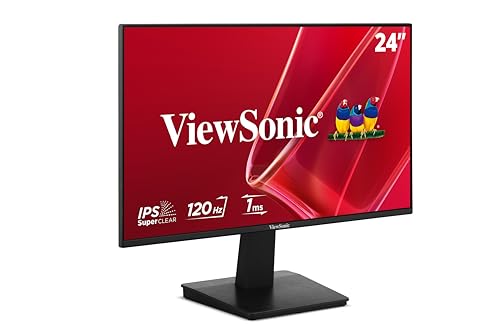
The ViewSonic XG2405 is a 24-inch FHD IPS gaming monitor at 144Hz with strong color coverage and a clean feature set. Its panel covers 99% sRGB and 90% DCI-P3, which is above average for a monitor in this price range. AMD FreeSync support handles screen tearing. The stand offers height, tilt, and swivel adjustments plus a 90-degree pivot for portrait orientation. A USB 3.1 hub on the back provides two USB-A ports for connecting peripherals. ViewSonic includes a three-year warranty. For FHD gaming at 144Hz with better-than-average color accuracy, the XG2405 is a well-rounded pick that does not cut corners where it matters.
Where it shines
- VERSATILE MONITOR: 24-Inch Full HD (1920x1080p) LED IPS monitor with frameless design and
- VARIABLE REFRESH RATE: Enjoy smoother visuals and reduced screen tearing for everyday task
- ENHANCED VIEWING COMFORT: Flicker-Free technology and Blue Light Filter for reduced eye fa
- OPTIMIZED VIEW SETTINGS: Offers “Game,” “Movie,” “Web,” “Text,” and “Mono” presets
- FLEXIBLE CONNECTIVITY: The VA2448-MH supports laptops, PCs, Macs and more with HDMI and VG
Before you buy
What to consider
Decide on resolution first. FHD (1080p) pairs well with mid-range GPUs and keeps costs lower. QHD (1440p) delivers noticeably sharper text and detail and is worth the premium if your GPU supports it. For panel type, IPS offers better colors and viewing angles while VA delivers deeper blacks. Choose IPS for general use and color-sensitive work; VA for dark-room gaming where contrast matters more. Confirm adaptive sync support matches your GPU: FreeSync for AMD, G-Sync or G-Sync Compatible for NVIDIA. An adjustable stand with height adjustment is worth prioritizing to protect your posture during long sessions.
What to consider
For related monitor coverage, see our [best computer monitors for coding](/articles/best-computer-monitors-for-coding) and [best computer monitor value](/articles/best-computer-monitor-value) articles. Full evaluation criteria are on the [methodology](/methodology) page.
Quick answers
To actually display 144 frames per second, your GPU needs to render games at that frame rate. If your GPU only outputs 60 fps in a given title, the monitor will still cap at 60 fps for that game. That said, even pushing 80 to 100 fps on a 144Hz monitor looks noticeably smoother than 60 fps on a 60Hz panel. A mid-range GPU gets meaningful benefit from 144Hz.
Yes. Even for productivity tasks, 144Hz makes scrolling through documents and browsers feel notably smoother than 60Hz. Cursor movement appears crisper. For video editing, smoother playback preview helps when scrubbing timelines. The difference is subtle compared to gaming but real enough that most people who switch to 144Hz do not want to go back.
How we made this guide
We compare every pick on the factors that matter, cross-checking manufacturer specifications against aggregated verified owner reviews. We rank independently and never take payment for placement. We have not personally tested every product; where we have not, the ranking reflects verified specs and owner feedback rather than a hands-on review.
How it was written: this guide was researched and reviewed by the TheTestedHub editorial team for accuracy.
Affiliate disclosure: TheTestedHub is reader-supported. When you buy through links on our site, we may earn a commission at no extra cost to you.
More to explore

Your Docking Station Match: CalDigit TS4 and More

Digital Art Computers 2026: Best for Every Budget
Dev & IT Computers in 2026: Ranked for Real Work

Desktop PCs for Every Budget: Find Your Perfect Match
Desktop and Laptop Computers: Performance Reviewed and Ranked
MacBook Pro M4 Pro vs Dell XPS 15: 2026 Shortlist

Buy the Best DIY Computer in 2026: Corsair One i300
