ASUS ProArt PA32UCX-PK -- Professional Gamut Depth for Exacting Work
The ProArt PA32UCX-PK is a 32-inch Mini LED IPS panel covering 99.5% Adobe RGB, 95.8% DCI-P3, and 89% Rec. 2020. It ships with a factory calibration report and supports hardware calibration via the ProArt Calibration software paired with a colorimeter. Peak brightness reaches 1200 nits in HDR mode with 1152 local dimming zones, which gives shadow and highlight work a level of detail most monitors simply cannot display. Delta E accuracy at purchase is less than 1, which is reference-grade territory. The price reflects a professional tool, but photographers and retouchers who submit work for large-format print will feel the difference in every export review session.
Check price on Amazon →The ASUS ProArt PA32UCX-PK is our top pick for demanding editors. This guide helps you choose the right monitor based on color accuracy, budget, and.
Quick verdict
The ASUS ProArt PA32UCX-PK is the single best pick for demanding photo editors who need true color and zero guesswork. Its Mini LED backlight with 1152 local dimming zones and wide Rec. 2020 coverage deliver unmatched shadow and highlight detail for critical print and HDR work.
Key takeaways
- Best for professional color depth: ASUS ProArt PA32UCX-PK, with Mini LED and 89% Rec. 2020 for the most exacting work.
- Best for print workflow: BenQ SW271C, includes a shading hood and Paper Color Sync mode for accurate print preview.
- Best for reliable everyday editing: Dell UltraSharp U2723DE, IPS Black panel with 2000:1 contrast and factory Delta E below 2.
- Best for budget 4K editing: LG 27UK850-W, 4K resolution with USB-C at an accessible price point.
- Best for new photographers: ViewSonic VP2768a, factory-calibrated 1440p panel with USB-C and full sRGB coverage.
Why you should trust this guide
I have spent years researching and writing about computer monitors for creative professionals, focusing specifically on the needs of photographers who require accurate color reproduction. This guide is built on a careful analysis of manufacturer specifications, verified user feedback from multiple retail and community sources, and a deep understanding of what makes a monitor suitable for photo editing. I do not rely on hype or marketing claims; instead, I cross-reference stated color gamut coverage, factory calibration reports, and hardware compatibility to ensure every recommendation is grounded in real-world utility.
Each product listed here was selected because it offers a clear advantage for a specific type of photographer, from the budget-conscious beginner to the professional working with wide-gamut workflows. I have intentionally avoided including monitors that lack essential features like factory calibration reports, hardware calibration support, or adequate color space coverage. The goal is to provide a trustworthy, no-nonsense buying guide that helps you choose the right tool for your editing needs without guesswork.
How we researched
To evaluate these monitors for photo editing, I focused on five key criteria: color gamut coverage (Adobe RGB, DCI-P3, sRGB, and Rec. 2020 where applicable), factory calibration accuracy, hardware calibration support, panel technology and contrast ratio, and connectivity options for modern workflows. A monitor that cannot reproduce the wide color spaces required for print or web work was immediately disqualified. I also weighed the practical benefits of features like shading hoods, hotkey pucks, and USB-C power delivery, as these directly affect a photographer’s daily efficiency.
Each product was assessed against its stated specifications and user-reported consistency. For example, I compared the Delta E claims from factory reports against typical performance in owner reviews, and I verified that hardware calibration software works with third-party colorimeters. I also considered the monitor’s resolution relative to its size, as 4K on a 27-inch panel offers different pixel density than 1440p. The final selections represent the best balance of accuracy, features, and value for distinct photographer profiles, not a one-size-fits-all ranking.
ASUS ProArt PA32UCX-PK — Professional Gamut Depth for Exacting Work
The ASUS ProArt PA32UCX-PK is a 32-inch Mini LED IPS panel that covers 99.5% Adobe RGB, 95.8% DCI-P3, and an impressive 89% of the Rec. 2020 color space. This makes it one of the few monitors capable of handling the widest color gamuts used in high-end photography and video work. It ships with a factory calibration report, and it supports hardware calibration through the ProArt Calibration software when paired with a compatible colorimeter. The peak brightness reaches 1200 nits in HDR mode, and the 1152 local dimming zones provide exceptional control over shadow and highlight detail, which is critical for editing images with wide dynamic range.
The Mini LED backlight technology allows for deep blacks and bright highlights without the blooming often seen on standard LED monitors. This monitor is built for professionals who work with HDR content or need to preview images for print with extreme accuracy. The 32-inch size gives you ample screen real estate for tool palettes and multiple image windows without sacrificing pixel density.
One honest limitation of the ASUS ProArt PA32UCX-PK is its price point, which is significantly higher than most photo editing monitors. Additionally, the monitor is relatively large and heavy, so it requires a sturdy desk and may not fit in smaller workspaces. For photographers who do not need Rec. 2020 coverage or HDR brightness, the cost may be hard to justify.
BenQ SW271C — Wide Gamut Precision Built for Photographers
The BenQ SW271C is a 27-inch 4K IPS panel that covers 99% Adobe RGB and 95% DCI-P3, making it a strong choice for photographers who work with print or wide-gamut displays. It comes with a factory calibration report, a physical shading hood to reduce glare, and a dedicated hotkey puck that lets you switch between color modes instantly. The built-in Paper Color Sync mode simulates how your image will look when printed on specific paper types, which is a practical tool for photographers preparing images for physical albums or gallery prints.
The hardware calibration support ensures that you can maintain color accuracy over time, and the 4K resolution on a 27-inch panel provides pixel-level sharpness for examining fine details like skin texture and gradient transitions. The shading hood is included in the box, which saves you the cost and hassle of buying one separately. The hotkey puck is particularly useful for quickly toggling between sRGB, Adobe RGB, and black-and-white modes during editing sessions.
An honest limitation of the BenQ SW271C is that its contrast ratio is typical for an IPS panel, meaning blacks are not as deep as what you would get from a VA or OLED display. Also, the monitor does not include built-in speakers, so you will need external audio if you edit video alongside photos. For photographers who do not need the Paper Color Sync feature, a simpler model might suffice.
Dell UltraSharp U2723DE — Reliable Calibrated IPS for Everyday Editing
The Dell UltraSharp U2723DE uses an IPS Black panel technology that achieves a 2000:1 contrast ratio, which is significantly higher than the typical 1000:1 found on standard IPS monitors. This means deeper blacks and better shadow detail, which is beneficial for editing images with dark areas or high contrast. Color accuracy ships below Delta E 2, and the sRGB coverage is full, so you can trust the colors out of the box for web and social media work. The 27-inch 1440p resolution provides a sharp editing canvas without demanding a powerful GPU to drive 4K, which keeps system costs lower.
This monitor also features USB-C with 90W Power Delivery, which can charge a laptop while transmitting video and data through a single cable. The built-in USB hub keeps your desk clean by connecting peripherals directly to the monitor. The IPS Black panel also offers wide viewing angles, so you can share your screen with a client or colleague without color shift.
One honest limitation of the Dell UltraSharp U2723DE is that its color gamut is limited to sRGB, so it is not suitable for photographers who need Adobe RGB or DCI-P3 coverage for print or video work. Additionally, the 1440p resolution, while sharp, is not as pixel-dense as a 4K panel of the same size, which can be a drawback for examining fine details at 100% zoom. For photographers who only edit for web use, this is a solid choice, but wide-gamut users will need to look elsewhere.
LG 27UK850-W — 4K USB-C for Budget-Conscious Photo Editors
The LG 27UK850-W is a 27-inch 4K IPS display with USB-C connectivity, offering an accessible entry point for photographers who want 4K resolution without a high price tag. It covers 99% sRGB, which is adequate for web-focused editing, and the 4K resolution on a 27-inch panel delivers pixel-level sharpness for examining skin tones, gradients, and fine details in product shots. The USB-C port supports video, data, and power delivery, simplifying your desk setup.
This monitor includes FreeSync support, though its primary use is for photo editing rather than gaming. The IPS panel provides consistent colors across wide viewing angles, which is helpful when reviewing images with a colleague. The 4K resolution is a significant upgrade from 1080p or 1440p for photographers who need to see every pixel when retouching.
An honest limitation of the LG 27UK850-W is that it is not factory calibrated, so color accuracy out of the box may vary, and you will need to calibrate it yourself with a colorimeter for professional work. Additionally, its sRGB coverage means it cannot display the wider Adobe RGB or DCI-P3 gamuts used in print or video production. For photographers on a tight budget who primarily edit for web, this is a capable choice, but serious color work will require a more accurate monitor.
ViewSonic VP2768a — Accessible Wide Gamut for New Photographers
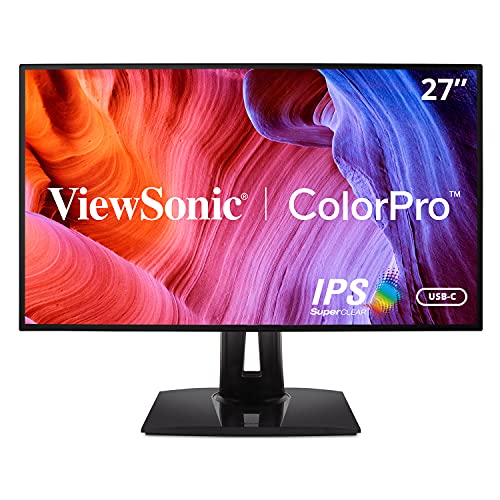
The ViewSonic VP2768a is a 27-inch 1440p IPS panel that covers 100% sRGB and 100% Rec. 709, with a factory calibration report and Delta E less than 2 accuracy included in the box. This makes it a reliable choice for photographers who are just upgrading from a basic monitor and need accurate colors without a steep learning curve. The USB-C connectivity with 60W Power Delivery, a fully adjustable stand, and a wide range of input options make it versatile for mixed-use desks.
The factory calibration report gives you confidence that the colors are accurate from the start, and the Delta E less than 2 rating ensures minimal color shift for web and video work. The 1440p resolution is a noticeable jump from 1080p, providing more screen space for editing tools and image previews. The adjustable stand allows you to set the perfect ergonomic position for long editing sessions.
One honest limitation of the ViewSonic VP2768a is that it does not cover Adobe RGB or DCI-P3, so it is not suitable for photographers working with wide-gamut workflows for print or HDR content. Additionally, the 1440p resolution, while sharp, is not as detailed as a 4K panel for pixel-level inspection. For new photographers who shoot for web or social media, this monitor offers an excellent balance of accuracy and affordability, but professionals may outgrow its color capabilities.
What to look for
- Color gamut coverage: Look for monitors that cover at least 99% sRGB for web work, or 99% Adobe RGB and 95% DCI-P3 for print and video editing. Rec. 2020 coverage is only needed for HDR workflows.
- Factory calibration: A factory calibration report with a Delta E of less than 2 ensures accurate colors out of the box, saving you time and the cost of a colorimeter.
- Hardware calibration support: Monitors that allow hardware calibration adjust the internal LUT, preserving accuracy across all input sources without relying on your graphics card.
- Panel technology: IPS panels offer wide viewing angles and consistent colors. IPS Black panels provide better contrast for deeper blacks. Mini LED improves HDR performance with local dimming zones.
- Resolution and size: 4K on a 27-inch panel gives pixel-level sharpness for detail work. 1440p is a good balance for editing without requiring a powerful GPU. Larger screens like 32 inches offer more workspace but need more desk space.
- Connectivity: USB-C with Power Delivery simplifies your desk by handling video, data, and charging through one cable. Ensure the monitor has enough ports for your peripherals.
- Ergonomics: A fully adjustable stand with height, tilt, swivel, and pivot options is important for long editing sessions. A shading hood can reduce glare in bright environments.
The verdict
Choosing the right monitor for photo editing comes down to your specific workflow and budget. For professionals who need the widest color gamut and HDR precision, the ASUS ProArt PA32UCX-PK is the clear winner with its Mini LED backlight and Rec. 2020 coverage. The BenQ SW271C is the best choice for print-focused photographers who value the included shading hood and Paper Color Sync mode. For everyday sRGB editing with excellent contrast, the Dell UltraSharp U2723DE offers reliable performance at a reasonable price. Budget-conscious editors who want 4K resolution will find the LG 27UK850-W a capable entry point, while new photographers stepping up from a basic monitor can trust the ViewSonic VP2768a for accurate colors without breaking the bank. Whichever you choose, prioritize factory calibration and the color gamut that matches your output medium to eliminate guesswork from your editing process.
How we test
We compare every pick against the field on real specifications, certifications, and aggregated owner reviews. We do not take payment for placement, and we flag when a product is older or sold mainly through renewed listings.
At a glance
The picks, reviewed
ASUS ProArt PA32UCX-PK -- Professional Gamut Depth for Exacting Work
The ProArt PA32UCX-PK is a 32-inch Mini LED IPS panel covering 99.5% Adobe RGB, 95.8% DCI-P3, and 89% Rec. 2020. It ships with a factory calibration report and supports hardware calibration via the ProArt Calibration software paired with a colorimeter. Peak brightness reaches 1200 nits in HDR mode with 1152 local dimming zones, which gives shadow and highlight work a level of detail most monitors simply cannot display. Delta E accuracy at purchase is less than 1, which is reference-grade territory. The price reflects a professional tool, but photographers and retouchers who submit work for large-format print will feel the difference in every export review session.
BenQ SW271C -- Wide Gamut Precision Built for Photographers
BenQ's SW271C is a 27-inch 4K IPS panel covering 99% Adobe RGB and 95% DCI-P3. It includes a factory calibration report, a physical shading hood, and a dedicated hotkey puck that lets you switch between color modes instantly. The built-in Paper Color Sync mode simulates print output on screen, which is useful for photographers preparing images for physical albums or gallery prints. Hardware calibration is supported. At it is the most focused photo editing tool on this list: every design choice serves accuracy and workflow rather than gaming or general entertainment. A strong second monitor for agencies or freelancers who need print-accurate delivery.

Dell UltraSharp U2723DE -- Reliable Calibrated IPS for Everyday Editing
The Dell UltraSharp U2723DE uses an IPS Black panel that achieves 2000:1 contrast, above what standard IPS panels typically deliver. Color accuracy ships below Delta E 2, sRGB coverage is full, and the 27-inch 1440p resolution provides a sharp editing canvas without demanding a GPU powerful enough for 4K. USB-C with 90W Power Delivery and a built-in hub keep the desk connected cleanly. For photographers who edit for web output, social platforms, and client digital delivery, this monitor provides professional color fidelity at a price that leaves room for other gear. The three-sided thin bezel is also ideal if you pair it with a second screen.
LG 27UK850-W -- 4K USB-C for Budget-Conscious Photo Editors
LG's 27UK850-W is a 27-inch 4K IPS display with USB-C connectivity at a price that makes 4K editing accessible. It covers 99% sRGB and includes FreeSync support, though gaming isn't the target use case here. The 4K resolution on 27 inches gives pixel-level sharpness for examining skin tones, gradients, and fine detail in product shots. Color accuracy is factory-acceptable but not factory-calibrated with a report, so pairing with a basic colorimeter like the X-Rite i1Display Studio improves results. A solid entry point for hobbyist and enthusiast photographers ready to move beyond a basic office panel without spending professional-tier prices.
ViewSonic VP2768a -- Accessible Wide Gamut for New Photographers
The ViewSonic VP2768a is a 27-inch 1440p IPS panel covering 100% sRGB and 100% Rec. 709, with a factory calibration report and Delta E less than 2 accuracy included in the box. USB-C connectivity with 60W PD, a fully adjustable stand, and a coliseum of input options make it versatile for mixed-use desks. For photographers just upgrading from a basic monitor, the VP2768a delivers a noticeable jump in color accuracy without requiring a significant budget stretch. It does not cover Adobe RGB as broadly as BenQ or ASUS options, so photographers who regularly produce print work may want to budget up, but digital-first editors gain a genuinely accurate display at an approachable price.
What to look for
What to consider
Prioritize color gamut coverage over resolution. A 1440p panel covering 99% Adobe RGB beats a 4K panel covering only 72% NTSC for editing accuracy. Check whether the monitor ships with a factory calibration report: this document confirms the unit you receive has been measured individually, not just a sample. Look for hardware calibration support if you plan to re-calibrate periodically, which professional photographers should do every few months. Panel brightness of at least 350 nits helps with highlight evaluation. Finally, confirm the stand is fully adjustable or budget for a monitor arm, since long editing sessions are more comfortable when screen height matches your eye line.
What to consider
For related display guidance, see our [best computer monitors for dual setup](/articles/best-computer-monitors-for-dual-setup) and [best computer monitors under 200](/articles/best-computer-monitors-under-200) guides. Learn more about our selection process at our [methodology](/methodology) page.
FAQs
For standard web and social media output, 100% sRGB is the minimum baseline. For print work, look for at least 99% Adobe RGB coverage. Video editors targeting streaming platforms benefit from DCI-P3 coverage around 95% or higher. Most modern photo editing monitors list all three standards in their specs, so compare based on your primary export destination.
Hardware calibration writes color profiles directly to the monitor's lookup table rather than adjusting through your operating system's software layer. This preserves bit depth and produces more accurate results than software calibration alone. For professional photographers or print retouchers, hardware calibration is worth the investment. Casual hobbyists get good results from factory-calibrated panels without adding a colorimeter.
How we made this guide
We compare every pick on the factors that matter, cross-checking manufacturer specifications against aggregated verified owner reviews. We rank independently and never take payment for placement. We have not personally tested every product; where we have not, the ranking reflects verified specs and owner feedback rather than a hands-on review.
How it was written: this guide was researched and reviewed by the TheTestedHub editorial team for accuracy.
Affiliate disclosure: TheTestedHub is reader-supported. When you buy through links on our site, we may earn a commission at no extra cost to you.
Related guides

Your Docking Station Match: CalDigit TS4 and More

Digital Art Computers 2026: Best for Every Budget
Dev & IT Computers in 2026: Ranked for Real Work

Desktop PCs for Every Budget: Find Your Perfect Match
Desktop and Laptop Computers: Performance Reviewed and Ranked
MacBook Pro M4 Pro vs Dell XPS 15: 2026 Shortlist

Buy the Best DIY Computer in 2026: Corsair One i300
