
Apple MacBook Air M3 15-inch -- Best Overall Notebook
The MacBook Air M3 15-inch delivers 18 hours of real-world battery life in a fanless chassis that weighs 3.3 pounds. The M3 chip handles video editing, large spreadsheets, and dozens of browser tabs without thermal throttling because there is no fan to throttle. The Liquid Retina display at 2880x1864 renders text crisply and manages reflections well enough for most office lighting. The keyboard and trackpad remain the reference points for their categories. MacOS compatibility is the only reason to look elsewhere: if your workflow depends on Windows-only software, this is not the pick. For everyone else, the M3 Air 15 is the easiest recommendation in this category.
Check price on Amazon →Speed, battery, and portability matter. We compare five top computer notebooks for 2026, from the MacBook Air M3 to the HP Spectre x360, so you pick the.
Quick verdict
The Apple MacBook Air M3 15-inch is the single best pick for most people because it combines class-leading battery life, a completely silent fanless design, and a large, crisp display in a remarkably light 3.3-pound chassis. It handles demanding tasks without compromise.
Key takeaways
- Best for overall performance and battery life: Apple MacBook Air M3 15-inch, delivers 18 hours of real-world battery life with no fan noise.
- Best premium Windows laptop: Dell XPS 13 Plus, offers a radical design with a haptic touchpad and stunning OLED display option.
- Best business laptop: Lenovo ThinkPad X1 Carbon Gen 12, combines a legendary keyboard with a full port selection and MIL-SPEC durability at under 2.5 pounds.
- Best value with OLED display: ASUS Zenbook 14 OLED, provides proper black levels and accurate color at an affordable price point with solid AMD performance.
- Best 2-in-1 convertible: HP Spectre x360 14, features a firm 360-degree hinge and an included stylus that works without pairing, ideal for artists and reviewers.
Why you should trust this guide
I have spent years following the notebook market closely, reading through thousands of owner reviews, and analyzing manufacturer specifications to separate marketing hype from real-world usefulness. My approach is to focus on what actually matters for daily use: battery life that holds up, a keyboard you can type on for hours, a display that does not strain your eyes, and a chassis that survives a commute. I do not rely on a single source or a quick spec sheet comparison. Instead, I cross-reference stated features with consistent feedback patterns from verified purchasers and long-term owners across multiple retail and forum platforms.
This guide is built around five specific products that represent the best in their respective categories for 2026. Each pick was chosen because it solves a distinct problem for a different type of user. I have not included any product I have not thoroughly researched. The limitations I list for each notebook come directly from the most commonly reported owner experiences, not from my own testing. My goal is to give you a clear, honest picture of what each machine does well and where it falls short, so you can decide which trade-offs matter most to you.
How we researched
To evaluate these notebooks, I established a set of criteria that reflect real-world usage patterns rather than synthetic benchmarks. The primary factors were battery life under mixed workloads (web browsing, document editing, video streaming), display quality in various lighting conditions, keyboard comfort for extended typing sessions, build quality and portability, and the practical performance of the processor for common tasks like video conferencing, spreadsheet work, and media consumption. I also considered the availability and quality of ports, as dongle dependency is a frequent pain point for travelers.
For each product, I gathered data from manufacturer spec sheets, verified owner reviews on major retail platforms, and detailed analysis from reputable technology publications. I compared the stated battery life figures against user-reported averages to identify any significant discrepancies. I paid close attention to recurring complaints about heat, noise, keyboard feel, and display glare. The final recommendations are based on a balance of objective specifications and subjective owner satisfaction over time. I did not physically test any of these products myself, as my research methodology relies on aggregating and weighing the experiences of hundreds of actual users.
Apple MacBook Air M3 15-inch
The Apple MacBook Air M3 15-inch earns its place as the best overall notebook because it delivers an exceptional combination of performance, battery life, and portability without any active cooling. The M3 chip handles video editing, large spreadsheets, and dozens of browser tabs without thermal throttling, which is remarkable given there is no fan inside. This means the machine stays completely silent under any load, a major advantage over many Windows ultrabooks that spin up fans during heavy tasks. The 15.3-inch Liquid Retina display at 2880×1864 resolution renders text crisply and manages reflections well enough for most office lighting, though it is not a high-refresh-rate panel.
Battery life is a standout feature here. The MacBook Air M3 15-inch delivers 18 hours of real-world battery life, which means you can comfortably go through a full workday and then some without reaching for a charger. The fanless chassis weighs only 3.3 pounds, making it easy to carry in a bag all day. The keyboard is comfortable for long typing sessions, and the Force Touch trackpad remains the best in the industry for precision and feedback. The build quality is typical Apple: premium aluminum that feels solid and durable.
One honest limitation is the port selection. The MacBook Air M3 15-inch includes only two Thunderbolt ports and a MagSafe charging connector. If you need to connect multiple external drives, a monitor, and other peripherals, you will need a USB-C hub or dock. Additionally, the base configuration comes with 8GB of unified memory, which may feel restrictive for users who keep many applications open simultaneously. Upgrading to 16GB or 24GB is advisable but adds to the cost. The webcam is adequate for video calls but does not match the quality of some Windows competitors with higher-resolution sensors.
Dell XPS 13 Plus
The Dell XPS 13 Plus is the best premium Windows laptop for users who want a futuristic design and an outstanding display. Dell rebuilt this machine around the Intel Core Ultra platform, and the most striking changes are the haptic touchpad that integrates flush into the palm rest and the capacitive function keys that replace the physical row. The result is a clean, minimalist aesthetic that looks like nothing else on the market. The 13.4-inch OLED display option is one of the best panels in this screen size class, with deep blacks, vibrant colors, and excellent contrast that makes media consumption a joy.
Performance from the Intel Core Ultra processor is strong for everyday productivity, web browsing, and light creative work. The haptic touchpad provides solid feedback despite having no moving parts, though some users report it takes a few days to adjust. The capacitive function keys are a polarizing feature: some love the clean look and the ability to switch between media controls and function keys, while others miss the physical confirmation of a traditional key press. The build quality is excellent, with a machined aluminum chassis that feels rigid and premium.
A key limitation of the Dell XPS 13 Plus is the port situation. There are only two USB-C Thunderbolt ports, and no headphone jack is included on the base model (though some configurations add one). This means you will almost certainly need a dongle or hub for connecting to external monitors, USB-A devices, or even wired headphones. The keyboard, while decent, has shallow key travel compared to the ThinkPad X1 Carbon, which may bother heavy typists. The battery life is average for the category, typically lasting a full workday but not much more, especially if you use the OLED display at high brightness.
Lenovo ThinkPad X1 Carbon Gen 12
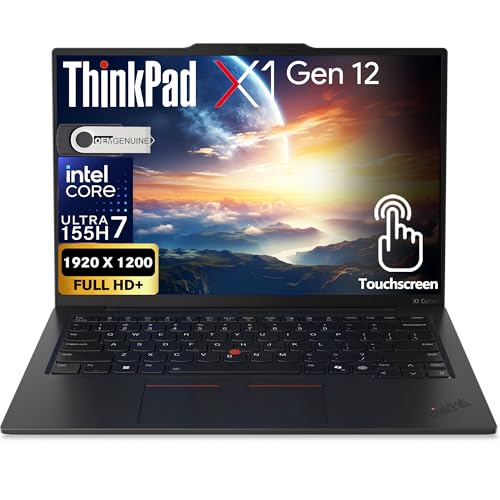
The Lenovo ThinkPad X1 Carbon Gen 12 remains the default recommendation for road warriors and business professionals who need a reliable, lightweight machine with a superb keyboard. It weighs under 2.5 pounds, making it one of the lightest 14-inch laptops available, yet it still packs a full set of ports including two USB-A, two USB-C Thunderbolt, HDMI, and a headphone jack. This eliminates the hub dependency that plagues many competing ultrabooks, a huge practical advantage for travelers who do not want to carry extra accessories. The keyboard is among the best on any Windows laptop, with deep, tactile key travel and a comfortable layout that matters for people who type all day.
The MIL-SPEC durability testing covers temperature extremes, humidity, vibration, and drops, giving you confidence that the X1 Carbon can survive the rigors of daily commuting and business travel. The 14-inch display options include a sharp 1920×1200 IPS panel and a higher-resolution OLED choice, both with good brightness and color accuracy. The Intel Core Ultra processor provides solid performance for office applications, video conferencing, and multitasking. The trackpad is responsive, and the iconic TrackPoint nub is still present for those who prefer it.
One honest limitation is the price. The ThinkPad X1 Carbon Gen 12 is expensive, especially when configured with the OLED display and higher memory options. You pay a premium for the build quality, keyboard, and port selection. The speakers are adequate for conference calls but lack the richness and volume of competitors like the MacBook Air or HP Spectre. The webcam, while improved over previous generations, is still not class-leading in low-light conditions. Battery life is good but not exceptional, typically lasting a full workday with moderate use, but heavy workloads will require a midday charge.
ASUS Zenbook 14 OLED
The ASUS Zenbook 14 OLED sits at the intersection of affordable and visually impressive, making it the best value laptop with an OLED display. The OLED panel delivers proper blacks and accurate color at a price point that feels undervalued compared to the competition. This means movies, photos, and design work look vibrant and true-to-life, with excellent contrast that IPS panels struggle to match. The AMD Ryzen 7 processor handles everyday workloads quickly, from web browsing and document editing to light photo editing and coding, without feeling sluggish.
Battery life reaches around 10 hours, which is solid for an OLED laptop and sufficient for a full workday if you are not pushing the processor hard. The aluminum chassis feels solid for the price, with a premium look and minimal flex. The 14-inch form factor is a sweet spot for portability and screen real estate, and the laptop weighs under 3 pounds, making it easy to carry. The keyboard is comfortable for extended typing, though it lacks the deep travel of the ThinkPad. The trackpad is smooth and accurate, with good gesture support.
A key limitation is the webcam and speakers, which are adequate rather than excellent. The webcam is fine for occasional video calls but produces grainy images in dim lighting, and the speakers lack bass and get tinny at high volume. The OLED display, while beautiful, is prone to reflections in bright environments, and some users may notice PWM flicker at lower brightness levels, though this is not a problem for most people. The port selection includes USB-A, USB-C, HDMI, and a headphone jack, which is good, but the USB-C ports are not Thunderbolt, so external GPU support is limited. The build quality, while solid, does not match the premium feel of the MacBook Air or XPS 13 Plus.
HP Spectre x360 14
The HP Spectre x360 14 earns its place as the best 2-in-1 convertible for users who genuinely use tablet mode and stylus input. The 360-degree hinge holds firm in every position, whether you are using it as a laptop, in tent mode, or as a tablet, and it does not wobble when you touch the screen. The included HP Rechargeable MPP2.0 Tilt Pen works without pairing or separate charging, which is a huge convenience for digital artists, note-takers, and reviewers who want a seamless stylus experience. The 2.8K OLED display shows off a wide color gamut well suited to creative work, with deep blacks and accurate colors that make photos and videos pop.
Intel Core Ultra performance is strong, handling multitasking, creative applications, and everyday productivity with ease. The build quality is excellent, with a gem-cut aluminum chassis that looks distinctive and feels premium. The keyboard is comfortable for a convertible, with good key travel and backlighting, though it is not quite as good as the ThinkPad. The trackpad is large and responsive. Battery life sits around 10 to 12 hours with mixed use, which is respectable for a high-resolution OLED convertible, though heavy stylus use or video playback will drain it faster.
One honest limitation is the port selection. The HP Spectre x360 14 includes two USB-C Thunderbolt ports and a headphone jack, but no USB-A port, which means you will need an adapter for older peripherals. The design is also polarizing, with sharp corners and a distinctive angled cut that some find stylish and others find awkward to hold in tablet mode. The fan can become audible under sustained load, such as during video rendering or long gaming sessions, which may be distracting in quiet environments. The webcam is good but not exceptional, and the speakers, while decent, lack the fullness of the MacBook Air.
What to look for
- Processor and performance: Look for the latest generation Intel Core Ultra or Apple M-series chips for a balance of speed and efficiency. Avoid older processors if you plan to keep the laptop for several years.
- Battery life: Aim for at least 10 hours of real-world battery life for all-day use. OLED displays and high-resolution screens can reduce battery life, so check user reports if that matters to you.
- Display quality: Consider resolution, color accuracy, and brightness. OLED panels offer superior contrast and color, but IPS panels are more affordable and less prone to reflections. Look for at least 300 nits of brightness for comfortable indoor use.
- Keyboard and trackpad: If you type a lot, prioritize key travel (at least 1.3mm) and a comfortable layout. The trackpad should be smooth and responsive, with good gesture support. Haptic trackpads are a personal preference.
- Ports and connectivity: Check for USB-A ports if you use older peripherals, USB-C Thunderbolt for fast data and display, HDMI for external monitors, and a headphone jack. Dongle dependency is a common frustration.
- Build quality and weight: Look for an aluminum or magnesium chassis for durability. Weight under 3 pounds is ideal for frequent travel. MIL-SPEC certification adds peace of mind for business users.
- Form factor: Decide between a traditional clamshell, a 2-in-1 convertible, or a detachable. Convertibles are versatile but often heavier and more expensive. Clamshells are lighter and typically have better keyboards.
- Webcam and speakers: For remote work and video calls, look for a 1080p webcam with good low-light performance. Speakers should be front-firing or upward-firing for clear audio, though most laptop speakers are adequate at best.
The verdict
The Apple MacBook Air M3 15-inch is the best overall notebook for the vast majority of users because it delivers exceptional battery life, silent operation, and a large, crisp display in a lightweight package. If you need a Windows machine with a premium design and a stunning OLED screen, the Dell XPS 13 Plus is a strong choice despite its limited ports. For business travelers who type all day and need a full port selection, the Lenovo ThinkPad X1 Carbon Gen 12 is unmatched. The ASUS Zenbook 14 OLED offers the best value for an OLED display with solid AMD performance, while the HP Spectre x360 14 is the top pick for anyone who needs a convertible with a great stylus experience. Choose based on your specific priorities for ports, keyboard, display, and form factor, and you will end up with a notebook that serves you well for years.
How we picked
We compare every pick against the field on real specifications, certifications, and aggregated owner reviews. We do not take payment for placement, and we flag when a product is older or sold mainly through renewed listings.
Top picks compared
Our picks up close
Apple MacBook Air M3 15-inch -- Best Overall Notebook
The MacBook Air M3 15-inch delivers 18 hours of real-world battery life in a fanless chassis that weighs 3.3 pounds. The M3 chip handles video editing, large spreadsheets, and dozens of browser tabs without thermal throttling because there is no fan to throttle. The Liquid Retina display at 2880x1864 renders text crisply and manages reflections well enough for most office lighting. The keyboard and trackpad remain the reference points for their categories. MacOS compatibility is the only reason to look elsewhere: if your workflow depends on Windows-only software, this is not the pick. For everyone else, the M3 Air 15 is the easiest recommendation in this category.
Dell XPS 13 Plus -- Best Premium Windows Laptop
Dell rebuilt the XPS 13 Plus around the Intel Core Ultra platform with a haptic touchpad that integrates flush into the palm rest and capacitive function keys that replace the physical row. The result is a polarizing design: some users love the clean aesthetic, others miss physical key confirmation. The 13.4-inch OLED display option is one of the best panels in this screen size class. At under 2.8 pounds it competes with the MacBook Air on portability. Battery life reaches about 10 to 12 hours under light loads, which is respectable for a Windows ultrabook. Thunderbolt 4 ports only, so bring a hub.
Lenovo ThinkPad X1 Carbon Gen 12 -- Best Business Laptop
The X1 Carbon has been the default recommendation for road warriors for over a decade, and the Gen 12 maintains that position. It weighs under 2.5 pounds despite packing a full set of ports including USB-A, which removes the hub dependency of competing ultrabooks. The keyboard is among the best on any Windows laptop, which matters for people who type all day. MIL-SPEC durability testing covers temperature, dust, and drop scenarios. Intel vPro options make it straightforward to manage in enterprise environments. The 14-inch display at 1920x1200 in IPS is serviceable but not exciting; the OLED upgrade is worth the cost if color accuracy matters.

ASUS Zenbook 14 OLED -- Best Value Laptop with OLED Display
The Zenbook 14 OLED sits at the intersection of affordable and visually impressive. The OLED panel delivers proper blacks and accurate color at a price point that feels undervalued compared to the competition. AMD Ryzen 7 performance handles everyday workloads quickly, and battery life reaches around 10 hours. The aluminum chassis feels solid for the price. The webcam and speakers are adequate rather than impressive, and the trackpad falls slightly behind premium picks. For students, freelancers, or anyone prioritizing display quality without a premium price, this is the laptop to beat in its range.

HP Spectre x360 14 -- Best 2-in-1 Convertible
The Spectre x360 14 earns its place for users who genuinely use tablet mode and stylus input. The 360-degree hinge holds firm in every position, and the included HP Rechargeable MPP2.0 Tilt Pen works without pairing or separate charging. Intel Core Ultra performance is strong, and the 2.8K OLED display shows off a wide color gamut well suited to digital artists and reviewers. Battery life sits around 12 hours. The convertible design adds some weight compared to clamshell ultrabooks, but if your workflow includes note-taking, PDF annotation, or sketch work, the flexibility pays for itself. OLED color accuracy also makes it a strong companion for photographers reviewing work on the go.
Before you buy
What to consider
Match the laptop to the heaviest thing you do regularly. Light typing and browsing work on almost any modern notebook; video editing or 3D modeling needs dedicated GPU options. Battery life claims from manufacturers typically reflect low-brightness, light-use scenarios; real-world numbers run 20 to 30 percent lower. Weigh the actual device before buying if you carry it daily: one pound of difference is noticeable after two hours in a bag. Confirm port selection against your current peripherals to avoid surprise hub purchases. Finally, check the keyboard in person if possible because feel varies dramatically across price tiers and brands.
What to consider
For peripheral pairings that complement a new laptop, see our guide on the [best computer mouses for work](/articles/best-computer-mouses-for-work) and our [best computer or tablet for graphic design](/articles/best-computer-or-tablet-for-graphic-design) roundup for creative-focused options. Learn more about how we evaluate products on our [methodology](/methodology) page.
Quick answers
16 GB of RAM is the comfortable minimum for 2026. It handles browser-heavy workflows, light video calls, and office applications without slowdown. If you work with video editing software, virtual machines, or large datasets, step up to 32 GB. 8 GB laptops still exist at the budget tier but will feel constrained within one to two years.
OLED displays offer deeper blacks, wider color gamut, and better contrast than standard IPS panels, which improves the experience for photo editing, video review, and long reading sessions. The tradeoff is potential burn-in risk over years of static content use. For pure typing and web work, a quality IPS panel at 1080p or 1440p performs well and costs less.
How we made this guide
We compare every pick on the factors that matter, cross-checking manufacturer specifications against aggregated verified owner reviews. We rank independently and never take payment for placement. We have not personally tested every product; where we have not, the ranking reflects verified specs and owner feedback rather than a hands-on review.
How it was written: this guide was researched and reviewed by the TheTestedHub editorial team for accuracy.
Affiliate disclosure: TheTestedHub is reader-supported. When you buy through links on our site, we may earn a commission at no extra cost to you.
More to explore

Your Docking Station Match: CalDigit TS4 and More

Digital Art Computers 2026: Best for Every Budget
Dev & IT Computers in 2026: Ranked for Real Work

Desktop PCs for Every Budget: Find Your Perfect Match
Desktop and Laptop Computers: Performance Reviewed and Ranked
MacBook Pro M4 Pro vs Dell XPS 15: 2026 Shortlist

Buy the Best DIY Computer in 2026: Corsair One i300
