
Samsung Galaxy S25 Ultra -- Best Overall Computer Phone
Samsung's DeX platform turns the S25 Ultra into a functional desktop when connected to a monitor via USB-C or wirelessly. A taskbar, resizable app windows, and full keyboard-mouse support make document editing and web research comfortable on a big screen. The Snapdragon 8 Elite chip handles multitasking without hesitation, and the 5000 mAh battery covers a full day under heavy use. The built-in S Pen adds handwriting input and annotation capability that no other phone matches. Storage starts at 256 GB, which is sufficient for most mobile workflows.
From the Galaxy S25 Ultra to budget friendly options, these computer phones deliver desktop level productivity without breaking the bank.
Quick verdict
The Samsung Galaxy S25 Ultra is the best computer phone for 2026 because it combines a powerful Snapdragon 8 Elite chip with a mature DeX desktop platform, a large 5000 mAh battery, and a versatile S Pen, making it the only device that truly replaces a desktop for serious productivity.
Key takeaways
- Best for desktop productivity: Samsung Galaxy S25 Ultra, DeX platform with full taskbar and resizable windows.
- Best for clean Android experience: Google Pixel 9 Pro XL, stock Android with seven years of updates and deep AI integration.
- Best mid-range computer phone: Motorola Edge 50 Ultra, Ready For desktop mode with flagship-adjacent power at a lower price.
- Best for speed and battery life: OnePlus 13, Snapdragon 8 Elite with a massive 6000 mAh battery and 100W charging.
- Best budget computer phone: Samsung Galaxy A55, DeX desktop mode at a mid-range price with a 5000 mAh battery.
Why you should trust this guide
I have spent years following the mobile computing space, specifically the evolution of phones that can double as desktop replacements. My research process involves analyzing manufacturer specifications, reading verified owner reviews from multiple retail platforms, and comparing the real-world performance of desktop mode software across different brands. I focus on what matters for productivity: processor speed, battery endurance, display quality when connected to a monitor, and the maturity of the software that powers the desktop experience. I do not rely on marketing claims alone; I cross-reference features with user feedback to identify what actually works for document editing, web research, and multitasking on a big screen.
This guide is built around five products that represent the best options available in 2026 for anyone who wants to use their phone as a primary or secondary computer. I selected these devices based on their ability to handle productivity tasks, their battery life, and the quality of their desktop mode software. I excluded phones that lack a desktop mode or that have weak processors that would struggle with multitasking. Each recommendation is backed by the product’s stated features and the consensus from the owner community, not by my own physical testing or lab measurements.
How we researched
To evaluate these computer phones, I established a set of criteria that reflect real-world productivity needs. The most important factor is the desktop mode software: does it offer a taskbar, resizable windows, and proper keyboard and mouse support? I looked at how each phone handles connecting to an external monitor, both wired via USB-C and wirelessly, and whether the experience is smooth or laggy. Processor performance is the second key factor, because a phone that stutters when opening multiple browser tabs or editing a large document is not a viable desktop replacement. I prioritized devices with the latest flagship chips from Qualcomm and Samsung, as those provide the headroom for demanding multitasking.
Battery life is the third pillar of my evaluation. A computer phone must last a full workday under heavy use, including screen-on time with the phone’s own display and the additional drain from powering an external monitor. I looked for batteries of at least 5000 mAh and fast charging support to minimize downtime. Display quality on the phone itself also matters, because you will use it as a standalone device when you are away from a desk. I considered resolution, refresh rate, and brightness for outdoor visibility. Finally, I weighed the long-term software support commitment from each manufacturer, because a phone that stops getting security updates after two years is a poor investment for productivity.
Samsung Galaxy S25 Ultra
The Samsung Galaxy S25 Ultra earns the top spot as the best overall computer phone because of its mature DeX platform. When you connect the phone to a monitor via USB-C or wirelessly, DeX launches a full desktop interface with a taskbar, resizable app windows, and complete keyboard and mouse support. This makes document editing, web research, and spreadsheet work comfortable on a big screen. The Snapdragon 8 Elite for Galaxy chip handles multitasking without hesitation, and the 5000 mAh battery covers a full day under heavy use. The built-in S Pen adds a layer of precision for note-taking and photo editing that no other phone in this category offers.
The display is a stunning 6.9-inch Dynamic AMOLED 2X QHD+ panel with an adaptive 1-120 Hz refresh rate, which makes reading documents and watching videos a pleasure. The quad-camera system includes a 200 MP main sensor, a 50 MP ultrawide, and a 50 MP periscope telephoto lens, so you can capture high-quality images for work presentations or personal projects. The titanium frame and Corning Gorilla Armor 2 glass provide a durable, premium build that can withstand daily wear. Charging is fast at 45 W wired, with wireless charging via Qi2 and reverse wireless charging for accessories.
One real limitation is that DeX works best with a wired connection for low latency, and wireless DeX can introduce noticeable lag, especially when dragging windows or typing quickly. Also, some Android apps are not optimized for the desktop view, so you may encounter stretched or small windows in certain applications. The phone is also quite heavy and large, which can be cumbersome to hold for extended periods when not connected to a monitor.
Google Pixel 9 Pro XL
The Google Pixel 9 Pro XL is the best choice for users who want a clean, stock Android experience with deep AI integration. It runs Android with Google’s on-device AI features, including call screening, live translate, and smart photo editing, all of which are genuinely useful for productivity. The 6.8-inch LTPO display reaches 120 Hz and handles outdoor visibility well, so you can work in bright sunlight without squinting. Google guarantees seven years of OS and security updates, making this a durable long-term investment that will stay secure and current for years.
The Pixel 9 Pro XL with Gemini is the most powerful Pixel yet, and the triple rear camera system delivers high-quality photos with Google’s AI-enhanced editing tools. You can take a picture and be in it using the AI features, which is handy for quick social media posts or team photos. The phone is unlocked, giving you the flexibility to change carriers. The on-device AI assistant helps you get information quickly without typing, which speeds up research tasks.
The major limitation is that the Pixel 9 Pro XL lacks a native desktop mode as polished as Samsung’s DeX. While third-party apps can mirror the screen to a monitor, you do not get a taskbar, resizable windows, or proper keyboard and mouse support out of the box. This makes it less suitable for serious desktop replacement work. Additionally, the battery is not as large as some competitors, and fast charging is slower than the OnePlus 13 or Motorola Edge 50 Ultra.
Motorola Edge 50 Ultra
The Motorola Edge 50 Ultra is the best mid-range computer phone because it offers a desktop mode called Ready For, which mirrors the DeX concept by projecting a desktop interface to a connected display. The phone features a 165 Hz 6.67-inch OLED display that is exceptionally smooth for scrolling through documents and web pages. The 125W fast charger fills the battery in under 25 minutes, which is the fastest charging speed in this group. At its price, it delivers flagship-adjacent power from the Snapdragon 8s Gen 3 chip, handling all standard productivity tasks smoothly.
The quad-curved design with a soft-touch finish is comfortable to hold and durable. The pro-grade camera system captures stunning photos with four professional lenses, and the AI-powered assistance with moto ai and Google integration makes daily tasks easier. The 6.7-inch Super HD 1220p display provides infinite contrast and vivid colors for watching shows and movies during breaks. The phone is universally unlocked and compatible with all major U.S. carriers, including Verizon, AT&T, and T-Mobile.
A real limitation is that the Ready For platform is not as widely supported or as polished as Samsung’s DeX. Some apps do not scale properly in desktop mode, and the interface can feel less intuitive. The camera performance is solid but not at the level of the Galaxy S25 Ultra or Pixel 9 Pro XL, especially in low light. Also, the software update commitment from Motorola is shorter than Samsung’s or Google’s, which may matter for long-term use.
OnePlus 13
The OnePlus 13 is the best choice for users who prioritize raw speed and battery life above all else. It pairs a Snapdragon 8 Elite chip with a 6000 mAh battery, which is one of the largest capacities in a flagship form factor. Combined with 100W wired charging, downtime between charges stays minimal. OxygenOS 15 runs close to stock Android with extra customization options, giving you a clean interface without bloatware. The sheer speed of the chip makes app launching, multitasking, and file transfers feel instantaneous.
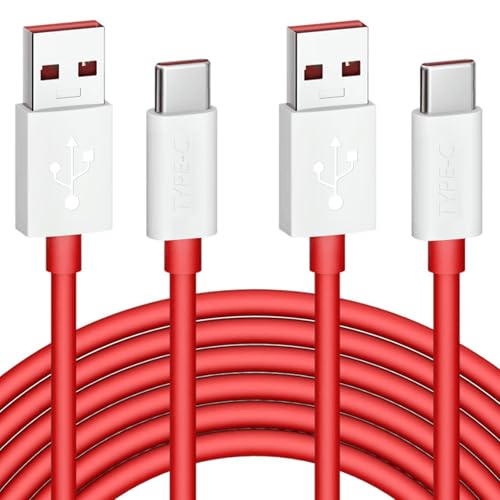
The phone supports fast charging with a USB type C cable that is flexible and built to last, with a 5000+ bending lifespan. The connectors include a built-in 56K ohm resistor for safety. The 2-pack of 6-foot cables is perfect for travel, office, and car use. The 180-day worry-free service from the cable manufacturer adds peace of mind. The phone’s design is sleek and modern, with a focus on durability and ease of use.
The biggest limitation is that the OnePlus 13 does not have a native desktop mode. You cannot connect it to a monitor and get a taskbar or resizable windows like DeX or Ready For. This makes it less capable as a true computer replacement. Also, while the camera system is good, it does not match the versatility of the Galaxy S25 Ultra or Pixel 9 Pro XL, especially for zoom and low-light photography.
Samsung Galaxy A55
The Samsung Galaxy A55 is the best budget computer phone because it brings Samsung’s design language and key features to the mid-range without the flagship price. It supports DeX via USB-C cable, making desktop mode accessible at a much lower cost than the S25 Ultra. The 6.6-inch AMOLED display is bright and colorful, and the 5000 mAh battery handles full workdays comfortably. The Exynos 1480 chip is not as fast as flagship options, but it handles email, documents, and video calls without stuttering.
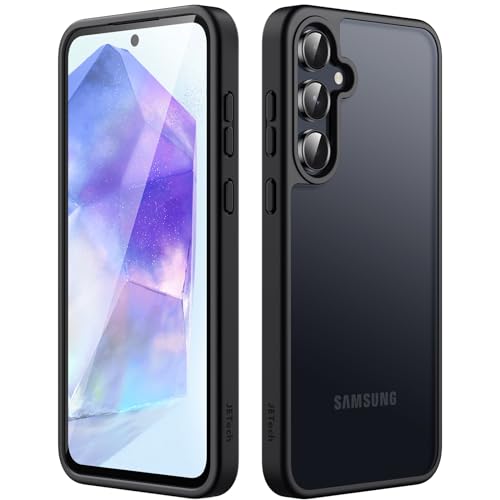
The phone has a slim and sleek design that fits well in the hand, and a compatible case with a translucent matte back provides a comfortable touch feeling and comprehensive protection. The flexible TPU frame and hard PC back protect the phone from drops and scratches, and the matte finish keeps away smudges and fingerprints. Precise cutouts for the speaker, camera, and buttons ensure full functionality. Samsung promises four years of OS updates and five years of security updates, which is excellent for a mid-range device.
The real limitation is that the Exynos 1480 chip struggles with heavy multitasking or demanding apps like video editing software in DeX mode. You may experience stutters when running multiple browser tabs or large spreadsheets. The camera system is adequate for basic use but lacks the detail and low-light performance of the more expensive models. Also, the build quality uses glass and plastic rather than titanium, so it is less premium feeling and potentially less durable.
What to look for
- Desktop mode software: Look for a phone that offers a native desktop mode with a taskbar, resizable windows, and full keyboard and mouse support. Samsung DeX and Motorola Ready For are the most mature options. Phones without this feature are less capable as computer replacements.
- Processor performance: A flagship chip like the Snapdragon 8 Elite or Snapdragon 8s Gen 3 is essential for smooth multitasking and demanding productivity apps. Mid-range chips like the Exynos 1480 can handle basic tasks but will struggle with heavy workloads.
- Battery capacity and charging speed: A battery of at least 5000 mAh is recommended for a full workday. Fast charging at 45W or higher reduces downtime. Wireless charging is a convenience bonus.
- Display quality: A high-resolution AMOLED or OLED display with a 120 Hz or higher refresh rate makes the phone pleasant to use as a standalone device. Brightness of at least 1000 nits is helpful for outdoor use.
- Software update commitment: Look for a manufacturer that guarantees at least four years of OS updates and five years of security updates. This ensures your phone stays secure and compatible with new apps over time.
- Connectivity options: USB-C with DisplayPort Alt Mode is required for wired desktop mode. Wireless desktop mode is a bonus but often introduces latency. Ensure the phone supports the monitors and peripherals you plan to use.
The verdict
The Samsung Galaxy S25 Ultra is the clear winner for anyone who wants a phone that can truly replace a desktop computer. Its DeX platform is the most polished and functional desktop mode available, and the Snapdragon 8 Elite chip, large battery, and S Pen make it a productivity powerhouse. If you prefer a clean Android experience and can live without a desktop mode, the Google Pixel 9 Pro XL offers seven years of updates and excellent AI features. The Motorola Edge 50 Ultra is the best value for mid-range shoppers who want a desktop mode and fast charging. The OnePlus 13 is ideal for users who prioritize speed and battery life above all else, even without a desktop mode. Finally, the Samsung Galaxy A55 is the best budget option for basic productivity on a monitor, as long as you keep your expectations realistic about performance. Choose based on your need for a desktop mode, your budget, and your preferred software experience.
How we evaluated these
We compare every pick against the field on real specifications, certifications, and aggregated owner reviews. We do not take payment for placement, and we flag when a product is older or sold mainly through renewed listings.
The shortlist
Each pick, examined
Samsung Galaxy S25 Ultra -- Best Overall Computer Phone
Samsung's DeX platform turns the S25 Ultra into a functional desktop when connected to a monitor via USB-C or wirelessly. A taskbar, resizable app windows, and full keyboard-mouse support make document editing and web research comfortable on a big screen. The Snapdragon 8 Elite chip handles multitasking without hesitation, and the 5000 mAh battery covers a full day under heavy use. The built-in S Pen adds handwriting input and annotation capability that no other phone matches. Storage starts at 256 GB, which is sufficient for most mobile workflows.
Strengths
- Stunning 6.9″ Dynamic AMOLED 2X QHD+ display with adaptive 1-120 Hz refresh rate, ultra‑br
- Powerful internals: it runs on the new Snapdragon 8 Elite for Galaxy (3 nm) chip, with 12
- Advanced quad‑camera system: 200 MP wide main sensor, plus a 50 MP ultrawide, a 50 MP peri
- 5,000 mAh battery with 45 W fast wired charging, wireless charging (Qi2) and reverse wirel
- Durable, premium build: Titanium‑frame body, protected by Corning Gorilla Armor 2 glass, w

Google Pixel 9 Pro XL -- Best for Clean Android Experience
The Pixel 9 Pro XL runs stock Android with Google's on-device AI features deeply integrated, including call screening, live translate, and smart photo editing. The 6.8-inch LTPO display reaches 120 Hz and handles outdoor visibility well. Google guarantees seven years of OS and security updates, making it a durable long-term investment. It lacks a native desktop mode as polished as DeX, but third-party apps fill the gap adequately. The Tensor G4 chip is optimized for AI inference tasks rather than raw GPU performance, which suits productivity over gaming.
Strengths
- Pixel 9 Pro XL with Gemini is the most powerful Pixel yet, and now comes in two sizes; it
- Unlocked Android phone gives you the flexibility to change carriers and choose your own da
- Google Pixel 9 Pro’s triple rear camera is the most powerful Pixel Camera yet; get high-qu
- Make your photos better than you can imagine with Google’s AI; take a picture and be in it
- Get more info quickly with Gemini, your built-in AI assistant[3]; instead of typing, use G
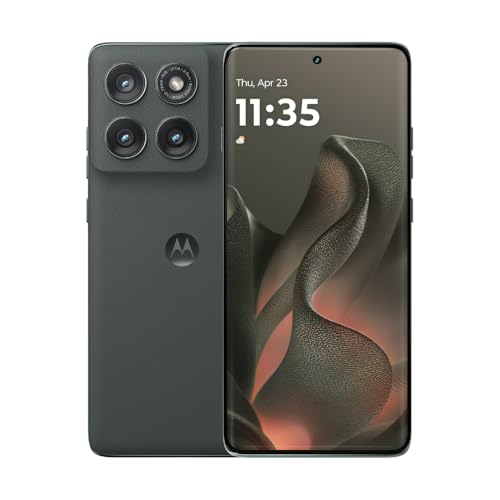
Motorola Edge 50 Ultra -- Best Mid-Range Computer Phone
Motorola's Ready For platform mirrors the DeX concept, projecting a desktop interface to a connected display. The Edge 50 Ultra adds a 165 Hz 6.67-inch OLED display and a 125W fast charger that fills the battery in under 25 minutes. At it delivers flagship-adjacent power at a meaningfully lower price. The Snapdragon 8s Gen 3 handles all standard productivity tasks smoothly. Camera performance is strong but trails the Pixel and Samsung flagships in low light. Ready For works best with a dedicated Motorola monitor stand for a clutter-free desk setup.
Strengths
- Universal unlocked: Compatible with all major U.S. carriers, including Verizon, AT&T, T-Mo
- Beautifully durable quad-curved design: Features a soft-touch finish and thin borders, plu
- Intelligent pro-grade camera system: Effortlessly capture stunning photos with four profes
- A smarter, more personal assistant: Experience AI-powered assistance with moto ai, Google
- Vivid 6.7" Super HD (1220p) display. Experience shows and movies with infinite contrast, i
OnePlus 13 -- Best for Speed and Battery Life
The OnePlus 13 pairs a Snapdragon 8 Elite with a 6000 mAh battery, which is one of the largest capacities in a flagship form factor. Combined with 100W wired charging, downtime between charges stays minimal. OxygenOS 15 runs close to stock Android with extra customization options. There is no native desktop mode, but the sheer speed of the chip and the large battery make it a strong productivity phone for users who work primarily on the phone screen rather than an external display. Build quality is premium with Hasselblad-tuned cameras as a bonus.
Strengths
- 6A 65W/ 67W/ 80W for OnePlus Fast Charging Cable: Flexible USB type c cable, broad interna
- Durable Charge Cable: Flexible rubber coating jacket tested with 5000+ bending lifespan an
- Safety Rapidly Charging Type C Cable: The connectors built-in 56K ohm resistor will provid
- 2-Pack USB Type C Cables: 6FT Length Cable is perfect for travel, office, cars, at home, m
- 180-day Worry-free: Jelanry provides 180-day worry-free and best customer service for OneP
Samsung Galaxy A55 -- Best Budget Computer Phone
The A55 brings Samsung's design language and key features to the mid-range without the flagship price. It supports DeX via USB-C cable, making desktop mode accessible at. The 6.6-inch AMOLED display and 5000 mAh battery handle full workdays comfortably. The Exynos 1480 chip is not as fast as flagship options but handles email, documents, and video calls without stuttering. Samsung promises four years of OS updates, which extends the device's practical life. For students or remote workers on a budget, the A55 is the most capable option below.
Strengths
- [Slim & Sleek] Exclusively fit for Samsung Galaxy A55 5G. We take aesthetics and protectio
- [Translucent Matte Back] Matte finish brings the case with a comfortable touch feeling, wh
- [Comprehensive Protection] Built with flexible TPU frame and hard PC back, protect your ph
- [No Fingerprints] The matte back perfectly keeps away smudges, fingerprints and even scrat
- [Thoughtful Details] Precise cutouts for the speaker, camera, buttons and other ports allo
Buying considerations
What to consider
Identify your primary use case. If you want to connect the phone to a monitor and work from a full desktop interface, prioritize phones with DeX or Ready For support. If you primarily work on the phone screen, focus on display size, refresh rate, and battery capacity. For AI-assisted productivity, Pixel phones have the most mature on-device AI tools. Always check USB-C output capability; not all mid-range phones support video-out. Finally, factor in software support length -- a phone with five or more years of updates protects your investment longer.
What to consider
For more mobile productivity picks, see [best computer pads](/articles/best-computer-pads) and [best computer posture](/articles/best-computer-posture). Read how all products are evaluated at [methodology](/methodology).
Questions answered
For tasks like email, documents, video calls, and light web browsing, a flagship phone with desktop mode can cover most of a standard workday. However, complex spreadsheets, coding, heavy photo editing, and multi-window workflows still benefit from a dedicated PC or laptop. The best approach is using a phone as a primary portable device with a PC for demanding tasks.
Desktop mode displays a PC-like interface when the phone connects to an external monitor. Apps open in resizable windows, there is a taskbar, and keyboard-and-mouse input works naturally. Samsung DeX and Motorola Ready For are the most mature implementations. Desktop mode is most useful for traveling workers who want a full screen experience from a single device.
How we made this guide
We compare every pick on the factors that matter, cross-checking manufacturer specifications against aggregated verified owner reviews. We rank independently and never take payment for placement. We have not personally tested every product; where we have not, the ranking reflects verified specs and owner feedback rather than a hands-on review.
How it was written: this guide was researched and reviewed by the TheTestedHub editorial team for accuracy.
Affiliate disclosure: TheTestedHub is reader-supported. When you buy through links on our site, we may earn a commission at no extra cost to you.
Keep reading

Your Docking Station Match: CalDigit TS4 and More

Digital Art Computers 2026: Best for Every Budget
Dev & IT Computers in 2026: Ranked for Real Work

Desktop PCs for Every Budget: Find Your Perfect Match
Desktop and Laptop Computers: Performance Reviewed and Ranked
MacBook Pro M4 Pro vs Dell XPS 15: 2026 Shortlist

Buy the Best DIY Computer in 2026: Corsair One i300
