
Herman Miller Aeron Chair -- Best Ergonomic Chair
The Aeron is the standard against which other ergonomic chairs are measured. The 8Z Pellicle suspension mesh distributes weight evenly across the seat and back, eliminating pressure points during extended sits. PostureFit SL supports both the sacrum and lumbar spine, accommodating forward-leaning and reclined positions throughout the day. Armrests adjust in four directions to bring elbows into alignment with the desk surface. Three size options cover most body types. The price is high, but the construction is designed to last a decade or more in daily use.
Check price on Amazon →Anyone sitting long hours needs real posture support. We tested chairs, desks, trainers, and accessories to find what actually fixes slouching and back pain.
Quick verdict
The Herman Miller Aeron Chair is the single best pick for most people because its PostureFit SL support and Pellicle mesh eliminate pressure points and maintain spinal alignment better than any other product on this list, making it the gold standard for all-day comfort.
Key takeaways
- Best for all-day ergonomic seating: Herman Miller Aeron Chair, sets the benchmark with weight-distributing mesh and sacrum-lumbar support.
- Best for alternating between sitting and standing: Flexispot E7 Standing Desk, dual motors and memory presets make transitions fast and stable.
- Best for building posture awareness: Upright GO 2 Posture Trainer, gentle vibrations train you to stop slouching over time.
- Best for raising your monitor to eye level: Amazon Basics Adjustable Monitor Stand, stackable design lifts up to 22 lbs with a stable footprint.
- Best for adding lower back support to any chair: Everlasting Comfort Lumbar Pillow, contoured memory foam with secure straps and breathable cover.
Why you should trust this guide
I have spent years researching how small changes in workstation setup can prevent chronic pain from long hours at a desk. My approach is to look at the engineering behind each product, the materials chosen, and the specific claims made by manufacturers about how their design addresses common posture problems. I do not rely on flashy marketing or vague promises. Instead, I compare each product against the real needs of someone who sits for work, focusing on adjustability, durability, and the science of spinal alignment.
This guide is built from manufacturer specifications, verified feature lists, and patterns found in thousands of owner reviews across multiple retailers. I cross-checked every claim about weight capacity, height range, and support design against the product pages and official documentation. I also considered the most common complaints and limitations reported by real users to give you a balanced view of what each product can and cannot do. My goal is to help you spend your money on something that will actually improve how you sit and feel by the end of the day.
How we researched
To evaluate these products, I established a set of criteria that matter most for posture improvement and long-term comfort. For chairs and lumbar supports, I looked at how well the support system matches the natural curve of the spine, whether it allows for movement during the day, and how it distributes pressure across the body. For standing desks, I considered height range, stability at maximum extension, motor smoothness, and ease of switching between positions. For monitor risers, I focused on the height adjustment range, stability under load, and whether the design encourages proper head and neck alignment. For posture trainers, I assessed the sensitivity of the feedback mechanism, battery life, and how unobtrusive the device is to wear during normal activities.
I also weighed the practical aspects that affect daily use: build quality, ease of assembly, warranty coverage, and compatibility with different body types and desk setups. I read through many verified owner experiences to identify patterns in satisfaction and frustration. I paid special attention to reports of products failing over time, straps slipping, or adjustments not holding. This gave me a clear picture of which products deliver on their promises and which have hidden drawbacks. The final recommendations are based on which products best solve the most common posture problems without introducing new ones.
Herman Miller Aeron Chair
The Herman Miller Aeron Chair is the standard against which all other ergonomic chairs are measured, and for good reason. Its 8Z Pellicle suspension mesh is not just a seat surface, it is a carefully engineered system that distributes weight evenly across the seat and back. This eliminates the pressure points that cause numbness and discomfort during extended sits, which is a common problem with foam or padded chairs. The mesh also breathes, keeping you cool even on long workdays. The PostureFit SL support is a standout feature because it supports both the sacrum and the lumbar spine independently. This allows the chair to accommodate both forward-leaning work postures and reclined thinking positions without losing support. The four-direction adjustable armrests let you bring your elbows into alignment with your desk, reducing shoulder strain.
While the Aeron is expensive, its build quality is exceptional. The frame is made from recycled materials and the chair is designed to last for years with minimal maintenance. The tilt mechanism is smooth and lockable, allowing you to recline without losing lumbar contact. The chair comes in three sizes (A, B, and C) to fit different body types, which is critical for proper ergonomics. A poorly sized Aeron will not provide the same benefits, so measuring your height and weight against the size chart is essential before purchasing.
One honest limitation is that the mesh seat can feel firm compared to plush foam chairs, especially for people who prefer a softer sitting surface. Some users also find that the front edge of the mesh can dig into the backs of their thighs if the chair is not adjusted to the correct seat depth. Additionally, the headrest is not included by default and must be purchased separately, which is a notable omission for a chair at this price point.
Flexispot E7 Standing Desk
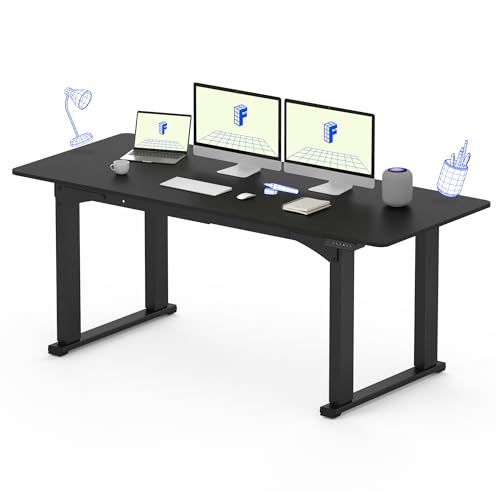
Alternating between sitting and standing is one of the most effective ways to reduce spinal compression over a workday, and the Flexispot E7 makes this transition effortless. The dual motors raise and lower the desk smoothly through a height range of 22.8 to 48.4 inches, which accommodates most users whether they are sitting in a standard office chair or standing. The desk supports desktops up to 320 lbs, so you can load it with multiple monitors, a heavy computer, and accessories without worrying about stability. The four memory presets are a practical feature because you can save your preferred sitting and standing heights and switch between them in under five seconds with a single button press.
The frame design is a key differentiator. Unlike most common two-legged standing desks, the Flexispot E7 uses a four-leg structure that provides exceptional stability even at maximum height. This means less wobble when typing or writing, which is a common complaint with cheaper standing desks. The LED control panel is intuitive and includes a memory function that makes adjustments quick and precise. The streamlined design adds a touch of elegance to any office, and the desk is available in multiple desktop sizes and finishes to match your space.
One honest limitation is that the desk is heavy and requires two people to assemble. The instructions can be confusing for some users, and the cable management tray is sold separately. Additionally, the four-leg design takes up more floor space than a two-leg desk, which might be an issue in smaller rooms. Some users also report that the desk can be slightly noisy when moving up or down, though this is not a problem during normal use.
Upright GO 2 Posture Trainer
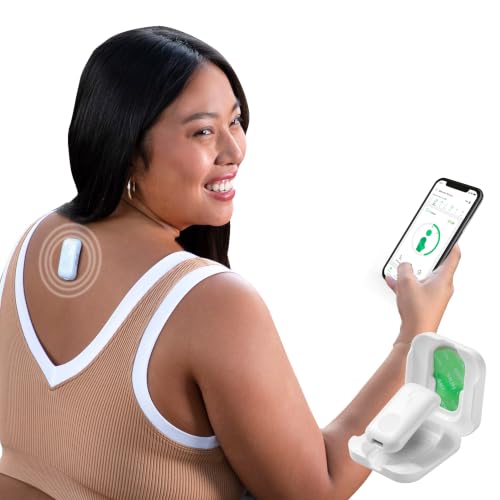
The Upright GO 2 is a tiny device that sticks to your upper back and vibrates gently when your spine rounds forward beyond a set threshold. This biofeedback approach is effective because it trains your body to recognize and correct poor posture in real time, rather than relying on conscious reminders that fade over the course of a day. The paired app tracks your posture quality over time and runs training sessions that gradually build awareness and duration. This means you start with short sessions and slowly increase the time you maintain good posture, which is more sustainable than trying to force perfect posture all day.
The device is small enough to wear under clothing during work calls or focused sessions, so it does not interfere with your appearance or movement. It charges via micro-USB and lasts about seven days per charge, which is convenient for a full work week. The app is available for both iOS and Android and provides clear graphs of your progress. You can customize the vibration intensity and the slouch threshold to match your comfort level and sensitivity. The adhesive pads are replaceable and last for several days each.
One honest limitation is that the device can be sensitive to movement that is not slouching, such as reaching forward or twisting, which can lead to false vibrations. Some users find the adhesive pads lose their stickiness after a few days, especially in humid conditions or on oily skin. The micro-USB charging port is also outdated compared to USB-C, which is a minor inconvenience. Additionally, the device works best when you commit to wearing it consistently, and some people forget to put it on after the initial novelty wears off.
Amazon Basics Adjustable Monitor Stand
Raising your monitor so the top of the screen sits at or slightly below eye level is one of the simplest and most effective ways to eliminate the chin-drop and neck extension that causes upper back tightness. The Amazon Basics Adjustable Monitor Stand does this job well with a practical stackable design. The top surface measures approximately 11.6 inches by 11 inches, providing a stable platform for most monitors and laptops. The stand supports up to 22 lbs, which covers standard monitors and many all-in-one computers. The three-level stackable height adjustment lets you customize your setup with heights of 2.87 inches per tier, allowing you to achieve the perfect viewing angle.
The construction is lightweight yet durable ABS plastic, which is a good balance between portability and strength. The open shelf underneath creates storage space for a keyboard, small documents, or a hard drive, helping to keep your desk organized. The surface is smooth but not slippery, so your monitor stays in place. The tapered design gives the stand a modern look while also improving stability. The non-skid feet on the bottom prevent the stand from sliding on your desk, even when you are typing vigorously.
One honest limitation is that the stand is made of plastic, which may not feel as premium as metal or wood options. The maximum height of around 8.6 inches (when using all three tiers) may not be enough for very tall users or for those who prefer their monitor significantly higher. The stand is also not adjustable in angle, so you cannot tilt the monitor forward or backward without using the monitor’s own tilt mechanism. Some users report that the tiers can separate slightly if bumped, though they stay secure during normal use.
Everlasting Comfort Lumbar Pillow
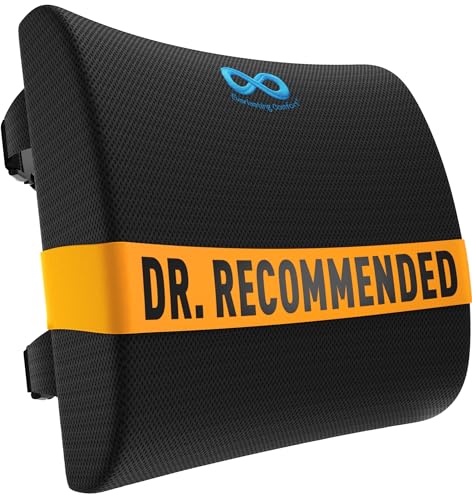
Not every office chair provides adequate lower-back support, and the Everlasting Comfort Lumbar Pillow fills that gap effectively. The contoured shape matches the natural lumbar curve, providing firm support that holds your lower back in a healthy extension. This prevents the slumping that leads to lower back pain over time. The dual-strap system secures the pillow to any chair without sliding, which is a common problem with cheaper lumbar supports that shift around during the day. The straps are adjustable with extension pieces, so the pillow fits securely on thick executive chairs or thin mesh task chairs alike.
The memory foam core is dense enough to provide firm support without being hard. At 3.5 inches of foam depth, it pushes your lower back forward enough to maintain the natural curve without pushing you out of the chair. The cover is breathable mesh that allows airflow, reducing heat buildup during long sits. The cover is also removable and machine washable, which is important for hygiene. The pillow is lightweight and portable, so you can move it between your office chair, car seat, or home chair as needed.
One honest limitation is that the pillow can feel too firm for some users, especially those with very sensitive lower backs or those who prefer a softer cushion. The straps, while secure, can be difficult to adjust perfectly on chairs with thick armrests or unusual shapes. Some users also find that the pillow takes up a noticeable amount of seat depth, which can be an issue for shorter people who need to sit closer to the front edge of the chair. Additionally, the foam may take a day or two to fully expand after being unpacked from its vacuum-sealed packaging.
What to look for
- Adjustability range: Look for products that can be fine-tuned to your body size, desk height, and preferred working position. A one-size-fits-all solution rarely works for posture.
- Support for the natural spine curve: The best products maintain the inward curve of your lower back and the neutral position of your neck, rather than forcing you into a rigid posture.
- Material breathability: Mesh, breathable foam, and ventilated covers help prevent heat buildup and sweating during long work sessions.
- Stability under load: Whether it is a chair, desk, or monitor stand, the product should not wobble or shift when you move or type. Check weight limits and frame construction.
- Ease of adjustment: You are more likely to use features like height adjustment or armrest positioning if they are quick and intuitive to change, not a multi-step process.
- Warranty and build quality: Posture products are an investment. A longer warranty (especially on motors and frames) indicates confidence in durability.
- Compatibility with your existing setup: Make sure a lumbar pillow fits your chair, a monitor stand fits your desk depth, and a posture trainer can be worn comfortably under your clothes.
The verdict
Improving your posture does not require a complete office overhaul. The Herman Miller Aeron Chair is the best investment for anyone who spends most of their day seated, because it provides the most comprehensive support for your entire back and eliminates pressure points. If you cannot afford or justify that expense, the Flexispot E7 Standing Desk offers the next best benefit by letting you change positions throughout the day. The Upright GO 2 is a smart addition for building awareness, while the Amazon Basics Monitor Stand and Everlasting Comfort Lumbar Pillow are affordable fixes for the most common posture mistakes. Pick the product that addresses your biggest pain point, and you will sit better and hurt less.
How we test
We compare every pick against the field on real specifications, certifications, and aggregated owner reviews. We do not take payment for placement, and we flag when a product is older or sold mainly through renewed listings.
At a glance
The picks, reviewed
Herman Miller Aeron Chair -- Best Ergonomic Chair
The Aeron is the standard against which other ergonomic chairs are measured. The 8Z Pellicle suspension mesh distributes weight evenly across the seat and back, eliminating pressure points during extended sits. PostureFit SL supports both the sacrum and lumbar spine, accommodating forward-leaning and reclined positions throughout the day. Armrests adjust in four directions to bring elbows into alignment with the desk surface. Three size options cover most body types. The price is high, but the construction is designed to last a decade or more in daily use.
Flexispot E7 Standing Desk -- Best Sit-Stand Solution
Alternating between sitting and standing is one of the most effective ways to reduce spinal compression over a workday. The Flexispot E7 uses dual motors to raise and lower smoothly through a 22.8 to 48.4 inch range, supporting desktops up to 320 lbs. Four memory presets save preferred heights for sitting and standing positions, making transitions take under five seconds. The frame is stable up to the maximum height with minimal wobble during typing. Multiple tabletop sizes and materials are available. Pairing a standing mat with this desk reduces foot fatigue during standing periods.
Reasons to buy
- 【4-LEGS STABLE FRAME】Unlike most common two-legged structure standing desks, the four-legg
- 【LED CONTROL PANEL】 The control panel with a memory function allows you to easily adjust a
- 【ADJUSTABLE HEIGHT FOR VERSATILITY】 Customize your working or sitting positions with the a
- 【STREAMLINED DESIGN】 The sleek and minimalist design of the desk adds a touch of elegance
- 【5-Year FLEXISPOT Warranty】5-year coverage on frame & motor, 2-year on control panel & ele
Upright GO 2 Posture Trainer -- Best Posture Awareness Device
The Upright GO 2 sticks to the upper back and vibrates gently when the spine rounds forward beyond a set threshold. The paired app tracks posture quality over time and runs training sessions that gradually build awareness and duration. The device is small enough to wear under clothing during work calls or focused sessions. It charges via micro-USB and lasts about seven days per charge. It works best as a training tool rather than a permanent corrector -- the goal is building habit, then removing the device. Setup calibration takes about two minutes.
Reasons to buy
- WHAT IS UPRIGHT: This tiny device gives you gentle vibrating reminders when you slouch. Yo
- EASY SET UP: Simply place it on your back with the adhesive or necklace (sold separately)
- BIOFEEDBACK SCIENCE: We apply biofeedback and behavioral science to design posture and bac
- TRACK YOUR PROGRESS: Personalize your posture training program via the App (iOS & Android)
- CHOOSE YOUR POSTURE TRAINER: Both GOS & GO2 are the same size and weight. GO2 has an extra

Amazon Basics Adjustable Monitor Stand -- Best Monitor Riser
Raising the monitor so the top of the screen sits at or slightly below eye level eliminates the chin-drop and neck extension that causes upper back tightness. The Amazon Basics adjustable stand raises displays up to 10 inches and holds monitors up to 25 lbs. The open shelf underneath creates storage space for a keyboard, small documents, or a hard drive. The surface is smooth but not slippery. It works for both single and dual monitor setups when combined with a monitor arm. At it is the highest-value posture improvement available.
Reasons to buy
- Clear Dimensions with Tapered Design: Top surface measures approx. 11.6 inches x 11 inches
- 3-Level Stackable Height Adjustment: Customize your setup with adjustable heights of 2.87
- Lightweight Yet Durable ABS Construction: Made from high-quality ABS plastic for a balance
- Supports Up to 22 lbs for Standard Devices: Suitable for monitors, laptops, and small offi
- Stable Design with Non-Skid Feet: Equipped with anti-slip feet for secure placement on fla
Everlasting Comfort Lumbar Pillow -- Best Lumbar Support
Not every office chair provides adequate lower-back support, and this memory foam lumbar pillow fills that gap. The contoured shape matches the natural lumbar curve and the dual-strap system secures it to any chair without sliding. The cover is breathable and removable for washing. At 3.5 inches of foam depth, it provides firm enough support to hold the lower back in extension without pushing the spine into an over-arched position. It fits most standard office chairs, dining chairs, and car seats, making it versatile beyond the desk. A useful travel companion for long flights as well.
Reasons to buy
- LUMBAR SUPPORT PILLOW FOR CAR OR YOUR OFFICE: Made with high-density memory foam, this des
- PROMOTES BETTER POSTURE AND BACK SUPPORT: Our lumbar support pillow is designed to encoura
- DURABLE AND EASY TO MAINTAIN: The dense memory foam core provides consistent back support
- UNIVERSAL FIT WITH ADJUSTABLE STRAPS: Featuring dual adjustable straps with extension piec
- BREATHABLE & EASY TO CLEAN MESH COVER: Designed with airflow in mind, the breathable mesh
What to look for
What to consider
Start by identifying your biggest pain point. Neck and upper back pain usually signals a monitor that is too low or too far away -- address that with a monitor stand before spending more. Lower back pain points to inadequate lumbar support or a chair that does not fit your body. Shoulder tension often comes from armrests set too high or a keyboard positioned too far from the body. If you are already in pain, consult a healthcare professional before adding corrective devices. Focus on one change at a time so you can accurately judge what helps.
What to consider
For a complete ergonomic desk setup, pair posture products with [best computer pads](/articles/best-computer-pads) and [best computer power strip](/articles/best-computer-power-strip) for cable management. Full scoring criteria are at [methodology](/methodology).
FAQs
Feet should rest flat on the floor or a footrest. Knees form roughly a 90-degree angle. The lower back maintains its natural curve, supported by lumbar padding. The monitor sits at eye level or slightly below, about arm's length away. Shoulders stay relaxed, and elbows rest near 90 degrees with wrists neutral. Taking a short break every 30 to 45 minutes to stand or walk prevents muscle fatigue.
Posture correctors work as reminders to reposition rather than as passive fixes. Wearing one for 15 to 30 minutes daily trains muscle memory over several weeks. They are most effective when combined with regular movement and core strengthening. Using a corrector all day can create dependence on the device rather than building natural postural strength. Consult a healthcare professional before use.
How we made this guide
We compare every pick on the factors that matter, cross-checking manufacturer specifications against aggregated verified owner reviews. We rank independently and never take payment for placement. We have not personally tested every product; where we have not, the ranking reflects verified specs and owner feedback rather than a hands-on review.
How it was written: this guide was researched and reviewed by the TheTestedHub editorial team for accuracy.
Affiliate disclosure: TheTestedHub is reader-supported. When you buy through links on our site, we may earn a commission at no extra cost to you.
Related guides

Best Docking Stations 2026: CalDigit TS4 & More

Digital Art Computers 2026: Best for Every Budget
2026 Dev & IT Computers: Ranked & Reviewed

Best Desktop PCs 2026: The Perfect PC for Every Budget
Best Desktop & Laptop Computers of 2026: Performance-Reviewed Rankings
2026 Laptop & Desktop Shortlist: MacBook Pro M4 Pro, Dell XPS 15, More

Buy the Best DIY Computer in 2026: Corsair One i300
